Solved garlin's PowerShell scripts for updating Secure Boot CA 2023


Look before you leap?

Before using the PS scripts I would like to know before hand if something goes wrong can I recover? That might be "refreshing" the BIOS firmware via a re-installation of the firmware and then being able to reboot into the OS. Or it could be a matter of replacing the keys using the factory default variables and, again, booting into the OS. And once that set of experiences and know-how is under my belt, then try using the Garlin PS scripts.
 

My Computers My Computers

  • At a glance

    Windows 11 Pro; Windows Server 2016 EssentialsNUC8I7BEH16 GBIntel Iris
    OS
    Windows 11 Pro; Windows Server 2016 Essentials
    Computer type
    PC/Desktop
    Manufacturer/Model
    Intel
    CPU
    NUC8I7BEH
    Motherboard
    Intel NUC8BEB
    Memory
    16 GB
    Graphics Card(s)
    Intel Iris
    Sound Card
    Intel Cannon Lake-LP - cAVS (Audio, Voice, Speech)
    Monitor(s) Displays
    ASUS PB328
    Screen Resolution
    1920 x 1200
    Hard Drives
    Kingston SSD
  • At a glance

    Windows Server 2016 EssentialsIntel Xeon E-2246G16 GBMatrox MGA-G200eW3
    Operating System
    Windows Server 2016 Essentials
    Computer type
    PC/Desktop
    Manufacturer/Model
    Dell
    CPU
    Intel Xeon E-2246G
    Motherboard
    DELL 0DK9CR (Poweredge T340)
    Memory
    16 GB
    Graphics card(s)
    Matrox MGA-G200eW3
  • Intel NUCs (NUC10I5, NUC13I7, NUC13I3); Dell 9020 MT
....I have found size of the NVRAM chips in the technical specifications for all. .....

be able to determine those details: Intel CSME: Drivers, Firmware and Tools for ME 16+ or Intel® Processor Diagnostic Tool .
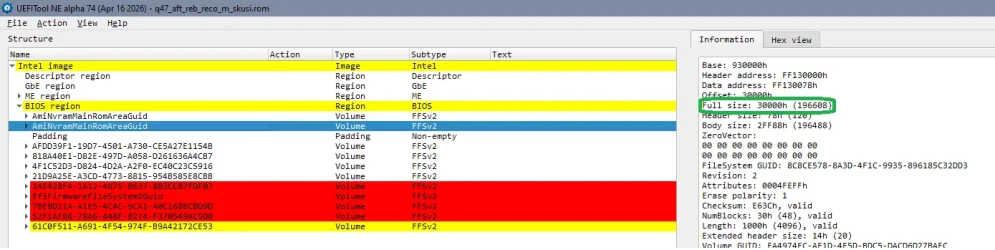
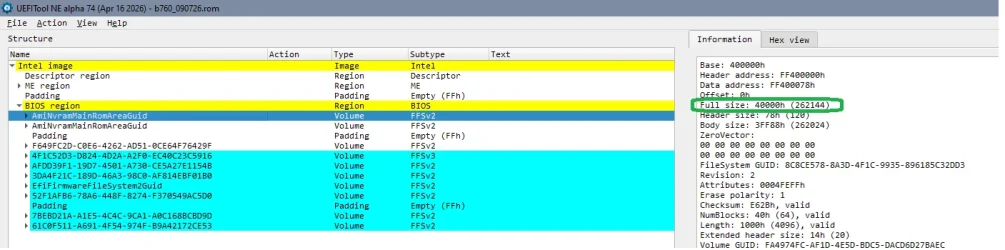
Machines don't have a NVRAM- chip. You find the size for the firmware chip(s), but the NVRAM is an EFI- volume in the firmware (with it's own defined size), and- depending on manufacturer- there are different configurations. Intel firmware can be dumped using the tools mentionend and there are parsing tools to display the structure of the firmware.

For Intel machines the bios vendor is only responsible for the part that is named Bios region. Flash descriptor, ME region are created with the mentioned Intel tools.

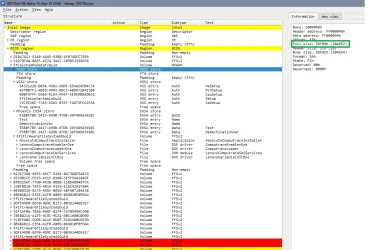
Firmware with AMI Bios region for 10 Gen Intel Asus q470- 2 NVRAM 192 kB each (24 MB size of firmware):
1783793596228.webp

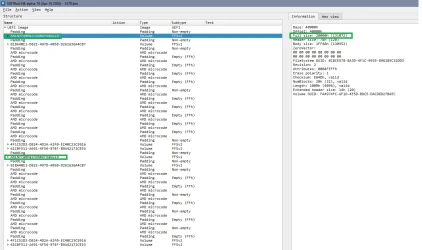
Firmware with AMI Bios region for Gigabyte B760 board - 2 NVRAM 256 kB each (16 MB size of firmware):
1783793712699.webp

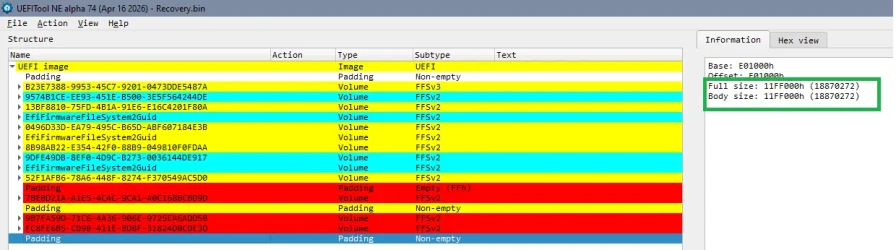
Intel firmware with Phoenix Bios region for 13th gen Intel Laptop - one NVRAM divided in sections, main volume ~380 kB (32 MB size of firmware):
1783794024271.webp

In addition the NVRAM is not only a store for the certificates, it's almost constantly written to by the OS and stores a lot more of settings. The invalid entries are old outdated entries. And there's normally a routine for emptying/ cleaning the NVRAM when it's full, it's not meant that one size the NVRAM should last the machines life and if NVRAM is full, the machine is finished...

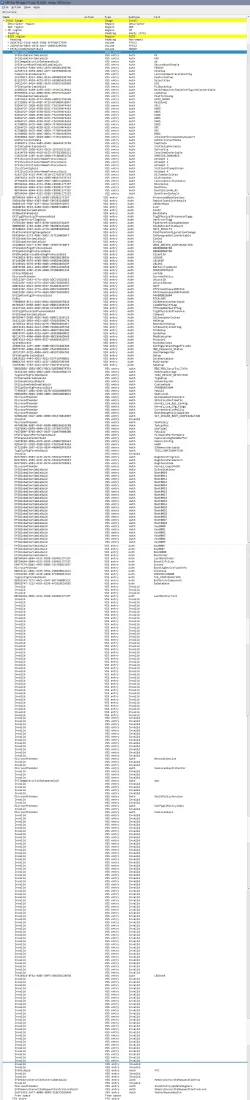
That't the Lenovo Notebook NVRAM expanded - full length:

1783794617627.webp

(Sorry for the length of this post...)
 
Last edited:

My Computer My Computer

At a glance

W10
OS
W10
I stand corrected: I should have said volume.
 

My Computers My Computers

  • At a glance

    Windows 11 Pro; Windows Server 2016 EssentialsNUC8I7BEH16 GBIntel Iris
    OS
    Windows 11 Pro; Windows Server 2016 Essentials
    Computer type
    PC/Desktop
    Manufacturer/Model
    Intel
    CPU
    NUC8I7BEH
    Motherboard
    Intel NUC8BEB
    Memory
    16 GB
    Graphics Card(s)
    Intel Iris
    Sound Card
    Intel Cannon Lake-LP - cAVS (Audio, Voice, Speech)
    Monitor(s) Displays
    ASUS PB328
    Screen Resolution
    1920 x 1200
    Hard Drives
    Kingston SSD
  • At a glance

    Windows Server 2016 EssentialsIntel Xeon E-2246G16 GBMatrox MGA-G200eW3
    Operating System
    Windows Server 2016 Essentials
    Computer type
    PC/Desktop
    Manufacturer/Model
    Dell
    CPU
    Intel Xeon E-2246G
    Motherboard
    DELL 0DK9CR (Poweredge T340)
    Memory
    16 GB
    Graphics card(s)
    Matrox MGA-G200eW3
  • Intel NUCs (NUC10I5, NUC13I7, NUC13I3); Dell 9020 MT
Unless AMD, the future is legacy BIOS (half kidding half not).
 

My Computer My Computer

At a glance

Windows 11Celeron J4125 (10th gen)8GB DDR4
OS
Windows 11
Manufacturer/Model
MeLE Quieter 2Q (fanless miniPC)
CPU
Celeron J4125 (10th gen)
Memory
8GB DDR4
Monitor(s) Displays
Samsung SyncMaster T260
Screen Resolution
1920x1200
Hard Drives
256GB eMMC (Windows)
2TB USB3 HDD Toshiba (Data)
Back
Top Bottom