My Computer
At a glance
Windows 11 Pro
- OS
- Windows 11 Pro
Follow along with the video below to see how to install our site as a web app on your home screen.
Note: This feature may not be available in some browsers.
OK, results:@starchase Do the same thing as before, "powershell -ep bypass -f TEST.ps1" from inside PS 7. I might have an idea what's going on.
PowerShell 7.6.3
A new PowerShell stable release is available: v7.6.4
Upgrade now, or check out the release page at:
https://aka.ms/PowerShell-Release?tag=v7.6.4
PS C:\Program Files\PowerShell\7> pwsh -nop -ep bypass -f C:\temp\newscripts\test.ps1
OperationalStatus : OK
HealthStatus : Healthy
DriveType : Removable
FileSystemType : FAT32
DedupMode : NotAvailable
ReFSDedupMode : NotAvailable
ObjectId : {1}\\BATEAU\root/Microsoft/Windows/Storage/Providers_v2\WSP_Volume.ObjectId="{97afb3df-70af-11e4-8253-806e6f6e6963}:VO:\\?\
Volume{852682a7-8d18-11f1-873e-bcfce72b56e7}\"
PassThroughClass :
PassThroughIds :
PassThroughNamespace :
PassThroughServer :
UniqueId : \\?\Volume{852682a7-8d18-11f1-873e-bcfce72b56e7}\
AllocationUnitSize : 16384
DriveLetter : D
FileSystem : FAT32
FileSystemLabel : HASLEOBS
Path : \\?\Volume{852682a7-8d18-11f1-873e-bcfce72b56e7}\
Size : 31015829504
SizeRemaining : 30150590464
PSComputerName :
CimClass : ROOT/Microsoft/Windows/Storage:MSFT_Volume
CimInstanceProperties : {ObjectId, PassThroughClass, PassThroughIds, PassThroughNamespace…}
CimSystemProperties : Microsoft.Management.Infrastructure.CimSystemProperties
OperationalStatus : Unknown
HealthStatus : Healthy
DriveType : CD-ROM
FileSystemType : Unknown
DedupMode : Disabled
ReFSDedupMode : Disabled
ObjectId : {1}\\BATEAU\root/Microsoft/Windows/Storage/Providers_v2\WSP_Volume.ObjectId="{97afb3df-70af-11e4-8253-806e6f6e6963}:VO:\\?\
Volume{97afb3f0-70af-11e4-8253-806e6f6e6963}\"
PassThroughClass :
PassThroughIds :
PassThroughNamespace :
PassThroughServer :
UniqueId : \\?\Volume{97afb3f0-70af-11e4-8253-806e6f6e6963}\
AllocationUnitSize : 0
DriveLetter : F
FileSystem :
FileSystemLabel :
Path : \\?\Volume{97afb3f0-70af-11e4-8253-806e6f6e6963}\
Size : 0
SizeRemaining : 0
PSComputerName :
CimClass : ROOT/Microsoft/Windows/Storage:MSFT_Volume
CimInstanceProperties : {ObjectId, PassThroughClass, PassThroughIds, PassThroughNamespace…}
CimSystemProperties : Microsoft.Management.Infrastructure.CimSystemProperties
Outside loop: D
PS C:\Program Files\PowerShell\7>
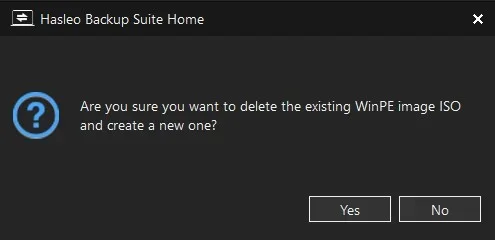
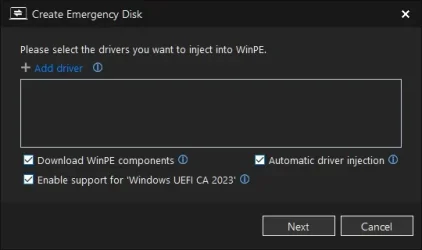
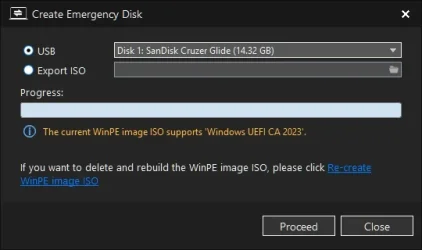
Did you select the option to re-create a new image?
View attachment 178542
Myself I just delete the iso located in "C:\Program Files\Hasleo\Hasleo Backup Suite\bin\winpe.iso"


Bootable Media
--------------
USB Drive E: "26200-8875"
Boot File [Production PCA 2011] is BANNED.
boot.wim:2 (WinPE 26100.8875)
Boot Manager [Windows UEFI CA 2023] is ALLOWED.
winload.efi is ALLOWED.
Please wait while install SWM is analyzed.
install.swm:1 (W11 25H2 26200.8875)
Boot Manager [Windows UEFI CA 2023] is ALLOWED.
winload.efi is ALLOWED.
Skipping over the next 6 images.
boot.stl is CURRENT.
Check-UEFI.bat -Verbose
Check-BootMedia.bat -Verbose
I was able to use my Macruim Rescue USB until Microsoft banned the 2011 certs. Now I get a red screen Secure Boot Violation (Invalid Signature Detected check secure boot policy in setup)
.\Update_UEFI-CA2023.ps1 -bootmediaIs this the script from here? I put in a bug fix for not detecting the USB drives.
USB Drive E:
Windows Boot Manager [Production PCA 2011] is BANNED.
E:\EFI\Microsoft\Boot\bootmgfw.efi
File Version: 28000.352, SVN 9.0
boot.wim:1 (WinRE 26100.1)
Boot Manager [Windows UEFI CA 2023] is ALLOWED.
\Windows\Boot\EFI_EX\bootmgfw_EX.efi
File Version: 28000.352, SVN 9.0
\Windows\System32\winload.efi is ALLOWED.
File Version: 10.0.26100.8971
E:\EFI\Microsoft\Boot\boot.stl [5/18/2026 1:44 PM] is CURRENT.
Update-UEFI.bat -BootMedia
I just tried the update boot-media and I still don't get anything from the USB. I use the the Bat file I get the readout I posted above.@starchase Try this updated version.
The boot file on the USB isn't the CA 2023 version. Run the update script to replace it.
Update-UEFI.bat -BootMedia
Trying a different fix for the PS1 script.I just tried the update boot-media and I still don't get anything from the USB. I use the the Bat file I get the readout I posted above.
Since I was already up to date this script gave me or maybe I was not up to date:Trying a different fix for the PS1 script.
C:\Program Files\Hasleo\Hasleo Backup Suite\bin\WADK\Boot\EFI_EX\bootmgfw.efi
www.elevenforum.com