Solved garlin's PowerShell scripts for updating Secure Boot CA 2023


Right before I ran the script I updated to the latest Hasleo version, V5.9.2.1 and made a new rescue stick.

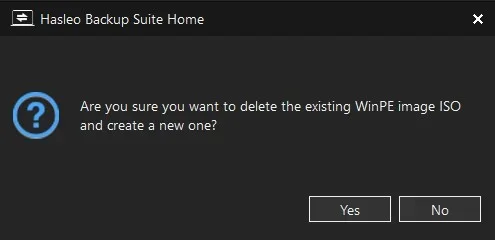
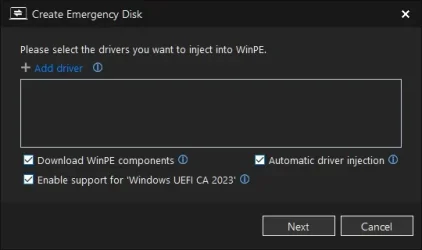
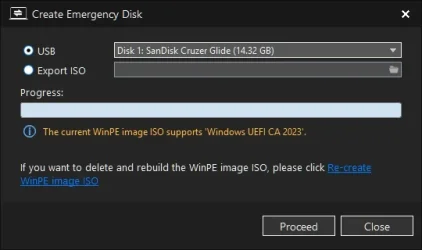
Did you select the option to re-create a new image?

Screenshot 2026-08-04 073918.webp

e.webp

Myself I just delete the iso located in "C:\Program Files\Hasleo\Hasleo Backup Suite\bin\winpe.iso"
 

My Computer My Computer

At a glance

Windows 11 Pro
OS
Windows 11 Pro
@starchase Do the same thing as before, "powershell -ep bypass -f TEST.ps1" from inside PS 7. I might have an idea what's going on.
OK, results:
Code:
PowerShell 7.6.3
   A new PowerShell stable release is available: v7.6.4
   Upgrade now, or check out the release page at:
     https://aka.ms/PowerShell-Release?tag=v7.6.4

PS C:\Program Files\PowerShell\7> pwsh -nop -ep bypass -f C:\temp\newscripts\test.ps1

OperationalStatus     : OK
HealthStatus          : Healthy
DriveType             : Removable
FileSystemType        : FAT32
DedupMode             : NotAvailable
ReFSDedupMode         : NotAvailable
ObjectId              : {1}\\BATEAU\root/Microsoft/Windows/Storage/Providers_v2\WSP_Volume.ObjectId="{97afb3df-70af-11e4-8253-806e6f6e6963}:VO:\\?\
                        Volume{852682a7-8d18-11f1-873e-bcfce72b56e7}\"
PassThroughClass      :
PassThroughIds        :
PassThroughNamespace  :
PassThroughServer     :
UniqueId              : \\?\Volume{852682a7-8d18-11f1-873e-bcfce72b56e7}\
AllocationUnitSize    : 16384
DriveLetter           : D
FileSystem            : FAT32
FileSystemLabel       : HASLEOBS
Path                  : \\?\Volume{852682a7-8d18-11f1-873e-bcfce72b56e7}\
Size                  : 31015829504
SizeRemaining         : 30150590464
PSComputerName        :
CimClass              : ROOT/Microsoft/Windows/Storage:MSFT_Volume
CimInstanceProperties : {ObjectId, PassThroughClass, PassThroughIds, PassThroughNamespace…}
CimSystemProperties   : Microsoft.Management.Infrastructure.CimSystemProperties

OperationalStatus     : Unknown
HealthStatus          : Healthy
DriveType             : CD-ROM
FileSystemType        : Unknown
DedupMode             : Disabled
ReFSDedupMode         : Disabled
ObjectId              : {1}\\BATEAU\root/Microsoft/Windows/Storage/Providers_v2\WSP_Volume.ObjectId="{97afb3df-70af-11e4-8253-806e6f6e6963}:VO:\\?\
                        Volume{97afb3f0-70af-11e4-8253-806e6f6e6963}\"
PassThroughClass      :
PassThroughIds        :
PassThroughNamespace  :
PassThroughServer     :
UniqueId              : \\?\Volume{97afb3f0-70af-11e4-8253-806e6f6e6963}\
AllocationUnitSize    : 0
DriveLetter           : F
FileSystem            :
FileSystemLabel       :
Path                  : \\?\Volume{97afb3f0-70af-11e4-8253-806e6f6e6963}\
Size                  : 0
SizeRemaining         : 0
PSComputerName        :
CimClass              : ROOT/Microsoft/Windows/Storage:MSFT_Volume
CimInstanceProperties : {ObjectId, PassThroughClass, PassThroughIds, PassThroughNamespace…}
CimSystemProperties   : Microsoft.Management.Infrastructure.CimSystemProperties

Outside loop: D
PS C:\Program Files\PowerShell\7>
 

My Computers My Computers

  • At a glance

    Windows 11 Home, ver 25H2 build 26200.8246Intel Core i5 5200U @ 2.20GH4 GBIntel HD Graphics 5500 on board
    OS
    Windows 11 Home, ver 25H2 build 26200.8246
    Computer type
    Laptop
    Manufacturer/Model
    Hewlett-Packard Spectre 13-4001 x360 convertable
    CPU
    Intel Core i5 5200U @ 2.20GH
    Motherboard
    Hewlett-Packard 802D
    Memory
    4 GB
    Graphics Card(s)
    Intel HD Graphics 5500 on board
    Sound Card
    Intel Smart Sound Technology (Intel SST)
    Hard Drives
    Micron 256GB M.2 2280 NGFF SSD MTFDDAV256TBN, (SATA 6.0 Gb/s)
    Keyboard
    Model # G01KB
    Antivirus
    Microsoft Defender
    Other Info
    born on date: 25 Feb 2016
  • At a glance

    Win 11 Home 25H2 build 26200.7922Intel Core i7 4th Gen 4790 (3.60GHz), Haswell...Samsung 16 GB DDR3 (8GB in 2 modules)NVIDIA GeForce GTX 760, 3GB, and on-board Int...
    Operating System
    Win 11 Home 25H2 build 26200.7922
    Computer type
    PC/Desktop
    Manufacturer/Model
    Asus Desktop model M32AD-US019S (DOM: 6/9/2014 )
    CPU
    Intel Core i7 4th Gen 4790 (3.60GHz), Haswell 22nm Technology, SOCKET 1150
    Motherboard
    H81M-E/M51AD/DP_MB
    Memory
    Samsung 16 GB DDR3 (8GB in 2 modules)
    Graphics card(s)
    NVIDIA GeForce GTX 760, 3GB, and on-board Intel HD Graphics 4600 Rev 6
    Monitor(s) Displays
    HP EliteDisplay E241i LED; HP EliteDisplay E243
    Hard Drives
    Samsung 500GB SSD, 870 EVO (SATA 6.0 )
    Micron 250GB SSD, CT250MX500
    Toshiba HDD, 3GB (original drive w/PC)
    Case
    ASUS
    Keyboard
    ASUS-------------------------
    Antivirus
    MS Defender
    Other Info
    Additional Laptops:

    HEWLETT PACKARD
    HP OmniBook X Flip NGAI (Next Gen AI),
    Model: 16-as0023dx
    PT# B5UH1UA#ABA Product #: B5UH1UA
    delivered and setup 7/25/25
    16" 2K Touch-Screen Laptop
    Intel Core Ultra 7 256V '24 Series 2 - CPU
    Boost Clock Frequency 4.8 gigahertz; Neural Processing Unit (NPU) Yes;
    16GB Memory, LPDDR5X
    1TB SSD PCIe 4.0
    Graphics: Intel Arc 140V
    1 x HDMI 2.1
    1 x Thunderbolt 4
    2K Touch-Screen display, LED, IPS; 1920 x 1200 (Full HD+)
    USB Ports: 1 x USB-C 3.1, 2 x USB-A 3.1
    Wi-Fi 6E
    weight 4.15 pounds

    DELL
    Model:I7591-7483BLK-PUS 2-in-1 (7000 Series)
    purchased 12/3/2019,
    15.6 inch 2-IN-1;
    4K Ultra HD Touch-Screen, 3840 x 2160,
    Intel Core i7 10510U CPU 1.80GHz,
    16GB RAM DDR4 SDRAM 2400 megahert (2 slots),
    dedicated graphics Nvidia GeForce MX250 2 GB Graphics,
    PCIe 512GB Intel SSD + 32GB Optane Memory (Intel Optane Memory H10 with solid-state storage),
    wireless-AX & Bluetooth
    Battery: 68wh, Type 4VGMP 4 cell

Did you select the option to re-create a new image?

View attachment 178542
Myself I just delete the iso located in "C:\Program Files\Hasleo\Hasleo Backup Suite\bin\winpe.iso"

Thanks, I did try that, (re-create new image) before my other post. When that did not seem to work. Then, I completely uninstalled Hasleo and re-installed it. Still a no-go with the new check boot media script.

After reading your post, I deleted the Hasleo "winpe.iso as you suggested and re-created the winpe iso in the Hasleo make a rescue media section - still no help. I still get;

boot.wim:1 (WinRE 26100.1)
Boot Manager [Windows UEFI CA 2023] is BANNED.
\Windows\Boot\EFI_EX\bootmgfw_EX.efi
File Version: 26089.1001, SVN 2.0

\Windows\System32\winload.efi is BANNED.
File Version: 10.0.26100.1


At this point it looks like I am up against it. Whatever is the issue, it is clearly above my paygrade to be able to correct it. Thanks for your help with this.


Screenshot 2026-08-04 121601.webp


Screenshot 2026-08-04 122102.webp
 

My Computers My Computers

  • At a glance

    Windows 11 Pro 25H2 26200.8894Intel® Core™ Ultra 7 265 1.8GHz to 5.3GHz (Ar...SK Hynix 32GB DDR5 5600 Desktop RAM UDIMM Non...Dell NVIDIA® GeForce RTX™ 4060 8GB GDDR6 & (i...
    OS
    Windows 11 Pro 25H2 26200.8894
    Computer type
    PC/Desktop
    Manufacturer/Model
    Dell Tower Plus EBT2250, DOB: 06/15/2025
    CPU
    Intel® Core™ Ultra 7 265 1.8GHz to 5.3GHz (Arrow Lake)
    Motherboard
    Dell Inc. 02D3NT A00 (U3E1)
    Memory
    SK Hynix 32GB DDR5 5600 Desktop RAM UDIMM Non-ECC PC5-5600B
    Graphics Card(s)
    Dell NVIDIA® GeForce RTX™ 4060 8GB GDDR6 & (iGPU) Integrated Intel® UHD Graphics
    Sound Card
    Chipset Realtek High-Definition Audio with Dolby Atmos
    Monitor(s) Displays
    Dell Ultra Sharp U2515H 25-Inch Screen LED-Lit
    Screen Resolution
    2560 X 1440
    Hard Drives
    Samsung (NVMe PM9C1a 1024GB) M.2 PCIe NVMe Solid State Drive (OS), with Samsung Piccolo (S4LY022) 6-Core 4 Channel Controller.

    Samsung T7 500GB SSD, USB-C External Drive
    PSU
    Dell 460W
    Case
    Dell Tower Plus EBT 2250
    Cooling
    Fan
    Keyboard
    Dell Wired Keyboard - KB216
    Mouse
    Logitech M510
    Internet Speed
    Intel Killer E3100G 2.5 Gigabit Ethernet Controller
    Browser
    Microsoft Edge
    Antivirus
    Microsoft Windows Security
    Other Info
    The Samsung NVMe PM9C1a 1024GB SSD does not use a Phison NAND controller. Instead, it uses Samsung's in-house developed Piccolo (S4LY022) 6-Core 4 Channel Controller. The PM9C1a utilizes a controller built using Samsung's 5-nanometer process and seventh-generation V-NAND technology. 🤔
  • At a glance

    Windows 11 Pro 25H2 26200.889410th Generation Intel Core i7-10510U Processo...16GB DDR4 RAMNVIDIA® GeForce® MX250 with 2GB GDDR5 graphic...
    Operating System
    Windows 11 Pro 25H2 26200.8894
    Computer type
    Laptop
    Manufacturer/Model
    Dell Inspiron 15 7000 (7591) 2-in-1, DOB: 11/30/2019
    CPU
    10th Generation Intel Core i7-10510U Processor (8MB Cache, up to 4.9 GHz) Comet Lake
    Motherboard
    Dell 0NNW5N
    Memory
    16GB DDR4 RAM
    Graphics card(s)
    NVIDIA® GeForce® MX250 with 2GB GDDR5 graphics memory
    Sound Card
    Chipset Realtek ALC3254 🤔
    Monitor(s) Displays
    Dell 15.6-inch UHD Truelife Touch Narrow Border WVA Display with Active Pen support
    Screen Resolution
    3840 x 2160
    Hard Drives
    Intel NVME 512GB SSD with 32GB Intel Optane Memory, M.2 80mm PCIe 3.0 RAID

    SanDisk 256GB Extreme microSDXC UHS-I Memory Card
    PSU
    Dell 4-Cell Battery, 68 Whr (Integrated), 90 Watt AC Adapter
    Case
    Dell Inspiron 15 7000 2-in-1 (7591)
    Cooling
    Standard Dell Case Fan & Havit HV-F2056 USB Powered (3 Fans) Laptop Cooling Pad.
    Keyboard
    Dell
    Mouse
    Logitech Wireless Mouse M650L
    Internet Speed
    Wireless/Wired connectivity (WiFi 6 - 802.11 ax)
    Browser
    Microsoft Edge
    Antivirus
    Microsoft Windows Security
    Other Info
    From Dell: 512GB NVME Solid State Drive accelerated by 32GB Intel Optane Memory are the fastest as compared to NAND SSDs. Intel Optane H10 with SSD offers speedy storage and accelerates opening your programs.
Interestingly, it looks like I do not have the issue with Windows 11 ISO now, before, I think, it had the same problem.

Code:
Bootable Media
--------------

USB Drive E: "26200-8875"
    Boot File [Production PCA 2011] is BANNED.

    boot.wim:2 (WinPE 26100.8875)
        Boot Manager [Windows UEFI CA 2023] is ALLOWED.
        winload.efi is ALLOWED.

    Please wait while install SWM is analyzed.

    install.swm:1 (W11 25H2 26200.8875)
        Boot Manager [Windows UEFI CA 2023] is ALLOWED.
        winload.efi is ALLOWED.

        Skipping over the next 6 images.

    boot.stl is CURRENT.
 

My Computers My Computers

  • At a glance

    Windows 11 Pro 25H2 26200.8894Intel® Core™ Ultra 7 265 1.8GHz to 5.3GHz (Ar...SK Hynix 32GB DDR5 5600 Desktop RAM UDIMM Non...Dell NVIDIA® GeForce RTX™ 4060 8GB GDDR6 & (i...
    OS
    Windows 11 Pro 25H2 26200.8894
    Computer type
    PC/Desktop
    Manufacturer/Model
    Dell Tower Plus EBT2250, DOB: 06/15/2025
    CPU
    Intel® Core™ Ultra 7 265 1.8GHz to 5.3GHz (Arrow Lake)
    Motherboard
    Dell Inc. 02D3NT A00 (U3E1)
    Memory
    SK Hynix 32GB DDR5 5600 Desktop RAM UDIMM Non-ECC PC5-5600B
    Graphics Card(s)
    Dell NVIDIA® GeForce RTX™ 4060 8GB GDDR6 & (iGPU) Integrated Intel® UHD Graphics
    Sound Card
    Chipset Realtek High-Definition Audio with Dolby Atmos
    Monitor(s) Displays
    Dell Ultra Sharp U2515H 25-Inch Screen LED-Lit
    Screen Resolution
    2560 X 1440
    Hard Drives
    Samsung (NVMe PM9C1a 1024GB) M.2 PCIe NVMe Solid State Drive (OS), with Samsung Piccolo (S4LY022) 6-Core 4 Channel Controller.

    Samsung T7 500GB SSD, USB-C External Drive
    PSU
    Dell 460W
    Case
    Dell Tower Plus EBT 2250
    Cooling
    Fan
    Keyboard
    Dell Wired Keyboard - KB216
    Mouse
    Logitech M510
    Internet Speed
    Intel Killer E3100G 2.5 Gigabit Ethernet Controller
    Browser
    Microsoft Edge
    Antivirus
    Microsoft Windows Security
    Other Info
    The Samsung NVMe PM9C1a 1024GB SSD does not use a Phison NAND controller. Instead, it uses Samsung's in-house developed Piccolo (S4LY022) 6-Core 4 Channel Controller. The PM9C1a utilizes a controller built using Samsung's 5-nanometer process and seventh-generation V-NAND technology. 🤔
  • At a glance

    Windows 11 Pro 25H2 26200.889410th Generation Intel Core i7-10510U Processo...16GB DDR4 RAMNVIDIA® GeForce® MX250 with 2GB GDDR5 graphic...
    Operating System
    Windows 11 Pro 25H2 26200.8894
    Computer type
    Laptop
    Manufacturer/Model
    Dell Inspiron 15 7000 (7591) 2-in-1, DOB: 11/30/2019
    CPU
    10th Generation Intel Core i7-10510U Processor (8MB Cache, up to 4.9 GHz) Comet Lake
    Motherboard
    Dell 0NNW5N
    Memory
    16GB DDR4 RAM
    Graphics card(s)
    NVIDIA® GeForce® MX250 with 2GB GDDR5 graphics memory
    Sound Card
    Chipset Realtek ALC3254 🤔
    Monitor(s) Displays
    Dell 15.6-inch UHD Truelife Touch Narrow Border WVA Display with Active Pen support
    Screen Resolution
    3840 x 2160
    Hard Drives
    Intel NVME 512GB SSD with 32GB Intel Optane Memory, M.2 80mm PCIe 3.0 RAID

    SanDisk 256GB Extreme microSDXC UHS-I Memory Card
    PSU
    Dell 4-Cell Battery, 68 Whr (Integrated), 90 Watt AC Adapter
    Case
    Dell Inspiron 15 7000 2-in-1 (7591)
    Cooling
    Standard Dell Case Fan & Havit HV-F2056 USB Powered (3 Fans) Laptop Cooling Pad.
    Keyboard
    Dell
    Mouse
    Logitech Wireless Mouse M650L
    Internet Speed
    Wireless/Wired connectivity (WiFi 6 - 802.11 ax)
    Browser
    Microsoft Edge
    Antivirus
    Microsoft Windows Security
    Other Info
    From Dell: 512GB NVME Solid State Drive accelerated by 32GB Intel Optane Memory are the fastest as compared to NAND SSDs. Intel Optane H10 with SSD offers speedy storage and accelerates opening your programs.
I have a new 2025 ASUS Rog Strix that performs normally for regular operations including updates. I have updated my certs to 2023 but they remain in- progress (Not fully Updated) due to the new bios June 2026. I still receive event 1801 when booting. I was able to use my Macruim Rescue USB until Microsoft banned the 2011 certs. Now I get a red screen Secure Boot Violation (Invalid Signature Detected check secure boot policy in setup)

It works fine if I turn off Secure Boot. I have the latest winre on my USB. I have tried your new CheckBootMedia script but it didn't help.
I'm thinking that I will just have to wait until my bios and firmware are excepted by Microsoft?
 

My Computer My Computer

At a glance

Windows 11 & Zorin ProIntel® Core™ Ultra 9 Processor 275HX 2.7 GHz32 gbNVIDIA® GeForce RTX™ 5060 Laptop GPU
OS
Windows 11 & Zorin Pro
Computer type
Laptop
Manufacturer/Model
Asus Rog Strix G16
CPU
Intel® Core™ Ultra 9 Processor 275HX 2.7 GHz
Motherboard
AsusteK Computer
Memory
32 gb
Graphics Card(s)
NVIDIA® GeForce RTX™ 5060 Laptop GPU
Sound Card
Realtek High Definition Audio
Monitor(s) Displays
Laptop 16 inch
Screen Resolution
2560 X 1600
Hard Drives
Boot: Samsung 9100 NVME 2 TB Microsoft Storage Controller: Standard NVM Express Driver: Microsoft 6/21/2006. No SATA/AHCI on my motherboard or in bios
Mouse
Pad
Browser
Google Chrome
Antivirus
Microsoft
Other Info
Printer: HP Color LaserJet MFP M477dw
1. Run the normal check script in Verbose mode, to see the PC's Secure Boot status.
Code:
Check-UEFI.bat -Verbose

2. If you were getting no output from Check_BootMedia.ps1, please try the version in post #3024 (two posts back).
Code:
Check-BootMedia.bat -Verbose
 

My Computer My Computer

At a glance

Windows 7
OS
Windows 7
I was able to use my Macruim Rescue USB until Microsoft banned the 2011 certs. Now I get a red screen Secure Boot Violation (Invalid Signature Detected check secure boot policy in setup)

Try running garlin's update script with the Macrium USB plugged in.

.\Update_UEFI-CA2023.ps1 -bootmedia
 

My Computers My Computers

  • At a glance

    Win 11 Pro 25H2 26200.8973Intel® Core™ i7-14700KG.SKILL Ripjaws S5 Series 64GB (2 x 32GB) DDR5ASUS GeForce RTX 4070 Super 12GB
    OS
    Win 11 Pro 25H2 26200.8973
    Computer type
    PC/Desktop
    Manufacturer/Model
    Self Built
    CPU
    Intel® Core™ i7-14700K
    Motherboard
    ASUS TUF Z690-PLUS WIFI (BIOS 4505)
    Memory
    G.SKILL Ripjaws S5 Series 64GB (2 x 32GB) DDR5
    Graphics Card(s)
    ASUS GeForce RTX 4070 Super 12GB
    Sound Card
    Sound Blaster AE-5 Plus
    Monitor(s) Displays
    ASUS TUF Gaming 27" 2K HDR Gaming
    Screen Resolution
    2560 x 1440
    Hard Drives
    Samsung 990 Pro 1TB NVMe (Win 11 25H2)
    SK hynix P41 500GB NVMe
    SK hynix P41 2TB NVMe (x3)
    Crucial P3 Plus 4TB
    PSU
    Corsair RM850x Shift
    Case
    Antec Dark Phantom DP502 FLUX
    Cooling
    Corsair Nautilus 360 RS AIO
    Keyboard
    Logitech MK 320
    Mouse
    Razer Basilisk V3
    Internet Speed
    750Mbs
    Browser
    Firefox
    Antivirus
    Winows Security
    Other Info
    MR 8.1 Home
  • At a glance

    Win 11 Pro 25H2 26200.8973Intel Core i5-1140064 GB DDR4MSI GeForce RTX 3060 Ventus 2X 12GB
    Operating System
    Win 11 Pro 25H2 26200.8973
    Computer type
    PC/Desktop
    Manufacturer/Model
    Self Built
    CPU
    Intel Core i5-11400
    Motherboard
    Asus TUF Gaming Z590 Plus WiFi (BIOS 2803)
    Memory
    64 GB DDR4
    Graphics card(s)
    MSI GeForce RTX 3060 Ventus 2X 12GB
    Sound Card
    SoundBlaster Audigy Fx V2
    Monitor(s) Displays
    Samsung F27T350
    Screen Resolution
    1920x1080
    Hard Drives
    Samsung 980 Pro 1TB
    Samsung 970 EVO Plus 2TB
    Samsung 870 EVO 500GB SSD
    PSU
    Corsair HX750
    Case
    Cougar MX330-G Window
    Cooling
    Thermalright Frozen Edge 240 Black AIO
    Internet Speed
    350Mbps
    Browser
    Firefox
    Antivirus
    Windows Security
  • System Three
    Win 11 Pro 25H2 26200.8973
    ASUS PRIME Z370-P II BIOS 3004 7/12/21
    Intel Core i7-8700 CPU @ 3.20GHz
    32GB DDR4 RAM (4x8)
    iGPU Intel UHD Graphics 630
    Mid-Tower Desktop
Windows 11 25H2 (26200.8973)

Secure Boot: ON
Virtualization Based Security: ON

UEFI KEK Certs
--------------
Microsoft Corporation KEK CA 2011
Microsoft Corporation KEK 2K CA 2023

UEFI DB Certs
-------------
Microsoft Corporation UEFI CA 2011
Microsoft Windows Production PCA 2011
Microsoft UEFI CA 2023
Windows UEFI CA 2023

UEFI DBX Certs
--------------
Microsoft Windows Production PCA 2011
Windows BootMgr SVN 9.0

EFI Files
---------
SkuSiPolicy.p7b is CURRENT.
\\.\HarddiskVolume1\EFI\Microsoft\Boot\SkuSiPolicy.p7b
Version: 3.0.0.16

FileRule MinimumFileVersion MaximumFileVersion
-------- ------------------ ------------------
ID_FILEATTRIB_F_0042 0.0.0.0 10.0.14393.9309
ID_FILEATTRIB_F_0044 10.0.14400.0 10.0.17763.8979
ID_FILEATTRIB_F_0040 10.0.18000.0 10.0.19041.7519
ID_FILEATTRIB_F_0049 10.0.19100.0 10.0.20348.5359
ID_FILEATTRIB_F_0047 10.0.20400.0 10.0.22621.7349
ID_FILEATTRIB_F_0041 10.0.23000.0 10.0.26100.8835
ID_FILEATTRIB_F_0043 10.0.26100.32000 10.0.26100.33099
ID_FILEATTRIB_F_0048 10.0.26172.0 10.0.26172.33099
ID_FILEATTRIB_F_0046 10.0.27000.0 10.0.28000.2489
ID_FILEATTRIB_F_0045 10.0.29426.0 65535.65535.65535.65535


Macrium v10.0.8843
------------------
WinRE Boot Manager [Production PCA 2011] is BANNED.
c:\boot\macrium\WinREFiles\media\EFI\Microsoft\Boot\bootmgfw.efi
File Version: 28000.352, SVN 9.0

Bootable Media
--------------

USB Drive E:
Windows Boot Manager [Production PCA 2011] is BANNED.
E:\EFI\Microsoft\Boot\bootmgfw.efi
File Version: 28000.352, SVN 9.0

boot.wim:1 (WinRE 26100.1)
Boot Manager [Windows UEFI CA 2023] is ALLOWED.
\Windows\Boot\EFI_EX\bootmgfw_EX.efi
File Version: 28000.352, SVN 9.0

\Windows\System32\winload.efi is ALLOWED.
File Version: 10.0.26100.8971

E:\EFI\Microsoft\Boot\boot.stl [5/18/2026 1:44 PM] is CURRENT.
 

My Computer My Computer

At a glance

Windows 11 & Zorin ProIntel® Core™ Ultra 9 Processor 275HX 2.7 GHz32 gbNVIDIA® GeForce RTX™ 5060 Laptop GPU
OS
Windows 11 & Zorin Pro
Computer type
Laptop
Manufacturer/Model
Asus Rog Strix G16
CPU
Intel® Core™ Ultra 9 Processor 275HX 2.7 GHz
Motherboard
AsusteK Computer
Memory
32 gb
Graphics Card(s)
NVIDIA® GeForce RTX™ 5060 Laptop GPU
Sound Card
Realtek High Definition Audio
Monitor(s) Displays
Laptop 16 inch
Screen Resolution
2560 X 1600
Hard Drives
Boot: Samsung 9100 NVME 2 TB Microsoft Storage Controller: Standard NVM Express Driver: Microsoft 6/21/2006. No SATA/AHCI on my motherboard or in bios
Mouse
Pad
Browser
Google Chrome
Antivirus
Microsoft
Other Info
Printer: HP Color LaserJet MFP M477dw
Is this the script from here? I put in a bug fix for not detecting the USB drives.
 

My Computer My Computer

At a glance

Windows 7
OS
Windows 7

My Computer My Computer

At a glance

Windows 11 & Zorin ProIntel® Core™ Ultra 9 Processor 275HX 2.7 GHz32 gbNVIDIA® GeForce RTX™ 5060 Laptop GPU
OS
Windows 11 & Zorin Pro
Computer type
Laptop
Manufacturer/Model
Asus Rog Strix G16
CPU
Intel® Core™ Ultra 9 Processor 275HX 2.7 GHz
Motherboard
AsusteK Computer
Memory
32 gb
Graphics Card(s)
NVIDIA® GeForce RTX™ 5060 Laptop GPU
Sound Card
Realtek High Definition Audio
Monitor(s) Displays
Laptop 16 inch
Screen Resolution
2560 X 1600
Hard Drives
Boot: Samsung 9100 NVME 2 TB Microsoft Storage Controller: Standard NVM Express Driver: Microsoft 6/21/2006. No SATA/AHCI on my motherboard or in bios
Mouse
Pad
Browser
Google Chrome
Antivirus
Microsoft
Other Info
Printer: HP Color LaserJet MFP M477dw
USB Drive E:
Windows Boot Manager [Production PCA 2011] is BANNED.
E:\EFI\Microsoft\Boot\bootmgfw.efi
File Version: 28000.352, SVN 9.0

boot.wim:1 (WinRE 26100.1)
Boot Manager [Windows UEFI CA 2023] is ALLOWED.
\Windows\Boot\EFI_EX\bootmgfw_EX.efi
File Version: 28000.352, SVN 9.0

\Windows\System32\winload.efi is ALLOWED.
File Version: 10.0.26100.8971

E:\EFI\Microsoft\Boot\boot.stl [5/18/2026 1:44 PM] is CURRENT.

The boot file on the USB isn't the CA 2023 version. Run the update script to replace it.
Code:
Update-UEFI.bat -BootMedia

A major reason for splitting off the boot media checks is now we have a gauntlet of multiple conditions to pass. Again, some of these backup tools are outdated (ie. Macrium 8), or they're not picking up the slack in making sure everything is up-to-date.

For now, these scripts can help identify the problems.
 

My Computer My Computer

At a glance

Windows 7
OS
Windows 7
@starchase Try this updated version.
I just tried the update boot-media and I still don't get anything from the USB. I use the the Bat file I get the readout I posted above.
 

My Computer My Computer

At a glance

Windows 11 Intel i5 10400 HD630 graphics chipi5-1040012 gbHD630 chipset
OS
Windows 11 Intel i5 10400 HD630 graphics chip
Computer type
PC/Desktop
Manufacturer/Model
HP
CPU
i5-10400
Memory
12 gb
Graphics Card(s)
HD630 chipset
Monitor(s) Displays
LG 24inch
Hard Drives
SSD, external usb drive 1tb for files/backups
Keyboard
wireless Logi
Mouse
ms 4000 wireless mouse
Internet Speed
10meg
Browser
Firefox
Antivirus
Defender
Other Info
Win11 Home 25h2 26200.8973 07/28/2026
The boot file on the USB isn't the CA 2023 version. Run the update script to replace it.
Update-UEFI.bat -BootMedia

Thanks Garlin that worked like a charm...
 

My Computer My Computer

At a glance

Windows 11 & Zorin ProIntel® Core™ Ultra 9 Processor 275HX 2.7 GHz32 gbNVIDIA® GeForce RTX™ 5060 Laptop GPU
OS
Windows 11 & Zorin Pro
Computer type
Laptop
Manufacturer/Model
Asus Rog Strix G16
CPU
Intel® Core™ Ultra 9 Processor 275HX 2.7 GHz
Motherboard
AsusteK Computer
Memory
32 gb
Graphics Card(s)
NVIDIA® GeForce RTX™ 5060 Laptop GPU
Sound Card
Realtek High Definition Audio
Monitor(s) Displays
Laptop 16 inch
Screen Resolution
2560 X 1600
Hard Drives
Boot: Samsung 9100 NVME 2 TB Microsoft Storage Controller: Standard NVM Express Driver: Microsoft 6/21/2006. No SATA/AHCI on my motherboard or in bios
Mouse
Pad
Browser
Google Chrome
Antivirus
Microsoft
Other Info
Printer: HP Color LaserJet MFP M477dw
Trying a different fix for the PS1 script.
Since I was already up to date this script gave me or maybe I was not up to date:
PS C:\Windows\System32> powershell -nop -ep bypass -f C:\temp16\update_uefi-ca2023.ps1
SUCCESS: NO UPDATES ARE REQUIRED.
 

My Computer My Computer

At a glance

Windows 11 Intel i5 10400 HD630 graphics chipi5-1040012 gbHD630 chipset
OS
Windows 11 Intel i5 10400 HD630 graphics chip
Computer type
PC/Desktop
Manufacturer/Model
HP
CPU
i5-10400
Memory
12 gb
Graphics Card(s)
HD630 chipset
Monitor(s) Displays
LG 24inch
Hard Drives
SSD, external usb drive 1tb for files/backups
Keyboard
wireless Logi
Mouse
ms 4000 wireless mouse
Internet Speed
10meg
Browser
Firefox
Antivirus
Defender
Other Info
Win11 Home 25h2 26200.8973 07/28/2026
@garlin Why is the script limiting the version of Haleo to less than 5.8.2.2. The current release is 5.9.2.1, and there is useful information with this version if the test is modified as shown below.

Hasleo 5.9.2.1
--------------
WinPE Boot Manager [Windows UEFI CA 2023] is BANNED.
C:\Program Files\Hasleo\Hasleo Backup Suite\bin\WADK\Boot\EFI_EX\bootmgfw.efi
File Version: 26100.30227, SVN 7.0
 

My Computer My Computer

At a glance

Windows 11 ProIntel Core Ultra16GBIntel(R) Arc Graphics
OS
Windows 11 Pro
Computer type
Laptop
Manufacturer/Model
ASUS Zenbook 14 OLED
CPU
Intel Core Ultra
Memory
16GB
Graphics Card(s)
Intel(R) Arc Graphics
Sound Card
Realtek High Definition Audio(SST)
Screen Resolution
2880 x 1800
Hard Drives
500 GB NVMe SSD
Internet Speed
1,500Mbps
Browser
Firefox, Edge
Antivirus
Windows Defender
@KevTech posted that 5.8.2.2 was where they added a fix for CA 2023.

Version 5.8.2.2 (6/26/2026)
  • Improved creation of bootable media that supports the UEFI CA 2023 certificate
  • Fixed an issue that caused system restore to fail
  • Fixed an issue where file backup could not list drives under Windows ARM64
  • Fixed an issue that caused backup of MacOS files/folders shared via Samba to fail
  • Fixed an issue that caused "Smart Backup" to not work properly
  • Fixed other minor bugs
I can remove the Hasleo version check in the next build, if you tell me it's still creating drives with the wrong boot files. I'm using the free version, so it doesn't give me any options to change anything.
 

My Computer My Computer

At a glance

Windows 7
OS
Windows 7
C:\Program Files\Hasleo\Hasleo Backup Suite\bin\WADK\Boot\EFI_EX\bootmgfw.efi

I had posted before that I do not think that location is being used anymore when creating rescue media.


My Computer My Computer

At a glance

Windows 11 Pro
OS
Windows 11 Pro
I had posted before that I do not think that location is being used anymore when creating rescue media.

I think that location is used when the build is done with the WPE.OPE.
 

My Computer My Computer

At a glance

Windows 11 ProIntel Core Ultra16GBIntel(R) Arc Graphics
OS
Windows 11 Pro
Computer type
Laptop
Manufacturer/Model
ASUS Zenbook 14 OLED
CPU
Intel Core Ultra
Memory
16GB
Graphics Card(s)
Intel(R) Arc Graphics
Sound Card
Realtek High Definition Audio(SST)
Screen Resolution
2880 x 1800
Hard Drives
500 GB NVMe SSD
Internet Speed
1,500Mbps
Browser
Firefox, Edge
Antivirus
Windows Defender

Latest Support Threads

Back
Top Bottom