Just wanted to double-check [Macrium 8.0] recovery media is solid...
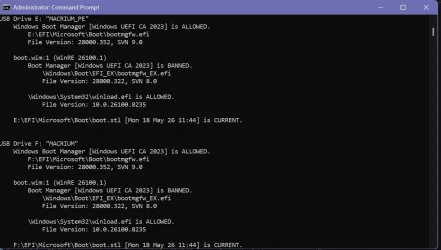
No, your boot.wim isn't current. This is what you can do:USB Drive F: "RESCUEM93P2"
Windows Boot Manager [Windows UEFI CA 2023] is ALLOWED.
F:\EFI\Microsoft\Boot\bootmgfw.efi
File Version: 28000.352, SVN 9.0
F:\EFI\Microsoft\Boot\boot.stl [Mon 05/18/2026 11:44 AM] is CURRENT.
boot.wim:1 (WinRE 26100.1)
Boot Manager [Windows UEFI CA 2023] is BANNED.
\Windows\Boot\EFI_EX\bootmgfw_EX.efi
File Version: 26100.30227, SVN 7.0
\Windows\System32\winload.efi is BANNED.
File Version: 26100.7149
1. Temporarily disable WinRE, so the winre.wim is pulled back into the \Windows\System32\Recovery folder.
Code:
reagentc /info
reagentc /disable
2. From Macrium, use the Advanced Options / Options to import from your own WIM file. Select "\Windows\System32\Recovery\winre.wim".
This file is marked hidden and system. So just type in the full path, instead of searching from the file browser window.
3. Build a new Recovery drive.
4. Re-enable WinRE, restoring the winre.wim back to the Recovery volume.
Code:
reagentc /enable
reagentc /info
My Computer
At a glance
Windows 7
- OS
- Windows 7