Solved garlin's PowerShell scripts for updating Secure Boot CA 2023


Just wanted to double-check [Macrium 8.0] recovery media is solid...
USB Drive F: "RESCUEM93P2"
Windows Boot Manager [Windows UEFI CA 2023] is ALLOWED.
F:\EFI\Microsoft\Boot\bootmgfw.efi
File Version: 28000.352, SVN 9.0

F:\EFI\Microsoft\Boot\boot.stl [Mon 05/18/2026 11:44 AM] is CURRENT.

boot.wim:1 (WinRE 26100.1)
Boot Manager [Windows UEFI CA 2023] is BANNED.
\Windows\Boot\EFI_EX\bootmgfw_EX.efi
File Version: 26100.30227, SVN 7.0

\Windows\System32\winload.efi is BANNED.
File Version: 26100.7149
No, your boot.wim isn't current. This is what you can do:

1. Temporarily disable WinRE, so the winre.wim is pulled back into the \Windows\System32\Recovery folder.
Code:
reagentc /info
reagentc /disable

2. From Macrium, use the Advanced Options / Options to import from your own WIM file. Select "\Windows\System32\Recovery\winre.wim".

This file is marked hidden and system. So just type in the full path, instead of searching from the file browser window.

3. Build a new Recovery drive.

4. Re-enable WinRE, restoring the winre.wim back to the Recovery volume.
Code:
reagentc /enable
reagentc /info
 

My Computer My Computer

At a glance

Windows 7
OS
Windows 7
Not sure why Macrium is not giving people the option to use the 2023 if building with WinRE wim.

They still expect nobody to revoke 2011.

Option in advanced to build with 2023 is only available if building with PE wim as the option is missing for RE wim.

1.webp
 

My Computer My Computer

At a glance

Windows 11 Pro
OS
Windows 11 Pro
"You can lead a horse to water. But you can't make him drink."
 

My Computer My Computer

At a glance

Windows 7
OS
Windows 7
I was able to get 2023 and no SVN error with WinRE on macrium without having to use a custom wim.

Once you create rescue media the files will be in the boot folder Macrium stored the RE files in.

As long as you do not rebuild the wim then the files are just used from this location.

So I just did this copy then created rescue media again.

Code:
copy C:\Windows\Boot\EFI_EX\bootmgfw_EX.efi C:\Boot\macrium\WinREFiles\media\EFI\Boot\bootx64.efi

I also know I can just copy the file after the media is created.

Code:
copy C:\Windows\Boot\EFI_EX\bootmgfw_EX.efi F:\EFI\boot\bootx64.efi

Exploring different ways until Macrium address this issue.
 
Last edited:

My Computer My Computer

At a glance

Windows 11 Pro
OS
Windows 11 Pro
OK am I missing something

Code:
PS C:\Users\jwdav> powershell -nop -ep bypass -f E:\Z_c2023\Check_BootMedia.ps1 -audit -verbose
Windows 11 25H2 (26200.8875)

Secure Boot: ON
Virtualization Based Security: ON

UEFI KEK Certs
--------------
    Microsoft Corporation KEK CA 2011
    Microsoft Corporation KEK 2K CA 2023

UEFI DB Certs
-------------
    Microsoft Corporation UEFI CA 2011
    Microsoft Windows Production PCA 2011
    Microsoft Option ROM UEFI CA 2023
    Microsoft UEFI CA 2023
    Windows UEFI CA 2023

UEFI DBX Certs
--------------
    Microsoft Windows Production PCA 2011
    Windows BootMgr SVN 9.0

EFI Files
---------
    SkuSiPolicy.p7b is CURRENT.
        \\.\HarddiskVolume1\EFI\Microsoft\Boot\SkuSiPolicy.p7b
        Version: 3.0.0.16

    FileRule             MinimumFileVersion MaximumFileVersion
    --------             ------------------ ------------------
    ID_FILEATTRIB_F_0042 0.0.0.0            10.0.14393.9309
    ID_FILEATTRIB_F_0044 10.0.14400.0       10.0.17763.8979
    ID_FILEATTRIB_F_0040 10.0.18000.0       10.0.19041.7519
    ID_FILEATTRIB_F_0049 10.0.19100.0       10.0.20348.5359
    ID_FILEATTRIB_F_0047 10.0.20400.0       10.0.22621.7349
    ID_FILEATTRIB_F_0041 10.0.23000.0       10.0.26100.8835
    ID_FILEATTRIB_F_0043 10.0.26100.32000   10.0.26100.33099
    ID_FILEATTRIB_F_0048 10.0.26172.0       10.0.26172.33099
    ID_FILEATTRIB_F_0046 10.0.27000.0       10.0.28000.2489
    ID_FILEATTRIB_F_0045 10.0.29426.0       65535.65535.65535.65535


Macrium v10.0.8843
------------------
    WinRE Boot Manager [Windows UEFI CA 2023] is ALLOWED.
        c:\boot\macrium\WinREFiles\media\EFI\Microsoft\Boot\bootmgfw.efi
        File Version: 28000.352, SVN 9.0

PS C:\Users\jwdav>

Just made this with Macrium X tonight, now we grab an older USB Media fromWednesday, ‎April ‎22, ‎2026, ‏‎4:24:32 AM

Code:
PS C:\Users\jwdav> powershell -nop -ep bypass -f E:\Z_c2023\Check_BootMedia.ps1 -audit -verbose
Windows 11 25H2 (26200.8875)

Secure Boot: ON
Virtualization Based Security: ON

UEFI KEK Certs
--------------
    Microsoft Corporation KEK CA 2011
    Microsoft Corporation KEK 2K CA 2023

UEFI DB Certs
-------------
    Microsoft Corporation UEFI CA 2011
    Microsoft Windows Production PCA 2011
    Microsoft Option ROM UEFI CA 2023
    Microsoft UEFI CA 2023
    Windows UEFI CA 2023

UEFI DBX Certs
--------------
    Microsoft Windows Production PCA 2011
    Windows BootMgr SVN 9.0

EFI Files
---------
    SkuSiPolicy.p7b is CURRENT.
        \\.\HarddiskVolume1\EFI\Microsoft\Boot\SkuSiPolicy.p7b
        Version: 3.0.0.16

    FileRule             MinimumFileVersion MaximumFileVersion
    --------             ------------------ ------------------
    ID_FILEATTRIB_F_0042 0.0.0.0            10.0.14393.9309
    ID_FILEATTRIB_F_0044 10.0.14400.0       10.0.17763.8979
    ID_FILEATTRIB_F_0040 10.0.18000.0       10.0.19041.7519
    ID_FILEATTRIB_F_0049 10.0.19100.0       10.0.20348.5359
    ID_FILEATTRIB_F_0047 10.0.20400.0       10.0.22621.7349
    ID_FILEATTRIB_F_0041 10.0.23000.0       10.0.26100.8835
    ID_FILEATTRIB_F_0043 10.0.26100.32000   10.0.26100.33099
    ID_FILEATTRIB_F_0048 10.0.26172.0       10.0.26172.33099
    ID_FILEATTRIB_F_0046 10.0.27000.0       10.0.28000.2489
    ID_FILEATTRIB_F_0045 10.0.29426.0       65535.65535.65535.65535


Macrium v10.0.8843
------------------
    WinRE Boot Manager [Windows UEFI CA 2023] is ALLOWED.
        c:\boot\macrium\WinREFiles\media\EFI\Microsoft\Boot\bootmgfw.efi
        File Version: 28000.352, SVN 9.0

PS C:\Users\jwdav>

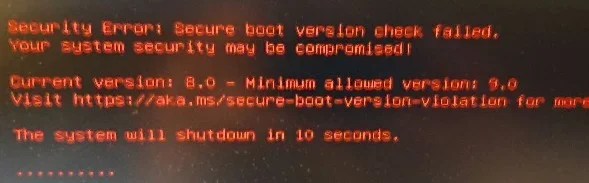
And I get the same result, even done a file compare with the text files and they are the same, till I boot the April USB

bootFailOld.webp
 

My Computer My Computer

At a glance

Win11 24H2 IOT LTSC / Win11 Pro 25H2AMD Ryzen 7 8700G / Ryzen 7 8700G / Ryzen 8600GF5-6000J3636F16GX2-FX5 32GB / Lexar Ares RGB ...internal
OS
Win11 24H2 IOT LTSC / Win11 Pro 25H2
Computer type
PC/Desktop
Manufacturer/Model
Gigabyte x2 / Asus = Home builds
CPU
AMD Ryzen 7 8700G / Ryzen 7 8700G / Ryzen 8600G
Motherboard
Gigabyte B650 AORUS ELITE AX V2 / ASUS TUF GAMING B650-PLUS / B650 GAMING X AX V2
Memory
F5-6000J3636F16GX2-FX5 32GB / Lexar Ares RGB LD5BU016G-R6000GDLA 32GB / Kingston FURY Beast 32 GB DDR5-5600
Graphics Card(s)
internal
Sound Card
Realtek
Monitor(s) Displays
BenQ 27 L EW2780
Screen Resolution
1920x1080
Hard Drives
Many M.2's (WD)
PSU
be quiet! Pure Power 13 M 550W
Case
Chieftec HC-10B-OP
Cooling
Gelid Solutions Tranquillo 5, many Noctua's 12x12
Keyboard
Microsoft
Mouse
Cherry
Internet Speed
500 mbs
Browser
Vivaldi
Antivirus
Eset
Other Info
PC builder / repair / Trouble-shooter etc.
@KevTech I do the same to copy over the c2023 certificates with Macrium free, X. I just update the Boot folder on C
 

My Computer My Computer

At a glance

Win11 24H2 IOT LTSC / Win11 Pro 25H2AMD Ryzen 7 8700G / Ryzen 7 8700G / Ryzen 8600GF5-6000J3636F16GX2-FX5 32GB / Lexar Ares RGB ...internal
OS
Win11 24H2 IOT LTSC / Win11 Pro 25H2
Computer type
PC/Desktop
Manufacturer/Model
Gigabyte x2 / Asus = Home builds
CPU
AMD Ryzen 7 8700G / Ryzen 7 8700G / Ryzen 8600G
Motherboard
Gigabyte B650 AORUS ELITE AX V2 / ASUS TUF GAMING B650-PLUS / B650 GAMING X AX V2
Memory
F5-6000J3636F16GX2-FX5 32GB / Lexar Ares RGB LD5BU016G-R6000GDLA 32GB / Kingston FURY Beast 32 GB DDR5-5600
Graphics Card(s)
internal
Sound Card
Realtek
Monitor(s) Displays
BenQ 27 L EW2780
Screen Resolution
1920x1080
Hard Drives
Many M.2's (WD)
PSU
be quiet! Pure Power 13 M 550W
Case
Chieftec HC-10B-OP
Cooling
Gelid Solutions Tranquillo 5, many Noctua's 12x12
Keyboard
Microsoft
Mouse
Cherry
Internet Speed
500 mbs
Browser
Vivaldi
Antivirus
Eset
Other Info
PC builder / repair / Trouble-shooter etc.
I was able to get 2023 and no SVN error with WinRE on macrium without having to use a custom wim.

Once you create rescue media the files will be in the boot folder Macrium stored the RE files in.

As long as you do not rebuild the wim then the files are just used from this location.

So I just did this copy then created rescue media again.

Code:
copy C:\Windows\Boot\EFI_EX\bootmgfw_EX.efi C:\Boot\macrium\WinREFiles\media\EFI\Boot\bootx64.efi

I also know I can just copy the file after the media is created.

Code:
copy C:\Windows\Boot\EFI_EX\bootmgfw_EX.efi F:\EFI\boot\bootx64.efi

Exploring different ways until Macrium address this issue.
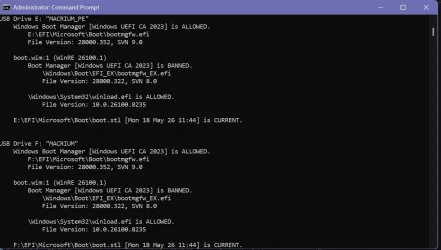
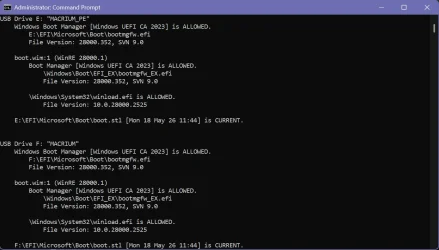
I did the same and it seemed to fix things up.

Before and after:

Screenshot 2026-08-06 115524.webpScreenshot 2026-08-06 152653.webp
 

My Computer My Computer

At a glance

Windows 11
OS
Windows 11
And I get the same result, even done a file compare with the text files and they are the same, till I boot the April USB

Do this on the April USB as it will update from Windows then you should not get SVN mismatch.

Change F: to the drive letter of your USB.

Code:
copy C:\Windows\Boot\EFI_EX\bootmgfw_EX.efi F:\EFI\boot\bootx64.efi
 

My Computer My Computer

At a glance

Windows 11 Pro
OS
Windows 11 Pro
Another interesting twist. I temporarily disabled WinRE and did a build. In this configuration Hasleo gave the option to download from MS or use an Offline. I chose download. This the result below, after the USB was created, suggest that the winload.efi on the system and boot.wim on the USB are both 26100.1, and not a later version.

Hasleo 5.9.2.1
--------------
C:\Program Files\Hasleo\Hasleo Backup Suite\bin\WADK\Windows Preinstallation Environment\amd64\winpe.wim:1 (WinPE 26100.1)
Boot Manager [Windows UEFI CA 2023] is BANNED.
\Windows\Boot\EFI_EX\bootmgfw_EX.efi
File Version: 26089.1001, SVN 2.0

\Windows\System32\winload.efi is ALLOWED.
File Version: 26100.1

WinPE Boot Manager [Windows UEFI CA 2023] is ALLOWED.
C:\Program Files\Hasleo\Hasleo Backup Suite\bin\WADK\Boot\EFI_EX\bootmgfw.efi
File Version: 28000.352, SVN 9.0

Bootable Media
--------------

USB Drive H: "HASLEOBS"
Boot File [Production PCA 2011] is BANNED.
H:\EFI\Boot\bootx64.efi
File Version: 28000.352, SVN 9.0

H:\EFI\Microsoft\Boot\boot.stl [2026-05-18 1:44 PM] is CURRENT.

boot.wim:1 (WinPE 26100.1)
Boot Manager [Windows UEFI CA 2023] is BANNED.
\Windows\Boot\EFI_EX\bootmgfw_EX.efi
File Version: 26089.1001, SVN 2.0

\Windows\System32\winload.efi is ALLOWED.
File Version: 26100.1
 

My Computer My Computer

At a glance

Windows 11 ProIntel Core Ultra16GBIntel(R) Arc Graphics
OS
Windows 11 Pro
Computer type
Laptop
Manufacturer/Model
ASUS Zenbook 14 OLED
CPU
Intel Core Ultra
Memory
16GB
Graphics Card(s)
Intel(R) Arc Graphics
Sound Card
Realtek High Definition Audio(SST)
Screen Resolution
2880 x 1800
Hard Drives
500 GB NVMe SSD
Internet Speed
1,500Mbps
Browser
Firefox, Edge
Antivirus
Windows Defender
Do this on the April USB as it will update from Windows then you should not get SVN mismatch.

Change F: to the drive letter of your USB.

Code:
copy C:\Windows\Boot\EFI_EX\bootmgfw_EX.efi F:\EFI\boot\bootx64.efi
Not the problem, the script quits after:
Code:
Macrium v10.0.8843
------------------
    WinRE Boot Manager [Windows UEFI CA 2023] is ALLOWED.
        c:\boot\macrium\WinREFiles\media\EFI\Microsoft\Boot\bootmgfw.efi
        File Version: 28000.352, SVN 9.0

It dont read my USB stick :confused:

I checked with an older version of Check_UEFI-CA2023.ps1 -BootMedia and voila it shows up
 

My Computer My Computer

At a glance

Win11 24H2 IOT LTSC / Win11 Pro 25H2AMD Ryzen 7 8700G / Ryzen 7 8700G / Ryzen 8600GF5-6000J3636F16GX2-FX5 32GB / Lexar Ares RGB ...internal
OS
Win11 24H2 IOT LTSC / Win11 Pro 25H2
Computer type
PC/Desktop
Manufacturer/Model
Gigabyte x2 / Asus = Home builds
CPU
AMD Ryzen 7 8700G / Ryzen 7 8700G / Ryzen 8600G
Motherboard
Gigabyte B650 AORUS ELITE AX V2 / ASUS TUF GAMING B650-PLUS / B650 GAMING X AX V2
Memory
F5-6000J3636F16GX2-FX5 32GB / Lexar Ares RGB LD5BU016G-R6000GDLA 32GB / Kingston FURY Beast 32 GB DDR5-5600
Graphics Card(s)
internal
Sound Card
Realtek
Monitor(s) Displays
BenQ 27 L EW2780
Screen Resolution
1920x1080
Hard Drives
Many M.2's (WD)
PSU
be quiet! Pure Power 13 M 550W
Case
Chieftec HC-10B-OP
Cooling
Gelid Solutions Tranquillo 5, many Noctua's 12x12
Keyboard
Microsoft
Mouse
Cherry
Internet Speed
500 mbs
Browser
Vivaldi
Antivirus
Eset
Other Info
PC builder / repair / Trouble-shooter etc.
Not the problem, the script quits after:
Code:
Macrium v10.0.8843
------------------
    WinRE Boot Manager [Windows UEFI CA 2023] is ALLOWED.
        c:\boot\macrium\WinREFiles\media\EFI\Microsoft\Boot\bootmgfw.efi
        File Version: 28000.352, SVN 9.0

It dont read my USB stick :confused:

I checked with an older version of Check_UEFI-CA2023.ps1 -BootMedia and voila it shows up

Did you get this error? I have Macruim v10.0.8843 also.

Line |
344 | Get-Volume -DriveLetter $Drive
| ~~~~~~
| Cannot validate argument on parameter 'DriveLetter'. The argument is null. Provide a valid value for the
| argument, and then try running the command again.
 

My Computer My Computer

At a glance

Windows 11 & Zorin ProIntel® Core™ Ultra 9 Processor 275HX 2.7 GHz32 gbNVIDIA® GeForce RTX™ 5060 Laptop GPU
OS
Windows 11 & Zorin Pro
Computer type
Laptop
Manufacturer/Model
Asus Rog Strix G16
CPU
Intel® Core™ Ultra 9 Processor 275HX 2.7 GHz
Motherboard
AsusteK Computer
Memory
32 gb
Graphics Card(s)
NVIDIA® GeForce RTX™ 5060 Laptop GPU
Sound Card
Realtek High Definition Audio
Monitor(s) Displays
Laptop 16 inch
Screen Resolution
2560 X 1600
Hard Drives
Boot: Samsung 9100 NVME 2 TB Microsoft Storage Controller: Standard NVM Express Driver: Microsoft 6/21/2006. No SATA/AHCI on my motherboard or in bios
Mouse
Pad
Browser
Google Chrome
Antivirus
Microsoft
Other Info
Printer: HP Color LaserJet MFP M477dw
Did you get this error? I have Macruim v10.0.8843 also
I did at first but turned out that I didnt download the last version as there's a couple floating around :censored:
 

My Computer My Computer

At a glance

Win11 24H2 IOT LTSC / Win11 Pro 25H2AMD Ryzen 7 8700G / Ryzen 7 8700G / Ryzen 8600GF5-6000J3636F16GX2-FX5 32GB / Lexar Ares RGB ...internal
OS
Win11 24H2 IOT LTSC / Win11 Pro 25H2
Computer type
PC/Desktop
Manufacturer/Model
Gigabyte x2 / Asus = Home builds
CPU
AMD Ryzen 7 8700G / Ryzen 7 8700G / Ryzen 8600G
Motherboard
Gigabyte B650 AORUS ELITE AX V2 / ASUS TUF GAMING B650-PLUS / B650 GAMING X AX V2
Memory
F5-6000J3636F16GX2-FX5 32GB / Lexar Ares RGB LD5BU016G-R6000GDLA 32GB / Kingston FURY Beast 32 GB DDR5-5600
Graphics Card(s)
internal
Sound Card
Realtek
Monitor(s) Displays
BenQ 27 L EW2780
Screen Resolution
1920x1080
Hard Drives
Many M.2's (WD)
PSU
be quiet! Pure Power 13 M 550W
Case
Chieftec HC-10B-OP
Cooling
Gelid Solutions Tranquillo 5, many Noctua's 12x12
Keyboard
Microsoft
Mouse
Cherry
Internet Speed
500 mbs
Browser
Vivaldi
Antivirus
Eset
Other Info
PC builder / repair / Trouble-shooter etc.
The one on Github also craps out after Macrium info ...

Code:
EFI Files
---------
    SkuSiPolicy.p7b is CURRENT.
        \\.\HarddiskVolume1\EFI\Microsoft\Boot\SkuSiPolicy.p7b
        Version: 3.0.0.16

    FileRule             MinimumFileVersion MaximumFileVersion
    --------             ------------------ ------------------
    ID_FILEATTRIB_F_0042 0.0.0.0            10.0.14393.9309
    ID_FILEATTRIB_F_0044 10.0.14400.0       10.0.17763.8979
    ID_FILEATTRIB_F_0040 10.0.18000.0       10.0.19041.7519
    ID_FILEATTRIB_F_0049 10.0.19100.0       10.0.20348.5359
    ID_FILEATTRIB_F_0047 10.0.20400.0       10.0.22621.7349
    ID_FILEATTRIB_F_0041 10.0.23000.0       10.0.26100.8835
    ID_FILEATTRIB_F_0043 10.0.26100.32000   10.0.26100.33099
    ID_FILEATTRIB_F_0048 10.0.26172.0       10.0.26172.33099
    ID_FILEATTRIB_F_0046 10.0.27000.0       10.0.28000.2489
    ID_FILEATTRIB_F_0045 10.0.29426.0       65535.65535.65535.65535


Macrium v10.0.8843
------------------
    WinRE Boot Manager [Windows UEFI CA 2023] is ALLOWED.
        c:\boot\macrium\WinREFiles\media\EFI\Microsoft\Boot\bootmgfw.efi
        File Version: 28000.352, SVN 9.0

PS C:\Users\
 

My Computer My Computer

At a glance

Win11 24H2 IOT LTSC / Win11 Pro 25H2AMD Ryzen 7 8700G / Ryzen 7 8700G / Ryzen 8600GF5-6000J3636F16GX2-FX5 32GB / Lexar Ares RGB ...internal
OS
Win11 24H2 IOT LTSC / Win11 Pro 25H2
Computer type
PC/Desktop
Manufacturer/Model
Gigabyte x2 / Asus = Home builds
CPU
AMD Ryzen 7 8700G / Ryzen 7 8700G / Ryzen 8600G
Motherboard
Gigabyte B650 AORUS ELITE AX V2 / ASUS TUF GAMING B650-PLUS / B650 GAMING X AX V2
Memory
F5-6000J3636F16GX2-FX5 32GB / Lexar Ares RGB LD5BU016G-R6000GDLA 32GB / Kingston FURY Beast 32 GB DDR5-5600
Graphics Card(s)
internal
Sound Card
Realtek
Monitor(s) Displays
BenQ 27 L EW2780
Screen Resolution
1920x1080
Hard Drives
Many M.2's (WD)
PSU
be quiet! Pure Power 13 M 550W
Case
Chieftec HC-10B-OP
Cooling
Gelid Solutions Tranquillo 5, many Noctua's 12x12
Keyboard
Microsoft
Mouse
Cherry
Internet Speed
500 mbs
Browser
Vivaldi
Antivirus
Eset
Other Info
PC builder / repair / Trouble-shooter etc.

My Computer My Computer

At a glance

Win11 24H2 IOT LTSC / Win11 Pro 25H2AMD Ryzen 7 8700G / Ryzen 7 8700G / Ryzen 8600GF5-6000J3636F16GX2-FX5 32GB / Lexar Ares RGB ...internal
OS
Win11 24H2 IOT LTSC / Win11 Pro 25H2
Computer type
PC/Desktop
Manufacturer/Model
Gigabyte x2 / Asus = Home builds
CPU
AMD Ryzen 7 8700G / Ryzen 7 8700G / Ryzen 8600G
Motherboard
Gigabyte B650 AORUS ELITE AX V2 / ASUS TUF GAMING B650-PLUS / B650 GAMING X AX V2
Memory
F5-6000J3636F16GX2-FX5 32GB / Lexar Ares RGB LD5BU016G-R6000GDLA 32GB / Kingston FURY Beast 32 GB DDR5-5600
Graphics Card(s)
internal
Sound Card
Realtek
Monitor(s) Displays
BenQ 27 L EW2780
Screen Resolution
1920x1080
Hard Drives
Many M.2's (WD)
PSU
be quiet! Pure Power 13 M 550W
Case
Chieftec HC-10B-OP
Cooling
Gelid Solutions Tranquillo 5, many Noctua's 12x12
Keyboard
Microsoft
Mouse
Cherry
Internet Speed
500 mbs
Browser
Vivaldi
Antivirus
Eset
Other Info
PC builder / repair / Trouble-shooter etc.
EmmyGarlin.webp

Cheers for the Man that helps us get through 2023 certificate's mess that Microsoft created !
 

My Computer My Computer

At a glance

Win11 24H2 IOT LTSC / Win11 Pro 25H2AMD Ryzen 7 8700G / Ryzen 7 8700G / Ryzen 8600GF5-6000J3636F16GX2-FX5 32GB / Lexar Ares RGB ...internal
OS
Win11 24H2 IOT LTSC / Win11 Pro 25H2
Computer type
PC/Desktop
Manufacturer/Model
Gigabyte x2 / Asus = Home builds
CPU
AMD Ryzen 7 8700G / Ryzen 7 8700G / Ryzen 8600G
Motherboard
Gigabyte B650 AORUS ELITE AX V2 / ASUS TUF GAMING B650-PLUS / B650 GAMING X AX V2
Memory
F5-6000J3636F16GX2-FX5 32GB / Lexar Ares RGB LD5BU016G-R6000GDLA 32GB / Kingston FURY Beast 32 GB DDR5-5600
Graphics Card(s)
internal
Sound Card
Realtek
Monitor(s) Displays
BenQ 27 L EW2780
Screen Resolution
1920x1080
Hard Drives
Many M.2's (WD)
PSU
be quiet! Pure Power 13 M 550W
Case
Chieftec HC-10B-OP
Cooling
Gelid Solutions Tranquillo 5, many Noctua's 12x12
Keyboard
Microsoft
Mouse
Cherry
Internet Speed
500 mbs
Browser
Vivaldi
Antivirus
Eset
Other Info
PC builder / repair / Trouble-shooter etc.
Try #3,115 the one you point me to has severe errors

The change btw post #3108 and #3115 is fixing the "null filter".
Code:
% diff Check_BootMedia_3108.ps1  Check_BootMedia_3115.ps1
339c339
<         ((Get-CimInstance -Class Win32_DiskDrive -Filter 'InterfaceType = "USB"' -KeyOnly | Get-CimAssociatedInstance -ResultClassName Win32_DiskPartition -KeyOnly | Get-CimAssociatedInstance -ResultClassName Win32_LogicalDisk).DeviceID | where { $_ -ne $null } | foreach { $_ -replace ':' }),
---
>         ((Get-CimInstance -Class Win32_DiskDrive -Filter 'InterfaceType = "USB"' -KeyOnly | Get-CimAssociatedInstance -ResultClassName Win32_DiskPartition -KeyOnly | Get-CimAssociatedInstance -ResultClassName Win32_LogicalDisk).DeviceID | foreach { $_ -replace ':' }),
344c344,346
<         Get-Volume -DriveLetter $Drive
---
>         if ($Drive -ne $null ) {
>             Get-Volume -DriveLetter $Drive
>         }
 

My Computer My Computer

At a glance

Windows 7
OS
Windows 7

Latest Support Threads

Back
Top Bottom