Solved garlin's PowerShell scripts for updating Secure Boot CA 2023


No they are very different USB model drives. Some other USB sticks returned drive letters.

This 64GB USB stick and an external SSD plugged in returned 0.

Not going to try the experiment as it took too much effort creating the Rufus drive some time ago.
 
Last edited:

My Computer My Computer

At a glance

Windows 11 ProIntel Core Ultra16GBIntel(R) Arc Graphics
OS
Windows 11 Pro
Computer type
Laptop
Manufacturer/Model
ASUS Zenbook 14 OLED
CPU
Intel Core Ultra
Memory
16GB
Graphics Card(s)
Intel(R) Arc Graphics
Sound Card
Realtek High Definition Audio(SST)
Screen Resolution
2880 x 1800
Hard Drives
500 GB NVMe SSD
Internet Speed
1,500Mbps
Browser
Firefox, Edge
Antivirus
Windows Defender
@garlin. Back to normal. Thanks. ^^

Got Win 11 installed.
Booted from Macrium media. Picked the backup I wanted, deleted all the newly installed partitions on my Windows drive and restored.
Went directly from Mac5rium bootable and turned Secure Boot and CSM back on.
And I'm back to where I was.

Image1.webp


All is well now. Thanks again.
 
Last edited:

My Computers My Computers

  • At a glance

    Win 11 Home ♦♦♦26200.8973 ♦♦♦♦♦♦♦25H2AMD Ryzen 7 3700XG.Skill (F4-3200C14D-16GTZKW)EVGA RTX 2070 (08G-P4-2171-KR)
    OS
    Win 11 Home ♦♦♦26200.8973 ♦♦♦♦♦♦♦25H2
    Computer type
    PC/Desktop
    Manufacturer/Model
    Built by Ghot® [May 2020]
    CPU
    AMD Ryzen 7 3700X
    Motherboard
    Asus Pro WS X570-ACE (BIOS 5302)
    Memory
    G.Skill (F4-3200C14D-16GTZKW)
    Graphics Card(s)
    EVGA RTX 2070 (08G-P4-2171-KR)
    Sound Card
    Realtek ALC1220P / ALC S1220A
    Monitor(s) Displays
    Dell U3011 30"
    Screen Resolution
    2560 x 1600
    Hard Drives
    2x Samsung 860 EVO 500GB,
    WD 4TB Black FZBX - SATA III,
    WD 8TB Black FZBX - SATA III,
    DRW-24B1ST CD/DVD Burner
    PSU
    PC Power & Cooling 750W Quad EPS12V
    Case
    Cooler Master ATCS 840 Tower
    Cooling
    CM Hyper 212 EVO (push/pull)
    Keyboard
    Ducky DK9008 Shine II Blue LED
    Mouse
    Logitech Optical M-100
    Internet Speed
    300/300
    Browser
    Firefox (latest)
    Antivirus
    Bitdefender Total Security
    Other Info
    Speakers: Klipsch Pro Media 2.1
  • At a glance

    Windows XP Pro 32bit w/SP3AMD Athlon 64 X2 5000+ (OC'd @ 3.2Ghz)TWIN2X2048-6400C4DHX (2 x 1GB, DDR2 800)EVGA 256-P2-N758-TR GeForce 8600GT SSC
    Operating System
    Windows XP Pro 32bit w/SP3
    Computer type
    PC/Desktop
    Manufacturer/Model
    Built by Ghot® (not in use)
    CPU
    AMD Athlon 64 X2 5000+ (OC'd @ 3.2Ghz)
    Motherboard
    ASUS M2N32-SLI Deluxe Wireless Edition
    Memory
    TWIN2X2048-6400C4DHX (2 x 1GB, DDR2 800)
    Graphics card(s)
    EVGA 256-P2-N758-TR GeForce 8600GT SSC
    Sound Card
    Onboard
    Monitor(s) Displays
    ViewSonic G90FB Black 19" Professional (CRT)
    Screen Resolution
    up to 2048 x 1536
    Hard Drives
    WD 36GB 10,000rpm Raptor SATA
    Seagate 80GB 7200rpm SATA
    Lite-On LTR-52246S CD/RW
    Lite-On LH-18A1P CD/DVD Burner
    PSU
    PC Power & Cooling Silencer 750 Quad EPS12V
    Case
    Generic Beige case, 80mm fans
    Cooling
    ZALMAN 9500A 92mm CPU Cooler
    Keyboard
    Logitech Classic Keybooard 200
    Mouse
    Logitech Optical M-BT96a
    Internet Speed
    300/300
    Browser
    Firefox 3.x ??
    Antivirus
    Symantec (Norton)
    Other Info
    Still assembled, still runs. Haven't turned it on for 15 years?
No they are very different USB model drives. Some other USB sticks returned drive letters.

This 64GB USB stick and an external SSD plugged in returned 0.

Not going to try the experiment as it was took too much effort creating the Rufus drive some time ago.

I think the best compromise is to allow for manual drive letters, in case your removable drive is "FIXED".
Code:
Check_BootMedia.ps1 E:
 

My Computer My Computer

At a glance

Windows 7
OS
Windows 7
@Quandary

Here's a wild shot:
Code:
(Get-CimInstance -ClassName Win32_DiskDrive | where { $_.PNPDeviceID -match @(((Get-PnpDevice -PresentOnly | where { $_.Service -eq 'USBSTOR' }).PNPDeviceID -split '\\')[-1]) } | foreach { Get-CimAssociatedInstance -InputObject $_ -ResultClass Win32_DiskPartition | Get-CimAssociatedInstance -ResultClass Win32_LogicalDisk }).DeviceID
 

My Computer My Computer

At a glance

Windows 7
OS
Windows 7
@Quandary

Here's a wild shot:
Code:
(Get-CimInstance -ClassName Win32_DiskDrive | where { $_.PNPDeviceID -match @(((Get-PnpDevice -PresentOnly | where { $_.Service -eq 'USBSTOR' }).PNPDeviceID -split '\\')[-1]) } | foreach { Get-CimAssociatedInstance -InputObject $_ -ResultClass Win32_DiskPartition | Get-CimAssociatedInstance -ResultClass Win32_LogicalDisk }).DeviceID

I have a UASP USB drive I am using as a Macrium recovery device. The script doesn't work in that instance.

Its Class is "DiskDrive" and its service is "disk". I can see that it is USB connected if I look at "device stack" in Computer Management properties details, which has \Driver\UASPStor the stack (I don't think "device stack" is a pnp device property in pwsh). Must be another simpler way.
 

My Computers My Computers

  • At a glance

    Windows 11 ProIntel Core i9 14900K 5800/4500 P/E all core96GB (2x48) G.skill Ripjaws 6800 MT/s DDR5Asus ROG Strix 4070 Ti OC
    OS
    Windows 11 Pro
    Computer type
    PC/Desktop
    Manufacturer/Model
    DIY Photoshop/Audio/Game/tinker
    CPU
    Intel Core i9 14900K 5800/4500 P/E all core
    Motherboard
    Asus ROG Maximus Z790 Dark Hero
    Memory
    96GB (2x48) G.skill Ripjaws 6800 MT/s DDR5
    Graphics Card(s)
    Asus ROG Strix 4070 Ti OC
    Sound Card
    Bowers & Wilkins 606 S3 speakers; Audiolabs 7000a integrated amp; RSL 10S Mk2 sub; Creative Pebble Pro Minimilist
    Monitor(s) Displays
    Eizo CG2730 ColorEdge, ViewSonic VP2768, i1 Display Pro calibration puck
    Screen Resolution
    2560 x 1440p x 2
    Hard Drives
    WDC SN850X 4TB nvme, SN850 1TB nvme, SK-Hynix 2 TB P41 nvme,. Sabrent USB-C DS-SC5B 5-bay docking station: 6TB WDC Black, 6TB Ironwolf Pro; 2x 2TB WDC Black HDD
    PSU
    850W Seasonic Vertex PX-850 ATX 3.0/PCI-E 5.0
    Case
    Fractal Design North XL Mesh, Black Walnut
    Cooling
    EK Nucleus black 360 AIO w/Phanteks T30-120 fans, 2 Noctua NF-A14 Chromax case fan, 1 T30-120 fan cooling memory
    Keyboard
    Keychron Q3 Max TKL with custom GMK Redsuns Red Samuri keycaps, TX Stabs
    Mouse
    Logitech G305 wireless gaming
    Internet Speed
    575 Mb/s down | 25 Mb/s up
    Browser
    Firefox
    Antivirus
    Defender, Macrium Reflect X
    Other Info
    Phangkey Amaterasu V2 Desk Mat
  • At a glance

    Apple M1
    Computer type
    Laptop
    Manufacturer/Model
    💻 Apple 13" Macbook Pro 2020 (m1)
    CPU
    Apple M1
    Screen Resolution
    2560x1600
    Browser
    Firefox
I am missing an entire class of Macrium users, who are using HDD's as their recovery media?
In that case, you wouldn't be limited to USB controller devices.

As a fallback I would need to determine what a Macrium or Hasleo recovery device looks like (regardless of physical media).

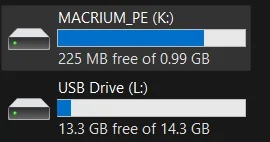
- Macrium uses "MACRIUM_PE" as the volume label, and it's formatted FAT32. Hopefully nobody renames the volume label.
- Macrium leaves behind a \RMBuilder.xml in the root folder.

- Hasleo uses "HASLEOBS" as the volume label, and it's formatted FAT32. Hopefully nobody renames the volume label.
- Hasleo leaves absolutely no breadcrumbs in the top-level folders. /shrug

Here's a test script which combines the above logic + looking for MACRIUM_PE/HASLEOBS in the volume label.
 

Attachments

My Computer My Computer

At a glance

Windows 7
OS
Windows 7
Didn't follow all the last pages, but it seems that 'Interfacetype' doesn't give a usable result for USB- harddisks?

What about using Get-Disk | Where-Object –FilterScript {$_.Bustype -Eq "USB"}?

I got an emergency disk created with PE-bakery on an SSD in an USB enclosure which correctly shows up in the remove media- dialogue but is mounted as harddrive
1786344179364.webp
1786344154090.webp
 

My Computer My Computer

At a glance

W10
OS
W10
- Macrium uses "MACRIUM_PE" as the volume label, and it's formatted FAT32. Hopefully nobody renames the volume label.

From what I've observed with MR 8.1, only drives built with the Windows PE base wim get the MACRIUM_PE volume label.
Drives built with WinRE get no volume labels.

Code:
PS D:\Scripts> .\COMBINED.ps1
USB Devices
-----------
L

CDROM Devices
-------------


Macrium/Hasleo
--------------
K

MBR + FAT32
-----------
K
L
PS D:\Scripts>

K is a WinPE drive.
L is a WinRE drive.

1786350517627.webp
 

My Computers My Computers

  • At a glance

    Win 11 Pro 25H2 26200.8973Intel® Core™ i7-14700KG.SKILL Ripjaws S5 Series 64GB (2 x 32GB) DDR5ASUS GeForce RTX 4070 Super 12GB
    OS
    Win 11 Pro 25H2 26200.8973
    Computer type
    PC/Desktop
    Manufacturer/Model
    Self Built
    CPU
    Intel® Core™ i7-14700K
    Motherboard
    ASUS TUF Z690-PLUS WIFI (BIOS 4505)
    Memory
    G.SKILL Ripjaws S5 Series 64GB (2 x 32GB) DDR5
    Graphics Card(s)
    ASUS GeForce RTX 4070 Super 12GB
    Sound Card
    Sound Blaster AE-5 Plus
    Monitor(s) Displays
    ASUS TUF Gaming 27" 2K HDR Gaming
    Screen Resolution
    2560 x 1440
    Hard Drives
    Samsung 990 Pro 1TB NVMe (Win 11 25H2)
    SK hynix P41 500GB NVMe
    SK hynix P41 2TB NVMe (x3)
    Crucial P3 Plus 4TB
    PSU
    Corsair RM850x Shift
    Case
    Antec Dark Phantom DP502 FLUX
    Cooling
    Corsair Nautilus 360 RS AIO
    Keyboard
    Logitech MK 320
    Mouse
    Razer Basilisk V3
    Internet Speed
    750Mbs
    Browser
    Firefox
    Antivirus
    Winows Security
    Other Info
    MR 8.1 Home
  • At a glance

    Win 11 Pro 25H2 26200.8973Intel Core i5-1140064 GB DDR4MSI GeForce RTX 3060 Ventus 2X 12GB
    Operating System
    Win 11 Pro 25H2 26200.8973
    Computer type
    PC/Desktop
    Manufacturer/Model
    Self Built
    CPU
    Intel Core i5-11400
    Motherboard
    Asus TUF Gaming Z590 Plus WiFi (BIOS 2803)
    Memory
    64 GB DDR4
    Graphics card(s)
    MSI GeForce RTX 3060 Ventus 2X 12GB
    Sound Card
    SoundBlaster Audigy Fx V2
    Monitor(s) Displays
    Samsung F27T350
    Screen Resolution
    1920x1080
    Hard Drives
    Samsung 980 Pro 1TB
    Samsung 970 EVO Plus 2TB
    Samsung 870 EVO 500GB SSD
    PSU
    Corsair HX750
    Case
    Cougar MX330-G Window
    Cooling
    Thermalright Frozen Edge 240 Black AIO
    Internet Speed
    350Mbps
    Browser
    Firefox
    Antivirus
    Windows Security
  • System Three
    Win 11 Pro 25H2 26200.8973
    ASUS PRIME Z370-P II BIOS 3004 7/12/21
    Intel Core i7-8700 CPU @ 3.20GHz
    32GB DDR4 RAM (4x8)
    iGPU Intel UHD Graphics 630
    Cooler Master Hyper 212
    Mid-Tower Desktop

Latest Support Threads

Back
Top Bottom