
Navigation
Install the app
How to install the app on iOS
Follow along with the video below to see how to install our site as a web app on your home screen.
Note: This feature may not be available in some browsers.
More options
Style variation
System
Light
Dark
You are using an out of date browser. It may not display this or other websites correctly.
You should upgrade or use an alternative browser.
You should upgrade or use an alternative browser.
Solved garlin's PowerShell scripts for updating Secure Boot CA 2023
- Thread starter garlin
- Start date


My Computers
-
At a glance
Win 11 Pro 25H2 26200.9168Intel® Core™ i7-14700KG.SKILL Ripjaws S5 Series 64GB (2 x 32GB) DDR5ASUS GeForce RTX 4070 Super 12GB- OS
- Win 11 Pro 25H2 26200.9168
- Computer type
- PC/Desktop
- Manufacturer/Model
- Self Built
- CPU
- Intel® Core™ i7-14700K
- Motherboard
- ASUS TUF Z690-PLUS WIFI (BIOS 4505)
- Memory
- G.SKILL Ripjaws S5 Series 64GB (2 x 32GB) DDR5
- Graphics Card(s)
- ASUS GeForce RTX 4070 Super 12GB
- Sound Card
- Sound Blaster AE-5 Plus
- Monitor(s) Displays
- ASUS TUF Gaming 27" 2K HDR Gaming
- Screen Resolution
- 2560 x 1440
- Hard Drives
- Samsung 990 Pro 1TB NVMe (Win 11 25H2)
SK hynix P41 500GB NVMe
SK hynix P41 2TB NVMe (x3)
Crucial P3 Plus 4TB
- PSU
- Corsair RM850x Shift
- Case
- Antec Dark Phantom DP502 FLUX
- Cooling
- Corsair Nautilus 360 RS AIO
- Keyboard
- Logitech MK 320
- Mouse
- Razer Basilisk V3
- Internet Speed
- 750Mbs
- Browser
- Firefox
- Antivirus
- Winows Security
- Other Info
- MR 8.1 Home
-
At a glance
Win 11 Pro 25H2 26200.9168Intel Core i5-1140064 GB DDR4MSI GeForce RTX 3060 Ventus 2X 12GB- Operating System
- Win 11 Pro 25H2 26200.9168
- Computer type
- PC/Desktop
- Manufacturer/Model
- Self Built
- CPU
- Intel Core i5-11400
- Motherboard
- Asus TUF Gaming Z590 Plus WiFi (BIOS 2803)
- Memory
- 64 GB DDR4
- Graphics card(s)
- MSI GeForce RTX 3060 Ventus 2X 12GB
- Sound Card
- SoundBlaster Audigy Fx V2
- Monitor(s) Displays
- Samsung F27T350
- Screen Resolution
- 1920x1080
- Hard Drives
- Samsung 980 Pro 1TB
Samsung 970 EVO Plus 2TB
Samsung 870 EVO 500GB SSD
- PSU
- Corsair HX750
- Case
- Cougar MX330-G Window
- Cooling
- Thermalright Frozen Edge 240 Black AIO
- Internet Speed
- 350Mbps
- Browser
- Firefox
- Antivirus
- Windows Security
-
System Three
Win 11 Pro 25H2 26200.9168
ASUS PRIME Z370-P II BIOS 3004 7/12/21
Intel Core i7-8700 CPU @ 3.20GHz
32GB DDR4 RAM (4x8)
iGPU Intel UHD Graphics 630
Cooler Master Hyper 212
Mid-Tower Desktop
Hmmmm, abbodi's backup of wimlib is version 1.4.1 (not 1.4.5). Maybe it's too old for our needs. I added a step to use Wayback Machine as a backup source.
1. Delete the wimlib in the temp file (only do this once):
2. Run latest version of script.
1. Delete the wimlib in the temp file (only do this once):
Code:
del $env:TEMP\wimlib-imagex.exe
del $env:TEMP\libwim-15.dll
2. Run latest version of script.
Attachments
My Computer
At a glance
Windows 7
- OS
- Windows 7

My Computers
-
At a glance
Win 11 Pro 25H2 26200.9168Intel® Core™ i7-14700KG.SKILL Ripjaws S5 Series 64GB (2 x 32GB) DDR5ASUS GeForce RTX 4070 Super 12GB- OS
- Win 11 Pro 25H2 26200.9168
- Computer type
- PC/Desktop
- Manufacturer/Model
- Self Built
- CPU
- Intel® Core™ i7-14700K
- Motherboard
- ASUS TUF Z690-PLUS WIFI (BIOS 4505)
- Memory
- G.SKILL Ripjaws S5 Series 64GB (2 x 32GB) DDR5
- Graphics Card(s)
- ASUS GeForce RTX 4070 Super 12GB
- Sound Card
- Sound Blaster AE-5 Plus
- Monitor(s) Displays
- ASUS TUF Gaming 27" 2K HDR Gaming
- Screen Resolution
- 2560 x 1440
- Hard Drives
- Samsung 990 Pro 1TB NVMe (Win 11 25H2)
SK hynix P41 500GB NVMe
SK hynix P41 2TB NVMe (x3)
Crucial P3 Plus 4TB
- PSU
- Corsair RM850x Shift
- Case
- Antec Dark Phantom DP502 FLUX
- Cooling
- Corsair Nautilus 360 RS AIO
- Keyboard
- Logitech MK 320
- Mouse
- Razer Basilisk V3
- Internet Speed
- 750Mbs
- Browser
- Firefox
- Antivirus
- Winows Security
- Other Info
- MR 8.1 Home
-
At a glance
Win 11 Pro 25H2 26200.9168Intel Core i5-1140064 GB DDR4MSI GeForce RTX 3060 Ventus 2X 12GB- Operating System
- Win 11 Pro 25H2 26200.9168
- Computer type
- PC/Desktop
- Manufacturer/Model
- Self Built
- CPU
- Intel Core i5-11400
- Motherboard
- Asus TUF Gaming Z590 Plus WiFi (BIOS 2803)
- Memory
- 64 GB DDR4
- Graphics card(s)
- MSI GeForce RTX 3060 Ventus 2X 12GB
- Sound Card
- SoundBlaster Audigy Fx V2
- Monitor(s) Displays
- Samsung F27T350
- Screen Resolution
- 1920x1080
- Hard Drives
- Samsung 980 Pro 1TB
Samsung 970 EVO Plus 2TB
Samsung 870 EVO 500GB SSD
- PSU
- Corsair HX750
- Case
- Cougar MX330-G Window
- Cooling
- Thermalright Frozen Edge 240 Black AIO
- Internet Speed
- 350Mbps
- Browser
- Firefox
- Antivirus
- Windows Security
-
System Three
Win 11 Pro 25H2 26200.9168
ASUS PRIME Z370-P II BIOS 3004 7/12/21
Intel Core i7-8700 CPU @ 3.20GHz
32GB DDR4 RAM (4x8)
iGPU Intel UHD Graphics 630
Cooler Master Hyper 212
Mid-Tower Desktop
@Scott Try this version. There's something weird if I delete the temporary converted copy of SWM too quickly.
For some reason, sometimes the converted SWM has a 1\ folder name (indicating index 1), and sometimes it doesn't. This confuses 7z.exe which can't find the right filenames to extract. But it's not a consistent behavior. I may need to reconsider the SWM part in case the -NoSkip option is actually used.
For some reason, sometimes the converted SWM has a 1\ folder name (indicating index 1), and sometimes it doesn't. This confuses 7z.exe which can't find the right filenames to extract. But it's not a consistent behavior. I may need to reconsider the SWM part in case the -NoSkip option is actually used.
Attachments
My Computer
At a glance
Windows 7
- OS
- Windows 7
This version produces:@Scott Try this version. There's something weird if I delete the temporary converted copy of SWM too quickly.
For some reason, sometimes the converted SWM has a 1\ folder name (indicating index 1), and sometimes it doesn't. This confuses 7z.exe which can't find the right filenames to extract. But it's not a consistent behavior. I may need to reconsider the SWM part in case the -NoSkip option is actually used.
You cannot call a method on a null-valued expression.
At E:\Garlin\Check_BootMedia.ps1:2402 char:9
+ $RemovableDrives = @(
+ ~~~~~~~~~~~~~~~~~~~~~
+ CategoryInfo : InvalidOperation: (:) [], RuntimeException
+ FullyQualifiedErrorId : InvokeMethodOnNull
Changing the code to:
$RemovableDrives = @(
@((Get-CimInstance -ClassName Win32_DiskDrive | where { $_.PNPDeviceID -match $USB_DeviceIDs -and $_.MediaLoaded } )) + `
@((Get-Volume | where { $_.DriveType -eq 'CD-ROM' -and $_.DriveLetter -match '[A-Z]' -and $_.OperationalStatus -eq 'OK' }).DriveLetter) + `
@((Get-Volume | where { $_.DriveLetter -in $MBR_Drives -and $_.FileSystemType -eq 'FAT32' }).DriveLetter)
Completes normally with:
Bootable Media
--------------
USB Drive H: "HASLEOBS"
Boot File [Windows UEFI CA 2023] is ALLOWED.
H:\EFI\Boot\bootx64.efi
File Version: 28000.342, SVN 9.0
boot.wim:1 (WinRE 26100.1)
Boot Manager [Windows UEFI CA 2023] is ALLOWED.
\Windows\Boot\EFI_EX\bootmgfw_EX.efi
File Version: 28000.342, SVN 9.0
\Windows\System32\winload.efi is ALLOWED.
File Version: 26100.8737
My Computer
At a glance
Windows 11 ProIntel Core Ultra16GBIntel(R) Arc Graphics
- OS
- Windows 11 Pro
- Computer type
- Laptop
- Manufacturer/Model
- ASUS Zenbook 14 OLED
- CPU
- Intel Core Ultra
- Memory
- 16GB
- Graphics Card(s)
- Intel(R) Arc Graphics
- Sound Card
- Realtek High Definition Audio(SST)
- Screen Resolution
- 2880 x 1800
- Hard Drives
- 500 GB NVMe SSD
- Internet Speed
- 1,500Mbps
- Browser
- Firefox, Edge
- Antivirus
- Windows Defender
IMO the whole process was a mess, thank goodness we have help on here. I also have a felling its not over
yet
yet
My Computer
At a glance
windows 11Intel i5-10600kf32gb corsair vengerance proAMD RX 6500XT
- OS
- windows 11
- Computer type
- PC/Desktop
- Manufacturer/Model
- Antec/Case
- CPU
- Intel i5-10600kf
- Motherboard
- GIGABYTE Z590 UD AC
- Memory
- 32gb corsair vengerance pro
- Graphics Card(s)
- AMD RX 6500XT
- Sound Card
- onboard
- Monitor(s) Displays
- 40" Hisense
- Hard Drives
- Samsung 850
Samsung 870
Seagate 2TB
- PSU
- EVGA GQ 750

- Local time
- 7:47 PM
- Posts
- 97
- OS
- Windows 11 Pro latest
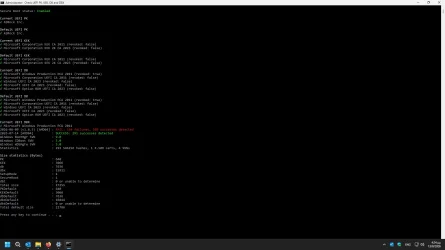
how i can fix the failed part?
My Computers
-
At a glance
Windows 11 Pro latestAMD Ryzen 5 5700x32 gb 3200 mhz xmp (4x8)msi rtx3060 8gb- OS
- Windows 11 Pro latest
- Computer type
- PC/Desktop
- CPU
- AMD Ryzen 5 5700x
- Motherboard
- Msi b550 gaming gen3
- Memory
- 32 gb 3200 mhz xmp (4x8)
- Graphics Card(s)
- msi rtx3060 8gb
- Sound Card
- Audigy RX
- Monitor(s) Displays
- Philips 222V8LA/00
- Screen Resolution
- 1980x1080
- Hard Drives
- MX500 Crucial
- PSU
- corsair cv 750
- Case
- q-tech
- Cooling
- amd wraith stealth
- Keyboard
- k81 gigabyte force
- Mouse
- zeroground daito
- Internet Speed
- 100-10
- Browser
- Mozilla
- Antivirus
- Windows defender
-
At a glance
windows 11 pro latesti5-2520M8Gb ddr3 1333 mhzhd3000- Operating System
- windows 11 pro latest
- Computer type
- Laptop
- Manufacturer/Model
- Lenovo T420
- CPU
- i5-2520M
- Memory
- 8Gb ddr3 1333 mhz
- Graphics card(s)
- hd3000
- Sound Card
- on board
- Screen Resolution
- 1366x768
- Hard Drives
- Team group lite 3d 240gb
- Internet Speed
- 100-10
- Antivirus
- defender

- Local time
- 6:47 PM
- Posts
- 339
- OS
- windows 11
I think the script isn't up to date.how i can fix the failed part?
View attachment 179545
Use garlin's script.
Run dbx.bat as an administrator.
My Computer
At a glance
windows 11
- OS
- windows 11
- Local time
- 7:47 PM
- Posts
- 97
- OS
- Windows 11 Pro latest
It didn't work.I think the script isn't up to date.
Use garlin's script.
Run dbx.bat as an administrator.
But i read that only the later matters and the later is 14/7/2026.
My Computers
-
At a glance
Windows 11 Pro latestAMD Ryzen 5 5700x32 gb 3200 mhz xmp (4x8)msi rtx3060 8gb- OS
- Windows 11 Pro latest
- Computer type
- PC/Desktop
- CPU
- AMD Ryzen 5 5700x
- Motherboard
- Msi b550 gaming gen3
- Memory
- 32 gb 3200 mhz xmp (4x8)
- Graphics Card(s)
- msi rtx3060 8gb
- Sound Card
- Audigy RX
- Monitor(s) Displays
- Philips 222V8LA/00
- Screen Resolution
- 1980x1080
- Hard Drives
- MX500 Crucial
- PSU
- corsair cv 750
- Case
- q-tech
- Cooling
- amd wraith stealth
- Keyboard
- k81 gigabyte force
- Mouse
- zeroground daito
- Internet Speed
- 100-10
- Browser
- Mozilla
- Antivirus
- Windows defender
-
At a glance
windows 11 pro latesti5-2520M8Gb ddr3 1333 mhzhd3000- Operating System
- windows 11 pro latest
- Computer type
- Laptop
- Manufacturer/Model
- Lenovo T420
- CPU
- i5-2520M
- Memory
- 8Gb ddr3 1333 mhz
- Graphics card(s)
- hd3000
- Sound Card
- on board
- Screen Resolution
- 1366x768
- Hard Drives
- Team group lite 3d 240gb
- Internet Speed
- 100-10
- Antivirus
- defender
- Local time
- 6:47 PM
- Posts
- 339
- OS
- windows 11
What isn't working?It didn't work.
But i read that only the later matters and the later is 14/7/2026.
In the folder containing Garlin's script, right-click on check-dbx.bat and select "Run as administrator." You should see three green "Success" lines if everything is in order.
Wait for Garlin regarding the date.
My Computer
At a glance
windows 11
- OS
- windows 11
- Local time
- 12:47 PM
- Posts
- 351
- OS
- Windows 11 Intel i5 10400 HD630 graphics chip
What isn't working?
In the folder containing Garlin's script, right-click on check-dbx.bat and select "Run as administrator." You should see three green "Success" lines if everything is in order.
Wait for Garlin regarding the date.
The latest scripts are here date 8/11 Releases · garlin-cant-code/SecureBoot-CA-2023-Updates
My Computer
At a glance
Windows 11 Intel i5 10400 HD630 graphics chipi5-1040012 gbHD630 chipset
- OS
- Windows 11 Intel i5 10400 HD630 graphics chip
- Computer type
- PC/Desktop
- Manufacturer/Model
- HP
- CPU
- i5-10400
- Memory
- 12 gb
- Graphics Card(s)
- HD630 chipset
- Monitor(s) Displays
- LG 24inch
- Hard Drives
- SSD, external usb drive 1tb for files/backups
- Keyboard
- wireless Logi
- Mouse
- ms 4000 wireless mouse
- Internet Speed
- 10meg
- Browser
- Firefox
- Antivirus
- Defender
- Other Info
- Win11 Home 25h2 26200.9168 08/11/2026
- Local time
- 6:47 PM
- Posts
- 339
- OS
- windows 11
The date boombastik is referring to is the one from his screenshot in post 3,369The latest scripts are here date 8/11 Releases · garlin-cant-code/SecureBoot-CA-2023-Updates

There are two dates for the UEFI dbx.
My Computer
At a glance
windows 11
- OS
- windows 11
- Local time
- 7:47 PM
- Posts
- 97
- OS
- Windows 11 Pro latest
With garlin script i see three green lights. The other three pc has also 2 dates for uefi dbx bath they have both days as sucess and green.The date boombastik is referring to is the one from his screenshot in post 3,369
There are two dates for the UEFI dbx.
My Computers
-
At a glance
Windows 11 Pro latestAMD Ryzen 5 5700x32 gb 3200 mhz xmp (4x8)msi rtx3060 8gb- OS
- Windows 11 Pro latest
- Computer type
- PC/Desktop
- CPU
- AMD Ryzen 5 5700x
- Motherboard
- Msi b550 gaming gen3
- Memory
- 32 gb 3200 mhz xmp (4x8)
- Graphics Card(s)
- msi rtx3060 8gb
- Sound Card
- Audigy RX
- Monitor(s) Displays
- Philips 222V8LA/00
- Screen Resolution
- 1980x1080
- Hard Drives
- MX500 Crucial
- PSU
- corsair cv 750
- Case
- q-tech
- Cooling
- amd wraith stealth
- Keyboard
- k81 gigabyte force
- Mouse
- zeroground daito
- Internet Speed
- 100-10
- Browser
- Mozilla
- Antivirus
- Windows defender
-
At a glance
windows 11 pro latesti5-2520M8Gb ddr3 1333 mhzhd3000- Operating System
- windows 11 pro latest
- Computer type
- Laptop
- Manufacturer/Model
- Lenovo T420
- CPU
- i5-2520M
- Memory
- 8Gb ddr3 1333 mhz
- Graphics card(s)
- hd3000
- Sound Card
- on board
- Screen Resolution
- 1366x768
- Hard Drives
- Team group lite 3d 240gb
- Internet Speed
- 100-10
- Antivirus
- defender
cjee21's script is broken since April 2026. He knows exactly why, because he added comments to an issue I filed on the official MS Secure Boot Objects GitHub which talks about the missing DBX entries.how i can fix the failed part?
[Bug]: Windows 11 April 2026 LCU pushed out a new DBXUpdateSVN.bin file · Issue #396 · microsoft/secureboot_objects
There is nothing to "fix" if you have already revoked CA 2011.
MS retired 154 EFI signature hashes which are now superseded by the banning of PCA 2011. This was done to help save valuable UEFI NVRAM space on older BIOS'es which could run out memory sooner than than later BIOS'es, because they're weren't so concerned about the size of DBX back in the day.
If his script wants to report this condition as a "failure", then I can't change it. MS made a deliberate decision to remove those entries to save space for the user's benefit.
My Computer
At a glance
Windows 7
- OS
- Windows 7
- Local time
- 7:47 PM
- Posts
- 97
- OS
- Windows 11 Pro latest
Thank for your time! I understand it now.
My Computers
-
At a glance
Windows 11 Pro latestAMD Ryzen 5 5700x32 gb 3200 mhz xmp (4x8)msi rtx3060 8gb- OS
- Windows 11 Pro latest
- Computer type
- PC/Desktop
- CPU
- AMD Ryzen 5 5700x
- Motherboard
- Msi b550 gaming gen3
- Memory
- 32 gb 3200 mhz xmp (4x8)
- Graphics Card(s)
- msi rtx3060 8gb
- Sound Card
- Audigy RX
- Monitor(s) Displays
- Philips 222V8LA/00
- Screen Resolution
- 1980x1080
- Hard Drives
- MX500 Crucial
- PSU
- corsair cv 750
- Case
- q-tech
- Cooling
- amd wraith stealth
- Keyboard
- k81 gigabyte force
- Mouse
- zeroground daito
- Internet Speed
- 100-10
- Browser
- Mozilla
- Antivirus
- Windows defender
-
At a glance
windows 11 pro latesti5-2520M8Gb ddr3 1333 mhzhd3000- Operating System
- windows 11 pro latest
- Computer type
- Laptop
- Manufacturer/Model
- Lenovo T420
- CPU
- i5-2520M
- Memory
- 8Gb ddr3 1333 mhz
- Graphics card(s)
- hd3000
- Sound Card
- on board
- Screen Resolution
- 1366x768
- Hard Drives
- Team group lite 3d 240gb
- Internet Speed
- 100-10
- Antivirus
- defender

@Scott Try this version. There's something weird if I delete the temporary converted copy of SWM too quickly.
For some reason, sometimes the converted SWM has a 1\ folder name (indicating index 1), and sometimes it doesn't. This confuses 7z.exe which can't find the right filenames to extract. But it's not a consistent behavior. I may need to reconsider the SWM part in case the -NoSkip option is actually used.
I ran the latest version of the script and the outcome is as followsHmmmm, abbodi's backup of wimlib is version 1.4.1 (not 1.4.5). Maybe it's too old for our needs. I added a step to use Wayback Machine as a backup source.
1. Delete the wimlib in the temp file (only do this once):
Code:del $env:TEMP\wimlib-imagex.exe del $env:TEMP\libwim-15.dll
2. Run latest version of script.
Secure Boot: ON
Virtualization Based Security: OFF
UEFI KEK Certs
--------------
Microsoft Corporation KEK CA 2011
Microsoft Corporation KEK 2K CA 2023
UEFI DB Certs
-------------
Microsoft Corporation UEFI CA 2011
Microsoft Windows Production PCA 2011
Microsoft Option ROM UEFI CA 2023
Microsoft UEFI CA 2023
Windows UEFI CA 2023
UEFI DBX Certs
--------------
Microsoft Windows Production PCA 2011
Windows BootMgr SVN 9.0
Bootable Media
--------------
PS C:\Windows\system32>
My Computer
At a glance
Windows 11 Home x64 Build 26200.9168 (25H2)Intel® Core™ i7-4750HQ CPU @ 2.00GHz16 GBIntel HD 5200 Integrated Graphics (128 MB); N...
- OS
- Windows 11 Home x64 Build 26200.9168 (25H2)
- Computer type
- Laptop
- Manufacturer/Model
- ASUSTeK COMPUTER INC./N751JX
- CPU
- Intel® Core™ i7-4750HQ CPU @ 2.00GHz
- Motherboard
- ASUSTeK Computer INC., BIOS version AMI N751JX.211
- Memory
- 16 GB
- Graphics Card(s)
- Intel HD 5200 Integrated Graphics (128 MB); NVIDIA GeForce GTX 950M (2 GB);
- Sound Card
- Realtek High Definition Audio
- Internet Speed
- 250 Mbps
- Antivirus
- Safe Online (F-Secure)
Similar threads
- Replies
- 23
- Views
- 4K

Latest Support Threads
-
-
Weird problem with W11 activation
- Started by ann_droid
- Replies: 3
-

-

-

Latest Tutorials
-

-
 Apps Add or Remove Images for Albums in OneDrive Photos app in Windows 11
- Started by Brink
- Replies: 0
-
 Apps Create and Delete Albums in OneDrive Photos app in Windows 11
- Started by Brink
- Replies: 0
-
 Apps Add or Remove Favorites in OneDrive Photos app in Windows 11
- Started by Brink
- Replies: 0
-
