Hi
@garlin,
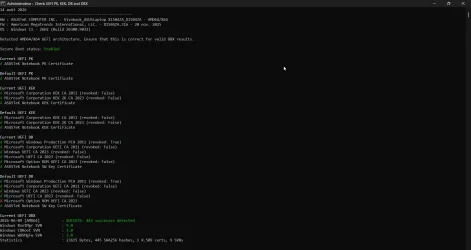
firstly thanks for your in depth analysis and work on this issue. I have an Elitebook 1050G1 with sureboot enabled but the 2023 certs have not been installed as blocked by a potential "firmware" issue reported in the event log. I have refrained from forcing any further update. I already attempted to clear the secure boot keys and try a self update (through setting the registry flags) but it doesn't succeed. Here is the output of the check UEFI 2023 PS:
PS C:\Temp\SecureBoot-CA-2023-Updates.v2026.08.11> .\Check_UEFI-CA2023.ps1 -verbose -log
Windows 11 25H2 (26200.9168)
Secure Boot: ON
Virtualization Based Security: ON
BitLocker on (C:) OFF
BIOS Firmware
-------------
HP HP EliteBook 1050 G1
Version: Q72 Ver. 01.31.00
Date: 2025-01-16
Factory Default UEFI PK Cert
----------------------------
HP UEFI Secure Boot PK 2017
UEFI PK Cert
------------
HP UEFI Secure Boot PK 2017
[KEK CA 2023] Update is available from HP or Microsoft.
Factory Default UEFI KEK Certs
------------------------------
Microsoft Corporation KEK CA 2011
HP UEFI Secure Boot KEK 2017
UEFI KEK Certs
--------------
Microsoft Corporation KEK CA 2011
HP UEFI Secure Boot KEK 2017
Factory Default UEFI DB Certs
-----------------------------
Microsoft Corporation UEFI CA 2011
Microsoft Windows Production PCA 2011
HP UEFI Secure Boot DB 2017
UEFI DB Certs
-------------
Microsoft Corporation UEFI CA 2011
Microsoft Windows Production PCA 2011
HP UEFI Secure Boot DB 2017
Factory Default UEFI DBX Certs
------------------------------
(NONE)
EFI_CERT_SHA256_GUID Signatures: 1
UEFI DBX Certs
--------------
(NONE)
Windows BootMgr SVN is MISSING.
EFI_CERT_SHA256_GUID Signatures: 292
EFI Files
---------
Windows Boot Manager [Production PCA 2011] is ALLOWED.
\\.\HarddiskVolume3\EFI\Microsoft\Boot\bootmgfw.efi
File Version: 28000.352, SVN 9.0
Registry: "WindowsUEFICA2023Capable" = 0
[Windows UEFI CA 2023] not in UEFI DB.
[OPTIONAL] SkuSiPolicy.p7b (for VBS) is MISSING.
REQUIRED ACTION
===============
OPTION 1: DO NOTHING AND WAIT. Windows will apply the UEFI updates (PC has supported BIOS).
OPTION 2: To install [UEFI CA 2023] certs WITHOUT REVOKING the [PCA 2011] cert, run the commands:
reg add HKEY_LOCAL_MACHINE\SYSTEM\CurrentControlSet\Control\Secureboot /v AvailableUpdates /t REG_DWORD /d 0x5944 /f
powershell Start-ScheduledTask -TaskName "\Microsoft\Windows\PI\Secure-Boot-Update"
OPTION 3: To install [UEFI CA 2023] certs and REVOKE the [PCA 2011] cert, run the commands:
reg add HKEY_LOCAL_MACHINE\SYSTEM\CurrentControlSet\Control\Secureboot /v AvailableUpdates /t REG_DWORD /d 0x5bc4 /f
powershell Start-ScheduledTask -TaskName "\Microsoft\Windows\PI\Secure-Boot-Update"
Log file saved as "C:\Temp\SecureBoot-CA-2023-Updates.v2026.08.11\2026-08-14 HP ELITEBOOK 1050 G1 Check-UEFI.log"
As you see I don't have the 2023 KEK certs and Windows won't auto update them, I get event ID 1800 events logged (need to reboot to install KEK/ROM CA/UEFI CA etc) but even after several reboots it doesn't. Prior to these EVent IDs I get this eventi ID 1796:
"The Secure Boot update failed to update SBAT with error Unknown HResult Error code: 0x800700c1. For more information, see
Secure Boot DB and DBX variable update events | Microsoft Support"
This points to a "generic" error during the update which fails to then update the all relevant certs as reported. Apparently after further investigation this is connected to a hp BIOS issue and as there is no other update from hp I don't want to force adding the new KEK & related certs and find myself with a bricked system (supposedly I can revert by clearing the Secure boot keys and disabling secure boot).
My question is, is it "safe" for me to proceed with this script to update the 2023 CA certs? Option 1 apparently FAILS on my system (certs are ready to be installed but the process is blocked). As I said I actually already tried OPTION 2 by simply adding the reg key and starting the task "Secure-Boot-Update" and rebooting but the certs still failed to update and the event log shows the same event IDs plus several event ID 1802 (one for each cert type) with a "Skipreason KI_7" (Update blocked due to a firmware issue).
At the moment I'm not in a rush to resolve this as the system boots fine and secure boot is enabled (though I believe there is an intended "software fallback" for compatibility reasons) but I don't want to have one day a surprise where the system won't boot after any subsequent Windows update.
Thanks for any insight!