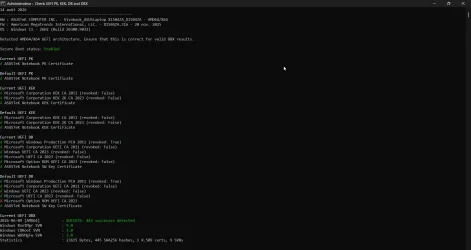
Solved garlin's PowerShell scripts for updating Secure Boot CA 2023


I don't want to spend a great deal of time chasing down everyone's weird drive setups, when it's a Secure Boot project. But it's turning out that way. Enough users actually do have Windows install or recovery images on fixed disks. It's still less common but a supported method.
Well, then you possibly made some accidental changes- at least this "weird" USB- SSD PE setup can be recognized now - thank you.

(At least it works if it's the only bootable USB media connected. If I have at the same time a USB recovery stick (WinRE) connected then the USB- SSD is omitted. Two USB sticks (WinRE) connected simultaneously are properly recognized.)
 

My Computer My Computer

At a glance

W10
OS
W10
Hello, I hope everything is well. Best regards.cmd_38M63kK4vX.webp
 

My Computer My Computer

At a glance

windows 11 25H224GBiris xe
OS
windows 11 25H2
Computer type
Laptop
Manufacturer/Model
ASUS Vivobook 15 (X1504)
Motherboard
Intel Alder Lake-P PCH
Memory
24GB
Graphics Card(s)
iris xe
Sound Card
realtek
Screen Resolution
1920X1080
Hard Drives
Samsung SSD 990 PRO 1TB
Browser
edge
Antivirus
eset anti virus
Well, then you possibly made some accidental changes- at least this "weird" USB- SSD PE setup can be recognized now - thank you.

(At least it works if it's the only bootable USB media connected. If I have at the same time a USB recovery stick (WinRE) connected then the USB- SSD is omitted. Two USB sticks (WinRE) connected simultaneously are properly recognized.)
I'm going in circles now! Every time I make a change which adds support for a "missing" drive, someone else says it stopped working for them.

My selection criteria is based on logic, but whatever Windows/PowerShell/your funky USB model is doing doesn't always fit the logic. I'm on like my 5th or 6th iteration. Reminds me of the insanity to get the EFI volume's true path. That took 4 tries, because enough corner cases existed.

It's probably a bug in PS, and I have to figure a method that doesn't depend on the bugs. Much like the EFI volume issue.
 

My Computer My Computer

At a glance

Windows 7
OS
Windows 7
In response to anchamp65: all the scripts run on my PC come from Garlin, not anyone else; I was just asking for an opinion on the test results.
 

My Computer My Computer

At a glance

windows 11 25H224GBiris xe
OS
windows 11 25H2
Computer type
Laptop
Manufacturer/Model
ASUS Vivobook 15 (X1504)
Motherboard
Intel Alder Lake-P PCH
Memory
24GB
Graphics Card(s)
iris xe
Sound Card
realtek
Screen Resolution
1920X1080
Hard Drives
Samsung SSD 990 PRO 1TB
Browser
edge
Antivirus
eset anti virus
I'm going in circles now! Every time I make a change which adds support for a "missing" drive, someone else says it stopped working for them.

My selection criteria is based on logic, but whatever Windows/PowerShell/your funky USB model is doing doesn't always fit the logic. I'm on like my 5th or 6th iteration. Reminds me of the insanity to get the EFI volume's true path. That took 4 tries, because enough corner cases existed.

It's probably a bug in PS, and I have to figure a method that doesn't depend on the bugs. Much like the EFI volume issue.
Yes, it so frustrating. I tested about 14 different types of USB attached drives from a 1TB SSD to CR-Rom. Only one gave an error. It is an old test Ventoy on a small USB stick. A Get-Volume query does not show any differences, except size, between it and a slightly larger Ventoy USB.

Let me know if I can provide and additional information.
 

My Computer My Computer

At a glance

Windows 11 ProIntel Core Ultra16GBIntel(R) Arc Graphics
OS
Windows 11 Pro
Computer type
Laptop
Manufacturer/Model
ASUS Zenbook 14 OLED
CPU
Intel Core Ultra
Memory
16GB
Graphics Card(s)
Intel(R) Arc Graphics
Sound Card
Realtek High Definition Audio(SST)
Screen Resolution
2880 x 1800
Hard Drives
500 GB NVMe SSD
Internet Speed
1,500Mbps
Browser
Firefox, Edge
Antivirus
Windows Defender
Hilarious...
You've given such a good support here that people use someone else's script and ask what to do 🤪
My scripts exist is because I didn't like what the other scripts do. Mostly because they don't interpret the data for you.
You know if a system is fully updated because it completes a check list of required items.

1. Secure Boot is enabled.
2. KEK CA 2023 and Windows UEFI CA 2023 are present. Those are the minimum for Windows to work. Everything else is a bonus, because not everyone wants or needs Linux or Option ROM support.
3. PCA 2011 in the DBX if you want to revoke the system.
4. Windows boot manager is allowed (this depends on whether you've updated or revoked other certs). Check the SVN if DBX exists.
5. The DBX list of banned EFI files matches whatever DBXupdate.bin you have (which can depend on your last installed Monthly Update).

If you know these conditions are fulfilled, then you have an updated BIOS.

Beyond the basics, we have SkuSiPolicy which isn't strictly part of Secure Boot. But MS wants users to enable SkuSiPolicy policy enforcement to help strengthen boot-time security. Having the wrong SkuSiPolicy settings will lead to boot failures, and inexperienced users blaming Secure Boot when it's not the same thing. That's why I've spent the time adding those features to my checklist.
 

My Computer My Computer

At a glance

Windows 7
OS
Windows 7
Hi @garlin,
firstly thanks for your in depth analysis and work on this issue. I have an Elitebook 1050G1 with sureboot enabled but the 2023 certs have not been installed as blocked by a potential "firmware" issue reported in the event log. I have refrained from forcing any further update. I already attempted to clear the secure boot keys and try a self update (through setting the registry flags) but it doesn't succeed. Here is the output of the check UEFI 2023 PS:

PS C:\Temp\SecureBoot-CA-2023-Updates.v2026.08.11> .\Check_UEFI-CA2023.ps1 -verbose -log
Windows 11 25H2 (26200.9168)

Secure Boot: ON
Virtualization Based Security: ON
BitLocker on (C:) OFF

BIOS Firmware
-------------
HP HP EliteBook 1050 G1
Version: Q72 Ver. 01.31.00
Date: 2025-01-16

Factory Default UEFI PK Cert
----------------------------
HP UEFI Secure Boot PK 2017

UEFI PK Cert
------------
HP UEFI Secure Boot PK 2017
[KEK CA 2023] Update is available from HP or Microsoft.

Factory Default UEFI KEK Certs
------------------------------
Microsoft Corporation KEK CA 2011
HP UEFI Secure Boot KEK 2017

UEFI KEK Certs
--------------
Microsoft Corporation KEK CA 2011
HP UEFI Secure Boot KEK 2017

Factory Default UEFI DB Certs
-----------------------------
Microsoft Corporation UEFI CA 2011
Microsoft Windows Production PCA 2011
HP UEFI Secure Boot DB 2017

UEFI DB Certs
-------------
Microsoft Corporation UEFI CA 2011
Microsoft Windows Production PCA 2011
HP UEFI Secure Boot DB 2017

Factory Default UEFI DBX Certs
------------------------------
(NONE)
EFI_CERT_SHA256_GUID Signatures: 1

UEFI DBX Certs
--------------
(NONE)
Windows BootMgr SVN is MISSING.
EFI_CERT_SHA256_GUID Signatures: 292

EFI Files
---------
Windows Boot Manager [Production PCA 2011] is ALLOWED.
\\.\HarddiskVolume3\EFI\Microsoft\Boot\bootmgfw.efi
File Version: 28000.352, SVN 9.0

Registry: "WindowsUEFICA2023Capable" = 0
[Windows UEFI CA 2023] not in UEFI DB.

[OPTIONAL] SkuSiPolicy.p7b (for VBS) is MISSING.

REQUIRED ACTION
===============

OPTION 1: DO NOTHING AND WAIT. Windows will apply the UEFI updates (PC has supported BIOS).

OPTION 2: To install [UEFI CA 2023] certs WITHOUT REVOKING the [PCA 2011] cert, run the commands:

reg add HKEY_LOCAL_MACHINE\SYSTEM\CurrentControlSet\Control\Secureboot /v AvailableUpdates /t REG_DWORD /d 0x5944 /f
powershell Start-ScheduledTask -TaskName "\Microsoft\Windows\PI\Secure-Boot-Update"


OPTION 3: To install [UEFI CA 2023] certs and REVOKE the [PCA 2011] cert, run the commands:

reg add HKEY_LOCAL_MACHINE\SYSTEM\CurrentControlSet\Control\Secureboot /v AvailableUpdates /t REG_DWORD /d 0x5bc4 /f
powershell Start-ScheduledTask -TaskName "\Microsoft\Windows\PI\Secure-Boot-Update"

Log file saved as "C:\Temp\SecureBoot-CA-2023-Updates.v2026.08.11\2026-08-14 HP ELITEBOOK 1050 G1 Check-UEFI.log"


As you see I don't have the 2023 KEK certs and Windows won't auto update them, I get event ID 1800 events logged (need to reboot to install KEK/ROM CA/UEFI CA etc) but even after several reboots it doesn't. Prior to these EVent IDs I get this eventi ID 1796:

"The Secure Boot update failed to update SBAT with error Unknown HResult Error code: 0x800700c1. For more information, see Secure Boot DB and DBX variable update events | Microsoft Support"

This points to a "generic" error during the update which fails to then update the all relevant certs as reported. Apparently after further investigation this is connected to a hp BIOS issue and as there is no other update from hp I don't want to force adding the new KEK & related certs and find myself with a bricked system (supposedly I can revert by clearing the Secure boot keys and disabling secure boot).

My question is, is it "safe" for me to proceed with this script to update the 2023 CA certs? Option 1 apparently FAILS on my system (certs are ready to be installed but the process is blocked). As I said I actually already tried OPTION 2 by simply adding the reg key and starting the task "Secure-Boot-Update" and rebooting but the certs still failed to update and the event log shows the same event IDs plus several event ID 1802 (one for each cert type) with a "Skipreason KI_7" (Update blocked due to a firmware issue).

At the moment I'm not in a rush to resolve this as the system boots fine and secure boot is enabled (though I believe there is an intended "software fallback" for compatibility reasons) but I don't want to have one day a surprise where the system won't boot after any subsequent Windows update.

Thanks for any insight!

 
Last edited:

My Computer My Computer

At a glance

Windows 11
OS
Windows 11
Computer type
PC/Desktop
Manufacturer/Model
HP
Yes, it so frustrating. I tested about 14 different types of USB attached drives from a 1TB SSD to CR-Rom. Only one gave an error. It is an old test Ventoy on a small USB stick. A Get-Volume query does not show any differences, except size, between it and a slightly larger Ventoy USB.

Let me know if I can provide and additional information.
Yeah. I'll have to write a longer test script which goes back and repeats the different methods.

I keep hearing this theme of "this drive by itself isn't seen, but two or more drives works". Which sounds like a nasty Windows bug.
 

My Computer My Computer

At a glance

Windows 7
OS
Windows 7
Hi @garlin,
firstly thanks for your in depth analysis and work on this issue. I have an Elitebook 1050G1 with sureboot enabled but the 2023 certs have not been installed as blocked by a potential "firmware" issue reported in the event log. I have refrained from forcing any further update. I already attempted to clear the secure boot keys and try a self update (through setting the registry flags) but it doesn't succeed. Here is the output of the check UEFI 2023 PS:
This points to a "generic" error during the update which fails to then update the all relevant certs as reported. Apparently after further investigation this is connected to a hp BIOS issue and as there is no other update from hp I don't want to force adding the new KEK & related certs and find myself with a bricked system (supposedly I can revert by clearing the Secure boot keys and disabling secure boot).

My question is, is it "safe" for me to proceed with this script to update the 2023 CA certs? Option 1 apparently FAILS on my system (certs are ready to be installed but the process is blocked). As I said I actually already tried OPTION 2 by simply adding the reg key and starting the task "Secure-Boot-Update" and rebooting but the certs still failed to update and the event log shows the same event IDs.
HP stragglers are turning into interesting cases, similar to some Acer models. There's two concerns:

1. HP Sure Start is supposed to prevent "unauthorized" changes. Meaning it knows the factory settings (it keeps a hidden backup copy for comparison), and will revert your manual changes. On paper, Sure Start can be safely disabled.

2. Is there a hidden firmware bug on selected HP models? Which HP engineering/support will never admit to? On the Acer forums, there's a technical dive on a BIOS implementation issue where some BIOS designs don't correctly size the memory allocation for Secure Boot variables. The total available NVRAM space is there to make changes, but depending on how old data isn't garbage collected (think of TRIM for SSD's), and how much room was assigned, it's possible to brick specific BIOS'es.

What happens is when you attempt to populate the new cert data, you overflow whatever limited memory was assigned to Secure Boot. Now you have truncated data, which fails the cert hash checks. Depending on your BIOS, it freaks out and doesn't boot/doesn't show POST. Hopefully, some weird power off/power on + hold magic key combo resets to factory defaults. Or it doesn't ever recover without reflashing the chip.

At this point, I don't know. Maybe manual enrollment will work. Looking at one of the HP docs (but not your model), it mentions HP Sure Start models don't accept cert files (DER format), and only want to import entire keys in .bin format. This implies you would have to clear all keys and my update script installs the Windows OEM Devices set as a drop-in replacement.

Other HP users have successfully update their PC's using the methods I support, but those are mostly consumer models. I suspect the Sure Start models have different firmware designs, and might not react well. We have an ongoing thread with an EliteBook 840 G5 user who only got as far as trying to disable Sure Start and messed up their BIOS settings.

If this was your primary PC, I would be concerned about a possible firmware limitation that can't be fixed without a new BIOS. Which you're not going to get.
 

My Computer My Computer

At a glance

Windows 7
OS
Windows 7
Being an"interim" model as this was rapidly replaced with a different hardware (in fact there is no 1050 G2) not may were sold. I suspect what you hint may be true which is why I am not too keen on forcing any update - older Probook 400 models have been bricked but successfully unbricked by reflashing the firmware resetting the settings directly on-chip, I really wish to avoid this. There is a key combination to reset to factory defaults I believe,similarly to the resetting of USB-C Thunderbolt settings by keeping the power on button pressed for like 30 seconds (some have this in combination with the F5 key) until the power LED starts flashing. This is my primary work machine so I'm careful to force any potential "brick" result which is the reason of my concern: I haven't had any 100% confrmed feedback by using the script(s) from the hp forums by ppl with the same machine. Specifically what worries me is event ID 1802 which lands to this page here:


and more specifically this section which is referred to in my event log (KI_7):

KI_7, KI_8, KI_9: HP Firmware
This HP device has a known compatibility problem during Secure Boot updates. Updates are skipped on affected models to prevent issues that can occur if the required firmware update is missing. Customers can check with HP to see whether updated firmware is available that resolves this issue and allows the Secure Boot update to proceed. For more information, please reference: HP PCs - Prepare for new Windows Secure Boot certificates | HP® Support.

and no update from hp regarding this - NOT reassuring.

What the underlying issue is is not public but I suspect your intuition may probably be spot on. If there is no way to extend this allocated certificate area then I'm stuck with this temporary "fall back" method which I have read about in some tech post. My question is how long will this be kept in place until MS forgets about it and due to the missing 2023 chain my system will no longer boot after a future potential update. That's the question I asked on the hp forums too but got no reply. The laptop is not super old and supported WIndows 11 in place upgrade (released with Windows 10) so it should have had these updates already. Unfortunately it is NOT listed in the supported business models sold between 2018 and 2023 here (under "List of supported HP Commercial PCs released between 2018 and 2023 and minimum BIOS versions" -> "Business Notebook PCs"):


This is sneaky by hp as it is a 2019 Business Elitebook 1050 G1 model with WIndows 11 support and sounds fishy not listing it as compatible - why would it be excluded if not for a hardware / firmware limitation that can't be resolved? I guess we know the answer to that then...

Well anyhow thanks for the feedback! I just hope it doesn't self brick itself as others have done after a "security" Windows Update...

Cheers
 

My Computer My Computer

At a glance

Windows 11
OS
Windows 11
Computer type
PC/Desktop
Manufacturer/Model
HP
In response to anchamp65: all the scripts run on my PC come from Garlin, not anyone else; I was just asking for an opinion on the test results.
Don't want to get into a fight with you...
But the image you posted from post #3382 is not from Garlin, it's from cjee21's GitHub (Check UEFI PK, KEK, DB and DBX.cmd)

Garlin's equivalent is Check_UEFI-CA2023.ps1
 

My Computer My Computer

At a glance

Windows 11
OS
Windows 11

and more specifically this section which is referred to in my event log (KI_7):

KI_7, KI_8, KI_9: HP Firmware
This HP device has a known compatibility problem during Secure Boot updates. Updates are skipped on affected models to prevent issues that can occur if the required firmware update is missing. Customers can check with HP to see whether updated firmware is available that resolves this issue and allows the Secure Boot update to proceed. For more information, please reference: HP PCs - Prepare for new Windows Secure Boot certificates | HP® Support.

and no update from hp regarding this - NOT reassuring.
Want to know a dirty secret? Those events are triggered by the Confidence Level data that MS publishes in every Monthly Update.

Your motherboard + BIOS version creates an unique hash (but it's shared by everyone with the exact same HW combination), and MS cross-indexes this BucketID against a set of JSON files that say go/no go. When the Secure Boot task runs, it compares your current BucketID against the list and throws these events.

There's no actual fancy HW probing or logic. Somewhere, MS maintains a giant database and gets feedback from HP and other vendors. The "bad" PC's get blocked by being added to a blocklist. This keeps the Secure Boot task lightweight. If you were to update the BIOS version, it would generate a different BucketID hash and the matching process starts all over again.

The fact that MS programmed this into the task means they know something bad we don't know.

Least Acer figured out this summer to go back and retrofit a large number of older models (presumably for a firmware glitch). If it wasn't a simple HW issue, HP would have simply submitted a signed KEK CA 2023 to MS for inclusion in the giant KEK database, and the task would have installed it with no fuss.
 

My Computer My Computer

At a glance

Windows 7
OS
Windows 7
Back
Top Bottom