Solved garlin's PowerShell scripts for updating Secure Boot CA 2023


+ CategoryInfo : InvalidOperation: (:) [], RuntimeException
+ FullyQualifiedErrorId : InvokeMethodOnNull

I may have found a clue, but no idea why the values are different for you.
Code:
$USB_DeviceIDs = @(Get-PnpDevice -PresentOnly | where { $_.Service -eq 'USBSTOR' } | foreach { ($_.PNPDeviceID -split '\\')[2] })
(Get-CimInstance -ClassName Win32_DiskDrive | where { (($_.PNPDeviceID -split '\\')[-1] -split '&')[0] -in $USB_DeviceIDs } | Get-CimAssociatedInstance -ResultClass Win32_DiskPartition | Get-CimAssociatedInstance -ResultClass Win32_LogicalDisk | where { $null -ne $_.Name }).Name.SubString(0,1)
 

My Computer My Computer

At a glance

Windows 7
OS
Windows 7
Well, no problem to check manually, but since you were able to include it in your script once....

1786856797525.webp
 

My Computer My Computer

At a glance

W10
OS
W10
Well, no problem to check manually, but since you were able to include it in your script once....
Is your FAT32 a GPT? We have this crazy Venn diagram...

USB Drives is looking at USBSTOR service (which is mostly removable drives). Previously I was using BusType USB, but people said that was missing devices...

MBR + FAT32 covers some devices like Rufus or Ventoy. But if your SSD is GPT + FAT32, then it's not in the Venn overlap.
 

My Computer My Computer

At a glance

Windows 7
OS
Windows 7
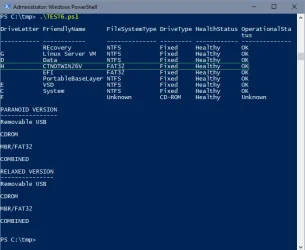
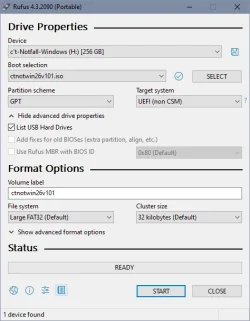
Is your FAT32 a GPT? We have this crazy Venn diagram...

Yes

1786862148190.webp 1786860790348.webp

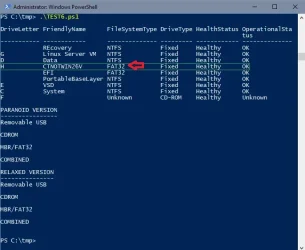
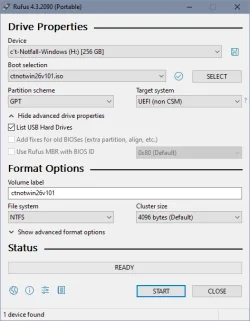
But if I create it with NTFS it doesn't make any difference:

1786862052324.webp 1786860844663.webp

But scripts from thursday still finding it with NTFS, too:

1786860924376.webp
 
Last edited:

My Computer My Computer

At a glance

W10
OS
W10
@t2s50

I don't know what you're up to, but why are you using the old version 4.3.2090 of Rufus (from 2023)?

The latest version of Rufus is 4.15 (2026.06.30).

Rufus also supports booting from NTFS in pure UEFI mode through its UEFI:NTFS feature. When NTFS is required, Rufus creates a small FAT partition labeled RUFUS_BOOT (previously labeled UEFI_NTFS) that contains the UEFI:NTFS bootloader. This allows UEFI systems to boot Windows 10/11 installation media containing files larger than 4 GB, such as install.wim.
 

My Computers My Computers

  • At a glance

    Windows 11 ProAMD Ryzen 9 9950X3DKingston FURY Beast 64GB (2x32GB) DDR5 6000MT/sASUS TUF Gaming Radeon RX 9070 OC Edition 16G...
    OS
    Windows 11 Pro
    Computer type
    PC/Desktop
    CPU
    AMD Ryzen 9 9950X3D
    Motherboard
    ASRock B650E Taichi Lite
    Memory
    Kingston FURY Beast 64GB (2x32GB) DDR5 6000MT/s
    Graphics Card(s)
    ASUS TUF Gaming Radeon RX 9070 OC Edition 16GB GDDR6
    Hard Drives
    Solidigm P44 Pro 2TB M.2 NVMe SSD
  • At a glance

    Windows 11 HomeIntel Core Ultra 9 275HX64GB (2x 32GB) DDR5-6400NVIDIA GeForce RTX 5080 16GB GDDR7 Laptop GPU
    Operating System
    Windows 11 Home
    Computer type
    Laptop
    Manufacturer/Model
    Lenovo Legion Pro 7i Gen 10 16"
    CPU
    Intel Core Ultra 9 275HX
    Memory
    64GB (2x 32GB) DDR5-6400
    Graphics card(s)
    NVIDIA GeForce RTX 5080 16GB GDDR7 Laptop GPU
    Hard Drives
    2x 1TB M.2 NVMe SSD (SK Hynix)
I don't know what you're up to, but why are you using the old version 4.3.2090 of Rufus (from 2023)? The latest version of Rufus is 4.15 (2026.06.30).

Rufus also supports booting from NTFS in pure UEFI mode through its UEFI:NTFS feature. When NTFS is required, Rufus creates a small FAT partition labeled RUFUS_BOOT (previously labeled UEFI_NTFS) that contains the UEFI:NTFS bootloader. This allows UEFI systems to boot Windows 10/11 installation media containing files larger than 4 GB, such as install.wim.
That's the Rufus version that came 'packed' with the project (a rescue Win PE from a pc magazine).

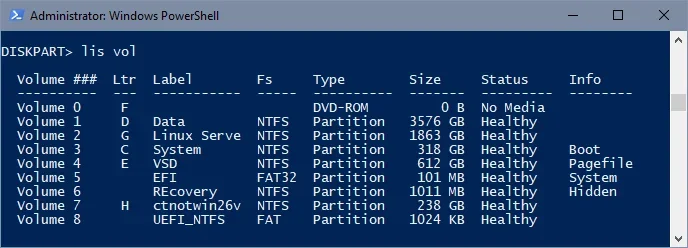
Why would GPT partitions and Large Fat32 not count as "pure UEFI mode"? But it's the same for Rufus 4.3.x, the second example from #3444 is precisely formatted this way (for diskpart see volumes 7 and 8):

1786886426592.webp

1786886739693.webp

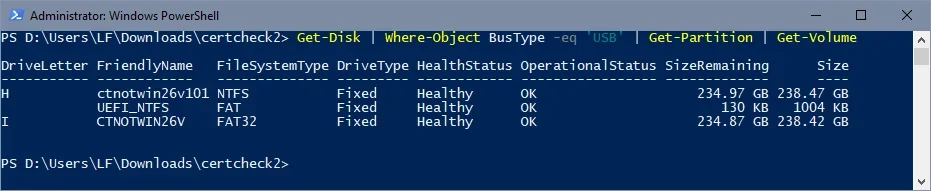
For the purpose of the script- checking bootable USB devices- it doesn't matter if I'd use an older or newer Rufus, the script in it latest version doesn't seem to recognize (GPT- formatted?) USB harddisks.
 

My Computer My Computer

At a glance

W10
OS
W10
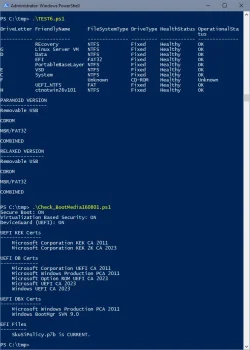
My USB is GPT and Test6.ps1 finds it
PS: I removed none pertinent drives from the script's initial Get-Volume

And USB was created with Rufus 4.15...

Code:
PS E:\Tmp> Get-Disk -number 3 | Select-Object Number, FriendlyName, PartitionStyle

Number FriendlyName      PartitionStyle
------ ------------      --------------
     3 Staples Relay UFD GPT

PS E:\Tmp> powershell -nop -ep bypass -f E:\tmp\TEST6.ps1

DriveLetter FriendlyName             FileSystemType DriveType HealthStatus OperationalStatus SizeRemaining      Size
----------- ------------             -------------- --------- ------------ ----------------- -------------      ----
G           RESCUE                   FAT32          Fixed     Healthy      OK                      2.48 GB   3.72 GB

PARANOID VERSION
----------------
Removable USB
G

CDROM

MBR/FAT32

COMBINED
G

RELAXED VERSION
---------------
Removable USB
G

CDROM

MBR/FAT32

COMBINED
G
 

My Computer My Computer

At a glance

Windows 11
OS
Windows 11
For the purpose of the script- checking bootable USB devices- it doesn't matter if I'd use an older or newer Rufus, the script in it latest version doesn't seem to recognize (GPT- formatted?) USB harddisks.
The idea is to avoid scanning everyone's external drives, and cause undue panic because we found a dual-boot setup.

The checks go in a progression:
1. Do you have a boot manager or boot file in the expected path? Continue
2. Do you have a boot.wim? Continue
3. Do you have an optional install WIM/ESD? Continue

I assume your drive would be covered by:
Code:
Get-Disk | Where-Object BusType -eq 'USB' | Get-Partition | Get-Volume | where { $_.FileSystemType -match 'FAT' }

Under the assumption that normal people don't really have FAT or FAT32 filesystems for a normal Windows data drive in 2026. exFAT is annoying because Seagate pre-formats that on externals, but Ventoy uses exFAT. :eyeroll:
 

My Computer My Computer

At a glance

Windows 7
OS
Windows 7
Get-Disk | Where-Object BusType -eq 'USB' | Get-Partition | Get-Volume | where { $_.FileSystemType -match 'FAT' }
My GPT + FAT32 comes out
Just to show that GPT are seen...

Code:
PS E:\Tmp> Get-Disk | Where-Object BusType -eq 'USB' | Get-Partition | Get-Volume | where { $_.FileSystemType -match 'FAT' }

DriveLetter FriendlyName FileSystemType DriveType HealthStatus OperationalStatus SizeRemaining    Size
----------- ------------ -------------- --------- ------------ ----------------- -------------    ----
G           RESCUE       FAT32          Fixed     Healthy      OK                      2.48 GB 3.72 GB
 

My Computer My Computer

At a glance

Windows 11
OS
Windows 11
.....
I assume your drive would be covered by:
Code:
Get-Disk | Where-Object BusType -eq 'USB' | Get-Partition | Get-Volume | where { $_.FileSystemType -match 'FAT' }
....
Yes: 1786900175345.webp
 

My Computer My Computer

At a glance

W10
OS
W10
I think the script throws an error for me is my Hasleo USB's (I created a second on a different type of USB) are FAT32, MBR, and Removable. If the two are inserted it does not throw an error. So:
  • Ventoy USB - ok
  • Other USB (FAT, Removable) - ok
  • Win11 ISO (NTFS, Fixed) -ok
  • Hasleo USB + Hasleo USB - ok
  • Hasleo USB + Ventoy USB - ok
  • Hasleo USB + Other USB (FAT, Removable) - ok

  • Hasleo USB - error
  • Hasleo USB + Win11 ISO (NTFS, Fixed) - error
 
Last edited:

My Computer My Computer

At a glance

Windows 11 ProIntel Core Ultra16GBIntel(R) Arc Graphics
OS
Windows 11 Pro
Computer type
Laptop
Manufacturer/Model
ASUS Zenbook 14 OLED
CPU
Intel Core Ultra
Memory
16GB
Graphics Card(s)
Intel(R) Arc Graphics
Sound Card
Realtek High Definition Audio(SST)
Screen Resolution
2880 x 1800
Hard Drives
500 GB NVMe SSD
Internet Speed
1,500Mbps
Browser
Firefox, Edge
Antivirus
Windows Defender
Thanks!
Works for me in all original combinations
(WinRE: Windows 10 22H2 recovery, Server 2016 Client restore, Server 2016 recovery and WinPE: ctnotwin26 W11 23H2- formatted FAT32)

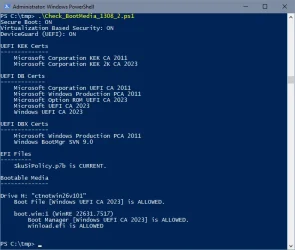
Not recognized is the copy WinPE ctnotwin26 W11 23H2- formatted NTFS created in #3444- no error message, just as if not connected:

1786906811544.webp

Both USB- SSDs connected:

1786907349564.webp
 

My Computer My Computer

At a glance

W10
OS
W10
ayzbf0.webp
 

My Computer My Computer

At a glance

Windows 7
OS
Windows 7

Latest Support Threads

Back
Top Bottom