Solved garlin's PowerShell scripts for updating Secure Boot CA 2023


Not sure if this is the same problem, but in Macrium Reflect Free, when choosing to save a Rescue Image as ISO, pressing Ctrl reveals a down arrow on the Build button as below.

View attachment 180938

Clicking the down arrow reveals a "Force WIM Rebuild" option. Choosing that has worked for me, together with Garlin's script to update the boot media after burning the ISO.
Thanks although rebuilding doesn't seem to do anything
 

My Computer My Computer

At a glance

win 11Intell Core i7 4900 MQDDR3 16 GB
OS
win 11
Computer type
Laptop
Manufacturer/Model
Dell Precision M4800
CPU
Intell Core i7 4900 MQ
Motherboard
Dell QT3YTY A00
Memory
DDR3 16 GB
That's the boot files, which are a separate thing than the boot.wim's actual contents. You need everything to line up (ISO boot file, boot.wim contents).
 

My Computer My Computer

At a glance

Windows 7
OS
Windows 7

My Computer My Computer

At a glance

win 11Intell Core i7 4900 MQDDR3 16 GB
OS
win 11
Computer type
Laptop
Manufacturer/Model
Dell Precision M4800
CPU
Intell Core i7 4900 MQ
Motherboard
Dell QT3YTY A00
Memory
DDR3 16 GB
Yes and you will end up with:

Code:
 ID_FILEATTRIB_F_0043 10.0.29426.0       65535.65535.65535.65535


Macrium v10.0.8843
------------------
    WinRE Boot Manager [Windows UEFI CA 2023] is ALLOWED.
        c:\boot\macrium\WinREFiles\media\EFI\Microsoft\Boot\bootmgfw.efi
        File Version: 28000.352, SVN 9.0

Bootable Media
--------------

USB Drive F: "TBWINRE"
    Windows Boot Manager [Windows UEFI CA 2023] is ALLOWED.
        F:\EFI\Microsoft\Boot\bootmgfw.efi
        File Version: 28000.352, SVN 9.0

    boot.wim:1 (WinRE 26100.9168)
        Boot Manager [Windows UEFI CA 2023] is ALLOWED.
            \Windows\Boot\EFI_EX\bootmgfw_EX.efi
            File Version: 28000.352, SVN 9.0

        \Windows\System32\winload.efi is ALLOWED.
            File Version: 26100.9168


PS C:\Users\

Several way's possible to get the same results :-)
 

My Computer My Computer

At a glance

Win11 24H2 IOT LTSC / Win11 Pro 25H2AMD Ryzen 7 8700G / Ryzen 7 8700G / Ryzen 8600GF5-6000J3636F16GX2-FX5 32GB / Lexar Ares RGB ...internal
OS
Win11 24H2 IOT LTSC / Win11 Pro 25H2
Computer type
PC/Desktop
Manufacturer/Model
Gigabyte x2 / Asus = Home builds
CPU
AMD Ryzen 7 8700G / Ryzen 7 8700G / Ryzen 8600G
Motherboard
Gigabyte B650 AORUS ELITE AX V2 / ASUS TUF GAMING B650-PLUS / B650 GAMING X AX V2
Memory
F5-6000J3636F16GX2-FX5 32GB / Lexar Ares RGB LD5BU016G-R6000GDLA 32GB / Kingston FURY Beast 32 GB DDR5-5600
Graphics Card(s)
internal
Sound Card
Realtek
Monitor(s) Displays
BenQ 27 L EW2780
Screen Resolution
1920x1080
Hard Drives
Many M.2's (WD)
PSU
be quiet! Pure Power 13 M 550W
Case
Chieftec HC-10B-OP
Cooling
Gelid Solutions Tranquillo 5, many Noctua's 12x12
Keyboard
Microsoft
Mouse
Cherry
Internet Speed
500 mbs
Browser
Vivaldi
Antivirus
Eset
Other Info
PC builder / repair / Trouble-shooter etc.
Yes and you will end up with:

Code:
 ID_FILEATTRIB_F_0043 10.0.29426.0       65535.65535.65535.65535


Macrium v10.0.8843
------------------
    WinRE Boot Manager [Windows UEFI CA 2023] is ALLOWED.
        c:\boot\macrium\WinREFiles\media\EFI\Microsoft\Boot\bootmgfw.efi
        File Version: 28000.352, SVN 9.0

Bootable Media
--------------

USB Drive F: "TBWINRE"
    Windows Boot Manager [Windows UEFI CA 2023] is ALLOWED.
        F:\EFI\Microsoft\Boot\bootmgfw.efi
        File Version: 28000.352, SVN 9.0

    boot.wim:1 (WinRE 26100.9168)
        Boot Manager [Windows UEFI CA 2023] is ALLOWED.
            \Windows\Boot\EFI_EX\bootmgfw_EX.efi
            File Version: 28000.352, SVN 9.0

        \Windows\System32\winload.efi is ALLOWED.
            File Version: 26100.9168


PS C:\Users\

Several way's possible to get the same result
I perform:
make an ISO(dummy), then run:
copy C:\Windows\Boot\EFI_EX\bootmgfw_EX.efi c:\boot\macrium\WinREFiles\media\EFI\Boot\bootx64.efi
copy C:\Windows\Boot\EFI_EX\bootmgfw_EX.efi c:\boot\macrium\WinREFiles\media\EFI\Microsoft\Boot\bootmgfw.efi

Create USB and I get:
Macrium v10.0.8750
------------------
WinRE Boot Manager [Windows UEFI CA 2023] is ALLOWED.
c:\boot\macrium\WinREFiles\media\EFI\Microsoft\Boot\bootmgfw.efi
File Version: 28000.352, SVN 9.0

WinPE Boot File [Windows UEFI CA 2023] is BANNED.
c:\boot\macrium\WA11KFiles\media\EFI\Boot\bootx64.efi
File Version: 26100.30227, SVN 7.0

Bootable Media
--------------

USB Drive I: "8 GB"
Windows Boot Manager [Windows UEFI CA 2023] is ALLOWED.
I:\EFI\Microsoft\Boot\bootmgfw.efi
File Version: 28000.352, SVN 9.0

boot.wim:1 (WinRE 26100.7014)
Boot Manager [Windows UEFI CA 2023] is BANNED. WHY DO I GET THIS?
\Windows\Boot\EFI_EX\bootmgfw_EX.efi
File Version: 26100.30227, SVN 7.0

\Windows\System32\winload.efi will be ALLOWED.
File Version: 26100.7014

 

My Computer My Computer

At a glance

win 11Intell Core i7 4900 MQDDR3 16 GB
OS
win 11
Computer type
Laptop
Manufacturer/Model
Dell Precision M4800
CPU
Intell Core i7 4900 MQ
Motherboard
Dell QT3YTY A00
Memory
DDR3 16 GB
Do you get this reading with: powershell -nop -ep bypass -f E:\Z_c2023\Check_BootMedia.ps1 -audit -verbose

Code:
EFI Files
---------
    Windows Boot Manager [Windows UEFI CA 2023] is ALLOWED.
        \\.\HarddiskVolume1\EFI\Microsoft\Boot\bootmgfw.efi
        File Version: 28000.352, SVN 9.0

    Registry: "WindowsUEFICA2023Capable" = 2
        [Windows UEFI CA 2023] in UEFI DB, and Windows starting from CA 2023 Boot Manager.

    SkuSiPolicy.p7b is CURRENT.
        \\.\HarddiskVolume1\EFI\Microsoft\Boot\SkuSiPolicy.p7b
        Version: 3.0.0.17
 
Last edited:

My Computer My Computer

At a glance

Win11 24H2 IOT LTSC / Win11 Pro 25H2AMD Ryzen 7 8700G / Ryzen 7 8700G / Ryzen 8600GF5-6000J3636F16GX2-FX5 32GB / Lexar Ares RGB ...internal
OS
Win11 24H2 IOT LTSC / Win11 Pro 25H2
Computer type
PC/Desktop
Manufacturer/Model
Gigabyte x2 / Asus = Home builds
CPU
AMD Ryzen 7 8700G / Ryzen 7 8700G / Ryzen 8600G
Motherboard
Gigabyte B650 AORUS ELITE AX V2 / ASUS TUF GAMING B650-PLUS / B650 GAMING X AX V2
Memory
F5-6000J3636F16GX2-FX5 32GB / Lexar Ares RGB LD5BU016G-R6000GDLA 32GB / Kingston FURY Beast 32 GB DDR5-5600
Graphics Card(s)
internal
Sound Card
Realtek
Monitor(s) Displays
BenQ 27 L EW2780
Screen Resolution
1920x1080
Hard Drives
Many M.2's (WD)
PSU
be quiet! Pure Power 13 M 550W
Case
Chieftec HC-10B-OP
Cooling
Gelid Solutions Tranquillo 5, many Noctua's 12x12
Keyboard
Microsoft
Mouse
Cherry
Internet Speed
500 mbs
Browser
Vivaldi
Antivirus
Eset
Other Info
PC builder / repair / Trouble-shooter etc.
Do you get this reading with: powershell -nop -ep bypass -f E:\Z_c2023\Check_UEFI-CA2023.ps1 -audit -verbose

Code:
EFI Files
---------
    Windows Boot Manager [Windows UEFI CA 2023] is ALLOWED.
        \\.\HarddiskVolume1\EFI\Microsoft\Boot\bootmgfw.efi
        File Version: 28000.352, SVN 9.0

    Registry: "WindowsUEFICA2023Capable" = 2
        [Windows UEFI CA 2023] in UEFI DB, and Windows starting from CA 2023 Boot Manager.

    SkuSiPolicy.p7b is CURRENT.
        \\.\HarddiskVolume1\EFI\Microsoft\Boot\SkuSiPolicy.p7b
        Version: 3.0.0.17
[/CO
[/QUOTE]

Do you get this reading with: powershell -nop -ep bypass -f E:\Z_c2023\Check_UEFI-CA2023.ps1 -audit -verbose

Code:
EFI Files
---------
    Windows Boot Manager [Windows UEFI CA 2023] is ALLOWED.
        \\.\HarddiskVolume1\EFI\Microsoft\Boot\bootmgfw.efi
        File Version: 28000.352, SVN 9.0

    Registry: "WindowsUEFICA2023Capable" = 2
        [Windows UEFI CA 2023] in UEFI DB, and Windows starting from CA 2023 Boot Manager.

    SkuSiPolicy.p7b is CURRENT.
        \\.\HarddiskVolume1\EFI\Microsoft\Boot\SkuSiPolicy.p7b
        Version: 3.0.0.17
Not sure what you want me to do? To get what I reported I used: Check_UEFI-CA2023.ps1 -audit -verbose
 

My Computer My Computer

At a glance

win 11Intell Core i7 4900 MQDDR3 16 GB
OS
win 11
Computer type
Laptop
Manufacturer/Model
Dell Precision M4800
CPU
Intell Core i7 4900 MQ
Motherboard
Dell QT3YTY A00
Memory
DDR3 16 GB
Hang on I will jump to my other PC where I have Macrium installed....
 

My Computer My Computer

At a glance

Win11 24H2 IOT LTSC / Win11 Pro 25H2AMD Ryzen 7 8700G / Ryzen 7 8700G / Ryzen 8600GF5-6000J3636F16GX2-FX5 32GB / Lexar Ares RGB ...internal
OS
Win11 24H2 IOT LTSC / Win11 Pro 25H2
Computer type
PC/Desktop
Manufacturer/Model
Gigabyte x2 / Asus = Home builds
CPU
AMD Ryzen 7 8700G / Ryzen 7 8700G / Ryzen 8600G
Motherboard
Gigabyte B650 AORUS ELITE AX V2 / ASUS TUF GAMING B650-PLUS / B650 GAMING X AX V2
Memory
F5-6000J3636F16GX2-FX5 32GB / Lexar Ares RGB LD5BU016G-R6000GDLA 32GB / Kingston FURY Beast 32 GB DDR5-5600
Graphics Card(s)
internal
Sound Card
Realtek
Monitor(s) Displays
BenQ 27 L EW2780
Screen Resolution
1920x1080
Hard Drives
Many M.2's (WD)
PSU
be quiet! Pure Power 13 M 550W
Case
Chieftec HC-10B-OP
Cooling
Gelid Solutions Tranquillo 5, many Noctua's 12x12
Keyboard
Microsoft
Mouse
Cherry
Internet Speed
500 mbs
Browser
Vivaldi
Antivirus
Eset
Other Info
PC builder / repair / Trouble-shooter etc.
I think that your are somehow taking the "PE" instead of the "RE"

Code:
WinPE Boot File [Windows UEFI CA 2023] is BANNED.
c:\boot\macrium\WA11KFiles\media\EFI\Boot\bootx64.efi
File Version: 26100.30227, SVN 7.0

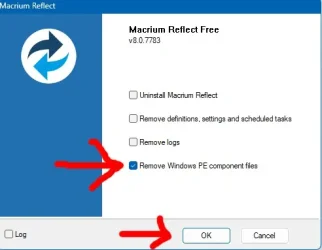
Clear the "c:\boot\macrium" with the uninstaller


clear1a.webp

and build a new one to make sure that you choose the "Windows RE"

again make a dummy ISO to populate it

and then make a USB and use Garlins "Update_UEFI-CA2023.ps1 -BootMedia"
 

My Computer My Computer

At a glance

Win11 24H2 IOT LTSC / Win11 Pro 25H2AMD Ryzen 7 8700G / Ryzen 7 8700G / Ryzen 8600GF5-6000J3636F16GX2-FX5 32GB / Lexar Ares RGB ...internal
OS
Win11 24H2 IOT LTSC / Win11 Pro 25H2
Computer type
PC/Desktop
Manufacturer/Model
Gigabyte x2 / Asus = Home builds
CPU
AMD Ryzen 7 8700G / Ryzen 7 8700G / Ryzen 8600G
Motherboard
Gigabyte B650 AORUS ELITE AX V2 / ASUS TUF GAMING B650-PLUS / B650 GAMING X AX V2
Memory
F5-6000J3636F16GX2-FX5 32GB / Lexar Ares RGB LD5BU016G-R6000GDLA 32GB / Kingston FURY Beast 32 GB DDR5-5600
Graphics Card(s)
internal
Sound Card
Realtek
Monitor(s) Displays
BenQ 27 L EW2780
Screen Resolution
1920x1080
Hard Drives
Many M.2's (WD)
PSU
be quiet! Pure Power 13 M 550W
Case
Chieftec HC-10B-OP
Cooling
Gelid Solutions Tranquillo 5, many Noctua's 12x12
Keyboard
Microsoft
Mouse
Cherry
Internet Speed
500 mbs
Browser
Vivaldi
Antivirus
Eset
Other Info
PC builder / repair / Trouble-shooter etc.
When you use the "-Verbose" option with the script, it reports if your boot.wim is from a WinPE or WinRE source.
 

My Computer My Computer

At a glance

Windows 7
OS
Windows 7
I think that your are somehow taking the "PE" instead of the "RE"

Code:
WinPE Boot File [Windows UEFI CA 2023] is BANNED.
c:\boot\macrium\WA11KFiles\media\EFI\Boot\bootx64.efi
File Version: 26100.30227, SVN 7.0

Clear the "c:\boot\macrium" with the uninstaller


View attachment 180952

and build a new one to make sure that you choose the "Windows RE"

again make a dummy ISO to populate it

and then make a USB and use Garlins "Update_UEFI-CA2023.ps1 -BootMedia"
I've done this before but will again and perform the whole process
 

My Computer My Computer

At a glance

win 11Intell Core i7 4900 MQDDR3 16 GB
OS
win 11
Computer type
Laptop
Manufacturer/Model
Dell Precision M4800
CPU
Intell Core i7 4900 MQ
Motherboard
Dell QT3YTY A00
Memory
DDR3 16 GB
Code:
powershell -nop -ep bypass -f D:\Z_c2023\Check_BootMedia.ps1 -verbose
Windows 11 25H2 (26200.9168)

Secure Boot: ON
Virtualization Based Security: ON

UEFI KEK Certs
--------------
    Microsoft Corporation KEK CA 2011
    Microsoft Corporation KEK 2K CA 2023

UEFI DB Certs
-------------
    Microsoft Corporation UEFI CA 2011
    Microsoft Windows Production PCA 2011
    Microsoft Option ROM UEFI CA 2023
    Microsoft UEFI CA 2023
    Windows UEFI CA 2023

UEFI DBX Certs
--------------
    Microsoft Windows Production PCA 2011
    Windows BootMgr SVN 9.0

EFI Files
---------
    SkuSiPolicy.p7b is CURRENT.
        \\.\HarddiskVolume1\EFI\Microsoft\Boot\SkuSiPolicy.p7b
        Version: 3.0.0.17

        FileRule             MinimumFileVersion MaximumFileVersion
        --------             ------------------ ------------------
        ID_FILEATTRIB_F_0044 0.0.0.0            10.0.14393.9399
        ID_FILEATTRIB_F_0042 10.0.14400.0       10.0.17763.9099
        ID_FILEATTRIB_F_0040 10.0.18000.0       10.0.19041.7639
        ID_FILEATTRIB_F_0041 10.0.19100.0       10.0.20348.5479
        ID_FILEATTRIB_F_0046 10.0.20400.0       10.0.22621.7494
        ID_FILEATTRIB_F_0049 10.0.23000.0       10.0.26100.9140
        ID_FILEATTRIB_F_0045 10.0.26100.32000   10.0.26100.33249
        ID_FILEATTRIB_F_0048 10.0.26172.0       10.0.26172.33249
        ID_FILEATTRIB_F_0047 10.0.27000.0       10.0.28000.2684
        ID_FILEATTRIB_F_0043 10.0.29426.0       65535.65535.65535.65535


Bootable Media
--------------

USB Drive E: "TBWINRE"
    Windows Boot Manager [Windows UEFI CA 2023] is ALLOWED.
        E:\EFI\Microsoft\Boot\bootmgfw.efi
        File Version: 28000.352, SVN 9.0

    boot.wim:1 (WinRE 26100.9168)
        Boot Manager [Windows UEFI CA 2023] is ALLOWED.
            \Windows\Boot\EFI_EX\bootmgfw_EX.efi
            File Version: 28000.352, SVN 9.0

        \Windows\System32\winload.efi is ALLOWED.
            File Version: 26100.9168


PS C:\Users

Kewl ! :D
 

My Computer My Computer

At a glance

Win11 24H2 IOT LTSC / Win11 Pro 25H2AMD Ryzen 7 8700G / Ryzen 7 8700G / Ryzen 8600GF5-6000J3636F16GX2-FX5 32GB / Lexar Ares RGB ...internal
OS
Win11 24H2 IOT LTSC / Win11 Pro 25H2
Computer type
PC/Desktop
Manufacturer/Model
Gigabyte x2 / Asus = Home builds
CPU
AMD Ryzen 7 8700G / Ryzen 7 8700G / Ryzen 8600G
Motherboard
Gigabyte B650 AORUS ELITE AX V2 / ASUS TUF GAMING B650-PLUS / B650 GAMING X AX V2
Memory
F5-6000J3636F16GX2-FX5 32GB / Lexar Ares RGB LD5BU016G-R6000GDLA 32GB / Kingston FURY Beast 32 GB DDR5-5600
Graphics Card(s)
internal
Sound Card
Realtek
Monitor(s) Displays
BenQ 27 L EW2780
Screen Resolution
1920x1080
Hard Drives
Many M.2's (WD)
PSU
be quiet! Pure Power 13 M 550W
Case
Chieftec HC-10B-OP
Cooling
Gelid Solutions Tranquillo 5, many Noctua's 12x12
Keyboard
Microsoft
Mouse
Cherry
Internet Speed
500 mbs
Browser
Vivaldi
Antivirus
Eset
Other Info
PC builder / repair / Trouble-shooter etc.
Been using Garlins script's since about march this year and never ran into problems with it.
 

My Computer My Computer

At a glance

Win11 24H2 IOT LTSC / Win11 Pro 25H2AMD Ryzen 7 8700G / Ryzen 7 8700G / Ryzen 8600GF5-6000J3636F16GX2-FX5 32GB / Lexar Ares RGB ...internal
OS
Win11 24H2 IOT LTSC / Win11 Pro 25H2
Computer type
PC/Desktop
Manufacturer/Model
Gigabyte x2 / Asus = Home builds
CPU
AMD Ryzen 7 8700G / Ryzen 7 8700G / Ryzen 8600G
Motherboard
Gigabyte B650 AORUS ELITE AX V2 / ASUS TUF GAMING B650-PLUS / B650 GAMING X AX V2
Memory
F5-6000J3636F16GX2-FX5 32GB / Lexar Ares RGB LD5BU016G-R6000GDLA 32GB / Kingston FURY Beast 32 GB DDR5-5600
Graphics Card(s)
internal
Sound Card
Realtek
Monitor(s) Displays
BenQ 27 L EW2780
Screen Resolution
1920x1080
Hard Drives
Many M.2's (WD)
PSU
be quiet! Pure Power 13 M 550W
Case
Chieftec HC-10B-OP
Cooling
Gelid Solutions Tranquillo 5, many Noctua's 12x12
Keyboard
Microsoft
Mouse
Cherry
Internet Speed
500 mbs
Browser
Vivaldi
Antivirus
Eset
Other Info
PC builder / repair / Trouble-shooter etc.
Code:
powershell -nop -ep bypass -f D:\Z_c2023\Check_BootMedia.ps1 -verbose
Windows 11 25H2 (26200.9168)

Secure Boot: ON
Virtualization Based Security: ON

UEFI KEK Certs
--------------
    Microsoft Corporation KEK CA 2011
    Microsoft Corporation KEK 2K CA 2023

UEFI DB Certs
-------------
    Microsoft Corporation UEFI CA 2011
    Microsoft Windows Production PCA 2011
    Microsoft Option ROM UEFI CA 2023
    Microsoft UEFI CA 2023
    Windows UEFI CA 2023

UEFI DBX Certs
--------------
    Microsoft Windows Production PCA 2011
    Windows BootMgr SVN 9.0

EFI Files
---------
    SkuSiPolicy.p7b is CURRENT.
        \\.\HarddiskVolume1\EFI\Microsoft\Boot\SkuSiPolicy.p7b
        Version: 3.0.0.17

        FileRule             MinimumFileVersion MaximumFileVersion
        --------             ------------------ ------------------
        ID_FILEATTRIB_F_0044 0.0.0.0            10.0.14393.9399
        ID_FILEATTRIB_F_0042 10.0.14400.0       10.0.17763.9099
        ID_FILEATTRIB_F_0040 10.0.18000.0       10.0.19041.7639
        ID_FILEATTRIB_F_0041 10.0.19100.0       10.0.20348.5479
        ID_FILEATTRIB_F_0046 10.0.20400.0       10.0.22621.7494
        ID_FILEATTRIB_F_0049 10.0.23000.0       10.0.26100.9140
        ID_FILEATTRIB_F_0045 10.0.26100.32000   10.0.26100.33249
        ID_FILEATTRIB_F_0048 10.0.26172.0       10.0.26172.33249
        ID_FILEATTRIB_F_0047 10.0.27000.0       10.0.28000.2684
        ID_FILEATTRIB_F_0043 10.0.29426.0       65535.65535.65535.65535


Bootable Media
--------------

USB Drive E: "TBWINRE"
    Windows Boot Manager [Windows UEFI CA 2023] is ALLOWED.
        E:\EFI\Microsoft\Boot\bootmgfw.efi
        File Version: 28000.352, SVN 9.0

    boot.wim:1 (WinRE 26100.9168)
        Boot Manager [Windows UEFI CA 2023] is ALLOWED.
            \Windows\Boot\EFI_EX\bootmgfw_EX.efi
            File Version: 28000.352, SVN 9.0

        \Windows\System32\winload.efi is ALLOWED.
            File Version: 26100.9168


PS C:\Users

Kewl ! :D
I'll do this tomorrow... done for the evening! Thanks
 

My Computer My Computer

At a glance

win 11Intell Core i7 4900 MQDDR3 16 GB
OS
win 11
Computer type
Laptop
Manufacturer/Model
Dell Precision M4800
CPU
Intell Core i7 4900 MQ
Motherboard
Dell QT3YTY A00
Memory
DDR3 16 GB

Latest Support Threads

Back
Top Bottom