Solved garlin's PowerShell scripts for updating Secure Boot CA 2023


UEFI Variables
--------------
Credential Guard: ON
SBAT (Linux only): sbat,1,2024010900 / shim,4 / grub,3 / grub.debian,4

EFI Files
---------
SkuSiPolicy.p7b is CURRENT.
\\.\HarddiskVolume1\EFI\Microsoft\Boot\SkuSiPolicy.p7b
Version: 3.0.0.17

1. Shutdown Windows.
2. Disable Secure Boot. Restart Windows.

3. Run as Admin:
Code:
mountvol S: /s
del S:\EFI\Microsoft\Boot\SkuSiPolicy.p7b

4. Shutdown Windows.
5. Enable Secure Boot. Restart Windows.
 

My Computer My Computer

At a glance

Windows 7
OS
Windows 7
1. Shutdown Windows.
2. Disable Secure Boot. Restart Windows.

3. Run as Admin:
mountvol S: /s del S:\EFI\Microsoft\Boot\SkuSiPolicy.p7b
I assume you have to replace 's' with the main C drive ? or is this for rescue drive
 

My Computer My Computer

At a glance

Windows 11 Intel i5 10400 HD630 graphics chipi5-1040012 gbHD630 chipset
OS
Windows 11 Intel i5 10400 HD630 graphics chip
Computer type
PC/Desktop
Manufacturer/Model
HP
CPU
i5-10400
Memory
12 gb
Graphics Card(s)
HD630 chipset
Monitor(s) Displays
LG 24inch
Hard Drives
SSD, external usb drive 1tb for files/backups
Keyboard
wireless Logi
Mouse
ms 4000 wireless mouse
Internet Speed
10meg
Browser
Firefox
Antivirus
Defender
Other Info
Win11 Home 25h2 26200.9168 08/11/2026
"mountvol [letter] /s" mounts the EFI volume on a temporary basis. Now you can can treat it as a normal drive letter.

You can run "mountvol [letter] /d" to release it. But if you're going to reboot immediately afterwards, you can skip the unmount. SkuSiPolicy.p7b files only work when it's copied to the EFI.

If the same file exists anywhere else (other drives or volumes), Windows doesn't care about those copies. It's very specific.
 

My Computer My Computer

At a glance

Windows 7
OS
Windows 7
Garlin:
do you plain on releasing another update the last one i have is from may . not that it matters but was just currious
 

My Computer My Computer

At a glance

WINDOWS 11 WINDOWS 10Intel(R) Core(TM) i7 -3770K CPU 3.50 GZ 3501 ...32.0 GB (31.9 GB usable)AMD RADEON TM R5240 INTELL HD GRAPHICS 4600 T...
OS
WINDOWS 11 WINDOWS 10
Computer type
PC/Desktop
Manufacturer/Model
HP H8 1360T
CPU
Intel(R) Core(TM) i7 -3770K CPU 3.50 GZ 3501 4 CORE
Motherboard
PEGATRON 2AD5
Memory
32.0 GB (31.9 GB usable)
Graphics Card(s)
AMD RADEON TM R5240 INTELL HD GRAPHICS 4600 TIGER 1+1 USB
Sound Card
AMD HD . IDT
Monitor(s) Displays
AOC WAL MART SPECIAL . HP 2311 IX IPS LED DELL 1708 FP
Screen Resolution
1920 X 1080 1600X900 1280X940
Hard Drives
1 FAXING S 100 512GB 1 KINGSTON 120 GB SSD 1 X12 SSD 512 GB
PSU
300 WATT HP
Case
FULL
Cooling
ON BOARD FAN
Keyboard
LOGITEC K 520 WIRELESS
Mouse
LOGITEC M 510 WIRELESS
Internet Speed
55 UP 11.2 DOWN
Browser
CHROME EDGE
Antivirus
WINDOWS SECUIRTY
Other Info
NON SUPPORTED HARDWARE FOR WINDOWS 11
Garlin:
do you plain on releasing another update the last one i have is from may . not that it matters but was just currious
I think you're behind on this thread (3604 posts is a lot to read!). There's been at least 11 updates since the end of May.

Check post #1 for the current ZIP file.

The major change is the "-BootMedia" feature was removed from the main script Check_UEFI-CA2023.ps1. It now lives as a standalone script Check_BootMedia.ps1 for better coverage. The original script now just handles the Windows-level certs and boot files. Whereas the boot media script goes into more details about the drive's contents.

Don't get overwhelmed by the new stuff. It's either the mounted drive will pass the current Secure Boot requirements, or it's out of date. If it's just the boot file on the top of the USB drive (and not the boot.wim or install.wim below it), the update script will still fix it. When you have an outdated boot.wim, you need to go find the program which installed it and see if they have a replacement version of boot.wim.
 

My Computer My Computer

At a glance

Windows 7
OS
Windows 7
I'll do this tomorrow... done for the evening! Thanks
Same thing with the exception of missing:
WinPE Boot File [Windows UEFI CA 2023] is BANNED.
c:\boot\macrium\WA11KFiles\media\EFI\Boot\bootx64.efi
File Version: 26100.30227, SVN 7.0
Which I think was due to Removing Windows PE component files.

Macrium v10.0.8750
------------------
WinRE Boot Manager [Windows UEFI CA 2023] is ALLOWED.
c:\boot\macrium\WinREFiles\media\EFI\Microsoft\Boot\bootmgfw.efi
File Version: 28000.352, SVN 9.0

Bootable Media
--------------

USB Drive I: "8 GB"
Windows Boot Manager [Windows UEFI CA 2023] is ALLOWED.
I:\EFI\Microsoft\Boot\bootmgfw.efi
File Version: 28000.352, SVN 9.0

boot.wim:1 (WinRE 26100.7014)
Boot Manager [Windows UEFI CA 2023] is BANNED.
\Windows\Boot\EFI_EX\bootmgfw_EX.efi
File Version: 26100.30227, SVN 7.0

\Windows\System32\winload.efi will be ALLOWED.
File Version: 26100.7014
 

My Computer My Computer

At a glance

win 11Intell Core i7 4900 MQDDR3 16 GB
OS
win 11
Computer type
Laptop
Manufacturer/Model
Dell Precision M4800
CPU
Intell Core i7 4900 MQ
Motherboard
Dell QT3YTY A00
Memory
DDR3 16 GB
Bootable Media
--------------
boot.wim:1 (WinRE 26100.7014)
Boot Manager [Windows UEFI CA 2023] is BANNED.
\Windows\Boot\EFI_EX\bootmgfw_EX.efi
File Version: 26100.30227, SVN 7.0
SVN 7.0 is out of date. This WinRE is too old (26100.7014), we're in the late 8000's, early 9000's range today.
 

My Computer My Computer

At a glance

Windows 7
OS
Windows 7
@LeeElectrode
I also use Macrium X and here is a step by step to create a bootable rescue media.
It's based on Garlin's instructions and recommendations.
I did not know how to do this before Garlin explained it to all of us ! ;-)
Thanks @garlin !
  1. run this PowerShell command, it will tell you where Macrium writes the staging files for WinRE & WinPE
    Powershell:
    Get-ItemPropertyValue -Path 'HKLM:\SOFTWARE\Macrium\RescuePE' -Name 'InstallDir'

  2. Go to that folder and delete everything in the folder, there should be only one folder named "Macrium", delete it.
    It does the samething as running Macrium uninstaller and selecting "Remove Windows PE component files".

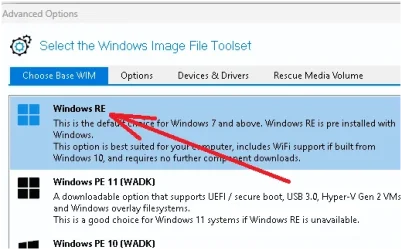
  3. Create a new Macrium Rescue Media, ISO or directly to a USB drive, it does not matter.
    In "Advanced", make sure you select "Windows RE" under "Choose Base WIM".

    1787774933258.webp

  4. Wait for it to be done, and then execute these commands in PowerShell
    It gets Macrium's staging folder like you did in step 1 and then uses it to copy the files to the proper folders.
    This fixes Macrium's staging WinRE files to use the latest boot manager from your own computer.
    It's the part that Garlin's explanations helped resolve...
    Powershell:
    $MacriumStagingFolder = Get-ItemPropertyValue -Path 'HKLM:\SOFTWARE\Macrium\RescuePE' -Name 'InstallDir'
    
    copy C:\Windows\Boot\EFI_EX\bootmgfw_EX.efi $MacriumStagingFolder\macrium\WinREFiles\media\EFI\Boot\bootx64.efi
    copy C:\Windows\Boot\EFI_EX\bootmgfw_EX.efi $MacriumStagingFolder\macrium\WinREFiles\media\EFI\Microsoft\Boot\bootmgfw.efi

  5. Go back to Macrium and rebuild the Rescue Media again, the same ISO or USB drive you did in step 3.
    This second build will now automatically use the good boot loaders that you copied in step 4.

  6. Leave the USB drive connected, or mount the ISO by double clicking on it from Explorer.

  7. Run Garlin's Check_BootMedia.ps1 -verbose
    It should now say "ALLOWED" everywhere !

PS: I also noticed you're not at the latest version of Macrium X, you're at v10.0.8750, there's a v10.0.8843 available.
 
Last edited:

My Computer My Computer

At a glance

Windows 11
OS
Windows 11
Hello.

I have an enquiry and a bug report.

1. Enquiry.

Code:
.\Check-BootMedia.bat -verbose -audit -noskip -winre
PowerShell 7.7.0-preview.3
Windows 11 26H2 (26340.9233)

Cannot confirm if W11 26H2 (26340.9233) has the latest files
Secure Boot: ON
Virtualization Based Security: ON

UEFI KEK Certs
--------------
    Microsoft Corporation KEK CA 2011
    Microsoft Corporation KEK 2K CA 2023

UEFI DB Certs
-------------
    Microsoft Corporation UEFI CA 2011
    Microsoft Windows Production PCA 2011
    Microsoft Option ROM UEFI CA 2023
    Microsoft UEFI CA 2023
    Windows UEFI CA 2023

UEFI DBX Certs
--------------
    Microsoft Windows Production PCA 2011
    Windows BootMgr SVN 9.0

EFI Files
---------
    SkuSiPolicy.p7b is CURRENT.
        \\.\HarddiskVolume1\EFI\Microsoft\Boot\SkuSiPolicy.p7b
        Version: 3.0.0.17

        FileRule             MinimumFileVersion MaximumFileVersion
        --------             ------------------ ------------------
        ID_FILEATTRIB_F_0044 0.0.0.0            10.0.14393.9399
        ID_FILEATTRIB_F_0042 10.0.14400.0       10.0.17763.9099
        ID_FILEATTRIB_F_0040 10.0.18000.0       10.0.19041.7639
        ID_FILEATTRIB_F_0041 10.0.19100.0       10.0.20348.5479
        ID_FILEATTRIB_F_0046 10.0.20400.0       10.0.22621.7494
        ID_FILEATTRIB_F_0049 10.0.23000.0       10.0.26100.9140
        ID_FILEATTRIB_F_0045 10.0.26100.32000   10.0.26100.33249
        ID_FILEATTRIB_F_0048 10.0.26172.0       10.0.26172.33249
        ID_FILEATTRIB_F_0047 10.0.27000.0       10.0.28000.2684
        ID_FILEATTRIB_F_0043 10.0.29426.0       65535.65535.65535.65535


Windows Recovery
----------------
    \\.\HarddiskVolume4\Recovery\WindowsRE\Winre.wim:1 (WinRE 26100.8951)
        Boot Manager [Windows UEFI CA 2023] is ALLOWED.
            \Windows\Boot\EFI_EX\bootmgfw_EX.efi
            File Version: 28000.352, SVN 9.0

        \Windows\System32\winload.efi is BANNED.
            File Version: 26100.8951

Every now and again winload.efi is BANNED and WinRE does not load with the error:
"The digital signature for this file couldn't be verified / winload.efi Error code: 0xc0000428".

Often it can be restored with an in-place upgrade using the latest iso.
But usually I have to wait for a new release.
Is there a safe, foolproof way to have winload.efi ALLOWED?


2. Bug Report.

Code:
.\Update-UEFI.bat -Verbose -Latest -Revoke
PowerShell 7.7.0-preview.3
VERBOSE: Perform operation 'Enumerate CimInstances' with following parameters, ''className' = Win32_ComputerSystem,'namespaceName' = root\cimv2'.
VERBOSE: Operation 'Enumerate CimInstances' complete.
VERBOSE: Perform operation 'Enumerate CimInstances' with following parameters, ''className' = Win32_OperatingSystem,'namespaceName' = root\cimv2'.
VERBOSE: Operation 'Enumerate CimInstances' complete.
WARNING: Cannot confirm if W11 26H2 (26340.9233) has the latest files.

VERBOSE: Perform operation 'Enumerate CimInstances' with following parameters, ''className' = Win32_DeviceGuard,'namespaceName' = root\Microsoft\Windows\DeviceGuard'.
VERBOSE: Operation 'Enumerate CimInstances' complete.
VERBOSE: Firmware SVN (from DBX): 9.0
VERBOSE: Using specified boot manager: \\.\HarddiskVolume1\EFI\Microsoft\Boot\bootmgfw.efi
VERBOSE: Boot Manager SVN: 9.0
VERBOSE: Staged SVN: 9.0
VERBOSE: Compliance Status: Compliant (Boot Manager SVN meets staged SVN)
VERBOSE: Exporting function 'Get-ScheduledTask'.
VERBOSE: Exporting function 'Unregister-ScheduledTask'.
VERBOSE: Exporting function 'Disable-ScheduledTask'.
VERBOSE: Exporting function 'Enable-ScheduledTask'.
VERBOSE: Exporting function 'Export-ScheduledTask'.
VERBOSE: Exporting function 'Get-ScheduledTaskInfo'.
VERBOSE: Exporting function 'New-ScheduledTask'.
VERBOSE: Exporting function 'New-ScheduledTaskAction'.
VERBOSE: Exporting function 'New-ScheduledTaskPrincipal'.
VERBOSE: Exporting function 'New-ScheduledTaskSettingsSet'.
VERBOSE: Exporting function 'New-ScheduledTaskTrigger'.
VERBOSE: Exporting function 'Register-ScheduledTask'.
VERBOSE: Exporting function 'Set-ScheduledTask'.
VERBOSE: Exporting function 'Start-ScheduledTask'.
VERBOSE: Exporting function 'Stop-ScheduledTask'.
VERBOSE: Exporting function 'Get-ClusteredScheduledTask'.
VERBOSE: Exporting function 'Register-ClusteredScheduledTask'.
VERBOSE: Exporting function 'Set-ClusteredScheduledTask'.
VERBOSE: Exporting function 'Unregister-ClusteredScheduledTask'.
Downloading "DBXUpdate.bin" from GitHub.
VERBOSE: WebRequest: v1.1 GET https://raw.githubusercontent.com/microsoft/secureboot_objects/main/PostSignedObjects/DBX//DBXUpdate.bin output to C:\Users\admin\AppData\Local\Temp\DBXUpdate.bin
VERBOSE: WebResponse: 404 Not Found with text/plain payload with body size 14 B (14 bytes)
Response status code does not indicate success: 404 (Not Found).

I think that the line
$DBXUpdate_bin_URL = "https://raw.githubusercontent.com/microsoft/secureboot_objects/main/PostSignedObjects/DBX/$Arch/DBXUpdate.bin"
should be
$DBXUpdate_bin_URL = "https://raw.githubusercontent.com/microsoft/secureboot_objects/main/PostSignedObjects/DBX/amd64/DBXUpdate.bin"

Something is not being detected correctly, and $Arch is actually null.

So maybe a tweak is needed here
Code:
switch ($env:PROCESSOR_ARCHITECTURE) {
    'amd64' { $EDK2_Arch = 'x64' }
    'x86'   { if ($env:PROCESSOR_ARCHITEW6432) { $EDK2_Arch = 'x64'; $Arch = 'amd64' } else { $EDK2_Arch = 'ia32' } }
    'arm64' { $EDK2_Arch = 'aarch64' }
    'arm'   { $EDK2_Arch = 'arm' }
}

Thanks in advance.
 

My Computer My Computer

At a glance

Windows 11
OS
Windows 11
Cannot confirm if W11 26H2 (26340.9233) has the latest files
I believe the garland scripts are not targeted to pre-release versions of Windows.
 

My Computer My Computer

At a glance

Windows 11 Pro 25H2
OS
Windows 11 Pro 25H2
Computer type
Laptop
Manufacturer/Model
Toshiba
I just did .......

Code:
powershell -nop -ep bypass -f E:\Z_c2023\Check_UEFI-CA2023.ps1 -audit -verbose
Windows 11 25H2 (26200.9168)

Secure Boot: ON
Virtualization Based Security: ON
BitLocker on (C:) OFF

BIOS Firmware
-------------
    Gigabyte Technology Co. B650 GAMING X AX V2
    Version: F40
    Date: 2026-02-06

Factory Default UEFI PK Cert
----------------------------
    GIGABYTE

UEFI PK Cert
------------
    GIGABYTE

Factory Default UEFI KEK Certs
------------------------------
    Microsoft Corporation KEK CA 2011
    Microsoft Corporation KEK 2K CA 2023
    GIGABYTE

UEFI KEK Certs
--------------
    Microsoft Corporation KEK CA 2011
    Microsoft Corporation KEK 2K CA 2023
    GIGABYTE

Factory Default UEFI DB Certs
-----------------------------
    Microsoft Corporation UEFI CA 2011
    Microsoft Windows Production PCA 2011
    Windows UEFI CA 2023
    GIGABYTE
    GIGABYTE

UEFI DB Certs
-------------
    Microsoft Corporation UEFI CA 2011
    Microsoft Windows Production PCA 2011
    Windows UEFI CA 2023
    GIGABYTE
    GIGABYTE

Factory Default UEFI DBX Certs
------------------------------
    (NONE)
    EFI_CERT_SHA256_GUID Signatures: 77

UEFI DBX Certs
--------------
    (NONE)
    Windows BootMgr SVN is MISSING.
    EFI_CERT_SHA256_GUID Signatures: 77

UEFI Variables
--------------
    Credential Guard: ON
    SBAT (Linux only): sbat,1,2024010900 / shim,4 / grub,3 / grub.debian,4

EFI Files
---------
    Windows Boot Manager [Windows UEFI CA 2023] is ALLOWED.
        \\.\HarddiskVolume1\EFI\Microsoft\Boot\bootmgfw.efi
        File Version: 28000.352, SVN 9.0

    Registry: "WindowsUEFICA2023Capable" = 2
        [Windows UEFI CA 2023] in UEFI DB, and Windows starting from CA 2023 Boot Manager.

    [OPTIONAL] SkuSiPolicy.p7b (for VBS) is MISSING.

AUDIT REPORT
============
1.  [Microsoft UEFI CA 2023] is missing from UEFI DB
2.  [Microsoft Option ROM UEFI CA 2023] is missing from UEFI DB
3.  [Production PCA 2011] is missing from UEFI DBX
4.  DBX Updates are missing from UEFI DBX
5.  Windows BootMgr SVN is missing from UEFI DBX

[OPTIONAL] SkuSiPolicy.p7b (for VBS) is missing from EFI

REQUIRED ACTION
===============

OPTION 1:  DO NOTHING AND WAIT.  Windows will apply the UEFI updates (PC has supported BIOS).

OPTION 2:  To install [UEFI CA 2023] certs WITHOUT REVOKING the [PCA 2011] cert, run the commands:

    reg add HKEY_LOCAL_MACHINE\SYSTEM\CurrentControlSet\Control\Secureboot /v AvailableUpdates /t REG_DWORD /d 0x5800 /f
    powershell Start-ScheduledTask -TaskName "\Microsoft\Windows\PI\Secure-Boot-Update"


OPTION 3:  To install [UEFI CA 2023] certs and REVOKE the [PCA 2011] cert, run the commands:

    reg add HKEY_LOCAL_MACHINE\SYSTEM\CurrentControlSet\Control\Secureboot /v AvailableUpdates /t REG_DWORD /d 0x5a82 /f
    powershell Start-ScheduledTask -TaskName "\Microsoft\Windows\PI\Secure-Boot-Update"

PS C:\Users\
 

My Computer My Computer

At a glance

Win11 24H2 IOT LTSC / Win11 Pro 25H2AMD Ryzen 7 8700G / Ryzen 7 8700G / Ryzen 8600GF5-6000J3636F16GX2-FX5 32GB / Lexar Ares RGB ...internal
OS
Win11 24H2 IOT LTSC / Win11 Pro 25H2
Computer type
PC/Desktop
Manufacturer/Model
Gigabyte x2 / Asus = Home builds
CPU
AMD Ryzen 7 8700G / Ryzen 7 8700G / Ryzen 8600G
Motherboard
Gigabyte B650 AORUS ELITE AX V2 / ASUS TUF GAMING B650-PLUS / B650 GAMING X AX V2
Memory
F5-6000J3636F16GX2-FX5 32GB / Lexar Ares RGB LD5BU016G-R6000GDLA 32GB / Kingston FURY Beast 32 GB DDR5-5600
Graphics Card(s)
internal
Sound Card
Realtek
Monitor(s) Displays
BenQ 27 L EW2780
Screen Resolution
1920x1080
Hard Drives
Many M.2's (WD)
PSU
be quiet! Pure Power 13 M 550W
Case
Chieftec HC-10B-OP
Cooling
Gelid Solutions Tranquillo 5, many Noctua's 12x12
Keyboard
Microsoft
Mouse
Cherry
Internet Speed
500 mbs
Browser
Vivaldi
Antivirus
Eset
Other Info
PC builder / repair / Trouble-shooter etc.
1. Shutdown Windows.
2. Disable Secure Boot. Restart Windows.

3. Run as Admin:
Code:
mountvol S: /s
del S:\EFI\Microsoft\Boot\SkuSiPolicy.p7b

4. Shutdown Windows.
5. Enable Secure Boot. Restart Windows.
Looks like the one that requested this deleted his post .......... :sleep:
 

My Computer My Computer

At a glance

Win11 24H2 IOT LTSC / Win11 Pro 25H2AMD Ryzen 7 8700G / Ryzen 7 8700G / Ryzen 8600GF5-6000J3636F16GX2-FX5 32GB / Lexar Ares RGB ...internal
OS
Win11 24H2 IOT LTSC / Win11 Pro 25H2
Computer type
PC/Desktop
Manufacturer/Model
Gigabyte x2 / Asus = Home builds
CPU
AMD Ryzen 7 8700G / Ryzen 7 8700G / Ryzen 8600G
Motherboard
Gigabyte B650 AORUS ELITE AX V2 / ASUS TUF GAMING B650-PLUS / B650 GAMING X AX V2
Memory
F5-6000J3636F16GX2-FX5 32GB / Lexar Ares RGB LD5BU016G-R6000GDLA 32GB / Kingston FURY Beast 32 GB DDR5-5600
Graphics Card(s)
internal
Sound Card
Realtek
Monitor(s) Displays
BenQ 27 L EW2780
Screen Resolution
1920x1080
Hard Drives
Many M.2's (WD)
PSU
be quiet! Pure Power 13 M 550W
Case
Chieftec HC-10B-OP
Cooling
Gelid Solutions Tranquillo 5, many Noctua's 12x12
Keyboard
Microsoft
Mouse
Cherry
Internet Speed
500 mbs
Browser
Vivaldi
Antivirus
Eset
Other Info
PC builder / repair / Trouble-shooter etc.
@LeeElectrode
I also use Macrium X and here is a step by step to create a bootable rescue media.
It's based on Garlin's instructions and recommendations.
I did not know how to do this before Garlin explained it to all of us ! ;-)
Thanks @garlin !
  1. run this PowerShell command, it will tell you where Macrium writes the staging files for WinRE & WinPE
    Powershell:
    Get-ItemPropertyValue -Path 'HKLM:\SOFTWARE\Macrium\RescuePE' -Name 'InstallDir'

  2. Go to that folder and delete everything in the folder, there should be only one folder named "Macrium", delete it.
    It does the samething as running Macrium uninstaller and selecting "Remove Windows PE component files".

  3. Create a new Macrium Rescue Media, ISO or directly to a USB drive, it does not matter.
    In "Advanced", make sure you select "Windows RE" under "Choose Base WIM".

    View attachment 180999

  4. Wait for it to be done, and then execute these commands in PowerShell
    It gets Macrium's staging folder like you did in step 1 and then uses it to copy the files to the proper folders.
    This fixes Macrium's staging WinRE files to use the latest boot manager from your own computer.
    It's the part that Garlin's explanations helped resolve...
    Powershell:
    $MacriumStagingFolder = Get-ItemPropertyValue -Path 'HKLM:\SOFTWARE\Macrium\RescuePE' -Name 'InstallDir'
    
    copy C:\Windows\Boot\EFI_EX\bootmgfw_EX.efi $MacriumStagingFolder\macrium\WinREFiles\media\EFI\Boot\bootx64.efi
    copy C:\Windows\Boot\EFI_EX\bootmgfw_EX.efi $MacriumStagingFolder\macrium\WinREFiles\media\EFI\Microsoft\Boot\bootmgfw.efi

  5. Go back to Macrium and rebuild the Rescue Media again, the same ISO or USB drive you did in step 3.
    This second build will now automatically use the good boot loaders that you copied in step 4.

  6. Leave the USB drive connected, or mount the ISO by double clicking on it from Explorer.

  7. Run Garlin's Check_BootMedia.ps1 -verbose
    It should now say "ALLOWED" everywhere !

PS: I also noticed you're not at the latest version of Macrium X, you're at v10.0.8750, there's a v10.0.8843 available.
I will try this.
8843 doesn't give any any additional functionality.
Bug fixes and Improvements, v10.0.8843 - 9th April 2026
  • Bug Fixes and Improvements
    • Update to enable new license keys. Existing users are unaffected by this change
 

My Computer My Computer

At a glance

win 11Intell Core i7 4900 MQDDR3 16 GB
OS
win 11
Computer type
Laptop
Manufacturer/Model
Dell Precision M4800
CPU
Intell Core i7 4900 MQ
Motherboard
Dell QT3YTY A00
Memory
DDR3 16 GB
I just did .......

Code:
powershell -nop -ep bypass -f E:\Z_c2023\Check_UEFI-CA2023.ps1 -audit -verbose
Windows 11 25H2 (26200.9168)

Secure Boot: ON
Virtualization Based Security: ON
BitLocker on (C:) OFF

BIOS Firmware
-------------
    Gigabyte Technology Co. B650 GAMING X AX V2
    Version: F40
    Date: 2026-02-06

Factory Default UEFI PK Cert
----------------------------
    GIGABYTE

UEFI PK Cert
------------
    GIGABYTE

Factory Default UEFI KEK Certs
------------------------------
    Microsoft Corporation KEK CA 2011
    Microsoft Corporation KEK 2K CA 2023
    GIGABYTE

UEFI KEK Certs
--------------
    Microsoft Corporation KEK CA 2011
    Microsoft Corporation KEK 2K CA 2023
    GIGABYTE

Factory Default UEFI DB Certs
-----------------------------
    Microsoft Corporation UEFI CA 2011
    Microsoft Windows Production PCA 2011
    Windows UEFI CA 2023
    GIGABYTE
    GIGABYTE

UEFI DB Certs
-------------
    Microsoft Corporation UEFI CA 2011
    Microsoft Windows Production PCA 2011
    Windows UEFI CA 2023
    GIGABYTE
    GIGABYTE

Factory Default UEFI DBX Certs
------------------------------
    (NONE)
    EFI_CERT_SHA256_GUID Signatures: 77

UEFI DBX Certs
--------------
    (NONE)
    Windows BootMgr SVN is MISSING.
    EFI_CERT_SHA256_GUID Signatures: 77

UEFI Variables
--------------
    Credential Guard: ON
    SBAT (Linux only): sbat,1,2024010900 / shim,4 / grub,3 / grub.debian,4

EFI Files
---------
    Windows Boot Manager [Windows UEFI CA 2023] is ALLOWED.
        \\.\HarddiskVolume1\EFI\Microsoft\Boot\bootmgfw.efi
        File Version: 28000.352, SVN 9.0

    Registry: "WindowsUEFICA2023Capable" = 2
        [Windows UEFI CA 2023] in UEFI DB, and Windows starting from CA 2023 Boot Manager.

    [OPTIONAL] SkuSiPolicy.p7b (for VBS) is MISSING.

AUDIT REPORT
============
1.  [Microsoft UEFI CA 2023] is missing from UEFI DB
2.  [Microsoft Option ROM UEFI CA 2023] is missing from UEFI DB
3.  [Production PCA 2011] is missing from UEFI DBX
4.  DBX Updates are missing from UEFI DBX
5.  Windows BootMgr SVN is missing from UEFI DBX

[OPTIONAL] SkuSiPolicy.p7b (for VBS) is missing from EFI

REQUIRED ACTION
===============

OPTION 1:  DO NOTHING AND WAIT.  Windows will apply the UEFI updates (PC has supported BIOS).

OPTION 2:  To install [UEFI CA 2023] certs WITHOUT REVOKING the [PCA 2011] cert, run the commands:

    reg add HKEY_LOCAL_MACHINE\SYSTEM\CurrentControlSet\Control\Secureboot /v AvailableUpdates /t REG_DWORD /d 0x5800 /f
    powershell Start-ScheduledTask -TaskName "\Microsoft\Windows\PI\Secure-Boot-Update"


OPTION 3:  To install [UEFI CA 2023] certs and REVOKE the [PCA 2011] cert, run the commands:

    reg add HKEY_LOCAL_MACHINE\SYSTEM\CurrentControlSet\Control\Secureboot /v AvailableUpdates /t REG_DWORD /d 0x5a82 /f
    powershell Start-ScheduledTask -TaskName "\Microsoft\Windows\PI\Secure-Boot-Update"

PS C:\Users\
The poster's ouput is showing 26 H2...

.\Check-BootMedia.bat -verbose -audit -noskip -winre
PowerShell 7.7.0-preview.3
Windows 11 26H2 (26340.9233)

Cannot confirm if W11 26H2 (26340.9233) has the latest files

Secure Boot: ON
Virtualization Based Security: ON

Haven't seen anything (so far) that shows garlin's scripts support it
 

My Computer My Computer

At a glance

Windows 11 Pro 25H2
OS
Windows 11 Pro 25H2
Computer type
Laptop
Manufacturer/Model
Toshiba
JamesSmith wanted someone to be the "guinea pig" with Garlins script:

Code:
1. Shutdown Windows.
2. Disable Secure Boot. Restart Windows.

3. Run as Admin:
Code:
mountvol S: /s
del S:\EFI\Microsoft\Boot\SkuSiPolicy.p7b

4. Shutdown Windows.
5. Enable Secure Boot. Restart Windows.

so above is not related to your post @Banjoman301 :-)
 

My Computer My Computer

At a glance

Win11 24H2 IOT LTSC / Win11 Pro 25H2AMD Ryzen 7 8700G / Ryzen 7 8700G / Ryzen 8600GF5-6000J3636F16GX2-FX5 32GB / Lexar Ares RGB ...internal
OS
Win11 24H2 IOT LTSC / Win11 Pro 25H2
Computer type
PC/Desktop
Manufacturer/Model
Gigabyte x2 / Asus = Home builds
CPU
AMD Ryzen 7 8700G / Ryzen 7 8700G / Ryzen 8600G
Motherboard
Gigabyte B650 AORUS ELITE AX V2 / ASUS TUF GAMING B650-PLUS / B650 GAMING X AX V2
Memory
F5-6000J3636F16GX2-FX5 32GB / Lexar Ares RGB LD5BU016G-R6000GDLA 32GB / Kingston FURY Beast 32 GB DDR5-5600
Graphics Card(s)
internal
Sound Card
Realtek
Monitor(s) Displays
BenQ 27 L EW2780
Screen Resolution
1920x1080
Hard Drives
Many M.2's (WD)
PSU
be quiet! Pure Power 13 M 550W
Case
Chieftec HC-10B-OP
Cooling
Gelid Solutions Tranquillo 5, many Noctua's 12x12
Keyboard
Microsoft
Mouse
Cherry
Internet Speed
500 mbs
Browser
Vivaldi
Antivirus
Eset
Other Info
PC builder / repair / Trouble-shooter etc.
JamesSmith wanted someone to be the "guinea pig" with Garlins script:

Code:
1. Shutdown Windows.
2. Disable Secure Boot. Restart Windows.

3. Run as Admin:
Code:
mountvol S: /s
del S:\EFI\Microsoft\Boot\SkuSiPolicy.p7b

4. Shutdown Windows.
5. Enable Secure Boot. Restart Windows.

so above is not related to your post @Banjoman301 :-)
I was referring to #3,609

Since you didn't quote, it was difficult to determine who and what you were responding to.

Thanks
 

My Computer My Computer

At a glance

Windows 11 Pro 25H2
OS
Windows 11 Pro 25H2
Computer type
Laptop
Manufacturer/Model
Toshiba
Windows 11 26H2 (26340.9233)

Cannot confirm if W11 26H2 (26340.9233) has the latest files
EFI Files
---------
SkuSiPolicy.p7b is CURRENT.
\\.\HarddiskVolume1\EFI\Microsoft\Boot\SkuSiPolicy.p7b
Version: 3.0.0.17
Windows Recovery
----------------
\\.\HarddiskVolume4\Recovery\WindowsRE\Winre.wim:1 (WinRE 26100.8951)
Boot Manager [Windows UEFI CA 2023] is ALLOWED.
\Windows\Boot\EFI_EX\bootmgfw_EX.efi
File Version: 28000.352, SVN 9.0

\Windows\System32\winload.efi is BANNED.
File Version: 26100.8951[/CODE]

Every now and again winload.efi is BANNED and WinRE does not load with the error:
"The digital signature for this file couldn't be verified / winload.efi Error code: 0xc0000428".

Often it can be restored with an in-place upgrade using the latest iso.
But usually I have to wait for a new release.
Is there a safe, foolproof way to have winload.efi ALLOWED?
Yes. Don't use SkuSiPolicy at all.

During a normal Monthly Update, WinRE should be patched at the same time. But now you have a mismatch of Windows 26340.9233 and WinRE 26100.8951.

.9233 and .8951 aren't the same patch levels, so you're likely to have winload.efi version mismatch.

$DBXUpdate_bin_URL = "https://raw.githubusercontent.com/microsoft/secureboot_objects/main/PostSignedObjects/DBX/$Arch/DBXUpdate.bin"
should be
$DBXUpdate_bin_URL = "https://raw.githubusercontent.com/microsoft/secureboot_objects/main/PostSignedObjects/DBX/amd64/DBXUpdate.bin"

Something is not being detected correctly, and $Arch is actually null.

So maybe a tweak is needed here
Code:
switch ($env:PROCESSOR_ARCHITECTURE) {
    'amd64' { $EDK2_Arch = 'x64' }
    'x86'   { if ($env:PROCESSOR_ARCHITEW6432) { $EDK2_Arch = 'x64'; $Arch = 'amd64' } else { $EDK2_Arch = 'ia32' } }
    'arm64' { $EDK2_Arch = 'aarch64' }
    'arm'   { $EDK2_Arch = 'arm' }
}
Thanks for noticing. The real problem is I mistakenly removed a line above the switch {}, because I was trying to mirror the same fix across the different scripts.

Code:
$Arch = $env:PROCESSOR_ARCHITECTURE  <-- I'm needed!

switch ($Arch) {
    'amd64' { $EDK2_Arch = 'x64' }
    'x86'   { if ($env:PROCESSOR_ARCHITEW6432) { $EDK2_Arch = 'x64' } else { $EDK2_Arch = 'ia32' } }
    'arm64' { $EDK2_Arch = 'aarch64' }
    'arm'   { $EDK2_Arch = 'arm' }
}
 

Attachments

My Computer My Computer

At a glance

Windows 7
OS
Windows 7
8843 doesn't give any any additional functionality.
Bug fixes and Improvements, v10.0.8843 - 9th April 2026
  • Bug Fixes and Improvements
    • Update to enable new license keys. Existing users are unaffected by this change
I know, just a habbit of installing latest and greatest... ;-)
And also knowing by experience that companies often publish updates without necessarily mentionning all changes in the release notes...
 
Last edited:

My Computer My Computer

At a glance

Windows 11
OS
Windows 11

Latest Support Threads

Back
Top Bottom