Solved garlin's PowerShell scripts for updating Secure Boot CA 2023


Your Windows can have a Winre.wim which is out-of-date or corrupted. Assuming it's from the same release branch, the next time WU applies the Monthly Update it will have instructions on how to update your Winre.wim at the same time.
I wasn't really asking about how winre.wim is suppose to get updated by Windows update.
I was only using it as an example to compare to what your script does.
Thanks any way
 

My Computer My Computer

At a glance

Windows 11
OS
Windows 11
The update script limits itself to the only safe option: replacing the USB's top-level boot file. Anything else would unsafe.
 

My Computer My Computer

At a glance

Windows 7
OS
Windows 7
Hope @garlin doesn't mind me posting an update for an Nitro AN515-45. I was updating to 2600.9278 today but not actually following it. It rebooted once, I think, then it went into full fanspeed mode. It not only did the preview update but it also updated the bios to 5.42.1.14. How that happened I don't know.

Once it was settled then checked update again and it installed Secure Boot Allowed Key Extchange Key (KEK) Update. At long last but better late than never. So if you have a Nitro machine it should be due for the Secure Boot update.
Thank you garlin.
 

My Computers My Computers

  • At a glance

    Win 11 ProAMD Ryzen™ 7 7730U24GB Dual-Channel DDR4 @ 1596MHz (22-22-22-52)512MB ATI AMD Radeon Graphics (ASUStek Comput...
    OS
    Win 11 Pro
    Computer type
    Laptop
    Manufacturer/Model
    ASUS Vivobook
    CPU
    AMD Ryzen™ 7 7730U
    Motherboard
    M1605YA
    Memory
    24GB Dual-Channel DDR4 @ 1596MHz (22-22-22-52)
    Graphics Card(s)
    512MB ATI AMD Radeon Graphics (ASUStek Computer Inc)
    Monitor(s) Displays
    Generic PnP Monitor (1920x1200@60Hz) - P1 PLUS (1920x1080@59Hz)
    Screen Resolution
    1920 X 1200
    Hard Drives
    953GB Western Digital WD
    PSU
    45 Watts
    Mouse
    Lenovo Bluetooth.
    Internet Speed
    500 Mbps
    Browser
    Edge
    Antivirus
    Defender
  • At a glance

    Windows 11AMD Ryzen 7 5800H / 3.2 GHz32 GB DDR4 SDRAM 3200 MHzNVIDIA GeForce RTX 3060 6 GB GDDR6 SDRAM
    Operating System
    Windows 11
    Computer type
    Laptop
    Manufacturer/Model
    ACER NITRO
    CPU
    AMD Ryzen 7 5800H / 3.2 GHz
    Motherboard
    CZ Scala_CAS (FP6)
    Memory
    32 GB DDR4 SDRAM 3200 MHz
    Graphics card(s)
    NVIDIA GeForce RTX 3060 6 GB GDDR6 SDRAM
    Sound Card
    Realtek Audio. NVIDIA High Definition Audio
    Monitor(s) Displays
    15.6" LED backlight 1920 x 1080 (Full HD) 144 Hz
    Screen Resolution
    1920 x 1080 (Full HD)
    Hard Drives
    Samsung 970 Evo Plus 2TB NVMe M.2
    PSU
    180 Watt, 19.5 V
    Mouse
    Lenovo Bluetooth
    Internet Speed
    500 Mbps
    Browser
    Edge
    Antivirus
    Defender
Hope @garlin doesn't mind me posting an update for an Nitro AN515-45. I was updating to 2600.9278 today but not actually following it. It rebooted once, I think, then it went into full fanspeed mode. It not only did the preview update but it also updated the bios to 5.42.1.14. How that happened I don't know.

Once it was settled then checked update again and it installed Secure Boot Allowed Key Extchange Key (KEK) Update. At long last but better late than never. So if you have a Nitro machine it should be due for the Secure Boot update.
Thank you garlin.

For supported models, Acer has decided to push BIOS capsule updates by using Windows Update.

Any OEM can submit a specially formatted BIOS image and have Windows install it without requiring a vendor-provided flashing tool. This is an universal method available to all OEM's, but less vendors take advantage of it. I imagine Acer didn't want to make a newer tool for all the affected PC's.
Nitro AN16-41Available on Windows UpdateV1.26
Nitro AN16-51Available on Windows UpdateV1.12
Nitro AN17-41Available on Windows UpdateV1.26
Nitro AN17-51Available on Windows UpdateV1.12
Nitro AN17-71Under process
Nitro AN515-44Under process
Nitro AN515-45Available on Windows UpdateV1.14
Nitro AN515-46Available on Windows UpdateV1.19
Nitro AN515-47Available on Windows UpdateV1.19
Nitro AN515-5509/22/2026
Nitro AN515-56Available on Windows UpdateV1.11
Nitro AN515-57Available on Windows UpdateV1.21
Nitro AN515-58Available on Windows UpdateV2.21
Nitro AN517-41Available on Windows UpdateV1.14
Nitro AN517-42Under process
Nitro AN517-43Under process
Nitro AN517-5209/22/2026
Aspire AN517-53Under process
Nitro AN517-54Available on Windows UpdateV1.21
Nitro AN517-55Available on Windows UpdateV2.20
Nitro ANV15-51Available on Windows UpdateV1.60
Nitro ANV15-52Available on Windows UpdateV1.60

Unlike earlier this year, Acer is now listing more models as "Under process". Which is a good sign they're really committed to supporting their users, a change from their previous stance of only announcing fewer supported PC's.
 

My Computer My Computer

At a glance

Windows 7
OS
Windows 7
UPDATE: 2026-08-31

1. Provide correct machine architecture names in different places
2. Required actions for Check_UEFI-CA2023.ps1 should allow for disabled or removed "Secure-Boot-Update" task
3. Check for Secure Boot update task is not locale-independent
4. Check for "reagentc /info" is not locale-independent

Minor bug fixes to correct handling of non-x64 architectures by using the proper EFI platform names (ia32 instead of x86).

Allow for users to disable the Secure Boot task (because of the TPM attestation bug on Dell's and other PC's), and report when it's disabled or removed. This mostly impacted Check_UEFI-CA2023.ps1, since it originally provided instructions to run the Secure Boot task. The update script has always been able to do 90% of the same things as the task (without needing it), but the check script reported the "MS method" any way for compatibility reasons.

If you have disabled or removed the task
, Check_UEFI-CA2023.ps1 will instruct you to run Update_UEFI-CA2023.ps1
Otherwise it works the same as before, when the task is available.

Improve international support because matching strings in English doesn't work for everyone.
 

My Computer My Computer

At a glance

Windows 7
OS
Windows 7
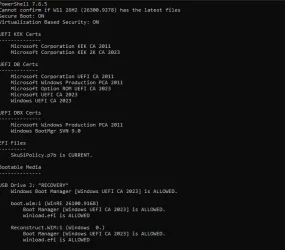
why reconstruct is saying Windows 0.? (i presume that Cannot confirm if... is because main pc in Release Preview)
1788254278634.webp
 

My Computer My Computer

At a glance

Windows 11 Pro 64bit (release preview channel)i5 840016 GB DDR4RTX 3060 Ti
OS
Windows 11 Pro 64bit (release preview channel)
Computer type
PC/Desktop
Manufacturer/Model
Asus
CPU
i5 8400
Motherboard
ROG STRIX Z370-H GAMING
Memory
16 GB DDR4
Graphics Card(s)
RTX 3060 Ti
Sound Card
On Board
Monitor(s) Displays
Acer VG242Y P
Screen Resolution
1080p
Hard Drives
Intel 660p SSD
PSU
800w
Internet Speed
1000 Mbps
why reconstruct is saying Windows 0.? (i presume that Cannot confirm if... is because main pc in Release Preview)
To report the image's real build number, the SOFTWARE reg hive needs to be extracted.

Recovery files are a little weird. Unlike a SWM where a single image is split across different parts, but can be reconstructed into a single image; Reconstruct WIM's are written ahead of time as standalone WIM files, with different parts of the backup. Don't ask me why MS decided to be inconsistent.

One of the problems is knowing where a file will end up in the multiple WIM's.

In my testing, the reg hives were always in the first WIM (which makes sense) and everything else was randomly in the following WIM's. There's logic to search for the boot manager across the files, but that's because they don't store the boot file itself but the WinSxS version of it. Not sure if this means I have to repeat that process with the SOFTWARE hive.

For a Recovery file, it's safe to presume the Windows images matches the boot.wim's built (or close enough). I see about changing the logic.
 

My Computer My Computer

At a glance

Windows 7
OS
Windows 7
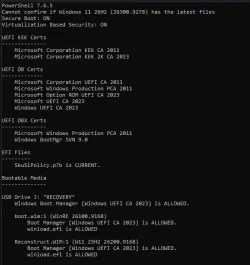
with that new one:
1788284575311.webp

so its probably ok. (usb is made before 26h2)
 

My Computer My Computer

At a glance

Windows 11 Pro 64bit (release preview channel)i5 840016 GB DDR4RTX 3060 Ti
OS
Windows 11 Pro 64bit (release preview channel)
Computer type
PC/Desktop
Manufacturer/Model
Asus
CPU
i5 8400
Motherboard
ROG STRIX Z370-H GAMING
Memory
16 GB DDR4
Graphics Card(s)
RTX 3060 Ti
Sound Card
On Board
Monitor(s) Displays
Acer VG242Y P
Screen Resolution
1080p
Hard Drives
Intel 660p SSD
PSU
800w
Internet Speed
1000 Mbps
Your Windows version doesn't really matter, but you would expect the backup process to "walk" the Windows folder structure and hit \Windows\System32\config before reaching Windows\WinSxS. And maybe it doesn't.

I just changed the code to brute force it, and ask 7z.exe to extract the same registry file from every WIM (and silently ignore the errors). It's not elegant, but considering you're only running this script occasionally, the extra time it takes isn't too bad.
 

My Computer My Computer

At a glance

Windows 7
OS
Windows 7
MS has made a dumbwitted decision to re-organize the latest post-signed DBX update files available for download from their GitHub repo. "Dumb" in because they provided the same DBX content into two wildly different folder layouts.

SignedByKEK2011 has multiple subfolders for each architecture (containing multiple files).
SignedByKEK2023 has a single folder containing a single file for each architecture type.

This breaks the rarely used (by still useful) "Update_UEFI-CA2023.ps1 -Revoke -Latest" command, which downloads the latest GitHub files in case MS has newer content than what's available on your local Windows. Which is useful on End-of-Life systems that no longer get Windows Updates to push the latest DBXupdate.bin file. It'll probably be fixed later tonight or by tomorrow.
 
Last edited:

My Computer My Computer

At a glance

Windows 7
OS
Windows 7

Latest Support Threads

Back
Top Bottom