Get ready for Windows 11 version 26H2


 Windows IT Pro Blog:

The next annual update for Windows 11 is coming soon and is already available to Windows Insiders! Windows 11, version 26H2 continues our focus on delivering a predictable, low-disruption update experience for organizations and IT professionals.

For devices already running recent versions of Windows 11, this release should be easy to adopt. It builds on the same platform and servicing approach introduced in prior releases, while continuing to improve how updates are delivered, tested, and deployed.

In this post, we'll walk through how to prepare for Windows 11, version 26H2.

A familiar update experience, refined​

Windows 11, version 26H2 uses the same shared servicing model as recent releases available annually in the second half of the calendar year. Supported devices get this feature update as a small enablement package instead of a full OS replacement.

If your organization is already on Windows 11, version 24H2 or 25H2, the update to 26H2 is similar to a regular monthly update in most environments:
  • A small, quick installation
  • Minimized disruption to users
  • No need for full reimaging or complex deployment motions
Note: Devices running Windows 11, version 26H1 won't be able to update to version 26H2. Instead, they'll have a path to update to a future Windows release. This is because Windows 11, version 26H1 is based on a different Windows core than Windows 11, versions 24H2, 25H2, and 26H2. Here's What to know about Windows 11, version 26H1.

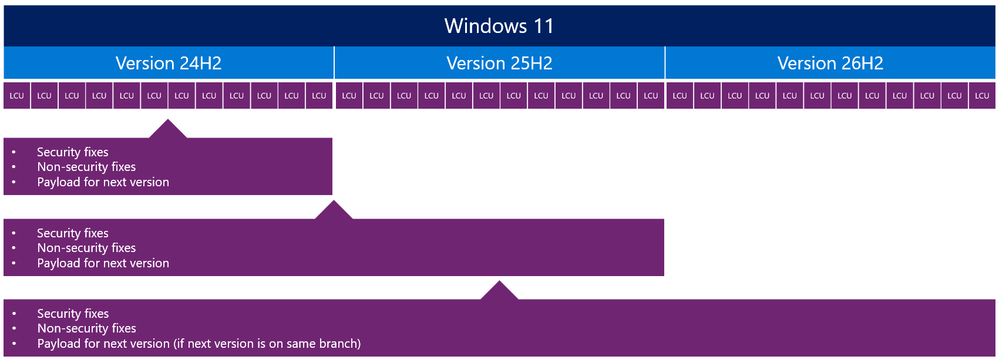
This is possible because multiple versions of Windows 11 share a common servicing branch, including:
  • The same source code base
  • The same security and quality updates
  • The same compatibility validation
The difference between versions is simply which features are enabled.

Diagram showing the steps when new features are enabled when versions share a servicing branch

Shared servicing branch progression

Why this matters for IT organizations​

The shared servicing model isn't just a technical detail. It directly impacts how you manage updates across your environment. Compared to full OS upgrades of the past, Windows 11, version 26H2 comes with reduced deployment complexity, improved compatibility confidence, and faster time to value.

Reduced deployment complexity​

Because features are delivered continuously and enabled later, there's no large "upgrade event." This makes planning easier and reduces operational overhead.

Improved compatibility confidence​

Devices moving between versions on the same servicing branch typically benefit from:
  • Existing application compatibility validation
  • Lower risk of regressions
  • Fewer surprises during rollout

Faster time to value​

With smaller updates and faster installations, organizations can move more quickly to the most current release. New features reach you without lengthy deployment cycles.

Support lifecycle considerations​

As with previous annual feature updates, moving to Windows 11, version 26H2 resets the Windows support lifecycle for your devices.

This provides:
  • 24 months of support for Home, Pro, Pro EDU, and Pro for Workstations editions
  • 36 months of support for Enterprise, Education, IoT Enterprise, and Enterprise Multi-session editions
What does it mean for your servicing strategy? The annual update becomes a key milestone for maintaining a supported and secure environment.

How to prepare for Windows 11, version 26H2​

Already managing Windows 11 in your organization? Preparing for 26H2 should align with your existing update processes.

1. Validate today​

Begin testing with devices running recent versions of Windows 11 to confirm compatibility with your apps, policies, and infrastructure.

If you'd like to get a peak of what's coming and begin previewing version 26H2 on devices now, the update is available through the Windows Insider Program in the Experimental channel. Otherwise, your organization might prefer to wait for the update to become available in Release Preview before doing more extensive testing. At that stage, the experience is closer to final shipping quality. We'll have more information to share when version 26H2 is in Release Preview.

2. Use your existing deployment tools​

Windows 11, version 26H2 will be available through familiar channels, including:
  • Windows Autopatch
  • Microsoft Intune
  • Windows Server Update Services (WSUS)

3. Plan your rollout rings​

Use your standard deployment rings to:
  1. Pilot the update with a small group of devices.
  2. Expand gradually based on validation results.

4. Stay current​

Windows features are delivered continuously. Stay up to date with monthly updates to help ensure a smoother transition when the feature update becomes available.
Timeline showing features delivered monthly and enabled together in a feature update

Feature delivery over time with enablement moment

Looking ahead and staying informed​

Windows 11, version 26H2 continues the move toward a more predictable and efficient servicing model. This model helps reduce disruption while helping your organization stay secure and up to date. By building on a shared platform and delivering innovation continuously, Windows enables you to focus less on large upgrade projects and more on delivering value to your users.

We'll continue to share updates and guidance as Windows 11, version 26H2 becomes available. In the meantime, test it in the Windows Insider Program's Experimental channel and use the updated plan-prepare-deploy learning path to get ready.


 Source:

 
Last edited:
I reckon 26H2 will go to Release Preview around August/September
 

My Computer My Computer

At a glance

Windows 11 Pro 25H2 (RP channel)AMD Ryzen 7 9800X3D 8-core64GB Corsair Titanium 6000/CL30MSI Suprim 5080 SOC
OS
Windows 11 Pro 25H2 (RP channel)
Computer type
PC/Desktop
Manufacturer/Model
MSI
CPU
AMD Ryzen 7 9800X3D 8-core
Motherboard
MEG X870E Godlike
Memory
64GB Corsair Titanium 6000/CL30
Graphics Card(s)
MSI Suprim 5080 SOC
Sound Card
Soundblaster AE-9
Monitor(s) Displays
ASUS TUF Gaming VG289Q
Screen Resolution
3840x2160
Hard Drives
Samsung 9100 Pro 4TB (gen 5 x4, system drive/games)
Samsung 990 Pro 2TB
Samsung 980 Pro 2TB
Samsung 870 Evo 4TB
Samsung 870 Evo 2TB
Samsung T9 4TB
PSU
Seasonic PX-2200
Case
Bequiet! Dark Base Pro 901
Cooling
Noctua NH-D15S Chromax black
Keyboard
Logitech G915 X (wired)
Mouse
Logitech G903 with PowerPlay charger
Internet Speed
900Mb/sec
Browser
Microsoft Edge
Antivirus
Windows Defender
Well, I did something I definitely regret. I installed 26H1 on my main test machine without paying enough attention to the documentation, and now there’s no way to upgrade to 26H2. I was tired… Is there any possible way to go back without wiping everything? Since it was a clean install, I can’t just roll back. Maybe there’s a trick to get the install to accept 25H1 without a full wipe? Just worried about the registry. I hate to do it because this thing is running so fast! Asking for a friend. 🤣😂😊
 

My Computers My Computers

  • At a glance

    Windows 11 Pro 26H1 (Build 28020.2308)AMD FX 8350 8 Core Processor, 4400 Mhz (Overc...24.0 GBAMD Radeon HD 7570 2GB
    OS
    Windows 11 Pro 26H1 (Build 28020.2308)
    Computer type
    PC/Desktop
    Manufacturer/Model
    ASUS Case
    CPU
    AMD FX 8350 8 Core Processor, 4400 Mhz (Overclocked)
    Motherboard
    M5A78L-M/USB3
    Memory
    24.0 GB
    Graphics Card(s)
    AMD Radeon HD 7570 2GB
    Sound Card
    AMD High Definition Audio Device
    Monitor(s) Displays
    Acer 27" SA240Y LED
    Screen Resolution
    1920x1080 Resolution
    Hard Drives
    Samsung SSD 860 EVO 500GB ATA Device
    WD My Book 25EE 4TB USB
    Toshiba External 3.0 TB USB
    WD Black External 1.0 TB USB
    PSU
    Corsair RM750x
    Case
    Custom Spider 9000
    Cooling
    Modded
    Keyboard
    Logitech K360
    Mouse
    Logitech M325
    Internet Speed
    AT&T 1GB Fiber
    Browser
    MS Edge
    Antivirus
    MS Windows Security
    Other Info
    Not bad for free parts!!!
  • At a glance

    Windows 11 Pro 26H1 (Build 28020.2308)AMD A6 Vision8GB
    Operating System
    Windows 11 Pro 26H1 (Build 28020.2308)
    Computer type
    Laptop
    Manufacturer/Model
    Toshiba Satellite Pro
    CPU
    AMD A6 Vision
    Memory
    8GB
    Sound Card
    AMD High Definition Audio Device
    Monitor(s) Displays
    Built In
    Hard Drives
    Samsung SSD 860 EVO 500GB ATA Device
    Internet Speed
    AT&T Gigabit Fiber
    Browser
    Google Chrome
    Antivirus
    Windows Defender
Well, I did something I definitely regret. I installed 26H1 on my main test machine without paying enough attention to the documentation, and now there’s no way to upgrade to 26H2. I was tired… Is there any possible way to go back without wiping everything? Since it was a clean install, I can’t just roll back. Maybe there’s a trick to get the install to accept 25H1 without a full wipe? Just worried about the registry. I hate to do it because this thing is running so fast! Asking for a friend. 🤣😂😊

No. You will have to do a clean install. If you want to go to 26H2, you'll have to wait til the fall, download the iso. and install it. Its a lesson: pay attention to what you're doing before making a mistake you can't do undo later.
 

My Computers My Computers

  • At a glance

    Windows 11 Education For 25H2Intel® Core i7 5500u8 GBIntel HD Family Graphics 5500 AMD Firepro 4150M
    OS
    Windows 11 Education For 25H2
    Computer type
    Laptop
    Manufacturer/Model
    HP ZBook G2
    CPU
    Intel® Core i7 5500u
    Motherboard
    HP
    Memory
    8 GB
    Graphics Card(s)
    Intel HD Family Graphics 5500 AMD Firepro 4150M
    Sound Card
    Realtek High Audio
    Hard Drives
    1 TB SSD
    Mouse
    HP USB Mouse
    Antivirus
    Windows Defender
  • At a glance

    Windows 11 Pro For Workstations 25H2Xeon 1535m v632 GBAMD Quadro Pro 4100
    Operating System
    Windows 11 Pro For Workstations 25H2
    Computer type
    Laptop
    Manufacturer/Model
    HP Zbook G4
    CPU
    Xeon 1535m v6
    Motherboard
    HP
    Memory
    32 GB
    Graphics card(s)
    AMD Quadro Pro 4100
    Sound Card
    Bang and Olufson Audio
    Hard Drives
    1TB SSD
    Mouse
    HP USB Mouse
    Antivirus
    Windows Defender
I reckon 26H2 will go to Release Preview around August/September
The funny thing is that with the 24H2 release Microsoft pushed that directly to the RP channel at the end of May. Why 26H2 (which is basically the same as 24H2/25H2) is released to the experimental?
 

My Computer My Computer

At a glance

Windows 11i5-12500H16GB DDR5
OS
Windows 11
Computer type
Laptop
Manufacturer/Model
HP
CPU
i5-12500H
Memory
16GB DDR5
Browser
Microsoft Edge
waiting
 

My Computer My Computer

At a glance

Windows 11I7 12700 K32 GB DDR 5 5600MHZZOTAC 1060 8 GB
OS
Windows 11
Computer type
PC/Desktop
Manufacturer/Model
ASUS
CPU
I7 12700 K
Motherboard
ASUS Z790-F
Memory
32 GB DDR 5 5600MHZ
Graphics Card(s)
ZOTAC 1060 8 GB
Monitor(s) Displays
Alienware G-SYNC
Screen Resolution
1920x1080
Hard Drives
XPG 1 TB NVME
PSU
ASUS 850
Case
CORSAIR 570x
Cooling
CORSAIR 360 MM
Keyboard
Logitech 815
Mouse
LOGITEH GPRO
Internet Speed
40/5
Browser
Edge
The experimental build 26H2 is due to expire on 8 Aug - so unless there's an update, date extension or an option to switch to another build - it might be that you have to re-install W11 clean which is a real pain these days if you have quite a lot of programs with their own keys, drivers etc and special hardware / mobo drivers etc.

Aug is particularly bad in N.Hemisphere as loads are away for Summer holidays (vacations) and don't want to come back to non functioning W11 systems. !!!

Is it worth cloning the system and then switching to the BETA channel (it's easy enough to keep BOTH versions especially if using physical vhdx files) - but my question is does the 26H2 experimental build actually convert to the Beta build -- If it does I'll have a go at the weekend but I don't want to waste a lot of time on this if it doesn't work. I'd prefer also to stay in the experimental 26H2 build if it's possible. Not sure why Ms has given this build such a short period especially as it seems a good one and to expire in the Summer --- !!!!!!! Well perhaps they don't have decent length Summer vacations / Holidays in Washington State.(Ms campus etc).

Cheers
jimbo
 

My Computer My Computer

At a glance

Windows XP,11 Linux Fedora Rawhide pre-releas...2 X Intel i7
OS
Windows XP,11 Linux Fedora Rawhide pre-release 45
Computer type
PC/Desktop
CPU
2 X Intel i7
Screen Resolution
4KUHD X 2
So looks like going from 26H1 to H2 will be a wipe/reinstall .. I was getting rusty remembering how to start fresh, again, anyway :/ ;)
 

My Computers My Computers

  • At a glance

    Win11Pro 26H1 Exp, Win11/10Pro 25H, 26H, Win7Intel i7 9700K @ 3.60GHz Coffee Lake 14nm Tech64.0GB (32x2) Dual-Channel DDR4 @ 1334MHzRadeon 8GB 5700XT, 3DP, 1HDMI ports
    OS
    Win11Pro 26H1 Exp, Win11/10Pro 25H, 26H, Win7
    Computer type
    PC/Desktop
    Manufacturer/Model
    Custom
    CPU
    Intel i7 9700K @ 3.60GHz Coffee Lake 14nm Tech
    Motherboard
    Gigabyte Z370 HD3-CF (U3E1)
    Memory
    64.0GB (32x2) Dual-Channel DDR4 @ 1334MHz
    Graphics Card(s)
    Radeon 8GB 5700XT, 3DP, 1HDMI ports
    Sound Card
    Realtek HD Audio
    Monitor(s) Displays
    (2x) VX3276-FHD on AMD Radeon RX5700 XT GME, DP, DVI, HDMI ports
    Screen Resolution
    1920x1080, Work Resolution 1920x1032 pixels
    Hard Drives
    WD Green 2tb M.2, Sandisk Ultra 2TB SATAIII, Targent 4TB SATAIII SSD, Sandisk Ultra 2TB SATAIII (24H2 DEV drive), Crucial 1TB SATAIII SSD, WD 6TB SATAIII Backup HD. 17TB ttl
    PSU
    RaidMax 850w
    Case
    Full Height Mesh Gamer 12bay case
    Cooling
    Thermaltake UX100 RGB Cooler, several 92, 120,140mm RGB fans
    Keyboard
    Fiddio RGB Gamer board
    Mouse
    Kensington Ergo Mouse
    Internet Speed
    Cox, 10gb 67mb/s
    Browser
    Chrome 64-bit
    Antivirus
    What could happen? ;) MS Defender
    Other Info
    Qualcomm Atheros AR9462 802.11a|b|g|n WiFi BT Adapter
  • At a glance

    W11Pro.Dev 26300.9032 26H1Intel i7-12700kf, @ 3.6ghz16GB (8gbx2) Dual-Channel DDR5Radeon 8gb RX5700 XT, DVI port
    Operating System
    W11Pro.Dev 26300.9032 26H1
    Computer type
    PC/Desktop
    Manufacturer/Model
    Custom
    CPU
    Intel i7-12700kf, @ 3.6ghz
    Motherboard
    ASRock Z790-S
    Memory
    16GB (8gbx2) Dual-Channel DDR5
    Graphics card(s)
    Radeon 8gb RX5700 XT, DVI port
    Sound Card
    NVidia HD Audio
    Monitor(s) Displays
    Acer G206HQL 27"
    Screen Resolution
    1600x900, VGA, HDMI, DVI ports
    Hard Drives
    Sandisk 2tb nvme, Sandisk 2tb SSD, SP 1tb SSD,
    PSU
    Thermaltake 700w
    Case
    HP Pavillion case, dented, not pretty, much like me
    Cooling
    Thermaltake UX100 RGB Cooler, several 92, 120, 140mm rgb case fans
    Keyboard
    HP oem
    Mouse
    Belkin mouse
    Internet Speed
    Cox 10gbs
    Browser
    Chrome 64bit
    Antivirus
    MS Defender
    Other Info
    Intel Wi-Fi 6 AX200 @160mhz 802.11a|b|g|n WiFi BT Adapter
I do as I cannot freaking remember otherwise🤪
My dad (God rest him) always used to tell me, "Rob, three things go when you get older. First is your memory, and then...and then...GODDAMMIT, I CAN'T REMEMBER THE OTHER TWO!!" 🤪🤪
 

My Computer My Computer

At a glance

Windows 10 Pro
OS
Windows 10 Pro

My Computers My Computers

  • At a glance

    Win11Pro 26H1 Exp, Win11/10Pro 25H, 26H, Win7Intel i7 9700K @ 3.60GHz Coffee Lake 14nm Tech64.0GB (32x2) Dual-Channel DDR4 @ 1334MHzRadeon 8GB 5700XT, 3DP, 1HDMI ports
    OS
    Win11Pro 26H1 Exp, Win11/10Pro 25H, 26H, Win7
    Computer type
    PC/Desktop
    Manufacturer/Model
    Custom
    CPU
    Intel i7 9700K @ 3.60GHz Coffee Lake 14nm Tech
    Motherboard
    Gigabyte Z370 HD3-CF (U3E1)
    Memory
    64.0GB (32x2) Dual-Channel DDR4 @ 1334MHz
    Graphics Card(s)
    Radeon 8GB 5700XT, 3DP, 1HDMI ports
    Sound Card
    Realtek HD Audio
    Monitor(s) Displays
    (2x) VX3276-FHD on AMD Radeon RX5700 XT GME, DP, DVI, HDMI ports
    Screen Resolution
    1920x1080, Work Resolution 1920x1032 pixels
    Hard Drives
    WD Green 2tb M.2, Sandisk Ultra 2TB SATAIII, Targent 4TB SATAIII SSD, Sandisk Ultra 2TB SATAIII (24H2 DEV drive), Crucial 1TB SATAIII SSD, WD 6TB SATAIII Backup HD. 17TB ttl
    PSU
    RaidMax 850w
    Case
    Full Height Mesh Gamer 12bay case
    Cooling
    Thermaltake UX100 RGB Cooler, several 92, 120,140mm RGB fans
    Keyboard
    Fiddio RGB Gamer board
    Mouse
    Kensington Ergo Mouse
    Internet Speed
    Cox, 10gb 67mb/s
    Browser
    Chrome 64-bit
    Antivirus
    What could happen? ;) MS Defender
    Other Info
    Qualcomm Atheros AR9462 802.11a|b|g|n WiFi BT Adapter
  • At a glance

    W11Pro.Dev 26300.9032 26H1Intel i7-12700kf, @ 3.6ghz16GB (8gbx2) Dual-Channel DDR5Radeon 8gb RX5700 XT, DVI port
    Operating System
    W11Pro.Dev 26300.9032 26H1
    Computer type
    PC/Desktop
    Manufacturer/Model
    Custom
    CPU
    Intel i7-12700kf, @ 3.6ghz
    Motherboard
    ASRock Z790-S
    Memory
    16GB (8gbx2) Dual-Channel DDR5
    Graphics card(s)
    Radeon 8gb RX5700 XT, DVI port
    Sound Card
    NVidia HD Audio
    Monitor(s) Displays
    Acer G206HQL 27"
    Screen Resolution
    1600x900, VGA, HDMI, DVI ports
    Hard Drives
    Sandisk 2tb nvme, Sandisk 2tb SSD, SP 1tb SSD,
    PSU
    Thermaltake 700w
    Case
    HP Pavillion case, dented, not pretty, much like me
    Cooling
    Thermaltake UX100 RGB Cooler, several 92, 120, 140mm rgb case fans
    Keyboard
    HP oem
    Mouse
    Belkin mouse
    Internet Speed
    Cox 10gbs
    Browser
    Chrome 64bit
    Antivirus
    MS Defender
    Other Info
    Intel Wi-Fi 6 AX200 @160mhz 802.11a|b|g|n WiFi BT Adapter
Back
Top Bottom