Windows IT Pro Blog:
The next annual update for Windows 11 is coming soon and is already available to Windows Insiders! Windows 11, version 26H2 continues our focus on delivering a predictable, low-disruption update experience for organizations and IT professionals.
For devices already running recent versions of Windows 11, this release should be easy to adopt. It builds on the same platform and servicing approach introduced in prior releases, while continuing to improve how updates are delivered, tested, and deployed.
In this post, we'll walk through how to prepare for Windows 11, version 26H2.
A familiar update experience, refined
Windows 11, version 26H2 uses the same shared servicing model as recent releases available annually in the second half of the calendar year. Supported devices get this feature update as a small enablement package instead of a full OS replacement.If your organization is already on Windows 11, version 24H2 or 25H2, the update to 26H2 is similar to a regular monthly update in most environments:
- A small, quick installation
- Minimized disruption to users
- No need for full reimaging or complex deployment motions
Note: Devices running Windows 11, version 26H1 won't be able to update to version 26H2. Instead, they'll have a path to update to a future Windows release. This is because Windows 11, version 26H1 is based on a different Windows core than Windows 11, versions 24H2, 25H2, and 26H2. Here's What to know about Windows 11, version 26H1.
This is possible because multiple versions of Windows 11 share a common servicing branch, including:
- The same source code base
- The same security and quality updates
- The same compatibility validation

Shared servicing branch progression
Why this matters for IT organizations
The shared servicing model isn't just a technical detail. It directly impacts how you manage updates across your environment. Compared to full OS upgrades of the past, Windows 11, version 26H2 comes with reduced deployment complexity, improved compatibility confidence, and faster time to value.Reduced deployment complexity
Because features are delivered continuously and enabled later, there's no large "upgrade event." This makes planning easier and reduces operational overhead.Improved compatibility confidence
Devices moving between versions on the same servicing branch typically benefit from:- Existing application compatibility validation
- Lower risk of regressions
- Fewer surprises during rollout
Faster time to value
With smaller updates and faster installations, organizations can move more quickly to the most current release. New features reach you without lengthy deployment cycles.Support lifecycle considerations
As with previous annual feature updates, moving to Windows 11, version 26H2 resets the Windows support lifecycle for your devices.This provides:
- 24 months of support for Home, Pro, Pro EDU, and Pro for Workstations editions
- 36 months of support for Enterprise, Education, IoT Enterprise, and Enterprise Multi-session editions
How to prepare for Windows 11, version 26H2
Already managing Windows 11 in your organization? Preparing for 26H2 should align with your existing update processes.1. Validate today
Begin testing with devices running recent versions of Windows 11 to confirm compatibility with your apps, policies, and infrastructure.If you'd like to get a peak of what's coming and begin previewing version 26H2 on devices now, the update is available through the Windows Insider Program in the Experimental channel. Otherwise, your organization might prefer to wait for the update to become available in Release Preview before doing more extensive testing. At that stage, the experience is closer to final shipping quality. We'll have more information to share when version 26H2 is in Release Preview.
2. Use your existing deployment tools
Windows 11, version 26H2 will be available through familiar channels, including:- Windows Autopatch
- Microsoft Intune
- Windows Server Update Services (WSUS)
3. Plan your rollout rings
Use your standard deployment rings to:- Pilot the update with a small group of devices.
- Expand gradually based on validation results.
4. Stay current
Windows features are delivered continuously. Stay up to date with monthly updates to help ensure a smoother transition when the feature update becomes available.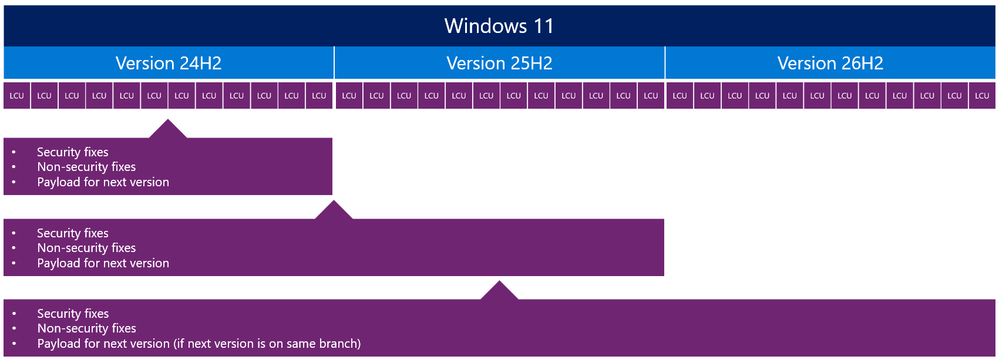
Feature delivery over time with enablement moment
Looking ahead and staying informed
Windows 11, version 26H2 continues the move toward a more predictable and efficient servicing model. This model helps reduce disruption while helping your organization stay secure and up to date. By building on a shared platform and delivering innovation continuously, Windows enables you to focus less on large upgrade projects and more on delivering value to your users.We'll continue to share updates and guidance as Windows 11, version 26H2 becomes available. In the meantime, test it in the Windows Insider Program's Experimental channel and use the updated plan-prepare-deploy learning path to get ready.
To use the correct enablement package based on your currently installed build:
KB5122776 is the enablement package for the Insider Experimental Preview Build 26340. In the installed updates list, it shows up as “Feature Enablement for Windows (Ge) 26H2 Insider Refresh - KB5122776 - 2026.08 A - BuildNumber Update.”
KB5121794 is the enablement package for the retail 26H2 release, listed as “Feature Enablement for Windows (Ge) 26H2 - KB5121794 - 2026.07 D.”
KB5122776 Enablement Package for 64-bit Windows 11 26H2
Windows11.0-KB5122776-x64.msu (173 KB)
Download
OR
KB5122776 Enablement Package for ARM64 Windows 11 26H2
Windows11.0-KB5122776-arm64.msu (172 KB)
Download
KB5121794 Enablement Package for 64-bit Windows 11 26H2
Windows11.0-KB5121794-x64.msu (174 KB)
Download
OR
KB5121794 Enablement Package for ARM64 Windows 11 26H2
Windows11.0-KB5121794-arm64.msu (174 KB)
Download
Source:
Get ready for Windows 11, version 26H2 - Windows IT Pro Blog
Explore the next feature update for Windows 11, with familiar servicing, testing, and rollout paths.
 techcommunity.microsoft.com
Attachments
Last edited: