Witterings
Member
- Local time
- 5:56 AM
- Posts
- 36
- OS
- Windows 11
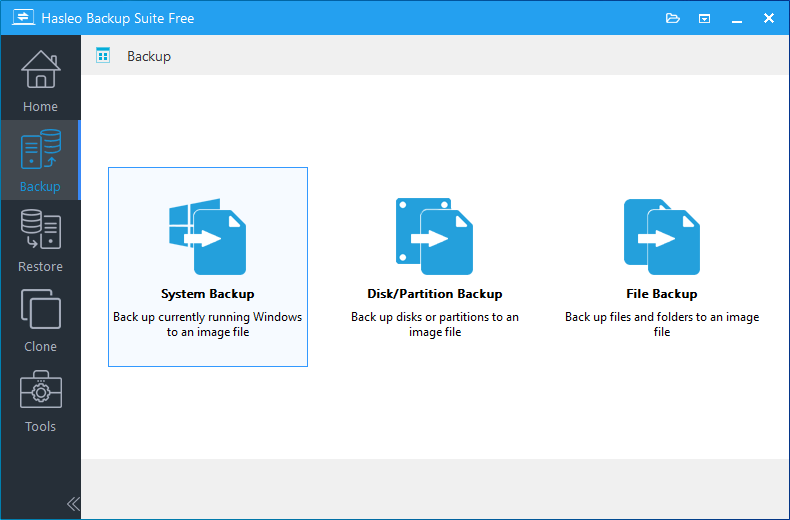
I'm trying to get my head around different types of backs and how far they go ... I have googled "what's the difference between a system and a disk / partition backup" but the answers are slightly unclear so just wanted to make sure.
Replies infer that a system back copied everything so you'd think you were completely covered but then ..... reading on is says "this is a great way to get to get your OS up and running again" it then suggests not all user data may be included which would be a concern for me
Disk / partition backs seems to suggest it's full but there's a risk that you may omit a partition by mistake .... have I understood this correctly?
I don't need to backup my whole machine often as my work files / folders which change on a daily basis are stored elsewhere and backed up on a regular basis HOWEVER if I did have a complete failure I'd like to be able to restore my machine to exactly how it was before, including files, folders and their content, user names / passwords in things like Chrome and Apps an to automatically re-install all my Software / Apps with any saved preferences in settings.
I'm guessing disk / partition is my best option and choosing disk which then automatically includes all the partitions on that disk .... am I right?
I'm using Hasleo in case that makes any difference.
Replies infer that a system back copied everything so you'd think you were completely covered but then ..... reading on is says "this is a great way to get to get your OS up and running again" it then suggests not all user data may be included which would be a concern for me
Disk / partition backs seems to suggest it's full but there's a risk that you may omit a partition by mistake .... have I understood this correctly?
I don't need to backup my whole machine often as my work files / folders which change on a daily basis are stored elsewhere and backed up on a regular basis HOWEVER if I did have a complete failure I'd like to be able to restore my machine to exactly how it was before, including files, folders and their content, user names / passwords in things like Chrome and Apps an to automatically re-install all my Software / Apps with any saved preferences in settings.
I'm guessing disk / partition is my best option and choosing disk which then automatically includes all the partitions on that disk .... am I right?
I'm using Hasleo in case that makes any difference.
My Computers
-
At a glance
Windows 11Intel(R) Core(TM) Ultra 7 258V (2.20 GHz)32gb- OS
- Windows 11
- Computer type
- Laptop
- Manufacturer/Model
- Lenovo Yoga 7 Gen10
- CPU
- Intel(R) Core(TM) Ultra 7 258V (2.20 GHz)
- Memory
- 32gb
- Hard Drives
- 1tb
-
At a glance
Windows 11 ProIntel i7Currently 16gb ... may upgrade to 32gb+- Operating System
- Windows 11 Pro
- Computer type
- PC/Desktop
- Manufacturer/Model
- Dell Optiplex 7090
- CPU
- Intel i7
- Memory
- Currently 16gb ... may upgrade to 32gb+
- Hard Drives
- NVME 512gb
- Internet Speed
- 1tb
- Browser
- Chrome
- Antivirus
- Windows Defender




 "Disk" does suggest everything on the disk but it would be nice if that was spelled out! "System" is definitely vague unless you know what they're talking about.