Getting rid of "Get Started"


The good old days! Looking back, I can see how youth is wasted on the young. What's the saying, if only I knew then, what I know now. ;-)
 

My Computers My Computers

  • At a glance

    Windows 11 Pro 25H2Intel Core i7-10700K16GB (8GB PC4-19200 DDR4 SDRAM x2)NVIDIA GeForce GTX 1050 TI
    OS
    Windows 11 Pro 25H2
    Computer type
    PC/Desktop
    Manufacturer/Model
    PowerSpec B746
    CPU
    Intel Core i7-10700K
    Motherboard
    ASRock Z490 Phantom Gaming 4/ax
    Memory
    16GB (8GB PC4-19200 DDR4 SDRAM x2)
    Graphics Card(s)
    NVIDIA GeForce GTX 1050 TI
    Sound Card
    Realtek Audio
    Monitor(s) Displays
    #1. LG ULTRAWIDE 34" #2. AOC Q32G2WG3 32"
    Screen Resolution
    #1. 3440 X 1440 #2. 1920 x 1080
    Hard Drives
    NVMe WDC WDS100T2B0C-00PXH0 1TB
    Samsung SSD 860 EVO 1TB
    PSU
    750 Watts (62.5A)
    Case
    PowerSpec/Lian Li ATX 205
    Keyboard
    Logitech K270
    Mouse
    Logitech M185
    Browser
    Microsoft Edge and Firefox
    Antivirus
    Webroot SecureAnywhere CE 26.1
  • At a glance

    Windows 11 Canary ChannelIntel Core i5-8400 CPU @ 2.80GHz16 MB DDR 4-2666
    Operating System
    Windows 11 Canary Channel
    Computer type
    PC/Desktop
    Manufacturer/Model
    PowerSpec G156
    CPU
    Intel Core i5-8400 CPU @ 2.80GHz
    Motherboard
    AsusTeK Prime B360M-A
    Memory
    16 MB DDR 4-2666
    Monitor(s) Displays
    23" Speptre HDMI 75Hz
    Screen Resolution
    1920x1080
    Hard Drives
    Samsung 970 EVO 500GB NVMe
    Keyboard
    Logitek K270
    Mouse
    Logitek M185
    Browser
    Firefox, Edge and Edge Canary
    Antivirus
    Windows Defender
As always, deviant thoughts :nope:. Sorry, I think you got it wrong! I didn't mean it is good for your back. In my region, early morning is a good time for charging then jogging (of course, without any makeup) Ohhh :woozy:, Big Lord...!

BTW, If your back doesn't work anymore, I know a couple of sacred hands who can take care of it for you for free (also tax-free). At the same time, serves you Burgundy. Just send me your back's profile picture (also its size) then you'll get a package with unlimited options full of rounded UIs. But there is a difference between those and Win 11 rounded/curve corners! Unlike your monitor pixels, they are natural and touchable. They are also adjustable (I love this one, I love it :hug: ). They lubricant your back. I promise your back will work like a drill, and you'll smell younger again. Don't worry. You'll be a GT3 Twin Turbo again. Just go ahead as our package's tutorial says.
 

My Computer My Computer

At a glance

Win 11 Enterprisei7
OS
Win 11 Enterprise
Computer type
Laptop
CPU
i7
Hard Drives
SSD
Still there, useless as ever, no way to uninstall it! 🤷‍♂️

0001726.png
 

My Computers My Computers

  • At a glance

    Windows 11 Pro
    OS
    Windows 11 Pro
    Computer type
    PC/Desktop
    Manufacturer/Model
    ASUS ROG Strix
  • At a glance

    Windows 11 Pro
    Operating System
    Windows 11 Pro
    Computer type
    Laptop
    Manufacturer/Model
    ASUS VivoBook
  • ASUS VivoBook 'Lite' ~ Windows 11 Home
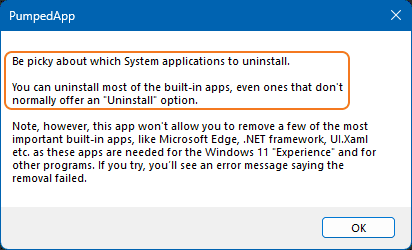
Can you decipher the list (SS below)?! I have to hire the ENIAC!
Just read the warning message first! For the same reason, I did not dare to touch anything for six months.

ss0.png

ss1.png
 

My Computer My Computer

At a glance

Win 11 Enterprisei7
OS
Win 11 Enterprise
Computer type
Laptop
CPU
i7
Hard Drives
SSD

My Computers My Computers

  • At a glance

    Windows 10 Home x64INTEL Core i5-11400KINGSTON HyperX Fury Black DDR4 16GB (2 x 8GB...EVGA GeForce GTX 750 Superclocked 1GB 128-Bit...
    OS
    Windows 10 Home x64
    Computer type
    PC/Desktop
    Manufacturer/Model
    Custom
    CPU
    INTEL Core i5-11400
    Motherboard
    ASUS PRIME H570-PLUS
    Memory
    KINGSTON HyperX Fury Black DDR4 16GB (2 x 8GB) 3200MHz, CL16
    Graphics Card(s)
    EVGA GeForce GTX 750 Superclocked 1GB 128-Bit GDDR5
    Monitor(s) Displays
    LG 32MA68HY 32" IPS
    Screen Resolution
    1920 x 1080
    Hard Drives
    SAMSUNG 250GB 970 EVO Plus NVMe, M.2 SSD, Crucial 250GB MX500, SEAGATE 500GB Barracuda® 7200.12, SATA 3 Gb/s, 7200 RPM, 16MB cache
    PSU
    CORSAIR RM550x 80 PLUS Gold 550W
    Case
    ANTEC P10 FLUX
    Cooling
    be quiet! Pure Rock 2, 5 x 120 mm Case Fans
    Internet Speed
    480 + Mbps Up/ 12+ Mbps Down
    Browser
    Vivaldi Snapshot
    Antivirus
    Avast
  • At a glance

    Windows 10 Home x64Intel Core i5-750Kingston HyperX Fury Black 8GB (2x4GB) DDR3-1...MSI GeForce GT 240 N240GT-MD1G/D5 1 GB DDR5
    Operating System
    Windows 10 Home x64
    Computer type
    PC/Desktop
    Manufacturer/Model
    Custom
    CPU
    Intel Core i5-750
    Motherboard
    ASUS P7P55D
    Memory
    Kingston HyperX Fury Black 8GB (2x4GB) DDR3-1600MHz CL8
    Graphics card(s)
    MSI GeForce GT 240 N240GT-MD1G/D5 1 GB DDR5
    Monitor(s) Displays
    LG 32MA68HY 32" IPS
    Screen Resolution
    1980x1040
    Hard Drives
    Samsung Electronics 840 EVO 120GB, SEAGATE 500GB Barracuda® 7200.12, SATA 3 Gb/s, 7200 RPM, 16MB cache
    PSU
    Antec TruePower New TP-550 550W
    Case
    Antec 300
    Cooling
    Cooler Master Hyper 212+, 4 Noctua NF-P12 120mm, 1 Noctua NF-P14 FLX
    Internet Speed
    480+ Mbps Down/12+Mbps Up
    Browser
    Vivaldi Snapshot
    Antivirus
    Avast
I don't love it, don't hate it, never used it, and was unaware of its existence before seeing this thread. Quite content to let it rest quietly there. I have long ago stopped worrying about the space taken up by all the apps and features that I do not use. Space is no longer the premium that it used to be, but I understand your motivation.
Exactly, its not doing any harm and is probably only a few MB at most. It doesn't run in the background either
 

My Computer My Computer

At a glance

Windows 11 Pro 25H2 (RP channel)AMD Ryzen 7 9800X3D 8-core64GB Corsair Titanium 6000/CL30MSI Suprim 5080 SOC
OS
Windows 11 Pro 25H2 (RP channel)
Computer type
PC/Desktop
Manufacturer/Model
MSI
CPU
AMD Ryzen 7 9800X3D 8-core
Motherboard
MEG X870E Godlike
Memory
64GB Corsair Titanium 6000/CL30
Graphics Card(s)
MSI Suprim 5080 SOC
Sound Card
Soundblaster AE-9
Monitor(s) Displays
ASUS TUF Gaming VG289Q
Screen Resolution
3840x2160
Hard Drives
Samsung 9100 Pro 4TB (gen 5 x4, system drive/games)
Samsung 990 Pro 2TB
Samsung 980 Pro 2TB
Samsung 870 Evo 4TB
Samsung 870 Evo 2TB
Samsung T9 4TB
PSU
Seasonic PX-2200
Case
Bequiet! Dark Base Pro 901
Cooling
Noctua NH-D15S Chromax black
Keyboard
Logitech G915 X (wired)
Mouse
Logitech G903 with PowerPlay charger
Internet Speed
900Mb/sec
Browser
Microsoft Edge
Antivirus
Windows Defender
That's not about MB or BG process, it's about redundancy! I don't like to have an extra icon in my App list. Most of my installed apps have a icon group in that list (after installation), but I remove even them! It should be neat and clean not messy!
 

My Computer My Computer

At a glance

Win 11 Enterprisei7
OS
Win 11 Enterprise
Computer type
Laptop
CPU
i7
Hard Drives
SSD

My Computers My Computers

  • At a glance

    Windows 11 Pro
    OS
    Windows 11 Pro
    Computer type
    PC/Desktop
    Manufacturer/Model
    ASUS ROG Strix
  • At a glance

    Windows 11 Pro
    Operating System
    Windows 11 Pro
    Computer type
    Laptop
    Manufacturer/Model
    ASUS VivoBook
  • ASUS VivoBook 'Lite' ~ Windows 11 Home

My Computers My Computers

  • At a glance

    Windows 11 Pro
    OS
    Windows 11 Pro
    Computer type
    PC/Desktop
    Manufacturer/Model
    ASUS ROG Strix
  • At a glance

    Windows 11 Pro
    Operating System
    Windows 11 Pro
    Computer type
    Laptop
    Manufacturer/Model
    ASUS VivoBook
  • ASUS VivoBook 'Lite' ~ Windows 11 Home
That's me whenever seeing the "Get Started" app in my "App List"... :woozy:

g1.gif
 

My Computer My Computer

At a glance

Win 11 Enterprisei7
OS
Win 11 Enterprise
Computer type
Laptop
CPU
i7
Hard Drives
SSD
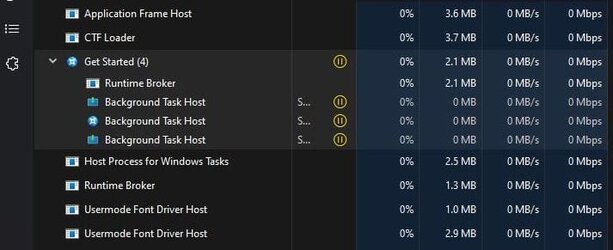
Sometimes, when I connect to the internet, I see "Get Started" popping into the Task Manager. What's it doing? I don't want it updating or installing anything. Does it have anything to do with the MS Store? I don't have MS account.. Any way to prevent it from running? Maybe by disabling something in the Task Scheduler? Thanks.
 

Attachments

  • Capture.JPG
    Capture.JPG
    35.4 KB · Views: 2
Last edited:

My Computer My Computer

At a glance

Win11Pro - 22H2-2621.1555i7-1270032 GB DDR5RTX 3060
OS
Win11Pro - 22H2-2621.1555
Computer type
PC/Desktop
Manufacturer/Model
Lenovo Legion T5 26IAB7
CPU
i7-12700
Memory
32 GB DDR5
Graphics Card(s)
RTX 3060

My Computer My Computer

At a glance

Win 11 Enterprisei7
OS
Win 11 Enterprise
Computer type
Laptop
CPU
i7
Hard Drives
SSD
Just be aware that Microsoft had such problems with people disabling the inappropriately named "Touch Keyboard and Handwriting Panel Service" because everybody incorrectly believed that they only needed it if they used a touch screen keyboard. Now, I actually got this info from some of the guys working on the Windows Terminal app and they told me that service should have been named "Touch, Keyboard, and Handwriting Panel Service" with the commas included. Matter of fact, that service STILL exists in Windows 11 today and you can look it up by it's old filename TextInputHost.exe. They changed the name of the service because so many users were disabling it and then complaining that Windows Terminal will no longer receive input from their keyboard. The new name is now "Windows Input Experience" and disabling it can break many of those UWP apps (such as Windows 11 Terminal).

I tell you this because TextInputHost.exe spawns under a subprocess named "Search". If you launch the Get Started app, you will see it in your task manager sitting right next to "Windows Input Experience". If you use PowerShell commands to remove "Get-AppxPackage *Client.CBS*" then you will also be removing TextInputHost.exe service. There has been a long discussion thread over on the Microsoft Terminal Github all about this.
 

My Computer My Computer

At a glance

Windows 11 Pro 25H2Intel 275HX32gb DDR5-6400NVIDIA RTX5090 Mobile
OS
Windows 11 Pro 25H2
Computer type
Laptop
Manufacturer/Model
Acer Predator Helios Ai
CPU
Intel 275HX
Motherboard
Acer Proprietary
Memory
32gb DDR5-6400
Graphics Card(s)
NVIDIA RTX5090 Mobile
Sound Card
Onboard
Monitor(s) Displays
LG Ultragear 48"
Screen Resolution
3840x2160
Hard Drives
1TB Gen5 NVME Sk Hynix
2TB Gen4 NVME 990pro
PSU
330w
Cooling
IETS GT600
Keyboard
LG G512 Carbon
Mouse
LG G502 Hero
Browser
FireFox
Antivirus
Defender
"8wekyb3d8bbwe" is Microsoft Publisher ID.

Also : You can see a list of all of your installed packages by running Get-AppxPackage * in PowerShell. In the list, you can see that most apps are by Microsoft, and will have Package IDs ending in 8wekyb3d8bbwe.
 

My Computer My Computer

At a glance

Windows 11 ProRyzen32 GDDR4RTX 3600
OS
Windows 11 Pro
Computer type
PC/Desktop
Manufacturer/Model
N/A
CPU
Ryzen
Motherboard
AMD Ryzen 5 5600x 6-Core
Memory
32 GDDR4
Graphics Card(s)
RTX 3600
Sound Card
Integrated to the motherboard...
Monitor(s) Displays
AOC G-Sync G27G2G4
Screen Resolution
2560x1900
Hard Drives
Seagate FireCuda 520, a couple of external HDD drives full of garbage.
Internet Speed
Desc : 76 Mbps / Asc : 0.52 (I not about the speedtest.net result)
Browser
Chrome
Antivirus
Eset
Other Info
Retired coder, yet still loving technology and its creative aspect.
Casual Anno player :)

I'm a normal IT tech / nerd, but I enjoy nature, animals and arts, and cooking.
Back
Top Bottom