
Gigabyte Z390 UD - Hardware Virtualisation?


If you want the MIT tab maybe try a more recent bios if there is one.
Looks like I have the latest update.
I think it's that the board wasn't an expensive board, just midrange.
 

My Computer My Computer

At a glance

Windows 11 HomeIntel Core i5 p400FKingston HyperX Fury 16GB (2x8) DDR4-2400NVidia GeForce GTX 1050 Ti (4GB)
OS
Windows 11 Home
Computer type
PC/Desktop
Manufacturer/Model
Homebuilt
CPU
Intel Core i5 p400F
Motherboard
Gigabyte Z390-UD rev.1
Memory
Kingston HyperX Fury 16GB (2x8) DDR4-2400
Graphics Card(s)
NVidia GeForce GTX 1050 Ti (4GB)
Sound Card
Onboard
Monitor(s) Displays
27" Samsung
Screen Resolution
1920 x 1080
Hard Drives
Samsun SSD 970 EVO 500GB
PSU
450W Corsair
Case
Coolermaster Masterbox MB530P
Cooling
Fans x 6
Keyboard
Logitech wireless
Mouse
Logitech wireless
Internet Speed
25mbps
Browser
Edge, Opera
Antivirus
Windows Defender, Malwarebytes (free)
That is quite weird. Go into Advanced settings

This b365 has MIT tab.

Even the h310 has MIT tab .

s2h-afterbiosupdate.webp
 
Last edited:

My Computers My Computers

  • At a glance

    Win7,Win11i7-97002x16gb 3600mhz
    OS
    Win7,Win11
    Computer type
    PC/Desktop
    CPU
    i7-9700
    Motherboard
    gigabyte b365m ds3h
    Memory
    2x16gb 3600mhz
    Monitor(s) Displays
    benq gw2480
    PSU
    bequiet pure power 11 400CM
    Cooling
    cryorig m9i
  • At a glance

    win7,win11i5-84002x8gb 3200
    Operating System
    win7,win11
    Computer type
    PC/Desktop
    CPU
    i5-8400
    Motherboard
    gigabyte b365m ds3h
    Memory
    2x8gb 3200
    PSU
    xfx pro 450
In advanced (which I always use) instead of the MIT tab, I think it's called features.
 

My Computer My Computer

At a glance

Windows 11 HomeIntel Core i5 p400FKingston HyperX Fury 16GB (2x8) DDR4-2400NVidia GeForce GTX 1050 Ti (4GB)
OS
Windows 11 Home
Computer type
PC/Desktop
Manufacturer/Model
Homebuilt
CPU
Intel Core i5 p400F
Motherboard
Gigabyte Z390-UD rev.1
Memory
Kingston HyperX Fury 16GB (2x8) DDR4-2400
Graphics Card(s)
NVidia GeForce GTX 1050 Ti (4GB)
Sound Card
Onboard
Monitor(s) Displays
27" Samsung
Screen Resolution
1920 x 1080
Hard Drives
Samsun SSD 970 EVO 500GB
PSU
450W Corsair
Case
Coolermaster Masterbox MB530P
Cooling
Fans x 6
Keyboard
Logitech wireless
Mouse
Logitech wireless
Internet Speed
25mbps
Browser
Edge, Opera
Antivirus
Windows Defender, Malwarebytes (free)
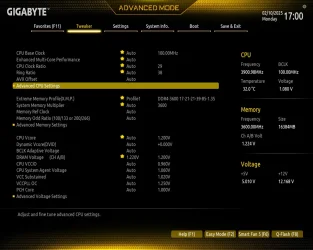
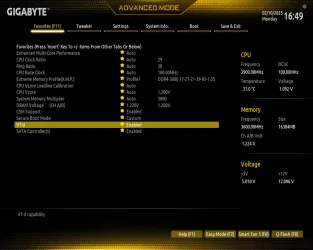
Interesting. can you post a screenshot ? press f12 to grab a bios screenshot onto a fat32 usb stick
 

My Computers My Computers

  • At a glance

    Win7,Win11i7-97002x16gb 3600mhz
    OS
    Win7,Win11
    Computer type
    PC/Desktop
    CPU
    i7-9700
    Motherboard
    gigabyte b365m ds3h
    Memory
    2x16gb 3600mhz
    Monitor(s) Displays
    benq gw2480
    PSU
    bequiet pure power 11 400CM
    Cooling
    cryorig m9i
  • At a glance

    win7,win11i5-84002x8gb 3200
    Operating System
    win7,win11
    Computer type
    PC/Desktop
    CPU
    i5-8400
    Motherboard
    gigabyte b365m ds3h
    Memory
    2x8gb 3200
    PSU
    xfx pro 450
Interesting. can you post a screenshot ? press f12 to grab a bios screenshot onto a fat32 usb stick
I thought I had the "Memory Integrity" thing sorted, but I fooled myself.
My Windows Security Icon shows "Actions Recommended.
Then in Device Security, it shows "Memory Integrity" as Disabled.
It lets me Enable it, then suggests a Reboot.
When I reboot, it's back to the Disabled "Memory Integrity".
Something in the Windows 11 bootup is disabling it.
I clearly have Hardware Visualisation on my Mainboard, or it wouldn't let me Enable "Mem. Integ".
At a loss now how to fix it, unless there's a Driver interfering with it.
 

Attachments

  • BiosFavorites.webp
    BiosFavorites.webp
    80.7 KB · Views: 1
  • BiosTweaker.webp
    BiosTweaker.webp
    89.3 KB · Views: 1
  • BiosTweakerAdvCPU.webp
    BiosTweakerAdvCPU.webp
    82.9 KB · Views: 1
  • BiosBootFastBoot Disabled.webp
    BiosBootFastBoot Disabled.webp
    82.5 KB · Views: 1

My Computer My Computer

At a glance

Windows 11 HomeIntel Core i5 p400FKingston HyperX Fury 16GB (2x8) DDR4-2400NVidia GeForce GTX 1050 Ti (4GB)
OS
Windows 11 Home
Computer type
PC/Desktop
Manufacturer/Model
Homebuilt
CPU
Intel Core i5 p400F
Motherboard
Gigabyte Z390-UD rev.1
Memory
Kingston HyperX Fury 16GB (2x8) DDR4-2400
Graphics Card(s)
NVidia GeForce GTX 1050 Ti (4GB)
Sound Card
Onboard
Monitor(s) Displays
27" Samsung
Screen Resolution
1920 x 1080
Hard Drives
Samsun SSD 970 EVO 500GB
PSU
450W Corsair
Case
Coolermaster Masterbox MB530P
Cooling
Fans x 6
Keyboard
Logitech wireless
Mouse
Logitech wireless
Internet Speed
25mbps
Browser
Edge, Opera
Antivirus
Windows Defender, Malwarebytes (free)
VT-D IS enabled in my BIOS, so it must be the Incompatible Driver issue stopping Memory Integrity from staying Enabled.
Any ideas what I can use to dind the suspect drivers?
Thanks again in advance for everyone's help so far :)
Hi there
VT-D is IOMMU enablement which allows passthru of pci devices such as ethernet controllers, graphics cards and HDD controllers which is unlikely to be enabled if VT-X isn't also - so it's possible VT-X on that machine might be permanently enabled without having any user settings to set it up. I'd be surprised if the MOBO didn't support VT-X -- INTEL CPU's have had that support available easily for the last 10 to 12 years !! (or longer).

Some Mobos also never separated VT-X and VT-D - often only showing VT-D as the option even though this included VT-X. As for the W11 Memory integrity thing -- I'd just forget it -- sometimes even on the same machine WD won't eneble it even if the switch in settings turns it on, but is off after a re-boot, othertimes it's on. If you can boot a W11 VM I'd just forget about it. !!

Cheers
jimbo
 

My Computer My Computer

At a glance

Windows XP,11 Linux Fedora Rawhide pre-releas...2 X Intel i7
OS
Windows XP,11 Linux Fedora Rawhide pre-release 45
Computer type
PC/Desktop
CPU
2 X Intel i7
Screen Resolution
4KUHD X 2
Hi there
VT-D is IOMMU enablement which allows passthru of pci devices such as ethernet controllers, graphics cards and HDD controllers which is unlikely to be enabled if VT-X isn't also - so it's possible VT-X on that machine might be permanently enabled without having any user settings to set it up. I'd be surprised if the MOBO didn't support VT-X -- INTEL CPU's have had that support available easily for the last 10 to 12 years !! (or longer).

Some Mobos also never separated VT-X and VT-D - often only showing VT-D as the option even though this included VT-X. As for the W11 Memory integrity thing -- I'd just forget it -- sometimes even on the same machine WD won't eneble it even if the switch in settings turns it on, but is off after a re-boot, othertimes it's on. If you can boot a W11 VM I'd just forget about it. !!

Cheers
jimbo
Thanks again everyone for all your input.
I'll just go back to "DISMISS" as the option now, that's a lot easier than trying to work out why :)
 

My Computer My Computer

At a glance

Windows 11 HomeIntel Core i5 p400FKingston HyperX Fury 16GB (2x8) DDR4-2400NVidia GeForce GTX 1050 Ti (4GB)
OS
Windows 11 Home
Computer type
PC/Desktop
Manufacturer/Model
Homebuilt
CPU
Intel Core i5 p400F
Motherboard
Gigabyte Z390-UD rev.1
Memory
Kingston HyperX Fury 16GB (2x8) DDR4-2400
Graphics Card(s)
NVidia GeForce GTX 1050 Ti (4GB)
Sound Card
Onboard
Monitor(s) Displays
27" Samsung
Screen Resolution
1920 x 1080
Hard Drives
Samsun SSD 970 EVO 500GB
PSU
450W Corsair
Case
Coolermaster Masterbox MB530P
Cooling
Fans x 6
Keyboard
Logitech wireless
Mouse
Logitech wireless
Internet Speed
25mbps
Browser
Edge, Opera
Antivirus
Windows Defender, Malwarebytes (free)
Back
Top Bottom




