GPU Preemption


shoober420

Well-known member
Member
VIP
Local time
7:26 PM
Posts
231
OS
Windows 11 27965
Ive read conflicting results as to whether GPU Premption increases or decrease latency / FPS. i decided to make scripts to enable or disable GPU Preemption. There is this one script from AlchemyTweaks.


This only includes one registry key out of numerous others ive found pertaining to GPU Preemption. the script ive put together includes many more.


i also need to add other mentions of GPU Preemption from the main GPUTweaks script.


my question is, does anyone know if these registry keys involve GPU Preemption and should they also be added to enable and disable GPU Preemption?

Code:
reg add "HKLM\SYSTEM\CurrentControlSet\Control\GraphicsDrivers\Power" /v "ComputePreemption" /t REG_DWORD /d "0" /f
reg add "HKLM\SYSTEM\CurrentControlSet\Control\GraphicsDrivers\Power" /v "DisableCudaContextPreemption" /t REG_DWORD /d "1" /f
reg add "HKLM\SYSTEM\CurrentControlSet\Control\GraphicsDrivers\Power" /v "EnableAsyncMidBufferPreemption" /t REG_DWORD /d "0" /f
reg add "HKLM\SYSTEM\CurrentControlSet\Control\GraphicsDrivers\Power" /v "EnableCEPreemption" /t REG_DWORD /d "0" /f
reg add "HKLM\SYSTEM\CurrentControlSet\Control\GraphicsDrivers\Power" /v "EnableMidBufferPreemption" /t REG_DWORD /d "0" /f
reg add "HKLM\SYSTEM\CurrentControlSet\Control\GraphicsDrivers\Power" /v "EnableMidBufferPreemptionForHighTdrTimeout" /t REG_DWORD /d "0" /f
reg add "HKLM\SYSTEM\CurrentControlSet\Control\GraphicsDrivers\Power" /v "EnableMidGfxPreemption" /t REG_DWORD /d "0" /f
reg add "HKLM\SYSTEM\CurrentControlSet\Control\GraphicsDrivers\Power" /v "EnableMidGfxPreemptionVGPU" /t REG_DWORD /d "0" /f
reg add "HKLM\SYSTEM\CurrentControlSet\Control\GraphicsDrivers\Power" /v "EnableSCGMidBufferPreemption" /t REG_DWORD /d "0" /f
reg add "HKLM\SYSTEM\CurrentControlSet\Control\GraphicsDrivers\Power" /v "PerfAnalyzeMidBufferPreemption" /t REG_DWORD /d "0" /f

they are under the "GraphicsDrivers" string, so they should naturally effect GPU Preemption, meaning it could possibly effect GPU Preemption. are those keys types of GPU Preemption? does anyone happen to know if those are needed to be enabled as well for GPU Preemption to work?

is there also a way to test if GPU Premption is on or off?
 
Last edited:

My Computer

System One

  • OS
    Windows 11 27965
    Computer type
    PC/Desktop
    CPU
    Intel i7 7700 @4.0ghz
    Memory
    64gb DDR4
    Graphics Card(s)
    Radeon RX 5500 XT
    Sound Card
    Topping D50s
    Hard Drives
    NVMe
    PSU
    Corsair
    Keyboard
    Stelseries G6v2
    Mouse
    Zowie EC2
    Other Info
    https://www.youtube.com/shoober420
Google says GPU Preemption improves responsiveness while multitasking. I don't see how this would improve performance when playing a single game at the time, unless you render some HD videos in the background while playing the game. But this would interrupt the game processing to pay attention to the rendering, so it would actually reduce performance, not boost it!

From Google AI:

GPU preemption is a technique that allows the operating system to interrupt a currently running graphics processing unit (GPU) task and switch to another task, similar to how CPU multitasking works. This capability is crucial for enabling features like improved responsiveness, fairness, and quality of service in multi-application and multi-user GPU environments.

Here's a breakdown of GPU preemption:
What it is:
  • Preemption is the act of temporarily suspending a currently running task to execute a higher-priority task.

  • In the context of GPUs, this means interrupting a GPU kernel or workload to switch to another one.

  • This is typically managed by the GPU scheduler, which decides when and how to preempt tasks.
Why it's important:

  • Improved Responsiveness:
    Preemption allows high-priority tasks to be executed more quickly, reducing latency and improving the user experience.
  • Resource Sharing:
    It enables efficient sharing of the GPU among multiple applications, preventing one application from monopolizing the resource.
  • Fairness and Quality of Service:
    Preemption helps ensure that all applications get a fair share of GPU resources and that critical tasks are prioritized.
How it works:
  • Context Switching:
    Preemption involves saving the state of the current GPU task (its context) and loading the context of the new task.

  • Timeslicing:
    Some preemption mechanisms use timeslicing, where each task gets a fixed amount of GPU time before being preempted.

  • Wait-based vs. Reset-based:
    Some strategies wait for the current task to finish before switching, while others can interrupt and reset the task, requiring it to be idempotent (meaning it can be restarted without issues).

  • Hardware and Software Support:
    Preemption requires both hardware support (e.g., mechanisms for context switching) and software support (e.g., GPU drivers and scheduling algorithms).
Examples:
  • Windows WDDM 1.2:
    Introduced a more robust GPU preemption model, ensuring that preemption requests are handled before a Timeout Detection and Recovery (TDR) process.

  • Real-time Scheduling:
    Research focuses on enabling preemptive scheduling for real-time tasks on GPUs, allowing for predictable and timely execution of critical workloads.

  • Multiprogrammed Workloads:
    Work is being done to extend GPU architectures to support efficient preemption in environments where multiple applications are running concurrently.
Challenges:
  • Overhead: Preemption can introduce overhead due to the context switching process.

  • Complexity: Implementing preemption can be complex, requiring careful design of scheduling algorithms and synchronization mechanisms.

  • Idempotency: Reset-based preemption requires tasks to be idempotent, which may not always be the case.
In summary, GPU preemption is a critical feature for modern GPU systems, enabling efficient resource sharing, improved responsiveness, and better support for diverse workloads.
 

My Computers

System One System Two

  • OS
    Windows 11 Pro 23H2 (5699), 25H2 (8655)
    Computer type
    Laptop
    Manufacturer/Model
    Acer Extensa 5630EZ
    CPU
    Mobile DualCore Intel Core 2 Duo T7250, 2000 MHz
    Motherboard
    Acer Extensa 5630
    Memory
    4GB
    Graphics Card(s)
    Mobile Intel(R) GMA 4500M (Mobile 4 series)
    Sound Card
    Realtek ALC268 @ Intel 82801IB ICH9 - High Definition Audio Controller
    Monitor(s) Displays
    1
    Screen Resolution
    1280x800
    Hard Drives
    Samsung SSD 850 EVO 250GB SATA Device (250 GB, SATA-III)
    Internet Speed
    VDSL 50 Mbps
    Browser
    MICROSOFT EDGE
    Antivirus
    WINDOWS DEFENDER
    Other Info
    Legacy MBR installation, no TPM, no Secure Boot, no WDDM 2.0 graphics drivers, no SSE4.2, cannot get more unsupported ;) This is only my test laptop. I had installed Windows 11 here before upgrading my main PC. For my main PC I use everyday see my 2nd system specs.
  • Operating System
    Windows 11 Pro v25H2 (build 26200.8655)
    Computer type
    PC/Desktop
    Manufacturer/Model
    Custom-built PC
    CPU
    Intel Core-i7 3770 3.40GHz s1155 (3rd generation)
    Motherboard
    Asus P8H61 s1155 ATX
    Memory
    2x Kingston Hyper-X Blu 8GB DDR3-1600
    Graphics card(s)
    GIGABYTE GeForce RTX 3050 WINDFORCE OC V2 6GB (GV-N3050WF2OCV2-6GD)
    Sound Card
    Realtek HD audio (ALC887)
    Monitor(s) Displays
    Sony Bravia KDL-19L4000 19" LCD TV via VGA
    Screen Resolution
    1440x900 32-bit 60Hz
    Hard Drives
    WD Blue SA510 2.5 1000GB SSD as system disk, Western Digital Caviar Purple 4TB SATA III (WD40PURZ) as second
    PSU
    Thermaltake Litepower RGB 550W Full Wired
    Case
    SUPERCASE MIDI-TOWER
    Cooling
    Deepcool Gamma Archer CPU cooler, 1x 8cm fan at the back
    Keyboard
    Mitsumi 101-key PS/2
    Mouse
    Sunnyline OptiEye PS/2
    Internet Speed
    100Mbps
    Browser
    Microsoft Edge, Mozilla Firefox
    Antivirus
    Microsoft Windows Defender
    Other Info
    Legacy BIOS (MBR) installation, no TPM, no Secure Boot, WDDM 3.0 graphics drivers, WEI score 7.4
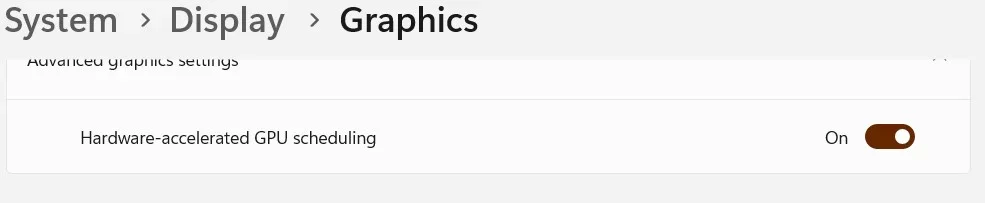
For some reason I thought it depended on

1.webp

but I was probably wrong.
 

My Computer

System One

  • OS
    Microsoft Windows 11 Home
    Computer type
    PC/Desktop
    Manufacturer/Model
    MSI MS-7D98
    CPU
    Intel Core i5-13490F
    Motherboard
    MSI B760 GAMING PLUS WIFI
    Memory
    2 x 16 Patriot Memory (PDP Systems) PSD516G560081 6400MT (32-37-37-74); 1.35V)
    Graphics Card(s)
    GIGABYTE GeForce RTX 4070 WINDFORCE OC 12G (GV-N4070WF3OC-12GD)
    Sound Card
    Bluetooth Аудио
    Monitor(s) Displays
    INNOCN 15K1F
    Screen Resolution
    1920 x 1080
    Hard Drives
    WD_BLACK SN770 250GB
    KINGSTON SNV2S1000G (ELFK0S.6)
    PSU
    Thermaltake Toughpower GF3 1000W
    Case
    CG560 - DeepCool
    Cooling
    ID-COOLING SE-224-XTS / 2 x 140Mm Fan - rear and top; 3 x 120Mm - front
    Keyboard
    Corsair K70 RGB TKL
    Mouse
    Corsair KATAR PRO XT
    Internet Speed
    100 Mbps
    Browser
    Firefox
    Antivirus
    Microsoft Defender Antivirus
    Other Info
    https://www.userbenchmark.com/UserRun/66553205
I would enable to show FPS on screen, then play a game with preemptive off. Then play the same game with preemptive on and compare results. Repeat test with 2-3 games to conclude if off or on is better.
 

My Computers

System One System Two

  • OS
    Windows 11 Pro 23H2 (5699), 25H2 (8655)
    Computer type
    Laptop
    Manufacturer/Model
    Acer Extensa 5630EZ
    CPU
    Mobile DualCore Intel Core 2 Duo T7250, 2000 MHz
    Motherboard
    Acer Extensa 5630
    Memory
    4GB
    Graphics Card(s)
    Mobile Intel(R) GMA 4500M (Mobile 4 series)
    Sound Card
    Realtek ALC268 @ Intel 82801IB ICH9 - High Definition Audio Controller
    Monitor(s) Displays
    1
    Screen Resolution
    1280x800
    Hard Drives
    Samsung SSD 850 EVO 250GB SATA Device (250 GB, SATA-III)
    Internet Speed
    VDSL 50 Mbps
    Browser
    MICROSOFT EDGE
    Antivirus
    WINDOWS DEFENDER
    Other Info
    Legacy MBR installation, no TPM, no Secure Boot, no WDDM 2.0 graphics drivers, no SSE4.2, cannot get more unsupported ;) This is only my test laptop. I had installed Windows 11 here before upgrading my main PC. For my main PC I use everyday see my 2nd system specs.
  • Operating System
    Windows 11 Pro v25H2 (build 26200.8655)
    Computer type
    PC/Desktop
    Manufacturer/Model
    Custom-built PC
    CPU
    Intel Core-i7 3770 3.40GHz s1155 (3rd generation)
    Motherboard
    Asus P8H61 s1155 ATX
    Memory
    2x Kingston Hyper-X Blu 8GB DDR3-1600
    Graphics card(s)
    GIGABYTE GeForce RTX 3050 WINDFORCE OC V2 6GB (GV-N3050WF2OCV2-6GD)
    Sound Card
    Realtek HD audio (ALC887)
    Monitor(s) Displays
    Sony Bravia KDL-19L4000 19" LCD TV via VGA
    Screen Resolution
    1440x900 32-bit 60Hz
    Hard Drives
    WD Blue SA510 2.5 1000GB SSD as system disk, Western Digital Caviar Purple 4TB SATA III (WD40PURZ) as second
    PSU
    Thermaltake Litepower RGB 550W Full Wired
    Case
    SUPERCASE MIDI-TOWER
    Cooling
    Deepcool Gamma Archer CPU cooler, 1x 8cm fan at the back
    Keyboard
    Mitsumi 101-key PS/2
    Mouse
    Sunnyline OptiEye PS/2
    Internet Speed
    100Mbps
    Browser
    Microsoft Edge, Mozilla Firefox
    Antivirus
    Microsoft Windows Defender
    Other Info
    Legacy BIOS (MBR) installation, no TPM, no Secure Boot, WDDM 3.0 graphics drivers, WEI score 7.4
For some reason I thought it depended on

View attachment 141461

but I was probably wrong.
it appears when googling that GPU scheduling does depend on GPU premption. thanks for the info

ive updated the GPU Preemption scripts and will test in CS2 shortly. ill also test with HAGS on and off as well
 

My Computer

System One

  • OS
    Windows 11 27965
    Computer type
    PC/Desktop
    CPU
    Intel i7 7700 @4.0ghz
    Memory
    64gb DDR4
    Graphics Card(s)
    Radeon RX 5500 XT
    Sound Card
    Topping D50s
    Hard Drives
    NVMe
    PSU
    Corsair
    Keyboard
    Stelseries G6v2
    Mouse
    Zowie EC2
    Other Info
    https://www.youtube.com/shoober420
i had no FPS increase when enabling GPU scheduling and GPU Preemption. i do have a Radeon 5500 XT card so having a new Radeon or Geforce card might see benefits. i still decided to leave it on since its supposed to increase perferormance and lower latency

i did find this though. according to this thread, the GraphicsPerfSvc is required for GPU Scheduling. does anyone know of this is true or a troll post?


My Computer

System One

  • OS
    Windows 11 27965
    Computer type
    PC/Desktop
    CPU
    Intel i7 7700 @4.0ghz
    Memory
    64gb DDR4
    Graphics Card(s)
    Radeon RX 5500 XT
    Sound Card
    Topping D50s
    Hard Drives
    NVMe
    PSU
    Corsair
    Keyboard
    Stelseries G6v2
    Mouse
    Zowie EC2
    Other Info
    https://www.youtube.com/shoober420
If you cannot currently afford a faster card you might be able to slightly overclock it (with caution, don't overdo it) to boost performance. I recently upgraded from nVidia GTX 1050 Ti 4GB GDDR5 to nVidia RTX 3050 6GB GDDR6 and it has a huge difference, even if it is not working at maximum speed due to my PCIe 3.0 version (the card is PCIe 4.0).
 

My Computers

System One System Two

  • OS
    Windows 11 Pro 23H2 (5699), 25H2 (8655)
    Computer type
    Laptop
    Manufacturer/Model
    Acer Extensa 5630EZ
    CPU
    Mobile DualCore Intel Core 2 Duo T7250, 2000 MHz
    Motherboard
    Acer Extensa 5630
    Memory
    4GB
    Graphics Card(s)
    Mobile Intel(R) GMA 4500M (Mobile 4 series)
    Sound Card
    Realtek ALC268 @ Intel 82801IB ICH9 - High Definition Audio Controller
    Monitor(s) Displays
    1
    Screen Resolution
    1280x800
    Hard Drives
    Samsung SSD 850 EVO 250GB SATA Device (250 GB, SATA-III)
    Internet Speed
    VDSL 50 Mbps
    Browser
    MICROSOFT EDGE
    Antivirus
    WINDOWS DEFENDER
    Other Info
    Legacy MBR installation, no TPM, no Secure Boot, no WDDM 2.0 graphics drivers, no SSE4.2, cannot get more unsupported ;) This is only my test laptop. I had installed Windows 11 here before upgrading my main PC. For my main PC I use everyday see my 2nd system specs.
  • Operating System
    Windows 11 Pro v25H2 (build 26200.8655)
    Computer type
    PC/Desktop
    Manufacturer/Model
    Custom-built PC
    CPU
    Intel Core-i7 3770 3.40GHz s1155 (3rd generation)
    Motherboard
    Asus P8H61 s1155 ATX
    Memory
    2x Kingston Hyper-X Blu 8GB DDR3-1600
    Graphics card(s)
    GIGABYTE GeForce RTX 3050 WINDFORCE OC V2 6GB (GV-N3050WF2OCV2-6GD)
    Sound Card
    Realtek HD audio (ALC887)
    Monitor(s) Displays
    Sony Bravia KDL-19L4000 19" LCD TV via VGA
    Screen Resolution
    1440x900 32-bit 60Hz
    Hard Drives
    WD Blue SA510 2.5 1000GB SSD as system disk, Western Digital Caviar Purple 4TB SATA III (WD40PURZ) as second
    PSU
    Thermaltake Litepower RGB 550W Full Wired
    Case
    SUPERCASE MIDI-TOWER
    Cooling
    Deepcool Gamma Archer CPU cooler, 1x 8cm fan at the back
    Keyboard
    Mitsumi 101-key PS/2
    Mouse
    Sunnyline OptiEye PS/2
    Internet Speed
    100Mbps
    Browser
    Microsoft Edge, Mozilla Firefox
    Antivirus
    Microsoft Windows Defender
    Other Info
    Legacy BIOS (MBR) installation, no TPM, no Secure Boot, WDDM 3.0 graphics drivers, WEI score 7.4
Ive read conflicting results as to whether GPU Premption increases or decrease latency / FPS. i decided to make scripts to enable or disable GPU Preemption. There is this one script from AlchemyTweaks.


This only includes one registry key out of numerous others ive found pertaining to GPU Preemption. the script ive put together includes many more.


i also need to add other mentions of GPU Preemption from the main GPUTweaks script.


my question is, does anyone know if these registry keys involve GPU Preemption and should they also be added to enable and disable GPU Preemption?

Code:
reg add "HKLM\SYSTEM\CurrentControlSet\Control\GraphicsDrivers\Power" /v "ComputePreemption" /t REG_DWORD /d "0" /f
reg add "HKLM\SYSTEM\CurrentControlSet\Control\GraphicsDrivers\Power" /v "DisableCudaContextPreemption" /t REG_DWORD /d "1" /f
reg add "HKLM\SYSTEM\CurrentControlSet\Control\GraphicsDrivers\Power" /v "EnableAsyncMidBufferPreemption" /t REG_DWORD /d "0" /f
reg add "HKLM\SYSTEM\CurrentControlSet\Control\GraphicsDrivers\Power" /v "EnableCEPreemption" /t REG_DWORD /d "0" /f
reg add "HKLM\SYSTEM\CurrentControlSet\Control\GraphicsDrivers\Power" /v "EnableMidBufferPreemption" /t REG_DWORD /d "0" /f
reg add "HKLM\SYSTEM\CurrentControlSet\Control\GraphicsDrivers\Power" /v "EnableMidBufferPreemptionForHighTdrTimeout" /t REG_DWORD /d "0" /f
reg add "HKLM\SYSTEM\CurrentControlSet\Control\GraphicsDrivers\Power" /v "EnableMidGfxPreemption" /t REG_DWORD /d "0" /f
reg add "HKLM\SYSTEM\CurrentControlSet\Control\GraphicsDrivers\Power" /v "EnableMidGfxPreemptionVGPU" /t REG_DWORD /d "0" /f
reg add "HKLM\SYSTEM\CurrentControlSet\Control\GraphicsDrivers\Power" /v "EnableSCGMidBufferPreemption" /t REG_DWORD /d "0" /f
reg add "HKLM\SYSTEM\CurrentControlSet\Control\GraphicsDrivers\Power" /v "PerfAnalyzeMidBufferPreemption" /t REG_DWORD /d "0" /f

they are under the "GraphicsDrivers" string, so they should naturally effect GPU Preemption, meaning it could possibly effect GPU Preemption. are those keys types of GPU Preemption? does anyone happen to know if those are needed to be enabled as well for GPU Preemption to work?

is there also a way to test if GPU Premption is on or off?
 

My Computer

System One

  • OS
    Windows 11 Pro
    Computer type
    PC/Desktop
    Manufacturer/Model
    Gigabyte
    CPU
    Intel i5 10400f ( Frequency: 3.98GHz )
    Motherboard
    Gigabyte Z590M UD
    Memory
    G.Skill Ripjaws V 16GB DDR4 RAM ( Frequency 3200MHz with XMP )
    Graphics Card(s)
    Gigabyte RX 5700 XTX OC EDITION
    Sound Card
    Motherboard's
    Monitor(s) Displays
    LG 27GN600-B IPS HDR Gaming Monitor 27" FHD 1920x1080 144Hz
    Screen Resolution
    1920x1080
    Hard Drives
    Samsung 980 Pro SSD 500GB M.2 NVMe PCI Express 4.0

    Seagate Barracuda 1TB HDD
    PSU
    Be Quiet System Power 10 750W
    Case
    Cougar MX410 Mesh-G RGB Gaming Midi Tower
    Cooling
    6 ARGB FANS ( NO WATER COOLING )
    Keyboard
    Hyperx Alloy fps pro
    Mouse
    Logitech g402
    Internet Speed
    Router with sim card (80down - 15 up)
    Browser
    Microsoft Edge
    Antivirus
    Symantec Endpoint Protection
I tested
Code:
reg add "HKLM\SYSTEM\CurrentControlSet\Control\GraphicsDrivers\Power" /v "ComputePreemption" /t REG_DWORD /d "0" /f<br>reg add "HKLM\SYSTEM\CurrentControlSet\Control\GraphicsDrivers\Power" /v "DisableCudaContextPreemption" /t REG_DWORD /d "1" /f<br>reg add "HKLM\SYSTEM\CurrentControlSet\Control\GraphicsDrivers\Power" /v "EnableAsyncMidBufferPreemption" /t REG_DWORD /d "0" /f<br>reg add "HKLM\SYSTEM\CurrentControlSet\Control\GraphicsDrivers\Power" /v "EnableCEPreemption" /t REG_DWORD /d "0" /f<br>reg add "HKLM\SYSTEM\CurrentControlSet\Control\GraphicsDrivers\Power" /v "EnableMidBufferPreemption" /t REG_DWORD /d "0" /f<br>reg add "HKLM\SYSTEM\CurrentControlSet\Control\GraphicsDrivers\Power" /v "EnableMidBufferPreemptionForHighTdrTimeout" /t REG_DWORD /d "0" /f<br>reg add "HKLM\SYSTEM\CurrentControlSet\Control\GraphicsDrivers\Power" /v "EnableMidGfxPreemption" /t REG_DWORD /d "0" /f<br>reg add "HKLM\SYSTEM\CurrentControlSet\Control\GraphicsDrivers\Power" /v "EnableMidGfxPreemptionVGPU" /t REG_DWORD /d "0" /f<br>reg add "HKLM\SYSTEM\CurrentControlSet\Control\GraphicsDrivers\Power" /v "EnableSCGMidBufferPreemption" /t REG_DWORD /d "0" /f<br>reg add "HKLM\SYSTEM\CurrentControlSet\Control\GraphicsDrivers\Power" /v "PerfAnalyzeMidBufferPreemption" /t REG_DWORD /d "0" /f`
From my perspective, I observed no measurable difference in FPS, latency, or related metrics. There may be internal GPU-level changes detectable through a deeper analysis (e.g., GPUView or similar tooling), but in my assessment, these do not deliver the performance improvements one might expect. The root cause is likely elsewhere. Υou may want to test ForcePreemptionAware. Based on my own experimentation with this set of settings ultimately keeping preemption enabled this DWORD showed some positive effect.
 

Attachments

My Computer

System One

  • OS
    Windows 11 Pro
    Computer type
    PC/Desktop
    Manufacturer/Model
    Gigabyte
    CPU
    Intel i5 10400f ( Frequency: 3.98GHz )
    Motherboard
    Gigabyte Z590M UD
    Memory
    G.Skill Ripjaws V 16GB DDR4 RAM ( Frequency 3200MHz with XMP )
    Graphics Card(s)
    Gigabyte RX 5700 XTX OC EDITION
    Sound Card
    Motherboard's
    Monitor(s) Displays
    LG 27GN600-B IPS HDR Gaming Monitor 27" FHD 1920x1080 144Hz
    Screen Resolution
    1920x1080
    Hard Drives
    Samsung 980 Pro SSD 500GB M.2 NVMe PCI Express 4.0

    Seagate Barracuda 1TB HDD
    PSU
    Be Quiet System Power 10 750W
    Case
    Cougar MX410 Mesh-G RGB Gaming Midi Tower
    Cooling
    6 ARGB FANS ( NO WATER COOLING )
    Keyboard
    Hyperx Alloy fps pro
    Mouse
    Logitech g402
    Internet Speed
    Router with sim card (80down - 15 up)
    Browser
    Microsoft Edge
    Antivirus
    Symantec Endpoint Protection
I tested
Code:
reg add "HKLM\SYSTEM\CurrentControlSet\Control\GraphicsDrivers\Power" /v "ComputePreemption" /t REG_DWORD /d "0" /f<br>reg add "HKLM\SYSTEM\CurrentControlSet\Control\GraphicsDrivers\Power" /v "DisableCudaContextPreemption" /t REG_DWORD /d "1" /f<br>reg add "HKLM\SYSTEM\CurrentControlSet\Control\GraphicsDrivers\Power" /v "EnableAsyncMidBufferPreemption" /t REG_DWORD /d "0" /f<br>reg add "HKLM\SYSTEM\CurrentControlSet\Control\GraphicsDrivers\Power" /v "EnableCEPreemption" /t REG_DWORD /d "0" /f<br>reg add "HKLM\SYSTEM\CurrentControlSet\Control\GraphicsDrivers\Power" /v "EnableMidBufferPreemption" /t REG_DWORD /d "0" /f<br>reg add "HKLM\SYSTEM\CurrentControlSet\Control\GraphicsDrivers\Power" /v "EnableMidBufferPreemptionForHighTdrTimeout" /t REG_DWORD /d "0" /f<br>reg add "HKLM\SYSTEM\CurrentControlSet\Control\GraphicsDrivers\Power" /v "EnableMidGfxPreemption" /t REG_DWORD /d "0" /f<br>reg add "HKLM\SYSTEM\CurrentControlSet\Control\GraphicsDrivers\Power" /v "EnableMidGfxPreemptionVGPU" /t REG_DWORD /d "0" /f<br>reg add "HKLM\SYSTEM\CurrentControlSet\Control\GraphicsDrivers\Power" /v "EnableSCGMidBufferPreemption" /t REG_DWORD /d "0" /f<br>reg add "HKLM\SYSTEM\CurrentControlSet\Control\GraphicsDrivers\Power" /v "PerfAnalyzeMidBufferPreemption" /t REG_DWORD /d "0" /f`
From my perspective, I observed no measurable difference in FPS, latency, or related metrics. There may be internal GPU-level changes detectable through a deeper analysis (e.g., GPUView or similar tooling), but in my assessment, these do not deliver the performance improvements one might expect. The root cause is likely elsewhere. Υou may want to test ForcePreemptionAware. Based on my own experimentation with this set of settings ultimately keeping preemption enabled this DWORD showed some positive effect.
In my PC, the only entry where Preemtion appears in the registry is at "Computer\HKEY_LOCAL_MACHINE\SYSTEM\ControlSet001\Control\GraphicsDrivers\Scheduler" REG_DWORD EnablePreemtion 0x00000001(1) or 0x00000000(0)

Running Windows 11 Pro 25h2
 

My Computer

System One

  • OS
    Windows 11 IoT Enterprise LTSC Evaluation + Atlas Playbook + Custom Tweaks
    Computer type
    PC/Desktop
    Manufacturer/Model
    Custom
    CPU
    AMD Ryzen 5 5600G with Radeon Graphics
    Motherboard
    Asus Prime 5600M-K
    Memory
    G.Skill SK Hynix F4-2400C15-16GFXR DDR4 (UDIMM) 2400 (1200MHz) 2x16Gb
    Graphics Card(s)
    GIGABYTE RTX 3060 GAMING OC Rev. 2.0 / AMD Radeon Graphics 448SP
    Monitor(s) Displays
    LG 32GN500B-AEU - Monitor Gaming LG UltraGear (Panel VA: 1920x1080p, 16:9, 300 cd/m², 3000:1, 165Hz, 5ms (MBR 1ms)); diag. 80,1cm; entradas: DP x1, HDMI x2; AMD Freesync Premium & G-Sync, HDR10, 165Hz / BenQ Zowie eSports XL2430 144Hz AMD Freesync
    Screen Resolution
    1920x1080p
    Hard Drives
    WD Blue SN570 500GB
    Samsung SSD 850 EVO 500GB
    ST1000DM003-1ER162
    Case
    Nfortec Azir Black PC Case
    Cooling
    Mars Gaming ML-PRO120 Liquid Cooler
    Keyboard
    Epomaker SKYLOONG GK61 SK61 RGB Gateron Optical Red 1000 Hz -1ms Latency / Razer BlackWidow Chroma Mechanical Razer Green
    Mouse
    Razer Naga Trinity -2.9 Latency (https://www.rtings.com/mouse/reviews/razer/naga-trinity)
    Internet Speed
    1Gb fiber optic ethernet
    Browser
    Edge Debloated
    Other Info
    Razer Kraken V3 Hypersense THX 7.1
    Mars Gaming MWPRO Black Webcam Full HD Light Ring
    Mars Gaming MSDUOW RGB Speakers/Soundbar
    Razer Gigantus V2 Large
Back
Top Bottom