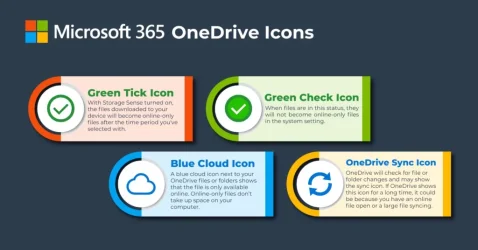
Solved Green Checkmarks On Desktop Shortcuts - But the OneDrive App is Uninstalled


BulldogX

Member
Local time
7:51 PM
Posts
26
OS
Windows 11
As others have experienced, I started to see green checkmarks on my desktop shortcuts:
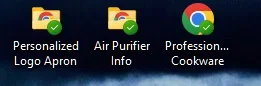
Screenshot 2024-12-11 135501.webp
Ordinarily, this means that the files are backed up on OneDrive. Problem: I uninstalled the OneDrive app more than a year ago. It has not returned (I checked.) Other times I see little file boxes:
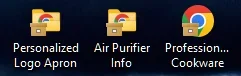
Screenshot 2024-12-11 140236.webp
Nice. But I don't have the OneDrive app. And there's more. I also see little green arrows:
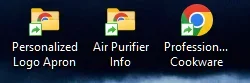
Screenshot 2024-12-11 140618.webp
Cute. This only happens to files on my desktop - nowhere else - and the overlays change from green checkmarks to file boxes to green arrows completely on their own, after about 30 seconds. Oh look, there's been another change. Now I'm back to the usual shortcut arrow.

Something is doing this on its own. It isn't harming anything, that I can tell. But it's weird. Can I get it to stop?

As always, thanks for your help.
 
Windows Build/Version
22631.4460

My Computer

System One

  • OS
    Windows 11
    Computer type
    PC/Desktop
    Manufacturer/Model
    Dell 8960
    CPU
    Intel Core i7-13700K Dell OEM
    Motherboard
    Dell OEM
    Memory
    32 GB DDR5 4800 MHz (Crucial)
    Graphics Card(s)
    NVIDIA GeForce GTX 1650 SUPER Dell OEM
    Monitor(s) Displays
    Dell P2719H
    Screen Resolution
    1920 x 1080
    Hard Drives
    NVMe M.2 PCI SSD
    PSU
    750 watts Dell OEM
    Case
    Dell OEM
    Cooling
    Tower air cooler Dell OEM
    Keyboard
    Logitech K360
    Mouse
    Logitech M330
    Internet Speed
    300 Mbps
    Browser
    Google Chrome
    Antivirus
    BitDefender
For things to work as they are supposed to, there is a proper series of events if one wants to uninstall Onedrive. One can't just arbitrarily uninstall onedrive without first turning off backup folder syncing and then unlinking from Onedrive.


PC first.
 

My Computers

System One System Two

  • OS
    Windows 11 Pro 25H2 26200.8655
    Computer type
    PC/Desktop
    Manufacturer/Model
    Dell Optiplex 7080
    CPU
    i9-10900 10 core 20 threads
    Motherboard
    DELL 0J37VM
    Memory
    32 gb
    Graphics Card(s)
    none-Intel UHD Graphics 630
    Sound Card
    Integrated Realtek
    Monitor(s) Displays
    Benq 27
    Screen Resolution
    2560x1440
    Hard Drives
    2x1tb Solidigm m.2 nvme /External drives 512gb Samsung m.2 sata+2tb Kingston m2.nvme
    PSU
    500w
    Case
    MT
    Cooling
    Dell Premium
    Keyboard
    Logitech wired
    Mouse
    Logitech wireless
    Internet Speed
    so slow I'm too embarrassed to tell
    Browser
    #1 Edge #2 Firefox
    Antivirus
    Defender+MWB Premium
  • Operating System
    Windows 11 Pro 24H2 26200.8457
    Computer type
    PC/Desktop
    Manufacturer/Model
    Beelink Mini PC SER5
    CPU
    AMD Ryzen 7 6800U
    Memory
    32 gb
    Graphics card(s)
    integrated
    Sound Card
    integrated
    Monitor(s) Displays
    Benq 27
    Screen Resolution
    2560x1440
    Hard Drives
    1TB Crucial nvme
    Keyboard
    Logitech wired
    Mouse
    Logitech wireless
    Internet Speed
    still too embarrassed to tell
    Browser
    Firefox
    Antivirus
    Defender
    Other Info
    System 3 is non compliant Dell 9020 i7-4770/24gb ram Win11 PRO 26200.8457
I have those green checkmarks as well and I don't use OneDrive either. However, I do use Google Drive.
 

My Computers

System One System Two

  • OS
    Win 11 Pro
    Computer type
    PC/Desktop
    Manufacturer/Model
    ABS (Newegg)
    CPU
    Intel(R) Core(TM) i5-10400F CPU @ 2.90GHz
    Motherboard
    ASUSTeK COMPUTER INC. PRIME B560M-A AC Rev 1.xx
    Memory
    Corsair VENGEANCE® LPX 32GB (2 x 16GB) DDR4 DRAM 3600MHz
    Graphics Card(s)
    MSI NVIDIA GeForce RTX 3060 Ti
    Sound Card
    Realtek Digital Output (Realtek(R) Audio)
    Monitor(s) Displays
    Viewsonic VS 2725 -2k 27"
    Screen Resolution
    2560x1440 100hz
    Hard Drives
    T-FORCE TM8FP800 1TB + a couple SATA SSDs
    PSU
    Gigabyte P650E
    Case
    DeepCool Matrexx 50 mid-tower
    Cooling
    Assassin X 120 Refined SE and 5 Thermalright TL-C12C case fans
    Keyboard
    Redragon K655 or K720
    Mouse
    CoolerMaster MM711 or Redragon M612
    Internet Speed
    Starlink: speed varies
    Browser
    Brave (default), Chrome (for ATG), Edge (for ATMS)
    Antivirus
    Windows Defender
    Other Info
    An assortment of "land fill, obsolete" computers all running Linux Mint 22 (at the moment).
  • Operating System
    Linux Mint 22.2 Cinnamon
    Computer type
    PC/Desktop
    Manufacturer/Model
    Hewlett-Packard HP ProDesk 600 G1 SFF
    CPU
    i5 4590
    Motherboard
    HP
    Memory
    16 GB
    Graphics card(s)
    Intel(R) HD Graphics 4600
    Sound Card
    Realtek High Definition Audio
    Monitor(s) Displays
    Generic 24"
    Hard Drives
    Samsung SSD 860 EVO 500GB
    Hitachi HUA722010CLA330
    WDC WD40EZAZ-19SF3B0
    PSU
    Factory 240 watt
    Case
    Low Profile Desktop
    Cooling
    Factory cooling
    Keyboard
    HP
    Mouse
    HP
    Internet Speed
    Starlink
    Browser
    Brave
    Antivirus
    ?
    Other Info
    This is my media server
For things to work as they are supposed to, there is a proper series of events if one wants to uninstall Onedrive. One can't just arbitrarily uninstall onedrive without first turning off backup folder syncing and then unlinking from Onedrive.


PC first.
I wonder why you presumed that I don't know how to properly uninstall the OneDrive app.
 

My Computer

System One

  • OS
    Windows 11
    Computer type
    PC/Desktop
    Manufacturer/Model
    Dell 8960
    CPU
    Intel Core i7-13700K Dell OEM
    Motherboard
    Dell OEM
    Memory
    32 GB DDR5 4800 MHz (Crucial)
    Graphics Card(s)
    NVIDIA GeForce GTX 1650 SUPER Dell OEM
    Monitor(s) Displays
    Dell P2719H
    Screen Resolution
    1920 x 1080
    Hard Drives
    NVMe M.2 PCI SSD
    PSU
    750 watts Dell OEM
    Case
    Dell OEM
    Cooling
    Tower air cooler Dell OEM
    Keyboard
    Logitech K360
    Mouse
    Logitech M330
    Internet Speed
    300 Mbps
    Browser
    Google Chrome
    Antivirus
    BitDefender
I have those green checkmarks as well and I don't use OneDrive either. However, I do use Google Drive.
I use Google Drive too, but not the Google Drive app. (I don't believe I've ever installed it.)

It might be Microsoft's doing, since they are insistent about people using their OneDrive. But I don't have the facts, so I can't put the blame on them.
 

My Computer

System One

  • OS
    Windows 11
    Computer type
    PC/Desktop
    Manufacturer/Model
    Dell 8960
    CPU
    Intel Core i7-13700K Dell OEM
    Motherboard
    Dell OEM
    Memory
    32 GB DDR5 4800 MHz (Crucial)
    Graphics Card(s)
    NVIDIA GeForce GTX 1650 SUPER Dell OEM
    Monitor(s) Displays
    Dell P2719H
    Screen Resolution
    1920 x 1080
    Hard Drives
    NVMe M.2 PCI SSD
    PSU
    750 watts Dell OEM
    Case
    Dell OEM
    Cooling
    Tower air cooler Dell OEM
    Keyboard
    Logitech K360
    Mouse
    Logitech M330
    Internet Speed
    300 Mbps
    Browser
    Google Chrome
    Antivirus
    BitDefender
I wonder why you presumed that I don't know how to properly uninstall the OneDrive app.

Because you haven’t stated otherwise and if these are actually Microsoft OneDrive Desktop Icon Overlays, it would indicate that you have not removed OneDrive correctly.

glasskuter freely gives her time to this forum and its members.

FYI we cannot presume to know what you know and what you don’t
When you ask for help here, you will get many questions according to your help request. Unless you cover all the bases, we’re left with filling in the blanks.
 

My Computers

System One System Two

  • OS
    Windows 11 Pro 25H2 Build 26200.8655
    Computer type
    PC/Desktop
    Manufacturer/Model
    Sin-built 2013
    CPU
    Intel(R) Core(TM) i7-4770K CPU @ 3.50GHz
    Motherboard
    ASUS ROG Maximus VI Formula
    Memory
    32.0 GB of I forget and the box is in storage.
    Graphics Card(s)
    Gigabyte nVidia GeForce GTX 1660 Super OC 6GB
    Sound Card
    Onboard thingy
    Monitor(s) Displays
    5 x LG 25MS500-B - 1 x 24MK430H-B - 1 x Wacom Pro 22" Touch Screen Tablet
    Screen Resolution
    All over the place
    Hard Drives
    Too many to list.
    OS on Samsung 1TB 870 QVO SATA
    PSU
    Silverstone 1500
    Case
    NZXT Phantom 820 Full-Tower Case
    Cooling
    Noctua NH-D15 Elite Class Dual Tower CPU Cooler / 6 x EziDIY 120mm / 2 x Corsair 140mm somethings / 1 x 140mm Thermaltake something / 2 x 200mm Corsair.
    Keyboard
    Corsair K95 / Logitech diNovo Edge Wireless
    Mouse
    Logitech: G402 / G502 / Mx Masters / Mx Air Cordless
    Internet Speed
    2000/500Mbps
    Browser
    All sorts
    Antivirus
    Kaspersky Premium
    Other Info
    ㅤㅤㅤㅤㅤㅤㅤㅤㅤㅤㅤㅤㅤㅤㅤㅤㅤㅤㅤㅤㅤㅤㅤㅤㅤㅤㅤㅤㅤㅤㅤㅤㅤㅤㅤㅤㅤㅤㅤㅤ⠀⠀⠀⠀⠀⠀⠀⠀⠀⠀
    TP-Link BE9300 WiFi 7 Bluetooth 5.4 (Archer TBE550E)
    TP-Link TX201 V1 2.5GB Lan

    Grandstream HT812 - VoIP
    ASUS DSL-AX82U - Mesh
    ASUS RT-AC68U - Mesh
    ASUS RT-BE88U Router

    Brother MFC-L2880DW Printer

    I’m on a horse.
  • Operating System
    Windows 11 Pro 25H2 Build 26200.8655
    Computer type
    Laptop
    Manufacturer/Model
    LENOVO Yoga 7 14IRL8 - 7i EVO OLED 14" Touchscreen i5 12 Core 16GB/512GB
    CPU
    Intel Core 12th Gen i5-1240P Processor (1.7 - 4.4GHz)
    Memory
    16GB LPDDR5 RAM
    Graphics card(s)
    Intel Iris Xe Graphics Processor
    Sound Card
    Optimized with Dolby Atmos®
    Screen Resolution
    QHD 2880 x 1800 OLED
    Hard Drives
    M.2 512GB
    Antivirus
    Defender / Malwarebytes
    Other Info
    …still on a horse.
Because you haven’t stated otherwise and if these are actually Microsoft OneDrive Desktop Icon Overlays, it would indicate that you have not removed OneDrive correctly.

glasskuter freely gives her time to this forum and its members.

FYI we cannot presume to know what you know and what you don’t
When you ask for help here, you will get many questions according to your help request. Unless you cover all the bases, we’re left with filling in the blanks.
If someone cannot presume to know what I know and what I don’t, then how about this:

"Perhaps you were unaware that there is a series of steps to perform before uninstalling the OneDrive app. There's more to it than uninstalling the app. If you were not aware, I will be glad to explain."

I've never received such rough treatment in this forum, so I'll say this is a one-off. Everyone has them, including me.
 

My Computer

System One

  • OS
    Windows 11
    Computer type
    PC/Desktop
    Manufacturer/Model
    Dell 8960
    CPU
    Intel Core i7-13700K Dell OEM
    Motherboard
    Dell OEM
    Memory
    32 GB DDR5 4800 MHz (Crucial)
    Graphics Card(s)
    NVIDIA GeForce GTX 1650 SUPER Dell OEM
    Monitor(s) Displays
    Dell P2719H
    Screen Resolution
    1920 x 1080
    Hard Drives
    NVMe M.2 PCI SSD
    PSU
    750 watts Dell OEM
    Case
    Dell OEM
    Cooling
    Tower air cooler Dell OEM
    Keyboard
    Logitech K360
    Mouse
    Logitech M330
    Internet Speed
    300 Mbps
    Browser
    Google Chrome
    Antivirus
    BitDefender
It’s not personal, the forum works. Go with the flow.
 

My Computers

System One System Two

  • OS
    Windows 11 Pro 25H2 Build 26200.8655
    Computer type
    PC/Desktop
    Manufacturer/Model
    Sin-built 2013
    CPU
    Intel(R) Core(TM) i7-4770K CPU @ 3.50GHz
    Motherboard
    ASUS ROG Maximus VI Formula
    Memory
    32.0 GB of I forget and the box is in storage.
    Graphics Card(s)
    Gigabyte nVidia GeForce GTX 1660 Super OC 6GB
    Sound Card
    Onboard thingy
    Monitor(s) Displays
    5 x LG 25MS500-B - 1 x 24MK430H-B - 1 x Wacom Pro 22" Touch Screen Tablet
    Screen Resolution
    All over the place
    Hard Drives
    Too many to list.
    OS on Samsung 1TB 870 QVO SATA
    PSU
    Silverstone 1500
    Case
    NZXT Phantom 820 Full-Tower Case
    Cooling
    Noctua NH-D15 Elite Class Dual Tower CPU Cooler / 6 x EziDIY 120mm / 2 x Corsair 140mm somethings / 1 x 140mm Thermaltake something / 2 x 200mm Corsair.
    Keyboard
    Corsair K95 / Logitech diNovo Edge Wireless
    Mouse
    Logitech: G402 / G502 / Mx Masters / Mx Air Cordless
    Internet Speed
    2000/500Mbps
    Browser
    All sorts
    Antivirus
    Kaspersky Premium
    Other Info
    ㅤㅤㅤㅤㅤㅤㅤㅤㅤㅤㅤㅤㅤㅤㅤㅤㅤㅤㅤㅤㅤㅤㅤㅤㅤㅤㅤㅤㅤㅤㅤㅤㅤㅤㅤㅤㅤㅤㅤㅤ⠀⠀⠀⠀⠀⠀⠀⠀⠀⠀
    TP-Link BE9300 WiFi 7 Bluetooth 5.4 (Archer TBE550E)
    TP-Link TX201 V1 2.5GB Lan

    Grandstream HT812 - VoIP
    ASUS DSL-AX82U - Mesh
    ASUS RT-AC68U - Mesh
    ASUS RT-BE88U Router

    Brother MFC-L2880DW Printer

    I’m on a horse.
  • Operating System
    Windows 11 Pro 25H2 Build 26200.8655
    Computer type
    Laptop
    Manufacturer/Model
    LENOVO Yoga 7 14IRL8 - 7i EVO OLED 14" Touchscreen i5 12 Core 16GB/512GB
    CPU
    Intel Core 12th Gen i5-1240P Processor (1.7 - 4.4GHz)
    Memory
    16GB LPDDR5 RAM
    Graphics card(s)
    Intel Iris Xe Graphics Processor
    Sound Card
    Optimized with Dolby Atmos®
    Screen Resolution
    QHD 2880 x 1800 OLED
    Hard Drives
    M.2 512GB
    Antivirus
    Defender / Malwarebytes
    Other Info
    …still on a horse.
I wonder why you presumed that I don't know how to properly uninstall the OneDrive app.
Because you did not tell us. This is a help forum. 95% of the folks who ask for help with Onedrive think all they have to do is uninstall Onedrive. (Don't believe me. Check the many, many posts about it) We can't presume to know anything unless you tell us up front. Therefore, we have no alternative but to presume you don't know it. Our answers are given based on the info WE ARE GIVEN.
All your title said was "But the OneDrive App is Uninstalled".
I've never received such rough treatment in this forum,
Rough treatment??? How so? I stated facts. @antspants stated facts. I would have answered anyone else the exact same way. If there's been any assumption on my part, it's that we're all adults and can handle facts without getting overly sensitive about them. Guess I was wrong.
 

My Computers

System One System Two

  • OS
    Windows 11 Pro 25H2 26200.8655
    Computer type
    PC/Desktop
    Manufacturer/Model
    Dell Optiplex 7080
    CPU
    i9-10900 10 core 20 threads
    Motherboard
    DELL 0J37VM
    Memory
    32 gb
    Graphics Card(s)
    none-Intel UHD Graphics 630
    Sound Card
    Integrated Realtek
    Monitor(s) Displays
    Benq 27
    Screen Resolution
    2560x1440
    Hard Drives
    2x1tb Solidigm m.2 nvme /External drives 512gb Samsung m.2 sata+2tb Kingston m2.nvme
    PSU
    500w
    Case
    MT
    Cooling
    Dell Premium
    Keyboard
    Logitech wired
    Mouse
    Logitech wireless
    Internet Speed
    so slow I'm too embarrassed to tell
    Browser
    #1 Edge #2 Firefox
    Antivirus
    Defender+MWB Premium
  • Operating System
    Windows 11 Pro 24H2 26200.8457
    Computer type
    PC/Desktop
    Manufacturer/Model
    Beelink Mini PC SER5
    CPU
    AMD Ryzen 7 6800U
    Memory
    32 gb
    Graphics card(s)
    integrated
    Sound Card
    integrated
    Monitor(s) Displays
    Benq 27
    Screen Resolution
    2560x1440
    Hard Drives
    1TB Crucial nvme
    Keyboard
    Logitech wired
    Mouse
    Logitech wireless
    Internet Speed
    still too embarrassed to tell
    Browser
    Firefox
    Antivirus
    Defender
    Other Info
    System 3 is non compliant Dell 9020 i7-4770/24gb ram Win11 PRO 26200.8457

It’s a little hard to see in your screenshots, but from what I can tell, I don’t believe these are OneDrive icon overlays.

As far as I know (I could be wrong) the solid green circle Onedrive Overlay is as follows. Note the darker green stroke which I can tell if yours have.

OneDrive - Always keep on this device

IMG_5179.webp

IMG_5181.webp


Other software that can add these overlays are Google Drive (as already mentioned) Nortons software, possibly AVG, Dropbox.
They actually look very similar to the green tick overlay that Carbonite and BOX Cloud services uses. And I don’t believe those arrows are microsoft related.
There are most likely other possibilities?

I remember from a few other threads here that I replied to, that there had been reports on Reddit about a glitch and believe it or not, right clicking on the desktop and selecting “Refresh” has sorted this out.

You could also try cleaning out the icon cache and rebuild it


Last edited:

My Computers

System One System Two

  • OS
    Windows 11 Pro 25H2 Build 26200.8655
    Computer type
    PC/Desktop
    Manufacturer/Model
    Sin-built 2013
    CPU
    Intel(R) Core(TM) i7-4770K CPU @ 3.50GHz
    Motherboard
    ASUS ROG Maximus VI Formula
    Memory
    32.0 GB of I forget and the box is in storage.
    Graphics Card(s)
    Gigabyte nVidia GeForce GTX 1660 Super OC 6GB
    Sound Card
    Onboard thingy
    Monitor(s) Displays
    5 x LG 25MS500-B - 1 x 24MK430H-B - 1 x Wacom Pro 22" Touch Screen Tablet
    Screen Resolution
    All over the place
    Hard Drives
    Too many to list.
    OS on Samsung 1TB 870 QVO SATA
    PSU
    Silverstone 1500
    Case
    NZXT Phantom 820 Full-Tower Case
    Cooling
    Noctua NH-D15 Elite Class Dual Tower CPU Cooler / 6 x EziDIY 120mm / 2 x Corsair 140mm somethings / 1 x 140mm Thermaltake something / 2 x 200mm Corsair.
    Keyboard
    Corsair K95 / Logitech diNovo Edge Wireless
    Mouse
    Logitech: G402 / G502 / Mx Masters / Mx Air Cordless
    Internet Speed
    2000/500Mbps
    Browser
    All sorts
    Antivirus
    Kaspersky Premium
    Other Info
    ㅤㅤㅤㅤㅤㅤㅤㅤㅤㅤㅤㅤㅤㅤㅤㅤㅤㅤㅤㅤㅤㅤㅤㅤㅤㅤㅤㅤㅤㅤㅤㅤㅤㅤㅤㅤㅤㅤㅤㅤ⠀⠀⠀⠀⠀⠀⠀⠀⠀⠀
    TP-Link BE9300 WiFi 7 Bluetooth 5.4 (Archer TBE550E)
    TP-Link TX201 V1 2.5GB Lan

    Grandstream HT812 - VoIP
    ASUS DSL-AX82U - Mesh
    ASUS RT-AC68U - Mesh
    ASUS RT-BE88U Router

    Brother MFC-L2880DW Printer

    I’m on a horse.
  • Operating System
    Windows 11 Pro 25H2 Build 26200.8655
    Computer type
    Laptop
    Manufacturer/Model
    LENOVO Yoga 7 14IRL8 - 7i EVO OLED 14" Touchscreen i5 12 Core 16GB/512GB
    CPU
    Intel Core 12th Gen i5-1240P Processor (1.7 - 4.4GHz)
    Memory
    16GB LPDDR5 RAM
    Graphics card(s)
    Intel Iris Xe Graphics Processor
    Sound Card
    Optimized with Dolby Atmos®
    Screen Resolution
    QHD 2880 x 1800 OLED
    Hard Drives
    M.2 512GB
    Antivirus
    Defender / Malwarebytes
    Other Info
    …still on a horse.
My old post about disabling icon overlay handlers, so you can see who the culprit is...


My Computer

System One

  • OS
    Windows 11 Pro 25H2
    Computer type
    PC/Desktop
    Manufacturer/Model
    Intel NUC12WSHi7
    CPU
    12th Gen Core i7-1260P
    Motherboard
    NUC12WSBi7
    Memory
    64 GB Micron PC4-25600
    Graphics Card(s)
    Intel Iris Xe Graphics
    Sound Card
    on-board Realtek HD Audio
    Monitor(s) Displays
    Dell U3219Q
    Screen Resolution
    3840 x 2160
    Hard Drives
    Samsung SSD 990 PRO 1TB
    Crucial MX500 2 TB
    Antivirus
    Microsoft Defender
My old post about disabling icon overlay handlers, so you can see who the culprit is...


Lmao at the sig 😂🤣

You always make me laugh, P-man
 

My Computers

System One System Two

  • OS
    Windows 11 Pro 25H2 Build 26200.8655
    Computer type
    PC/Desktop
    Manufacturer/Model
    Sin-built 2013
    CPU
    Intel(R) Core(TM) i7-4770K CPU @ 3.50GHz
    Motherboard
    ASUS ROG Maximus VI Formula
    Memory
    32.0 GB of I forget and the box is in storage.
    Graphics Card(s)
    Gigabyte nVidia GeForce GTX 1660 Super OC 6GB
    Sound Card
    Onboard thingy
    Monitor(s) Displays
    5 x LG 25MS500-B - 1 x 24MK430H-B - 1 x Wacom Pro 22" Touch Screen Tablet
    Screen Resolution
    All over the place
    Hard Drives
    Too many to list.
    OS on Samsung 1TB 870 QVO SATA
    PSU
    Silverstone 1500
    Case
    NZXT Phantom 820 Full-Tower Case
    Cooling
    Noctua NH-D15 Elite Class Dual Tower CPU Cooler / 6 x EziDIY 120mm / 2 x Corsair 140mm somethings / 1 x 140mm Thermaltake something / 2 x 200mm Corsair.
    Keyboard
    Corsair K95 / Logitech diNovo Edge Wireless
    Mouse
    Logitech: G402 / G502 / Mx Masters / Mx Air Cordless
    Internet Speed
    2000/500Mbps
    Browser
    All sorts
    Antivirus
    Kaspersky Premium
    Other Info
    ㅤㅤㅤㅤㅤㅤㅤㅤㅤㅤㅤㅤㅤㅤㅤㅤㅤㅤㅤㅤㅤㅤㅤㅤㅤㅤㅤㅤㅤㅤㅤㅤㅤㅤㅤㅤㅤㅤㅤㅤ⠀⠀⠀⠀⠀⠀⠀⠀⠀⠀
    TP-Link BE9300 WiFi 7 Bluetooth 5.4 (Archer TBE550E)
    TP-Link TX201 V1 2.5GB Lan

    Grandstream HT812 - VoIP
    ASUS DSL-AX82U - Mesh
    ASUS RT-AC68U - Mesh
    ASUS RT-BE88U Router

    Brother MFC-L2880DW Printer

    I’m on a horse.
  • Operating System
    Windows 11 Pro 25H2 Build 26200.8655
    Computer type
    Laptop
    Manufacturer/Model
    LENOVO Yoga 7 14IRL8 - 7i EVO OLED 14" Touchscreen i5 12 Core 16GB/512GB
    CPU
    Intel Core 12th Gen i5-1240P Processor (1.7 - 4.4GHz)
    Memory
    16GB LPDDR5 RAM
    Graphics card(s)
    Intel Iris Xe Graphics Processor
    Sound Card
    Optimized with Dolby Atmos®
    Screen Resolution
    QHD 2880 x 1800 OLED
    Hard Drives
    M.2 512GB
    Antivirus
    Defender / Malwarebytes
    Other Info
    …still on a horse.
Just a little tribute for the return of The Great One 😁
 

My Computer

System One

  • OS
    Windows 11 Pro 25H2
    Computer type
    PC/Desktop
    Manufacturer/Model
    Intel NUC12WSHi7
    CPU
    12th Gen Core i7-1260P
    Motherboard
    NUC12WSBi7
    Memory
    64 GB Micron PC4-25600
    Graphics Card(s)
    Intel Iris Xe Graphics
    Sound Card
    on-board Realtek HD Audio
    Monitor(s) Displays
    Dell U3219Q
    Screen Resolution
    3840 x 2160
    Hard Drives
    Samsung SSD 990 PRO 1TB
    Crucial MX500 2 TB
    Antivirus
    Microsoft Defender
Thanks, you Irish ♥️
 

My Computers

System One System Two

  • OS
    Windows 11 Pro 25H2 Build 26200.8655
    Computer type
    PC/Desktop
    Manufacturer/Model
    Sin-built 2013
    CPU
    Intel(R) Core(TM) i7-4770K CPU @ 3.50GHz
    Motherboard
    ASUS ROG Maximus VI Formula
    Memory
    32.0 GB of I forget and the box is in storage.
    Graphics Card(s)
    Gigabyte nVidia GeForce GTX 1660 Super OC 6GB
    Sound Card
    Onboard thingy
    Monitor(s) Displays
    5 x LG 25MS500-B - 1 x 24MK430H-B - 1 x Wacom Pro 22" Touch Screen Tablet
    Screen Resolution
    All over the place
    Hard Drives
    Too many to list.
    OS on Samsung 1TB 870 QVO SATA
    PSU
    Silverstone 1500
    Case
    NZXT Phantom 820 Full-Tower Case
    Cooling
    Noctua NH-D15 Elite Class Dual Tower CPU Cooler / 6 x EziDIY 120mm / 2 x Corsair 140mm somethings / 1 x 140mm Thermaltake something / 2 x 200mm Corsair.
    Keyboard
    Corsair K95 / Logitech diNovo Edge Wireless
    Mouse
    Logitech: G402 / G502 / Mx Masters / Mx Air Cordless
    Internet Speed
    2000/500Mbps
    Browser
    All sorts
    Antivirus
    Kaspersky Premium
    Other Info
    ㅤㅤㅤㅤㅤㅤㅤㅤㅤㅤㅤㅤㅤㅤㅤㅤㅤㅤㅤㅤㅤㅤㅤㅤㅤㅤㅤㅤㅤㅤㅤㅤㅤㅤㅤㅤㅤㅤㅤㅤ⠀⠀⠀⠀⠀⠀⠀⠀⠀⠀
    TP-Link BE9300 WiFi 7 Bluetooth 5.4 (Archer TBE550E)
    TP-Link TX201 V1 2.5GB Lan

    Grandstream HT812 - VoIP
    ASUS DSL-AX82U - Mesh
    ASUS RT-AC68U - Mesh
    ASUS RT-BE88U Router

    Brother MFC-L2880DW Printer

    I’m on a horse.
  • Operating System
    Windows 11 Pro 25H2 Build 26200.8655
    Computer type
    Laptop
    Manufacturer/Model
    LENOVO Yoga 7 14IRL8 - 7i EVO OLED 14" Touchscreen i5 12 Core 16GB/512GB
    CPU
    Intel Core 12th Gen i5-1240P Processor (1.7 - 4.4GHz)
    Memory
    16GB LPDDR5 RAM
    Graphics card(s)
    Intel Iris Xe Graphics Processor
    Sound Card
    Optimized with Dolby Atmos®
    Screen Resolution
    QHD 2880 x 1800 OLED
    Hard Drives
    M.2 512GB
    Antivirus
    Defender / Malwarebytes
    Other Info
    …still on a horse.
OneDrive Icon Overlays explained


Other than glasskuter correctly suggesting that check that all the correct steps to uninstall OneDrive were followed via tutorials in here, and pseymours great suggestion of using Shellxview, can I suggest you do the ‘ol Ctrl Alt Del and check out what might be running in the task manager that is related to backup, like Dropbox.
 
Last edited:

My Computers

System One System Two

  • OS
    Windows 11 Pro 25H2 Build 26200.8655
    Computer type
    PC/Desktop
    Manufacturer/Model
    Sin-built 2013
    CPU
    Intel(R) Core(TM) i7-4770K CPU @ 3.50GHz
    Motherboard
    ASUS ROG Maximus VI Formula
    Memory
    32.0 GB of I forget and the box is in storage.
    Graphics Card(s)
    Gigabyte nVidia GeForce GTX 1660 Super OC 6GB
    Sound Card
    Onboard thingy
    Monitor(s) Displays
    5 x LG 25MS500-B - 1 x 24MK430H-B - 1 x Wacom Pro 22" Touch Screen Tablet
    Screen Resolution
    All over the place
    Hard Drives
    Too many to list.
    OS on Samsung 1TB 870 QVO SATA
    PSU
    Silverstone 1500
    Case
    NZXT Phantom 820 Full-Tower Case
    Cooling
    Noctua NH-D15 Elite Class Dual Tower CPU Cooler / 6 x EziDIY 120mm / 2 x Corsair 140mm somethings / 1 x 140mm Thermaltake something / 2 x 200mm Corsair.
    Keyboard
    Corsair K95 / Logitech diNovo Edge Wireless
    Mouse
    Logitech: G402 / G502 / Mx Masters / Mx Air Cordless
    Internet Speed
    2000/500Mbps
    Browser
    All sorts
    Antivirus
    Kaspersky Premium
    Other Info
    ㅤㅤㅤㅤㅤㅤㅤㅤㅤㅤㅤㅤㅤㅤㅤㅤㅤㅤㅤㅤㅤㅤㅤㅤㅤㅤㅤㅤㅤㅤㅤㅤㅤㅤㅤㅤㅤㅤㅤㅤ⠀⠀⠀⠀⠀⠀⠀⠀⠀⠀
    TP-Link BE9300 WiFi 7 Bluetooth 5.4 (Archer TBE550E)
    TP-Link TX201 V1 2.5GB Lan

    Grandstream HT812 - VoIP
    ASUS DSL-AX82U - Mesh
    ASUS RT-AC68U - Mesh
    ASUS RT-BE88U Router

    Brother MFC-L2880DW Printer

    I’m on a horse.
  • Operating System
    Windows 11 Pro 25H2 Build 26200.8655
    Computer type
    Laptop
    Manufacturer/Model
    LENOVO Yoga 7 14IRL8 - 7i EVO OLED 14" Touchscreen i5 12 Core 16GB/512GB
    CPU
    Intel Core 12th Gen i5-1240P Processor (1.7 - 4.4GHz)
    Memory
    16GB LPDDR5 RAM
    Graphics card(s)
    Intel Iris Xe Graphics Processor
    Sound Card
    Optimized with Dolby Atmos®
    Screen Resolution
    QHD 2880 x 1800 OLED
    Hard Drives
    M.2 512GB
    Antivirus
    Defender / Malwarebytes
    Other Info
    …still on a horse.
As others have experienced, I started to see green checkmarks on my desktop shortcuts:
View attachment 119099
Ordinarily, this means that the files are backed up on OneDrive. Problem: I uninstalled the OneDrive app more than a year ago. It has not returned (I checked.) Other times I see little file boxes:
View attachment 119100
Nice. But I don't have the OneDrive app. And there's more. I also see little green arrows:
View attachment 119101
Cute. This only happens to files on my desktop - nowhere else - and the overlays change from green checkmarks to file boxes to green arrows completely on their own, after about 30 seconds. Oh look, there's been another change. Now I'm back to the usual shortcut arrow.

Something is doing this on its own. It isn't harming anything, that I can tell. But it's weird. Can I get it to stop?

As always, thanks for your help.
 

My Computer

System One

  • OS
    Windows 11
    Computer type
    PC/Desktop
    Manufacturer/Model
    Dell 8960
    CPU
    Intel Core i7-13700K Dell OEM
    Motherboard
    Dell OEM
    Memory
    32 GB DDR5 4800 MHz (Crucial)
    Graphics Card(s)
    NVIDIA GeForce GTX 1650 SUPER Dell OEM
    Monitor(s) Displays
    Dell P2719H
    Screen Resolution
    1920 x 1080
    Hard Drives
    NVMe M.2 PCI SSD
    PSU
    750 watts Dell OEM
    Case
    Dell OEM
    Cooling
    Tower air cooler Dell OEM
    Keyboard
    Logitech K360
    Mouse
    Logitech M330
    Internet Speed
    300 Mbps
    Browser
    Google Chrome
    Antivirus
    BitDefender
I believe I have discovered the solution for my problem.

The solution was to disconnect my computer from my Microsoft account. (After signing in to your Microsoft account, go to Devices > Remove device.)

Since I uninstalled the OneDrive app (correctly) shortly after receiving my computer, and re-did the default folder locations, I thought I was done with syncing. All was well until these icon overlays started showing up, a few months ago.

Even with no OneDrive app, Windows started to apply the usual OneDrive icon overlays to files on the desktop. (Why only the desktop? No idea.) After disconnecting my computer from my Microsoft account, the icon overlays vanished and have not returned for 8 days as of this writing.

There have been no negative consequences to doing this. It means I have to sign in (and sign out again) each time I want to use one of Microsoft's online properties (like OneDrive) but that's okay with me. I was doing that anyway.

I hope this solution works for others as well.
 

My Computer

System One

  • OS
    Windows 11
    Computer type
    PC/Desktop
    Manufacturer/Model
    Dell 8960
    CPU
    Intel Core i7-13700K Dell OEM
    Motherboard
    Dell OEM
    Memory
    32 GB DDR5 4800 MHz (Crucial)
    Graphics Card(s)
    NVIDIA GeForce GTX 1650 SUPER Dell OEM
    Monitor(s) Displays
    Dell P2719H
    Screen Resolution
    1920 x 1080
    Hard Drives
    NVMe M.2 PCI SSD
    PSU
    750 watts Dell OEM
    Case
    Dell OEM
    Cooling
    Tower air cooler Dell OEM
    Keyboard
    Logitech K360
    Mouse
    Logitech M330
    Internet Speed
    300 Mbps
    Browser
    Google Chrome
    Antivirus
    BitDefender
OneDrive can be a pain sometimes.

OneDrive decided to backup my desktop shortcuts. I turned it off, then it removed them from the desktop and backed them up to a folder. 🤨
 

My Computers

System One System Two

  • OS
    Windows 11 Pro
    Computer type
    PC/Desktop
    Manufacturer/Model
    Stigg's Build
    CPU
    Intel Core i9-10900X
    Motherboard
    GIGABYTE X299X DESIGNARE 10G
    Memory
    Corsair 64 GB (4 x 16 GB) CMW64GX4M4C3000C15 Vengeance RGB Pro 3000Mhz DDR4
    Graphics Card(s)
    GIGABYTE GeForce GTX 1660 Super Mini ITX 6 GB OC
    Sound Card
    Realtek ALC1220
    Monitor(s) Displays
    Samsung 27" FHD LED FreeSync Gaming Monitor (LS27F350FHEXXY)
    Screen Resolution
    1920 x 1080
    Hard Drives
    Samsung 970 Pro Series 1TB M.2 2280 NVMe SSD
    Western Digital Red Pro WD8003FFBX-68B9AN0 8 TB, 7200 RPM, SATA-III
    Western Digital Red Pro WD8003FFBX-68B9AN0 8 TB, 7200 RPM, SATA-III
    PSU
    Corsair HX1200 1200W 80 Plus Platinum
    Case
    Fractal Design Define 7 Black Solid Case
    Cooling
    Noctua NH-D15 Chromax Black
    Keyboard
    Razer Ornata V2
    Mouse
    Razer DeathAdder Essential
    Internet Speed
    FTTN 100Mbps / 40Mbps
    Browser
    Mozilla Firefox
    Antivirus
    N/A
    Other Info
    Logitech BRIO 4k Ultra HD USB-C Webcam
  • Operating System
    Windows 10 Pro
    Computer type
    Laptop
    Manufacturer/Model
    ASUS ROG Zephyrus M GM501GS
    CPU
    Core i7-8750H
    Motherboard
    Zephyrus M GM501GS
    Memory
    SK Hynix 32 GB (2 x 16 GB) HMA82GS6CJR8N-VK 16 GB DDR4-2666 DDR4 SDRAM
    Graphics card(s)
    NVIDIA GeForce GTX 1070
    Sound Card
    Realtek ALC294
    Monitor(s) Displays
    AU Optronics B156HAN07.1 [15.6" LCD]
    Screen Resolution
    1920 x 1080
    Hard Drives
    Samsung MZVKW512HMJP-00000 512 GB, PCI-E 3.0 x4
    Samsung SSD 860 QVO 4TB 4 TB, SATA-III
    PSU
    N/A
    Case
    N/A
    Cooling
    N/A
    Keyboard
    PC/AT Enhanced PS2 Keyboard (101/102-Key)
    Mouse
    Razer DeathAdder Essential
    Internet Speed
    FTTN 100Mbps / 40Mbps
    Browser
    Mozilla Firefox
    Antivirus
    N/A
    Other Info
    USB2.0 HD UVC Webcam
This can happen when you mess around with OneDrive. This happened to me and I had to recover from a Reflect backup.
 

My Computer

System One

  • OS
    Windows 11 Pro
    Computer type
    PC/Desktop
    Manufacturer/Model
    Self build
    CPU
    Core i7-13700K
    Motherboard
    Asus TUF Gaming Plus WiFi Z790
    Memory
    64 GB Kingston Fury Beast DDR5
    Graphics Card(s)
    Gigabyte GeForce RTX 2060 Super Gaming OC 8G
    Sound Card
    Realtek S1200A
    Monitor(s) Displays
    Viewsonic VP2770 & Dell (secondary)
    Screen Resolution
    2560 x 1440
    Hard Drives
    Kingston KC3000 2TB NVME SSD & SATA HDDs & SSD
    PSU
    EVGA SuperNova G2 850W
    Case
    Nanoxia Deep Silence 1
    Cooling
    Noctua NH-D14
    Keyboard
    Microsoft Digital Media Pro
    Mouse
    Logitech Wireless
    Internet Speed
    80 Mb / s
    Browser
    Chrome
    Antivirus
    Defender, Malwarebytes Free & AdwCleaner
This can happen when you mess around with OneDrive. This happened to me and I had to recover from a Reflect backup.
OneDrive has a few traps for the unsuspecting. The Desktop shortcuts problem has happened to me at least twice, even though I don't mess with it. I suspect a OneDrive update is what causes these issues.
 

My Computers

System One System Two

  • OS
    Windows 11 Pro
    Computer type
    PC/Desktop
    Manufacturer/Model
    Stigg's Build
    CPU
    Intel Core i9-10900X
    Motherboard
    GIGABYTE X299X DESIGNARE 10G
    Memory
    Corsair 64 GB (4 x 16 GB) CMW64GX4M4C3000C15 Vengeance RGB Pro 3000Mhz DDR4
    Graphics Card(s)
    GIGABYTE GeForce GTX 1660 Super Mini ITX 6 GB OC
    Sound Card
    Realtek ALC1220
    Monitor(s) Displays
    Samsung 27" FHD LED FreeSync Gaming Monitor (LS27F350FHEXXY)
    Screen Resolution
    1920 x 1080
    Hard Drives
    Samsung 970 Pro Series 1TB M.2 2280 NVMe SSD
    Western Digital Red Pro WD8003FFBX-68B9AN0 8 TB, 7200 RPM, SATA-III
    Western Digital Red Pro WD8003FFBX-68B9AN0 8 TB, 7200 RPM, SATA-III
    PSU
    Corsair HX1200 1200W 80 Plus Platinum
    Case
    Fractal Design Define 7 Black Solid Case
    Cooling
    Noctua NH-D15 Chromax Black
    Keyboard
    Razer Ornata V2
    Mouse
    Razer DeathAdder Essential
    Internet Speed
    FTTN 100Mbps / 40Mbps
    Browser
    Mozilla Firefox
    Antivirus
    N/A
    Other Info
    Logitech BRIO 4k Ultra HD USB-C Webcam
  • Operating System
    Windows 10 Pro
    Computer type
    Laptop
    Manufacturer/Model
    ASUS ROG Zephyrus M GM501GS
    CPU
    Core i7-8750H
    Motherboard
    Zephyrus M GM501GS
    Memory
    SK Hynix 32 GB (2 x 16 GB) HMA82GS6CJR8N-VK 16 GB DDR4-2666 DDR4 SDRAM
    Graphics card(s)
    NVIDIA GeForce GTX 1070
    Sound Card
    Realtek ALC294
    Monitor(s) Displays
    AU Optronics B156HAN07.1 [15.6" LCD]
    Screen Resolution
    1920 x 1080
    Hard Drives
    Samsung MZVKW512HMJP-00000 512 GB, PCI-E 3.0 x4
    Samsung SSD 860 QVO 4TB 4 TB, SATA-III
    PSU
    N/A
    Case
    N/A
    Cooling
    N/A
    Keyboard
    PC/AT Enhanced PS2 Keyboard (101/102-Key)
    Mouse
    Razer DeathAdder Essential
    Internet Speed
    FTTN 100Mbps / 40Mbps
    Browser
    Mozilla Firefox
    Antivirus
    N/A
    Other Info
    USB2.0 HD UVC Webcam

Latest Support Threads

Back
Top Bottom