Edit:
(Just sharing a tip to fix "inaccessible drives" when nothing else works. It worked for me. And I used a partition manager to do it. Any partition manager software will probably work. The windows partition utility just keeps saying "not responding" when I tried to use it.)
I have a data hard drive that suddenly became inaccessible. Usually, when I encounter this problem, a normal CHKDSK command will fix it.
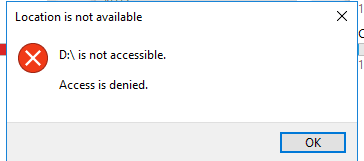
But not this time. I can't even run the error check via Properties>Tools>Error checking because the drive is not accessible.
Fortunately, the drive is being detected and visible in the Windows hard disk management utility and my partition management software (MiniTool Partition Wizard) which means the drive is ok (it should be okay because it is fairly new). It is just stuck due to some kind of error.
So I opened up my favorite partition manager tool and split the problematic drive into two. I created a small partition of about 10GB which automatically showed and accessible in the file explorer. But the original main partition is still inaccessible showing only the drive letter in the file explorer. Then back in the partition wizard tool, I merged the two partitions back together and voila! The entire drive is now accessible in the file explorer with all my data intact.
(Just sharing a tip to fix "inaccessible drives" when nothing else works. It worked for me. And I used a partition manager to do it. Any partition manager software will probably work. The windows partition utility just keeps saying "not responding" when I tried to use it.)
I have a data hard drive that suddenly became inaccessible. Usually, when I encounter this problem, a normal CHKDSK command will fix it.
But not this time. I can't even run the error check via Properties>Tools>Error checking because the drive is not accessible.
Fortunately, the drive is being detected and visible in the Windows hard disk management utility and my partition management software (MiniTool Partition Wizard) which means the drive is ok (it should be okay because it is fairly new). It is just stuck due to some kind of error.
So I opened up my favorite partition manager tool and split the problematic drive into two. I created a small partition of about 10GB which automatically showed and accessible in the file explorer. But the original main partition is still inaccessible showing only the drive letter in the file explorer. Then back in the partition wizard tool, I merged the two partitions back together and voila! The entire drive is now accessible in the file explorer with all my data intact.
Last edited:
My Computers
-
At a glance
Windows 11 ProAMD Ryzen 7 9800X3D32GB DDR5 CL30 Kingston FuryASUS Prime Radeon RX 9060 XT OC Edition 16GB- OS
- Windows 11 Pro
- Computer type
- PC/Desktop
- CPU
- AMD Ryzen 7 9800X3D
- Motherboard
- MSI PRO B850-P Wifi
- Memory
- 32GB DDR5 CL30 Kingston Fury
- Graphics Card(s)
- ASUS Prime Radeon RX 9060 XT OC Edition 16GB
- Monitor(s) Displays
- LG Ultrawide 34" 1440p+ MSI 27" 4K UHD
- Screen Resolution
- 3440x1440
- Hard Drives
- Main Boot Drive : 512GB Adata XPG RGB Gen3x4 NVMe M.2 SSD
- PSU
- EVGA 750 Watts 80+ Gold
- Case
- Deepcool Genome II
- Cooling
- Thermalright Burst Assassin 120
- Internet Speed
- FTTH 3Gbps
- Browser
- Chrome
- Antivirus
- "Moderna"
-
At a glance
Windows 11 Proi7-4790K16GB Corsair Vengeance ProMSI R9 290- Operating System
- Windows 11 Pro
- Computer type
- PC/Desktop
- CPU
- i7-4790K
- Motherboard
- ASRock Xtreme6 Z97
- Memory
- 16GB Corsair Vengeance Pro
- Graphics card(s)
- MSI R9 290
- Monitor(s) Displays
- LG Ultrawide 34"
- Screen Resolution
- 3440x1440
- Hard Drives
- 500GB Adata SSD (OS Only)
- PSU
- Thermaltake 475 Watts 80 Bronze
- Case
- Thermaltake Commander I Snow Edition
- Cooling
- Deep Cool Archer Air Cooler
- Keyboard
- Armageddon MKA-5R RGB-Hornet
- Mouse
- Logitech G402
- Internet Speed
- 1Gbps
- Browser
- Chrome
- Antivirus
- Moderna :)