

- Local time
- 12:23 AM
- Posts
- 88
- OS
- Windows 11
I might need some help.... I already tweaked a couple things and so far no crashes but this has happened before. Today was by far the worst!
livekernelevent 141, 193, 117, 1b8, 1a8, 1b0
I was playing Words of Wonders on Youtube while streaming a movie on Plex and CRASH. All 3 screens lost signal but the audio kept on going. There was no stutter in the audio. No BSOD. The RGB on the GPU went dark. Sometimes it will stay dark and will not produce a signal to the screens. Will still have audio, I can hear the Windows Boot up chime.
I held the power button down to reboot. When it booted up there were no GPU drivers enabled. I tried a repair using the AMD Driver I just downloaded from the official site and that ran into an error. Checked device manager and the display driver had the yellow error icon over it. I disabled the device then re-enabled it and my drivers came back like nothing happened.
From there I checked my BIOS version and I was out of date by 1 year. It came out a couple months ago. Updated that.
I googled a bit and a lot of others have also had this issue not just with the 7900xtx specifically. Their advice was to go into the BIOS, Locate Power Supply Idle Control and change it from Auto to Typical Current Idle to reduce deep sleep stability issues without fully turning off power management.
So far this is working. I stress tested with Cinebench and Furmark. No issues there. It never crashed while gaming, just when watching something on Plex.
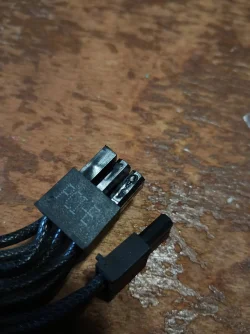
Last month on the other hand it was crashing at the exact spot when loading into Forza Horizon 6. Turns out one of the PCIE cables was melted. Yes it was plugged in all the way. The PSU is only 6 months old. Lian Li Edge 1000. No I did not recycle cables either.
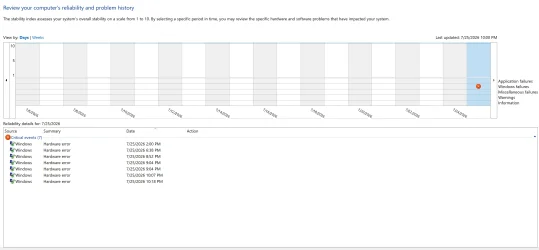
livekernelevent 141, 193, 117, 1b8, 1a8, 1b0
I was playing Words of Wonders on Youtube while streaming a movie on Plex and CRASH. All 3 screens lost signal but the audio kept on going. There was no stutter in the audio. No BSOD. The RGB on the GPU went dark. Sometimes it will stay dark and will not produce a signal to the screens. Will still have audio, I can hear the Windows Boot up chime.
I held the power button down to reboot. When it booted up there were no GPU drivers enabled. I tried a repair using the AMD Driver I just downloaded from the official site and that ran into an error. Checked device manager and the display driver had the yellow error icon over it. I disabled the device then re-enabled it and my drivers came back like nothing happened.
From there I checked my BIOS version and I was out of date by 1 year. It came out a couple months ago. Updated that.
I googled a bit and a lot of others have also had this issue not just with the 7900xtx specifically. Their advice was to go into the BIOS, Locate Power Supply Idle Control and change it from Auto to Typical Current Idle to reduce deep sleep stability issues without fully turning off power management.
So far this is working. I stress tested with Cinebench and Furmark. No issues there. It never crashed while gaming, just when watching something on Plex.
Last month on the other hand it was crashing at the exact spot when loading into Forza Horizon 6. Turns out one of the PCIE cables was melted. Yes it was plugged in all the way. The PSU is only 6 months old. Lian Li Edge 1000. No I did not recycle cables either.
My Computer
At a glance
Windows 11AMD 5950X64gigs DDR4 4000mhz Neo TridentZRadeon 7900XTX
- OS
- Windows 11
- Computer type
- PC/Desktop
- Manufacturer/Model
- Aorus
- CPU
- AMD 5950X
- Motherboard
- Aorus X570S Master
- Memory
- 64gigs DDR4 4000mhz Neo TridentZ
- Graphics Card(s)
- Radeon 7900XTX
- Monitor(s) Displays
- Dual 42" Insignia 1080p 55" TCL 6 series
- Screen Resolution
- 3200x1800 / 3840x2160
- Hard Drives
- 1 500gb NvMe Operating System Drive
3x 2TB NvMe
1 2tb SSD
1 500gb SSD
- PSU
- Lian Li Edge Serie - 1000W
- Cooling
- ARCTIC Liquid Freezer II 360
- Browser
- Chrome






