Has anyone ever found a fix for this annoying taskbar tab issue?


BSmith81

Well-known member
Local time
7:01 PM
Posts
7
OS
Windows 11 Home
Still looking for a solution for that annoying issue of the tabs being grouped together and can't be separated / rearranged. I had ExplorerPatcher which worked great, until a major Windows update last year killed the compatibility and you can no longer use the Windows 10 taskbar. Plus, EP hasn't been updated in 7 months
 
Windows Build/Version
24H2

My Computer

System One

  • OS
    Windows 11 Home
    Computer type
    PC/Desktop
    Manufacturer/Model
    ACER Aspire TC-1660
    CPU
    Intel(R) Core(TM) i5-10400 CPU @ 2.90GHz 2.90 GHz
    Memory
    16gb
    Graphics Card(s)
    Intel UHD Graphics 630
    Monitor(s) Displays
    Philips 272E1CA 27" Curved Frameless Monitor
    Screen Resolution
    1920 x 1080
    Hard Drives
    512 GB SSD
    Seagate BarraCuda 2TB Internal Hard Drive HDD
    Browser
    Firefox
    Antivirus
    Norton
............tabs being grouped together and can't be separated / rearranged.
The Taskbar buttons can be ungrouped. Head over to Windows Settings -> Personalisation -> Taskbar -> Combine taskbar buttons then adjust the settings to your liking.

Irrespective of the above settings, the Taskbar buttons can be rearranged by dragging and dropping them.
 

My Computer

System One

  • OS
    Windows 11
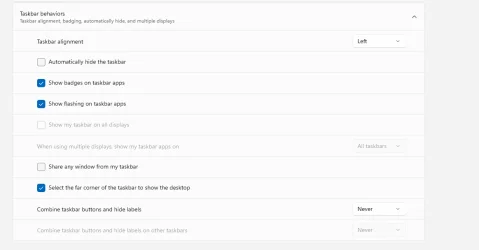
I don't even have that option, only the never combine option which will merge all files onto one tab, which I don't like.

This is all I have in the behavior section

Screenshot 2025-05-10 084854.webp
 

My Computer

System One

  • OS
    Windows 11 Home
    Computer type
    PC/Desktop
    Manufacturer/Model
    ACER Aspire TC-1660
    CPU
    Intel(R) Core(TM) i5-10400 CPU @ 2.90GHz 2.90 GHz
    Memory
    16gb
    Graphics Card(s)
    Intel UHD Graphics 630
    Monitor(s) Displays
    Philips 272E1CA 27" Curved Frameless Monitor
    Screen Resolution
    1920 x 1080
    Hard Drives
    512 GB SSD
    Seagate BarraCuda 2TB Internal Hard Drive HDD
    Browser
    Firefox
    Antivirus
    Norton
...............the never combine option which will merge all files onto one tab.................
The "Never" option is supposed to do the opposite - namely separate the program buttons and display their name labels.

Please provide a screenshot of what's bugging you because I'm not completely understanding you - especially when you talk about "tabs" and "files".
 

My Computer

System One

  • OS
    Windows 11
My taskbar never does that, but I don't see anything wrong with your settings.
 

My Computers

System One System Two

  • OS
    Win 11 Pro 25H2, Build 26200.8524
    Computer type
    PC/Desktop
    Manufacturer/Model
    Home Brew
    CPU
    Intel Core i5 14500
    Motherboard
    Gigabyte B760M G P WIFI
    Memory
    64GB DDR4
    Graphics Card(s)
    GeForce RTX 4060
    Sound Card
    Chipset Realtek
    Monitor(s) Displays
    LG 45" Ultragear, Acer 24" 1080p
    Screen Resolution
    5120x1440, 1920x1080
    Hard Drives
    Crucial P310 2TB 2280 PCIe Gen4 3D NAND NVMe M.2 SSD (O/S)
    Silicon Power 2TB US75 NVMe PCIe Gen4 M.2 2280 SSD (backup)
    Crucial BX500 2TB 3D NAND (2nd backup)
    Seagate 4TB Ironwolf, rotating HDD archive files
    External off-line backup Drives: 2 NVMe 4TB drives in external enclosures
    PSU
    Thermaltake Toughpower GF3 750W
    Case
    LIAN LI LANCOOL 216 E-ATX PC Case
    Cooling
    Lots of fans!
    Keyboard
    Microsoft Comfort Curve 2000
    Mouse
    Logitech G305
    Internet Speed
    Verizon FiOS 1GB
    Browser
    Firefox
    Antivirus
    Malware Bytes & Windows Defender Security
  • Operating System
    Win 11 Pro 25H2, Build 26200.8524
    Computer type
    PC/Desktop
    Manufacturer/Model
    Home Brew
    CPU
    Intel Core i5 14400
    Motherboard
    Gigabyte B760M DS3H AX
    Memory
    32GB DDR5
    Graphics card(s)
    Intel 700 Embedded GPU
    Sound Card
    Realtek Embedded
    Monitor(s) Displays
    27" HP 1080p
    Screen Resolution
    1920x1080
    Hard Drives
    Crucial P310 2TB 2280 PCIe Gen4 eD NAND PCIe SSD
    Samsung EVO 990 2TB NVMe Gen4 SSD
    Samsung 2TB SATA SSD
    PSU
    Thermaltake Smart BM3 650W
    Case
    Okinos Micro ATX Case
    Cooling
    Fans
    Keyboard
    Microsoft Comfort Curve 2000
    Mouse
    Logitech G305
    Internet Speed
    Verizon FiOS 1GB
    Browser
    Firefox
    Antivirus
    Malware Bytes & Windows Defender Security
Odd, my problem is say I have firefox open and I have 4 tabs open, on the windows taskbar it seperates every tab out even though I have the checkbox checked to combine them. So how do I fix that?
 

My Computer

System One

  • OS
    Windows 11 Pro Version 23H2(OS Build 22631.4890)
    Computer type
    PC/Desktop
    Manufacturer/Model
    AMD
    CPU
    12-Core AMD Ryzen 9 5900X, 4950 MHz (49.5 x 100)
    Motherboard
    Gigabyte X570 Aorus Master
    Memory
    4 - G Skill Trident Z Neo F4-3600C16-16GTZNC
    Graphics Card(s)
    PCI Express 4.0 x16: PowerColor RX 6800
    Sound Card
    Realtek ALC1220 @ AMD K19.2 - High Definition Audio Controller
    Monitor(s) Displays
    2 - 27 inch Westinghouse
    Screen Resolution
    1920 x 1080
    Hard Drives
    2 SSD - 2 TB each
    1 SSD - 4TB
    1 HDD - 2TB
    Keyboard
    logitech
    Mouse
    logitech
    Internet Speed
    1 GB
    Browser
    Firefox
    Antivirus
    Eset Endpoint Security
Odd, my problem is say I have firefox open and I have 4 tabs open, on the windows taskbar it seperates every tab out even though I have the checkbox checked to combine them. So how do I fix that?
I don't think Windows controls that, I have six tabs open and there's only one instance of FF on the taskbar. Are you sure you're not opening new pages in Windows?
1746909182271.webp
 

My Computers

System One System Two

  • OS
    Win 11 Pro 25H2, Build 26200.8524
    Computer type
    PC/Desktop
    Manufacturer/Model
    Home Brew
    CPU
    Intel Core i5 14500
    Motherboard
    Gigabyte B760M G P WIFI
    Memory
    64GB DDR4
    Graphics Card(s)
    GeForce RTX 4060
    Sound Card
    Chipset Realtek
    Monitor(s) Displays
    LG 45" Ultragear, Acer 24" 1080p
    Screen Resolution
    5120x1440, 1920x1080
    Hard Drives
    Crucial P310 2TB 2280 PCIe Gen4 3D NAND NVMe M.2 SSD (O/S)
    Silicon Power 2TB US75 NVMe PCIe Gen4 M.2 2280 SSD (backup)
    Crucial BX500 2TB 3D NAND (2nd backup)
    Seagate 4TB Ironwolf, rotating HDD archive files
    External off-line backup Drives: 2 NVMe 4TB drives in external enclosures
    PSU
    Thermaltake Toughpower GF3 750W
    Case
    LIAN LI LANCOOL 216 E-ATX PC Case
    Cooling
    Lots of fans!
    Keyboard
    Microsoft Comfort Curve 2000
    Mouse
    Logitech G305
    Internet Speed
    Verizon FiOS 1GB
    Browser
    Firefox
    Antivirus
    Malware Bytes & Windows Defender Security
  • Operating System
    Win 11 Pro 25H2, Build 26200.8524
    Computer type
    PC/Desktop
    Manufacturer/Model
    Home Brew
    CPU
    Intel Core i5 14400
    Motherboard
    Gigabyte B760M DS3H AX
    Memory
    32GB DDR5
    Graphics card(s)
    Intel 700 Embedded GPU
    Sound Card
    Realtek Embedded
    Monitor(s) Displays
    27" HP 1080p
    Screen Resolution
    1920x1080
    Hard Drives
    Crucial P310 2TB 2280 PCIe Gen4 eD NAND PCIe SSD
    Samsung EVO 990 2TB NVMe Gen4 SSD
    Samsung 2TB SATA SSD
    PSU
    Thermaltake Smart BM3 650W
    Case
    Okinos Micro ATX Case
    Cooling
    Fans
    Keyboard
    Microsoft Comfort Curve 2000
    Mouse
    Logitech G305
    Internet Speed
    Verizon FiOS 1GB
    Browser
    Firefox
    Antivirus
    Malware Bytes & Windows Defender Security
Basically like this. I can't move any of the 3 file explorer tabs individually.... the whole group moves. And if i open a new file, the new tab will open up next to the last file explorer tab. And You see the 2 Firefox tabs move as one. I want to be able to move each tab individually, like if I wanted to move just the RealPlayer tab to the other side of Spotify, not the entire group

Recording 2025-05-10 162952.gif
 

My Computer

System One

  • OS
    Windows 11 Home
    Computer type
    PC/Desktop
    Manufacturer/Model
    ACER Aspire TC-1660
    CPU
    Intel(R) Core(TM) i5-10400 CPU @ 2.90GHz 2.90 GHz
    Memory
    16gb
    Graphics Card(s)
    Intel UHD Graphics 630
    Monitor(s) Displays
    Philips 272E1CA 27" Curved Frameless Monitor
    Screen Resolution
    1920 x 1080
    Hard Drives
    512 GB SSD
    Seagate BarraCuda 2TB Internal Hard Drive HDD
    Browser
    Firefox
    Antivirus
    Norton
Don't know about the Windows Explorer tabs as the tabbed feature that I saw previously in mine disappeared in 24H2, and I can't see how to enable it. However, my Firefox never puts more than one entry on the taskbar.
 

My Computers

System One System Two

  • OS
    Win 11 Pro 25H2, Build 26200.8524
    Computer type
    PC/Desktop
    Manufacturer/Model
    Home Brew
    CPU
    Intel Core i5 14500
    Motherboard
    Gigabyte B760M G P WIFI
    Memory
    64GB DDR4
    Graphics Card(s)
    GeForce RTX 4060
    Sound Card
    Chipset Realtek
    Monitor(s) Displays
    LG 45" Ultragear, Acer 24" 1080p
    Screen Resolution
    5120x1440, 1920x1080
    Hard Drives
    Crucial P310 2TB 2280 PCIe Gen4 3D NAND NVMe M.2 SSD (O/S)
    Silicon Power 2TB US75 NVMe PCIe Gen4 M.2 2280 SSD (backup)
    Crucial BX500 2TB 3D NAND (2nd backup)
    Seagate 4TB Ironwolf, rotating HDD archive files
    External off-line backup Drives: 2 NVMe 4TB drives in external enclosures
    PSU
    Thermaltake Toughpower GF3 750W
    Case
    LIAN LI LANCOOL 216 E-ATX PC Case
    Cooling
    Lots of fans!
    Keyboard
    Microsoft Comfort Curve 2000
    Mouse
    Logitech G305
    Internet Speed
    Verizon FiOS 1GB
    Browser
    Firefox
    Antivirus
    Malware Bytes & Windows Defender Security
  • Operating System
    Win 11 Pro 25H2, Build 26200.8524
    Computer type
    PC/Desktop
    Manufacturer/Model
    Home Brew
    CPU
    Intel Core i5 14400
    Motherboard
    Gigabyte B760M DS3H AX
    Memory
    32GB DDR5
    Graphics card(s)
    Intel 700 Embedded GPU
    Sound Card
    Realtek Embedded
    Monitor(s) Displays
    27" HP 1080p
    Screen Resolution
    1920x1080
    Hard Drives
    Crucial P310 2TB 2280 PCIe Gen4 eD NAND PCIe SSD
    Samsung EVO 990 2TB NVMe Gen4 SSD
    Samsung 2TB SATA SSD
    PSU
    Thermaltake Smart BM3 650W
    Case
    Okinos Micro ATX Case
    Cooling
    Fans
    Keyboard
    Microsoft Comfort Curve 2000
    Mouse
    Logitech G305
    Internet Speed
    Verizon FiOS 1GB
    Browser
    Firefox
    Antivirus
    Malware Bytes & Windows Defender Security
Last edited:

My Computers

System One System Two

  • OS
    11 Home
    Computer type
    Laptop
    Manufacturer/Model
    Asus TUF Gaming F16 (2024)
    CPU
    i7 13650HX
    Memory
    16GB DDR5
    Graphics Card(s)
    GeForce RTX 4060 Mobile
    Sound Card
    Eastern Electric MiniMax DAC Supreme; Emotiva UMC-200; Astell & Kern AK240
    Monitor(s) Displays
    Sony Bravia XR-55X90J
    Screen Resolution
    3840×2160
    Hard Drives
    512GB SSD internal
    37TB external
    PSU
    Li-ion
    Cooling
    2× Arc Flow Fans, 4× exhaust vents, 5× heatpipes
    Keyboard
    Logitech K800
    Mouse
    Logitech G402
    Internet Speed
    30Mbit/s up, 500Mbit/s down
    Browser
    FF
    Antivirus
    What's an antivirus?
  • Operating System
    11 Home
    Computer type
    Laptop
    Manufacturer/Model
    Medion S15450
    CPU
    i5 1135G7
    Memory
    16GB DDR4
    Graphics card(s)
    Intel Iris Xe
    Sound Card
    Eastern Electric MiniMax DAC Supreme; Emotiva UMC-200; Astell & Kern AK240
    Monitor(s) Displays
    Sony Bravia XR-55X90J
    Screen Resolution
    3840×2160
    Hard Drives
    2TB SSD internal
    37TB external
    PSU
    Li-ion
    Keyboard
    Logitech K800
    Mouse
    Logitech G402
    Internet Speed
    30Mbit/s up, 500Mbit/s down
    Browser
    FF
Odd, my problem is say I have firefox open and I have 4 tabs open, on the windows taskbar it seperates every tab out even though I have the checkbox checked to combine them. So how do I fix that?
I had this same thing. You go to your Firefox settings > General > Tabs > Uncheck "Show tab previews in the Windows taskbar"
 

My Computers

System One System Two

  • OS
    Windows 11
    Computer type
    Laptop
    Manufacturer/Model
    Lenovo ThinkPad X1 Yoga Gen 6 14"
    CPU
    Intel Core i7 Gen 11
    Memory
    16gb
    Graphics Card(s)
    Intel Iris Xe 128mb
    Screen Resolution
    1920x1200
    Browser
    Firefox
  • Operating System
    macOS Tahoe
    Computer type
    Laptop
    Manufacturer/Model
    Apple MacBook Pro 13"
    CPU
    Apple M1
    Memory
    8gb
    Screen Resolution
    2560x1600
    Browser
    Firefox
See my post in this thread. Hope thats what you looking for. You can move them around individually as well.


My Computer

System One

  • OS
    Win 11 Pro Insider Beta (26220.8370), Kali Linux
    Computer type
    Laptop
    Manufacturer/Model
    HP Victus 15
    CPU
    AMD Ryzen 5 5600H
    Memory
    16GB (2x8GB) Dual Channel
    Graphics Card(s)
    Nvidia RTX 3050
    Monitor(s) Displays
    1080p IPS 144Hz (Laptop Screen) + 3x 1080p 60Hz screens
    Screen Resolution
    4x 1920x1080 monitors
    Hard Drives
    M.2 NVMe 512GB Samsung - PCIe 4.0x4 - Main system drive

    USB-A and USB-C M.2 NVMe Enclosure with NVMe SSSTC 256GB - NVM Express 1.3 - Ventoy with all install files and all ISO images i use.

    USB External SSD Kingston XS100 1TB - USB 3.2 Gen 2 - WindowsToGo (Clone of my existing Sytem), and all games I play.

    USB External SSHD Seagate FireCuda 2TB - USB 3.0 - For Macrium system images, data, photos, stays always safe at home
    PSU
    200W
    Cooling
    Zalman ZM-NC3 Cooling pad
    Keyboard
    Dell KM7120W
    Mouse
    Dell KM7120W
    Internet Speed
    1Gb/s down / 500Mb/s up
    Browser
    Chrome
    Antivirus
    Windows Defender

Latest Support Threads

Back
Top Bottom