Has MS wiped Office 2010 Home and Student off our PC?


Trapperr

Well-known member
Member
Local time
10:58 PM
Posts
36
Location
Hertfordshire UK
OS
Win 11Pro 24H2
My wife's Dell PC had until yesterday, our fully working and paid for original original copy of 2010 Home and Office. She said she could not open Excel and was getting an error message. I had a look and after much searching found that the whole suite had gone. I found an AI article about reinstalling and using Control Panel uninstall to repair it. However it was not there to repair, I was asked if I wanted to delete the reference to it! Everything was gone; Excel, Word, Powerpoint and Onenote.

I checked on the Office 14 folder which was virtually empty, the contents did not even get to the bottom the screen, whereas mine goes on for pages (Office 2010 Pro) I do not understand why this should have been removed. The CD was original and belongs to us. I could not even reinstall the whole program as what ever I tried- failed.

Any suggestions as to why and what, if anything can we do about this?

Maybe MS switched if off with no warning or time of grace? Will they do the same to my 2010Pro installation? My wife is our clubs treasurer and uses Excel every day. Do we have to install MS 365 and pay the subscription? Being pensioners we are not tech savvy and only want the basics of Excel and Word. We are to old to start learning new programs and updates and upgrades usually mean more complications and more confusion!

I have done so much reading I am rather lost. I also read that 365 may be phased out anyway!

Some of your expert guidance would be very much appreciated here, as I feel MS has just stolen a product that we purchased from them. I am also very concerned that the same may happen to my Office 2010Pro.
 

My Computer My Computer

At a glance

Win 11Pro 24H2AMD Ryzensets 5 7600X32GBGforce RTX 360
OS
Win 11Pro 24H2
Computer type
PC/Desktop
Manufacturer/Model
Self Build 2025
CPU
AMD Ryzensets 5 7600X
Motherboard
MSI Pro B850-P WIFI
Memory
32GB
Graphics Card(s)
Gforce RTX 360
Sound Card
On Board
Monitor(s) Displays
AOC 2460 [Monitor] (24.0"vis, October 2019)
Hard Drives
1 Internal 5 External
PSU
ENERMAX REvolution 850W
Case
Be quiet Pure Base 600
Cooling
Thermalright Assassin X 120R
Keyboard
Logi K540
Mouse
Logi M310
Browser
Firefox
Antivirus
Bitdefender

My Computers My Computers

  • At a glance

    Windows 11 Home 26H2 RPIntel I3-1010016 GBNvidia GT 1030
    OS
    Windows 11 Home 26H2 RP
    Computer type
    PC/Desktop
    Manufacturer/Model
    Self-build
    CPU
    Intel I3-10100
    Motherboard
    MSI H410M-PRO
    Memory
    16 GB
    Graphics Card(s)
    Nvidia GT 1030
    Sound Card
    Motherboard default
    Monitor(s) Displays
    Philips 27 inch
    Screen Resolution
    1920x1080
    Hard Drives
    Samsung EVO 970 NVMe SSD 256 Gb
    Samsung QVO 870 SATA SSD 2 Tb
    PSU
    ATX 450W
    Keyboard
    Logitech
    Mouse
    Logitech Wireless
    Internet Speed
    930 Mb down / 120 Mb up
    Browser
    Edge
    Antivirus
    Windows Defender
    Other Info
    Microsoft Office 2021 Plus
  • At a glance

    Windows 11 HomeIntel i3-810016 GbNvidia GT 720
    Operating System
    Windows 11 Home
    Computer type
    PC/Desktop
    Manufacturer/Model
    Self-build
    CPU
    Intel i3-8100
    Motherboard
    Gigabyte Z370 D3
    Memory
    16 Gb
    Graphics card(s)
    Nvidia GT 720
    Sound Card
    Motherboard default
    Monitor(s) Displays
    Philips 27-inch
    Screen Resolution
    1920x1080
    Hard Drives
    Samsung 960 NVMe SSD 256 Gb
    Seagate 2 Tb HDD
    PSU
    ATX 450W
    Keyboard
    Microsoft
    Mouse
    Logitech Wireless
    Internet Speed
    930 Mb down / 120 Mb up
    Browser
    Edge
    Antivirus
    Windows Defender
Hi RFS.
Thanks for the link, I do not have a 365 update suggestion or free upgrade. I have tried to reinstall using the original media (CD) and I still have the original product key but cannot reinstall.
 

My Computer My Computer

At a glance

Win 11Pro 24H2AMD Ryzensets 5 7600X32GBGforce RTX 360
OS
Win 11Pro 24H2
Computer type
PC/Desktop
Manufacturer/Model
Self Build 2025
CPU
AMD Ryzensets 5 7600X
Motherboard
MSI Pro B850-P WIFI
Memory
32GB
Graphics Card(s)
Gforce RTX 360
Sound Card
On Board
Monitor(s) Displays
AOC 2460 [Monitor] (24.0"vis, October 2019)
Hard Drives
1 Internal 5 External
PSU
ENERMAX REvolution 850W
Case
Be quiet Pure Base 600
Cooling
Thermalright Assassin X 120R
Keyboard
Logi K540
Mouse
Logi M310
Browser
Firefox
Antivirus
Bitdefender
From my past experience, if you mix two different versions of Microsoft Office you have problem installing or activating. For example since you now have Office 365 you cannot install properly or activate Office 2010. Go to Settings -> Apps -> Installed Apps and look all the list carefully. Uninstall everything related to Office 365 or Office 2010. Also uninstall stand-alone versions like OneNote, Office one-click and others. Restart the computer and try to install Microsoft Office 2010 from the CD-ROM. Remember to right-click Setup and select Run as Administrator to grant the required access rights to copy the files and modify Registry. After a successful installation open Word or any other application and activate Office 2010. If it doesn't activate automatically there should be the option to call Microsoft and activate by phone.
 
Last edited:

My Computers My Computers

  • At a glance

    Windows 11 Pro 23H2 (7582), 25H2 (9457)Mobile DualCore Intel Core 2 Duo T7250, 2000 MHz4GBMobile Intel(R) GMA 4500M (Mobile 4 series)
    OS
    Windows 11 Pro 23H2 (7582), 25H2 (9457)
    Computer type
    Laptop
    Manufacturer/Model
    Acer Extensa 5630EZ
    CPU
    Mobile DualCore Intel Core 2 Duo T7250, 2000 MHz
    Motherboard
    Acer Extensa 5630
    Memory
    4GB
    Graphics Card(s)
    Mobile Intel(R) GMA 4500M (Mobile 4 series)
    Sound Card
    Realtek ALC268 @ Intel 82801IB ICH9 - High Definition Audio Controller
    Monitor(s) Displays
    1
    Screen Resolution
    1280x800
    Hard Drives
    Samsung SSD 850 EVO 250GB SATA Device (250 GB, SATA-III)
    Internet Speed
    802.11g wireless 54 Mbps
    Browser
    MICROSOFT EDGE
    Antivirus
    WINDOWS DEFENDER
    Other Info
    Legacy MBR installation, no TPM, no Secure Boot, no WDDM 2.0 graphics drivers, no SSE4.2, cannot get more unsupported ;) This is only my test laptop. I had installed Windows 11 here before upgrading my main PC. For my main PC I use everyday see my 2nd system specs.
  • At a glance

    Windows 11 Pro 25H2 (build 26200.9457)Intel Core-i7 3770 3.40GHz s1155 (3rd generat...2x Kingston Hyper-X Blu 8GB DDR3-1600GIGABYTE GeForce RTX 3050 WINDFORCE OC V2 6GB...
    Operating System
    Windows 11 Pro 25H2 (build 26200.9457)
    Computer type
    PC/Desktop
    Manufacturer/Model
    Custom-built PC
    CPU
    Intel Core-i7 3770 3.40GHz s1155 (3rd generation)
    Motherboard
    Asus P8H61 s1155 ATX
    Memory
    2x Kingston Hyper-X Blu 8GB DDR3-1600
    Graphics card(s)
    GIGABYTE GeForce RTX 3050 WINDFORCE OC V2 6GB (GV-N3050WF2OCV2-6GD)
    Sound Card
    Realtek HD audio (ALC887)
    Monitor(s) Displays
    Sony Bravia KDL-19L4000 19" LCD TV via VGA
    Screen Resolution
    1440x900 32-bit 60Hz
    Hard Drives
    WD Blue SA510 2.5 1000GB SSD as system disk, Western Digital Caviar Purple 4TB SATA III (WD40PURZ) as second
    PSU
    Thermaltake Litepower RGB 550W Full Wired
    Case
    SUPERCASE MIDI-TOWER
    Cooling
    Deepcool Gamma Archer CPU cooler, 1x 8cm fan at the back
    Keyboard
    Mitsumi 101-key PS/2
    Mouse
    Microsoft Compact Optical Mouse
    Internet Speed
    802.11ac 5GHz wireless 260Mpbs
    Browser
    Microsoft Edge, Mozilla Firefox
    Antivirus
    Microsoft Windows Defender
    Other Info
    Legacy BIOS (MBR) installation, no TPM, no Secure Boot, WDDM 3.0 graphics drivers, WEI score 7.4
Maybe MS switched if off ...? Will they do the same to my 2010Pro installation?
If it's any encouragement, I doubt this is what happened. My Windows 11 is fully up-to-date and my MSOffice 2007 is still all there and functioning correctly.

I checked on the Office 14 folder
I have to look in the x64 & the x86 folders - for you, those would be:-
C:\Program Files\Microsoft Office\Office14
C:\Program Files (x86)\Microsoft Office\Office14
but this might not apply to Office 2010.

There are several Office 2010 users in the forum so hopefully one of them will come along and provide better support than I can.


Best of luck,
Denis
 
Last edited:

My Computer My Computer

At a glance

Windows 11 Home x64 Version 26H2 Build 26300....
OS
Windows 11 Home x64 Version 26H2 Build 26300.9457
cannot reinstall
Exactly what happens when you try?
And did you check that Settings, Apps, Installed apps list or Control panel, Progs & features for all listed MSOffice installations?


Denis
 
Last edited:

My Computer My Computer

At a glance

Windows 11 Home x64 Version 26H2 Build 26300....
OS
Windows 11 Home x64 Version 26H2 Build 26300.9457
I am using Home and Student 2010 without incident on Windows 11 Pro. Knock on wood.

My relevant folders:

Program files/Microsoft Office/Office 2014: 1 folder; 23 files; 6.43 mb

Program files (x86)/Microsoft Office/Office 2014: 30 folders; 526 files; 406 mb

I last knowingly ran Windows Update on September 8.

My installation was from Microsoft SKU 79G-02144, a 3 pack retail license in optical disc form purchased in 2013. I rebuilt in January 2026 with a clean install of all applications and had no issues at all with activation.
 

My Computer My Computer

At a glance

Windows 11 ProIntel 265KG Skill DDR5 2 x 16 kit 6000/36none
OS
Windows 11 Pro
Computer type
PC/Desktop
Manufacturer/Model
Fishmill Special
CPU
Intel 265K
Motherboard
MSI Pro Z890-A
Memory
G Skill DDR5 2 x 16 kit 6000/36
Graphics Card(s)
none
Sound Card
none
Monitor(s) Displays
Dell SE2726HS
Screen Resolution
1920 x 1080
Hard Drives
WD SN770 NVME 500 GB boot; Intel 660p NVME 2 TB and WD Green 3 TB storage
PSU
Be Quiet 13M 750 ATX 3.1
Case
Lancool PC-K65
Cooling
Noctua U12S
Keyboard
Logitech K120 Wired
Mouse
Dell MS-116
Browser
Chrome
Antivirus
Microsoft Defender and Malwarebytes
Personally, I've never understood the logic of using software that's well over a decade old and no longer supported and undoubtedly full of security holes when you can buy a perfectly working licence key for say MS Office 2021 for just US six dollars.
 

My Computers My Computers

  • At a glance

    Windows 11 Pro 25H2 26200.9550Intel i5 10400x2 8gb Corsair Vengeance LPX 3600Intel(R) UHD Graphics 630
    OS
    Windows 11 Pro 25H2 26200.9550
    Computer type
    PC/Desktop
    Manufacturer/Model
    MSI
    CPU
    Intel i5 10400
    Motherboard
    B560M PRO-VDH WiFi BIOS 1.A1
    Memory
    x2 8gb Corsair Vengeance LPX 3600
    Graphics Card(s)
    Intel(R) UHD Graphics 630
    Sound Card
    Realtek onboard AL897
    Monitor(s) Displays
    MSI MAG Artymis 242C
    Screen Resolution
    1920 x 1080
    Hard Drives
    Samsung 970 Evo Plus 500gb
    PSU
    EVGA SuperNova 650w G3
    Case
    Gaming case
    Keyboard
    MSI GK20
    Mouse
    MSI Versa 300
    Internet Speed
    500mbps
    Browser
    Brave
    Antivirus
    Bitdefender
    Other Info
    MSI Herald BE9400 WiFi PCIe
    Printer - Brother MFC-L2750DW
  • At a glance

    Windows 11 Home 25H2 26200.955012th Gen Intel(R) Core(TM) i3-1215U8GBIntel(R) UHD Graphics (128 MB)
    Operating System
    Windows 11 Home 25H2 26200.9550
    Computer type
    Laptop
    Manufacturer/Model
    MSI Modern 14 C12M 637UK
    CPU
    12th Gen Intel(R) Core(TM) i3-1215U
    Motherboard
    Micro-Star International Co., Ltd. MS-14J1 (U3E1)
    Memory
    8GB
    Graphics card(s)
    Intel(R) UHD Graphics (128 MB)
    Sound Card
    Intel Smart Sound Technology for Bluetooth Audio
    Internet Speed
    500mbps
    Browser
    Brave
    Antivirus
    BitDefender
Personally, I've never understood the logic of using software that's well over a decade old and no longer supported and undoubtedly full of security holes when you can buy a perfectly working licence key for say MS Office 2021 for just US six dollars.
TBH, for the casual Word or Excel user a free solution like Libre Office is more than enough.
 

My Computers My Computers

  • At a glance

    Windows 11 WorkstationRyzen 9 5950XCorsair Vengeance RGB PRO Black 64GB (4x16GB)...ASUS AMD Radeon RX 6900 XT 16GB ROG Strix LC OC
    OS
    Windows 11 Workstation
    Computer type
    PC/Desktop
    Manufacturer/Model
    doofenshmirtz evil incorporated
    CPU
    Ryzen 9 5950X
    Motherboard
    Asus ROG Crosshair VIII Formula
    Memory
    Corsair Vengeance RGB PRO Black 64GB (4x16GB) 3600MHz AMD Ryzen Tuned DDR4
    Graphics Card(s)
    ASUS AMD Radeon RX 6900 XT 16GB ROG Strix LC OC
    Sound Card
    Sound BlasterX Katana
    Monitor(s) Displays
    3 x27" Dell U2724D & 1 x 34" Dell U3415W
    Hard Drives
    Samsung 980 Pro 1TB M.2 2280 PCI-e 4.0 x4 NVMe Solid State
    Drive
    PSU
    ASUS ROG THOR 850W 80 Plus Platinum
    Case
    ASUS ROG Strix Helios Midi-Tower ARGB Gaming Case
    Cooling
    ASUS ROG Strix LC Performance RGB AIO CPU Liquid Cooler - 360mm
    Keyboard
    Logi Ergo
    Mouse
    Logitech MX Vertical
    Internet Speed
    1000/200 Mbps
    Browser
    Chrome
    Antivirus
    Windows Defender, Malwarebytes Pro
    Other Info
    HP M281 Printer
    Logitech Brio Stream webcam
    Logitech G Yeti orb mic
  • At a glance

    Windows 11 ProSnapdragon X2 Plus64GB
    Operating System
    Windows 11 Pro
    Computer type
    Laptop
    Manufacturer/Model
    Surface Laptop
    CPU
    Snapdragon X2 Plus
    Memory
    64GB
    Monitor(s) Displays
    15"
  • Nothing to see here.
I last knowingly ran Windows Update on September 8
It will be interesting to know if you have done the September updates [to reach 26200.9457].


Denis
 

My Computer My Computer

At a glance

Windows 11 Home x64 Version 26H2 Build 26300....
OS
Windows 11 Home x64 Version 26H2 Build 26300.9457
TBH, for the casual Word or Excel user a free solution like Libre Office is more than enough.
I have to admit, I've tried Libre Office more than once and for some reason, I just couldn't get on with it. I honestly have no idea why. I currently have Office 2024 and it does everything I need and of course, it still gets regular updates.
 

My Computers My Computers

  • At a glance

    Windows 11 Pro 25H2 26200.9550Intel i5 10400x2 8gb Corsair Vengeance LPX 3600Intel(R) UHD Graphics 630
    OS
    Windows 11 Pro 25H2 26200.9550
    Computer type
    PC/Desktop
    Manufacturer/Model
    MSI
    CPU
    Intel i5 10400
    Motherboard
    B560M PRO-VDH WiFi BIOS 1.A1
    Memory
    x2 8gb Corsair Vengeance LPX 3600
    Graphics Card(s)
    Intel(R) UHD Graphics 630
    Sound Card
    Realtek onboard AL897
    Monitor(s) Displays
    MSI MAG Artymis 242C
    Screen Resolution
    1920 x 1080
    Hard Drives
    Samsung 970 Evo Plus 500gb
    PSU
    EVGA SuperNova 650w G3
    Case
    Gaming case
    Keyboard
    MSI GK20
    Mouse
    MSI Versa 300
    Internet Speed
    500mbps
    Browser
    Brave
    Antivirus
    Bitdefender
    Other Info
    MSI Herald BE9400 WiFi PCIe
    Printer - Brother MFC-L2750DW
  • At a glance

    Windows 11 Home 25H2 26200.955012th Gen Intel(R) Core(TM) i3-1215U8GBIntel(R) UHD Graphics (128 MB)
    Operating System
    Windows 11 Home 25H2 26200.9550
    Computer type
    Laptop
    Manufacturer/Model
    MSI Modern 14 C12M 637UK
    CPU
    12th Gen Intel(R) Core(TM) i3-1215U
    Motherboard
    Micro-Star International Co., Ltd. MS-14J1 (U3E1)
    Memory
    8GB
    Graphics card(s)
    Intel(R) UHD Graphics (128 MB)
    Sound Card
    Intel Smart Sound Technology for Bluetooth Audio
    Internet Speed
    500mbps
    Browser
    Brave
    Antivirus
    BitDefender
Personally, I've never understood the logic of using software that's well over a decade old and no longer supported and undoubtedly full of security holes when you can buy a perfectly working licence key for say MS Office 2021 for just US six dollars.
I am not sure how legit these very cheap licenses are. They might be genuine but violate the EULA. Also if an old version, such as Office 2010 say, works fine and you don't need the extra features of a newer version, why pay again? That's the difference between standalone versions and 365 versions. You pay for the standalone once and you use it as long as it suits your needs. Besides, there are many old third-party applications that new ones do not duplicate their features or do them in a much different and inconvenient way. In that case I would rather use the old application and do it the way I want and feel familiar with, than buy a new application and struggle to do it a new way.
 

My Computers My Computers

  • At a glance

    Windows 11 Pro 23H2 (7582), 25H2 (9457)Mobile DualCore Intel Core 2 Duo T7250, 2000 MHz4GBMobile Intel(R) GMA 4500M (Mobile 4 series)
    OS
    Windows 11 Pro 23H2 (7582), 25H2 (9457)
    Computer type
    Laptop
    Manufacturer/Model
    Acer Extensa 5630EZ
    CPU
    Mobile DualCore Intel Core 2 Duo T7250, 2000 MHz
    Motherboard
    Acer Extensa 5630
    Memory
    4GB
    Graphics Card(s)
    Mobile Intel(R) GMA 4500M (Mobile 4 series)
    Sound Card
    Realtek ALC268 @ Intel 82801IB ICH9 - High Definition Audio Controller
    Monitor(s) Displays
    1
    Screen Resolution
    1280x800
    Hard Drives
    Samsung SSD 850 EVO 250GB SATA Device (250 GB, SATA-III)
    Internet Speed
    802.11g wireless 54 Mbps
    Browser
    MICROSOFT EDGE
    Antivirus
    WINDOWS DEFENDER
    Other Info
    Legacy MBR installation, no TPM, no Secure Boot, no WDDM 2.0 graphics drivers, no SSE4.2, cannot get more unsupported ;) This is only my test laptop. I had installed Windows 11 here before upgrading my main PC. For my main PC I use everyday see my 2nd system specs.
  • At a glance

    Windows 11 Pro 25H2 (build 26200.9457)Intel Core-i7 3770 3.40GHz s1155 (3rd generat...2x Kingston Hyper-X Blu 8GB DDR3-1600GIGABYTE GeForce RTX 3050 WINDFORCE OC V2 6GB...
    Operating System
    Windows 11 Pro 25H2 (build 26200.9457)
    Computer type
    PC/Desktop
    Manufacturer/Model
    Custom-built PC
    CPU
    Intel Core-i7 3770 3.40GHz s1155 (3rd generation)
    Motherboard
    Asus P8H61 s1155 ATX
    Memory
    2x Kingston Hyper-X Blu 8GB DDR3-1600
    Graphics card(s)
    GIGABYTE GeForce RTX 3050 WINDFORCE OC V2 6GB (GV-N3050WF2OCV2-6GD)
    Sound Card
    Realtek HD audio (ALC887)
    Monitor(s) Displays
    Sony Bravia KDL-19L4000 19" LCD TV via VGA
    Screen Resolution
    1440x900 32-bit 60Hz
    Hard Drives
    WD Blue SA510 2.5 1000GB SSD as system disk, Western Digital Caviar Purple 4TB SATA III (WD40PURZ) as second
    PSU
    Thermaltake Litepower RGB 550W Full Wired
    Case
    SUPERCASE MIDI-TOWER
    Cooling
    Deepcool Gamma Archer CPU cooler, 1x 8cm fan at the back
    Keyboard
    Mitsumi 101-key PS/2
    Mouse
    Microsoft Compact Optical Mouse
    Internet Speed
    802.11ac 5GHz wireless 260Mpbs
    Browser
    Microsoft Edge, Mozilla Firefox
    Antivirus
    Microsoft Windows Defender
    Other Info
    Legacy BIOS (MBR) installation, no TPM, no Secure Boot, WDDM 3.0 graphics drivers, WEI score 7.4
I have to admit, I've tried Libre Office more than once and for some reason, I just couldn't get on with it. I honestly have no idea why. I currently have Office 2024 and it does everything I need and of course, it still gets regular updates.
Libre Office might be enough for simple documents and simple spreadsheets, but once something more advanced is involved there are incompatibilities. I was creating a document in Microsoft Word with tables. images placed at specific places related to the text, certain colors etc. I then wanted to edit this document on a computer that did not have Microsoft Office, so I installed Libre Office. Once I opened the document all the page layout was screwed! The tables and images were at wrong places, the colors were different, a total mess. Same if I created a document in Libre Office, saved as Word 97-2003 and then opened in Microsoft Word to edit it. I don't know what happens elsewhere, but here in Greece almost everyone running Windows is using some version of Microsoft Word. So if I want to share documents with others without any issues I must also use Microsoft Word, let alone the interface is more familiar and there are many features not in Libre Office. Regardless if I use any of these features, I want them all, I hate the idea I am missing something.
 

My Computers My Computers

  • At a glance

    Windows 11 Pro 23H2 (7582), 25H2 (9457)Mobile DualCore Intel Core 2 Duo T7250, 2000 MHz4GBMobile Intel(R) GMA 4500M (Mobile 4 series)
    OS
    Windows 11 Pro 23H2 (7582), 25H2 (9457)
    Computer type
    Laptop
    Manufacturer/Model
    Acer Extensa 5630EZ
    CPU
    Mobile DualCore Intel Core 2 Duo T7250, 2000 MHz
    Motherboard
    Acer Extensa 5630
    Memory
    4GB
    Graphics Card(s)
    Mobile Intel(R) GMA 4500M (Mobile 4 series)
    Sound Card
    Realtek ALC268 @ Intel 82801IB ICH9 - High Definition Audio Controller
    Monitor(s) Displays
    1
    Screen Resolution
    1280x800
    Hard Drives
    Samsung SSD 850 EVO 250GB SATA Device (250 GB, SATA-III)
    Internet Speed
    802.11g wireless 54 Mbps
    Browser
    MICROSOFT EDGE
    Antivirus
    WINDOWS DEFENDER
    Other Info
    Legacy MBR installation, no TPM, no Secure Boot, no WDDM 2.0 graphics drivers, no SSE4.2, cannot get more unsupported ;) This is only my test laptop. I had installed Windows 11 here before upgrading my main PC. For my main PC I use everyday see my 2nd system specs.
  • At a glance

    Windows 11 Pro 25H2 (build 26200.9457)Intel Core-i7 3770 3.40GHz s1155 (3rd generat...2x Kingston Hyper-X Blu 8GB DDR3-1600GIGABYTE GeForce RTX 3050 WINDFORCE OC V2 6GB...
    Operating System
    Windows 11 Pro 25H2 (build 26200.9457)
    Computer type
    PC/Desktop
    Manufacturer/Model
    Custom-built PC
    CPU
    Intel Core-i7 3770 3.40GHz s1155 (3rd generation)
    Motherboard
    Asus P8H61 s1155 ATX
    Memory
    2x Kingston Hyper-X Blu 8GB DDR3-1600
    Graphics card(s)
    GIGABYTE GeForce RTX 3050 WINDFORCE OC V2 6GB (GV-N3050WF2OCV2-6GD)
    Sound Card
    Realtek HD audio (ALC887)
    Monitor(s) Displays
    Sony Bravia KDL-19L4000 19" LCD TV via VGA
    Screen Resolution
    1440x900 32-bit 60Hz
    Hard Drives
    WD Blue SA510 2.5 1000GB SSD as system disk, Western Digital Caviar Purple 4TB SATA III (WD40PURZ) as second
    PSU
    Thermaltake Litepower RGB 550W Full Wired
    Case
    SUPERCASE MIDI-TOWER
    Cooling
    Deepcool Gamma Archer CPU cooler, 1x 8cm fan at the back
    Keyboard
    Mitsumi 101-key PS/2
    Mouse
    Microsoft Compact Optical Mouse
    Internet Speed
    802.11ac 5GHz wireless 260Mpbs
    Browser
    Microsoft Edge, Mozilla Firefox
    Antivirus
    Microsoft Windows Defender
    Other Info
    Legacy BIOS (MBR) installation, no TPM, no Secure Boot, WDDM 3.0 graphics drivers, WEI score 7.4
It will be interesting to know if you have done the September updates [to reach 26200.9457].


Denis

For what it's worth: as of right now, the last things shown in my Windows Update listing are:

Security Update (KB5124008) (26200.9445)

.NET Framework Security Update (KB5126052)

Both successfully installed on September 8, 2026.

I have no idea if that is accurate or what it ultimately signifies. I've long since given up on the machinations of Windows Update and just try to protect myself from it by making a full disc image immediately before searching for Updates. For all I know, my Office 2010 Home and Student will fail to open on my next attempt.
 

My Computer My Computer

At a glance

Windows 11 ProIntel 265KG Skill DDR5 2 x 16 kit 6000/36none
OS
Windows 11 Pro
Computer type
PC/Desktop
Manufacturer/Model
Fishmill Special
CPU
Intel 265K
Motherboard
MSI Pro Z890-A
Memory
G Skill DDR5 2 x 16 kit 6000/36
Graphics Card(s)
none
Sound Card
none
Monitor(s) Displays
Dell SE2726HS
Screen Resolution
1920 x 1080
Hard Drives
WD SN770 NVME 500 GB boot; Intel 660p NVME 2 TB and WD Green 3 TB storage
PSU
Be Quiet 13M 750 ATX 3.1
Case
Lancool PC-K65
Cooling
Noctua U12S
Keyboard
Logitech K120 Wired
Mouse
Dell MS-116
Browser
Chrome
Antivirus
Microsoft Defender and Malwarebytes
This calls for a little experiment. I have a virtual machine running Windows 11 26H2 26300.9445. I will try to install Microsoft Office 2010 or 2007 and see what happens. I will post results.
 

My Computers My Computers

  • At a glance

    Windows 11 Pro 23H2 (7582), 25H2 (9457)Mobile DualCore Intel Core 2 Duo T7250, 2000 MHz4GBMobile Intel(R) GMA 4500M (Mobile 4 series)
    OS
    Windows 11 Pro 23H2 (7582), 25H2 (9457)
    Computer type
    Laptop
    Manufacturer/Model
    Acer Extensa 5630EZ
    CPU
    Mobile DualCore Intel Core 2 Duo T7250, 2000 MHz
    Motherboard
    Acer Extensa 5630
    Memory
    4GB
    Graphics Card(s)
    Mobile Intel(R) GMA 4500M (Mobile 4 series)
    Sound Card
    Realtek ALC268 @ Intel 82801IB ICH9 - High Definition Audio Controller
    Monitor(s) Displays
    1
    Screen Resolution
    1280x800
    Hard Drives
    Samsung SSD 850 EVO 250GB SATA Device (250 GB, SATA-III)
    Internet Speed
    802.11g wireless 54 Mbps
    Browser
    MICROSOFT EDGE
    Antivirus
    WINDOWS DEFENDER
    Other Info
    Legacy MBR installation, no TPM, no Secure Boot, no WDDM 2.0 graphics drivers, no SSE4.2, cannot get more unsupported ;) This is only my test laptop. I had installed Windows 11 here before upgrading my main PC. For my main PC I use everyday see my 2nd system specs.
  • At a glance

    Windows 11 Pro 25H2 (build 26200.9457)Intel Core-i7 3770 3.40GHz s1155 (3rd generat...2x Kingston Hyper-X Blu 8GB DDR3-1600GIGABYTE GeForce RTX 3050 WINDFORCE OC V2 6GB...
    Operating System
    Windows 11 Pro 25H2 (build 26200.9457)
    Computer type
    PC/Desktop
    Manufacturer/Model
    Custom-built PC
    CPU
    Intel Core-i7 3770 3.40GHz s1155 (3rd generation)
    Motherboard
    Asus P8H61 s1155 ATX
    Memory
    2x Kingston Hyper-X Blu 8GB DDR3-1600
    Graphics card(s)
    GIGABYTE GeForce RTX 3050 WINDFORCE OC V2 6GB (GV-N3050WF2OCV2-6GD)
    Sound Card
    Realtek HD audio (ALC887)
    Monitor(s) Displays
    Sony Bravia KDL-19L4000 19" LCD TV via VGA
    Screen Resolution
    1440x900 32-bit 60Hz
    Hard Drives
    WD Blue SA510 2.5 1000GB SSD as system disk, Western Digital Caviar Purple 4TB SATA III (WD40PURZ) as second
    PSU
    Thermaltake Litepower RGB 550W Full Wired
    Case
    SUPERCASE MIDI-TOWER
    Cooling
    Deepcool Gamma Archer CPU cooler, 1x 8cm fan at the back
    Keyboard
    Mitsumi 101-key PS/2
    Mouse
    Microsoft Compact Optical Mouse
    Internet Speed
    802.11ac 5GHz wireless 260Mpbs
    Browser
    Microsoft Edge, Mozilla Firefox
    Antivirus
    Microsoft Windows Defender
    Other Info
    Legacy BIOS (MBR) installation, no TPM, no Secure Boot, WDDM 3.0 graphics drivers, WEI score 7.4
Do we have to install MS 365 and pay the subscription? Being pensioners we are not tech savvy and only want the basics of Excel and Word. We are to old to start learning new programs and updates and upgrades usually mean more complications and more confusion!
You can purchase a perpetual license of Office 2024 which is supported until October 09, 2029.
 

My Computer My Computer

At a glance

Windows 11AMD Ryzen 9 5950XCorsair Vengeance LPX CMK32GX4M2B3200C16 (64 GB)Asus ProArt RTX 5070 Ti OC
OS
Windows 11
Computer type
PC/Desktop
Manufacturer/Model
Custom
CPU
AMD Ryzen 9 5950X
Motherboard
Asus ROG Strix X570-F Gaming
Memory
Corsair Vengeance LPX CMK32GX4M2B3200C16 (64 GB)
Graphics Card(s)
Asus ProArt RTX 5070 Ti OC
Sound Card
Sound Blaster AE-9
Monitor(s) Displays
2 x Dell UltraSharp U2413f
Screen Resolution
1920 x 1200
Hard Drives
Samsung 990 Pro (2000 GB, M.2 2280)
Seagate Barracuda Pro (12TB, 3.5")
Seagate Exos X12 512E (12TB, 3.5")
WD Red Plus (12 TB, 3.5", CMR)
Corsair Force MP510 M.2 NVME SSD (1788 GB)
Samsung SSD 870 EVO 2TB (SATA)
PSU
Seasonic Vertex PX-1000 (1000 W)
Case
Corsair Obsidian 750D
Cooling
Deepcool GamerStorm Captain 240 Pro (12cm)
Keyboard
Logitech G910
Mouse
Logitech G502
Internet Speed
1000 Mbit/s (synchronous)
Browser
Firefox, Vivaldi
Antivirus
GDATA Internet Security
Something weird happened to my Office license too. Yesterday I installed KB5124010 aka 26200.9550. I woke up today to find Office 2019 uninstalled, or reinstalled and unlicensed. I had three languages installed including US English, which matches my OS. Office would only run in language 2. I could make out that it was asking me for a license key. In my installed apps, it shows that language 2 was installed yesterday, though I made no changes. It did not show Language 1 or 3.

I found the original installer stub (6 MB file) from 2019 in my files and ran that, hoping to get English. It started in Language 3 (which I never used until 2022 or so) and it installed Language 3, but Office still ran in Language 2. I then realized I could change language without entering the license key, so I did that, and Office downloaded US English and made it the default. I then re-entered my license key, and things seem to be working again. For what it's worth, I do not have (or want) an online account with Microsoft. I am using a legit HUP license key. And Windows uses a local account.

tl;dr I also think that Windows update messed with my Office license.
 

My Computer My Computer

At a glance

Windows 11 Pro
OS
Windows 11 Pro
Computer type
PC/Desktop
Manufacturer/Model
Dell
You can purchase a perpetual license of Office 2024 which is supported until October 09, 2029.
He could, if he could afford it. But unless he needs new features not available in older version, why pay again? The whole point of a standalone version if to use it forever without paying again. Microsoft should consider a free upgrade between versions. Of course not from 2010 to 2024, but from 2021 to 2024 should be free as it is from Windows 10 to 11.
 

My Computers My Computers

  • At a glance

    Windows 11 Pro 23H2 (7582), 25H2 (9457)Mobile DualCore Intel Core 2 Duo T7250, 2000 MHz4GBMobile Intel(R) GMA 4500M (Mobile 4 series)
    OS
    Windows 11 Pro 23H2 (7582), 25H2 (9457)
    Computer type
    Laptop
    Manufacturer/Model
    Acer Extensa 5630EZ
    CPU
    Mobile DualCore Intel Core 2 Duo T7250, 2000 MHz
    Motherboard
    Acer Extensa 5630
    Memory
    4GB
    Graphics Card(s)
    Mobile Intel(R) GMA 4500M (Mobile 4 series)
    Sound Card
    Realtek ALC268 @ Intel 82801IB ICH9 - High Definition Audio Controller
    Monitor(s) Displays
    1
    Screen Resolution
    1280x800
    Hard Drives
    Samsung SSD 850 EVO 250GB SATA Device (250 GB, SATA-III)
    Internet Speed
    802.11g wireless 54 Mbps
    Browser
    MICROSOFT EDGE
    Antivirus
    WINDOWS DEFENDER
    Other Info
    Legacy MBR installation, no TPM, no Secure Boot, no WDDM 2.0 graphics drivers, no SSE4.2, cannot get more unsupported ;) This is only my test laptop. I had installed Windows 11 here before upgrading my main PC. For my main PC I use everyday see my 2nd system specs.
  • At a glance

    Windows 11 Pro 25H2 (build 26200.9457)Intel Core-i7 3770 3.40GHz s1155 (3rd generat...2x Kingston Hyper-X Blu 8GB DDR3-1600GIGABYTE GeForce RTX 3050 WINDFORCE OC V2 6GB...
    Operating System
    Windows 11 Pro 25H2 (build 26200.9457)
    Computer type
    PC/Desktop
    Manufacturer/Model
    Custom-built PC
    CPU
    Intel Core-i7 3770 3.40GHz s1155 (3rd generation)
    Motherboard
    Asus P8H61 s1155 ATX
    Memory
    2x Kingston Hyper-X Blu 8GB DDR3-1600
    Graphics card(s)
    GIGABYTE GeForce RTX 3050 WINDFORCE OC V2 6GB (GV-N3050WF2OCV2-6GD)
    Sound Card
    Realtek HD audio (ALC887)
    Monitor(s) Displays
    Sony Bravia KDL-19L4000 19" LCD TV via VGA
    Screen Resolution
    1440x900 32-bit 60Hz
    Hard Drives
    WD Blue SA510 2.5 1000GB SSD as system disk, Western Digital Caviar Purple 4TB SATA III (WD40PURZ) as second
    PSU
    Thermaltake Litepower RGB 550W Full Wired
    Case
    SUPERCASE MIDI-TOWER
    Cooling
    Deepcool Gamma Archer CPU cooler, 1x 8cm fan at the back
    Keyboard
    Mitsumi 101-key PS/2
    Mouse
    Microsoft Compact Optical Mouse
    Internet Speed
    802.11ac 5GHz wireless 260Mpbs
    Browser
    Microsoft Edge, Mozilla Firefox
    Antivirus
    Microsoft Windows Defender
    Other Info
    Legacy BIOS (MBR) installation, no TPM, no Secure Boot, WDDM 3.0 graphics drivers, WEI score 7.4
This calls for a little experiment. I have a virtual machine running Windows 11 26H2 26300.9445. I will try to install Microsoft Office 2010 or 2007 and see what happens. I will post results.
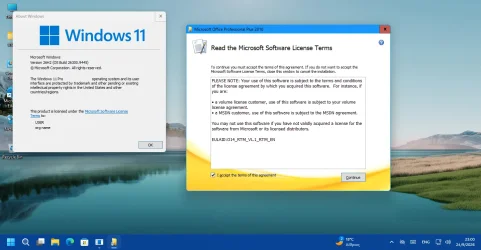
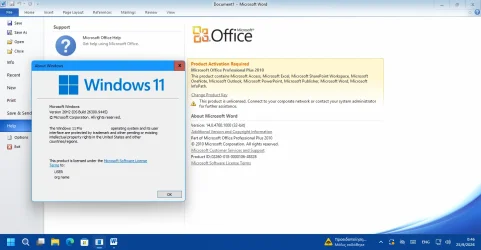
I installed the trial version of Microsoft Office 2010 Professional Plus on a virtual machine running Windows 11 26H2 build 26300.9445. Installer did not warn me against compatibility and completed successfully as you can see in the screenshots. I am now updating to build 26300.9457 to see if that affects Office 2010. I will also install all available Office 2010 updates and check again. I will post back with my results.

Installing Office 2010 in Windows 11 26H2.webp

Running Office 2010 in Windows 11 26H2.webp
 

My Computers My Computers

  • At a glance

    Windows 11 Pro 23H2 (7582), 25H2 (9457)Mobile DualCore Intel Core 2 Duo T7250, 2000 MHz4GBMobile Intel(R) GMA 4500M (Mobile 4 series)
    OS
    Windows 11 Pro 23H2 (7582), 25H2 (9457)
    Computer type
    Laptop
    Manufacturer/Model
    Acer Extensa 5630EZ
    CPU
    Mobile DualCore Intel Core 2 Duo T7250, 2000 MHz
    Motherboard
    Acer Extensa 5630
    Memory
    4GB
    Graphics Card(s)
    Mobile Intel(R) GMA 4500M (Mobile 4 series)
    Sound Card
    Realtek ALC268 @ Intel 82801IB ICH9 - High Definition Audio Controller
    Monitor(s) Displays
    1
    Screen Resolution
    1280x800
    Hard Drives
    Samsung SSD 850 EVO 250GB SATA Device (250 GB, SATA-III)
    Internet Speed
    802.11g wireless 54 Mbps
    Browser
    MICROSOFT EDGE
    Antivirus
    WINDOWS DEFENDER
    Other Info
    Legacy MBR installation, no TPM, no Secure Boot, no WDDM 2.0 graphics drivers, no SSE4.2, cannot get more unsupported ;) This is only my test laptop. I had installed Windows 11 here before upgrading my main PC. For my main PC I use everyday see my 2nd system specs.
  • At a glance

    Windows 11 Pro 25H2 (build 26200.9457)Intel Core-i7 3770 3.40GHz s1155 (3rd generat...2x Kingston Hyper-X Blu 8GB DDR3-1600GIGABYTE GeForce RTX 3050 WINDFORCE OC V2 6GB...
    Operating System
    Windows 11 Pro 25H2 (build 26200.9457)
    Computer type
    PC/Desktop
    Manufacturer/Model
    Custom-built PC
    CPU
    Intel Core-i7 3770 3.40GHz s1155 (3rd generation)
    Motherboard
    Asus P8H61 s1155 ATX
    Memory
    2x Kingston Hyper-X Blu 8GB DDR3-1600
    Graphics card(s)
    GIGABYTE GeForce RTX 3050 WINDFORCE OC V2 6GB (GV-N3050WF2OCV2-6GD)
    Sound Card
    Realtek HD audio (ALC887)
    Monitor(s) Displays
    Sony Bravia KDL-19L4000 19" LCD TV via VGA
    Screen Resolution
    1440x900 32-bit 60Hz
    Hard Drives
    WD Blue SA510 2.5 1000GB SSD as system disk, Western Digital Caviar Purple 4TB SATA III (WD40PURZ) as second
    PSU
    Thermaltake Litepower RGB 550W Full Wired
    Case
    SUPERCASE MIDI-TOWER
    Cooling
    Deepcool Gamma Archer CPU cooler, 1x 8cm fan at the back
    Keyboard
    Mitsumi 101-key PS/2
    Mouse
    Microsoft Compact Optical Mouse
    Internet Speed
    802.11ac 5GHz wireless 260Mpbs
    Browser
    Microsoft Edge, Mozilla Firefox
    Antivirus
    Microsoft Windows Defender
    Other Info
    Legacy BIOS (MBR) installation, no TPM, no Secure Boot, WDDM 3.0 graphics drivers, WEI score 7.4
Back
Top Bottom