Solved Has my Windows update gone mad? Intel -extension- updates duplicates everywhere


KiVri

Member
Local time
7:04 AM
Posts
9
OS
Win11
Yeah title. I'm not sure what's going on with my Win11 23H2 build 22631.5909. It's constantly wanting to install these Intel Extension updates even though I've installed the newest already. Also latest Intel ver 31.xx.xx integrated GPU drivers from DELL is already installed.

I'm not sure what's going on. Any idea? Not really a troubleshooting thread just want other's opinions. I realize I'm on the last month of 23h2 support and a reinstall is overdue but if it works...


Why you do this?
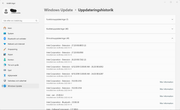


Update history driver section...

I might have to get the WU show/hide tool. Haha.

Also, hi everyone! Just registered. I hope the images show, preview says it should
 
Windows Build/Version
23H2 build 22631.5909

My Computer

System One

  • OS
    Win11
    Computer type
    PC/Desktop
    Manufacturer/Model
    Dell OptiPlex 3060 MFF
    CPU
    i5 8500T
    Motherboard
    N/A
    Memory
    32 GB DDR4 SODIMM
    Graphics Card(s)
    N/A
    Sound Card
    N/A
    Monitor(s) Displays
    BenQ GW2470HM
    Screen Resolution
    1080p (1920x1080)
    Hard Drives
    Kingston 480 GB as DATA/ An odd Samsung M.2 boot drive 256 GB (OEM?)
    PSU
    65W External PSU
    Case
    N/A
    Cooling
    N/A
    Keyboard
    Logitech K120
    Mouse
    Logitech M100
    Internet Speed
    150/20 (Router is 10/100 so I'm capped...)
    Browser
    Firefox/Edge/Chrome
    Antivirus
    Defender/MS Security
    Other Info
    Nothing really.
Do as most of us here do. .....turn off letting windows update our drivers and handle our own driver updates either manually or using the tool provided by our OEM or motherboard manufacturer


My Computers

System One System Two

  • OS
    Windows 11 Pro 25H2 26200.8655
    Computer type
    PC/Desktop
    Manufacturer/Model
    Dell Optiplex 7080
    CPU
    i9-10900 10 core 20 threads
    Motherboard
    DELL 0J37VM
    Memory
    32 gb
    Graphics Card(s)
    none-Intel UHD Graphics 630
    Sound Card
    Integrated Realtek
    Monitor(s) Displays
    Benq 27
    Screen Resolution
    2560x1440
    Hard Drives
    2x1tb Solidigm m.2 nvme /External drives 512gb Samsung m.2 sata+2tb Kingston m2.nvme
    PSU
    500w
    Case
    MT
    Cooling
    Dell Premium
    Keyboard
    Logitech wired
    Mouse
    Logitech wireless
    Internet Speed
    so slow I'm too embarrassed to tell
    Browser
    #1 Edge #2 Firefox
    Antivirus
    Defender+MWB Premium
  • Operating System
    Windows 11 Pro 24H2 26200.8457
    Computer type
    PC/Desktop
    Manufacturer/Model
    Beelink Mini PC SER5
    CPU
    AMD Ryzen 7 6800U
    Memory
    32 gb
    Graphics card(s)
    integrated
    Sound Card
    integrated
    Monitor(s) Displays
    Benq 27
    Screen Resolution
    2560x1440
    Hard Drives
    1TB Crucial nvme
    Keyboard
    Logitech wired
    Mouse
    Logitech wireless
    Internet Speed
    still too embarrassed to tell
    Browser
    Firefox
    Antivirus
    Defender
    Other Info
    System 3 is non compliant Dell 9020 i7-4770/24gb ram Win11 PRO 26200.8457
Hi! I'm already doing that, I thought I disabled driver updates in control panel window. Did that the other day in fact, not long ago. Hence my confusion. I might have to double check.

But I'm off to bed now, so feel free to continue speculating here. :P
 

My Computer

System One

  • OS
    Win11
    Computer type
    PC/Desktop
    Manufacturer/Model
    Dell OptiPlex 3060 MFF
    CPU
    i5 8500T
    Motherboard
    N/A
    Memory
    32 GB DDR4 SODIMM
    Graphics Card(s)
    N/A
    Sound Card
    N/A
    Monitor(s) Displays
    BenQ GW2470HM
    Screen Resolution
    1080p (1920x1080)
    Hard Drives
    Kingston 480 GB as DATA/ An odd Samsung M.2 boot drive 256 GB (OEM?)
    PSU
    65W External PSU
    Case
    N/A
    Cooling
    N/A
    Keyboard
    Logitech K120
    Mouse
    Logitech M100
    Internet Speed
    150/20 (Router is 10/100 so I'm capped...)
    Browser
    Firefox/Edge/Chrome
    Antivirus
    Defender/MS Security
    Other Info
    Nothing really.
That does look like an awful lot of Intel extensions! Maybe 2 or 3 but .............. You're on 23H2 and that is stopping being supported soon. Are you planning to upgrade?
 

My Computers

System One System Two

  • OS
    Windows 11 Home 25H2
    Computer type
    Laptop
    Manufacturer/Model
    HP Pavilion 14-ce3606sa
    CPU
    Core i5-1035G1
    Memory
    32gb
    Hard Drives
    Samsung 870 evo sata ssd
    Cooling
    Could be better
    Internet Speed
    50 mbps Starlink
    Browser
    Firefox
    Other Info
    Originally came installed with a 500gb H10 Optane ssd
  • Operating System
    Windows 11 Home
    Computer type
    Laptop
    Manufacturer/Model
    HP Pavilion ce3606sa
    CPU
    Intel Core i5-1035G1
    Memory
    16gb
    Hard Drives
    Hynix Gold P31 2TB
    Internet Speed
    200mbps Starlink
    Browser
    Firefox
    Antivirus
    Defender
thought I disabled driver updates in control panel window
Since you have an Optiplex, I am assuming you run Pro. Use the tutorial and use the group policy method.
 

My Computers

System One System Two

  • OS
    Windows 11 Pro 25H2 26200.8655
    Computer type
    PC/Desktop
    Manufacturer/Model
    Dell Optiplex 7080
    CPU
    i9-10900 10 core 20 threads
    Motherboard
    DELL 0J37VM
    Memory
    32 gb
    Graphics Card(s)
    none-Intel UHD Graphics 630
    Sound Card
    Integrated Realtek
    Monitor(s) Displays
    Benq 27
    Screen Resolution
    2560x1440
    Hard Drives
    2x1tb Solidigm m.2 nvme /External drives 512gb Samsung m.2 sata+2tb Kingston m2.nvme
    PSU
    500w
    Case
    MT
    Cooling
    Dell Premium
    Keyboard
    Logitech wired
    Mouse
    Logitech wireless
    Internet Speed
    so slow I'm too embarrassed to tell
    Browser
    #1 Edge #2 Firefox
    Antivirus
    Defender+MWB Premium
  • Operating System
    Windows 11 Pro 24H2 26200.8457
    Computer type
    PC/Desktop
    Manufacturer/Model
    Beelink Mini PC SER5
    CPU
    AMD Ryzen 7 6800U
    Memory
    32 gb
    Graphics card(s)
    integrated
    Sound Card
    integrated
    Monitor(s) Displays
    Benq 27
    Screen Resolution
    2560x1440
    Hard Drives
    1TB Crucial nvme
    Keyboard
    Logitech wired
    Mouse
    Logitech wireless
    Internet Speed
    still too embarrassed to tell
    Browser
    Firefox
    Antivirus
    Defender
    Other Info
    System 3 is non compliant Dell 9020 i7-4770/24gb ram Win11 PRO 26200.8457
Old Windows Update Bug (one of the oldest - since this Windows update ecosystem was introduced). If 10 years was not enough to fix/solve it - doubt this will change. Even more than that - instead of solving it - Microsoft developed a lazy workaround: Show or Hide Updates in Windows 11
 

My Computer

System One

  • OS
    WinDOS 25H2
    Computer type
    Laptop
    CPU
    Intel & AMD
    Memory
    SO-DIMM SK Hynix 15.8 GB Dual-Channel DDR4-2666 (2 x 8 GB) 1329MHz (19-19-19-43)
    Graphics Card(s)
    nVidia RTX 2060 6GB Mobile GPU (TU106M)
    Sound Card
    Onbord Realtek ALC1220
    Screen Resolution
    1920 x 1080
    Hard Drives
    1x Samsung PM981 NVMe PCIe M.2 512GB / 1x Seagate Expansion ST1000LM035 1TB
Since you have an Optiplex, I am assuming you run Pro. Use the tutorial and use the group policy method.
Is this setting not enough? Image below. I'll check out GPO, I'm a former Home user of Windows so it's a little unfamiliar, I've been doing stuff with the registry since forever. Yeah, I've Pro version. :P


Old Windows Update Bug (one of the oldest - since this Windows update ecosystem was introduced). If 10 years was not enough to fix/solve it - doubt this will change. Even more than that - instead of solving it - Microsoft developed a lazy workaround: Show or Hide Updates in Windows 11

I figured it was a bug. It reminds me of the decade old Mozilla bugs in Firefox in the Bugzilla. Was this change done back in Windows 10? Also look at that, there's a thread I didn't notice in the bottom, someone with the exact same problem! This even happened with an hp elitebook I just helped finish setting up for dad yesterday, it wanted to install a keyboard driver of all things even though I had installed everything via the HP Support Assistant software! Go figure. I did use the Show/hide tool, took a few tries but it got there (it say it's being discontinued, is that true?). Also had the UEFI firmware in the optional drivers which was scary indeed, also had that installed as the very last thing via the Support Assistant software.

Why do you this, Windows? :( Is there an official channel I can report this? Not that it'll do anything... the MS feedback hub?

That does look like an awful lot of Intel extensions! Maybe 2 or 3 but .............. You're on 23H2 and that is stopping being supported soon. Are you planning to upgrade?

Yeah, all in due time. I'm an LTS kinda guy, use software until eol, lol. I realise I might be an outlier here. (Maybe?)
 

My Computer

System One

  • OS
    Win11
    Computer type
    PC/Desktop
    Manufacturer/Model
    Dell OptiPlex 3060 MFF
    CPU
    i5 8500T
    Motherboard
    N/A
    Memory
    32 GB DDR4 SODIMM
    Graphics Card(s)
    N/A
    Sound Card
    N/A
    Monitor(s) Displays
    BenQ GW2470HM
    Screen Resolution
    1080p (1920x1080)
    Hard Drives
    Kingston 480 GB as DATA/ An odd Samsung M.2 boot drive 256 GB (OEM?)
    PSU
    65W External PSU
    Case
    N/A
    Cooling
    N/A
    Keyboard
    Logitech K120
    Mouse
    Logitech M100
    Internet Speed
    150/20 (Router is 10/100 so I'm capped...)
    Browser
    Firefox/Edge/Chrome
    Antivirus
    Defender/MS Security
    Other Info
    Nothing really.
Just work your way thru the updates from the oldest version/date one at a time.

The reason being that some updates require previous ones to be done.

You are way behind that is why there are so many.
 

My Computer

System One

  • OS
    Windows 11
Was this change done back in Windows 10?

Yes.
Why do you this, Windows? :( Is there an official channel I can report this? Not that it'll do anything... the MS feedback hub?

You can use the Send feedback to Microsoft with the Feedback Hub app - Microsoft Support - but this issue was obviously reported over a million times and fixing it is still not a priority for Microsoft. It's why they created the "Hide Updates" tool, or at least - even if you use the official support - you'll get the same recommendation (to use the Updates Hide tool), same goes for OEM support. Cause of Bugs like this - it's recommended to avoid Windows Update feature - when it comes to Driver or OEM/Manufacturer Apps updates. Microsoft has multiple dev teams - each working on a specific feature. Wew features/apps - are usually covered by younger generation of devs - while core features like Windows Update - is covered by some of the oldest and laziest devs still working at Microsoft. Unless an update brakes Windows - the core devs responsible of Windows Update projects answer to nobody (their time with the company earned them that privilege - irelevant how well they do their job or not). Thus, this devs getting retired/replaces - is the only chance for this issue being fixed.

Who knows, maybe Windows 12 will get a new team. Waiting for a preview to see - if they're STILL stacking new frameworks on top of the old, even ancient. Or, will they clean-up the code (for a change - after decades of stacking).
 

My Computer

System One

  • OS
    WinDOS 25H2
    Computer type
    Laptop
    CPU
    Intel & AMD
    Memory
    SO-DIMM SK Hynix 15.8 GB Dual-Channel DDR4-2666 (2 x 8 GB) 1329MHz (19-19-19-43)
    Graphics Card(s)
    nVidia RTX 2060 6GB Mobile GPU (TU106M)
    Sound Card
    Onbord Realtek ALC1220
    Screen Resolution
    1920 x 1080
    Hard Drives
    1x Samsung PM981 NVMe PCIe M.2 512GB / 1x Seagate Expansion ST1000LM035 1TB
Just work your way thru the updates from the oldest version/date one at a time.

The reason being that some updates require previous ones to be done.

You are way behind that is why there are so many.

I did that with my dad's computer it failed anyway LOL.

@neves Yeah. Window's a mess rn. Maybe 12 will be written by AI? Hurr durr. Anyway thanks for all the help!

I wanted to add a multiquote, can't do that while editing. How do I add one to an already posted post?
 

My Computer

System One

  • OS
    Win11
    Computer type
    PC/Desktop
    Manufacturer/Model
    Dell OptiPlex 3060 MFF
    CPU
    i5 8500T
    Motherboard
    N/A
    Memory
    32 GB DDR4 SODIMM
    Graphics Card(s)
    N/A
    Sound Card
    N/A
    Monitor(s) Displays
    BenQ GW2470HM
    Screen Resolution
    1080p (1920x1080)
    Hard Drives
    Kingston 480 GB as DATA/ An odd Samsung M.2 boot drive 256 GB (OEM?)
    PSU
    65W External PSU
    Case
    N/A
    Cooling
    N/A
    Keyboard
    Logitech K120
    Mouse
    Logitech M100
    Internet Speed
    150/20 (Router is 10/100 so I'm capped...)
    Browser
    Firefox/Edge/Chrome
    Antivirus
    Defender/MS Security
    Other Info
    Nothing really.
I wanted to add a multiquote, can't do that while editing. How do I add one to an already posted post?

Just select the line you want to click (left mouse click) - and a "multi / quote" pop-up should appear at the end of the selected text. You can chose "quote" and repeat that again with any line you want to quote (be it from same user or another - it will wrap the quote around the selected user).
 

My Computer

System One

  • OS
    WinDOS 25H2
    Computer type
    Laptop
    CPU
    Intel & AMD
    Memory
    SO-DIMM SK Hynix 15.8 GB Dual-Channel DDR4-2666 (2 x 8 GB) 1329MHz (19-19-19-43)
    Graphics Card(s)
    nVidia RTX 2060 6GB Mobile GPU (TU106M)
    Sound Card
    Onbord Realtek ALC1220
    Screen Resolution
    1920 x 1080
    Hard Drives
    1x Samsung PM981 NVMe PCIe M.2 512GB / 1x Seagate Expansion ST1000LM035 1TB
I marked this as solved already earlier in the day, later on I did install all of the Intel extensions and hopefully they will stay gone now. My screen flashed for every single one of them, haha.

Does the WU show/hide tool not really work anymore? It doesn't refresh Windows Update and then hide them. Is there a command somewhere that one can type to refresh the list of updates in the Windows Update window? Even on my dad's laptop it only vanished after I did a failed install of the keyboard driver it wanted to install.
 

My Computer

System One

  • OS
    Win11
    Computer type
    PC/Desktop
    Manufacturer/Model
    Dell OptiPlex 3060 MFF
    CPU
    i5 8500T
    Motherboard
    N/A
    Memory
    32 GB DDR4 SODIMM
    Graphics Card(s)
    N/A
    Sound Card
    N/A
    Monitor(s) Displays
    BenQ GW2470HM
    Screen Resolution
    1080p (1920x1080)
    Hard Drives
    Kingston 480 GB as DATA/ An odd Samsung M.2 boot drive 256 GB (OEM?)
    PSU
    65W External PSU
    Case
    N/A
    Cooling
    N/A
    Keyboard
    Logitech K120
    Mouse
    Logitech M100
    Internet Speed
    150/20 (Router is 10/100 so I'm capped...)
    Browser
    Firefox/Edge/Chrome
    Antivirus
    Defender/MS Security
    Other Info
    Nothing really.

Latest Support Threads

Back
Top Bottom