Hasleo Backup Suite


My Computer

System One

  • OS
    Windows 10 22H2
    Computer type
    PC/Desktop
    Manufacturer/Model
    Custom
    CPU
    Ryzen 7 5800XT
    Motherboard
    Asrock B550 Pro4
    Memory
    4x8=32 GB DDR4 3200
    Graphics Card(s)
    Radeon RX 6750 XT
    Sound Card
    Syba Sonic DAC SD-DAC63118
    Screen Resolution
    2560x1080
    Hard Drives
    2 NVME M.2, 1 SATA SSD
    PSU
    XPG Core Reactor 750w
    Case
    Phanteks Enthoo Pro
    Cooling
    Air
    Antivirus
    nope
-1
I am liking Hasleo so far.
Using the ISO on my Ventoy , as a third backupper ( sequence ; Macrium, AoMEI, Hasleo )
If Macrium fails , will use the others .
However , Macrium never failed ( using it many years ) , so dont know yet how Hasleo will perform.............. :wink:
 

My Computer

System One

  • OS
    Windows11 Pro 25H2
    Computer type
    PC/Desktop
    Manufacturer/Model
    Asus
    CPU
    i7
    Motherboard
    z97k
    Memory
    32GB
    Graphics Card(s)
    nVidia
    Sound Card
    Realtek
    Hard Drives
    3
    Cooling
    air
    Browser
    Edge
    Antivirus
    ESET
Using the ISO on my Ventoy , as a third backupper ( sequence ; Macrium, AoMEI, Hasleo )
If Macrium fails , will use the others .
However , Macrium never failed ( using it many years ) , so dont know yet how Hasleo will perform.............. :wink:
If Macrium fails and you have not tried the others even once, how will you restore?
 

My Computers

System One System Two

  • OS
    Windows 11 Pro 25H2 26200.8524
    Computer type
    Laptop
    Manufacturer/Model
    Acemagic LX15PRO
    CPU
    AMD Ryzen 7 5825U with Radeon Graphics
    Memory
    16GB
    Screen Resolution
    1920 x 1080
    Hard Drives
    SSD 2TB
    Internet Speed
    30 Mbps
    Browser
    Brave
    Antivirus
    Webroot Secure Anywhere
    Other Info
    System 3

    Acer Swift SF114-34 laptop
    OS Windows 11 Pro 26200.8524
    CPU Pentium Silver N6000
    RAM 4GB
    SSD Samsung 970 EVO Plus SSD 2TB (an upgrade)
  • Operating System
    Windows 11 Pro 23H2 22631.2506
    Computer type
    Laptop
    Manufacturer/Model
    HP Mini 210-1090NR PC (bought in late 2009!)
    CPU
    Atom N450 1.66GHz
    Memory
    2GB
    Browser
    Brave
    Antivirus
    Webroot
If Macrium fails and you have not tried the others even once, how will you restore?
Maybe my faith in Macrium is too big , also used AoMEI once , its good too............
 

My Computer

System One

  • OS
    Windows11 Pro 25H2
    Computer type
    PC/Desktop
    Manufacturer/Model
    Asus
    CPU
    i7
    Motherboard
    z97k
    Memory
    32GB
    Graphics Card(s)
    nVidia
    Sound Card
    Realtek
    Hard Drives
    3
    Cooling
    air
    Browser
    Edge
    Antivirus
    ESET
Just do one backup with Hasleo to see how fast it is. Repeat monthly. I use MR weekly - sometimes.
 

My Computers

System One System Two

  • OS
    Windows 11 Pro 25H2 26200.8524
    Computer type
    Laptop
    Manufacturer/Model
    Acemagic LX15PRO
    CPU
    AMD Ryzen 7 5825U with Radeon Graphics
    Memory
    16GB
    Screen Resolution
    1920 x 1080
    Hard Drives
    SSD 2TB
    Internet Speed
    30 Mbps
    Browser
    Brave
    Antivirus
    Webroot Secure Anywhere
    Other Info
    System 3

    Acer Swift SF114-34 laptop
    OS Windows 11 Pro 26200.8524
    CPU Pentium Silver N6000
    RAM 4GB
    SSD Samsung 970 EVO Plus SSD 2TB (an upgrade)
  • Operating System
    Windows 11 Pro 23H2 22631.2506
    Computer type
    Laptop
    Manufacturer/Model
    HP Mini 210-1090NR PC (bought in late 2009!)
    CPU
    Atom N450 1.66GHz
    Memory
    2GB
    Browser
    Brave
    Antivirus
    Webroot
Just do one backup with Hasleo to see how fast it is. Repeat monthly. I use MR weekly - sometimes.
Ok , will try......... :wink:
 

My Computer

System One

  • OS
    Windows11 Pro 25H2
    Computer type
    PC/Desktop
    Manufacturer/Model
    Asus
    CPU
    i7
    Motherboard
    z97k
    Memory
    32GB
    Graphics Card(s)
    nVidia
    Sound Card
    Realtek
    Hard Drives
    3
    Cooling
    air
    Browser
    Edge
    Antivirus
    ESET
I use MR weekly but every month, I also do a backup with the current Hasleo version to compare times and sizes.

Here is the latest comparison:

Hasleo v5.0.2.2 Backup (medium compression) comparison results with MR v8.1;
MR Hasleo
Time 1:37 0:58
Space 26.0GB 23.8GB
 

My Computer

System One

  • OS
    Windows 11
    Computer type
    PC/Desktop
    Manufacturer/Model
    Custom built
    CPU
    Ryzen 5600X
    Motherboard
    ASRock Steel Legend
    Memory
    16GB
    Graphics Card(s)
    EVGA GT 710
    Sound Card
    None
    Monitor(s) Displays
    23",24", 19" - flat panels
    Screen Resolution
    1920x1200
    Hard Drives
    None - only M.2 SATA and NVMe drives
    PSU
    750W
    Case
    Antec
    Cooling
    stock Wraith cooler
    Keyboard
    Corsair gaming
    Mouse
    Logitech M720
    Internet Speed
    1Gb
Which version of MR?
Hasleo is faster that Macrium 8.1.
 

My Computers

System One System Two

  • OS
    Windows 11 Pro 25H2 26200.8524
    Computer type
    Laptop
    Manufacturer/Model
    Acemagic LX15PRO
    CPU
    AMD Ryzen 7 5825U with Radeon Graphics
    Memory
    16GB
    Screen Resolution
    1920 x 1080
    Hard Drives
    SSD 2TB
    Internet Speed
    30 Mbps
    Browser
    Brave
    Antivirus
    Webroot Secure Anywhere
    Other Info
    System 3

    Acer Swift SF114-34 laptop
    OS Windows 11 Pro 26200.8524
    CPU Pentium Silver N6000
    RAM 4GB
    SSD Samsung 970 EVO Plus SSD 2TB (an upgrade)
  • Operating System
    Windows 11 Pro 23H2 22631.2506
    Computer type
    Laptop
    Manufacturer/Model
    HP Mini 210-1090NR PC (bought in late 2009!)
    CPU
    Atom N450 1.66GHz
    Memory
    2GB
    Browser
    Brave
    Antivirus
    Webroot
Which version of MR?
Hasleo is faster that Macrium 8.1.
Stability and secure backups is most important , then speed ...........
Macrium is ( for me) best , it never failed , year after year.
Secure till latest bit........... :wink:
 

My Computer

System One

  • OS
    Windows11 Pro 25H2
    Computer type
    PC/Desktop
    Manufacturer/Model
    Asus
    CPU
    i7
    Motherboard
    z97k
    Memory
    32GB
    Graphics Card(s)
    nVidia
    Sound Card
    Realtek
    Hard Drives
    3
    Cooling
    air
    Browser
    Edge
    Antivirus
    ESET
Which version of MR?
Hasleo is faster that Macrium 8.1.
MR v8.1.8325.

I downloaded a 30-day trial of MR version X when it first came out and it was only a little faster and created image files a little smaller, than v8.1. I felt the very trivial improvements were not worth the subscription cost.
 

My Computer

System One

  • OS
    Windows 11
    Computer type
    PC/Desktop
    Manufacturer/Model
    Custom built
    CPU
    Ryzen 5600X
    Motherboard
    ASRock Steel Legend
    Memory
    16GB
    Graphics Card(s)
    EVGA GT 710
    Sound Card
    None
    Monitor(s) Displays
    23",24", 19" - flat panels
    Screen Resolution
    1920x1200
    Hard Drives
    None - only M.2 SATA and NVMe drives
    PSU
    750W
    Case
    Antec
    Cooling
    stock Wraith cooler
    Keyboard
    Corsair gaming
    Mouse
    Logitech M720
    Internet Speed
    1Gb
I’ve been using Macrium Reflect for years, and it has never failed a restore (well over a hundred). I thought such a great reliability doesn’t require another imaging program just in case Macrium would botch a restore. Lately I changed my mind and decided to try Hasleo Backup Suite, it is free after all and everyone seems to be happy with it.

I am quite impressed with the results, compared to MacriumX, the performance is almost identical, on my fast laptop Macrium is slightly faster with full backups (really insignificant differences, we are talking about 3.50 minutes with Macrium and 4 minutes with Hasleo, and 50 seconds and 1 minute for incremental backups respectively.

They are both extremely fast. What Hasleo seems to have an edge for compared to Macrium is the standard volume produced, 95 GB for Hasleo and 113 GB for Macrium. Not a hugedifference, but a significant one. What I think is great with Hasleo, it is still free for now and the procedure to start a backup is very simple compared to Macrium. I will keep Hasleo for extra security.
 

My Computers

System One System Two

  • OS
    Windows 11 PRO 25H2
    Computer type
    Laptop
    Manufacturer/Model
    Dell XPS 15 9520
    CPU
    i7 12700H 4.7 GHz
    Motherboard
    Dell 0YD3W1
    Memory
    16 GB, DDR5, 4800
    Graphics Card(s)
    NVIDIA GeFORCE RTX 3050 Ti 4 GB GDDR6 45W - INTEL IRIS Xe Graphics
    Sound Card
    Realtek and NVIDIA WDM
    Monitor(s) Displays
    15.6"
    Screen Resolution
    3840X2400 @ 60 Hz ANTIREFLECT 500 nit infinity edge
    Hard Drives
    1 TB M.2 PCle NVMe SSD
    PSU
    Dell
    Case
    Standard case
    Cooling
    Laptop cooling pad
    Keyboard
    Standard
    Mouse
    LOGITECH G304
    Internet Speed
    DOWN 94.75 Mbps up 94.83 Mbps
    Browser
    CHROME
    Antivirus
    MICROSOFT DEFENDER
    Other Info
    Imaging program: Macrium Reflect X Home , and Hasleo Backup Suite
    Google Chrome
    Browser content filter: uBlock Origin and SpywareBlaster
    Heavy programs in use: Photoshop 2025 Beta
  • Operating System
    Windows 11 Home 24H2
    Computer type
    Laptop
    Manufacturer/Model
    Samsung series 7 CHRONOS 15" NT770Z5E-S78
    CPU
    i7 3630QM @ 2.40 GHz
    Motherboard
    Samsung NT770Z5E-S78
    Memory
    8 GB dual DDR3
    Graphics card(s)
    Intel HD graphics 4000 and ATI AMD Radeon HD 8800
    Sound Card
    Realtek HD
    Monitor(s) Displays
    Generic PnP monitor
    Screen Resolution
    1920 X 1080 @ 60 Hz
    Hard Drives
    Samsung SSD 860 EVO 500 GB
    PSU
    Samsung
    Case
    standard
    Cooling
    Fans
    Keyboard
    Standard
    Mouse
    Logitech M221
    Internet Speed
    96 down 97 up
    Browser
    Chrome
    Antivirus
    MS Defender
    Other Info
    Imaging program: Macrium Reflect free edition
    Browser content filter: uBlock Origin
I'm trying Hasleo Bkup for the first time. I did a "system" bkup of my 512 GB M.2 system SSD. Then I did a restore to a different 512 GB SATA SSD. The restore completed successfully and the SATA SSD works perfectly.

BUT, checking the SATA SSD in Win11's Disk Management, there is a large unallocated partition after the Recovery partition, as follows:
- 100 MB Healthy (EFI System Partiton)
- C-SYSTEM partition
- Recovery partition
- Unallocated

The original M.2 SSD has the Recovery partition at the far right with the C-SYSTEM partition at its maximum size.

What setting do I need to make when I do the restore operation from the emergency flash drive to have the C partition at it's maximum size like the original M.2 SSD has it?
 

My Computer

System One

  • OS
    Windows 11
    Computer type
    PC/Desktop
    Manufacturer/Model
    Self Built
    CPU
    Intel Core Ultra 7, 265K
    Motherboard
    MSI Pro Z890-P WiFi
    Memory
    32GB
    Graphics Card(s)
    Using integrated graphics
    Monitor(s) Displays
    LG
    Screen Resolution
    4K
    Hard Drives
    512 GB SSD, 2TB M.2 SSD and 2TB SATA SSD
    PSU
    Seasonic Modular 550 watt Focus Plus
    Case
    Corsair 4000D
    Cooling
    ThermalRight Phantom Sprit
If you did your restore to a larger drive, that's exactly what's supposed to happen... the unused space will be at the right of the last partition in the image and your OS partition will be as it was when it was imaged.

I have not used the function, but Hasleo does give you the ability to modify partition sizes during the restore operation.
 

My Computer

System One

  • OS
    Windows 10, Linux MINT (Guests 7, 11, ZorinOS)
    Computer type
    PC/Desktop
    Manufacturer/Model
    HP Z2 G5 Workstation
    CPU
    Intel Core i7-10700
    Motherboard
    HP Model# 8751
    Memory
    32gB (DDR4)
    Graphics Card(s)
    Intel UHD Graphics 630
    Sound Card
    Realtek basic audio
    Monitor(s) Displays
    32" (Viewsonic) UHD
    Screen Resolution
    3840 x 2160
    Hard Drives
    2-NvME (mainboard), 1-NvME (PCIe), 1-SATA3 SSD
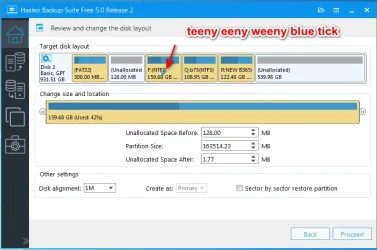
where it says change size and location

it is very small and not easy to see. That is the only problem with this program

click on the partition on the top. if you look very hard you can see it has a miscroscopic blue tick on it

that is the partition which shows underneath you can resize

hasleo-retore-layout.webp

to select a different partition to resize click on it as below


hasleo-retore-layout-teeeny.webp
 

My Computers

System One System Two

  • OS
    Win7,Win11
    Computer type
    PC/Desktop
    CPU
    i7-9700
    Motherboard
    gigabyte b365m ds3h
    Memory
    2x16gb 3600mhz
    Monitor(s) Displays
    benq gw2480
    PSU
    bequiet pure power 11 400CM
    Cooling
    cryorig m9i
  • Operating System
    win7,win11
    Computer type
    PC/Desktop
    CPU
    i5-8400
    Motherboard
    gigabyte b365m ds3h
    Memory
    2x8gb 3200
    PSU
    xfx pro 450
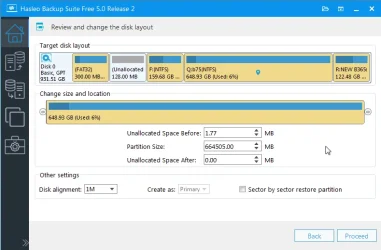
for example

hasleo-retore-layout-relocate.webp


hasleo-retore-layout-relocate2.webp


hasleo-retore-layout-relocate3.webp


hasleo-retore-layout-relocate4.webp

when you are happy with target disk layout click Proceed

Maybe it is not a tick. The nano sized blue object might be a balloon shape.
 
Last edited:

My Computers

System One System Two

  • OS
    Win7,Win11
    Computer type
    PC/Desktop
    CPU
    i7-9700
    Motherboard
    gigabyte b365m ds3h
    Memory
    2x16gb 3600mhz
    Monitor(s) Displays
    benq gw2480
    PSU
    bequiet pure power 11 400CM
    Cooling
    cryorig m9i
  • Operating System
    win7,win11
    Computer type
    PC/Desktop
    CPU
    i5-8400
    Motherboard
    gigabyte b365m ds3h
    Memory
    2x8gb 3200
    PSU
    xfx pro 450
If you did your restore to a larger drive, that's exactly what's supposed to happen... the unused space will be at the right of the last partition in the image and your OS partition will be as it was when it was imaged.

I have not used the function, but Hasleo does give you the ability to modify partition sizes during the restore operation.
Please note that the backed up M.2 SSD is 512 GB and the restore to SATA SSD is also 512 GB. That's why I don't understand why HBS made the C partition smaller, moved the Recovery partition to the left with the resultant unallocated space at the far right.

Shouldn't a restore to the same capacity SSD be identical to the backed up SSD?

Actually, even restoring to a larger capacity SSD, HBS should enlarge the C partition to fill the SSD and not leave any unallocated space.
 

My Computer

System One

  • OS
    Windows 11
    Computer type
    PC/Desktop
    Manufacturer/Model
    Self Built
    CPU
    Intel Core Ultra 7, 265K
    Motherboard
    MSI Pro Z890-P WiFi
    Memory
    32GB
    Graphics Card(s)
    Using integrated graphics
    Monitor(s) Displays
    LG
    Screen Resolution
    4K
    Hard Drives
    512 GB SSD, 2TB M.2 SSD and 2TB SATA SSD
    PSU
    Seasonic Modular 550 watt Focus Plus
    Case
    Corsair 4000D
    Cooling
    ThermalRight Phantom Sprit

My Computer

System One

  • OS
    Windows 11
    Computer type
    PC/Desktop
    Manufacturer/Model
    Self Built
    CPU
    Intel Core Ultra 7, 265K
    Motherboard
    MSI Pro Z890-P WiFi
    Memory
    32GB
    Graphics Card(s)
    Using integrated graphics
    Monitor(s) Displays
    LG
    Screen Resolution
    4K
    Hard Drives
    512 GB SSD, 2TB M.2 SSD and 2TB SATA SSD
    PSU
    Seasonic Modular 550 watt Focus Plus
    Case
    Corsair 4000D
    Cooling
    ThermalRight Phantom Sprit

My Computers

System One System Two

  • OS
    Windows 11 Pro 25H2 Build 26200.8524
    Computer type
    PC/Desktop
    Manufacturer/Model
    Sin-built 2013
    CPU
    Intel(R) Core(TM) i7-4770K CPU @ 3.50GHz
    Motherboard
    ASUS ROG Maximus VI Formula
    Memory
    32.0 GB of I forget and the box is in storage.
    Graphics Card(s)
    Gigabyte nVidia GeForce GTX 1660 Super OC 6GB
    Sound Card
    Onboard thingy
    Monitor(s) Displays
    5 x LG 25MS500-B - 1 x 24MK430H-B - 1 x Wacom Pro 22" Touch Screen Tablet
    Screen Resolution
    All over the place
    Hard Drives
    Too many to list.
    OS on Samsung 1TB 870 QVO SATA
    PSU
    Silverstone 1500
    Case
    NZXT Phantom 820 Full-Tower Case
    Cooling
    Noctua NH-D15 Elite Class Dual Tower CPU Cooler / 6 x EziDIY 120mm / 2 x Corsair 140mm somethings / 1 x 140mm Thermaltake something / 2 x 200mm Corsair.
    Keyboard
    Corsair K95 / Logitech diNovo Edge Wireless
    Mouse
    Logitech: G402 / G502 / Mx Masters / Mx Air Cordless
    Internet Speed
    2000/500Mbps
    Browser
    All sorts
    Antivirus
    Kaspersky Premium
    Other Info
    ㅤㅤㅤㅤㅤㅤㅤㅤㅤㅤㅤㅤㅤㅤㅤㅤㅤㅤㅤㅤㅤㅤㅤㅤㅤㅤㅤㅤㅤㅤㅤㅤㅤㅤㅤㅤㅤㅤㅤㅤ⠀⠀⠀⠀⠀⠀⠀⠀⠀⠀
    TP-Link BE9300 WiFi 7 Bluetooth 5.4 (Archer TBE550E)
    TP-Link TX201 V1 2.5GB Lan

    Grandstream HT812 - VoIP
    ASUS DSL-AX82U - Mesh
    ASUS RT-AC68U - Mesh
    ASUS RT-BE88U Router

    Brother MFC-L2880DW Printer

    I’m on a horse.
  • Operating System
    Windows 11 Pro 25H2 Build 26200.8524
    Computer type
    Laptop
    Manufacturer/Model
    LENOVO Yoga 7 14IRL8 - 7i EVO OLED 14" Touchscreen i5 12 Core 16GB/512GB
    CPU
    Intel Core 12th Gen i5-1240P Processor (1.7 - 4.4GHz)
    Memory
    16GB LPDDR5 RAM
    Graphics card(s)
    Intel Iris Xe Graphics Processor
    Sound Card
    Optimized with Dolby Atmos®
    Screen Resolution
    QHD 2880 x 1800 OLED
    Hard Drives
    M.2 512GB
    Antivirus
    Defender / Malwarebytes
    Other Info
    …still on a horse.

My Computers

System One System Two

  • OS
    Win7,Win11
    Computer type
    PC/Desktop
    CPU
    i7-9700
    Motherboard
    gigabyte b365m ds3h
    Memory
    2x16gb 3600mhz
    Monitor(s) Displays
    benq gw2480
    PSU
    bequiet pure power 11 400CM
    Cooling
    cryorig m9i
  • Operating System
    win7,win11
    Computer type
    PC/Desktop
    CPU
    i5-8400
    Motherboard
    gigabyte b365m ds3h
    Memory
    2x8gb 3200
    PSU
    xfx pro 450
Not the answer I would of given.
 

My Computers

System One System Two

  • OS
    Windows 11 Pro 25H2 Build 26200.8524
    Computer type
    PC/Desktop
    Manufacturer/Model
    Sin-built 2013
    CPU
    Intel(R) Core(TM) i7-4770K CPU @ 3.50GHz
    Motherboard
    ASUS ROG Maximus VI Formula
    Memory
    32.0 GB of I forget and the box is in storage.
    Graphics Card(s)
    Gigabyte nVidia GeForce GTX 1660 Super OC 6GB
    Sound Card
    Onboard thingy
    Monitor(s) Displays
    5 x LG 25MS500-B - 1 x 24MK430H-B - 1 x Wacom Pro 22" Touch Screen Tablet
    Screen Resolution
    All over the place
    Hard Drives
    Too many to list.
    OS on Samsung 1TB 870 QVO SATA
    PSU
    Silverstone 1500
    Case
    NZXT Phantom 820 Full-Tower Case
    Cooling
    Noctua NH-D15 Elite Class Dual Tower CPU Cooler / 6 x EziDIY 120mm / 2 x Corsair 140mm somethings / 1 x 140mm Thermaltake something / 2 x 200mm Corsair.
    Keyboard
    Corsair K95 / Logitech diNovo Edge Wireless
    Mouse
    Logitech: G402 / G502 / Mx Masters / Mx Air Cordless
    Internet Speed
    2000/500Mbps
    Browser
    All sorts
    Antivirus
    Kaspersky Premium
    Other Info
    ㅤㅤㅤㅤㅤㅤㅤㅤㅤㅤㅤㅤㅤㅤㅤㅤㅤㅤㅤㅤㅤㅤㅤㅤㅤㅤㅤㅤㅤㅤㅤㅤㅤㅤㅤㅤㅤㅤㅤㅤ⠀⠀⠀⠀⠀⠀⠀⠀⠀⠀
    TP-Link BE9300 WiFi 7 Bluetooth 5.4 (Archer TBE550E)
    TP-Link TX201 V1 2.5GB Lan

    Grandstream HT812 - VoIP
    ASUS DSL-AX82U - Mesh
    ASUS RT-AC68U - Mesh
    ASUS RT-BE88U Router

    Brother MFC-L2880DW Printer

    I’m on a horse.
  • Operating System
    Windows 11 Pro 25H2 Build 26200.8524
    Computer type
    Laptop
    Manufacturer/Model
    LENOVO Yoga 7 14IRL8 - 7i EVO OLED 14" Touchscreen i5 12 Core 16GB/512GB
    CPU
    Intel Core 12th Gen i5-1240P Processor (1.7 - 4.4GHz)
    Memory
    16GB LPDDR5 RAM
    Graphics card(s)
    Intel Iris Xe Graphics Processor
    Sound Card
    Optimized with Dolby Atmos®
    Screen Resolution
    QHD 2880 x 1800 OLED
    Hard Drives
    M.2 512GB
    Antivirus
    Defender / Malwarebytes
    Other Info
    …still on a horse.
Back
Top Bottom