
Hasleo Backup Suite


EaseUS Partition Master includes both, but I haven't tried it yet.
I have tried it and it fixed my problem with secure boot many times as mentioned here:
 

My Computer

System One

  • OS
    WindowsXP/7/8/8.1/10/11,Linux,Android,FreeBSD Unix
    Computer type
    Laptop
    Manufacturer/Model
    Dell XPS 15 9570
    CPU
    Intel® Core™ i7-8750H 8th Gen 2.2Ghz up to 4.1Ghz
    Motherboard
    Dell XPS 15 9570
    Memory
    64GB using 2x32GB CL16 Mushkin redLine modules
    Graphics Card(s)
    Intel UHD 630 & NVIDIA GeForce GTX 1050 Ti with 4GB DDR5
    Sound Card
    Realtek ALC3266-CG
    Monitor(s) Displays
    15.6" 4K Touch UltraHD 3840x2160 made by Sharp
    Screen Resolution
    3840x2160 4K UltraHD
    Hard Drives
    Samsung MZ-V9P4T0B/AM 990 PRO 4TB PCIe®4.0 NVMe™ M.2 SSD was Toshiba KXG60ZNV1T02 NVMe 1TB SSD
    PSU
    Dell XPS 15 9570
    Case
    Dell XPS 15 9570
    Cooling
    Stock
    Keyboard
    Stock
    Mouse
    SwitftPoint ProPoint
    Internet Speed
    Comcast/XFinity 1.44Gbps/42.5Mbps
    Browser
    Microsoft EDGE (Chromium based) & Google Chrome
    Antivirus
    Windows Defender that came with Windows
All current versions have a time bomb in them. If you don't update your software in a timely manner, the current version will stop working. This is not a phone home thing, it is a real time bomb. When it goes PAID (not anticipated in the near future), I'm sure it will be removed.

The problem here assuming both the free and paid versions have the time bomb and the company no longer provides new versions or goes out of business, people would have problems restoring.

As for the paid version, they can also do the Foxit model. One option is pay once license and the other option is a subscription model which costs lest than the pay once license. I can't remember the exact pricing but I think the subscription costs less than 50% of the one time license fee.

And as far as reliability is concerned, let's assume both MR and Hasleo are 100% reliable from past and current experience but like the saying goes, past performance is no guarantee of future results so it can be that critical time when you need it when it actually fails while it works fine in all the stress tests that one did in the past. Since there are no certainties in life except death and taxes.
 

My Computer

System One

  • OS
    WindowsXP/7/8/8.1/10/11,Linux,Android,FreeBSD Unix
    Computer type
    Laptop
    Manufacturer/Model
    Dell XPS 15 9570
    CPU
    Intel® Core™ i7-8750H 8th Gen 2.2Ghz up to 4.1Ghz
    Motherboard
    Dell XPS 15 9570
    Memory
    64GB using 2x32GB CL16 Mushkin redLine modules
    Graphics Card(s)
    Intel UHD 630 & NVIDIA GeForce GTX 1050 Ti with 4GB DDR5
    Sound Card
    Realtek ALC3266-CG
    Monitor(s) Displays
    15.6" 4K Touch UltraHD 3840x2160 made by Sharp
    Screen Resolution
    3840x2160 4K UltraHD
    Hard Drives
    Samsung MZ-V9P4T0B/AM 990 PRO 4TB PCIe®4.0 NVMe™ M.2 SSD was Toshiba KXG60ZNV1T02 NVMe 1TB SSD
    PSU
    Dell XPS 15 9570
    Case
    Dell XPS 15 9570
    Cooling
    Stock
    Keyboard
    Stock
    Mouse
    SwitftPoint ProPoint
    Internet Speed
    Comcast/XFinity 1.44Gbps/42.5Mbps
    Browser
    Microsoft EDGE (Chromium based) & Google Chrome
    Antivirus
    Windows Defender that came with Windows
The problem here assuming both the free and paid versions have the time bomb and the company no longer provides new versions or goes out of business, people would have problems restoring.
Of course, but that's not the case. A lot of users don't realize that the time bomb is needed in the case of Hasleo's developers. They do not run PUBLIC or PRIVATE betas on their FREE software... the users of that software are their "beta testers" (that's basically why it's FREE at this stage). To ensure that testing continues on the version being developed, they use a time bomb to force you (their beta testers) to continue to move along their development timeline and continue testing newer versions of their software. When they consider it "production quality," the time bomb will be removed (no more beta testing) and it will officially be offered as either FREE, PERPETUAL license or SUBSCRIPTION... whatever their decision may be.

I don't believe any of their current products are of a SUBSCRIPTION nature, only FREE or PERPETUAL license. If you wanna use the product today, you are an "unofishul" beta tester until further notice. :cautious:

From my use (over 3-years "testing" and working with the Devs), this product is in excellent shape. I believe they still wanna add some features (FileSystem support, etc.) so it should remain FREE for a bit, IMHO.
 
Last edited:

My Computer

System One

  • OS
    Windows 10, (also 7, 11, Linux <MINT & ZorinOS>)
    Computer type
    PC/Desktop
    Manufacturer/Model
    HP Z2 G5 Workstation
    CPU
    Intel Core i7-10700
    Motherboard
    HP Model# 8751
    Memory
    32gB (DDR4)
    Graphics Card(s)
    Intel UHD Graphics 630
    Sound Card
    Realtek basic audio
    Monitor(s) Displays
    32" (Viewsonic)
    Screen Resolution
    3840 x 2160
    Hard Drives
    (3) NvME SSDs <(1) PCiE v3>, (1) SATA3 SSD
  • Like
Reactions: miw
I've given up on using Hasleo Backup Suite Free. Here's what happened:

A friend's Win11 PC suddenly developed a problem of getting an "Invalid password" when doing a power on boot into Win11. No idea why that happened. We used the same password that she's been using and verified that it was correct by clicking "show password". After multiple tries, Win11 locked up and disabled its password entry. IOW, Win11 was now dead in the water.

*1 So to get her backup, I used the Hasleo emergency flash drive (that I had made for her on her Win11 PC when she first got it about 5 months ago) and restored her last system drive image backup. Mind bogglingly, the same "Invalid Password" problem happened on booting Win11! How could that have happened with a restore of a known good image backup that was done when her Win11 password was working fine?

*2 So I used the Win11 troubleshooter and reset Win11 to see if the PC could even run Win11. After the reset, the PC booted into Win11 OK. But as expected via the Win11 reset, she lost all of her installed programs. (She did not lose any of her data since I had set her up with a separate D drive for data only, when she first got this Win11 PC.)

THE HASLEO RESTORE PROBLEM:
Now that we knew that the PC could run Win11 OK (apparently not a hardware problem), I tried to restore the same system image backup that I just did in the "*1" paragraph above. I booted the emergency flash drive but this time when I selected "Restore", the link to the backup drive was grayed out. Why did this happen when it was OK in the *1 paragraph above???

I selected "Home" in Hasleo and there's an option there to initiate a restore. But when I clicked that restore option, Hasleo displayed an error code (don't remember what it was). So there was no way to initiate the restore of her last backup using the emergency flash drive. I rebooted into the emergency flash drive again but the same problems occurred. Why did those problems happen when I was able to do a restore in the *1 paragraph OK previously?

THE FIX:
I booted back into the reset version of Win11 (*2) and downloaded and installed Hasleo. In that version, I was able to select the Home tab and when I clicked the restore option, it worked! I restored the system image backup (*1) and it restored successfully.

Amazingly, the same invalid password problem occurred. But this time we noticed that in small letters there was an option to reset her Win11 password. So I clicked it and after answering the 3 Win11 security questions, was able to create a new Win11 password. Shutdown and on power on boot, the new Win11 password worked! She was backup and running fine on her restored Win11.

NOT SURE:
Not sure if the "reset password" option was on her original "Invalid Password" problem. It probably was but we didn't notice it due to it being in such small letters. Had we noticed it, we could have avoided doing the Hasleo restore.

SUMMARY:
She's been running fine on her restored Win11 for about 2 weeks now. No problems at all. Why the Hasleo emergency flash drive failed to allow doing a restore the second time is unknown. Thank goodness installing the latest version of Hasleo in the reset version of Win11 and running the restore from there worked. Am going back to the last free version of Macrium Reflect for both her and my PCs.
Hard to know what happened but glad the restore worked at the end and she didn't lose any data. You might want to post on their forums so at least they are aware of the issue and at least prevent something like this happening to others in the future even though you might not ever use Hasleo ever again. But it will still be helpful for Hasleo developers to have the information to determine if the problem is actually with Hasleo which they can fix or if the problem is elsewhere.
 
Last edited:

My Computer

System One

  • OS
    WindowsXP/7/8/8.1/10/11,Linux,Android,FreeBSD Unix
    Computer type
    Laptop
    Manufacturer/Model
    Dell XPS 15 9570
    CPU
    Intel® Core™ i7-8750H 8th Gen 2.2Ghz up to 4.1Ghz
    Motherboard
    Dell XPS 15 9570
    Memory
    64GB using 2x32GB CL16 Mushkin redLine modules
    Graphics Card(s)
    Intel UHD 630 & NVIDIA GeForce GTX 1050 Ti with 4GB DDR5
    Sound Card
    Realtek ALC3266-CG
    Monitor(s) Displays
    15.6" 4K Touch UltraHD 3840x2160 made by Sharp
    Screen Resolution
    3840x2160 4K UltraHD
    Hard Drives
    Samsung MZ-V9P4T0B/AM 990 PRO 4TB PCIe®4.0 NVMe™ M.2 SSD was Toshiba KXG60ZNV1T02 NVMe 1TB SSD
    PSU
    Dell XPS 15 9570
    Case
    Dell XPS 15 9570
    Cooling
    Stock
    Keyboard
    Stock
    Mouse
    SwitftPoint ProPoint
    Internet Speed
    Comcast/XFinity 1.44Gbps/42.5Mbps
    Browser
    Microsoft EDGE (Chromium based) & Google Chrome
    Antivirus
    Windows Defender that came with Windows
Security information may not be stored in the disk, but in the TPM or elsewhere. If this happens, the restore of an image of the disk may not solve the problem.
 

My Computer

System One

  • OS
    Windows 10
Of course, but that's not the case. A lot of users don't realize that the time bomb is needed in the case of Hasleo's developers. They do not run PUBLIC or PRIVATE betas on their FREE software... the users of that software are their "beta testers" (that's basically why it's FREE at this stage). To ensure that testing continues on the version being developed, they use a time bomb to force you (their beta testers) to continue to move along their development timeline and continue testing newer versions of their software. When they consider it "production quality," the time bomb will be removed (no more beta testing) and it will officially be offered as either FREE, PERPETUAL license or SUBSCRIPTION... whatever their decision may be.

I don't believe any of their current products are of a SUBSCRIPTION nature, only FREE or PERPETUAL license. If you wanna use the product today, you are an "unofishul" beta tester until further notice. :cautious:

From my use (over 3-years "testing" and working with the Devs), this product is in excellent shape. I believe they still wanna add some features (FileSystem support, etc.) so it should remain FREE for a bit, IMHO.
That's true since the only way they can get people to use their product is by offering it for free to get feedback. This is similar to in 1995 when Internet access on leased lines were provided free for 2 years to organizations or entities and then since someone is already using it, the chances of them continuing to use it is high even at $1,000-$5,000/month including non-profit organizations. It's to gain market share from the markets they are interested in getting it from and even if they do charge, if they have like 90% of everything the competition has and the price is less than 90% of the competition, then they will still gain market share. It's similar to loss leader products first to gain the business and let the users spread the word. In reality, there is no such thing as bug free in software as there is always something to fix or otherwise the developers will not have jobs. Look at Windows, there are bug fixes and then there are new bugs and that will happen until the end of time.

As for the time bomb, is that done based on the system clock or is that based on it connecting to the server? If it's the former, I wonder what would happen if one disconnected from the internet after the version they are using has expired and then set the clock back to a earlier date/time just to use the program.

Yes, from reading the thread, you seem to be the one who is most competent in knowing their products. I haven't used any backup programs and only cloning programs and that's very infrequently so I will give Hasleo a shot as early as today or in the next few days with a 980GB of data internal 1TB Toshiba SSD which will be imaged to a 5TB Portable 2.5" external HDD and then restored immediately to the 4TB Samsung 990 Pro SSD sitting in a USB 3.2 Gen 2 SSD enclosure and then replacing the 1TB with the new 4TB drive and see how it goes on my notebook computer.

I am probably going to read the Hasleo Backup Suite thread at wildersseurityas well either before I attempt this or after I attempt this as I see you have been contributing a lot there too. I will probably post things that are helpful from that thread that is missing in this thread. Thanks everyone for sharing your knowledge and input on Hasleo and backups in general.
 
Last edited:

My Computer

System One

  • OS
    WindowsXP/7/8/8.1/10/11,Linux,Android,FreeBSD Unix
    Computer type
    Laptop
    Manufacturer/Model
    Dell XPS 15 9570
    CPU
    Intel® Core™ i7-8750H 8th Gen 2.2Ghz up to 4.1Ghz
    Motherboard
    Dell XPS 15 9570
    Memory
    64GB using 2x32GB CL16 Mushkin redLine modules
    Graphics Card(s)
    Intel UHD 630 & NVIDIA GeForce GTX 1050 Ti with 4GB DDR5
    Sound Card
    Realtek ALC3266-CG
    Monitor(s) Displays
    15.6" 4K Touch UltraHD 3840x2160 made by Sharp
    Screen Resolution
    3840x2160 4K UltraHD
    Hard Drives
    Samsung MZ-V9P4T0B/AM 990 PRO 4TB PCIe®4.0 NVMe™ M.2 SSD was Toshiba KXG60ZNV1T02 NVMe 1TB SSD
    PSU
    Dell XPS 15 9570
    Case
    Dell XPS 15 9570
    Cooling
    Stock
    Keyboard
    Stock
    Mouse
    SwitftPoint ProPoint
    Internet Speed
    Comcast/XFinity 1.44Gbps/42.5Mbps
    Browser
    Microsoft EDGE (Chromium based) & Google Chrome
    Antivirus
    Windows Defender that came with Windows
FYI, the time bomb does not require "phoning home"... BUT it's only in the Windows installed version, it does not exist in the WIM version that is used in their ISO, BOOT or UFD versions. As a result, off-line imaging/restoration may be completed regarding of the version used... assuming image formats have not changed along the way.
 

My Computer

System One

  • OS
    Windows 10, (also 7, 11, Linux <MINT & ZorinOS>)
    Computer type
    PC/Desktop
    Manufacturer/Model
    HP Z2 G5 Workstation
    CPU
    Intel Core i7-10700
    Motherboard
    HP Model# 8751
    Memory
    32gB (DDR4)
    Graphics Card(s)
    Intel UHD Graphics 630
    Sound Card
    Realtek basic audio
    Monitor(s) Displays
    32" (Viewsonic)
    Screen Resolution
    3840 x 2160
    Hard Drives
    (3) NvME SSDs <(1) PCiE v3>, (1) SATA3 SSD
From reading the thread on Wilderssecurity, am I correct that backup images can be mounted into Windows Explorer now instead of what was mentioned in this thread of using Hasleo itself only?
 

My Computer

System One

  • OS
    WindowsXP/7/8/8.1/10/11,Linux,Android,FreeBSD Unix
    Computer type
    Laptop
    Manufacturer/Model
    Dell XPS 15 9570
    CPU
    Intel® Core™ i7-8750H 8th Gen 2.2Ghz up to 4.1Ghz
    Motherboard
    Dell XPS 15 9570
    Memory
    64GB using 2x32GB CL16 Mushkin redLine modules
    Graphics Card(s)
    Intel UHD 630 & NVIDIA GeForce GTX 1050 Ti with 4GB DDR5
    Sound Card
    Realtek ALC3266-CG
    Monitor(s) Displays
    15.6" 4K Touch UltraHD 3840x2160 made by Sharp
    Screen Resolution
    3840x2160 4K UltraHD
    Hard Drives
    Samsung MZ-V9P4T0B/AM 990 PRO 4TB PCIe®4.0 NVMe™ M.2 SSD was Toshiba KXG60ZNV1T02 NVMe 1TB SSD
    PSU
    Dell XPS 15 9570
    Case
    Dell XPS 15 9570
    Cooling
    Stock
    Keyboard
    Stock
    Mouse
    SwitftPoint ProPoint
    Internet Speed
    Comcast/XFinity 1.44Gbps/42.5Mbps
    Browser
    Microsoft EDGE (Chromium based) & Google Chrome
    Antivirus
    Windows Defender that came with Windows
Yes, that feature was added quite a while ago.
 

My Computer

System One

  • OS
    Windows 10, (also 7, 11, Linux <MINT & ZorinOS>)
    Computer type
    PC/Desktop
    Manufacturer/Model
    HP Z2 G5 Workstation
    CPU
    Intel Core i7-10700
    Motherboard
    HP Model# 8751
    Memory
    32gB (DDR4)
    Graphics Card(s)
    Intel UHD Graphics 630
    Sound Card
    Realtek basic audio
    Monitor(s) Displays
    32" (Viewsonic)
    Screen Resolution
    3840 x 2160
    Hard Drives
    (3) NvME SSDs <(1) PCiE v3>, (1) SATA3 SSD
Thanks @Froggie

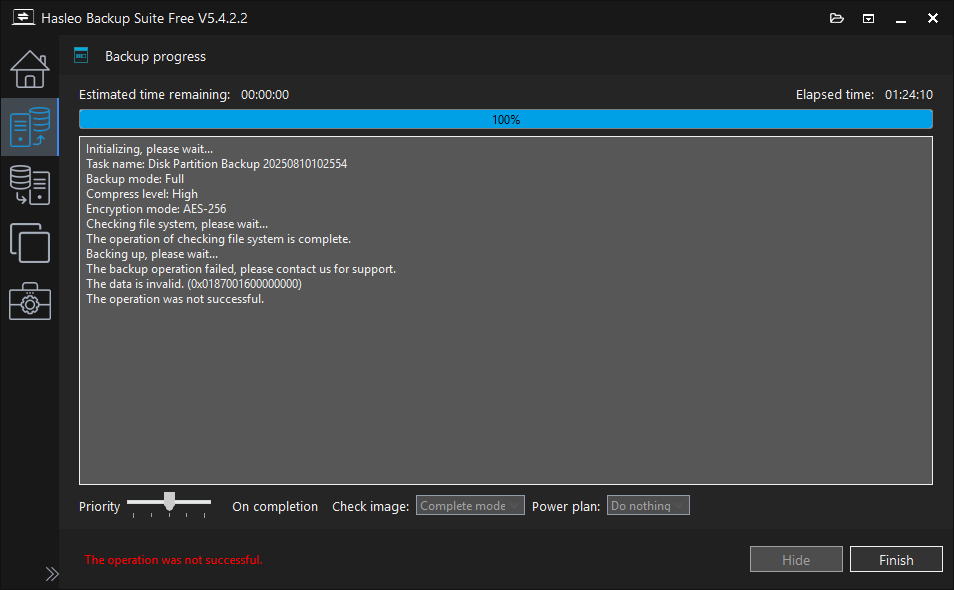
A few hours ago, I attempted to do a backup of the 1TB Toshiba now known as Kioxia Internal SSD to an external USB Western Digital 5TB My Passport Portable HDD on my Dell XPS 15 9570 computer with a Intel i9-8950HK CPU after installing Hasleo Backup Suite v5.4.2.2 and did a full Disk Partition Backup and selected the main 1TB Internal SSD which checked all the boxes for the all the partitions on the drive which was what I wanted except it failed as follows:

image.png


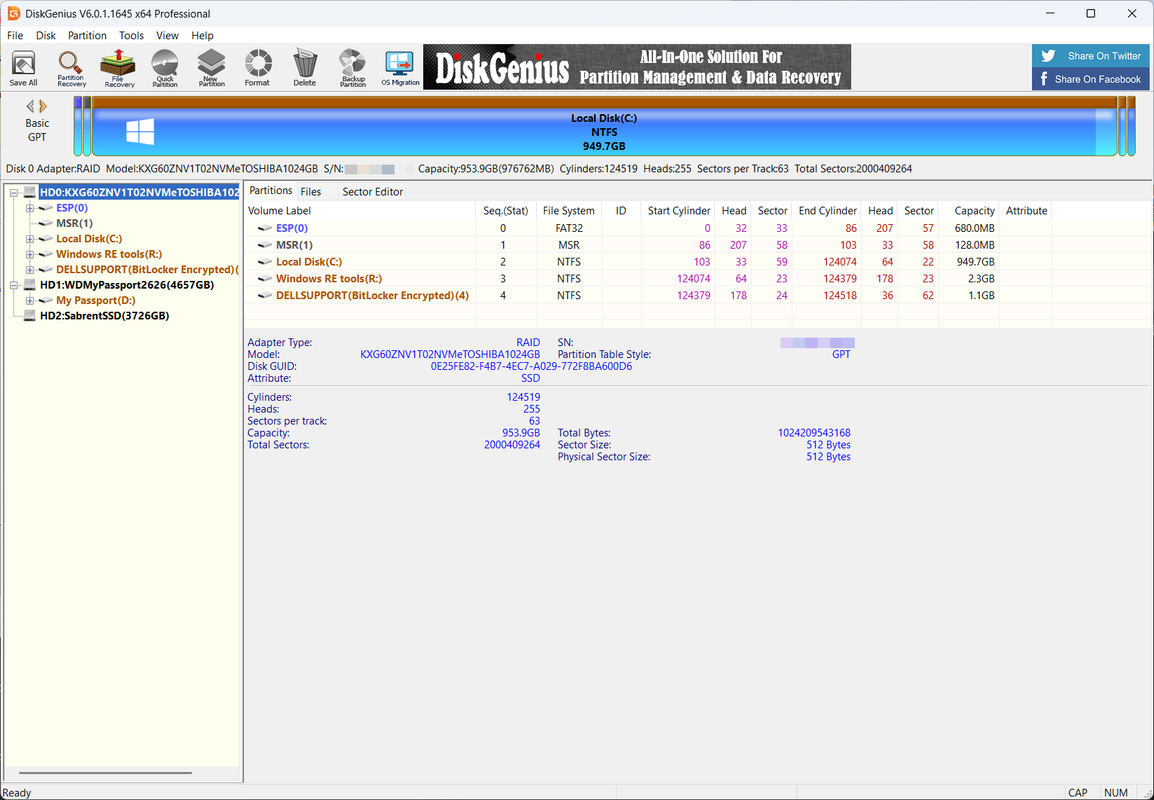
The entire disk was selected so all 5 partitions were also selected as the purpose of my backup is to restore the image after backing up to the 4TB Samsung 990 Pro external SSD which is currently in a USB 3.2 Gen 2 enclosure before swapping the original 1TB Toshiba now known as Konxia SSD with the 4TB SSD in my notebook computer:

image.png


I have read this as well as other forums and it seems like I have only seen people using Hasleo Backup Suite with smaller GB sized partitions, at least not 1 TB SSD drives or partitions anywhere near 949.7GB in size. I noticed my MSR which was how the machine shipped from Dell is 128MB and not the 16MB maximum common size.
 

My Computer

System One

  • OS
    WindowsXP/7/8/8.1/10/11,Linux,Android,FreeBSD Unix
    Computer type
    Laptop
    Manufacturer/Model
    Dell XPS 15 9570
    CPU
    Intel® Core™ i7-8750H 8th Gen 2.2Ghz up to 4.1Ghz
    Motherboard
    Dell XPS 15 9570
    Memory
    64GB using 2x32GB CL16 Mushkin redLine modules
    Graphics Card(s)
    Intel UHD 630 & NVIDIA GeForce GTX 1050 Ti with 4GB DDR5
    Sound Card
    Realtek ALC3266-CG
    Monitor(s) Displays
    15.6" 4K Touch UltraHD 3840x2160 made by Sharp
    Screen Resolution
    3840x2160 4K UltraHD
    Hard Drives
    Samsung MZ-V9P4T0B/AM 990 PRO 4TB PCIe®4.0 NVMe™ M.2 SSD was Toshiba KXG60ZNV1T02 NVMe 1TB SSD
    PSU
    Dell XPS 15 9570
    Case
    Dell XPS 15 9570
    Cooling
    Stock
    Keyboard
    Stock
    Mouse
    SwitftPoint ProPoint
    Internet Speed
    Comcast/XFinity 1.44Gbps/42.5Mbps
    Browser
    Microsoft EDGE (Chromium based) & Google Chrome
    Antivirus
    Windows Defender that came with Windows
I used Hasleo in the past but not with BitLocker, There may be an option that is needed for encrypted drives.
 

My Computers

System One System Two

  • OS
    Windows11 Pro 26200.8524
    Computer type
    PC/Desktop
    Manufacturer/Model
    Dell Alienware Aurora R16
    CPU
    Intel Core i9 14900F (24 -Core, 68 MB Total Cache)
    Motherboard
    Dell Alienware
    Memory
    32GB DDR5
    Graphics Card(s)
    RTX 4080 Super w/581.95
    Sound Card
    Realtec
    Monitor(s) Displays
    Corsair XENEON 32QHD165
    Screen Resolution
    2560 X 1440
    Hard Drives
    1-2TB Samsung 990 Pro PCIe NVMe M2 SSD
    1-4TB Samsung 990 Pro PCIe NVMe M2 SSD
    PSU
    1000 Watt Platinum Dell
    Case
    Alienware
    Cooling
    Liquid Closed Loop
    Keyboard
    Logitech MK270 Wireless Keyboard
    Mouse
    Logitech MK270 Wireless
    Internet Speed
    100Gb's Down-20 Up
    Browser
    Firefox 151.0.2
    Antivirus
    Defender
    Other Info
    Very Quiet And Fast
    CyberPower UPS CP1500PFCLCD
  • Operating System
    PClinuxOS Mate (2025.7)
    Computer type
    PC/Desktop
    Manufacturer/Model
    Intel
    CPU
    13th Gen Inter(R) Core(TM) i3-1315U
    Motherboard
    Intel
    Memory
    64 GB DDR4 @3200 MHz.
    Graphics card(s)
    Internal
    Sound Card
    None
    Monitor(s) Displays
    Dell 2419HGCF
    Screen Resolution
    1920 X 1080
    Hard Drives
    SAMSUNG 980 PRO SSD 2TB, PCIe 4.0 M.2 2280
    PSU
    Chicony 30 Watt
    Case
    Small
    Keyboard
    Dell
    Mouse
    Razor
    Internet Speed
    1GB
    Browser
    Slimjet
I used Hasleo in the past but not with BitLocker, There may be an option that is needed for encrypted drives.
Good point, I think that is a Dell OEM Recovery partition or something, it was how the system came. I already e-mailed Hasleo support so waiting for their response before closing Hasleo Backup Suite in case they need logs or anything else.
 

My Computer

System One

  • OS
    WindowsXP/7/8/8.1/10/11,Linux,Android,FreeBSD Unix
    Computer type
    Laptop
    Manufacturer/Model
    Dell XPS 15 9570
    CPU
    Intel® Core™ i7-8750H 8th Gen 2.2Ghz up to 4.1Ghz
    Motherboard
    Dell XPS 15 9570
    Memory
    64GB using 2x32GB CL16 Mushkin redLine modules
    Graphics Card(s)
    Intel UHD 630 & NVIDIA GeForce GTX 1050 Ti with 4GB DDR5
    Sound Card
    Realtek ALC3266-CG
    Monitor(s) Displays
    15.6" 4K Touch UltraHD 3840x2160 made by Sharp
    Screen Resolution
    3840x2160 4K UltraHD
    Hard Drives
    Samsung MZ-V9P4T0B/AM 990 PRO 4TB PCIe®4.0 NVMe™ M.2 SSD was Toshiba KXG60ZNV1T02 NVMe 1TB SSD
    PSU
    Dell XPS 15 9570
    Case
    Dell XPS 15 9570
    Cooling
    Stock
    Keyboard
    Stock
    Mouse
    SwitftPoint ProPoint
    Internet Speed
    Comcast/XFinity 1.44Gbps/42.5Mbps
    Browser
    Microsoft EDGE (Chromium based) & Google Chrome
    Antivirus
    Windows Defender that came with Windows
Good point, I think that is a Dell OEM Recovery partition or something, it was how the system came. I already e-mailed Hasleo support so waiting for their response before closing Hasleo Backup Suite in case they need logs or anything else.
I am unsure of what type of support they offer for the free version? But it is worth a shot,👍
 

My Computers

System One System Two

  • OS
    Windows11 Pro 26200.8524
    Computer type
    PC/Desktop
    Manufacturer/Model
    Dell Alienware Aurora R16
    CPU
    Intel Core i9 14900F (24 -Core, 68 MB Total Cache)
    Motherboard
    Dell Alienware
    Memory
    32GB DDR5
    Graphics Card(s)
    RTX 4080 Super w/581.95
    Sound Card
    Realtec
    Monitor(s) Displays
    Corsair XENEON 32QHD165
    Screen Resolution
    2560 X 1440
    Hard Drives
    1-2TB Samsung 990 Pro PCIe NVMe M2 SSD
    1-4TB Samsung 990 Pro PCIe NVMe M2 SSD
    PSU
    1000 Watt Platinum Dell
    Case
    Alienware
    Cooling
    Liquid Closed Loop
    Keyboard
    Logitech MK270 Wireless Keyboard
    Mouse
    Logitech MK270 Wireless
    Internet Speed
    100Gb's Down-20 Up
    Browser
    Firefox 151.0.2
    Antivirus
    Defender
    Other Info
    Very Quiet And Fast
    CyberPower UPS CP1500PFCLCD
  • Operating System
    PClinuxOS Mate (2025.7)
    Computer type
    PC/Desktop
    Manufacturer/Model
    Intel
    CPU
    13th Gen Inter(R) Core(TM) i3-1315U
    Motherboard
    Intel
    Memory
    64 GB DDR4 @3200 MHz.
    Graphics card(s)
    Internal
    Sound Card
    None
    Monitor(s) Displays
    Dell 2419HGCF
    Screen Resolution
    1920 X 1080
    Hard Drives
    SAMSUNG 980 PRO SSD 2TB, PCIe 4.0 M.2 2280
    PSU
    Chicony 30 Watt
    Case
    Small
    Keyboard
    Dell
    Mouse
    Razor
    Internet Speed
    1GB
    Browser
    Slimjet
They've offered excellent support to date. You can always get the LOG and send it to them (most of the time they ask for it) using the little BOX with the DownArrow in it next to the MINIMIZE button.
 

My Computer

System One

  • OS
    Windows 10, (also 7, 11, Linux <MINT & ZorinOS>)
    Computer type
    PC/Desktop
    Manufacturer/Model
    HP Z2 G5 Workstation
    CPU
    Intel Core i7-10700
    Motherboard
    HP Model# 8751
    Memory
    32gB (DDR4)
    Graphics Card(s)
    Intel UHD Graphics 630
    Sound Card
    Realtek basic audio
    Monitor(s) Displays
    32" (Viewsonic)
    Screen Resolution
    3840 x 2160
    Hard Drives
    (3) NvME SSDs <(1) PCiE v3>, (1) SATA3 SSD
I am unsure of what type of support they offer for the free version? But it is worth a shot,👍
There is only a free version at this time. They replied in 3.5 hours, -+ a few minutes and provided instructions on sending the log file which was what I did, exactly as @Froggie mentioned. I just sent them the logfile.
 

My Computer

System One

  • OS
    WindowsXP/7/8/8.1/10/11,Linux,Android,FreeBSD Unix
    Computer type
    Laptop
    Manufacturer/Model
    Dell XPS 15 9570
    CPU
    Intel® Core™ i7-8750H 8th Gen 2.2Ghz up to 4.1Ghz
    Motherboard
    Dell XPS 15 9570
    Memory
    64GB using 2x32GB CL16 Mushkin redLine modules
    Graphics Card(s)
    Intel UHD 630 & NVIDIA GeForce GTX 1050 Ti with 4GB DDR5
    Sound Card
    Realtek ALC3266-CG
    Monitor(s) Displays
    15.6" 4K Touch UltraHD 3840x2160 made by Sharp
    Screen Resolution
    3840x2160 4K UltraHD
    Hard Drives
    Samsung MZ-V9P4T0B/AM 990 PRO 4TB PCIe®4.0 NVMe™ M.2 SSD was Toshiba KXG60ZNV1T02 NVMe 1TB SSD
    PSU
    Dell XPS 15 9570
    Case
    Dell XPS 15 9570
    Cooling
    Stock
    Keyboard
    Stock
    Mouse
    SwitftPoint ProPoint
    Internet Speed
    Comcast/XFinity 1.44Gbps/42.5Mbps
    Browser
    Microsoft EDGE (Chromium based) & Google Chrome
    Antivirus
    Windows Defender that came with Windows
This image of Ghost brings back the memories. My very first backup software.
 

My Computer

System One

  • OS
    Win 7,8.1,10,11, Mint, Kde Plasma, Debian
    Computer type
    Laptop
    Manufacturer/Model
    Dell
    CPU
    Intel(R) Core(TM) i7-6500U CPU @ 2.50GHz
    Memory
    16 GB
    Graphics Card(s)
    Intel(R) HD Graphics 520/Nvidia GeForce 930M
    Sound Card
    Intel(R) Display Audio/RealtekAudio
    Monitor(s) Displays
    Generic Pnp Monitor
    Screen Resolution
    1366 X 768
    Hard Drives
    ST2000LM024-1EJ164
    Keyboard
    Eng (US)
    Mouse
    Sanwa Supply
    Browser
    Firefox
    Antivirus
    Avast One
    Other Info
    Too many laptops with different system specifications.
From reading the thread on Wilderssecurity, am I correct that backup images can be mounted into Windows Explorer now instead of what was mentioned in this thread of using Hasleo itself only?
There is a lot of handy information in the Wilders Security Forums | Hasleo Backup Suite thread, as well as lots more good information about other image applications in the Backup, Imaging & Disk Mgmt forum section. There is a wealth of information about image backup applications there.
 

My Computers

System One System Two

  • OS
    Windows 11 Pro
    Computer type
    PC/Desktop
    Manufacturer/Model
    Stigg's Build
    CPU
    Intel Core i9-10900X
    Motherboard
    GIGABYTE X299X DESIGNARE 10G
    Memory
    Corsair 64 GB (4 x 16 GB) CMW64GX4M4C3000C15 Vengeance RGB Pro 3000Mhz DDR4
    Graphics Card(s)
    GIGABYTE GeForce GTX 1660 Super Mini ITX 6 GB OC
    Sound Card
    Realtek ALC1220
    Monitor(s) Displays
    Samsung 27" FHD LED FreeSync Gaming Monitor (LS27F350FHEXXY)
    Screen Resolution
    1920 x 1080
    Hard Drives
    Samsung 970 Pro Series 1TB M.2 2280 NVMe SSD
    Western Digital Red Pro WD8003FFBX-68B9AN0 8 TB, 7200 RPM, SATA-III
    Western Digital Red Pro WD8003FFBX-68B9AN0 8 TB, 7200 RPM, SATA-III
    PSU
    Corsair HX1200 1200W 80 Plus Platinum
    Case
    Fractal Design Define 7 Black Solid Case
    Cooling
    Noctua NH-D15 Chromax Black
    Keyboard
    Razer Ornata V2
    Mouse
    Razer DeathAdder Essential
    Internet Speed
    FTTN 100Mbps / 40Mbps
    Browser
    Mozilla Firefox
    Antivirus
    N/A
    Other Info
    Logitech BRIO 4k Ultra HD USB-C Webcam
  • Operating System
    Windows 10 Pro
    Computer type
    Laptop
    Manufacturer/Model
    ASUS ROG Zephyrus M GM501GS
    CPU
    Core i7-8750H
    Motherboard
    Zephyrus M GM501GS
    Memory
    SK Hynix 32 GB (2 x 16 GB) HMA82GS6CJR8N-VK 16 GB DDR4-2666 DDR4 SDRAM
    Graphics card(s)
    NVIDIA GeForce GTX 1070
    Sound Card
    Realtek ALC294
    Monitor(s) Displays
    AU Optronics B156HAN07.1 [15.6" LCD]
    Screen Resolution
    1920 x 1080
    Hard Drives
    Samsung MZVKW512HMJP-00000 512 GB, PCI-E 3.0 x4
    Samsung SSD 860 QVO 4TB 4 TB, SATA-III
    PSU
    N/A
    Case
    N/A
    Cooling
    N/A
    Keyboard
    PC/AT Enhanced PS2 Keyboard (101/102-Key)
    Mouse
    Razer DeathAdder Essential
    Internet Speed
    FTTN 100Mbps / 40Mbps
    Browser
    Mozilla Firefox
    Antivirus
    N/A
    Other Info
    USB2.0 HD UVC Webcam
I used Hasleo in the past but not with BitLocker, There may be an option that is needed for encrypted drives.
Thanks for your tip about it being the BitLocker encrypted drive and I did some further tests.
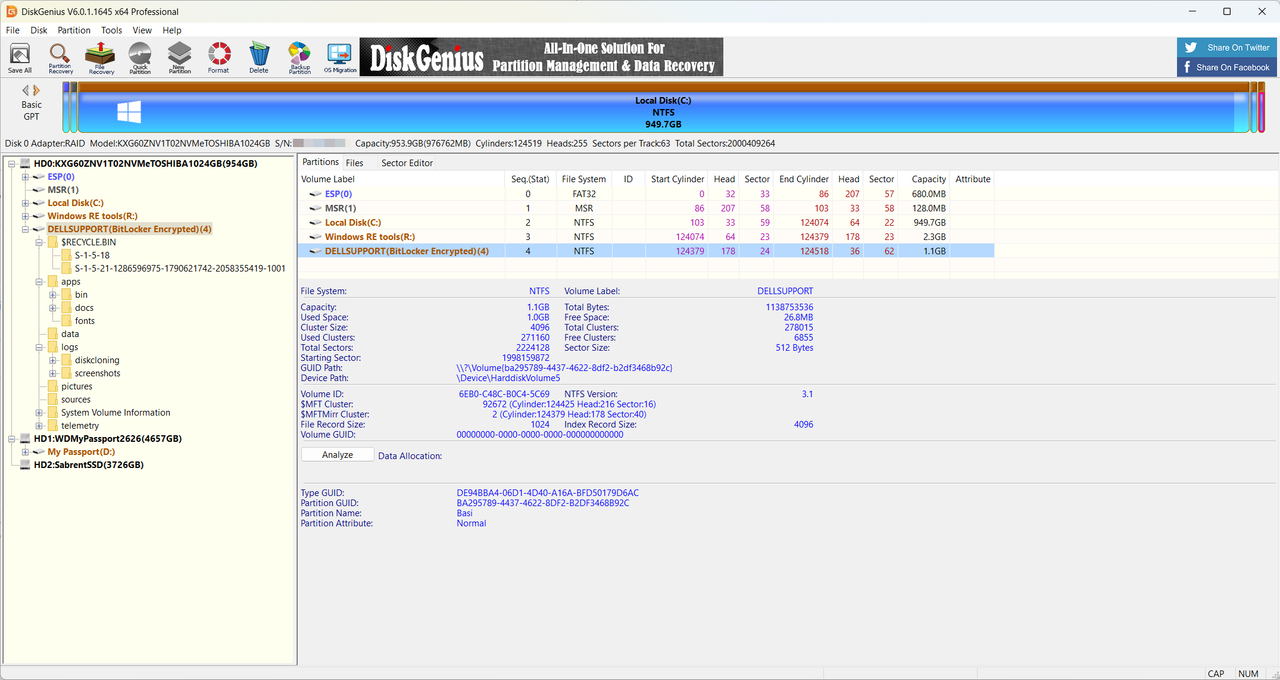
I just tried backing up each individual partition except Local Disk(C:) in different backups and the ESP(0), MSR(1), Windows RE tools(R:) all pass without issues. The one that has the failure is the DELLSUPPORT (BitLocker Encrypted)(4) which I am not even sure how to fix since when I look at my Microsoft Account page, it shows different Bitlocker Recovery keys but I don't know if that covers the hidden recovery partition like in this case and my C: is not Bitlocker encrypted. Yesterday, I assigned a drive letter (Z:) to that partition and I can see everything in that partition with Windows Explorer and even without the drive letter assignment, DIsk Genius can see the files and folders of that partition.

image.png


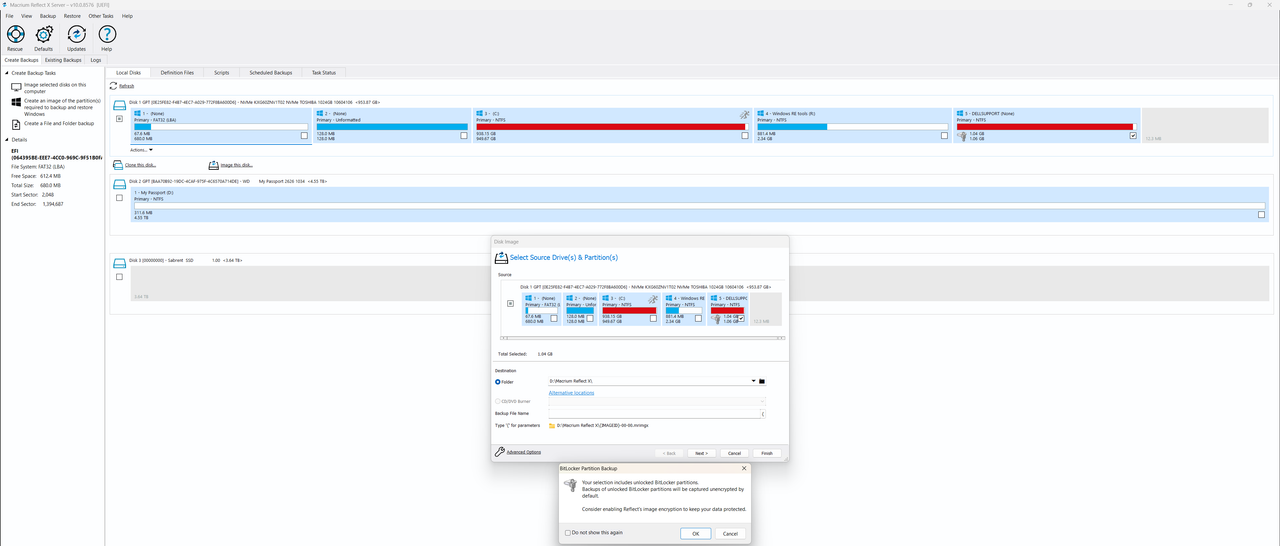
Macrium Reflect X Server appears to show the partition as unlocked and successfully backed it up without issues:

image.png
 

My Computer

System One

  • OS
    WindowsXP/7/8/8.1/10/11,Linux,Android,FreeBSD Unix
    Computer type
    Laptop
    Manufacturer/Model
    Dell XPS 15 9570
    CPU
    Intel® Core™ i7-8750H 8th Gen 2.2Ghz up to 4.1Ghz
    Motherboard
    Dell XPS 15 9570
    Memory
    64GB using 2x32GB CL16 Mushkin redLine modules
    Graphics Card(s)
    Intel UHD 630 & NVIDIA GeForce GTX 1050 Ti with 4GB DDR5
    Sound Card
    Realtek ALC3266-CG
    Monitor(s) Displays
    15.6" 4K Touch UltraHD 3840x2160 made by Sharp
    Screen Resolution
    3840x2160 4K UltraHD
    Hard Drives
    Samsung MZ-V9P4T0B/AM 990 PRO 4TB PCIe®4.0 NVMe™ M.2 SSD was Toshiba KXG60ZNV1T02 NVMe 1TB SSD
    PSU
    Dell XPS 15 9570
    Case
    Dell XPS 15 9570
    Cooling
    Stock
    Keyboard
    Stock
    Mouse
    SwitftPoint ProPoint
    Internet Speed
    Comcast/XFinity 1.44Gbps/42.5Mbps
    Browser
    Microsoft EDGE (Chromium based) & Google Chrome
    Antivirus
    Windows Defender that came with Windows
Thanks for your tip about it being the BitLocker encrypted drive and I did some further tests.
I just tried backing up each individual partition except Local Disk(C:) in different backups and the ESP(0), MSR(1), Windows RE tools(R:) all pass without issues. The one that has the failure is the DELLSUPPORT (BitLocker Encrypted)(4) which I am not even sure how to fix since when I look at my Microsoft Account page, it shows different Bitlocker Recovery keys but I don't know if that covers the hidden recovery partition like in this case and my C: is not Bitlocker encrypted. Yesterday, I assigned a drive letter (Z:) to that partition and I can see everything in that partition with Windows Explorer and even without the drive letter assignment, DIsk Genius can see the files and folders of that partition.

image.png


Macrium Reflect X Server appears to show the partition as unlocked and successfully backed it up without issues:

image.png
You are quite welcome. I prefer MR X.👍
 

My Computers

System One System Two

  • OS
    Windows11 Pro 26200.8524
    Computer type
    PC/Desktop
    Manufacturer/Model
    Dell Alienware Aurora R16
    CPU
    Intel Core i9 14900F (24 -Core, 68 MB Total Cache)
    Motherboard
    Dell Alienware
    Memory
    32GB DDR5
    Graphics Card(s)
    RTX 4080 Super w/581.95
    Sound Card
    Realtec
    Monitor(s) Displays
    Corsair XENEON 32QHD165
    Screen Resolution
    2560 X 1440
    Hard Drives
    1-2TB Samsung 990 Pro PCIe NVMe M2 SSD
    1-4TB Samsung 990 Pro PCIe NVMe M2 SSD
    PSU
    1000 Watt Platinum Dell
    Case
    Alienware
    Cooling
    Liquid Closed Loop
    Keyboard
    Logitech MK270 Wireless Keyboard
    Mouse
    Logitech MK270 Wireless
    Internet Speed
    100Gb's Down-20 Up
    Browser
    Firefox 151.0.2
    Antivirus
    Defender
    Other Info
    Very Quiet And Fast
    CyberPower UPS CP1500PFCLCD
  • Operating System
    PClinuxOS Mate (2025.7)
    Computer type
    PC/Desktop
    Manufacturer/Model
    Intel
    CPU
    13th Gen Inter(R) Core(TM) i3-1315U
    Motherboard
    Intel
    Memory
    64 GB DDR4 @3200 MHz.
    Graphics card(s)
    Internal
    Sound Card
    None
    Monitor(s) Displays
    Dell 2419HGCF
    Screen Resolution
    1920 X 1080
    Hard Drives
    SAMSUNG 980 PRO SSD 2TB, PCIe 4.0 M.2 2280
    PSU
    Chicony 30 Watt
    Case
    Small
    Keyboard
    Dell
    Mouse
    Razor
    Internet Speed
    1GB
    Browser
    Slimjet
@Josey Wales - I guess I wanted to try Hasleo Backup Suite and at least found a issue that they could use which will benefit others, let's see how long it takes them to fix this. Hopefully soon since I am trying to migrate to the new 4TB SSD as I don't have enough space for the swap file, hibernation files on the current 1TB drive.
 

My Computer

System One

  • OS
    WindowsXP/7/8/8.1/10/11,Linux,Android,FreeBSD Unix
    Computer type
    Laptop
    Manufacturer/Model
    Dell XPS 15 9570
    CPU
    Intel® Core™ i7-8750H 8th Gen 2.2Ghz up to 4.1Ghz
    Motherboard
    Dell XPS 15 9570
    Memory
    64GB using 2x32GB CL16 Mushkin redLine modules
    Graphics Card(s)
    Intel UHD 630 & NVIDIA GeForce GTX 1050 Ti with 4GB DDR5
    Sound Card
    Realtek ALC3266-CG
    Monitor(s) Displays
    15.6" 4K Touch UltraHD 3840x2160 made by Sharp
    Screen Resolution
    3840x2160 4K UltraHD
    Hard Drives
    Samsung MZ-V9P4T0B/AM 990 PRO 4TB PCIe®4.0 NVMe™ M.2 SSD was Toshiba KXG60ZNV1T02 NVMe 1TB SSD
    PSU
    Dell XPS 15 9570
    Case
    Dell XPS 15 9570
    Cooling
    Stock
    Keyboard
    Stock
    Mouse
    SwitftPoint ProPoint
    Internet Speed
    Comcast/XFinity 1.44Gbps/42.5Mbps
    Browser
    Microsoft EDGE (Chromium based) & Google Chrome
    Antivirus
    Windows Defender that came with Windows
Back
Top Bottom




