Hasleo Win to Usb - works on mine, not on my friend's


IDC

Member
Local time
2:37 PM
Posts
9
OS
Windows 11
I have made several Windows to go on a portable SSD using Hasleo WinToUsb for Windows 11. They run beautifully on my computer (W11). I also have a not so old custom built that won't run W11 (currently runs W10 on internal), but the portable runs on there too, very well. Both computers are custom built.

I wanted to try the portable W11 on a friend's computer, but none of the three that he has (all W10) would boot up with it. Disk Management did show the portable, but File Explorer did not.

These 3 computers of his are older, none have TPM and cannot install Windows. All are custom built.

I asked Hasleo for advice, and they said the WtG is offline by default when running the first time. If that is true, then why do all WtG that I made run perfectly on my two computers?

I read something about including drivers in the WtG so I asked Hasleo about this. They left that out when replying. I wouldn't know what drivers to include or how to include them.

Any suggestions? I don't know what specs his computers are.
 

My Computer

System One

  • OS
    Windows 11
    Computer type
    PC/Desktop
    Manufacturer/Model
    Custom Built
    CPU
    12th Gen Intel Core i7-12700KF 3600Mhz, 12 cores
    Motherboard
    Asus
    Memory
    128 gigs
    Graphics Card(s)
    Nvidia
    Hard Drives
    Nvme (internal) Sandisk portable SSD (external)
    Antivirus
    Avast
Interesting.

I don't use this myself yet but looks like a good tool on the go.

There's some info on the offiical how-to but nothing over the offline part, unfortunately:

If it is meant for personal use, the stick will be already online on the PC it was created on.
My guess is you would need to set it online on each PC you try to use it on.
For this I'm looking at setting the USB drive online in Disk Management on the target PC.
Though I never encountered this with other USB tools before.
 

My Computers

System One System Two

  • OS
    Windows 11 Pro
    Computer type
    PC/Desktop
    Manufacturer/Model
    Intel NUC
    CPU
    i3 8109U
    Motherboard
    Intel
    Memory
    16GB DDR4 @2400
    Graphics Card(s)
    Intel Iris Plus Graphics 655
    Sound Card
    Intel / Realtek HD Audio
    Monitor(s) Displays
    LG-32ML600M
    Screen Resolution
    1920x1080
    Hard Drives
    Intel SSD 250GB + Samsung QVO SSD 1TB
    PSU
    Adapter
    Cooling
    The usual NUC airflow
    Keyboard
    Logitech Orion G610
    Mouse
    SteelSeries Rival 100 Red
    Internet Speed
    Good enough
    Browser
    Chromium, Edge, Firefox
    Antivirus
    Windows Defender
  • Operating System
    CentOS 9 Stream / Alma / Rocky / Fedora
    Computer type
    Laptop
    Manufacturer/Model
    TOSHIBA
    CPU
    Intel i7 4800MQ
    Motherboard
    TOSHIBA
    Memory
    32GB DDR3 @1600
    Graphics card(s)
    NVIDIA Quadro K2100M
    Sound Card
    Realtek HD Audio
    Monitor(s) Displays
    Built-in
    Screen Resolution
    1920x1080
Interesting.

I don't use this myself yet but looks like a good tool on the go.

There's some info on the offiical how-to but nothing over the offline part, unfortunately:

If it is meant for personal use, the stick will be already online on the PC it was created on.
My guess is you would need to set it online on each PC you try to use it on.
For this I'm looking at setting the USB drive online in Disk Management on the target PC.
Though I never encountered this with other USB tools before.
Possible to use on "incompatible " PC also ?
With/without internet-connection ?
Possible to repair also ?
 

My Computer

System One

  • OS
    Windows11 Pro 25H2
    Computer type
    PC/Desktop
    Manufacturer/Model
    Asus
    CPU
    i7
    Motherboard
    z97k
    Memory
    32GB
    Graphics Card(s)
    nVidia
    Sound Card
    Realtek
    Hard Drives
    3
    Cooling
    air
    Browser
    Edge
    Antivirus
    ESET
  • Like
Reactions: IDC
Interesting.

I don't use this myself yet but looks like a good tool on the go.

There's some info on the offiical how-to but nothing over the offline part, unfortunately:

If it is meant for personal use, the stick will be already online on the PC it was created on.
My guess is you would need to set it online on each PC you try to use it on.
For this I'm looking at setting the USB drive online in Disk Management on the target PC.
Though I never encountered this with other USB tools before.
Actually, Windows To Go can install to a stick, but many use portable SSD. I use both 1 and 2 Terabyte drives. I have avoided using the Hasleo "wintousb" title as it is too easy to assume the stick. I use this as my Windows OS, and it will run both online and off. The only thing we can't do is to make it run on other computers (but it does bootup and run on my older back-up computers). But my friend's computers, the first thing we did was to check if it was online and it was. Disk management sees it but File Explorer does not.

I created the WtoG on myW11 capable install computer. When I tried it on my slightly older custom built computer, I did not have to set it to online. It already was and did boot. But my friends, even though we made sure it was online, it would not boot from the WtoGo drive.
 
Last edited:

My Computer

System One

  • OS
    Windows 11
    Computer type
    PC/Desktop
    Manufacturer/Model
    Custom Built
    CPU
    12th Gen Intel Core i7-12700KF 3600Mhz, 12 cores
    Motherboard
    Asus
    Memory
    128 gigs
    Graphics Card(s)
    Nvidia
    Hard Drives
    Nvme (internal) Sandisk portable SSD (external)
    Antivirus
    Avast
Is your friends computer setup in the Bios as the older MBR/Legacy/CSM Bios or is it set to the newer UEFI?
Boot into their Bios and go to the Boot Tab. If it doesn't mention UEFI,
Then most likely their computer is set for MBR bios,
You would need to Initialize a USB Flash drive as MBR not GPT for UEFI Bios when you burn the Hasleo ISO.
 

My Computer

System One

  • OS
    Windows 11 Pro Insider 64 bit 25H2 26200.5742
    Computer type
    PC/Desktop
    Manufacturer/Model
    Gigabyte Z390 UD
    CPU
    Intel Core i7 9700K 3.60
    Motherboard
    Gigabyte Z390 UD
    Memory
    16 GB
    Graphics Card(s)
    nVidia GEForce RTX 2060 Super
    Sound Card
    onboard
    Monitor(s) Displays
    Two 27" Dell 4K monitors
    Screen Resolution
    3840 x 2160
    Hard Drives
    M.2 NVME SSD, 500 GB; Two 2TB Mechanical HDD's
    PSU
    850w PSU
    Case
    Cyberpower PC
    Cooling
    Water cooled
    Keyboard
    Backlit Cyberpower gaming keyboard
    Mouse
    Backlit Cyberpower gaming mouse
    Internet Speed
    1 GB mbps
    Browser
    Brave
    Antivirus
    Windows Security
  • Like
Reactions: IDC
Is your friends computer setup in the Bios as the older MBR/Legacy/CSM Bios or is it set to the newer UEFI?
Boot into their Bios and go to the Boot Tab. If it doesn't mention UEFI,
Then most likely their computer is set for MBR bios,
You would need to Initialize a USB Flash drive as MBR not GPT for UEFI Bios when you burn the Hasleo ISO.
When making these Hasleo WtoG, I choose from the Hasleo tutorial: "MBR for BIOS and UEFI: This option creates a Windows To Go USB that can be booted on both BIOS and UEFI computers."

My latest & greatest Custom built and also my can't run W11 but not that old both boot up.

I am not sure what his 3 computers are, I'll see if he can find out. He has knee problems so it is difficult for him to navigate the steep stairs down to the basement where the computers are.

I read something about fat32. Diskmanagement shows that when Windows was allosed to format, it was as NTFS and the small partition was fat32.
 

My Computer

System One

  • OS
    Windows 11
    Computer type
    PC/Desktop
    Manufacturer/Model
    Custom Built
    CPU
    12th Gen Intel Core i7-12700KF 3600Mhz, 12 cores
    Motherboard
    Asus
    Memory
    128 gigs
    Graphics Card(s)
    Nvidia
    Hard Drives
    Nvme (internal) Sandisk portable SSD (external)
    Antivirus
    Avast
Your Hasleo boot USB shouldn't make a difference if the Flash drive is formatted NTFS or FAT32.
FAT32 is the most universal format that works for Mac, Linux, or Windows.

It may make a difference if the Computers HDD mode is set to CSM/Legacy (MBR) or UEFI Bios.
 

My Computer

System One

  • OS
    Windows 11 Pro Insider 64 bit 25H2 26200.5742
    Computer type
    PC/Desktop
    Manufacturer/Model
    Gigabyte Z390 UD
    CPU
    Intel Core i7 9700K 3.60
    Motherboard
    Gigabyte Z390 UD
    Memory
    16 GB
    Graphics Card(s)
    nVidia GEForce RTX 2060 Super
    Sound Card
    onboard
    Monitor(s) Displays
    Two 27" Dell 4K monitors
    Screen Resolution
    3840 x 2160
    Hard Drives
    M.2 NVME SSD, 500 GB; Two 2TB Mechanical HDD's
    PSU
    850w PSU
    Case
    Cyberpower PC
    Cooling
    Water cooled
    Keyboard
    Backlit Cyberpower gaming keyboard
    Mouse
    Backlit Cyberpower gaming mouse
    Internet Speed
    1 GB mbps
    Browser
    Brave
    Antivirus
    Windows Security
Most Windows PCs are set to natively access the C: Drive first when booting, so will never get to see an external WinToGo USB Boot Drive. This default setting was introduced years ago as a basic security measure to reduce the possibility of malware injection (whether deliberate or accidental) by simply booting with an infected external USB drive

If Booting from an external Drive is required, it may first be necessary to check and, if necessary, change the Boot priority in the Legacy BIOS/UEFI Manager to make the external source the first Boot device to be used. The user does, of course, need to understand the security risk involved in allowing this system alteration as a 'permanent' option.

Example Guide: How to Boot from External Hard Drive
 

My Computers

System One System Two

  • OS
    macOS 14.x (plus Windows 11, Debian, FreeBSD for ARM64)
    Computer type
    Laptop
    Manufacturer/Model
    MacBook Pro M1 MAX
    CPU
    Apple M1 Max (T6001) - 8 performance 2 efficiency cores
    Memory
    32GB LPDDR5
    Graphics Card(s)
    Apple M1 Max (32-core)
    Hard Drives
    a) 1TB SSD + + 1TB SD Card + external SSD Drives
    Browser
    1. Safari 2. DuckDuckGo
    Antivirus
    -
  • Operating System
    Windows 11 Pro, plus VirtualBox VMs: various Windows & Linux
    Computer type
    Laptop
    Manufacturer/Model
    Microsoft Surface Laptop Studio
    CPU
    i7
    Memory
    32GB
    Hard Drives
    1TB SSD, plus external SSDs for Virtual Machines etc.
    Browser
    1. MS Edge 2. DuckDuckGo
    Antivirus
    Defender
Maybe your friends computers CPU is old enough to not have SSE4.2 Instructions set? Since Win 11 24H2 wont boot without SSE4.2 instructions. Check the CPU if it has SSE4.2 with CPU-Z.
 

My Computer

System One

  • OS
    Win 11 Pro Insider Beta (26220.8370), Kali Linux
    Computer type
    Laptop
    Manufacturer/Model
    HP Victus 15
    CPU
    AMD Ryzen 5 5600H
    Memory
    16GB (2x8GB) Dual Channel
    Graphics Card(s)
    Nvidia RTX 3050
    Monitor(s) Displays
    1080p IPS 144Hz (Laptop Screen) + 3x 1080p 60Hz screens
    Screen Resolution
    4x 1920x1080 monitors
    Hard Drives
    M.2 NVMe 512GB Samsung - PCIe 4.0x4 - Main system drive

    USB-A and USB-C M.2 NVMe Enclosure with NVMe SSSTC 256GB - NVM Express 1.3 - Ventoy with all install files and all ISO images i use.

    USB External SSD Kingston XS100 1TB - USB 3.2 Gen 2 - WindowsToGo (Clone of my existing Sytem), and all games I play.

    USB External SSHD Seagate FireCuda 2TB - USB 3.0 - For Macrium system images, data, photos, stays always safe at home
    PSU
    200W
    Cooling
    Zalman ZM-NC3 Cooling pad
    Keyboard
    Dell KM7120W
    Mouse
    Dell KM7120W
    Internet Speed
    1Gb/s down / 500Mb/s up
    Browser
    Chrome
    Antivirus
    Windows Defender
Maybe your friends computers CPU is old enough to not have SSE4.2 Instructions set? Since Win 11 24H2 wont boot without SSE4.2 instructions. Check the CPU if it has SSE4.2 with CPU-Z.
We checked that, they can run SSe4.2. Supposedly, computers from the past 10 years or so, can run SSE4.2
 

My Computer

System One

  • OS
    Windows 11
    Computer type
    PC/Desktop
    Manufacturer/Model
    Custom Built
    CPU
    12th Gen Intel Core i7-12700KF 3600Mhz, 12 cores
    Motherboard
    Asus
    Memory
    128 gigs
    Graphics Card(s)
    Nvidia
    Hard Drives
    Nvme (internal) Sandisk portable SSD (external)
    Antivirus
    Avast
Most Windows PCs are set to natively access the C: Drive first when booting, so will never get to see an external WinToGo USB Boot Drive. This default setting was introduced years ago as a basic security measure to reduce the possibility of malware injection (whether deliberate or accidental) by simply booting with an infected external USB drive

If Booting from an external Drive is required, it may first be necessary to check and, if necessary, change the Boot priority in the Legacy BIOS/UEFI Manager to make the external source the first Boot device to be used. The user does, of course, need to understand the security risk involved in allowing this system alteration as a 'permanent' option.

Example Guide: How to Boot from External Hard Drive
I have to set the bios everytime I change the Portable SSD, so that is familiar to me. Once changed it stays until I choose another Portable SSD.
We set the bios on my friends's three computers, didn't work.

When I boot up with any Portable SSD, Disk Management always lists it as Drive C
 

My Computer

System One

  • OS
    Windows 11
    Computer type
    PC/Desktop
    Manufacturer/Model
    Custom Built
    CPU
    12th Gen Intel Core i7-12700KF 3600Mhz, 12 cores
    Motherboard
    Asus
    Memory
    128 gigs
    Graphics Card(s)
    Nvidia
    Hard Drives
    Nvme (internal) Sandisk portable SSD (external)
    Antivirus
    Avast
Your Hasleo boot USB shouldn't make a difference if the Flash drive is formatted NTFS or FAT32.
FAT32 is the most universal format that works for Mac, Linux, or Windows.

It may make a difference if the Computers HDD mode is set to CSM/Legacy (MBR) or UEFI Bios.
My internal drive is set to NTFS, and my Win2Usb is also NTFS. Not sure what my friend's computers are, hopefully I can find out.
I am following the Hasleo tutorials of
Partition scheme: MBR for BIOS and UEFI
Installation mode: Legacy
 

My Computer

System One

  • OS
    Windows 11
    Computer type
    PC/Desktop
    Manufacturer/Model
    Custom Built
    CPU
    12th Gen Intel Core i7-12700KF 3600Mhz, 12 cores
    Motherboard
    Asus
    Memory
    128 gigs
    Graphics Card(s)
    Nvidia
    Hard Drives
    Nvme (internal) Sandisk portable SSD (external)
    Antivirus
    Avast
I would try to make portable win with rufus. Had better experience with rufus. Other option i used in past was to put ssd into machine (not USB) and then clean install or clone win 11 normal way and then use it as external portable win.
 

My Computer

System One

  • OS
    Win 11 Pro Insider Beta (26220.8370), Kali Linux
    Computer type
    Laptop
    Manufacturer/Model
    HP Victus 15
    CPU
    AMD Ryzen 5 5600H
    Memory
    16GB (2x8GB) Dual Channel
    Graphics Card(s)
    Nvidia RTX 3050
    Monitor(s) Displays
    1080p IPS 144Hz (Laptop Screen) + 3x 1080p 60Hz screens
    Screen Resolution
    4x 1920x1080 monitors
    Hard Drives
    M.2 NVMe 512GB Samsung - PCIe 4.0x4 - Main system drive

    USB-A and USB-C M.2 NVMe Enclosure with NVMe SSSTC 256GB - NVM Express 1.3 - Ventoy with all install files and all ISO images i use.

    USB External SSD Kingston XS100 1TB - USB 3.2 Gen 2 - WindowsToGo (Clone of my existing Sytem), and all games I play.

    USB External SSHD Seagate FireCuda 2TB - USB 3.0 - For Macrium system images, data, photos, stays always safe at home
    PSU
    200W
    Cooling
    Zalman ZM-NC3 Cooling pad
    Keyboard
    Dell KM7120W
    Mouse
    Dell KM7120W
    Internet Speed
    1Gb/s down / 500Mb/s up
    Browser
    Chrome
    Antivirus
    Windows Defender
I would try to make portable win with rufus. Had better experience with rufus. Other option i used in past was to put ssd into machine (not USB) and then clean install or clone win 11 normal way and then use it as external portable win.
I have read where users use Macrium Reflect to restore an image to a Vmware Workstation virtual machine. Never tried it though.
Does a portable with Rufus boot up with any machine? I mean, like Hasleo is supposed to do.
To make a portable, I put the ISO onto the Rufus thumb drive like usual. Then I proceed to install Windows onto the portable SSD?
The only thing, Windows doesn't like being installed to an external, doesn't it? To a usb anyway.
I usually make my Windows Portable SSD with it plugged in to the Thunderbird port.
 

My Computer

System One

  • OS
    Windows 11
    Computer type
    PC/Desktop
    Manufacturer/Model
    Custom Built
    CPU
    12th Gen Intel Core i7-12700KF 3600Mhz, 12 cores
    Motherboard
    Asus
    Memory
    128 gigs
    Graphics Card(s)
    Nvidia
    Hard Drives
    Nvme (internal) Sandisk portable SSD (external)
    Antivirus
    Avast
I have read where users use Macrium Reflect to restore an image to a Vmware Workstation virtual machine. Never tried it though.
Does a portable with Rufus boot up with any machine? I mean, like Hasleo is supposed to do.
To make a portable, I put the ISO onto the Rufus thumb drive like usual. Then I proceed to install Windows onto the portable SSD?
The only thing, Windows doesn't like being installed to an external, doesn't it? To a usb anyway.
I usually make my Windows Portable SSD with it plugged in to the Thunderbird port.
Never tried it eighter. But with Rufus you can make Windows To Go. Should boot up on any computer with bios boot set to UEFI. It wont work if BIOS is set to Legacy (CSM) mode. Follow the steps bellow.

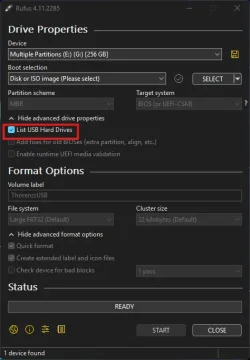
1.Open Rufus and check "List USB Hard Drives".
1.webp

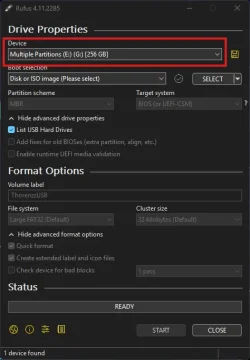
2. Select your Portable SSD. IT WILL BE WIPED obviously.
2.webp

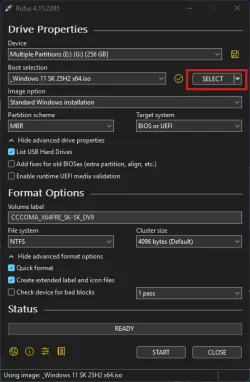
3. Select your ISO image. Preferably untouched ISO from MS.
3.webp

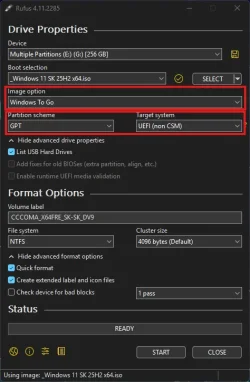
4. Select Windows To Go in Image Options. Select GPT partition scheme. Target system UEFI.
4.webp

5. Click "Start", choose your preferred edition, create local account if you want.

As you know creating Windows To Go could take a while. After done, you should be able just to boot up from portable USB the same way as you would boot up installation Media.

Let me know if that worked for you. Good luck.
 

My Computer

System One

  • OS
    Win 11 Pro Insider Beta (26220.8370), Kali Linux
    Computer type
    Laptop
    Manufacturer/Model
    HP Victus 15
    CPU
    AMD Ryzen 5 5600H
    Memory
    16GB (2x8GB) Dual Channel
    Graphics Card(s)
    Nvidia RTX 3050
    Monitor(s) Displays
    1080p IPS 144Hz (Laptop Screen) + 3x 1080p 60Hz screens
    Screen Resolution
    4x 1920x1080 monitors
    Hard Drives
    M.2 NVMe 512GB Samsung - PCIe 4.0x4 - Main system drive

    USB-A and USB-C M.2 NVMe Enclosure with NVMe SSSTC 256GB - NVM Express 1.3 - Ventoy with all install files and all ISO images i use.

    USB External SSD Kingston XS100 1TB - USB 3.2 Gen 2 - WindowsToGo (Clone of my existing Sytem), and all games I play.

    USB External SSHD Seagate FireCuda 2TB - USB 3.0 - For Macrium system images, data, photos, stays always safe at home
    PSU
    200W
    Cooling
    Zalman ZM-NC3 Cooling pad
    Keyboard
    Dell KM7120W
    Mouse
    Dell KM7120W
    Internet Speed
    1Gb/s down / 500Mb/s up
    Browser
    Chrome
    Antivirus
    Windows Defender
Never tried it eighter. But with Rufus you can make Windows To Go. Should boot up on any computer with bios boot set to UEFI. It wont work if BIOS is set to Legacy (CSM) mode. Follow the steps bellow.
As you know creating Windows To Go could take a while. After done, you should be able just to boot up from portable USB the same way as you would boot up installation Media.

Let me know if that worked for you. Good luck.
Thanks for your help. I made several W2G using Hasleo, and I tried running them both on a new and a lslightly older computer and they worked perfectly. My older computer didn't pass the requirements for W11 yet it ran very well.

The problem comes when I tried to run the W2G on my friends older computers. None of the 3 would boot.

Since them I have found the Hasleo W3G Help Forum (not just tutorials, they actually offer suggestions).

1. Both Secure Boot and fast startup should be disabled.
2. Portable SSD should be connected directly to a USB port, not a pci add-on card or hub
3. If W2G won't boot from a USB 3.0 port, it will from a USB 2.0
4. Some computer's Bios have problems with booting USB drives larger 128 gigs.

Another Hasleo user could not get his W3G to boot on modern Pc (this was 2013) but it would run on older.
Hasleo suggested to set the Fat32 partition as the first (set as the system partition), and the NTFS partition as the 2nd and the boot and primary.
This did work for him. My W2G was already like that.

So I am thinking maybe it is the secure boot and fast startup needs to be disabled on my friend's computers. And maybe using 2.0 ports.
Unfortunately, my friend is rather different in his old age, and installed Linux on his computer. So now I'll never know.
I will definiately try Rufus, thanks for the tutorial. I am one that needs pictures :)
 

My Computer

System One

  • OS
    Windows 11
    Computer type
    PC/Desktop
    Manufacturer/Model
    Custom Built
    CPU
    12th Gen Intel Core i7-12700KF 3600Mhz, 12 cores
    Motherboard
    Asus
    Memory
    128 gigs
    Graphics Card(s)
    Nvidia
    Hard Drives
    Nvme (internal) Sandisk portable SSD (external)
    Antivirus
    Avast
You are welcome. And yes good point with secure boot, forgot to mention that in my previous post. So try to disable Secure Boot. Do the same if W2G made with Rufus wont work. Dont use USB 2.0, because it will be super slow for W2G.
 

My Computer

System One

  • OS
    Win 11 Pro Insider Beta (26220.8370), Kali Linux
    Computer type
    Laptop
    Manufacturer/Model
    HP Victus 15
    CPU
    AMD Ryzen 5 5600H
    Memory
    16GB (2x8GB) Dual Channel
    Graphics Card(s)
    Nvidia RTX 3050
    Monitor(s) Displays
    1080p IPS 144Hz (Laptop Screen) + 3x 1080p 60Hz screens
    Screen Resolution
    4x 1920x1080 monitors
    Hard Drives
    M.2 NVMe 512GB Samsung - PCIe 4.0x4 - Main system drive

    USB-A and USB-C M.2 NVMe Enclosure with NVMe SSSTC 256GB - NVM Express 1.3 - Ventoy with all install files and all ISO images i use.

    USB External SSD Kingston XS100 1TB - USB 3.2 Gen 2 - WindowsToGo (Clone of my existing Sytem), and all games I play.

    USB External SSHD Seagate FireCuda 2TB - USB 3.0 - For Macrium system images, data, photos, stays always safe at home
    PSU
    200W
    Cooling
    Zalman ZM-NC3 Cooling pad
    Keyboard
    Dell KM7120W
    Mouse
    Dell KM7120W
    Internet Speed
    1Gb/s down / 500Mb/s up
    Browser
    Chrome
    Antivirus
    Windows Defender
You are welcome. And yes good point with secure boot, forgot to mention that in my previous post. So try to disable Secure Boot. Do the same if W2G made with Rufus wont work. Dont use USB 2.0, because it will be super slow for W2G.
Sounds lika a plan. Thanks again for your help. I just checked both of my computers and both have only 3.0 usb ports. And win2go flies!
 

My Computer

System One

  • OS
    Windows 11
    Computer type
    PC/Desktop
    Manufacturer/Model
    Custom Built
    CPU
    12th Gen Intel Core i7-12700KF 3600Mhz, 12 cores
    Motherboard
    Asus
    Memory
    128 gigs
    Graphics Card(s)
    Nvidia
    Hard Drives
    Nvme (internal) Sandisk portable SSD (external)
    Antivirus
    Avast
Back
Top Bottom