Have created a restore point task at pc startup need a prompt to show its working each time


JAK

Active member
Member
Local time
9:18 AM
Posts
177
OS
Windows 11
Have created a restore point task at pc startup need a prompt to show its working each time

hopefully this is an easy fix
thanks
 

My Computer My Computer

At a glance

Windows 11Ryzen 78+16 total 24GB
OS
Windows 11
Computer type
Laptop
Manufacturer/Model
Asus
CPU
Ryzen 7
Memory
8+16 total 24GB
Other Info
Asus Vivobook 15 M513U
Hi, unsure what sort of verification you need.

If you were to schedule a small script to do this, I suppose you could create a notification within the script to tell you it's run... if you mean 'has the restore point been created?'.

Such a prompt would only indicate the task has been executed, not that the restore point has been created successfully.

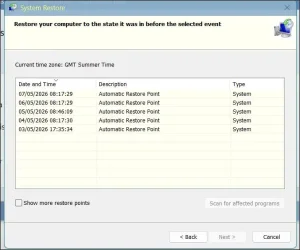
Running rstrui.exe, and clicking 'Next' gives you this list of restore points, so you could then visually inspect the list:
1.webp

For reference on scheduling restore point creation see:
(I've not seen an equivalent in elevenforum.com tutorials- yet)

Related:


Personally once I set up the scheduled creation of restore points I just checked with e.g.
Win key + R
rstrui.exe

a couple of times to see it was working.
 
Last edited:

My Computer My Computer

At a glance

Windows 11 Proi7-8650U16GBIntel UHD 620
OS
Windows 11 Pro
Computer type
Laptop
Manufacturer/Model
Lenovo t480s
CPU
i7-8650U
Memory
16GB
Graphics Card(s)
Intel UHD 620
Screen Resolution
1920x1080
Hard Drives
C SN810 SDCPNRY-512G-1006
Browser
Edge, Firefox
Antivirus
Defender

My Computer My Computer

At a glance

Windows 11 Pro 25H2 (Build 26200.8737)Intel Core Ultra 9 285 5.6 GHz32.00 GBIntel Integrated Graphics (128 MB)
OS
Windows 11 Pro 25H2 (Build 26200.8737)
Computer type
PC/Desktop
Manufacturer/Model
Dell Pro Max Tower T2 FCT2250
CPU
Intel Core Ultra 9 285 5.6 GHz
Motherboard
64-bit operating system, x64-based processor
Memory
32.00 GB
Graphics Card(s)
Intel Integrated Graphics (128 MB)
Sound Card
Realtek Audio
Monitor(s) Displays
Dell P2714H Monitor
Screen Resolution
1920 x 1080
Hard Drives
1 x 512GB M.2 XG10d SED KIOXIA PCIe solid state drive (Internal)
1 x 2TB Seagate ST2000DM008-2UB102 HDD (Internal)
1 x 1TB Seagate STGX4000400 External HDD
1 x 4TB Seagate STGX4000400 External HDD
1 x 6TB WD Elements AE 2689 External HDD
PSU
500 Watts
Cooling
Air
Keyboard
Microsoft Wired Keyboard 600
Mouse
Microsoft USB Basic Optical Mouse v2.0
Browser
Firefox
Antivirus
Windows Defender + Malwarebytes Premium
Other Info
BaseBoard Manufacturer Dell Inc.
BaseBoard Product 022RY57
BaseBoard Version A01
That comment does not address the poster's question at all.

Restore points- to once again state the huge difference- are
a. complementary to imaging
b. unlike restoring an image of a partition, do NOT affect the personal data on that partition
c. do a completely different job compared with imaging
d. permit quick and easy reversal of recent changes.

The differences must be understood. They are different tools for different purposes.

Restore points are more surgical. Imaging is the essential robust means permitting recovery even if a disk fails for example.

But let's not have that discussion here, as it's irrelevant to the question.
 

My Computer My Computer

At a glance

Windows 11 Proi7-8650U16GBIntel UHD 620
OS
Windows 11 Pro
Computer type
Laptop
Manufacturer/Model
Lenovo t480s
CPU
i7-8650U
Memory
16GB
Graphics Card(s)
Intel UHD 620
Screen Resolution
1920x1080
Hard Drives
C SN810 SDCPNRY-512G-1006
Browser
Edge, Firefox
Antivirus
Defender
  • Like
Reactions: JAK
Assuming you followed the TenForum tutorial and created a scheduled task, you can replace the single command with a script that provides a pop-up Notification when the Checkpoint-Computer command has finished.

1. Download the PS file.

2. From a CMD or PS prompt, run the command:
Code:
powershell Unblock-File CheckPoint-Task.ps1

3. Open the Task Scheduler, and find your previously created task. Right click Properties

4. Under Actions, select Edit.

5. Under "Add arguments", replace the entire existing line with:
Code:
-ep bypass -f \folder\path\where\you\saved\CheckPoint-Task.ps1

Change the full folder path to match where you saved the PowerShell script file. If you missed seeing the message, it will be saved in the Notifications Center.
 

Attachments

My Computer My Computer

At a glance

Windows 7
OS
Windows 7
Thanks garlin, will try that, all I need is a popup message saying "restore point created" or similar, thanks
 

My Computer My Computer

At a glance

Windows 11Ryzen 78+16 total 24GB
OS
Windows 11
Computer type
Laptop
Manufacturer/Model
Asus
CPU
Ryzen 7
Memory
8+16 total 24GB
Other Info
Asus Vivobook 15 M513U
strange thing.....sometimes a restore point is not created on my laptop startup, started ithe laptop today but no restore point created
 

My Computer My Computer

At a glance

Windows 11Ryzen 78+16 total 24GB
OS
Windows 11
Computer type
Laptop
Manufacturer/Model
Asus
CPU
Ryzen 7
Memory
8+16 total 24GB
Other Info
Asus Vivobook 15 M513U
Windows doesn't allow you to create a restore point faster than the default interval (every 24 hours). Otherwise a script could go crazy and eat up disk space with endless restore points.
 

My Computer My Computer

At a glance

Windows 7
OS
Windows 7
  • Like
Reactions: JAK
Wow didn't know that, can I over ride that to create one in each start up regardless of time interval
Thanks
 

My Computer My Computer

At a glance

Windows 11Ryzen 78+16 total 24GB
OS
Windows 11
Computer type
Laptop
Manufacturer/Model
Asus
CPU
Ryzen 7
Memory
8+16 total 24GB
Other Info
Asus Vivobook 15 M513U
On that point, see point 1 in this tutorial:

Clearly, if a restore point was created by Windows within the default period, the scheduled point would not be created.

Therefore to allow that to happen, the default timing must be changed,

There are also some circumstances where when diagnosing something perhaps you might want to make restore points while you are working- perhaps 2 or 3 over an hour or two.
 

My Computer My Computer

At a glance

Windows 11 Proi7-8650U16GBIntel UHD 620
OS
Windows 11 Pro
Computer type
Laptop
Manufacturer/Model
Lenovo t480s
CPU
i7-8650U
Memory
16GB
Graphics Card(s)
Intel UHD 620
Screen Resolution
1920x1080
Hard Drives
C SN810 SDCPNRY-512G-1006
Browser
Edge, Firefox
Antivirus
Defender
The creation frequency flag is already set to zero
 

My Computer My Computer

At a glance

Windows 11Ryzen 78+16 total 24GB
OS
Windows 11
Computer type
Laptop
Manufacturer/Model
Asus
CPU
Ryzen 7
Memory
8+16 total 24GB
Other Info
Asus Vivobook 15 M513U
The script is just "Checkpoint-Computer -Description 'Automatic Restore Point' -RestorePointType MODIFY_SETTINGS" with extra code to create the Windows notification. Can you open the Notifications Center, and confirm you didn't have an unread notification?
 

My Computer My Computer

At a glance

Windows 7
OS
Windows 7

My Computer My Computer

At a glance

Windows 11 Proi7-8650U16GBIntel UHD 620
OS
Windows 11 Pro
Computer type
Laptop
Manufacturer/Model
Lenovo t480s
CPU
i7-8650U
Memory
16GB
Graphics Card(s)
Intel UHD 620
Screen Resolution
1920x1080
Hard Drives
C SN810 SDCPNRY-512G-1006
Browser
Edge, Firefox
Antivirus
Defender
Back
Top Bottom