Help finding mobo audio drivers (offline install)


MilkyWindow

Member
Local time
5:36 PM
Posts
75
OS
W11 24H2 26100.712
Hello
Id like to ask for help since I cannot find any drivers for my (old?) mobo sound output.

I switched some time ago to win11 and oh boy here we go again with issues.

So I just simply cannot find drivers that woulda be working through audio jack ofcourse.
Ive had them installed while back on win10 from bundled disk sound was working alright. (but it was back on win10)
Now I am outta luck I belive since apparently from official site and that particular mobo theres only win10 max drivers.
Ive been using all this time build in speakers and my ACER VG240Y and GPU-HDMI sound ofcourse since why the audio jack while HDMI?
Back then it didnt matter much but now I need to get it working since im about to dish out monitor replaced by projector. So ofcourse I have to get sound working through mobo audio jack.

On current win11 stock delivered CD drivers arent working aswell as latest win10 drivers (REALTEK)
I cannot find any win11 related for this mobo and auto win updates bla bla is not option. Could be any replacement like custom drivers or antyhting liike that just to get the sound working at all.

Mobo model: Gigabyte Z270P-D3 with Realtek ALC887
W11 24H2

I will really apreciate the links if any.
Thanks
 

My Computer My Computer

At a glance

W11 24H2 26100.712
OS
W11 24H2 26100.712
Other Info
Updates are disease.
I'm not sure, I haven't used Realtek for a long time.

1. Realtek HD Audio (UAD) Drivers Version R2.8x (9832.1)(Gigabyte) (R2.8x (9832.1)(Gigabyte))Gigabyte
(File Repository)
... (X64) Pack Version: R2.8x (4.77) Pour: ALC1220, ALC1150, ALC880, ALC882, ALC883, ALC885, ALC886, ALC887,

(Warning: Compared to the HDA drivers, the UAD drivers do not take all of the Realtek chipsets) choose either the UAD pack built for the above brand chipsets or the HDA pack which includes all of the Realtek chipsets for all brands (universal)
 
Last edited:

My Computer My Computer

At a glance

Microsoft Windows 11 HomeIntel Core i5-13490F2 x 16 Patriot Memory (PDP Systems) PSD516G56...GIGABYTE GeForce RTX 4070 WINDFORCE OC 12G (G...
OS
Microsoft Windows 11 Home
Computer type
PC/Desktop
Manufacturer/Model
MSI MS-7D98
CPU
Intel Core i5-13490F
Motherboard
MSI B760 GAMING PLUS WIFI
Memory
2 x 16 Patriot Memory (PDP Systems) PSD516G560081 6400MT (32-37-37-74); 1.35V)
Graphics Card(s)
GIGABYTE GeForce RTX 4070 WINDFORCE OC 12G (GV-N4070WF3OC-12GD)
Sound Card
Bluetooth Аудио
Monitor(s) Displays
INNOCN 15K1F
Screen Resolution
1920 x 1080
Hard Drives
WD_BLACK SN770 250GB
KINGSTON SNV2S1000G (ELFK0S.6)
PSU
Thermaltake Toughpower GF3 1000W
Case
CG560 - DeepCool
Cooling
ID-COOLING SE-224-XTS / 2 x 140Mm Fan - rear and top; 3 x 120Mm - front
Keyboard
Corsair K70 RGB TKL
Mouse
Corsair KATAR PRO XT
Internet Speed
100 Mbps
Browser
Firefox
Antivirus
Microsoft Defender Antivirus
Other Info
https://www.userbenchmark.com/UserRun/66553205
unfortunately nothing works ive tried install-reinstall 10 top most updated ones and nothing HDA and UAD too. still no sound.
 

My Computer My Computer

At a glance

W11 24H2 26100.712
OS
W11 24H2 26100.712
Other Info
Updates are disease.
You can try the drivers from Realtek web support site:


Hope this helps.
 

My Computers My Computers

  • At a glance

    Windows 11 Pro build 26200.8524Intel i7-4790Teams DDR3-1600 4x4 GBMSI Nvidia GeForce GTX 1050Ti
    OS
    Windows 11 Pro build 26200.8524
    Computer type
    PC/Desktop
    Manufacturer/Model
    Home Built
    CPU
    Intel i7-4790
    Motherboard
    Asus H97 Pro Gamer with add-on TPM1.2 module
    Memory
    Teams DDR3-1600 4x4 GB
    Graphics Card(s)
    MSI Nvidia GeForce GTX 1050Ti
    Sound Card
    Realtek ALC1150
    Monitor(s) Displays
    Dell P2425D
    Screen Resolution
    2560 by 1440 pixels
    Hard Drives
    Corsair NVMe M.2 Core XT 1000 GB (Windows 11 v.25H2); Samsung SATA Evo 870 500 GB (Windows 11 v.25H2);
    PSU
    Corsair HX850
    Case
    Gigabyte Solo 210
    Cooling
    Zalman CNPS7X Tower
    Keyboard
    Microsoft AIO Wireless (includes touchpad)
    Mouse
    HP S1000 Plus Wireless
    Internet Speed
    500 Mb fiber optic
    Browser
    Chrome; MS Edge
    Antivirus
    Windows Defender
  • At a glance

    MacOS 12 MontereyIntel Core i58 GBIntel integrated
    Operating System
    MacOS 12 Monterey
    Computer type
    Laptop
    Manufacturer/Model
    Apple Macbook Air
    CPU
    Intel Core i5
    Memory
    8 GB
    Graphics card(s)
    Intel integrated
    Screen Resolution
    1440 by 900 pixels
    Hard Drives
    128 GB
    Keyboard
    Built-in
    Mouse
    Microsoft Wireless
    Internet Speed
    802.11 ac
    Browser
    Chrome; Safari
    Antivirus
    N/A
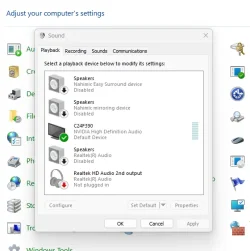
Have to ask just in case. What shows up in the sound settings and is the headphone jack selected as default output?

Screenshot 2025-08-10 060059.webp
 

My Computer My Computer

At a glance

11 Pro 25H2i7-10750H16GB Samsung DDR4 3200Intel + Nvidia RTX3060 Laptop
OS
11 Pro 25H2
Computer type
Laptop
Manufacturer/Model
MSI
CPU
i7-10750H
Motherboard
MSI MS-17F5
Memory
16GB Samsung DDR4 3200
Graphics Card(s)
Intel + Nvidia RTX3060 Laptop
Sound Card
Realtek
Monitor(s) Displays
Samsung 24" Curved (HDMI)
Screen Resolution
1920x1080
Hard Drives
Sabrent Rocket Gen3 1Tb Smasung EVO 870 1TB
Antivirus
Bitdefender
After you download the drivers, the .zip file, extract the .zip file and find the .inf file.

Open .inf file in Notepad and there you will see some hardware identification lines.

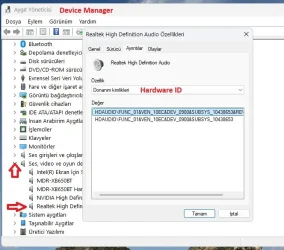
Open Device Manager, expand the Audio-Video controllers, double-click your audio device, namely, Realtek.

Audio device properties page will open. Switch to Hardware Identifcation in drop-down box in Details section(tab).

There you will see your Realtek chipset identification.

HW-ID.webp

If the .inf file includes your Realtek chipset identification number in it, the blue line in above screenshot, your device accepts the drivers.

You can use device manager to install/update your Audio drivers. Windows will choose the correct files for your audio chipset.
 

My Computers My Computers

  • At a glance

    Windows 11 Pro build 26200.8524Intel i7-4790Teams DDR3-1600 4x4 GBMSI Nvidia GeForce GTX 1050Ti
    OS
    Windows 11 Pro build 26200.8524
    Computer type
    PC/Desktop
    Manufacturer/Model
    Home Built
    CPU
    Intel i7-4790
    Motherboard
    Asus H97 Pro Gamer with add-on TPM1.2 module
    Memory
    Teams DDR3-1600 4x4 GB
    Graphics Card(s)
    MSI Nvidia GeForce GTX 1050Ti
    Sound Card
    Realtek ALC1150
    Monitor(s) Displays
    Dell P2425D
    Screen Resolution
    2560 by 1440 pixels
    Hard Drives
    Corsair NVMe M.2 Core XT 1000 GB (Windows 11 v.25H2); Samsung SATA Evo 870 500 GB (Windows 11 v.25H2);
    PSU
    Corsair HX850
    Case
    Gigabyte Solo 210
    Cooling
    Zalman CNPS7X Tower
    Keyboard
    Microsoft AIO Wireless (includes touchpad)
    Mouse
    HP S1000 Plus Wireless
    Internet Speed
    500 Mb fiber optic
    Browser
    Chrome; MS Edge
    Antivirus
    Windows Defender
  • At a glance

    MacOS 12 MontereyIntel Core i58 GBIntel integrated
    Operating System
    MacOS 12 Monterey
    Computer type
    Laptop
    Manufacturer/Model
    Apple Macbook Air
    CPU
    Intel Core i5
    Memory
    8 GB
    Graphics card(s)
    Intel integrated
    Screen Resolution
    1440 by 900 pixels
    Hard Drives
    128 GB
    Keyboard
    Built-in
    Mouse
    Microsoft Wireless
    Internet Speed
    802.11 ac
    Browser
    Chrome; Safari
    Antivirus
    N/A
Have to ask just in case. What shows up in the sound settings and is the headphone jack selected as default output?

View attachment 141880
Shows exactly like under your default device ( set as default with checkmark on (Default Device)
Ive tried even disabling completely Nvidia HD audio (monitor icon) and run it
While I select test device the bars are pulsing up so it looks llike its working but there is no sound...looks like its installed alright the driver but still no sound...
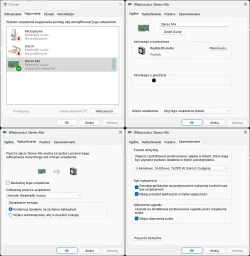
Additionally in recording devices there is "Stereo Mix" (ive tried set this on and off and default and not) still no sound.
under "speakers I have also second which I belive substituted SPDIF something now it displays Realtek DIgital Output - Ready.
 

My Computer My Computer

At a glance

W11 24H2 26100.712
OS
W11 24H2 26100.712
Other Info
Updates are disease.
Shows exactly like under your default device ( set as default with checkmark on (Default Device)
Ive tried even disabling completely Nvidia HD audio (monitor icon) and run it
While I select test device the bars are pulsing up so it looks llike its working but there is no sound...looks like its installed alright the driver but still no sound...
Additionally in recording devices there is "Stereo Mix" (ive tried set this on and off and default and not) still no sound.
under "speakers I have also second which I belive substituted SPDIF something now it displays Realtek DIgital Output - Ready.

Can try disabling everything except headphone audio and set it to default if it lets you.
 

My Computer My Computer

At a glance

11 Pro 25H2i7-10750H16GB Samsung DDR4 3200Intel + Nvidia RTX3060 Laptop
OS
11 Pro 25H2
Computer type
Laptop
Manufacturer/Model
MSI
CPU
i7-10750H
Motherboard
MSI MS-17F5
Memory
16GB Samsung DDR4 3200
Graphics Card(s)
Intel + Nvidia RTX3060 Laptop
Sound Card
Realtek
Monitor(s) Displays
Samsung 24" Curved (HDMI)
Screen Resolution
1920x1080
Hard Drives
Sabrent Rocket Gen3 1Tb Smasung EVO 870 1TB
Antivirus
Bitdefender
Can try disabling everything except headphone audio and set it to default if it lets you.
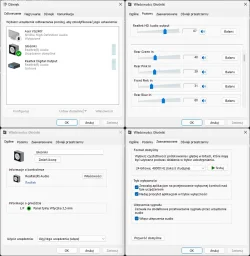
main_speakers.webpsmix.webp

I already did from the start settings looks like that (plus disabled enabled that third realtek digital output too and still nothing)
 

My Computer My Computer

At a glance

W11 24H2 26100.712
OS
W11 24H2 26100.712
Other Info
Updates are disease.
Cable?
 

My Computer My Computer

At a glance

Microsoft Windows 11 HomeIntel Core i5-13490F2 x 16 Patriot Memory (PDP Systems) PSD516G56...GIGABYTE GeForce RTX 4070 WINDFORCE OC 12G (G...
OS
Microsoft Windows 11 Home
Computer type
PC/Desktop
Manufacturer/Model
MSI MS-7D98
CPU
Intel Core i5-13490F
Motherboard
MSI B760 GAMING PLUS WIFI
Memory
2 x 16 Patriot Memory (PDP Systems) PSD516G560081 6400MT (32-37-37-74); 1.35V)
Graphics Card(s)
GIGABYTE GeForce RTX 4070 WINDFORCE OC 12G (GV-N4070WF3OC-12GD)
Sound Card
Bluetooth Аудио
Monitor(s) Displays
INNOCN 15K1F
Screen Resolution
1920 x 1080
Hard Drives
WD_BLACK SN770 250GB
KINGSTON SNV2S1000G (ELFK0S.6)
PSU
Thermaltake Toughpower GF3 1000W
Case
CG560 - DeepCool
Cooling
ID-COOLING SE-224-XTS / 2 x 140Mm Fan - rear and top; 3 x 120Mm - front
Keyboard
Corsair K70 RGB TKL
Mouse
Corsair KATAR PRO XT
Internet Speed
100 Mbps
Browser
Firefox
Antivirus
Microsoft Defender Antivirus
Other Info
https://www.userbenchmark.com/UserRun/66553205
well? simple audio jack 3.5 green that even came with monitor? Cable for sure is not broken...plugged in 3 headphones and mobo to monitor wasnt any sound throught them. headphones for sure working checked.
 

My Computer My Computer

At a glance

W11 24H2 26100.712
OS
W11 24H2 26100.712
Other Info
Updates are disease.
Yea, you don't even have a headphone jack showing.
 

My Computer My Computer

At a glance

11 Pro 25H2i7-10750H16GB Samsung DDR4 3200Intel + Nvidia RTX3060 Laptop
OS
11 Pro 25H2
Computer type
Laptop
Manufacturer/Model
MSI
CPU
i7-10750H
Motherboard
MSI MS-17F5
Memory
16GB Samsung DDR4 3200
Graphics Card(s)
Intel + Nvidia RTX3060 Laptop
Sound Card
Realtek
Monitor(s) Displays
Samsung 24" Curved (HDMI)
Screen Resolution
1920x1080
Hard Drives
Sabrent Rocket Gen3 1Tb Smasung EVO 870 1TB
Antivirus
Bitdefender
After you download the drivers, the .zip file, extract the .zip file and find the .inf file.

Open .inf file in Notepad and there you will see some hardware identification lines.

Open Device Manager, expand the Audio-Video controllers, double-click your audio device, namely, Realtek.

Audio device properties page will open. Switch to Hardware Identifcation in drop-down box in Details section(tab).

There you will see your Realtek chipset identification.

View attachment 141881

If the .inf file includes your Realtek chipset identification number in it, the blue line in above screenshot, your device accepts the drivers.

You can use device manager to install/update your Audio drivers. Windows will choose the correct files for your audio chipset.
shows nothing like in screenshot.
written:
MMDEVAPI\AudioEndpoints
 

My Computer My Computer

At a glance

W11 24H2 26100.712
OS
W11 24H2 26100.712
Other Info
Updates are disease.
Yea, you don't even have a headphone jack showing.
strange thing is that all was working fine while on win10...now no sound at all...means 50/50 fault of driver or OS
 

My Computer My Computer

At a glance

W11 24H2 26100.712
OS
W11 24H2 26100.712
Other Info
Updates are disease.
You got a strange one there for sure. Last resort could try a repair/reinstall and select save all apps and data when asked. It's got me since it does seem like drivers are installing. If you go to Windows update, check for updates, then look under advanced you can see if any optional drivers for sound appear.
 

My Computer My Computer

At a glance

11 Pro 25H2i7-10750H16GB Samsung DDR4 3200Intel + Nvidia RTX3060 Laptop
OS
11 Pro 25H2
Computer type
Laptop
Manufacturer/Model
MSI
CPU
i7-10750H
Motherboard
MSI MS-17F5
Memory
16GB Samsung DDR4 3200
Graphics Card(s)
Intel + Nvidia RTX3060 Laptop
Sound Card
Realtek
Monitor(s) Displays
Samsung 24" Curved (HDMI)
Screen Resolution
1920x1080
Hard Drives
Sabrent Rocket Gen3 1Tb Smasung EVO 870 1TB
Antivirus
Bitdefender
You got a strange one there for sure. Last resort could try a repair/reinstall and select save all apps and data when asked. It's got me since it does seem like drivers are installing. If you go to Windows update, check for updates, then look under advanced you can see if any optional drivers for sound appear.
well thats the thing. I have to do it offline. theres no means for me to do it through windows updates. since tis offline pc.
 

My Computer My Computer

At a glance

W11 24H2 26100.712
OS
W11 24H2 26100.712
Other Info
Updates are disease.
well thats the thing. I have to do it offline. theres no means for me to do it through windows updates. since tis offline pc.
Well, that's a problem for sure. I've gotten numerous windows optional sound updates online so you might be out of luck if there is some kind of update that might fix it.
 

My Computer My Computer

At a glance

11 Pro 25H2i7-10750H16GB Samsung DDR4 3200Intel + Nvidia RTX3060 Laptop
OS
11 Pro 25H2
Computer type
Laptop
Manufacturer/Model
MSI
CPU
i7-10750H
Motherboard
MSI MS-17F5
Memory
16GB Samsung DDR4 3200
Graphics Card(s)
Intel + Nvidia RTX3060 Laptop
Sound Card
Realtek
Monitor(s) Displays
Samsung 24" Curved (HDMI)
Screen Resolution
1920x1080
Hard Drives
Sabrent Rocket Gen3 1Tb Smasung EVO 870 1TB
Antivirus
Bitdefender

My Computer My Computer

At a glance

W11 24H2 26100.712
OS
W11 24H2 26100.712
Other Info
Updates are disease.
Back
Top Bottom