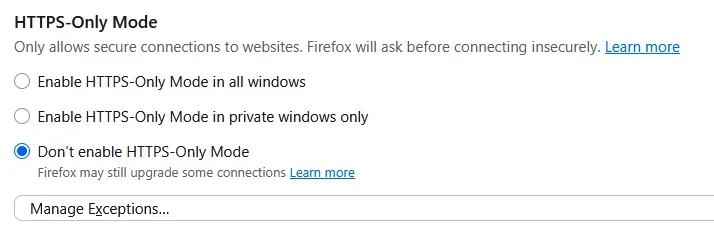
Turned on my computer and tried to log into my banking site (example in this case, Bank of America). Normally, when I click on the bookmark in firefox, the link shows up as "Bank of America - Banking, Credit Cards, Loans and Merrill Investing" (minus the quotation marks. This morning, it showed up as "www.bankofamerica.com/" (missing the https://). Rather than sending me to my normal login page, clicking on the link sent me to a very strange page that implied I must use the a cell phone app, with complicated page asking for verification info (to be honest, most of it meant nothing to me). I was trying to log in using my computer, not a cell phone app.
Strangely, when I manually add the missing https:// to the beginning of the link, it disappears (reverts back to the link without the https:// prefix), and takes me to the same useless page. It appears to my untrained eye that Firefox no longer recognizes the secure site. This seemed to happen shortly after I updated Firefox to the latest version, so I reverted back to the previous version, with the same results. I should note that the site I used as an example was not the only site with this issue, it happened on another banking site that also uses a secure connection.
I tried to access the site with Microsoft Edge, and also with Pale Moon, and it seems to work fine with either one.
Are there some settings that I might have messed up, or can change, in Firefox that would correct this problem.
It's driving me crazy!
Strangely, when I manually add the missing https:// to the beginning of the link, it disappears (reverts back to the link without the https:// prefix), and takes me to the same useless page. It appears to my untrained eye that Firefox no longer recognizes the secure site. This seemed to happen shortly after I updated Firefox to the latest version, so I reverted back to the previous version, with the same results. I should note that the site I used as an example was not the only site with this issue, it happened on another banking site that also uses a secure connection.
I tried to access the site with Microsoft Edge, and also with Pale Moon, and it seems to work fine with either one.
Are there some settings that I might have messed up, or can change, in Firefox that would correct this problem.
It's driving me crazy!
My Computer
At a glance
Window 11 Pro, v.10.0.26200AMD6431,862 MB
- OS
- Window 11 Pro, v.10.0.26200
- Computer type
- PC/Desktop
- Manufacturer/Model
- Custom Built,
- CPU
- AMD64
- Motherboard
- Gigabyte Technology/B650 GAMING X AX V2
- Memory
- 31,862 MB