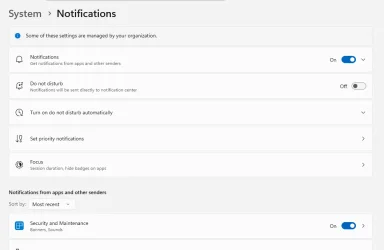
help to find registry key that turns off notification on w11 24h2


maur0

Well-known member
Member
VIP
Local time
7:59 AM
Posts
237
OS
Windows 11 Iot Enterprise 21h2 22000.3260
Turn off Notifications in Windows 11

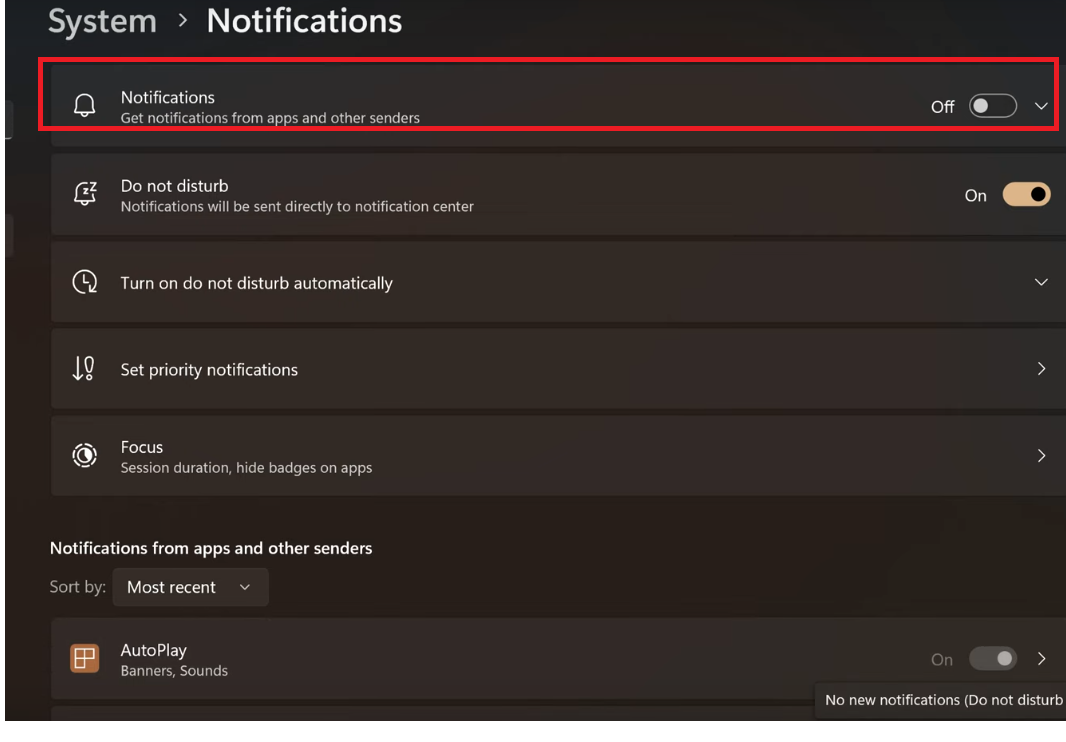
I need help to disconnect, notify me by registering on 11 24h2 the new options no longer work in 24h2

[HKEY_CURRENT_USER\Software\Microsoft\Windows\CurrentVersion\Notifications\Toast]

"ToastEnable"=dword:0

not work

[HKEY_CURRENT_USER\Software\Policies\Microsoft\Windows\Explorer]

"DisableNotificationCenter"=dword:00000001

[HKEY_LOCAL_MACHINE\SOFTWARE\Policies\Microsoft\Windows\Explorer]

"DisableNotificationCenter"=dword:00000001


Does anyone know what new registry key to turn off?

Apparently it changed on 24h2, it must be another switch that needs to be moved to turn off notifications, all of the above no longer work on 11 24h2
C0EQgGD.png
 
Last edited:

My Computer My Computer

At a glance

Windows 11 Iot Enterprise 21h2 22000.3260xeon E5-2697v232gb 8x4gb ddr3 1333 mhzgtx 570 poit of view
OS
Windows 11 Iot Enterprise 21h2 22000.3260
Computer type
PC/Desktop
Manufacturer/Model
Asus
CPU
xeon E5-2697v2
Motherboard
rampage iv extreme
Memory
32gb 8x4gb ddr3 1333 mhz
Graphics Card(s)
gtx 570 poit of view
Sound Card
realtek HD (ALC898)
Monitor(s) Displays
samsung b2030
Screen Resolution
1600x900
Hard Drives
2tb hd 5400 rpm
3tb hd 5400 rpm
1tb nvme pcie 3.0
PSU
hx850w
Keyboard
mtek
Internet Speed
500/250 gpon
Browser
r3dfox 146.0
Antivirus
none

My Computers My Computers

  • At a glance

    Windows 11 Pro 25H2 26200.8875i9-10900 10 core 20 threads32 gbnone-Intel UHD Graphics 630
    OS
    Windows 11 Pro 25H2 26200.8875
    Computer type
    PC/Desktop
    Manufacturer/Model
    Dell Optiplex 7080
    CPU
    i9-10900 10 core 20 threads
    Motherboard
    DELL 0J37VM
    Memory
    32 gb
    Graphics Card(s)
    none-Intel UHD Graphics 630
    Sound Card
    Integrated Realtek
    Monitor(s) Displays
    Benq 27
    Screen Resolution
    2560x1440
    Hard Drives
    2x1tb Solidigm m.2 nvme /External drives 512gb Samsung m.2 sata+2tb Kingston m2.nvme
    PSU
    500w
    Case
    MT
    Cooling
    Dell Premium
    Keyboard
    Logitech wired
    Mouse
    Logitech wireless
    Internet Speed
    so slow I'm too embarrassed to tell
    Browser
    #1 Edge #2 Firefox
    Antivirus
    Defender+MWB Premium
  • At a glance

    Windows 11 Pro 24H2 26200.8875AMD Ryzen 7 6800U32 gbintegrated
    Operating System
    Windows 11 Pro 24H2 26200.8875
    Computer type
    PC/Desktop
    Manufacturer/Model
    Beelink Mini PC SER5
    CPU
    AMD Ryzen 7 6800U
    Memory
    32 gb
    Graphics card(s)
    integrated
    Sound Card
    integrated
    Monitor(s) Displays
    Benq 27
    Screen Resolution
    2560x1440
    Hard Drives
    1TB Crucial nvme
    Keyboard
    Logitech wired
    Mouse
    Logitech wireless
    Internet Speed
    still too embarrassed to tell
    Browser
    Firefox
    Antivirus
    Defender
    Other Info
    System 3 is non compliant Dell 9020 i7-4770/24gb ram Win11 PRO 26200.8875

My Computers My Computers

  • At a glance

    Windows 11 Pro Latest Retail BuildIntel 13th Gen i5-13600KFG-Skill Trident Z5 RGB 32GB Kit (F5-7200J3445...Nvidia GeForce RTX 4060 Ti 16GB OC
    OS
    Windows 11 Pro Latest Retail Build
    Computer type
    PC/Desktop
    Manufacturer/Model
    Gaming-Rig (Intel 13th Gen based Self-Assembled)
    CPU
    Intel 13th Gen i5-13600KF
    Motherboard
    MSI PRO Z790-A WIFI DDR5
    Memory
    G-Skill Trident Z5 RGB 32GB Kit (F5-7200J3445G16GX2-TZ5RK) @7200 MT/s CL34
    Graphics Card(s)
    Nvidia GeForce RTX 4060 Ti 16GB OC
    Sound Card
    Motherboard Realtek UDA DTS Audio
    Monitor(s) Displays
    Hisense 43" 4K QLED
    Screen Resolution
    4096 * 2160 (4K)
    Hard Drives
    1. SSD1: NVME PCI-e Gen4x4 Kingstone KC3000 [500 GB]
    2. SSD2: NVME PCI-e Gen4x4 Adata XPG S70 Blade [1 TB]
    3. HDD 1: Seagate BarraCuda 4TB 5400 RPM
    4. HDD 2: Seagate SkyHawk 4TB 7200 RPM
    PSU
    Deepcool 750W Gold Full Modular
    Case
    Deepcool CH510 MESH DIGITAL
    Cooling
    Deepcool AK400 Zero Dark Edition CPU Cooler + 5x Arctic Chassis 120mm PWM PST CO Pressure-Optimized Fans
    Keyboard
    Razer Cynosa V2 RGB Gaming Keyboard
    Mouse
    Logitech G304 LIGHTSPEED Wireless Gaming Mouse
    Internet Speed
    100 Mbps Fiber Broadband
    Browser
    Chrome+Firefox (Latest always)
    Antivirus
    Eset Security Ultimate (Latest)
    Other Info
    My Gaming Configurations
  • At a glance

    Windows 11 Pro Latest BuildIntel 12th Gen i5-12400Crucial Ballistix DDR4 32GB [16x2 Dual Channe...Integrated Intel UHD 720 iGPU
    Operating System
    Windows 11 Pro Latest Build
    Computer type
    PC/Desktop
    Manufacturer/Model
    Work Desktop (Intel 12th Gen based Self-Assembled)
    CPU
    Intel 12th Gen i5-12400
    Motherboard
    MSI MAG B760 Tomahawk WIFI
    Memory
    Crucial Ballistix DDR4 32GB [16x2 Dual Channel] @3600 CL:16
    Graphics card(s)
    Integrated Intel UHD 720 iGPU
    Sound Card
    Motherboard Realtek UDA DTS Audio
    Monitor(s) Displays
    Sony Bravia 32" LED TV
    Screen Resolution
    1920 * 1080 (Full HD)
    Hard Drives
    1. SSD: NVME M.2 2280 Gen3x4 WD Blue SN570 250GB
    2. HDD: WD Blue 1TB @5400
    PSU
    Cooler Master MWE V2 750W Gold Fully Modular
    Case
    Cooler Master MasterBox MB540 ARGB
    Cooling
    Intel Stock CPU Cooler FAN+ 5x Arctic Chassis 120mm PWM PST CO Pressure-Optimized Fans
    Keyboard
    Logitech K295 Wireless M&K Combo
    Mouse
    Logitech K295 Wireless M&K Combo
    Internet Speed
    100 Mbps Optical Fiber Broadband
    Browser
    Google+Firefox (Latest)
    Antivirus
    Eset Security Ultimate (Latest)
    Other Info
    My Workbench Configuration
Turn off Notifications in Windows 11

I need help to disconnect, notify me by registering on 11 24h2 the new options no longer work in 24h2

[HKEY_CURRENT_USER\Software\Microsoft\Windows\CurrentVersion\Notifications\Toast]

"ToastEnable"=dword:0

not work

[HKEY_CURRENT_USER\Software\Policies\Microsoft\Windows\Explorer]

"DisableNotificationCenter"=dword:00000001

[HKEY_LOCAL_MACHINE\SOFTWARE\Policies\Microsoft\Windows\Explorer]

"DisableNotificationCenter"=dword:00000001


Does anyone know what new registry key to turn off?

Apparently it changed on 24h2, it must be another switch that needs to be moved to turn off notifications, all of the above no longer work on 11 24h2

C0EQgGD.png

I am running into the same issue on win11 24H2, did you ever find a regkey or solutions to blocking this notification?
Thanks
Jake
 

My Computer My Computer

At a glance

Win11
OS
Win11
When you disable Notifications from this Settings option, it does:
Code:
Windows Registry Editor Version 5.00

[HKEY_CURRENT_USER\Software\Microsoft\Windows\CurrentVersion\PushNotifications]
"ToastEnabled"=dword:00000000
 

My Computer My Computer

At a glance

Windows 7
OS
Windows 7
When you disable Notifications from this Settings option, it does:
Code:
Windows Registry Editor Version 5.00

[HKEY_CURRENT_USER\Software\Microsoft\Windows\CurrentVersion\PushNotifications]
"ToastEnabled"=dword:00000000


I've tried that with my Win11 24H2 OS and it doesnt seem to turn off those settings in System > Notifications.

1775855550867.webp


1775855578257.webp
 

Attachments

  • 1775855567460.webp
    1775855567460.webp
    20.1 KB · Views: 1

My Computer My Computer

At a glance

Win11
OS
Win11
That reg file disables all Notifications.

The problem is some of the Settings options can trigger multiple reg changes at the same time. You only see one slider, but several different keys are updated simultaneously. There is no group policy which handles it.

Security has two reg keys which disable all notifications. But Maintenance has many others, and each must be individually turned on or off. I don't have a previous alert triggered for this category, so I can't test what happens in the background when you move the slider.
 

My Computer My Computer

At a glance

Windows 7
OS
Windows 7
this will turn off or on the slider in settings for ALL notifications. tested on 25h2.

Code:
$pushPath  = "HKCU:\SOFTWARE\Microsoft\Windows\CurrentVersion\PushNotifications"
$notifPath = "HKCU:\Software\Microsoft\Windows\CurrentVersion\Notifications\Settings"

# check current state
$current = (Get-ItemProperty -Path $pushPath -Name ToastEnabled -ErrorAction SilentlyContinue).ToastEnabled

# new state
$newToast = if ($current -eq 1) { 0 } else { 1 }
$newNoc   = if ($newToast -eq 1) { 0 } else { 1 }

# apply value
Set-ItemProperty -Path $pushPath  -Name ToastEnabled -Value $newToast -Force
Set-ItemProperty -Path $notifPath -Name NOC_GLOBAL_SETTING_TOASTS_ENABLED -Value $newNoc -Force

# restart notification service
Get-Service -Name WpnUserService* | Restart-Service -Force

# output status
if ($newToast -eq 1) {
    Write-Host "Notifications are now: ON"
} else {
    Write-Host "Notifications are now: OFF"
}
 
Last edited:

My Computer My Computer

At a glance

Windows 11 Pro
OS
Windows 11 Pro
I think the OP wants to disable Security and Maintenance, not turn off ALL alerts.
 

My Computer My Computer

At a glance

Windows 7
OS
Windows 7
I think the OP wants to disable Security and Maintenance, not turn off ALL alerts.

done. this will turn off or on the slider in settings for Security & Maintenance notifications. tested on 25h2.

Code:
# reg path for Security & Maintenance notif
$secPath = "HKCU:\Software\Microsoft\Windows\CurrentVersion\Notifications\Settings\Windows.SystemToast.SecurityAndMaintenance"

# check key exists
if (-not (Test-Path $secPath)) {
    New-Item -Path $secPath -Force | Out-Null
}

# check current state
$current = (Get-ItemProperty -Path $secPath -Name Enabled -ErrorAction SilentlyContinue).Enabled

# new state
$newState = if ($current -eq 1) { 0 } else { 1 }

# apply new
Set-ItemProperty -Path $secPath -Name Enabled -Value $newState -Force

# restart notification service
Get-Service -Name WpnUserService* | Restart-Service -Force

# output status
if ($newState -eq 1) {
    Write-Host "Security & Maintenance notifications are now: ON"
} else {
    Write-Host "Security & Maintenance notifications are now: OFF"
}
 

My Computer My Computer

At a glance

Windows 11 Pro
OS
Windows 11 Pro
Back
Top Bottom