

Xylem Flow
Member
Hallo!
First, I'm not an image guy so I only have a vague understanding of how image apps work. I could tell you lots about audio, just not this. So, please forgive my ignorance. I don't know the terminology.
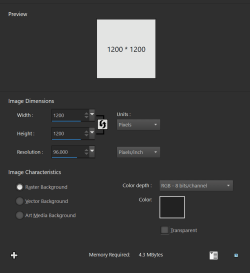
Anyway, I used to use Photoshop very sparingly when I had access to it. I used to make simple audiobook covers for my audiobook server by finding an image of a book cover, which are always tall rectangles, plopping it on top of a 1200x1200 dark gray square so that there are two layers in the PSP file: the square, dark gray background, and the book cover floating on top of it. Then, I would add a border to the book cover image (the rectangular bit) by going into a Layer submenu and then selecting Stroke. This would let me add strokes to text as well.
1. Create the 1200x1200 dark-gray sqaure (Image 1).
2. Open book cover image in Paintshop (Image 2).
3. Copy and paste book cover image as a layer in the 1200x1200 dark-gray file (Image 3).
I want to add a border/stroke to the finished image (All You Need Is Kill) (Image 4). See the gold border? That's what I want to add. In Photoshop, this was called Stroke and it was something you could do to text as well.
I'm trying to learn how to do this in Paintshop. Anyone know how?
Thanks.
First, I'm not an image guy so I only have a vague understanding of how image apps work. I could tell you lots about audio, just not this. So, please forgive my ignorance. I don't know the terminology.
Anyway, I used to use Photoshop very sparingly when I had access to it. I used to make simple audiobook covers for my audiobook server by finding an image of a book cover, which are always tall rectangles, plopping it on top of a 1200x1200 dark gray square so that there are two layers in the PSP file: the square, dark gray background, and the book cover floating on top of it. Then, I would add a border to the book cover image (the rectangular bit) by going into a Layer submenu and then selecting Stroke. This would let me add strokes to text as well.
1. Create the 1200x1200 dark-gray sqaure (Image 1).
2. Open book cover image in Paintshop (Image 2).
3. Copy and paste book cover image as a layer in the 1200x1200 dark-gray file (Image 3).
I want to add a border/stroke to the finished image (All You Need Is Kill) (Image 4). See the gold border? That's what I want to add. In Photoshop, this was called Stroke and it was something you could do to text as well.
I'm trying to learn how to do this in Paintshop. Anyone know how?
Thanks.
- Windows Build/Version
- Windows 11 Home 64-bit 23H2 22631.3880 | WFEP 1000.22700.1020.0
Attachments


My Computer
At a glance
Windows 11 Home 64-bitIntel Core i9 10920X @ 3.5GHz80 GB Triple-Channel DDR4 @ 1199MHzGeForce RTX 3050
- OS
- Windows 11 Home 64-bit
- Computer type
- PC/Desktop
- Manufacturer/Model
- Digital Storm Velox
- CPU
- Intel Core i9 10920X @ 3.5GHz
- Motherboard
- MSI X299 Pro
- Memory
- 80 GB Triple-Channel DDR4 @ 1199MHz
- Graphics Card(s)
- GeForce RTX 3050
- Sound Card
- Topping DX3-Pro DAC
- Monitor(s) Displays
- LG HDR 4K x2
- Screen Resolution
- 3840x2160
- Hard Drives
- 8TB Western Digital WDC WD8003FFBX-68B9AN0
16TB Seagate ST16000NM001G-2KK103
1TB Samsung SSD 980 PRO
1TB Kingston SNVS1000G
8TB ASMT 2115 SCSI Disk Device
14TB Western Digital EasyStore 264D
- Case
- Digital Storm Velox




