
Hide drives with no media BUT ALSO show hidden/system files?


Novgorod

Well-known member
Local time
7:01 PM
Posts
39
OS
Windows 11
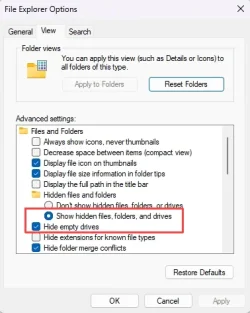
The "Hide empty drives" setting leads to a strange interaction with the "Hidden files and folders" setting. Apparently all it does is setting the "hidden" flag on an empty drive's root folder (since a "drive" is treated as a folder in file explorer), so the visibility of an empty drive becomes dependent on the "Hidden files and folders" setting. I see why MS would choose this lazy implementation, but it leads to annoying and unwanted behavior. In particular, I always want to show hidden files (and "normal" hidden folders), but I don't want empty drives to show up, e.g. virtual drives from a rarely used card reader. Is there some hack to decouple the visibility of empty drives from the setting for normal hidden files and folders?
1779491236704.webp
 

My Computer

System One

  • OS
    Windows 11
    Computer type
    PC/Desktop
    Manufacturer/Model
    Novgorod Scientific Instruments, Inc.
    CPU
    Core i9 13900K
    Motherboard
    Asus Z690-I
    Memory
    64GB DDR5
    Graphics Card(s)
    3080Ti
    Screen Resolution
    WQHD
    Hard Drives
    Samsung 990 Pro 2TB
    PSU
    Coolermaster SFX 750W
    Case
    LianLi Q58
    Cooling
    Custom loop
    Keyboard
    Coolermaster MK850 Blingblingbling
    Mouse
    G502
    Internet Speed
    Jiggabit
    Antivirus
    Remaining brain cells
Co-Pilot gives a very clear answer.

What you’re seeing is actually expected behavior—just not good behavior.

Windows doesn’t have a dedicated mechanism for “hide empty drives” at the shell level. Instead, File Explorer marks the root directory of an empty drive as hidden, and then relies on the global Hidden files and folders setting to decide whether that drive should appear. That’s why the two settings are tied together: the drive only disappears when hidden items are suppressed.This is exactly what you described in your post .

So unfortunately, there’s no built‑in way to decouple the two behaviors. If you always show hidden/system files, Explorer will always show those empty card‑reader slots too.

Workarounds people typically use

None are perfect, but they may help depending on your setup:

  • Disable the unused device entirely If the empty drives come from a USB card reader, you can disable the device in Device Manager. That prevents the phantom drive letters from appearing at all.
  • Use a third‑party file manager Tools like Directory Opus or XYplorer have independent logic for hiding empty drives and don’t rely on the hidden attribute trick.
  • Assign drive letters only when needed Some multi‑slot readers let you switch to “mount on insertion” mode so Windows doesn’t create drive letters until media is present.

What you can't do

There’s no registry flag, group policy, or Explorer tweak that forces Windows to hide empty drives while still showing hidden/system files. Explorer’s behavior is hard‑coded, and the OS doesn’t expose a separate visibility rule for empty volumes.
 

My Computers

System One System Two

  • OS
    Windows 11 Pro 25H2
    Computer type
    PC/Desktop
    Manufacturer/Model
    Dell Optiplex 7080
    CPU
    i9-10900 10 core 20 threads
    Motherboard
    DELL 0J37VM
    Memory
    32 gb
    Graphics Card(s)
    none-Intel UHD Graphics 630
    Sound Card
    Integrated Realtek
    Monitor(s) Displays
    Benq 27
    Screen Resolution
    2560x1440
    Hard Drives
    2x1tb Solidigm m.2 nvme /External drives 512gb Samsung m.2 sata+2tb Kingston m2.nvme
    PSU
    500w
    Case
    MT
    Cooling
    Dell Premium
    Keyboard
    Logitech wired
    Mouse
    Logitech wireless
    Internet Speed
    so slow I'm too embarrassed to tell
    Browser
    #1 Edge #2 Firefox
    Antivirus
    Defender+MWB Premium
  • Operating System
    Windows 11 Pro 24H2 26200.8457
    Computer type
    PC/Desktop
    Manufacturer/Model
    Beelink Mini PC SER5
    CPU
    AMD Ryzen 7 6800U
    Memory
    32 gb
    Graphics card(s)
    integrated
    Sound Card
    integrated
    Monitor(s) Displays
    Benq 27
    Screen Resolution
    2560x1440
    Hard Drives
    1TB Crucial nvme
    Keyboard
    Logitech wired
    Mouse
    Logitech wireless
    Internet Speed
    still too embarrassed to tell
    Browser
    Firefox
    Antivirus
    Defender
    Other Info
    System 3 is non compliant Dell 9020 i7-4770/24gb ram Win11 PRO 26200.8457
Thanks, Nvidia. I had little hope this could be done with file explorer anyway. Then I have no choice but to ban these card reader drives to a folder mount without drive letters. Given the rare usage, that's much less annoying than having empty drives show up all the time.
 
Last edited:

My Computer

System One

  • OS
    Windows 11
    Computer type
    PC/Desktop
    Manufacturer/Model
    Novgorod Scientific Instruments, Inc.
    CPU
    Core i9 13900K
    Motherboard
    Asus Z690-I
    Memory
    64GB DDR5
    Graphics Card(s)
    3080Ti
    Screen Resolution
    WQHD
    Hard Drives
    Samsung 990 Pro 2TB
    PSU
    Coolermaster SFX 750W
    Case
    LianLi Q58
    Cooling
    Custom loop
    Keyboard
    Coolermaster MK850 Blingblingbling
    Mouse
    G502
    Internet Speed
    Jiggabit
    Antivirus
    Remaining brain cells

My Computer

System One

  • OS
    Windows 11 2H25
    Computer type
    PC/Desktop
    Manufacturer/Model
    DIY
    CPU
    AMD 9900X
    Motherboard
    MSI X870E Carbon
    Memory
    64 GB
    Graphics Card(s)
    AMD 9070 XT
    Sound Card
    built-in
    Monitor(s) Displays
    Dell 24"
    Hard Drives
    Sabrent 1 TB NVMe, 4 x SSD (need to check models), 4 x 3.5" HDD, 8-16 TB, all WD
    PSU
    Seasonic 850
    Case
    Fractal Design North XL (which I likw)
    Cooling
    Corsair AIO for CPU, fans for case
    Keyboard
    Das Keyboard 4
    Mouse
    Corsair M65 (white)
    Internet Speed
    1 TB download
    Browser
    Firefox
    Antivirus
    Bitdefender
    Other Info
    Also have Lenovo T14S laptop (me) and Lenovo Slim 71 (wife)

Latest Support Threads

Back
Top Bottom


