
Hide drives with no media BUT ALSO show hidden/system files?


Novgorod

Well-known member
Local time
1:08 AM
Posts
39
OS
Windows 11
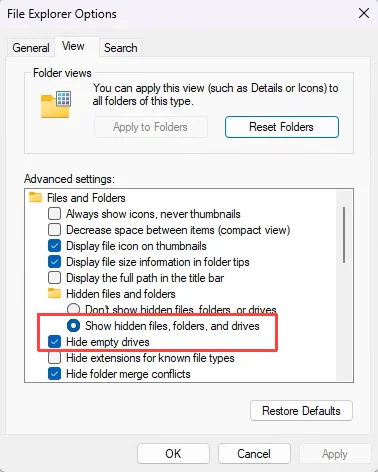
The "Hide empty drives" setting leads to a strange interaction with the "Hidden files and folders" setting. Apparently all it does is setting the "hidden" flag on an empty drive's root folder (since a "drive" is treated as a folder in file explorer), so the visibility of an empty drive becomes dependent on the "Hidden files and folders" setting. I see why MS would choose this lazy implementation, but it leads to annoying and unwanted behavior. In particular, I always want to show hidden files (and "normal" hidden folders), but I don't want empty drives to show up, e.g. virtual drives from a rarely used card reader. Is there some hack to decouple the visibility of empty drives from the setting for normal hidden files and folders?
1779491236704.webp
 

My Computer My Computer

At a glance

Windows 11Core i9 13900K64GB DDR53080Ti
OS
Windows 11
Computer type
PC/Desktop
Manufacturer/Model
Novgorod Scientific Instruments, Inc.
CPU
Core i9 13900K
Motherboard
Asus Z690-I
Memory
64GB DDR5
Graphics Card(s)
3080Ti
Screen Resolution
WQHD
Hard Drives
Samsung 990 Pro 2TB
PSU
Coolermaster SFX 750W
Case
LianLi Q58
Cooling
Custom loop
Keyboard
Coolermaster MK850 Blingblingbling
Mouse
G502
Internet Speed
Jiggabit
Antivirus
Remaining brain cells
Co-Pilot gives a very clear answer.

What you’re seeing is actually expected behavior—just not good behavior.

Windows doesn’t have a dedicated mechanism for “hide empty drives” at the shell level. Instead, File Explorer marks the root directory of an empty drive as hidden, and then relies on the global Hidden files and folders setting to decide whether that drive should appear. That’s why the two settings are tied together: the drive only disappears when hidden items are suppressed.This is exactly what you described in your post .

So unfortunately, there’s no built‑in way to decouple the two behaviors. If you always show hidden/system files, Explorer will always show those empty card‑reader slots too.

Workarounds people typically use

None are perfect, but they may help depending on your setup:

  • Disable the unused device entirely If the empty drives come from a USB card reader, you can disable the device in Device Manager. That prevents the phantom drive letters from appearing at all.
  • Use a third‑party file manager Tools like Directory Opus or XYplorer have independent logic for hiding empty drives and don’t rely on the hidden attribute trick.
  • Assign drive letters only when needed Some multi‑slot readers let you switch to “mount on insertion” mode so Windows doesn’t create drive letters until media is present.

What you can't do

There’s no registry flag, group policy, or Explorer tweak that forces Windows to hide empty drives while still showing hidden/system files. Explorer’s behavior is hard‑coded, and the OS doesn’t expose a separate visibility rule for empty volumes.
 

My Computers My Computers

  • At a glance

    Windows 11 Pro 25H2 26200.8875i9-10900 10 core 20 threads32 gbnone-Intel UHD Graphics 630
    OS
    Windows 11 Pro 25H2 26200.8875
    Computer type
    PC/Desktop
    Manufacturer/Model
    Dell Optiplex 7080
    CPU
    i9-10900 10 core 20 threads
    Motherboard
    DELL 0J37VM
    Memory
    32 gb
    Graphics Card(s)
    none-Intel UHD Graphics 630
    Sound Card
    Integrated Realtek
    Monitor(s) Displays
    Benq 27
    Screen Resolution
    2560x1440
    Hard Drives
    2x1tb Solidigm m.2 nvme /External drives 512gb Samsung m.2 sata+2tb Kingston m2.nvme
    PSU
    500w
    Case
    MT
    Cooling
    Dell Premium
    Keyboard
    Logitech wired
    Mouse
    Logitech wireless
    Internet Speed
    so slow I'm too embarrassed to tell
    Browser
    #1 Edge #2 Firefox
    Antivirus
    Defender+MWB Premium
  • At a glance

    Windows 11 Pro 24H2 26200.8875AMD Ryzen 7 6800U32 gbintegrated
    Operating System
    Windows 11 Pro 24H2 26200.8875
    Computer type
    PC/Desktop
    Manufacturer/Model
    Beelink Mini PC SER5
    CPU
    AMD Ryzen 7 6800U
    Memory
    32 gb
    Graphics card(s)
    integrated
    Sound Card
    integrated
    Monitor(s) Displays
    Benq 27
    Screen Resolution
    2560x1440
    Hard Drives
    1TB Crucial nvme
    Keyboard
    Logitech wired
    Mouse
    Logitech wireless
    Internet Speed
    still too embarrassed to tell
    Browser
    Firefox
    Antivirus
    Defender
    Other Info
    System 3 is non compliant Dell 9020 i7-4770/24gb ram Win11 PRO 26200.8875
Thanks, Nvidia. I had little hope this could be done with file explorer anyway. Then I have no choice but to ban these card reader drives to a folder mount without drive letters. Given the rare usage, that's much less annoying than having empty drives show up all the time.
 
Last edited:

My Computer My Computer

At a glance

Windows 11Core i9 13900K64GB DDR53080Ti
OS
Windows 11
Computer type
PC/Desktop
Manufacturer/Model
Novgorod Scientific Instruments, Inc.
CPU
Core i9 13900K
Motherboard
Asus Z690-I
Memory
64GB DDR5
Graphics Card(s)
3080Ti
Screen Resolution
WQHD
Hard Drives
Samsung 990 Pro 2TB
PSU
Coolermaster SFX 750W
Case
LianLi Q58
Cooling
Custom loop
Keyboard
Coolermaster MK850 Blingblingbling
Mouse
G502
Internet Speed
Jiggabit
Antivirus
Remaining brain cells

My Computer My Computer

At a glance

Windows 11 2H25AMD 9900X64 GBAMD 9070 XT
OS
Windows 11 2H25
Computer type
PC/Desktop
Manufacturer/Model
DIY
CPU
AMD 9900X
Motherboard
MSI X870E Carbon
Memory
64 GB
Graphics Card(s)
AMD 9070 XT
Sound Card
built-in
Monitor(s) Displays
Dell 24"
Hard Drives
Sabrent 1 TB NVMe, 4 x SSD (need to check models), 4 x 3.5" HDD, 8-16 TB, all WD
PSU
Seasonic 850
Case
Fractal Design North XL (which I likw)
Cooling
Corsair AIO for CPU, fans for case
Keyboard
Das Keyboard 4
Mouse
Corsair M65 (white)
Internet Speed
1 TB download
Browser
Firefox
Antivirus
Bitdefender
Other Info
Also have Lenovo T14S laptop (me) and Lenovo Slim 71 (wife)
Back
Top Bottom




