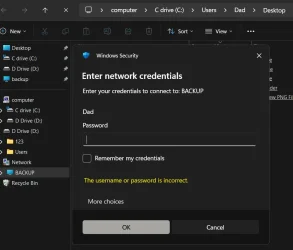
I have systems A and B on my home network, they each have folders shared with the other. i upgraded them to win11 and everything is working except now they cannot share folders. I did a few hours of troubleshooting with chatgpt and copilot but it seemed like it was just throwing ideas at the wall, nothing worked. So I asked it to summarize my case so I could post about it here for some human input, here is its summary. Any advice is welcome, thanks.
Two Win11 PCs (same HOME workgroup, 192.168.50.x) can ping and see each other normally, but SMB auth always fails.
SMB auth failure between two Win11 LAN hosts
Two Win11 PCs (same HOME workgroup, 192.168.50.x) can ping and see each other normally, but SMB auth always fails.
What Works
- Ping both directions OK
- nbtstat -A resolves names + MAC correctly
- net view \\localhost works on both machines
- SMB2 enabled, SMB1 disabled
- Shares exist and are visible locally
- \\host\share and \\ip\share → ask for password then say its the wrong password
net use \\host\IPC$ /user:Dad → error 1326
- Event ID 4625
- Logon Type 3
- NTLM (NtLmSsp)
- Status: 0xC000006A (bad password)
- Accounts exist locally on both machines (“Dad”, admin)
- NetBIOS and name resolution confirmed working
- Firewall ruled out
- Issue isolated to NTLM SMB authentication only
My Computer
At a glance
windows 11
- OS
- windows 11