BonzaiDuck
Member
- Local time
- 4:26 AM
- Posts
- 24
- OS
- Windows 11 Pro
I will be more valuable to the community if I create a thread of more widespread value, but I'm seeking some guidance for my particular situation.
I have all the hardware requirements for Windows 11 Pro but one: My CPU is Kaby Lake -- just short of MS's list of "eligibles" -- beginning with Coffee Lake.
I only needed to make a single registry hack for successful installation (repair-upgrade to Win 10 Pro) of Win 11 on this system. It has been running great. Totally stable; all software from "Keep Programs and Files" is working properly. I have had Windows Updates without problem through the cumulative update for 24H2 of August 12 -- KB 5063878. There seems to be some concern about this update in the community, but this interest seems focused on the recent story about certain models of SSDs. I have no problem there.
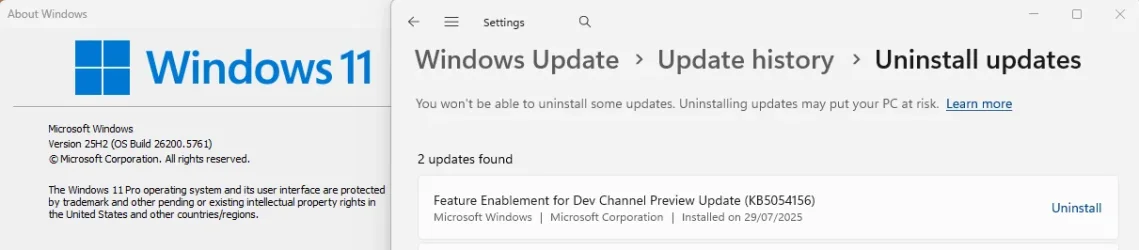
I had figured to wait until I could download an ISO based on version 25H2. My plan was then to prepare my current installation with the same registry hack (as might be needed but not certain of that). Then I would install the ISO after mounting it as virtual drive -- as a "repair-upgrade" to my current 24H2 version. Please comment or advise if this plan seems deficient.
I'm enrolled in the "Insider Program" "Dev" category. I've examined web-sites for "UUP Dump" and the MS site for Windows Insider Preview Downloads -- the later featuring ISO downloads for my particular case. But these downloads apparently are still in the category of "Preview" updates, and they are apparently not "final".
I want to get beyond this, knowing I should be patient and avoid any hurry. When will the final 25H2 be available? Do you think my approach to this is sound?
In the event that I have insurmountable difficulties moving forward with my Win 11 installations on two computers so far which have identical hardware, I have acquired motherboard and CPU items from EBay (new in shrink-wrap) to actually upgrade the hardware -- using my existing (at one time expensive) RAM kits -- which match the needs of ASUS Z590 motherboards for Rocket Lake CPUs. I really don't want to do this right away. Since I have a year's reprieve with the existing Windows 10 ESU on a third computer (daily-driver), I am laying groundwork to "take my time", and I hope that I can get past these Feature Updates (25H2) to buy more time.
As I said already, Win 11 Pro 24H2 is running great on two of these machines -- all three (as already explained) use the same hardware.
I have all the hardware requirements for Windows 11 Pro but one: My CPU is Kaby Lake -- just short of MS's list of "eligibles" -- beginning with Coffee Lake.
I only needed to make a single registry hack for successful installation (repair-upgrade to Win 10 Pro) of Win 11 on this system. It has been running great. Totally stable; all software from "Keep Programs and Files" is working properly. I have had Windows Updates without problem through the cumulative update for 24H2 of August 12 -- KB 5063878. There seems to be some concern about this update in the community, but this interest seems focused on the recent story about certain models of SSDs. I have no problem there.
I had figured to wait until I could download an ISO based on version 25H2. My plan was then to prepare my current installation with the same registry hack (as might be needed but not certain of that). Then I would install the ISO after mounting it as virtual drive -- as a "repair-upgrade" to my current 24H2 version. Please comment or advise if this plan seems deficient.
I'm enrolled in the "Insider Program" "Dev" category. I've examined web-sites for "UUP Dump" and the MS site for Windows Insider Preview Downloads -- the later featuring ISO downloads for my particular case. But these downloads apparently are still in the category of "Preview" updates, and they are apparently not "final".
I want to get beyond this, knowing I should be patient and avoid any hurry. When will the final 25H2 be available? Do you think my approach to this is sound?
In the event that I have insurmountable difficulties moving forward with my Win 11 installations on two computers so far which have identical hardware, I have acquired motherboard and CPU items from EBay (new in shrink-wrap) to actually upgrade the hardware -- using my existing (at one time expensive) RAM kits -- which match the needs of ASUS Z590 motherboards for Rocket Lake CPUs. I really don't want to do this right away. Since I have a year's reprieve with the existing Windows 10 ESU on a third computer (daily-driver), I am laying groundwork to "take my time", and I hope that I can get past these Feature Updates (25H2) to buy more time.
As I said already, Win 11 Pro 24H2 is running great on two of these machines -- all three (as already explained) use the same hardware.
My Computer
At a glance
Windows 11 ProIntel i7-7700K (Kaby Lake)G.SKILL DDR4-3200nVidia GeForce 1070 Mini OC
- OS
- Windows 11 Pro
- Computer type
- PC/Desktop
- Manufacturer/Model
- ASUS motherboard Intel CPU
- CPU
- Intel i7-7700K (Kaby Lake)
- Motherboard
- ASUS Sabertooth Z170 S with TPM 2.0 module
- Memory
- G.SKILL DDR4-3200
- Graphics Card(s)
- nVidia GeForce 1070 Mini OC
- Sound Card
- RealTek
- Monitor(s) Displays
- BenQ
- Screen Resolution
- 2560x1440
- Hard Drives
- SK Hynix NVME; Crucial SATA SSD; Seagate 2.5" 5GB
- PSU
- Seasonic Platinum Prime 650W
- Case
- CoolerMaster Stacker 830/832 (2007)
- Cooling
- ThermalRight Le Grand Macho RT
- Keyboard
- Logitech Gaming
- Mouse
- Logitech Gaming
- Internet Speed
- 600 Mbps
- Browser
- Opera -- Edge as needed
- Antivirus
- MalWareBytes + Windows Defender
- Other Info
- Win 11 installed with the registry hack to specify "MoSetup" to circumvent hardware requirement on the CPU. CPU preceded Coffee Lake -- first on the Win 11 eligibles list. We are waiting and hoping for success in manual installation of Feature Update 25H2. If not, we have plans for least expensive hardware swap-out to Comet Lake and Rocket Lake.
At this point, all my desktops use Z170 chipsets and SKY- or KABY-Lake processors.