
Hoping to get beyond the 25H2 Milestone with my ineligible CPU


BonzaiDuck

Member
Local time
5:25 AM
Posts
24
OS
Windows 11 Pro
I will be more valuable to the community if I create a thread of more widespread value, but I'm seeking some guidance for my particular situation.

I have all the hardware requirements for Windows 11 Pro but one: My CPU is Kaby Lake -- just short of MS's list of "eligibles" -- beginning with Coffee Lake.

I only needed to make a single registry hack for successful installation (repair-upgrade to Win 10 Pro) of Win 11 on this system. It has been running great. Totally stable; all software from "Keep Programs and Files" is working properly. I have had Windows Updates without problem through the cumulative update for 24H2 of August 12 -- KB 5063878. There seems to be some concern about this update in the community, but this interest seems focused on the recent story about certain models of SSDs. I have no problem there.

I had figured to wait until I could download an ISO based on version 25H2. My plan was then to prepare my current installation with the same registry hack (as might be needed but not certain of that). Then I would install the ISO after mounting it as virtual drive -- as a "repair-upgrade" to my current 24H2 version. Please comment or advise if this plan seems deficient.

I'm enrolled in the "Insider Program" "Dev" category. I've examined web-sites for "UUP Dump" and the MS site for Windows Insider Preview Downloads -- the later featuring ISO downloads for my particular case. But these downloads apparently are still in the category of "Preview" updates, and they are apparently not "final".

I want to get beyond this, knowing I should be patient and avoid any hurry. When will the final 25H2 be available? Do you think my approach to this is sound?

In the event that I have insurmountable difficulties moving forward with my Win 11 installations on two computers so far which have identical hardware, I have acquired motherboard and CPU items from EBay (new in shrink-wrap) to actually upgrade the hardware -- using my existing (at one time expensive) RAM kits -- which match the needs of ASUS Z590 motherboards for Rocket Lake CPUs. I really don't want to do this right away. Since I have a year's reprieve with the existing Windows 10 ESU on a third computer (daily-driver), I am laying groundwork to "take my time", and I hope that I can get past these Feature Updates (25H2) to buy more time.

As I said already, Win 11 Pro 24H2 is running great on two of these machines -- all three (as already explained) use the same hardware.
 

My Computer My Computer

At a glance

Windows 11 ProIntel i7-7700K (Kaby Lake)G.SKILL DDR4-3200nVidia GeForce 1070 Mini OC
OS
Windows 11 Pro
Computer type
PC/Desktop
Manufacturer/Model
ASUS motherboard Intel CPU
CPU
Intel i7-7700K (Kaby Lake)
Motherboard
ASUS Sabertooth Z170 S with TPM 2.0 module
Memory
G.SKILL DDR4-3200
Graphics Card(s)
nVidia GeForce 1070 Mini OC
Sound Card
RealTek
Monitor(s) Displays
BenQ
Screen Resolution
2560x1440
Hard Drives
SK Hynix NVME; Crucial SATA SSD; Seagate 2.5" 5GB
PSU
Seasonic Platinum Prime 650W
Case
CoolerMaster Stacker 830/832 (2007)
Cooling
ThermalRight Le Grand Macho RT
Keyboard
Logitech Gaming
Mouse
Logitech Gaming
Internet Speed
600 Mbps
Browser
Opera -- Edge as needed
Antivirus
MalWareBytes + Windows Defender
Other Info
Win 11 installed with the registry hack to specify "MoSetup" to circumvent hardware requirement on the CPU. CPU preceded Coffee Lake -- first on the Win 11 eligibles list. We are waiting and hoping for success in manual installation of Feature Update 25H2. If not, we have plans for least expensive hardware swap-out to Comet Lake and Rocket Lake.

At this point, all my desktops use Z170 chipsets and SKY- or KABY-Lake processors.
25H2 should be available in October and there will be no foreseeable problem with any system upgrading a 24H2 system.

what comes after that is any ones guess as Microsoft haven't stated what the requirements/restrictions are for Windows 12.

best of luck, Steve ..
 

My Computers My Computers

  • At a glance

    Debian 13 KDE .. Windows 11 HomeRyzen 7 5825u64GB DDR4 3200Ryzen 7 5825u
    OS
    Debian 13 KDE .. Windows 11 Home
    Computer type
    PC/Desktop
    Manufacturer/Model
    HP 24" AiO
    CPU
    Ryzen 7 5825u
    Motherboard
    HP
    Memory
    64GB DDR4 3200
    Graphics Card(s)
    Ryzen 7 5825u
    Sound Card
    RealTek
    Monitor(s) Displays
    24" HP AiO
    Screen Resolution
    1920 x 1080 @60 Hz
    Hard Drives
    1TB WD Blue SN580 M2 SSD Partitioned.
    2x 1TB USB HDD External Backup/Storage.
    PSU
    90W external power brick
    Case
    24" All in One
    Cooling
    Default Air Cooling
    Keyboard
    HP WiFi UK extended
    Mouse
    HP WiFi 3 Button
    Internet Speed
    1GB full fibre
    Browser
    Edge & Firefox
    Antivirus
    AVG Internet Security/Windows Defender
    Other Info
    Mainly Open Source Software
  • At a glance

    Ubuntu 22.04.5 LTSi5 7200u16GB DDR4Intel
    Operating System
    Ubuntu 22.04.5 LTS
    Computer type
    Laptop
    Manufacturer/Model
    Dell 13" Latitude 2017
    CPU
    i5 7200u
    Motherboard
    Dell
    Memory
    16GB DDR4
    Graphics card(s)
    Intel
    Sound Card
    Intel
    Monitor(s) Displays
    13" Dell Laptop
    Hard Drives
    250GB Crucial 2.5" SSD
    Mouse
    Generic WiFi 3 button
    Internet Speed
    WiFi only
    Browser
    Firefox
    Antivirus
    ClamAV TK
    Other Info
    Mainly Open Source Software
25H2 should be available in October and there will be no foreseeable problem with any system upgrading a 24H2 system.

what comes after that is any ones guess as Microsoft haven't stated what the requirements/restrictions are for Windows 12.

best of luck, Steve ..
Thanks -- thank you very much. I'll just keep my fingers crossed and be patient. After that, two years to replace the hardware. But as I said, it's working great now and hopefully for the foreseeable future!

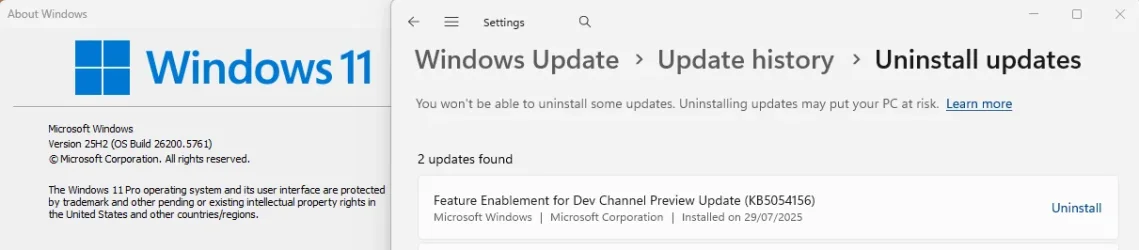
UPDATE: Just checked my Settings->. . Windows Update. it is pulling in 10.0.26200.5761 "INsider Preview" as I speak. Sitting on pins and needles. This is going to be interesting. Need to check my Macrium backup disk to see what's there in case I have to do any "roll back". I'm very hopeful, though!
 

My Computer My Computer

At a glance

Windows 11 ProIntel i7-7700K (Kaby Lake)G.SKILL DDR4-3200nVidia GeForce 1070 Mini OC
OS
Windows 11 Pro
Computer type
PC/Desktop
Manufacturer/Model
ASUS motherboard Intel CPU
CPU
Intel i7-7700K (Kaby Lake)
Motherboard
ASUS Sabertooth Z170 S with TPM 2.0 module
Memory
G.SKILL DDR4-3200
Graphics Card(s)
nVidia GeForce 1070 Mini OC
Sound Card
RealTek
Monitor(s) Displays
BenQ
Screen Resolution
2560x1440
Hard Drives
SK Hynix NVME; Crucial SATA SSD; Seagate 2.5" 5GB
PSU
Seasonic Platinum Prime 650W
Case
CoolerMaster Stacker 830/832 (2007)
Cooling
ThermalRight Le Grand Macho RT
Keyboard
Logitech Gaming
Mouse
Logitech Gaming
Internet Speed
600 Mbps
Browser
Opera -- Edge as needed
Antivirus
MalWareBytes + Windows Defender
Other Info
Win 11 installed with the registry hack to specify "MoSetup" to circumvent hardware requirement on the CPU. CPU preceded Coffee Lake -- first on the Win 11 eligibles list. We are waiting and hoping for success in manual installation of Feature Update 25H2. If not, we have plans for least expensive hardware swap-out to Comet Lake and Rocket Lake.

At this point, all my desktops use Z170 chipsets and SKY- or KABY-Lake processors.
I have all the hardware requirements for Windows 11 Pro but one: My CPU is Kaby Lake -- just short of MS's list of "eligibles" -- beginning with Coffee Lake. I only needed to make a single registry hack for successful installation (repair-upgrade to Win 10 Pro) of Win 11 on this system. It has been running great.....
....I had figured to wait until I could download an ISO based on version 25H2. My plan was then to prepare my current installation with the same registry hack (as might be needed but not certain of that). Then I would install the ISO after mounting it as virtual drive -- as a "repair-upgrade" to my current 24H2 version....
The ISO method will be unnecessary. 24H2 and 25H2 share a common set of system files. By the time 25H2 is ready to be released (expected to be in October) the 25H2 features will already be in the 24H2 code, but in a dormant state.

The feature update to 25H2 will just require installing a small Enablement Package that will turn on the dormant 25H2 features. Shortly after the release of 25H2 you should be able to download the Enablement Package from Eleven Forums, as was the case for the 23H2 Enablement Package.

The good thing about these enablement packages is that they make no system compatibility checks, no workaround will be needed.
 

My Computers My Computers

  • At a glance

    Windows 11 HomeAMD Athlon Silver 3050U8GBRadeon Graphics
    OS
    Windows 11 Home
    Computer type
    Laptop
    Manufacturer/Model
    Acer Aspire 3 A315-23-R9VY
    CPU
    AMD Athlon Silver 3050U
    Memory
    8GB
    Graphics Card(s)
    Radeon Graphics
    Monitor(s) Displays
    laptop screen
    Screen Resolution
    1366x768 native resolution, up to 2560x1440 with Radeon Virtual Super Resolution
    Hard Drives
    1TB Samsung EVO 870 SSD (from April 2026: 250GB EVO 850)
    Internet Speed
    150 Mbps
    Browser
    Edge, Firefox
    Antivirus
    Defender
    Other Info
    fully 'Windows 11 ready' laptop. Windows 10 C: partition migrated from my old unsupported 'main machine' then upgraded to 11. A test migration ran Insider builds for 2 months. When 11 was released on 5th October 2021 it was re-imaged back to 10 and was offered the upgrade in Windows Update on 20th October. Windows Update offered the 22H2 Feature Update on 20th September 2022. It got the 23H2 Feature Update on 4th November 2023 through Windows Update, 24H2 on 3rd October 2024 through Windows Update by setting the Target Release Version for 24H2, and 25H2 on 30th September 2025 through Windows Update by setting the Target Release Version for 25H2.

    UPDATE - 11 April 2026: due to mechanical deterioration this PC has been retired from active duty. The OS with all software and files has been migrated to my System Seven in 'Other systems' to carry on as my general purpose 'main machine'.
  • At a glance

    Windows 11 ProIntel® Core™ i5-520M8GB(integrated graphics) Intel HD Graphics
    Operating System
    Windows 11 Pro
    Computer type
    Laptop
    Manufacturer/Model
    Dell Latitude E4310
    CPU
    Intel® Core™ i5-520M
    Motherboard
    0T6M8G
    Memory
    8GB
    Graphics card(s)
    (integrated graphics) Intel HD Graphics
    Screen Resolution
    1366x768
    Hard Drives
    500GB Crucial MX500 SSD
    Browser
    Firefox, Edge
    Antivirus
    Defender
    Other Info
    unsupported machine: Legacy bios, MBR, TPM 1.2, upgraded from W10 to W11 using W10/W11 hybrid install media workaround.

    In-place upgrade to 22H2 using ISO and a workaround.
    Feature Update to 23H2 by manually installing the Enablement Package.
    In-place upgrade to 24H2 using hybrid 23H2/24H2 install media.
    Upgraded to 25H2 by Enablement Package.

    Also running Insider Dev, and Canary builds and Windows 10 as native boot .vhdx.
  • My SYSTEM THREE is a Dell Latitude 5410, i7-10610U, 32GB RAM, 512GB NVMe ssd, supported device running Windows 11 Pro.

    My SYSTEM FOUR is a 2-in-1 convertible Lenovo Yoga 11e 20DA, Celeron N2930, 8GB RAM, 256GB ssd. Unsupported device: currently running Win10 Pro, plus Win11 Pro RTM and Insider Dev, Beta, and RP 24H2 as native boot vhdx.

    My SYSTEM FIVE is a Dell Latitude 3190 2-in-1, Pentium Silver N5030, 8GB RAM, 1TB NVMe ssd, supported device running Windows 11 Pro, plus Insider Beta, Dev, and Canary builds (and a few others) as a native boot .vhdx.

    My SYSTEM SIX is a Dell Latitude 5550, Core Ultra 7 165H, 64GB RAM, 1TB NVMe SSD, supported device, Windows 11 Pro 24H2, Hyper-V host machine. Updated to 25H2 on 30th September 2025.

    My SYSTEM SEVEN is a Lenovo Thinkpad T580, Intel Core i7-8650U, 16GB RAM, 512GB NVMe SSD + 2nd 512GB NVMe SSD, a supported device for Windows 11. This is my current general purpose 'main machine'. The installed Windows 11 Home from my System One has been migrated to this machine.
I too have Kaby Lake HDD (I know it's slower, but I have patience). I've been on the DEV since 25H2 came out and it's running great. Just with the CPU registry hack. No problemos.
 

My Computer My Computer

At a glance

Win 11 Insider Release Preview and Beta chann...i5 Core [email protected] (Unsupported for Win 11)12GBGeneric PnP Monitor (1920x1080@60Hz) Intel HD...
OS
Win 11 Insider Release Preview and Beta channels.
Computer type
Laptop
Manufacturer/Model
HP ENVY Bought: March 2017
CPU
i5 Core [email protected] (Unsupported for Win 11)
Motherboard
HP 81AD (U3E1)
Memory
12GB
Graphics Card(s)
Generic PnP Monitor (1920x1080@60Hz) Intel HD Graphics 620 (HP)
Sound Card
Conexant ISST audio
Monitor(s) Displays
Generic PnP Monitor
Screen Resolution
1536x864 pixels
Hard Drives
HGST HTS721010A9E630
PSU
Well...PSU you too!! What's this mean?
Case
HP ENVY SILVER
Cooling
A fan.
Keyboard
USA
Mouse
Logitec Anywhere 2
Internet Speed
Good enough for me! Fast!
Browser
Edge/Waterfox
Antivirus
Windows Defender
Other Info
No 'mo.
25H2 should be available in October and there will be no foreseeable problem with any system upgrading a 24H2 system.

what comes after that is any ones guess as Microsoft haven't stated what the requirements/restrictions are for Windows 12.

best of luck, Steve ..
DEVELOPMENTS OCCURRING AT A PRODIGIOUS RATE, HERE!

I checked Win Update again, and it was downloading 10.0.26200.5761. I just told myself to let it start installing -- which it did! Then did a web-search to get an assessment of prospects, Google AI telling me "No, it won't install . . . . you'll need to go through [all these manual hoops]." It kept on rollin' . . . re-booting three times . . . each posting an updated % completed. I was getting to 98%, thinking how CRUEL it would be if Microsoft made me wait through all that and then say "Sorry . . . rolling back to previous update status". But -- NOTHING! IT WENT FORWARD! System->About shows "25H2 . . . [yada yada] Feature Experience Pack . . . . " Big wheel keep on turnin'! . . . Proud Mary keep on burnin'! Rollin' . . . Rollin' . . . Rollin' on the ri-ver!!

This blew my whole morning for exercise and chores, but I am happy as a pig . . . in . . . shee-it!:p
 

My Computer My Computer

At a glance

Windows 11 ProIntel i7-7700K (Kaby Lake)G.SKILL DDR4-3200nVidia GeForce 1070 Mini OC
OS
Windows 11 Pro
Computer type
PC/Desktop
Manufacturer/Model
ASUS motherboard Intel CPU
CPU
Intel i7-7700K (Kaby Lake)
Motherboard
ASUS Sabertooth Z170 S with TPM 2.0 module
Memory
G.SKILL DDR4-3200
Graphics Card(s)
nVidia GeForce 1070 Mini OC
Sound Card
RealTek
Monitor(s) Displays
BenQ
Screen Resolution
2560x1440
Hard Drives
SK Hynix NVME; Crucial SATA SSD; Seagate 2.5" 5GB
PSU
Seasonic Platinum Prime 650W
Case
CoolerMaster Stacker 830/832 (2007)
Cooling
ThermalRight Le Grand Macho RT
Keyboard
Logitech Gaming
Mouse
Logitech Gaming
Internet Speed
600 Mbps
Browser
Opera -- Edge as needed
Antivirus
MalWareBytes + Windows Defender
Other Info
Win 11 installed with the registry hack to specify "MoSetup" to circumvent hardware requirement on the CPU. CPU preceded Coffee Lake -- first on the Win 11 eligibles list. We are waiting and hoping for success in manual installation of Feature Update 25H2. If not, we have plans for least expensive hardware swap-out to Comet Lake and Rocket Lake.

At this point, all my desktops use Z170 chipsets and SKY- or KABY-Lake processors.
DEVELOPMENTS OCCURRING AT A PRODIGIOUS RATE, HERE!

I checked Win Update again, and it was downloading 10.0.26200.5761. I just told myself to let it start installing -- which it did! Then did a web-search to get an assessment of prospects, Google AI telling me "No, it won't install . . . . you'll need to go through [all these manual hoops]." It kept on rollin' . . . re-booting three times . . . each posting an updated % completed. I was getting to 98%, thinking how CRUEL it would be if Microsoft made me wait through all that and then say "Sorry . . . rolling back to previous update status". But -- NOTHING! IT WENT FORWARD! System->About shows "25H2 . . . [yada yada] Feature Experience Pack . . . . " Big wheel keep on turnin'! . . . Proud Mary keep on burnin'! Rollin' . . . Rollin' . . . Rollin' on the ri-ver!!

This blew my whole morning for exercise and chores, but I am happy as a pig . . . in . . . shee-it!:p
I figured it would. Not much difference between the two.
 

My Computer My Computer

At a glance

Win 11 Insider Release Preview and Beta chann...i5 Core [email protected] (Unsupported for Win 11)12GBGeneric PnP Monitor (1920x1080@60Hz) Intel HD...
OS
Win 11 Insider Release Preview and Beta channels.
Computer type
Laptop
Manufacturer/Model
HP ENVY Bought: March 2017
CPU
i5 Core [email protected] (Unsupported for Win 11)
Motherboard
HP 81AD (U3E1)
Memory
12GB
Graphics Card(s)
Generic PnP Monitor (1920x1080@60Hz) Intel HD Graphics 620 (HP)
Sound Card
Conexant ISST audio
Monitor(s) Displays
Generic PnP Monitor
Screen Resolution
1536x864 pixels
Hard Drives
HGST HTS721010A9E630
PSU
Well...PSU you too!! What's this mean?
Case
HP ENVY SILVER
Cooling
A fan.
Keyboard
USA
Mouse
Logitec Anywhere 2
Internet Speed
Good enough for me! Fast!
Browser
Edge/Waterfox
Antivirus
Windows Defender
Other Info
No 'mo.
I figured it would. Not much difference between the two.
Well . . . I'm supposed to be "an Old Hand". I was swapping out expansion cards in 1984. But the knowledge in this field expands prodigiously, and then becomes obsolete. I THINK I'm HUMBLE! Where do you go? Gotta "read up" to solve your problem and resolve uncertainty. I come here, go to 10 Forums, Anandtech, Tom's Hardware, Overclock.net -- using a consistent "handle", you will find my mark at all those places.

With this problem, you and I have "marginal hardware" -- we don't KNOW for SURE what's going to develop. It consumes a lot of time and energy -- anxiety and uncertainty cost energy! So what do I know? What did I know? I only knew that this Feature Upgrade was a "milestone" that buys me a couple years on this platform. I have friends who have "dropped" conversations because they just "don't want to fight it anymore". They gave up on their collections of old hardware and assumed a completely different strategy.

So what I didn't KNOW before I know now... What next? I have to wonder. Leisurely hardware updates, likely. But -- LEISURELY!
 

My Computer My Computer

At a glance

Windows 11 ProIntel i7-7700K (Kaby Lake)G.SKILL DDR4-3200nVidia GeForce 1070 Mini OC
OS
Windows 11 Pro
Computer type
PC/Desktop
Manufacturer/Model
ASUS motherboard Intel CPU
CPU
Intel i7-7700K (Kaby Lake)
Motherboard
ASUS Sabertooth Z170 S with TPM 2.0 module
Memory
G.SKILL DDR4-3200
Graphics Card(s)
nVidia GeForce 1070 Mini OC
Sound Card
RealTek
Monitor(s) Displays
BenQ
Screen Resolution
2560x1440
Hard Drives
SK Hynix NVME; Crucial SATA SSD; Seagate 2.5" 5GB
PSU
Seasonic Platinum Prime 650W
Case
CoolerMaster Stacker 830/832 (2007)
Cooling
ThermalRight Le Grand Macho RT
Keyboard
Logitech Gaming
Mouse
Logitech Gaming
Internet Speed
600 Mbps
Browser
Opera -- Edge as needed
Antivirus
MalWareBytes + Windows Defender
Other Info
Win 11 installed with the registry hack to specify "MoSetup" to circumvent hardware requirement on the CPU. CPU preceded Coffee Lake -- first on the Win 11 eligibles list. We are waiting and hoping for success in manual installation of Feature Update 25H2. If not, we have plans for least expensive hardware swap-out to Comet Lake and Rocket Lake.

At this point, all my desktops use Z170 chipsets and SKY- or KABY-Lake processors.
The ISO method will be unnecessary. 24H2 and 25H2 share a common set of system files. By the time 25H2 is ready to be released (expected to be in October) the 25H2 features will already be in the 24H2 code, but in a dormant state.

The feature update to 25H2 will just require installing a small Enablement Package that will turn on the dormant 25H2 features. Shortly after the release of 25H2 you should be able to download the Enablement Package from Eleven Forums, as was the case for the 23H2 Enablement Package.

The good thing about these enablement packages is that they make no system compatibility checks, no workaround will be needed.

Is this true for all older ineligible PCs now running 24H2? I Have an old Sandy Bridge and wondering if it will be able to use the enablement rather than an an ISO repair install using rufus.
 

My Computers My Computers

  • At a glance

    win 11 pro, 25H2i5-240032 GB DDR-3Intel HD Graphics 2000 (on-board)
    OS
    win 11 pro, 25H2
    Computer type
    PC/Desktop
    Manufacturer/Model
    Dell 790 (Mt)
    CPU
    i5-2400
    Motherboard
    Dell
    Memory
    32 GB DDR-3
    Graphics Card(s)
    Intel HD Graphics 2000 (on-board)
    Sound Card
    Intel Cougar Point PCH [B2] (On-Board)
    Monitor(s) Displays
    LG 27MN60T
  • At a glance

    Windows 11 home, 25H2Intel I7-3630QM16GB DDR3
    Operating System
    Windows 11 home, 25H2
    Computer type
    Laptop
    Manufacturer/Model
    Dell Inspiron 17R SE 7720
    CPU
    Intel I7-3630QM
    Memory
    16GB DDR3
    Hard Drives
    Samsung 500GB SSD
I might be wrong, but build 10.0.26200.xxxx is 25H2, isn't it? 24H2 is 10.0.26100.xxxx Unless 26200 is Insider's version.
 

My Computers My Computers

  • At a glance

    Windows 11 Pro 23H2 (5699), 25H2 (8655)Mobile DualCore Intel Core 2 Duo T7250, 2000 MHz4GBMobile Intel(R) GMA 4500M (Mobile 4 series)
    OS
    Windows 11 Pro 23H2 (5699), 25H2 (8655)
    Computer type
    Laptop
    Manufacturer/Model
    Acer Extensa 5630EZ
    CPU
    Mobile DualCore Intel Core 2 Duo T7250, 2000 MHz
    Motherboard
    Acer Extensa 5630
    Memory
    4GB
    Graphics Card(s)
    Mobile Intel(R) GMA 4500M (Mobile 4 series)
    Sound Card
    Realtek ALC268 @ Intel 82801IB ICH9 - High Definition Audio Controller
    Monitor(s) Displays
    1
    Screen Resolution
    1280x800
    Hard Drives
    Samsung SSD 850 EVO 250GB SATA Device (250 GB, SATA-III)
    Internet Speed
    VDSL 50 Mbps
    Browser
    MICROSOFT EDGE
    Antivirus
    WINDOWS DEFENDER
    Other Info
    Legacy MBR installation, no TPM, no Secure Boot, no WDDM 2.0 graphics drivers, no SSE4.2, cannot get more unsupported ;) This is only my test laptop. I had installed Windows 11 here before upgrading my main PC. For my main PC I use everyday see my 2nd system specs.
  • At a glance

    Windows 11 Pro v25H2 (build 26200.8655)Intel Core-i7 3770 3.40GHz s1155 (3rd generat...2x Kingston Hyper-X Blu 8GB DDR3-1600GIGABYTE GeForce RTX 3050 WINDFORCE OC V2 6GB...
    Operating System
    Windows 11 Pro v25H2 (build 26200.8655)
    Computer type
    PC/Desktop
    Manufacturer/Model
    Custom-built PC
    CPU
    Intel Core-i7 3770 3.40GHz s1155 (3rd generation)
    Motherboard
    Asus P8H61 s1155 ATX
    Memory
    2x Kingston Hyper-X Blu 8GB DDR3-1600
    Graphics card(s)
    GIGABYTE GeForce RTX 3050 WINDFORCE OC V2 6GB (GV-N3050WF2OCV2-6GD)
    Sound Card
    Realtek HD audio (ALC887)
    Monitor(s) Displays
    Sony Bravia KDL-19L4000 19" LCD TV via VGA
    Screen Resolution
    1440x900 32-bit 60Hz
    Hard Drives
    WD Blue SA510 2.5 1000GB SSD as system disk, Western Digital Caviar Purple 4TB SATA III (WD40PURZ) as second
    PSU
    Thermaltake Litepower RGB 550W Full Wired
    Case
    SUPERCASE MIDI-TOWER
    Cooling
    Deepcool Gamma Archer CPU cooler, 1x 8cm fan at the back
    Keyboard
    Mitsumi 101-key PS/2
    Mouse
    Sunnyline OptiEye PS/2
    Internet Speed
    100Mbps
    Browser
    Microsoft Edge, Mozilla Firefox
    Antivirus
    Microsoft Windows Defender
    Other Info
    Legacy BIOS (MBR) installation, no TPM, no Secure Boot, WDDM 3.0 graphics drivers, WEI score 7.4
I might be wrong, but build 10.0.26200.xxxx is 25H2, isn't it? 24H2 is 10.0.26100.xxxx Unless 26200 is Insider's version.
25H2 is the DEV channel. 26200. xxxx
 

My Computer My Computer

At a glance

Win 11 Insider Release Preview and Beta chann...i5 Core [email protected] (Unsupported for Win 11)12GBGeneric PnP Monitor (1920x1080@60Hz) Intel HD...
OS
Win 11 Insider Release Preview and Beta channels.
Computer type
Laptop
Manufacturer/Model
HP ENVY Bought: March 2017
CPU
i5 Core [email protected] (Unsupported for Win 11)
Motherboard
HP 81AD (U3E1)
Memory
12GB
Graphics Card(s)
Generic PnP Monitor (1920x1080@60Hz) Intel HD Graphics 620 (HP)
Sound Card
Conexant ISST audio
Monitor(s) Displays
Generic PnP Monitor
Screen Resolution
1536x864 pixels
Hard Drives
HGST HTS721010A9E630
PSU
Well...PSU you too!! What's this mean?
Case
HP ENVY SILVER
Cooling
A fan.
Keyboard
USA
Mouse
Logitec Anywhere 2
Internet Speed
Good enough for me! Fast!
Browser
Edge/Waterfox
Antivirus
Windows Defender
Other Info
No 'mo.
build 10.0.26200.xxxx is 25H2, isn't it? 24H2 is 10.0.26100.xxxx Unless 26200 is Insider's version.
26200 is 25H2, at present only available in the Insider Dev Channel. 24H2 and 25H2 share a common set of system files. The 25H2 features will be rolled out to 24H2 in the cumulative updates, but in a dormant state. When the 25H2 feature update is released a small enablement package will turn them on and bump the build number up by 100. You could uninstall this enablement package and drop back down to 24H2 26100.

1756328663126.webp
 

My Computers My Computers

  • At a glance

    Windows 11 HomeAMD Athlon Silver 3050U8GBRadeon Graphics
    OS
    Windows 11 Home
    Computer type
    Laptop
    Manufacturer/Model
    Acer Aspire 3 A315-23-R9VY
    CPU
    AMD Athlon Silver 3050U
    Memory
    8GB
    Graphics Card(s)
    Radeon Graphics
    Monitor(s) Displays
    laptop screen
    Screen Resolution
    1366x768 native resolution, up to 2560x1440 with Radeon Virtual Super Resolution
    Hard Drives
    1TB Samsung EVO 870 SSD (from April 2026: 250GB EVO 850)
    Internet Speed
    150 Mbps
    Browser
    Edge, Firefox
    Antivirus
    Defender
    Other Info
    fully 'Windows 11 ready' laptop. Windows 10 C: partition migrated from my old unsupported 'main machine' then upgraded to 11. A test migration ran Insider builds for 2 months. When 11 was released on 5th October 2021 it was re-imaged back to 10 and was offered the upgrade in Windows Update on 20th October. Windows Update offered the 22H2 Feature Update on 20th September 2022. It got the 23H2 Feature Update on 4th November 2023 through Windows Update, 24H2 on 3rd October 2024 through Windows Update by setting the Target Release Version for 24H2, and 25H2 on 30th September 2025 through Windows Update by setting the Target Release Version for 25H2.

    UPDATE - 11 April 2026: due to mechanical deterioration this PC has been retired from active duty. The OS with all software and files has been migrated to my System Seven in 'Other systems' to carry on as my general purpose 'main machine'.
  • At a glance

    Windows 11 ProIntel® Core™ i5-520M8GB(integrated graphics) Intel HD Graphics
    Operating System
    Windows 11 Pro
    Computer type
    Laptop
    Manufacturer/Model
    Dell Latitude E4310
    CPU
    Intel® Core™ i5-520M
    Motherboard
    0T6M8G
    Memory
    8GB
    Graphics card(s)
    (integrated graphics) Intel HD Graphics
    Screen Resolution
    1366x768
    Hard Drives
    500GB Crucial MX500 SSD
    Browser
    Firefox, Edge
    Antivirus
    Defender
    Other Info
    unsupported machine: Legacy bios, MBR, TPM 1.2, upgraded from W10 to W11 using W10/W11 hybrid install media workaround.

    In-place upgrade to 22H2 using ISO and a workaround.
    Feature Update to 23H2 by manually installing the Enablement Package.
    In-place upgrade to 24H2 using hybrid 23H2/24H2 install media.
    Upgraded to 25H2 by Enablement Package.

    Also running Insider Dev, and Canary builds and Windows 10 as native boot .vhdx.
  • My SYSTEM THREE is a Dell Latitude 5410, i7-10610U, 32GB RAM, 512GB NVMe ssd, supported device running Windows 11 Pro.

    My SYSTEM FOUR is a 2-in-1 convertible Lenovo Yoga 11e 20DA, Celeron N2930, 8GB RAM, 256GB ssd. Unsupported device: currently running Win10 Pro, plus Win11 Pro RTM and Insider Dev, Beta, and RP 24H2 as native boot vhdx.

    My SYSTEM FIVE is a Dell Latitude 3190 2-in-1, Pentium Silver N5030, 8GB RAM, 1TB NVMe ssd, supported device running Windows 11 Pro, plus Insider Beta, Dev, and Canary builds (and a few others) as a native boot .vhdx.

    My SYSTEM SIX is a Dell Latitude 5550, Core Ultra 7 165H, 64GB RAM, 1TB NVMe SSD, supported device, Windows 11 Pro 24H2, Hyper-V host machine. Updated to 25H2 on 30th September 2025.

    My SYSTEM SEVEN is a Lenovo Thinkpad T580, Intel Core i7-8650U, 16GB RAM, 512GB NVMe SSD + 2nd 512GB NVMe SSD, a supported device for Windows 11. This is my current general purpose 'main machine'. The installed Windows 11 Home from my System One has been migrated to this machine.
Is this true for all older ineligible PCs now running 24H2? I Have an old Sandy Bridge and wondering if it will be able to use the enablement rather than an an ISO repair install using rufus.
I used the 23H2 enablement package to update my unsupported System Two to 23H2. That has one of the oldest Intel processors to have the required SSE4.2 for 24H2 and above, a 1st gen i5-520M. Your Sandy Bridge is a 2nd gen processor, the enablement package should do just fine.
 

My Computers My Computers

  • At a glance

    Windows 11 HomeAMD Athlon Silver 3050U8GBRadeon Graphics
    OS
    Windows 11 Home
    Computer type
    Laptop
    Manufacturer/Model
    Acer Aspire 3 A315-23-R9VY
    CPU
    AMD Athlon Silver 3050U
    Memory
    8GB
    Graphics Card(s)
    Radeon Graphics
    Monitor(s) Displays
    laptop screen
    Screen Resolution
    1366x768 native resolution, up to 2560x1440 with Radeon Virtual Super Resolution
    Hard Drives
    1TB Samsung EVO 870 SSD (from April 2026: 250GB EVO 850)
    Internet Speed
    150 Mbps
    Browser
    Edge, Firefox
    Antivirus
    Defender
    Other Info
    fully 'Windows 11 ready' laptop. Windows 10 C: partition migrated from my old unsupported 'main machine' then upgraded to 11. A test migration ran Insider builds for 2 months. When 11 was released on 5th October 2021 it was re-imaged back to 10 and was offered the upgrade in Windows Update on 20th October. Windows Update offered the 22H2 Feature Update on 20th September 2022. It got the 23H2 Feature Update on 4th November 2023 through Windows Update, 24H2 on 3rd October 2024 through Windows Update by setting the Target Release Version for 24H2, and 25H2 on 30th September 2025 through Windows Update by setting the Target Release Version for 25H2.

    UPDATE - 11 April 2026: due to mechanical deterioration this PC has been retired from active duty. The OS with all software and files has been migrated to my System Seven in 'Other systems' to carry on as my general purpose 'main machine'.
  • At a glance

    Windows 11 ProIntel® Core™ i5-520M8GB(integrated graphics) Intel HD Graphics
    Operating System
    Windows 11 Pro
    Computer type
    Laptop
    Manufacturer/Model
    Dell Latitude E4310
    CPU
    Intel® Core™ i5-520M
    Motherboard
    0T6M8G
    Memory
    8GB
    Graphics card(s)
    (integrated graphics) Intel HD Graphics
    Screen Resolution
    1366x768
    Hard Drives
    500GB Crucial MX500 SSD
    Browser
    Firefox, Edge
    Antivirus
    Defender
    Other Info
    unsupported machine: Legacy bios, MBR, TPM 1.2, upgraded from W10 to W11 using W10/W11 hybrid install media workaround.

    In-place upgrade to 22H2 using ISO and a workaround.
    Feature Update to 23H2 by manually installing the Enablement Package.
    In-place upgrade to 24H2 using hybrid 23H2/24H2 install media.
    Upgraded to 25H2 by Enablement Package.

    Also running Insider Dev, and Canary builds and Windows 10 as native boot .vhdx.
  • My SYSTEM THREE is a Dell Latitude 5410, i7-10610U, 32GB RAM, 512GB NVMe ssd, supported device running Windows 11 Pro.

    My SYSTEM FOUR is a 2-in-1 convertible Lenovo Yoga 11e 20DA, Celeron N2930, 8GB RAM, 256GB ssd. Unsupported device: currently running Win10 Pro, plus Win11 Pro RTM and Insider Dev, Beta, and RP 24H2 as native boot vhdx.

    My SYSTEM FIVE is a Dell Latitude 3190 2-in-1, Pentium Silver N5030, 8GB RAM, 1TB NVMe ssd, supported device running Windows 11 Pro, plus Insider Beta, Dev, and Canary builds (and a few others) as a native boot .vhdx.

    My SYSTEM SIX is a Dell Latitude 5550, Core Ultra 7 165H, 64GB RAM, 1TB NVMe SSD, supported device, Windows 11 Pro 24H2, Hyper-V host machine. Updated to 25H2 on 30th September 2025.

    My SYSTEM SEVEN is a Lenovo Thinkpad T580, Intel Core i7-8650U, 16GB RAM, 512GB NVMe SSD + 2nd 512GB NVMe SSD, a supported device for Windows 11. This is my current general purpose 'main machine'. The installed Windows 11 Home from my System One has been migrated to this machine.
DEVELOPMENTS OCCURRING AT A PRODIGIOUS RATE, HERE!

I checked Win Update again, and it was downloading 10.0.26200.5761. I just told myself to let it start installing -- which it did! Then did a web-search to get an assessment of prospects, Google AI telling me "No, it won't install . . . . you'll need to go through [all these manual hoops]." It kept on rollin' . . . re-booting three times . . . each posting an updated % completed. I was getting to 98%, thinking how CRUEL it would be if Microsoft made me wait through all that and then say "Sorry . . . rolling back to previous update status". But -- NOTHING! IT WENT FORWARD! System->About shows "25H2 . . . [yada yada] Feature Experience Pack . . . . " Big wheel keep on turnin'! . . . Proud Mary keep on burnin'! Rollin' . . . Rollin' . . . Rollin' on the ri-ver!!

This blew my whole morning for exercise and chores, but I am happy as a pig . . . in . . . shee-it!:p

AI is only as good as the stuff it can purloin from the internet or who ever programs it.
Microsoft don't have a good record in the programming department when it comes to 'their' AI.

you can always burn a Rufus made USB from updated ISO and then install/upgrade Windows from that
i have found that it has a greater chance of updating/upgrading Windows then Windows update.

well done and best of luck, Steve
 

My Computers My Computers

  • At a glance

    Debian 13 KDE .. Windows 11 HomeRyzen 7 5825u64GB DDR4 3200Ryzen 7 5825u
    OS
    Debian 13 KDE .. Windows 11 Home
    Computer type
    PC/Desktop
    Manufacturer/Model
    HP 24" AiO
    CPU
    Ryzen 7 5825u
    Motherboard
    HP
    Memory
    64GB DDR4 3200
    Graphics Card(s)
    Ryzen 7 5825u
    Sound Card
    RealTek
    Monitor(s) Displays
    24" HP AiO
    Screen Resolution
    1920 x 1080 @60 Hz
    Hard Drives
    1TB WD Blue SN580 M2 SSD Partitioned.
    2x 1TB USB HDD External Backup/Storage.
    PSU
    90W external power brick
    Case
    24" All in One
    Cooling
    Default Air Cooling
    Keyboard
    HP WiFi UK extended
    Mouse
    HP WiFi 3 Button
    Internet Speed
    1GB full fibre
    Browser
    Edge & Firefox
    Antivirus
    AVG Internet Security/Windows Defender
    Other Info
    Mainly Open Source Software
  • At a glance

    Ubuntu 22.04.5 LTSi5 7200u16GB DDR4Intel
    Operating System
    Ubuntu 22.04.5 LTS
    Computer type
    Laptop
    Manufacturer/Model
    Dell 13" Latitude 2017
    CPU
    i5 7200u
    Motherboard
    Dell
    Memory
    16GB DDR4
    Graphics card(s)
    Intel
    Sound Card
    Intel
    Monitor(s) Displays
    13" Dell Laptop
    Hard Drives
    250GB Crucial 2.5" SSD
    Mouse
    Generic WiFi 3 button
    Internet Speed
    WiFi only
    Browser
    Firefox
    Antivirus
    ClamAV TK
    Other Info
    Mainly Open Source Software
Is this true for all older ineligible PCs now running 24H2? I Have an old Sandy Bridge and wondering if it will be able to use the enablement rather than an an ISO repair install using rufus.
Just noting the last remark by XxXxX, and some of our other brethren and sistern (?). This is a lively bunch on this forum!

So -- as to your Sandy Bridge. SOMEBODY ELSEWHERE mentioned installing Win 11 on a Sandy Bridge system, but I'm not too hopeful about either the chances or the results. Someone else noted doing it with an Ivy Bridge system -- a processor generation just after Sandy. If you run a web search, somebody had written a blog about experiences with dozens of systems going back that far, indicating prospects for smooth ongoing usage for various hardware more recent than that.

I honestly don't know what to say here for you. I'm most certain that I and mecanicogolf in this forum are quite lucky to have Kaby Lake systems. I have -- for myself -- "one down" and "one to go" -- latter already started with the download of the 25H2 update/install package.

I must convince myself that "I've done enough for today as an old man of 77." I was just informed by a friend on the East coast that his wife is in hospital with COVID -- very serious. Don't mean to sound callous, but the progress with Win 11 feature updates relieves a bit the frustration of not being able to do anything when you hear about such tragedies. Otherwise, I could feel overwhelmed by my day -- with everything.
 

My Computer My Computer

At a glance

Windows 11 ProIntel i7-7700K (Kaby Lake)G.SKILL DDR4-3200nVidia GeForce 1070 Mini OC
OS
Windows 11 Pro
Computer type
PC/Desktop
Manufacturer/Model
ASUS motherboard Intel CPU
CPU
Intel i7-7700K (Kaby Lake)
Motherboard
ASUS Sabertooth Z170 S with TPM 2.0 module
Memory
G.SKILL DDR4-3200
Graphics Card(s)
nVidia GeForce 1070 Mini OC
Sound Card
RealTek
Monitor(s) Displays
BenQ
Screen Resolution
2560x1440
Hard Drives
SK Hynix NVME; Crucial SATA SSD; Seagate 2.5" 5GB
PSU
Seasonic Platinum Prime 650W
Case
CoolerMaster Stacker 830/832 (2007)
Cooling
ThermalRight Le Grand Macho RT
Keyboard
Logitech Gaming
Mouse
Logitech Gaming
Internet Speed
600 Mbps
Browser
Opera -- Edge as needed
Antivirus
MalWareBytes + Windows Defender
Other Info
Win 11 installed with the registry hack to specify "MoSetup" to circumvent hardware requirement on the CPU. CPU preceded Coffee Lake -- first on the Win 11 eligibles list. We are waiting and hoping for success in manual installation of Feature Update 25H2. If not, we have plans for least expensive hardware swap-out to Comet Lake and Rocket Lake.

At this point, all my desktops use Z170 chipsets and SKY- or KABY-Lake processors.
Is this true for all older ineligible PCs now running 24H2? I Have an old Sandy Bridge and wondering if it will be able to use the enablement rather than an an ISO repair install using rufus.
Just noting the last remark by XxXxX, and some of our other brethren and sistern (?). This is a lively bunch on this forum!

So -- as to your Sandy Bridge. SOMEBODY ELSEWHERE mentioned installing Win 11 on a Sandy Bridge system, but I'm not too hopeful about either the chances or the results. Someone else noted doing it with an Ivy Bridge system -- a processor generation just after Sandy. If you run a web search, somebody had written a blog about experiences with dozens of systems going back that far, indicating prospects for smooth ongoing usage for various hardware more recent than that.

I honestly don't know what to say here for you. You could try it! If you actually get it installed with enough hacks applied as necessary, maybe the 25H2 feature update would also "take". But I'm most certain that I and mecanicogolf in this forum are quite lucky to have Kaby Lake systems. I have -- for myself -- "one down" and "one to go" -- latter already started with the download of the 25H2 update/install package.

I must convince myself that "I've done enough for today as an old man of 77." I think if I take a shower, I will achieve a feeling of accomplishment! Is that weird, or what?!
 

My Computer My Computer

At a glance

Windows 11 ProIntel i7-7700K (Kaby Lake)G.SKILL DDR4-3200nVidia GeForce 1070 Mini OC
OS
Windows 11 Pro
Computer type
PC/Desktop
Manufacturer/Model
ASUS motherboard Intel CPU
CPU
Intel i7-7700K (Kaby Lake)
Motherboard
ASUS Sabertooth Z170 S with TPM 2.0 module
Memory
G.SKILL DDR4-3200
Graphics Card(s)
nVidia GeForce 1070 Mini OC
Sound Card
RealTek
Monitor(s) Displays
BenQ
Screen Resolution
2560x1440
Hard Drives
SK Hynix NVME; Crucial SATA SSD; Seagate 2.5" 5GB
PSU
Seasonic Platinum Prime 650W
Case
CoolerMaster Stacker 830/832 (2007)
Cooling
ThermalRight Le Grand Macho RT
Keyboard
Logitech Gaming
Mouse
Logitech Gaming
Internet Speed
600 Mbps
Browser
Opera -- Edge as needed
Antivirus
MalWareBytes + Windows Defender
Other Info
Win 11 installed with the registry hack to specify "MoSetup" to circumvent hardware requirement on the CPU. CPU preceded Coffee Lake -- first on the Win 11 eligibles list. We are waiting and hoping for success in manual installation of Feature Update 25H2. If not, we have plans for least expensive hardware swap-out to Comet Lake and Rocket Lake.

At this point, all my desktops use Z170 chipsets and SKY- or KABY-Lake processors.
Just noting the last remark by XxXxX, and some of our other brethren and sistern (?). This is a lively bunch on this forum!

So -- as to your Sandy Bridge. SOMEBODY ELSEWHERE mentioned installing Win 11 on a Sandy Bridge system, but I'm not too hopeful about either the chances or the results.

I've beem running Windows 11 on this old machine for severals years. Currently 24H2. I guess I confused you. Sorry.
 

My Computers My Computers

  • At a glance

    win 11 pro, 25H2i5-240032 GB DDR-3Intel HD Graphics 2000 (on-board)
    OS
    win 11 pro, 25H2
    Computer type
    PC/Desktop
    Manufacturer/Model
    Dell 790 (Mt)
    CPU
    i5-2400
    Motherboard
    Dell
    Memory
    32 GB DDR-3
    Graphics Card(s)
    Intel HD Graphics 2000 (on-board)
    Sound Card
    Intel Cougar Point PCH [B2] (On-Board)
    Monitor(s) Displays
    LG 27MN60T
  • At a glance

    Windows 11 home, 25H2Intel I7-3630QM16GB DDR3
    Operating System
    Windows 11 home, 25H2
    Computer type
    Laptop
    Manufacturer/Model
    Dell Inspiron 17R SE 7720
    CPU
    Intel I7-3630QM
    Memory
    16GB DDR3
    Hard Drives
    Samsung 500GB SSD
I've beem running Windows 11 on this old machine for severals years. Currently 24H2. I guess I confused you. Sorry.
Sandy Bridge, hey? Nice to know. I think the prospects may be reasonable for the Feature Update 25H2, but I cannot be sure. Try it!

I didn't have to make any registry hacks to get it to go. some of the members here note that the code for it significantly overlaps the 24H2 version.

There was no obstruction to its moving through the installation routine as if it was a very natural thing. I'm impressed with your Sandy Bridge Win 11. Really. See -- I've got behind in all of this -- could've installed Win 11 on these boxes back in 2021 or 2022. Too busy in those years, didn't want to take the chance. This has been a "learning experience" -- I have to tell you!
 

My Computer My Computer

At a glance

Windows 11 ProIntel i7-7700K (Kaby Lake)G.SKILL DDR4-3200nVidia GeForce 1070 Mini OC
OS
Windows 11 Pro
Computer type
PC/Desktop
Manufacturer/Model
ASUS motherboard Intel CPU
CPU
Intel i7-7700K (Kaby Lake)
Motherboard
ASUS Sabertooth Z170 S with TPM 2.0 module
Memory
G.SKILL DDR4-3200
Graphics Card(s)
nVidia GeForce 1070 Mini OC
Sound Card
RealTek
Monitor(s) Displays
BenQ
Screen Resolution
2560x1440
Hard Drives
SK Hynix NVME; Crucial SATA SSD; Seagate 2.5" 5GB
PSU
Seasonic Platinum Prime 650W
Case
CoolerMaster Stacker 830/832 (2007)
Cooling
ThermalRight Le Grand Macho RT
Keyboard
Logitech Gaming
Mouse
Logitech Gaming
Internet Speed
600 Mbps
Browser
Opera -- Edge as needed
Antivirus
MalWareBytes + Windows Defender
Other Info
Win 11 installed with the registry hack to specify "MoSetup" to circumvent hardware requirement on the CPU. CPU preceded Coffee Lake -- first on the Win 11 eligibles list. We are waiting and hoping for success in manual installation of Feature Update 25H2. If not, we have plans for least expensive hardware swap-out to Comet Lake and Rocket Lake.

At this point, all my desktops use Z170 chipsets and SKY- or KABY-Lake processors.
your Intel i7-7700K (Kaby Lake) will run Windows 11 24H2 no problem
my laptop, a refurbished 13" dell, with a i5 7200u runs it with ease.

just make a bootable USB stick with Rufus using the 25H2 ISO when its released
then browse to the USB stick and double click the setup file within the bootable USB

Windows will then start the upgrade to 25H2 direct from there
also with having the 25H2 ISO on a bootable USB will ensure you have an installable copy of Windows handy.

just as a note.
i have had COVID twice 2021 and 2022, the second bout nearly killed me.
it took several months to recover enough to get back on my feet
even now 3 nearly 4 years later i still suffer re-occurrence's
that will teach me being an expendable, sorry, an essential worker
thankfully i am now retired and hopefully with a few years left in me yet.

best of luck, Steve ..
 

My Computers My Computers

  • At a glance

    Debian 13 KDE .. Windows 11 HomeRyzen 7 5825u64GB DDR4 3200Ryzen 7 5825u
    OS
    Debian 13 KDE .. Windows 11 Home
    Computer type
    PC/Desktop
    Manufacturer/Model
    HP 24" AiO
    CPU
    Ryzen 7 5825u
    Motherboard
    HP
    Memory
    64GB DDR4 3200
    Graphics Card(s)
    Ryzen 7 5825u
    Sound Card
    RealTek
    Monitor(s) Displays
    24" HP AiO
    Screen Resolution
    1920 x 1080 @60 Hz
    Hard Drives
    1TB WD Blue SN580 M2 SSD Partitioned.
    2x 1TB USB HDD External Backup/Storage.
    PSU
    90W external power brick
    Case
    24" All in One
    Cooling
    Default Air Cooling
    Keyboard
    HP WiFi UK extended
    Mouse
    HP WiFi 3 Button
    Internet Speed
    1GB full fibre
    Browser
    Edge & Firefox
    Antivirus
    AVG Internet Security/Windows Defender
    Other Info
    Mainly Open Source Software
  • At a glance

    Ubuntu 22.04.5 LTSi5 7200u16GB DDR4Intel
    Operating System
    Ubuntu 22.04.5 LTS
    Computer type
    Laptop
    Manufacturer/Model
    Dell 13" Latitude 2017
    CPU
    i5 7200u
    Motherboard
    Dell
    Memory
    16GB DDR4
    Graphics card(s)
    Intel
    Sound Card
    Intel
    Monitor(s) Displays
    13" Dell Laptop
    Hard Drives
    250GB Crucial 2.5" SSD
    Mouse
    Generic WiFi 3 button
    Internet Speed
    WiFi only
    Browser
    Firefox
    Antivirus
    ClamAV TK
    Other Info
    Mainly Open Source Software
If you bypass compatibility check, Windows 11 21H2, 22H2 and 23H2 can be installed on ALL 64-bit systems except first generation AMD-64 that lack certain instructions and cannot run Windows 8 64-bit or higher (they can run Windows 8 and 10 32-bit). For 24H2 and 25H2 which have the same hardware requirements, you need a CPU with SSE4.2 instructions. This is 1st generation Intel Core-i3 or equivalent AMD. So ALL higher generations, including my 3rd generation Intel Core-i7 CAN run Windows 11 24H2 and 25H2. If you already run 24H2, you don't have to use the ISO to upgrade to 25H2. Just install all the available updates to reach the required build and then the 25H2 Enablement Package. Same method as we did from 22H2 to 23H2.

PS: The oldest system I have successfully installed Windows 11 23H2 is an Intel Pentium 4 640 3.2GHz socket 775 (1st Intel 64-bit CPU family), with 2GB SDRAM, 250GB IDE mechanical hard disk and a graphics card without WDDM drivers. No UEFI, no Secure Boot, no TPM. It cannot be more unsupported than that.
 
Last edited:

My Computers My Computers

  • At a glance

    Windows 11 Pro 23H2 (5699), 25H2 (8655)Mobile DualCore Intel Core 2 Duo T7250, 2000 MHz4GBMobile Intel(R) GMA 4500M (Mobile 4 series)
    OS
    Windows 11 Pro 23H2 (5699), 25H2 (8655)
    Computer type
    Laptop
    Manufacturer/Model
    Acer Extensa 5630EZ
    CPU
    Mobile DualCore Intel Core 2 Duo T7250, 2000 MHz
    Motherboard
    Acer Extensa 5630
    Memory
    4GB
    Graphics Card(s)
    Mobile Intel(R) GMA 4500M (Mobile 4 series)
    Sound Card
    Realtek ALC268 @ Intel 82801IB ICH9 - High Definition Audio Controller
    Monitor(s) Displays
    1
    Screen Resolution
    1280x800
    Hard Drives
    Samsung SSD 850 EVO 250GB SATA Device (250 GB, SATA-III)
    Internet Speed
    VDSL 50 Mbps
    Browser
    MICROSOFT EDGE
    Antivirus
    WINDOWS DEFENDER
    Other Info
    Legacy MBR installation, no TPM, no Secure Boot, no WDDM 2.0 graphics drivers, no SSE4.2, cannot get more unsupported ;) This is only my test laptop. I had installed Windows 11 here before upgrading my main PC. For my main PC I use everyday see my 2nd system specs.
  • At a glance

    Windows 11 Pro v25H2 (build 26200.8655)Intel Core-i7 3770 3.40GHz s1155 (3rd generat...2x Kingston Hyper-X Blu 8GB DDR3-1600GIGABYTE GeForce RTX 3050 WINDFORCE OC V2 6GB...
    Operating System
    Windows 11 Pro v25H2 (build 26200.8655)
    Computer type
    PC/Desktop
    Manufacturer/Model
    Custom-built PC
    CPU
    Intel Core-i7 3770 3.40GHz s1155 (3rd generation)
    Motherboard
    Asus P8H61 s1155 ATX
    Memory
    2x Kingston Hyper-X Blu 8GB DDR3-1600
    Graphics card(s)
    GIGABYTE GeForce RTX 3050 WINDFORCE OC V2 6GB (GV-N3050WF2OCV2-6GD)
    Sound Card
    Realtek HD audio (ALC887)
    Monitor(s) Displays
    Sony Bravia KDL-19L4000 19" LCD TV via VGA
    Screen Resolution
    1440x900 32-bit 60Hz
    Hard Drives
    WD Blue SA510 2.5 1000GB SSD as system disk, Western Digital Caviar Purple 4TB SATA III (WD40PURZ) as second
    PSU
    Thermaltake Litepower RGB 550W Full Wired
    Case
    SUPERCASE MIDI-TOWER
    Cooling
    Deepcool Gamma Archer CPU cooler, 1x 8cm fan at the back
    Keyboard
    Mitsumi 101-key PS/2
    Mouse
    Sunnyline OptiEye PS/2
    Internet Speed
    100Mbps
    Browser
    Microsoft Edge, Mozilla Firefox
    Antivirus
    Microsoft Windows Defender
    Other Info
    Legacy BIOS (MBR) installation, no TPM, no Secure Boot, WDDM 3.0 graphics drivers, WEI score 7.4

Latest Support Threads

Back
Top Bottom




