Solved How can I achieve this at the Sign-in screen? See image for details


win11freak

Well-known member
Member
Local time
1:14 PM
Posts
211
OS
Windows 11 Pro 22H2
Hi, I followed the below steps but why is the login screen default to entering a password when I have the Windows Hello PIN set for my Local account?

This is happening only on booting up, and signing out.

When I just Lock the screen, the PIN entry appears.

When turning on my machine it always defaults to the password entry and then I always need to click on the More Sign In Options to enter the PIN.


My Computer My Computer

At a glance

Windows 11 Pro 22H2

OS
Windows 11 Pro 22H2

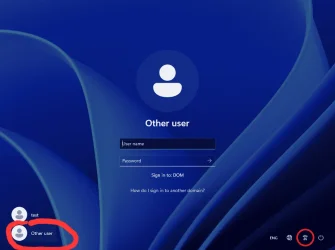
I'm using a Local account on a Standalone PC. How can show my local user account in addition to having the Other User showing as well?

I have Two local accounts: one Administrator and plus Standard Local Account.

I need the sign in screen to look EXACTLY like this.
 

Attachments

  • The-Utilman-button-on-Windows-11-at-the-lower-right-corner.webp
    The-Utilman-button-on-Windows-11-at-the-lower-right-corner.webp
    101.9 KB · Views: 1
Last edited:

My Computer My Computer

At a glance

Windows 11 Pro 22H2
OS
Windows 11 Pro 22H2
It seems to me you can achieve that by making one local account named 'test' and another local account named 'Other account'.
Which of the two you make the Administrator account is to your choice.
 

My Computer My Computer

At a glance

Windows 11 Pro 25H2 26200.8457AMD Ryzen 7 5700GKingston FURY Beast 2x16GB DIMM DDR4 2666 CL16MSI GeForce GT 730 2GB LP V1
OS
Windows 11 Pro 25H2 26200.8457
Computer type
PC/Desktop
Manufacturer/Model
Build by vendor to my specs
CPU
AMD Ryzen 7 5700G
Motherboard
MSI PRO B550M-P Gen3
Memory
Kingston FURY Beast 2x16GB DIMM DDR4 2666 CL16
Graphics Card(s)
MSI GeForce GT 730 2GB LP V1
Sound Card
Creative Sound Blaster Audigy FX
Monitor(s) Displays
Samsung S24E450F 24"
Screen Resolution
1920 x 1080
Hard Drives
1. SSD Crucial P5 Plus 500GB PCIe M.2
2. SSD-SATA Crucial MX500-2TB
PSU
Corsair CV650W
Case
Cooler Master Silencio S400
Cooling
Cooler Master Hyper H412R with Be Quiet Pure Wings 2 PWM BL038 fan
Keyboard
Cherry Stream (wired, scissor keys)
Mouse
Asus WT465 (wireless)
Internet Speed
70 Mbps down / 80 Mbps up
Browser
Firefox 130.0
Antivirus
F-Secure (Internetprovider version)
Other Info
Router: FRITZBox 7490
Oracle VirtualBox 7 for testing software on Win 10 or 11
It seems to me you can achieve that by making one local account named 'test' and another local account named 'Other account'.
Which of the two you make the Administrator account is to your choice.
OK, I'll try that. Seems that according to screen shot, you need to be in a domain joined environment.
 

My Computer My Computer

At a glance

Windows 11 Pro 22H2
OS
Windows 11 Pro 22H2
Seems that according to screen shot, you need to be in a domain joined environment.
I don't know where you got that screenshot from.
In my login screen I don't have that DOM choice.
Maybe it's in a server - client environment?
Don't know what you need it for, maybe you can decribe your wishes somewhat more in details?
Now we just have to guess what you want to do!
 

My Computer My Computer

At a glance

Windows 11 Pro 25H2 26200.8457AMD Ryzen 7 5700GKingston FURY Beast 2x16GB DIMM DDR4 2666 CL16MSI GeForce GT 730 2GB LP V1
OS
Windows 11 Pro 25H2 26200.8457
Computer type
PC/Desktop
Manufacturer/Model
Build by vendor to my specs
CPU
AMD Ryzen 7 5700G
Motherboard
MSI PRO B550M-P Gen3
Memory
Kingston FURY Beast 2x16GB DIMM DDR4 2666 CL16
Graphics Card(s)
MSI GeForce GT 730 2GB LP V1
Sound Card
Creative Sound Blaster Audigy FX
Monitor(s) Displays
Samsung S24E450F 24"
Screen Resolution
1920 x 1080
Hard Drives
1. SSD Crucial P5 Plus 500GB PCIe M.2
2. SSD-SATA Crucial MX500-2TB
PSU
Corsair CV650W
Case
Cooler Master Silencio S400
Cooling
Cooler Master Hyper H412R with Be Quiet Pure Wings 2 PWM BL038 fan
Keyboard
Cherry Stream (wired, scissor keys)
Mouse
Asus WT465 (wireless)
Internet Speed
70 Mbps down / 80 Mbps up
Browser
Firefox 130.0
Antivirus
F-Secure (Internetprovider version)
Other Info
Router: FRITZBox 7490
Oracle VirtualBox 7 for testing software on Win 10 or 11
The image was from another source.

My wish is this to achieve:

Like mentioned, I have Two local accounts. Display name of my Standard Local Account is my full name. My Administrator account is my full name with the (Admin) added.

I really don't want my local Administrator account display name to be shown on the Windows Sign In screen. Only my Standard account.

My goal is that on the sign in screen I don't want to have the Administrator account Display name listed on the Windows login screen but only my Standard Local Account.

I just need to accomplish this except that my machine is not domain joined. And this would perhaps be impossible to achieve because my device is a Standalone PC.

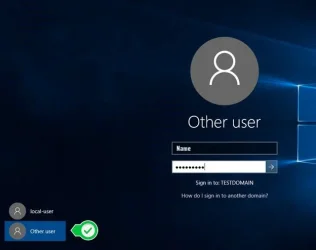
Here's another image.
Source: 3 Ways to Switch Between User Accounts - Managed IT Support
 

Attachments

  • User-1.webp
    User-1.webp
    13.4 KB · Views: 1

My Computer My Computer

At a glance

Windows 11 Pro 22H2
OS
Windows 11 Pro 22H2
 

My Computer My Computer

At a glance

Home26H2CanAMD Ryzen 5 8600G (07/24)2x32GB Kingston FURY DDR5 5600 MHz CL36 @5200...ASROCK Radeon RX 6600 Challenger D 8G @48FPS ...
OS
Home26H2Can
Computer type
PC/Desktop
CPU
AMD Ryzen 5 8600G (07/24)
Motherboard
ASROCK B650M-HDV/M.2 (07/24) BIOS 4.21 AGESA ComboAM5 1.3.0.1 (04/26)
Memory
2x32GB Kingston FURY DDR5 5600 MHz CL36 @5200 CL36 (07/24)
Graphics Card(s)
ASROCK Radeon RX 6600 Challenger D 8G @48FPS (08/24)
Sound Card
Creative Sound BlasterX AE-5 Plus (05/24)
Monitor(s) Displays
24" Philips 24M1N3200ZS/00 (05/24)
Screen Resolution
1920×1080@165Hz via DP1.4
Hard Drives
Kingston KC3000 NVMe 2TB (05/24)
ADATA XPG GAMMIX S11 Pro 512GB (07/19)
PSU
Seasonic Core GM 550 Gold (04/24)
Case
Fractal Design Define 7 Mini with 3x Noctua NF-P14s/12@555rpm (04/24)
Cooling
Noctua NH-U12S with Noctua NF-P12 (04/24)
Keyboard
HP Pavilion Wired Keyboard 300 (07/24) + Rabalux 76017 Parker (01/24)
Mouse
Logitech M330 Silent Plus (01/26)
Internet Speed
500/100 Mbps via RouterOS (05/21) & TCP Optimizer
Browser
Edge, Brave for YouTube, LibreWolf for FB
Antivirus
NextDNS blocking 1/3 Traffic
Other Info
Phone: Motorola Moto G86 (02/26)
Backup: Hasleo Backup Suite (PreOS)
Headphones: Sennheiser RS170 (09/10)
Chair: Huzaro Force 4.4 Grey Mesh (05/24)
Notifier: Xiaomi Mi Band 9 Milanese (10/24)
FlexCore USB-C 3.2 Gen 1 (M) to LAN (F) (08/25)
I tried the first url link already to don't display last signed-in user, but the issue with that, it always defaults to entering a password instead of my Windows Hello PIN. Especially after a Startup or when Signing Out.
 

My Computer My Computer

At a glance

Windows 11 Pro 22H2
OS
Windows 11 Pro 22H2
Hello @win11freak, :alien:

You can see if disabling the password sign in option for local accounts using the method in the tutorial below will leave the PIN available by default.


My Computers My Computers

  • At a glance

    Windows 11 Pro for WorkstationsIntel i7-8700K 5 GHz64 GB (4x16GB) G.SKILL TridentZ RGB DDR4 3600...ASUS ROG-STRIX-GTX1080TI-O11G-GAMING (11GB GD...
    OS
    Windows 11 Pro for Workstations
    Computer type
    PC/Desktop
    Manufacturer/Model
    Custom self build
    CPU
    Intel i7-8700K 5 GHz
    Motherboard
    ASUS ROG Maximus XI Formula Z390
    Memory
    64 GB (4x16GB) G.SKILL TridentZ RGB DDR4 3600 MHz (F4-3600C18D-32GTZR)
    Graphics Card(s)
    ASUS ROG-STRIX-GTX1080TI-O11G-GAMING (11GB GDDR5X)
    Sound Card
    Integrated Digital Audio (S/PDIF)
    Monitor(s) Displays
    2 x Samsung Odyssey G75 27"
    Screen Resolution
    2560x1440
    Hard Drives
    1TB Samsung 990 PRO M.2,
    4TB Samsung 990 PRO M.2,
    TerraMaster F8 SSD Plus NAS
    PSU
    Seasonic Prime Titanium 850W
    Case
    Thermaltake Core P3 wall mounted
    Cooling
    Corsair Hydro H115i
    Keyboard
    Amazon Basics Wired Full Keyboard MD005
    Mouse
    Logitech MX Master 4
    Internet Speed
    2 Gbps Download and 100 Mbps Upload
    Browser
    Chrome and Edge
    Antivirus
    Microsoft Defender
    Other Info
    Logitech Z625 speaker system,
    Logitech BRIO 4K Pro webcam,
    HP Color LaserJet Pro MFP M477fdn,
    CyberPower CP1500PFCLCD
    Galaxy S23 Plus phone
  • At a glance

    Windows 11 ProSnapdragon X Elite (12 core) 3.42 GHz16 GB LPDDR5x-7467 MHz
    Operating System
    Windows 11 Pro
    Computer type
    Laptop
    Manufacturer/Model
    Surface Laptop 7 Copilot+ PC
    CPU
    Snapdragon X Elite (12 core) 3.42 GHz
    Memory
    16 GB LPDDR5x-7467 MHz
    Monitor(s) Displays
    15" HDR
    Screen Resolution
    2496 x 1664
    Hard Drives
    1 TB SSD
    Internet Speed
    Wi-Fi 7 and Bluetooth 5.4
    Browser
    Chrome and Edge
    Antivirus
    Microsoft Defender

My Computer My Computer

At a glance

Windows 11 Pro 25H212th Gen Core i7-1260P64 GB Micron PC4-25600Intel Iris Xe Graphics
OS
Windows 11 Pro 25H2
Computer type
PC/Desktop
Manufacturer/Model
Intel NUC12WSHi7
CPU
12th Gen Core i7-1260P
Motherboard
NUC12WSBi7
Memory
64 GB Micron PC4-25600
Graphics Card(s)
Intel Iris Xe Graphics
Sound Card
on-board Realtek HD Audio
Monitor(s) Displays
Dell U3219Q
Screen Resolution
3840 x 2160
Hard Drives
Samsung SSD 990 PRO 1TB
Crucial MX500 2 TB
Antivirus
Microsoft Defender
Hello @win11freak, :alien:

You can see if disabling the password sign in option for local accounts using the method in the tutorial below will leave the PIN available by default.

Will this also remove the password entry for my Administrator account as well especially from the UAC when elevated rights are required?
 

My Computer My Computer

At a glance

Windows 11 Pro 22H2
OS
Windows 11 Pro 22H2
Will this also remove the password entry for my Administrator account as well especially from the UAC when elevated rights are required?

It will, but you can use the PIN or any other available sign-in option.
 

My Computers My Computers

  • At a glance

    Windows 11 Pro for WorkstationsIntel i7-8700K 5 GHz64 GB (4x16GB) G.SKILL TridentZ RGB DDR4 3600...ASUS ROG-STRIX-GTX1080TI-O11G-GAMING (11GB GD...
    OS
    Windows 11 Pro for Workstations
    Computer type
    PC/Desktop
    Manufacturer/Model
    Custom self build
    CPU
    Intel i7-8700K 5 GHz
    Motherboard
    ASUS ROG Maximus XI Formula Z390
    Memory
    64 GB (4x16GB) G.SKILL TridentZ RGB DDR4 3600 MHz (F4-3600C18D-32GTZR)
    Graphics Card(s)
    ASUS ROG-STRIX-GTX1080TI-O11G-GAMING (11GB GDDR5X)
    Sound Card
    Integrated Digital Audio (S/PDIF)
    Monitor(s) Displays
    2 x Samsung Odyssey G75 27"
    Screen Resolution
    2560x1440
    Hard Drives
    1TB Samsung 990 PRO M.2,
    4TB Samsung 990 PRO M.2,
    TerraMaster F8 SSD Plus NAS
    PSU
    Seasonic Prime Titanium 850W
    Case
    Thermaltake Core P3 wall mounted
    Cooling
    Corsair Hydro H115i
    Keyboard
    Amazon Basics Wired Full Keyboard MD005
    Mouse
    Logitech MX Master 4
    Internet Speed
    2 Gbps Download and 100 Mbps Upload
    Browser
    Chrome and Edge
    Antivirus
    Microsoft Defender
    Other Info
    Logitech Z625 speaker system,
    Logitech BRIO 4K Pro webcam,
    HP Color LaserJet Pro MFP M477fdn,
    CyberPower CP1500PFCLCD
    Galaxy S23 Plus phone
  • At a glance

    Windows 11 ProSnapdragon X Elite (12 core) 3.42 GHz16 GB LPDDR5x-7467 MHz
    Operating System
    Windows 11 Pro
    Computer type
    Laptop
    Manufacturer/Model
    Surface Laptop 7 Copilot+ PC
    CPU
    Snapdragon X Elite (12 core) 3.42 GHz
    Memory
    16 GB LPDDR5x-7467 MHz
    Monitor(s) Displays
    15" HDR
    Screen Resolution
    2496 x 1664
    Hard Drives
    1 TB SSD
    Internet Speed
    Wi-Fi 7 and Bluetooth 5.4
    Browser
    Chrome and Edge
    Antivirus
    Microsoft Defender
It will, but you can use the PIN or any other available sign-in option.
I don't even have a PIN set for the Administrator account. Only my Standard account. I don't even login to the Admin account except only when performing RunAs-type tasks.
 

My Computer My Computer

At a glance

Windows 11 Pro 22H2
OS
Windows 11 Pro 22H2
Thank you for all the suggestions.
For now I will mark as resolved and try the suggestions given.

But first, its a good time to backup in case something may go wrong 🙂
 

My Computer My Computer

At a glance

Windows 11 Pro 22H2
OS
Windows 11 Pro 22H2

Latest Support Threads

Back
Top Bottom