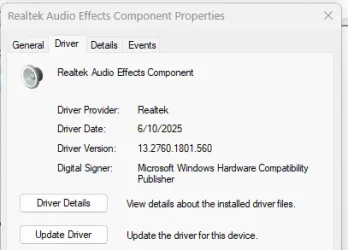
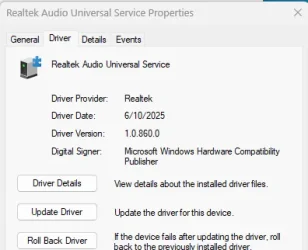
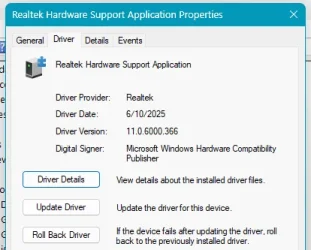
Solved How can I get the latest Realtek Audio Driver for my ASUS laptop? Windows Update and support page only provides version 6.0.9590.1 which is from 2023

xomuz

Member
Member
Local time
9:15 PM
Posts
56
OS
Windows 11
How can I get the latest Realtek Audio Driver for my ASUS laptop? Windows Update and support page only provides version 6.0.9590.1 which is from 2023

1.webp
 
Windows Build/Version
Windows 11 25H2 (26200.7019)

My Computer My Computer

At a glance

Windows 11
OS
Windows 11
Do you have any audio "issue" - which could be related to your Sound Drivers - if in search for new/different drivers? :unsure:

Compared to GPU/Video Drivers - where new drivers - can improve support for GPU dependent software (games in particular) - integrated Sound Cards are rather simple (by design - there's not much that can be optimized with future versions - in relation to a particular software), only worth updating - to "fix" some audio issue.
 
Last edited:

My Computer My Computer

At a glance

WinDOS 25H2Intel & AMDSO-DIMM SK Hynix 15.8 GB Dual-Channel DDR4-26...nVidia RTX 2060 6GB Mobile GPU (TU106M)
OS
WinDOS 25H2
Computer type
Laptop
CPU
Intel & AMD
Memory
SO-DIMM SK Hynix 15.8 GB Dual-Channel DDR4-2666 (2 x 8 GB) 1329MHz (19-19-19-43)
Graphics Card(s)
nVidia RTX 2060 6GB Mobile GPU (TU106M)
Sound Card
Onbord Realtek ALC1220
Screen Resolution
1920 x 1080
Hard Drives
1x Samsung PM981 NVMe PCIe M.2 512GB / 1x Seagate Expansion ST1000LM035 1TB
The above is correct and you really can have issues with the incorrect Audio drivers.
Trust me, I have had two Asus machines and made the error to want to update to the latest & 'bestest' driver.
It was a mistake and I wasted a lot of time , in the end, the right driver was on the Asus site.
 

My Computers My Computers

  • At a glance

    All Branches but ReleaseAMD Ryzen 7 7735HS 3200-4500 Mhz 8 cores x 232 GB DDR5Radeon Graphic / NVIDIA GeForce RTX 4060 8 GB...
    OS
    All Branches but Release
    Computer type
    Laptop
    Manufacturer/Model
    Acer Nitro ANV15-51
    CPU
    AMD Ryzen 7 7735HS 3200-4500 Mhz 8 cores x 2
    Motherboard
    Sportage_RBH
    Memory
    32 GB DDR5
    Graphics Card(s)
    Radeon Graphic / NVIDIA GeForce RTX 4060 8 GB GDDR6
    Sound Card
    AMD/Realtek(R) Audio
    Monitor(s) Displays
    Integrated Monitor (15.3"vis)
    Screen Resolution
    FHD 1920X1080 16:9 144Hz
    Hard Drives
    KINGSTON OM8SEP4512Q-AA 1TB
    Western Digital 256GB
    PSU
    19V DC 6.32 A 120 W
    Cooling
    Dual Fans
    Mouse
    MS Bluetooth
    Internet Speed
    Fiber 1GB Cox -us & 1GB Orange-fr
    Browser
    Edge Canary- Firefox Nightly-Chrome Dev-Chrome Dev
    Antivirus
    Windows Defender
  • At a glance

    Windows 11 BetaAMD A9-94208 GB of DDR4AMD Radeon R5
    Operating System
    Windows 11 Beta
    Computer type
    Laptop
    Manufacturer/Model
    Asus X751BP
    CPU
    AMD A9-9420
    Memory
    8 GB of DDR4
    Graphics card(s)
    AMD Radeon R5
    Screen Resolution
    1600x900
    Hard Drives
    Seagate 1 TB
In the Search box,type ---dxdiag ---and on the System page,check that the WHQL box is ticked.
This only allows Windows approved drivers to be used.If you wish to use non-approved drivers,then untick it and be prepared for possible problems.
Check through all the other pages in dxdiag for comments etc.
 

My Computer My Computer

At a glance

win 10amd ryzen 5-2600ng skill sniper x 16gbnvidea gtx 1050
OS
win 10
Computer type
PC/Desktop
Manufacturer/Model
home built
CPU
amd ryzen 5-2600
Motherboard
gigabyte b450m-ds3h
Memory
ng skill sniper x 16gb
Graphics Card(s)
nvidea gtx 1050
Monitor(s) Displays
benq fp 92
Hard Drives
samsung 860 evo 500gb m2 ssd
PSU
antec ea550g
Case
nzxt noctis 450
Browser
edge
The above is correct and you really can have issues with the incorrect Audio drivers.
Trust me, I have had two Asus machines and made the error to want to update to the latest & 'bestest' driver.
It was a mistake and I wasted a lot of time , in the end, the right driver was on the Asus site.

Indeed, your OEM drivers for your particular device - are usually the best/optimal choice. Not some random version - intended for a different product (from a different OEM) - which happens to use the same audio chip. That's where so called automated driver updating apps - usually go wrong - finding that "as a new drier" - only to cause all kinds of issue - cause that other OEM despite of using the same audio chip - has slightly different assembly or/and difrent 3rd party embed software.
 

My Computer My Computer

At a glance

WinDOS 25H2Intel & AMDSO-DIMM SK Hynix 15.8 GB Dual-Channel DDR4-26...nVidia RTX 2060 6GB Mobile GPU (TU106M)
OS
WinDOS 25H2
Computer type
Laptop
CPU
Intel & AMD
Memory
SO-DIMM SK Hynix 15.8 GB Dual-Channel DDR4-2666 (2 x 8 GB) 1329MHz (19-19-19-43)
Graphics Card(s)
nVidia RTX 2060 6GB Mobile GPU (TU106M)
Sound Card
Onbord Realtek ALC1220
Screen Resolution
1920 x 1080
Hard Drives
1x Samsung PM981 NVMe PCIe M.2 512GB / 1x Seagate Expansion ST1000LM035 1TB
I can't agree with you
I successfully updated drivers directly from Intel (iGPU, Wi-Fi, Bluetooth, RST), which are much newer than those on the support page because ASUS doesn’t update them frequently. Since ASUS doesn’t customize the drivers in any way I don’t lose anything
 

My Computer My Computer

At a glance

Windows 11
OS
Windows 11
I said "Audio" - not GPU (intel, AMD or Nvidia), or Network/Bluetooth (if offered by intel). If you're that stubborn - go to Realtek's official site and see if you find drivers for your audio chip: Realtek - same way you can find for Intel, AMD or NVIDIA components.

If you prefer having the latest version available - rather than the latest stable version (offered by the OEM - even if older), use a driver updating tool like Driver Booster 13 Free: Official Free Driver Updater Tool for Windows 2025 or the one included with CCleaner (you'll have to pay for that one -rather faulty, but it does what it says - finds newer version - even if unstable on your system - since they're from difrent OEM - with same chip). Might work, or maybe you'll loose sound - when Windows wakes up from sleep, maybe you'll hear popping audio artifacts at random times - but that's less important since driver stability is clearly not what you value, but hey... you will have a newer version. ;)
 

My Computer My Computer

At a glance

WinDOS 25H2Intel & AMDSO-DIMM SK Hynix 15.8 GB Dual-Channel DDR4-26...nVidia RTX 2060 6GB Mobile GPU (TU106M)
OS
WinDOS 25H2
Computer type
Laptop
CPU
Intel & AMD
Memory
SO-DIMM SK Hynix 15.8 GB Dual-Channel DDR4-2666 (2 x 8 GB) 1329MHz (19-19-19-43)
Graphics Card(s)
nVidia RTX 2060 6GB Mobile GPU (TU106M)
Sound Card
Onbord Realtek ALC1220
Screen Resolution
1920 x 1080
Hard Drives
1x Samsung PM981 NVMe PCIe M.2 512GB / 1x Seagate Expansion ST1000LM035 1TB
Interesting as HP lists Realtex audio drivers for my machine but there aren't any installed. There are three microsoft drivers and one Intel driver installed. Intel installed one audio driver when I installed the latest graphics driver.
 

My Computers My Computers

  • At a glance

    Windows 11 Home 25H2Core i5-1035G132gb
    OS
    Windows 11 Home 25H2
    Computer type
    Laptop
    Manufacturer/Model
    HP Pavilion 14-ce3606sa
    CPU
    Core i5-1035G1
    Memory
    32gb
    Hard Drives
    Samsung 870 evo sata ssd
    Cooling
    Could be better
    Internet Speed
    50 mbps Starlink
    Browser
    Firefox
    Other Info
    Originally came installed with a 500gb H10 Optane ssd
  • At a glance

    Windows 11 HomeIntel Core i5-1035G116gb
    Operating System
    Windows 11 Home
    Computer type
    Laptop
    Manufacturer/Model
    HP Pavilion ce3606sa
    CPU
    Intel Core i5-1035G1
    Memory
    16gb
    Hard Drives
    Hynix Gold P31 2TB
    Internet Speed
    200mbps Starlink
    Browser
    Firefox
    Antivirus
    Defender
Reference Post 4.
Could you confirm the status of WHQL And if there are any comments on the Sound pages ?
 

My Computer My Computer

At a glance

win 10amd ryzen 5-2600ng skill sniper x 16gbnvidea gtx 1050
OS
win 10
Computer type
PC/Desktop
Manufacturer/Model
home built
CPU
amd ryzen 5-2600
Motherboard
gigabyte b450m-ds3h
Memory
ng skill sniper x 16gb
Graphics Card(s)
nvidea gtx 1050
Monitor(s) Displays
benq fp 92
Hard Drives
samsung 860 evo 500gb m2 ssd
PSU
antec ea550g
Case
nzxt noctis 450
Browser
edge
Also look in Advanced options, optional updates in WU. I've received software APO and software component updates.

Screenshot 2025-11-02 191951.webpScreenshot 2025-11-02 192129.webpScreenshot 2025-11-02 192311.webp
 

My Computer My Computer

At a glance

11 Pro 25H2i7-10750H16GB Samsung DDR4 3200Intel + Nvidia RTX3060 Laptop
OS
11 Pro 25H2
Computer type
Laptop
Manufacturer/Model
MSI
CPU
i7-10750H
Motherboard
MSI MS-17F5
Memory
16GB Samsung DDR4 3200
Graphics Card(s)
Intel + Nvidia RTX3060 Laptop
Sound Card
Realtek
Monitor(s) Displays
Samsung 24" Curved (HDMI)
Screen Resolution
1920x1080
Hard Drives
Sabrent Rocket Gen3 1Tb Smasung EVO 870 1TB
Antivirus
Bitdefender
I can't agree with you
I successfully updated drivers directly from Intel (iGPU, Wi-Fi, Bluetooth, RST), which are much newer than those on the support page because ASUS doesn’t update them frequently. Since ASUS doesn’t customize the drivers in any way I don’t lose anything
It is more complicated than that. All Laptop manufacturers have an audio overlay app and possibly other additions which suit their Laptop.
Mine has Nahimic and a noise cancelling app for the internal mics. Those and other elements in the audio system have updates coming through Windows updates, similar to those illustrated in post #11.

You do not need an update for the basic chip. My Realtek "version" as in Audio Console is 6.0.9597.1 also from 2023.
 

My Computer My Computer

At a glance

Windows 11
OS
Windows 11
all right I'll leave it be
 

My Computer My Computer

At a glance

Windows 11
OS
Windows 11
Easy .........Search "Mokichu" at top right for his latest page of Realtek updates on these forums, and /or post request to him showing your model no
 

My Computers My Computers

  • At a glance

    Windows 11 Pro 25 H2 / Windows 3.11 EmulatorPentium I9 14900K64 GB Corsair Dominator DDR5Sapphire Radeon Pure RX 9060 XT , 16 GB , ARG...
    OS
    Windows 11 Pro 25 H2 / Windows 3.11 Emulator
    Computer type
    PC/Desktop
    Manufacturer/Model
    Self build Dec 2023
    CPU
    Pentium I9 14900K
    Motherboard
    Asus Rog Z790 E Wifi 7
    Memory
    64 GB Corsair Dominator DDR5
    Graphics Card(s)
    Sapphire Radeon Pure RX 9060 XT , 16 GB , ARGB Lighting ,.
    Sound Card
    Realtek Codec ALC 4080 internal + Creative Soundblaster X3 External , when former sometimes a problem
    Monitor(s) Displays
    32" Toshiba PC / TV , Corsair Xeneon Edge 14.5" screen Res : 2560 x 720
    Screen Resolution
    2560 x 1440
    Hard Drives
    4 x Corsair MP 600 Pro 500GB M2 drives ( Main ), + Samsung M2 USB 500GB +Corsair M2 1TB Ext USB+ Hitachi Sata Drive 1TB , 2 x DVD-RW
    PSU
    Corsair 1000 w
    Case
    NZXT Phantom 240 , 5 fans built in system
    Cooling
    Silentium PC Spartan 5 Max
    Keyboard
    Seenda Luminous
    Mouse
    1) Aston Martin DB9 Car , 2) McLaren Yellow P2 car , 3) Seenda Wireless
    Internet Speed
    950 mbps
    Browser
    Edge , Opera , Firefox , Brave, Samsung Browsers .
    Antivirus
    Norton 360 , 10 User
    Other Info
    Asus GT BE 98 Wifi 7 Router
    Pertelian X2040 ,
    Echo Show 8"
    Logitech Z906 5.1 speakers
    Aura Sync LED's Internal case lighting
  • At a glance

    Windows 11 25H28GB
    Operating System
    Windows 11 25H2
    Computer type
    Laptop
    Manufacturer/Model
    Microsoft Surface Go
    Memory
    8GB
    Hard Drives
    128 GB and 256 GB Micro SD
    Internet Speed
    950 mbps

Latest Support Threads

Back
Top Bottom