How can I stop receiving Windows 11 Insider Preview builds?


King Mustard

Well-known member
Local time
3:50 AM
Posts
36
OS
Windows 11
I am using Windows 10 build 21390 (May 2021).

I believe I have the Windows Insider Program disabled.

eb_wininsider2.png eb_wininsider3.png

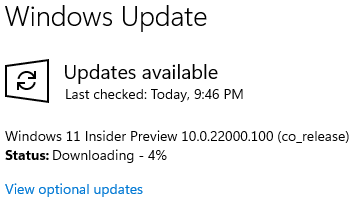
However, Windows Update keeps downloading, and wanting me to install, Windows 11 Insider Preview builds.

eb_wininsider1.png

Any idea how I can stop this?
 

My Computer My Computer

At a glance

Windows 11AMD Ryzen 7 7800X3D32 GB DDR5-6000Radeon RX 9070 XT
OS
Windows 11
Computer type
PC/Desktop
CPU
AMD Ryzen 7 7800X3D
Motherboard
ASRock B650M Pro RS
Memory
32 GB DDR5-6000
Graphics Card(s)
Radeon RX 9070 XT
Monitor(s) Displays
42" LG C4 OLED, 42" LG C2 OLED
Screen Resolution
2x 4K (100% scaling)
PSU
Corsair RM850x
Case
Cooler Master MasterBox NR400
Keyboard
Tecware Phantom RGB
Mouse
Logitech G309
Internet Speed
1 Gbps down, 1 Gbps up
Browser
Google Chrome
From my understanding you really have to go back to 10 via a clean instillation or using a backup. I believe that was mentioned in another thread in the news section by Brink.
 

My Computer My Computer

At a glance

Windows 11 Home(Beta) - 25H2 -26220.8754AMD Ryzen 5 5600GG.SKILL Ripjaws V Series 64GB 4x16Nvidia geforce gtx titan x
OS
Windows 11 Home(Beta) - 25H2 -26220.8754
Computer type
PC/Desktop
Manufacturer/Model
Banana Junior 5600-G Series
CPU
AMD Ryzen 5 5600G
Motherboard
Asus ROG Strix B550-F
Memory
G.SKILL Ripjaws V Series 64GB 4x16
Graphics Card(s)
Nvidia geforce gtx titan x
Monitor(s) Displays
28" ASUS VP28U 4k
Screen Resolution
4K
Hard Drives
Primary SAMSUNG 970 EVO Plus
PSU
EVGA BQ 700w 80+ Bronze
Case
Zalman i3 NEO
Cooling
ARCTIC Freezer 7 X
Keyboard
Corsair
Mouse
Amazon Generic with Cord
Internet Speed
Download: 295.11 mbps Upload: 65.35 mbps T-Mobile Internet
Browser
Firefox and Edge
Antivirus
MS - Defender
Other Info
Speakers: Klipsch ProMedia 2.1
I left it 3 times without doing a clean install, using Macrium Reflect. One time from The Dev Channel and the others from The BETA. But you would need some sort of backup. You can stop it in Progress by just restarting your machine.
 

My Computers My Computers

  • At a glance

    Windows11 Pro 26200.8737Intel Core i9 14900F (24 -Core, 68 MB Total C...32GB DDR5RTX 4080 Super w/581.95
    OS
    Windows11 Pro 26200.8737
    Computer type
    PC/Desktop
    Manufacturer/Model
    Dell Alienware Aurora R16
    CPU
    Intel Core i9 14900F (24 -Core, 68 MB Total Cache)
    Motherboard
    Dell Alienware
    Memory
    32GB DDR5
    Graphics Card(s)
    RTX 4080 Super w/581.95
    Sound Card
    Realtec
    Monitor(s) Displays
    Corsair XENEON 32QHD165
    Screen Resolution
    2560 X 1440
    Hard Drives
    1-2TB Samsung 990 Pro PCIe NVMe M2 SSD
    1-4TB Samsung 990 Pro PCIe NVMe M2 SSD
    PSU
    1000 Watt Platinum Dell
    Case
    Alienware
    Cooling
    Liquid Closed Loop
    Keyboard
    Corsair Strafe RGB
    Mouse
    Logitech MK270 Wireless
    Internet Speed
    100Gb's Down-20 Up
    Browser
    Firefox 152.0.2
    Antivirus
    Defender
    Other Info
    Very Quiet And Fast
    CyberPower UPS CP1500PFCLCD
  • At a glance

    PClinuxOS Mate (2025.7)13th Gen Inter(R) Core(TM) i3-1315U64 GB DDR4 @3200 MHz.Internal
    Operating System
    PClinuxOS Mate (2025.7)
    Computer type
    PC/Desktop
    Manufacturer/Model
    Intel
    CPU
    13th Gen Inter(R) Core(TM) i3-1315U
    Motherboard
    Intel
    Memory
    64 GB DDR4 @3200 MHz.
    Graphics card(s)
    Internal
    Sound Card
    None
    Monitor(s) Displays
    Dell 2419HGCF
    Screen Resolution
    1920 X 1080
    Hard Drives
    SAMSUNG 980 PRO SSD 2TB, PCIe 4.0 M.2 2280
    PSU
    Chicony 30 Watt
    Case
    Small
    Keyboard
    Dell
    Mouse
    Razor
    Internet Speed
    1GB
    Browser
    Slimjet
I left it 3 times without doing a clean install, using Macrium Reflect. One time from The Dev Channel and the others from The BETA. But you would need some sort of backup. You can stop it in Progress by just restarting your machine.
I mentioned using a backup,. that is the best way to go.
 

My Computer My Computer

At a glance

Windows 11 Home(Beta) - 25H2 -26220.8754AMD Ryzen 5 5600GG.SKILL Ripjaws V Series 64GB 4x16Nvidia geforce gtx titan x
OS
Windows 11 Home(Beta) - 25H2 -26220.8754
Computer type
PC/Desktop
Manufacturer/Model
Banana Junior 5600-G Series
CPU
AMD Ryzen 5 5600G
Motherboard
Asus ROG Strix B550-F
Memory
G.SKILL Ripjaws V Series 64GB 4x16
Graphics Card(s)
Nvidia geforce gtx titan x
Monitor(s) Displays
28" ASUS VP28U 4k
Screen Resolution
4K
Hard Drives
Primary SAMSUNG 970 EVO Plus
PSU
EVGA BQ 700w 80+ Bronze
Case
Zalman i3 NEO
Cooling
ARCTIC Freezer 7 X
Keyboard
Corsair
Mouse
Amazon Generic with Cord
Internet Speed
Download: 295.11 mbps Upload: 65.35 mbps T-Mobile Internet
Browser
Firefox and Edge
Antivirus
MS - Defender
Other Info
Speakers: Klipsch ProMedia 2.1
I am using Windows 10 build 21390 (May 2021).

I believe I have the Windows Insider Program disabled.

View attachment 5165 View attachment 5166

However, Windows Update keeps downloading, and wanting me to install, Windows 11 Insider Preview builds.
View attachment 5164

Any idea how I can stop this?
I got same problem with you.
Please try to run the items below to disable insider preview. (use adminstartor)

reg add "HKLM\SOFTWARE\Policies\Microsoft\Windows\PreviewBuilds" /v "AllowBuildPreview" /t REG_DWORD /d 0 /f
reg add "HKLM\SOFTWARE\Policies\Microsoft\Windows\PreviewBuilds" /v "EnableConfigFlighting" /t REG_DWORD /d 0 /f

Re-start system!
 

My Computer My Computer

At a glance

windows 11 25H2 7623i5-1250016MBIntel UHD 770
OS
windows 11 25H2 7623
Computer type
PC/Desktop
Manufacturer/Model
Dell Optiplex 7400 AIO
CPU
i5-12500
Motherboard
DELL 00RG59
Memory
16MB
Graphics Card(s)
Intel UHD 770
Sound Card
REALTEK
Monitor(s) Displays
DEL940B
Screen Resolution
1920x1080
Hard Drives
Micron 3400 NVMe 512G (NVM Express 1.4)
Samsung 860 SSD 256G
Realtek RTL9210 NVMe SCSI 1TB Disk (NVM Express 2.0)
Realtek RTL9210 NVMe SCSI 2TB Disk (NVM Express 1.4)
I got same problem with you.
Please try to run the items below to disable insider preview. (use adminstartor)

reg add "HKLM\SOFTWARE\Policies\Microsoft\Windows\PreviewBuilds" /v "AllowBuildPreview" /t REG_DWORD /d 0 /f
reg add "HKLM\SOFTWARE\Policies\Microsoft\Windows\PreviewBuilds" /v "EnableConfigFlighting" /t REG_DWORD /d 0 /f

Re-start system!
I didn't have that key, so I manually created the key and strings.

Thank you! 😊
 

My Computer My Computer

At a glance

Windows 11AMD Ryzen 7 7800X3D32 GB DDR5-6000Radeon RX 9070 XT
OS
Windows 11
Computer type
PC/Desktop
CPU
AMD Ryzen 7 7800X3D
Motherboard
ASRock B650M Pro RS
Memory
32 GB DDR5-6000
Graphics Card(s)
Radeon RX 9070 XT
Monitor(s) Displays
42" LG C4 OLED, 42" LG C2 OLED
Screen Resolution
2x 4K (100% scaling)
PSU
Corsair RM850x
Case
Cooler Master MasterBox NR400
Keyboard
Tecware Phantom RGB
Mouse
Logitech G309
Internet Speed
1 Gbps down, 1 Gbps up
Browser
Google Chrome
Back
Top Bottom