How Do I Get Out of the Windows Insider Program?


I cant understand why, as you paused updates for 7 days.
 

My Computers

System One System Two

  • OS
    Windows 11 Pro 25H2 Build 26200.8524
    Computer type
    PC/Desktop
    Manufacturer/Model
    Sin-built 2013
    CPU
    Intel(R) Core(TM) i7-4770K CPU @ 3.50GHz
    Motherboard
    ASUS ROG Maximus VI Formula
    Memory
    32.0 GB of I forget and the box is in storage.
    Graphics Card(s)
    Gigabyte nVidia GeForce GTX 1660 Super OC 6GB
    Sound Card
    Onboard thingy
    Monitor(s) Displays
    5 x LG 25MS500-B - 1 x 24MK430H-B - 1 x Wacom Pro 22" Touch Screen Tablet
    Screen Resolution
    All over the place
    Hard Drives
    Too many to list.
    OS on Samsung 1TB 870 QVO SATA
    PSU
    Silverstone 1500
    Case
    NZXT Phantom 820 Full-Tower Case
    Cooling
    Noctua NH-D15 Elite Class Dual Tower CPU Cooler / 6 x EziDIY 120mm / 2 x Corsair 140mm somethings / 1 x 140mm Thermaltake something / 2 x 200mm Corsair.
    Keyboard
    Corsair K95 / Logitech diNovo Edge Wireless
    Mouse
    Logitech: G402 / G502 / Mx Masters / Mx Air Cordless
    Internet Speed
    2000/500Mbps
    Browser
    All sorts
    Antivirus
    Kaspersky Premium
    Other Info
    ㅤㅤㅤㅤㅤㅤㅤㅤㅤㅤㅤㅤㅤㅤㅤㅤㅤㅤㅤㅤㅤㅤㅤㅤㅤㅤㅤㅤㅤㅤㅤㅤㅤㅤㅤㅤㅤㅤㅤㅤ⠀⠀⠀⠀⠀⠀⠀⠀⠀⠀
    TP-Link BE9300 WiFi 7 Bluetooth 5.4 (Archer TBE550E)
    TP-Link TX201 V1 2.5GB Lan

    Grandstream HT812 - VoIP
    ASUS DSL-AX82U - Mesh
    ASUS RT-AC68U - Mesh
    ASUS RT-BE88U Router

    Brother MFC-L2880DW Printer

    I’m on a horse.
  • Operating System
    Windows 11 Pro 25H2 Build 26200.8524
    Computer type
    Laptop
    Manufacturer/Model
    LENOVO Yoga 7 14IRL8 - 7i EVO OLED 14" Touchscreen i5 12 Core 16GB/512GB
    CPU
    Intel Core 12th Gen i5-1240P Processor (1.7 - 4.4GHz)
    Memory
    16GB LPDDR5 RAM
    Graphics card(s)
    Intel Iris Xe Graphics Processor
    Sound Card
    Optimized with Dolby Atmos®
    Screen Resolution
    QHD 2880 x 1800 OLED
    Hard Drives
    M.2 512GB
    Antivirus
    Defender / Malwarebytes
    Other Info
    …still on a horse.
In that case you have to clear the Windows Update cache and try unenrolling again. Search for Disk Cleanup and use it on Windows partition. Click to show system files (advanced) as well. Make sure you check the Windows Update files box.

Step 1: Stop Windows Update Service


  1. Press Win + R, type services.msc, and hit Enter.
  2. Scroll down to Windows Update.
  3. Right-click → Stop.


Step 2: Clear the Windows Update Cache


  1. Open File Explorer and go to:


    <span><span><span>C:\Windows\SoftwareDistribution\Download</span></span><span><br></span></span>
  2. Delete all files and folders in the Download folder.
  3. (Optional) You can also clear C:\Windows\SoftwareDistribution\DataStore if needed.


Step 3: Use Disk Cleanup


  1. Press Win + S, search for Disk Cleanup, and open it.
  2. Select your Windows (C:) drive.
  3. Click Clean up system files.
  4. Check Windows Update Cleanup and any other items you want to remove.
  5. Click OK → Delete Files.


Step 4: Restart Windows Update Service


  1. Go back to services.msc.
  2. Right-click Windows UpdateStart.
    There is no option to "unenroll" after completing these tasks.
    It still says I am on the "Dev" channel and other options are greyed out.
 

My Computers

System One System Two

  • OS
    Windows 11 Pro 25H2 26200.7627
    Computer type
    PC/Desktop
    Manufacturer/Model
    Gigababyte X870E Aorus Pro Rev 1.1
    CPU
    Ryzen 7 9800X3D
    Motherboard
    Gigababyte X870E Aorus Pro Rev 1.1
    Memory
    G.Skill Trident Z5 RGB DDR5-6000 32GB (2×16GB) CL30 2 x 16gb
    Graphics Card(s)
    RTX 5080 Palit Gaming Pro
    Sound Card
    Steel Series Arctis 1 Gaming Head phones
    Monitor(s) Displays
    Asus ROG Strix 27″ QHD OLED XG27AQDMG & Phillips 272V8
    Screen Resolution
    2560 X1440 27 Inch 240 HZ Asus
    PSU
    Corsair RM1000X
    Case
    Corsair CC750D (CC-9011078) Obsidian 750D Airflow Edition Black Full Tower ATX Case
    Cooling
    Corsair iCUE LINK TITAN 360 RX RGB
    Keyboard
    Razer BlackWidow V4 X Razer™ Yellow Mechanical Switches
    Mouse
    Logitech G502X Plus
    Internet Speed
    HFC 2000/100
    Browser
    Opera GX
    Antivirus
    Kaspersky Plus
  • Operating System
    Windows 11 23H2 22631.2715
    Computer type
    Laptop
    Manufacturer/Model
    Dell XPS EVO 13.3" RNX9305C01AUSB
    CPU
    Intel i5-1135G7
    Motherboard
    Dell
    Memory
    8 GB
    Graphics card(s)
    Intel Iris Xe Graphics
    Monitor(s) Displays
    LED
    Screen Resolution
    1920 x 1080
    Hard Drives
    256GB SSD
    Other Info
    https://www.thegoodguys.com.au/dell-xps-evo-133-inches-win-11-laptop-rnx9305c01ausb

Step 1: Stop Windows Update Service


  1. Press Win + R, type services.msc, and hit Enter.
  2. Scroll down to Windows Update.
  3. Right-click → Stop.


Step 2: Clear the Windows Update Cache


  1. Open File Explorer and go to:


    <span><span><span>C:\Windows\SoftwareDistribution\Download</span></span><span><br></span></span>
  2. Delete all files and folders in the Download folder.
  3. (Optional) You can also clear C:\Windows\SoftwareDistribution\DataStore if needed.


Step 3: Use Disk Cleanup


  1. Press Win + S, search for Disk Cleanup, and open it.
  2. Select your Windows (C:) drive.
  3. Click Clean up system files.
  4. Check Windows Update Cleanup and any other items you want to remove.
  5. Click OK → Delete Files.


Step 4: Restart Windows Update Service


  1. Go back to services.msc.
  2. Right-click Windows UpdateStart.
    There is no option to "unenroll" after completing these tasks.
    It still says I am on the "Dev" channel and other options are greyed out.
Yes, this is the "advanced" method, but I thought it would be easier to try Disk Cleanup first.
 

My Computers

System One System Two

  • OS
    Windows 11 Pro 23H2 (5699), 25H2 (8457)
    Computer type
    Laptop
    Manufacturer/Model
    Acer Extensa 5630EZ
    CPU
    Mobile DualCore Intel Core 2 Duo T7250, 2000 MHz
    Motherboard
    Acer Extensa 5630
    Memory
    4GB
    Graphics Card(s)
    Mobile Intel(R) GMA 4500M (Mobile 4 series)
    Sound Card
    Realtek ALC268 @ Intel 82801IB ICH9 - High Definition Audio Controller
    Monitor(s) Displays
    1
    Screen Resolution
    1280x800
    Hard Drives
    Samsung SSD 850 EVO 250GB SATA Device (250 GB, SATA-III)
    Internet Speed
    VDSL 50 Mbps
    Browser
    MICROSOFT EDGE
    Antivirus
    WINDOWS DEFENDER
    Other Info
    Legacy MBR installation, no TPM, no Secure Boot, no WDDM 2.0 graphics drivers, no SSE4.2, cannot get more unsupported ;) This is only my test laptop. I had installed Windows 11 here before upgrading my main PC. For my main PC I use everyday see my 2nd system specs.
  • Operating System
    Windows 11 Pro v25H2 (build 26200.8457)
    Computer type
    PC/Desktop
    Manufacturer/Model
    Custom-built PC
    CPU
    Intel Core-i7 3770 3.40GHz s1155 (3rd generation)
    Motherboard
    Asus P8H61 s1155 ATX
    Memory
    2x Kingston Hyper-X Blu 8GB DDR3-1600
    Graphics card(s)
    GIGABYTE GeForce RTX 3050 WINDFORCE OC V2 6GB (GV-N3050WF2OCV2-6GD)
    Sound Card
    Realtek HD audio (ALC887)
    Monitor(s) Displays
    Sony Bravia KDL-19L4000 19" LCD TV via VGA
    Screen Resolution
    1440x900 32-bit 60Hz
    Hard Drives
    WD Blue SA510 2.5 1000GB SSD as system disk, Western Digital Caviar Purple 4TB SATA III (WD40PURZ) as second
    PSU
    Thermaltake Litepower RGB 550W Full Wired
    Case
    SUPERCASE MIDI-TOWER
    Cooling
    Deepcool Gamma Archer CPU cooler, 1x 8cm fan at the back
    Keyboard
    Mitsumi 101-key PS/2
    Mouse
    Sunnyline OptiEye PS/2
    Internet Speed
    100Mbps
    Browser
    Microsoft Edge, Mozilla Firefox
    Antivirus
    Microsoft Windows Defender
    Other Info
    Legacy BIOS (MBR) installation, no TPM, no Secure Boot, WDDM 3.0 graphics drivers, WEI score 7.4
Yes, this is the "advanced" method, but I thought it would be easier to try Disk Cleanup first.
I'd already done that with the disk cleanup so I thought I'd do this as well.. in any case the issue still exists. I can't escape Windows Insider Dev Channel. It's like I have been imprisoned.. 😂
 
Last edited:

My Computers

System One System Two

  • OS
    Windows 11 Pro 25H2 26200.7627
    Computer type
    PC/Desktop
    Manufacturer/Model
    Gigababyte X870E Aorus Pro Rev 1.1
    CPU
    Ryzen 7 9800X3D
    Motherboard
    Gigababyte X870E Aorus Pro Rev 1.1
    Memory
    G.Skill Trident Z5 RGB DDR5-6000 32GB (2×16GB) CL30 2 x 16gb
    Graphics Card(s)
    RTX 5080 Palit Gaming Pro
    Sound Card
    Steel Series Arctis 1 Gaming Head phones
    Monitor(s) Displays
    Asus ROG Strix 27″ QHD OLED XG27AQDMG & Phillips 272V8
    Screen Resolution
    2560 X1440 27 Inch 240 HZ Asus
    PSU
    Corsair RM1000X
    Case
    Corsair CC750D (CC-9011078) Obsidian 750D Airflow Edition Black Full Tower ATX Case
    Cooling
    Corsair iCUE LINK TITAN 360 RX RGB
    Keyboard
    Razer BlackWidow V4 X Razer™ Yellow Mechanical Switches
    Mouse
    Logitech G502X Plus
    Internet Speed
    HFC 2000/100
    Browser
    Opera GX
    Antivirus
    Kaspersky Plus
  • Operating System
    Windows 11 23H2 22631.2715
    Computer type
    Laptop
    Manufacturer/Model
    Dell XPS EVO 13.3" RNX9305C01AUSB
    CPU
    Intel i5-1135G7
    Motherboard
    Dell
    Memory
    8 GB
    Graphics card(s)
    Intel Iris Xe Graphics
    Monitor(s) Displays
    LED
    Screen Resolution
    1920 x 1080
    Hard Drives
    256GB SSD
    Other Info
    https://www.thegoodguys.com.au/dell-xps-evo-133-inches-win-11-laptop-rnx9305c01ausb
Reading this thread has me confused because I recently updated from 24H2 to 25H2 using the ISO from MS and Winver doesn't show the OS as being a Insider version. In fact when I checked in Windows Update > Windows Insider Program, I'm still given the option to join the Insider Program. I know it's not the final release but I don't think it's an Insider version.
 

My Computers

System One System Two

  • OS
    Windows 11 Pro 25H2
    Computer type
    PC/Desktop
    Manufacturer/Model
    PowerSpec B746
    CPU
    Intel Core i7-10700K
    Motherboard
    ASRock Z490 Phantom Gaming 4/ax
    Memory
    16GB (8GB PC4-19200 DDR4 SDRAM x2)
    Graphics Card(s)
    NVIDIA GeForce GTX 1050 TI
    Sound Card
    Realtek Audio
    Monitor(s) Displays
    #1. LG ULTRAWIDE 34" #2. AOC Q32G2WG3 32"
    Screen Resolution
    #1. 3440 X 1440 #2. 1920 x 1080
    Hard Drives
    NVMe WDC WDS100T2B0C-00PXH0 1TB
    Samsung SSD 860 EVO 1TB
    PSU
    750 Watts (62.5A)
    Case
    PowerSpec/Lian Li ATX 205
    Keyboard
    Logitech K270
    Mouse
    Logitech M185
    Browser
    Microsoft Edge and Firefox
    Antivirus
    Webroot SecureAnywhere CE 26.1
  • Operating System
    Windows 11 Canary Channel
    Computer type
    PC/Desktop
    Manufacturer/Model
    PowerSpec G156
    CPU
    Intel Core i5-8400 CPU @ 2.80GHz
    Motherboard
    AsusTeK Prime B360M-A
    Memory
    16 MB DDR 4-2666
    Monitor(s) Displays
    23" Speptre HDMI 75Hz
    Screen Resolution
    1920x1080
    Hard Drives
    Samsung 970 EVO 500GB NVMe
    Keyboard
    Logitek K270
    Mouse
    Logitek M185
    Browser
    Firefox, Edge and Edge Canary
    Antivirus
    Windows Defender
I read in a Google news article that it might have been already released, but didn't check. I am in no hurry to upgrade. I'll just check the threads for any issues and how to solve them first.

PS: Three days ago Microsoft's site still offered 24H2. I haven't checked again since then.
 

My Computers

System One System Two

  • OS
    Windows 11 Pro 23H2 (5699), 25H2 (8457)
    Computer type
    Laptop
    Manufacturer/Model
    Acer Extensa 5630EZ
    CPU
    Mobile DualCore Intel Core 2 Duo T7250, 2000 MHz
    Motherboard
    Acer Extensa 5630
    Memory
    4GB
    Graphics Card(s)
    Mobile Intel(R) GMA 4500M (Mobile 4 series)
    Sound Card
    Realtek ALC268 @ Intel 82801IB ICH9 - High Definition Audio Controller
    Monitor(s) Displays
    1
    Screen Resolution
    1280x800
    Hard Drives
    Samsung SSD 850 EVO 250GB SATA Device (250 GB, SATA-III)
    Internet Speed
    VDSL 50 Mbps
    Browser
    MICROSOFT EDGE
    Antivirus
    WINDOWS DEFENDER
    Other Info
    Legacy MBR installation, no TPM, no Secure Boot, no WDDM 2.0 graphics drivers, no SSE4.2, cannot get more unsupported ;) This is only my test laptop. I had installed Windows 11 here before upgrading my main PC. For my main PC I use everyday see my 2nd system specs.
  • Operating System
    Windows 11 Pro v25H2 (build 26200.8457)
    Computer type
    PC/Desktop
    Manufacturer/Model
    Custom-built PC
    CPU
    Intel Core-i7 3770 3.40GHz s1155 (3rd generation)
    Motherboard
    Asus P8H61 s1155 ATX
    Memory
    2x Kingston Hyper-X Blu 8GB DDR3-1600
    Graphics card(s)
    GIGABYTE GeForce RTX 3050 WINDFORCE OC V2 6GB (GV-N3050WF2OCV2-6GD)
    Sound Card
    Realtek HD audio (ALC887)
    Monitor(s) Displays
    Sony Bravia KDL-19L4000 19" LCD TV via VGA
    Screen Resolution
    1440x900 32-bit 60Hz
    Hard Drives
    WD Blue SA510 2.5 1000GB SSD as system disk, Western Digital Caviar Purple 4TB SATA III (WD40PURZ) as second
    PSU
    Thermaltake Litepower RGB 550W Full Wired
    Case
    SUPERCASE MIDI-TOWER
    Cooling
    Deepcool Gamma Archer CPU cooler, 1x 8cm fan at the back
    Keyboard
    Mitsumi 101-key PS/2
    Mouse
    Sunnyline OptiEye PS/2
    Internet Speed
    100Mbps
    Browser
    Microsoft Edge, Mozilla Firefox
    Antivirus
    Microsoft Windows Defender
    Other Info
    Legacy BIOS (MBR) installation, no TPM, no Secure Boot, WDDM 3.0 graphics drivers, WEI score 7.4
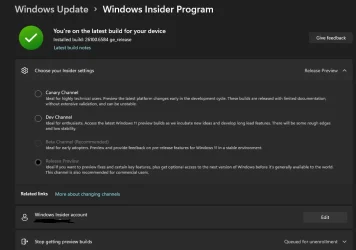
Please tell me I have left the Dev channel and wit is now showing I am on the 24H2 version of windows 11.
Installed build: 26100.6584 (ge_release)
Here’s what that means:
Build 26100 = Windows 11 24H2 (2024 Update).
ge_release = This is the General Availability (GA) release branch, not Dev.
.6584 = A cumulative update on top of the base 26100 build.
I registered my MS account in Windows Insider Getting started with the Windows Insider Program now the channel has changed to "release preview" am I good to download this now? I am confused about what is going on here. Is release preview OK to update to? Can I just unenroll immediately now that I am release preview without any adverse outcome? It appears I am no longer stuck/confined to the "Dev Channel"
 

Attachments

  • bandicam 2025-09-16 11-39-58-655.webp
    bandicam 2025-09-16 11-39-58-655.webp
    45.1 KB · Views: 2
  • bandicam 2025-09-16 11-37-25-626.webp
    bandicam 2025-09-16 11-37-25-626.webp
    12.9 KB · Views: 2

My Computers

System One System Two

  • OS
    Windows 11 Pro 25H2 26200.7627
    Computer type
    PC/Desktop
    Manufacturer/Model
    Gigababyte X870E Aorus Pro Rev 1.1
    CPU
    Ryzen 7 9800X3D
    Motherboard
    Gigababyte X870E Aorus Pro Rev 1.1
    Memory
    G.Skill Trident Z5 RGB DDR5-6000 32GB (2×16GB) CL30 2 x 16gb
    Graphics Card(s)
    RTX 5080 Palit Gaming Pro
    Sound Card
    Steel Series Arctis 1 Gaming Head phones
    Monitor(s) Displays
    Asus ROG Strix 27″ QHD OLED XG27AQDMG & Phillips 272V8
    Screen Resolution
    2560 X1440 27 Inch 240 HZ Asus
    PSU
    Corsair RM1000X
    Case
    Corsair CC750D (CC-9011078) Obsidian 750D Airflow Edition Black Full Tower ATX Case
    Cooling
    Corsair iCUE LINK TITAN 360 RX RGB
    Keyboard
    Razer BlackWidow V4 X Razer™ Yellow Mechanical Switches
    Mouse
    Logitech G502X Plus
    Internet Speed
    HFC 2000/100
    Browser
    Opera GX
    Antivirus
    Kaspersky Plus
  • Operating System
    Windows 11 23H2 22631.2715
    Computer type
    Laptop
    Manufacturer/Model
    Dell XPS EVO 13.3" RNX9305C01AUSB
    CPU
    Intel i5-1135G7
    Motherboard
    Dell
    Memory
    8 GB
    Graphics card(s)
    Intel Iris Xe Graphics
    Monitor(s) Displays
    LED
    Screen Resolution
    1920 x 1080
    Hard Drives
    256GB SSD
    Other Info
    https://www.thegoodguys.com.au/dell-xps-evo-133-inches-win-11-laptop-rnx9305c01ausb
Please tell me I have left the Dev channel and wit is now showing I am on the 24H2 version of windows 11.
I can't answer your question but I can show you a pic of what shows on my computer. I used the 25H2 ISO download link posted by @Brink to upgrade from 24H2 to 25H2 on my main desktop (PoweSpec B746).

Insider Program.webp
 

My Computers

System One System Two

  • OS
    Windows 11 Pro 25H2
    Computer type
    PC/Desktop
    Manufacturer/Model
    PowerSpec B746
    CPU
    Intel Core i7-10700K
    Motherboard
    ASRock Z490 Phantom Gaming 4/ax
    Memory
    16GB (8GB PC4-19200 DDR4 SDRAM x2)
    Graphics Card(s)
    NVIDIA GeForce GTX 1050 TI
    Sound Card
    Realtek Audio
    Monitor(s) Displays
    #1. LG ULTRAWIDE 34" #2. AOC Q32G2WG3 32"
    Screen Resolution
    #1. 3440 X 1440 #2. 1920 x 1080
    Hard Drives
    NVMe WDC WDS100T2B0C-00PXH0 1TB
    Samsung SSD 860 EVO 1TB
    PSU
    750 Watts (62.5A)
    Case
    PowerSpec/Lian Li ATX 205
    Keyboard
    Logitech K270
    Mouse
    Logitech M185
    Browser
    Microsoft Edge and Firefox
    Antivirus
    Webroot SecureAnywhere CE 26.1
  • Operating System
    Windows 11 Canary Channel
    Computer type
    PC/Desktop
    Manufacturer/Model
    PowerSpec G156
    CPU
    Intel Core i5-8400 CPU @ 2.80GHz
    Motherboard
    AsusTeK Prime B360M-A
    Memory
    16 MB DDR 4-2666
    Monitor(s) Displays
    23" Speptre HDMI 75Hz
    Screen Resolution
    1920x1080
    Hard Drives
    Samsung 970 EVO 500GB NVMe
    Keyboard
    Logitek K270
    Mouse
    Logitek M185
    Browser
    Firefox, Edge and Edge Canary
    Antivirus
    Windows Defender
I can't answer your question but I can show you a pic of what shows on my computer. I used the 25H2 ISO download link posted by @Brink to upgrade from 24H2 to 25H2 on my main desktop (PoweSpec B746).

View attachment 145519
Yes but that isn't really answering my question.
 

My Computers

System One System Two

  • OS
    Windows 11 Pro 25H2 26200.7627
    Computer type
    PC/Desktop
    Manufacturer/Model
    Gigababyte X870E Aorus Pro Rev 1.1
    CPU
    Ryzen 7 9800X3D
    Motherboard
    Gigababyte X870E Aorus Pro Rev 1.1
    Memory
    G.Skill Trident Z5 RGB DDR5-6000 32GB (2×16GB) CL30 2 x 16gb
    Graphics Card(s)
    RTX 5080 Palit Gaming Pro
    Sound Card
    Steel Series Arctis 1 Gaming Head phones
    Monitor(s) Displays
    Asus ROG Strix 27″ QHD OLED XG27AQDMG & Phillips 272V8
    Screen Resolution
    2560 X1440 27 Inch 240 HZ Asus
    PSU
    Corsair RM1000X
    Case
    Corsair CC750D (CC-9011078) Obsidian 750D Airflow Edition Black Full Tower ATX Case
    Cooling
    Corsair iCUE LINK TITAN 360 RX RGB
    Keyboard
    Razer BlackWidow V4 X Razer™ Yellow Mechanical Switches
    Mouse
    Logitech G502X Plus
    Internet Speed
    HFC 2000/100
    Browser
    Opera GX
    Antivirus
    Kaspersky Plus
  • Operating System
    Windows 11 23H2 22631.2715
    Computer type
    Laptop
    Manufacturer/Model
    Dell XPS EVO 13.3" RNX9305C01AUSB
    CPU
    Intel i5-1135G7
    Motherboard
    Dell
    Memory
    8 GB
    Graphics card(s)
    Intel Iris Xe Graphics
    Monitor(s) Displays
    LED
    Screen Resolution
    1920 x 1080
    Hard Drives
    256GB SSD
    Other Info
    https://www.thegoodguys.com.au/dell-xps-evo-133-inches-win-11-laptop-rnx9305c01ausb
I can't answer your question but I can show you a pic of what shows on my computer. I used the 25H2 ISO download link posted by @Brink to upgrade from 24H2 to 25H2 on my main desktop (PoweSpec B746).

View attachment 145519
Yes that's nice for you but that isn't really answering my question. You weren't on Windows Insider just 24H2 GA
 

My Computers

System One System Two

  • OS
    Windows 11 Pro 25H2 26200.7627
    Computer type
    PC/Desktop
    Manufacturer/Model
    Gigababyte X870E Aorus Pro Rev 1.1
    CPU
    Ryzen 7 9800X3D
    Motherboard
    Gigababyte X870E Aorus Pro Rev 1.1
    Memory
    G.Skill Trident Z5 RGB DDR5-6000 32GB (2×16GB) CL30 2 x 16gb
    Graphics Card(s)
    RTX 5080 Palit Gaming Pro
    Sound Card
    Steel Series Arctis 1 Gaming Head phones
    Monitor(s) Displays
    Asus ROG Strix 27″ QHD OLED XG27AQDMG & Phillips 272V8
    Screen Resolution
    2560 X1440 27 Inch 240 HZ Asus
    PSU
    Corsair RM1000X
    Case
    Corsair CC750D (CC-9011078) Obsidian 750D Airflow Edition Black Full Tower ATX Case
    Cooling
    Corsair iCUE LINK TITAN 360 RX RGB
    Keyboard
    Razer BlackWidow V4 X Razer™ Yellow Mechanical Switches
    Mouse
    Logitech G502X Plus
    Internet Speed
    HFC 2000/100
    Browser
    Opera GX
    Antivirus
    Kaspersky Plus
  • Operating System
    Windows 11 23H2 22631.2715
    Computer type
    Laptop
    Manufacturer/Model
    Dell XPS EVO 13.3" RNX9305C01AUSB
    CPU
    Intel i5-1135G7
    Motherboard
    Dell
    Memory
    8 GB
    Graphics card(s)
    Intel Iris Xe Graphics
    Monitor(s) Displays
    LED
    Screen Resolution
    1920 x 1080
    Hard Drives
    256GB SSD
    Other Info
    https://www.thegoodguys.com.au/dell-xps-evo-133-inches-win-11-laptop-rnx9305c01ausb
Yes that's nice for you but that isn't really answering my question. You weren't on Windows Insider just 24H2 GA
I'm showing you what you should be seeing if your not an Insider. To be honest and I could be wrong, I think that even though your computer is still on 24H2 that you computer is registered as being an Insider computer. You just haven't chosen what channel you want.
 

My Computers

System One System Two

  • OS
    Windows 11 Pro 25H2
    Computer type
    PC/Desktop
    Manufacturer/Model
    PowerSpec B746
    CPU
    Intel Core i7-10700K
    Motherboard
    ASRock Z490 Phantom Gaming 4/ax
    Memory
    16GB (8GB PC4-19200 DDR4 SDRAM x2)
    Graphics Card(s)
    NVIDIA GeForce GTX 1050 TI
    Sound Card
    Realtek Audio
    Monitor(s) Displays
    #1. LG ULTRAWIDE 34" #2. AOC Q32G2WG3 32"
    Screen Resolution
    #1. 3440 X 1440 #2. 1920 x 1080
    Hard Drives
    NVMe WDC WDS100T2B0C-00PXH0 1TB
    Samsung SSD 860 EVO 1TB
    PSU
    750 Watts (62.5A)
    Case
    PowerSpec/Lian Li ATX 205
    Keyboard
    Logitech K270
    Mouse
    Logitech M185
    Browser
    Microsoft Edge and Firefox
    Antivirus
    Webroot SecureAnywhere CE 26.1
  • Operating System
    Windows 11 Canary Channel
    Computer type
    PC/Desktop
    Manufacturer/Model
    PowerSpec G156
    CPU
    Intel Core i5-8400 CPU @ 2.80GHz
    Motherboard
    AsusTeK Prime B360M-A
    Memory
    16 MB DDR 4-2666
    Monitor(s) Displays
    23" Speptre HDMI 75Hz
    Screen Resolution
    1920x1080
    Hard Drives
    Samsung 970 EVO 500GB NVMe
    Keyboard
    Logitek K270
    Mouse
    Logitek M185
    Browser
    Firefox, Edge and Edge Canary
    Antivirus
    Windows Defender
I have a question for you and I hope you say yes. Did you make a system image before you tried to make the change. I'm not sure that would get your computer out of the Insider channel or not but it would be worth a try. Before I used the 25H2 ISO I made two backup images just to be safe.I admit that I was nervous and afraid I was making a mistake. Luckily so far 25H2 is working great. I wish I could use the 25H2 ISO on my other desktop but that is running the Canary channel. One can move up but not back. I know I could do a clean install but that would cause me to lose my favorite video editing program because the program can no longer be activated.
 

My Computers

System One System Two

  • OS
    Windows 11 Pro 25H2
    Computer type
    PC/Desktop
    Manufacturer/Model
    PowerSpec B746
    CPU
    Intel Core i7-10700K
    Motherboard
    ASRock Z490 Phantom Gaming 4/ax
    Memory
    16GB (8GB PC4-19200 DDR4 SDRAM x2)
    Graphics Card(s)
    NVIDIA GeForce GTX 1050 TI
    Sound Card
    Realtek Audio
    Monitor(s) Displays
    #1. LG ULTRAWIDE 34" #2. AOC Q32G2WG3 32"
    Screen Resolution
    #1. 3440 X 1440 #2. 1920 x 1080
    Hard Drives
    NVMe WDC WDS100T2B0C-00PXH0 1TB
    Samsung SSD 860 EVO 1TB
    PSU
    750 Watts (62.5A)
    Case
    PowerSpec/Lian Li ATX 205
    Keyboard
    Logitech K270
    Mouse
    Logitech M185
    Browser
    Microsoft Edge and Firefox
    Antivirus
    Webroot SecureAnywhere CE 26.1
  • Operating System
    Windows 11 Canary Channel
    Computer type
    PC/Desktop
    Manufacturer/Model
    PowerSpec G156
    CPU
    Intel Core i5-8400 CPU @ 2.80GHz
    Motherboard
    AsusTeK Prime B360M-A
    Memory
    16 MB DDR 4-2666
    Monitor(s) Displays
    23" Speptre HDMI 75Hz
    Screen Resolution
    1920x1080
    Hard Drives
    Samsung 970 EVO 500GB NVMe
    Keyboard
    Logitek K270
    Mouse
    Logitek M185
    Browser
    Firefox, Edge and Edge Canary
    Antivirus
    Windows Defender
What is the hurry? 25H2 will be officially released in a month. Early adopters usually have issues. Then they post about them, eventually they find a solution, so us know how to fix them. "Who is in a hurry will trip (and fell)", as we say in Greek.
 

My Computers

System One System Two

  • OS
    Windows 11 Pro 23H2 (5699), 25H2 (8457)
    Computer type
    Laptop
    Manufacturer/Model
    Acer Extensa 5630EZ
    CPU
    Mobile DualCore Intel Core 2 Duo T7250, 2000 MHz
    Motherboard
    Acer Extensa 5630
    Memory
    4GB
    Graphics Card(s)
    Mobile Intel(R) GMA 4500M (Mobile 4 series)
    Sound Card
    Realtek ALC268 @ Intel 82801IB ICH9 - High Definition Audio Controller
    Monitor(s) Displays
    1
    Screen Resolution
    1280x800
    Hard Drives
    Samsung SSD 850 EVO 250GB SATA Device (250 GB, SATA-III)
    Internet Speed
    VDSL 50 Mbps
    Browser
    MICROSOFT EDGE
    Antivirus
    WINDOWS DEFENDER
    Other Info
    Legacy MBR installation, no TPM, no Secure Boot, no WDDM 2.0 graphics drivers, no SSE4.2, cannot get more unsupported ;) This is only my test laptop. I had installed Windows 11 here before upgrading my main PC. For my main PC I use everyday see my 2nd system specs.
  • Operating System
    Windows 11 Pro v25H2 (build 26200.8457)
    Computer type
    PC/Desktop
    Manufacturer/Model
    Custom-built PC
    CPU
    Intel Core-i7 3770 3.40GHz s1155 (3rd generation)
    Motherboard
    Asus P8H61 s1155 ATX
    Memory
    2x Kingston Hyper-X Blu 8GB DDR3-1600
    Graphics card(s)
    GIGABYTE GeForce RTX 3050 WINDFORCE OC V2 6GB (GV-N3050WF2OCV2-6GD)
    Sound Card
    Realtek HD audio (ALC887)
    Monitor(s) Displays
    Sony Bravia KDL-19L4000 19" LCD TV via VGA
    Screen Resolution
    1440x900 32-bit 60Hz
    Hard Drives
    WD Blue SA510 2.5 1000GB SSD as system disk, Western Digital Caviar Purple 4TB SATA III (WD40PURZ) as second
    PSU
    Thermaltake Litepower RGB 550W Full Wired
    Case
    SUPERCASE MIDI-TOWER
    Cooling
    Deepcool Gamma Archer CPU cooler, 1x 8cm fan at the back
    Keyboard
    Mitsumi 101-key PS/2
    Mouse
    Sunnyline OptiEye PS/2
    Internet Speed
    100Mbps
    Browser
    Microsoft Edge, Mozilla Firefox
    Antivirus
    Microsoft Windows Defender
    Other Info
    Legacy BIOS (MBR) installation, no TPM, no Secure Boot, WDDM 3.0 graphics drivers, WEI score 7.4
I have a question for you and I hope you say yes. Did you make a system image before you tried to make the change. I'm not sure that would get your computer out of the Insider channel or not but it would be worth a try. Before I used the 25H2 ISO I made two backup images just to be safe.I admit that I was nervous and afraid I was making a mistake. Luckily so far 25H2 is working great. I wish I could use the 25H2 ISO on my other desktop but that is running the Canary channel. One can move up but not back. I know I could do a clean install but that would cause me to lose my favorite video editing program because the program can no longer be activated.
As per previous advice I am still on 24H2 updates paused but now I am on release preview channel not the Dev Channel..I am pending unenrollment as per screenshot what do I do to get out of this Windows Insider? Is anyone able to tell me?
 

My Computers

System One System Two

  • OS
    Windows 11 Pro 25H2 26200.7627
    Computer type
    PC/Desktop
    Manufacturer/Model
    Gigababyte X870E Aorus Pro Rev 1.1
    CPU
    Ryzen 7 9800X3D
    Motherboard
    Gigababyte X870E Aorus Pro Rev 1.1
    Memory
    G.Skill Trident Z5 RGB DDR5-6000 32GB (2×16GB) CL30 2 x 16gb
    Graphics Card(s)
    RTX 5080 Palit Gaming Pro
    Sound Card
    Steel Series Arctis 1 Gaming Head phones
    Monitor(s) Displays
    Asus ROG Strix 27″ QHD OLED XG27AQDMG & Phillips 272V8
    Screen Resolution
    2560 X1440 27 Inch 240 HZ Asus
    PSU
    Corsair RM1000X
    Case
    Corsair CC750D (CC-9011078) Obsidian 750D Airflow Edition Black Full Tower ATX Case
    Cooling
    Corsair iCUE LINK TITAN 360 RX RGB
    Keyboard
    Razer BlackWidow V4 X Razer™ Yellow Mechanical Switches
    Mouse
    Logitech G502X Plus
    Internet Speed
    HFC 2000/100
    Browser
    Opera GX
    Antivirus
    Kaspersky Plus
  • Operating System
    Windows 11 23H2 22631.2715
    Computer type
    Laptop
    Manufacturer/Model
    Dell XPS EVO 13.3" RNX9305C01AUSB
    CPU
    Intel i5-1135G7
    Motherboard
    Dell
    Memory
    8 GB
    Graphics card(s)
    Intel Iris Xe Graphics
    Monitor(s) Displays
    LED
    Screen Resolution
    1920 x 1080
    Hard Drives
    256GB SSD
    Other Info
    https://www.thegoodguys.com.au/dell-xps-evo-133-inches-win-11-laptop-rnx9305c01ausb
Like I said, you must wait until 25H2 is released officially before you can unenroll. "Who is in hurry slips (and fells)", as I said in my previous post.
 

My Computers

System One System Two

  • OS
    Windows 11 Pro 23H2 (5699), 25H2 (8457)
    Computer type
    Laptop
    Manufacturer/Model
    Acer Extensa 5630EZ
    CPU
    Mobile DualCore Intel Core 2 Duo T7250, 2000 MHz
    Motherboard
    Acer Extensa 5630
    Memory
    4GB
    Graphics Card(s)
    Mobile Intel(R) GMA 4500M (Mobile 4 series)
    Sound Card
    Realtek ALC268 @ Intel 82801IB ICH9 - High Definition Audio Controller
    Monitor(s) Displays
    1
    Screen Resolution
    1280x800
    Hard Drives
    Samsung SSD 850 EVO 250GB SATA Device (250 GB, SATA-III)
    Internet Speed
    VDSL 50 Mbps
    Browser
    MICROSOFT EDGE
    Antivirus
    WINDOWS DEFENDER
    Other Info
    Legacy MBR installation, no TPM, no Secure Boot, no WDDM 2.0 graphics drivers, no SSE4.2, cannot get more unsupported ;) This is only my test laptop. I had installed Windows 11 here before upgrading my main PC. For my main PC I use everyday see my 2nd system specs.
  • Operating System
    Windows 11 Pro v25H2 (build 26200.8457)
    Computer type
    PC/Desktop
    Manufacturer/Model
    Custom-built PC
    CPU
    Intel Core-i7 3770 3.40GHz s1155 (3rd generation)
    Motherboard
    Asus P8H61 s1155 ATX
    Memory
    2x Kingston Hyper-X Blu 8GB DDR3-1600
    Graphics card(s)
    GIGABYTE GeForce RTX 3050 WINDFORCE OC V2 6GB (GV-N3050WF2OCV2-6GD)
    Sound Card
    Realtek HD audio (ALC887)
    Monitor(s) Displays
    Sony Bravia KDL-19L4000 19" LCD TV via VGA
    Screen Resolution
    1440x900 32-bit 60Hz
    Hard Drives
    WD Blue SA510 2.5 1000GB SSD as system disk, Western Digital Caviar Purple 4TB SATA III (WD40PURZ) as second
    PSU
    Thermaltake Litepower RGB 550W Full Wired
    Case
    SUPERCASE MIDI-TOWER
    Cooling
    Deepcool Gamma Archer CPU cooler, 1x 8cm fan at the back
    Keyboard
    Mitsumi 101-key PS/2
    Mouse
    Sunnyline OptiEye PS/2
    Internet Speed
    100Mbps
    Browser
    Microsoft Edge, Mozilla Firefox
    Antivirus
    Microsoft Windows Defender
    Other Info
    Legacy BIOS (MBR) installation, no TPM, no Secure Boot, WDDM 3.0 graphics drivers, WEI score 7.4
Here’s the short way to leave the Windows Insider Program:

1. Open Settings → Update & Security → Windows Insider Program.
2. Select Stop getting preview builds.
3. Choose either:
  • Unenroll this device when the next major release of Windows is installed (wait until next stable update), or
  • Unenroll immediately (requires a clean install of Windows to fully exit).
that's what's shown in my screenshots. thanks for confirming. Unenroll this device when..... is selected.
 

My Computers

System One System Two

  • OS
    Windows 11 Pro 25H2 26200.7627
    Computer type
    PC/Desktop
    Manufacturer/Model
    Gigababyte X870E Aorus Pro Rev 1.1
    CPU
    Ryzen 7 9800X3D
    Motherboard
    Gigababyte X870E Aorus Pro Rev 1.1
    Memory
    G.Skill Trident Z5 RGB DDR5-6000 32GB (2×16GB) CL30 2 x 16gb
    Graphics Card(s)
    RTX 5080 Palit Gaming Pro
    Sound Card
    Steel Series Arctis 1 Gaming Head phones
    Monitor(s) Displays
    Asus ROG Strix 27″ QHD OLED XG27AQDMG & Phillips 272V8
    Screen Resolution
    2560 X1440 27 Inch 240 HZ Asus
    PSU
    Corsair RM1000X
    Case
    Corsair CC750D (CC-9011078) Obsidian 750D Airflow Edition Black Full Tower ATX Case
    Cooling
    Corsair iCUE LINK TITAN 360 RX RGB
    Keyboard
    Razer BlackWidow V4 X Razer™ Yellow Mechanical Switches
    Mouse
    Logitech G502X Plus
    Internet Speed
    HFC 2000/100
    Browser
    Opera GX
    Antivirus
    Kaspersky Plus
  • Operating System
    Windows 11 23H2 22631.2715
    Computer type
    Laptop
    Manufacturer/Model
    Dell XPS EVO 13.3" RNX9305C01AUSB
    CPU
    Intel i5-1135G7
    Motherboard
    Dell
    Memory
    8 GB
    Graphics card(s)
    Intel Iris Xe Graphics
    Monitor(s) Displays
    LED
    Screen Resolution
    1920 x 1080
    Hard Drives
    256GB SSD
    Other Info
    https://www.thegoodguys.com.au/dell-xps-evo-133-inches-win-11-laptop-rnx9305c01ausb
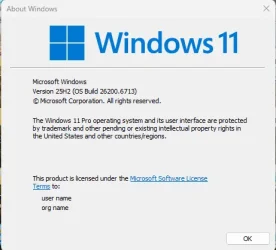
I bit the bullet and updated to 25H2, seems to be OK so far.
 

Attachments

  • bandicam 2025-09-17 06-25-53-564.webp
    bandicam 2025-09-17 06-25-53-564.webp
    20.4 KB · Views: 6

My Computers

System One System Two

  • OS
    Windows 11 Pro 25H2 26200.7627
    Computer type
    PC/Desktop
    Manufacturer/Model
    Gigababyte X870E Aorus Pro Rev 1.1
    CPU
    Ryzen 7 9800X3D
    Motherboard
    Gigababyte X870E Aorus Pro Rev 1.1
    Memory
    G.Skill Trident Z5 RGB DDR5-6000 32GB (2×16GB) CL30 2 x 16gb
    Graphics Card(s)
    RTX 5080 Palit Gaming Pro
    Sound Card
    Steel Series Arctis 1 Gaming Head phones
    Monitor(s) Displays
    Asus ROG Strix 27″ QHD OLED XG27AQDMG & Phillips 272V8
    Screen Resolution
    2560 X1440 27 Inch 240 HZ Asus
    PSU
    Corsair RM1000X
    Case
    Corsair CC750D (CC-9011078) Obsidian 750D Airflow Edition Black Full Tower ATX Case
    Cooling
    Corsair iCUE LINK TITAN 360 RX RGB
    Keyboard
    Razer BlackWidow V4 X Razer™ Yellow Mechanical Switches
    Mouse
    Logitech G502X Plus
    Internet Speed
    HFC 2000/100
    Browser
    Opera GX
    Antivirus
    Kaspersky Plus
  • Operating System
    Windows 11 23H2 22631.2715
    Computer type
    Laptop
    Manufacturer/Model
    Dell XPS EVO 13.3" RNX9305C01AUSB
    CPU
    Intel i5-1135G7
    Motherboard
    Dell
    Memory
    8 GB
    Graphics card(s)
    Intel Iris Xe Graphics
    Monitor(s) Displays
    LED
    Screen Resolution
    1920 x 1080
    Hard Drives
    256GB SSD
    Other Info
    https://www.thegoodguys.com.au/dell-xps-evo-133-inches-win-11-laptop-rnx9305c01ausb
Please as soon as you see any issues, even minor bugs, post here to know what to expect and help you deal with these.
 

My Computers

System One System Two

  • OS
    Windows 11 Pro 23H2 (5699), 25H2 (8457)
    Computer type
    Laptop
    Manufacturer/Model
    Acer Extensa 5630EZ
    CPU
    Mobile DualCore Intel Core 2 Duo T7250, 2000 MHz
    Motherboard
    Acer Extensa 5630
    Memory
    4GB
    Graphics Card(s)
    Mobile Intel(R) GMA 4500M (Mobile 4 series)
    Sound Card
    Realtek ALC268 @ Intel 82801IB ICH9 - High Definition Audio Controller
    Monitor(s) Displays
    1
    Screen Resolution
    1280x800
    Hard Drives
    Samsung SSD 850 EVO 250GB SATA Device (250 GB, SATA-III)
    Internet Speed
    VDSL 50 Mbps
    Browser
    MICROSOFT EDGE
    Antivirus
    WINDOWS DEFENDER
    Other Info
    Legacy MBR installation, no TPM, no Secure Boot, no WDDM 2.0 graphics drivers, no SSE4.2, cannot get more unsupported ;) This is only my test laptop. I had installed Windows 11 here before upgrading my main PC. For my main PC I use everyday see my 2nd system specs.
  • Operating System
    Windows 11 Pro v25H2 (build 26200.8457)
    Computer type
    PC/Desktop
    Manufacturer/Model
    Custom-built PC
    CPU
    Intel Core-i7 3770 3.40GHz s1155 (3rd generation)
    Motherboard
    Asus P8H61 s1155 ATX
    Memory
    2x Kingston Hyper-X Blu 8GB DDR3-1600
    Graphics card(s)
    GIGABYTE GeForce RTX 3050 WINDFORCE OC V2 6GB (GV-N3050WF2OCV2-6GD)
    Sound Card
    Realtek HD audio (ALC887)
    Monitor(s) Displays
    Sony Bravia KDL-19L4000 19" LCD TV via VGA
    Screen Resolution
    1440x900 32-bit 60Hz
    Hard Drives
    WD Blue SA510 2.5 1000GB SSD as system disk, Western Digital Caviar Purple 4TB SATA III (WD40PURZ) as second
    PSU
    Thermaltake Litepower RGB 550W Full Wired
    Case
    SUPERCASE MIDI-TOWER
    Cooling
    Deepcool Gamma Archer CPU cooler, 1x 8cm fan at the back
    Keyboard
    Mitsumi 101-key PS/2
    Mouse
    Sunnyline OptiEye PS/2
    Internet Speed
    100Mbps
    Browser
    Microsoft Edge, Mozilla Firefox
    Antivirus
    Microsoft Windows Defender
    Other Info
    Legacy BIOS (MBR) installation, no TPM, no Secure Boot, WDDM 3.0 graphics drivers, WEI score 7.4
Back
Top Bottom