How Do I Get Rid Of Edge Copilot Discover (Preview) Icon?


Mitch

Well-known member
Member
Local time
2:55 AM
Posts
437
Location
Scotland
OS
Windows 11 Home
Hello, Ever since Edge was updated to 143.3650.96, a Copilot Discover (Preview) button at the top left of the Home Page has appeared on our PC's. In the Page Settings on the Home Page there is only the option to turn Copilot Preview on or off, not remove it from view. In Edge main settings Copilot is off and the sidebar isn't shown although "Always Show Copilot" is toggled on. When i turn it off - I don't want to use Copilot- it always turns on automatically on browser restart. Does anyone have a method of making this nuisance disappear? Would be grateful. Thanks.Copilot Discover Preview..webp
 

My Computer My Computer

At a glance

Windows 11 Home
OS
Windows 11 Home
Download Windows Ai Remover batch script.


Execute the RemoveAI.bat and disable the Windows AI you don't want.
 

My Computer My Computer

At a glance

Windows 11AMD Ryzen 7 5700GMicron Technology DDR4-3200 16GBNVIDIA GeForce RTX 3060
OS
Windows 11
Computer type
PC/Desktop
Manufacturer/Model
HP Pavilion
CPU
AMD Ryzen 7 5700G
Motherboard
Erica6
Memory
Micron Technology DDR4-3200 16GB
Graphics Card(s)
NVIDIA GeForce RTX 3060
Sound Card
Realtek ALC671
Monitor(s) Displays
Samsung SyncMaster U28E590
Screen Resolution
3840 x 2160
Hard Drives
SAMSUNG MZVLQ1T0HALB-000H1
As a simple workaround, I just have Edge open to a blank page (about:blank).
 

My Computer My Computer

At a glance

Windows 10 Pro
OS
Windows 10 Pro
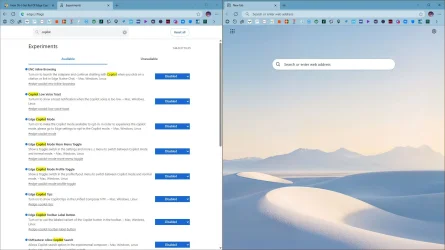
Try to disable everything copilot related in edge://flags
I block copilot, bing, msn via DNS to keep NewTab clean.

capture_12282025_152245.webp
 

My Computer My Computer

At a glance

Home26H2CanAMD Ryzen 5 8600G (07/24)2x32GB Kingston FURY DDR5 5600 MHz CL36 @5200...ASROCK Radeon RX 6600 Challenger D 8G @48FPS ...
OS
Home26H2Can
Computer type
PC/Desktop
CPU
AMD Ryzen 5 8600G (07/24)
Motherboard
ASROCK B650M-HDV/M.2 (07/24) BIOS 4.21 AGESA ComboAM5 1.3.0.1 (04/26)
Memory
2x32GB Kingston FURY DDR5 5600 MHz CL36 @5200 CL36 (07/24)
Graphics Card(s)
ASROCK Radeon RX 6600 Challenger D 8G @48FPS (08/24)
Sound Card
Creative Sound BlasterX AE-5 Plus (05/24)
Monitor(s) Displays
24" Philips 24M1N3200ZS/00 (05/24)
Screen Resolution
1920×1080@165Hz via DP1.4
Hard Drives
Kingston KC3000 NVMe 2TB (05/24)
ADATA XPG GAMMIX S11 Pro 512GB (07/19)
PSU
Seasonic Core GM 550 Gold (04/24)
Case
Fractal Design Define 7 Mini with 3x Noctua NF-P14s/12@555rpm (04/24)
Cooling
Noctua NH-U12S with Noctua NF-P12 (04/24)
Keyboard
HP Pavilion Wired Keyboard 300 (07/24) + Rabalux 76017 Parker (01/24)
Mouse
Logitech M330 Silent Plus (01/26)
Internet Speed
500/100 Mbps via RouterOS (05/21) & TCP Optimizer
Browser
Edge, Brave for YouTube, LibreWolf for FB
Antivirus
NextDNS blocking 1/3 Traffic
Other Info
Phone: Motorola Moto G86 (02/26)
Backup: Hasleo Backup Suite (PreOS)
Headphones: Sennheiser RS170 (09/10)
Chair: Huzaro Force 4.4 Grey Mesh (05/24)
Notifier: Xiaomi Mi Band 9 Milanese (10/24)
FlexCore USB-C 3.2 Gen 1 (M) to LAN (F) (08/25)
You might want to try this.

Search | gpedit | Edit Group Policy | Local Computer Policy | User Configuration | Administrative Templates | Windows Components | Windows Copilot

Turn off Windows Copilot | Double-click | Enabled - OK. Log off and Reboot.

To uninstall Copilot:
1. Search - Copilot
2. Settings | Apps | Installed apps | Copilot
3. Click the three dots and uninstall it
4. Remove residual files
- Run box
- %appdata%
5. Roaming - Look for any folders related to Copilot to delete
6. Run box
- %localappdata%
7. Look for any residual Copilot folders to delete

There is no guarantee Copilot will not make a return in your next Windows update.
 
Last edited:

My Computer My Computer

At a glance

Win 7,8.1,10,11, Mint, Kde Plasma, DebianIntel(R) Core(TM) i7-6500U CPU @ 2.50GHz16 GBIntel(R) HD Graphics 520/Nvidia GeForce 930M
OS
Win 7,8.1,10,11, Mint, Kde Plasma, Debian
Computer type
Laptop
Manufacturer/Model
Dell
CPU
Intel(R) Core(TM) i7-6500U CPU @ 2.50GHz
Memory
16 GB
Graphics Card(s)
Intel(R) HD Graphics 520/Nvidia GeForce 930M
Sound Card
Intel(R) Display Audio/RealtekAudio
Monitor(s) Displays
Generic Pnp Monitor
Screen Resolution
1366 X 768
Hard Drives
ST2000LM024-1EJ164
Keyboard
Eng (US)
Mouse
Sanwa Supply
Browser
Firefox
Antivirus
Avast One
Other Info
Too many laptops with different system specifications.
You might want to try this.

Search | gpedit | Edit Group Policy | Local Computer Policy | User Configuration | Administrative Templates | Windows Components | Windows Copilot

Turn off Windows Copilot | Double-click | Enabled - OK. Log off and Reboot.

To uninstall Copilot:
1. Search - Copilot
2. Settings | Apps | Installed apps | Copilot
3. Click the three dots and uninstall it
4. Remove residual files
- Run box
- %appdata%
5. Roaming - Look for any folders related to Copilot to delete
6. Run box
- %localappdata%
7. Look for any residual Copilot folders to delete

There is no guarantee Copilot will not make a return in your next Windows update.

None of this helps to turn this:


1767736780957.webp

Off.

I have every setting I can find - set to disabled. And this thing is still visible.

S
 

My Computer My Computer

At a glance

Windows 11 PRO 25H2Intel i5-10600KCorsair Vengeance LPX 64GB (2x32GB) (CMK64GX5...Intel UHD Graphics 630
OS
Windows 11 PRO 25H2
Computer type
PC/Desktop
Manufacturer/Model
ASUS
CPU
Intel i5-10600K
Motherboard
ProArt z490-Creator 10G
Memory
Corsair Vengeance LPX 64GB (2x32GB) (CMK64GX5M2B5600C40)
Graphics Card(s)
Intel UHD Graphics 630
Sound Card
RME ADI-2 FS DAC
Monitor(s) Displays
Dell U2415
Screen Resolution
1920x1080
Hard Drives
Samsung NMVE (990 Pro, 970 EVO)
PSU
Seasonic GX750
Case
Coolermaster CM-690II
Cooling
Noctua
Keyboard
Logitech MX Keys
Mouse
Logitech M510
Internet Speed
1 GBPS+
Browser
MS Edge
Antivirus
Windows Defender
Try to disable everything copilot related in edge://flags
I block copilot, bing, msn via DNS to keep NewTab clean.

View attachment 158236
I count 14 Copilot flags and disabling them does not remove it. It must be an A/B rollout.

Solution = Chrome. Still the leanest of the major browsers.
 

My Computer My Computer

At a glance

Windows 11 Pro 25H2 26200.7840Intel Core i3-8145U16GB
OS
Windows 11 Pro 25H2 26200.7840
Computer type
Laptop
Manufacturer/Model
Lenovo IdeaPad L340
CPU
Intel Core i3-8145U
Memory
16GB
Hard Drives
500 GB M2 1 TB HDD
Internet Speed
400 MB
Browser
Chrome | Edge
Antivirus
Microsoft Defender | Block unknown executables | Various ASR rules enabled | Smart App Control
Solution = Chrome. Still the leanest of the major browsers.

You clearly haven’t seen what is happening to Chrome as far as AI slop is concerned. Was actually watching YT video on just how bad AI is getting in there before I came here to ask this question.

From a resource viewpoint,RAM viewpoint and especially a privacy standpoint - I dumped it 4 years ago and won’t be supporting Google in any way.

I realize that MS has its own detractors but that its the one I have decided to stick with.

S
 

My Computer My Computer

At a glance

Windows 11 PRO 25H2Intel i5-10600KCorsair Vengeance LPX 64GB (2x32GB) (CMK64GX5...Intel UHD Graphics 630
OS
Windows 11 PRO 25H2
Computer type
PC/Desktop
Manufacturer/Model
ASUS
CPU
Intel i5-10600K
Motherboard
ProArt z490-Creator 10G
Memory
Corsair Vengeance LPX 64GB (2x32GB) (CMK64GX5M2B5600C40)
Graphics Card(s)
Intel UHD Graphics 630
Sound Card
RME ADI-2 FS DAC
Monitor(s) Displays
Dell U2415
Screen Resolution
1920x1080
Hard Drives
Samsung NMVE (990 Pro, 970 EVO)
PSU
Seasonic GX750
Case
Coolermaster CM-690II
Cooling
Noctua
Keyboard
Logitech MX Keys
Mouse
Logitech M510
Internet Speed
1 GBPS+
Browser
MS Edge
Antivirus
Windows Defender
Back
Top Bottom