
How do you get all subfolders to look the same in file view?


xpac5896

Well-known member
Local time
5:56 AM
Posts
23
OS
Windows 10
22H2 is really becoming a challenge. First, you cannot rename folders as you could in prior versions, or can you? 2. I have no idea how to make all my subfolders look the same in file view unless you go to each folder and change it the way you want. I'm sure someone out there has figured this out and if there is please school me how to do it. I tried calling Microsoft and apparently, they must be swamped with calls because I can't even get my authenticator to work on chat because it keeps timing out. Any help would be greatly appreciated. Thanks in advance.
 

My Computer

System One

  • OS
    Windows 10
    Computer type
    PC/Desktop
    Manufacturer/Model
    ASUS
    CPU
    I7-8700 3.70
    Motherboard
    ROG Maximus X Hero (wi-fi AC)
    Memory
    32gig
    Graphics Card(s)
    EVGA GTX 1070
    Sound Card
    Soundblaster XAE-5
    Monitor(s) Displays
    Samsung Curved
    Screen Resolution
    1920 X 1080
    Hard Drives
    NVME Samsung SSD 970 1TB, Samsung SSD EVO 860 1TB, WD Passport 1TB, My Passport 259B 2TB
Also note that there are some significant folder view bugs in Windows 11, especially with removable drives. Please provide a bit more detail about the issue you're seeing and then I can tell you if it's a known issue.
 

My Computer

System One

  • OS
    Windows 10/11
    Computer type
    Laptop
    Manufacturer/Model
    Acer
LesFerch
It's on all my drives Internal and external. My internal is a NVME 1TB Samsung and my two externals are also Samsung 500gig each. I would guess you already know that you can rename your folders if they are in File View>Right pane which to me is rather weird but at least you can rename them if needed. I would rather have the old way back if Microsoft feels like it in their next big update. But actually I thought it was my machine that was causing the problem or something didn't get installed right.
 

My Computer

System One

  • OS
    Windows 10
    Computer type
    PC/Desktop
    Manufacturer/Model
    ASUS
    CPU
    I7-8700 3.70
    Motherboard
    ROG Maximus X Hero (wi-fi AC)
    Memory
    32gig
    Graphics Card(s)
    EVGA GTX 1070
    Sound Card
    Soundblaster XAE-5
    Monitor(s) Displays
    Samsung Curved
    Screen Resolution
    1920 X 1080
    Hard Drives
    NVME Samsung SSD 970 1TB, Samsung SSD EVO 860 1TB, WD Passport 1TB, My Passport 259B 2TB
I wasn't replying to the renaming issue, but rather the request to make "subfolders look the same". The recommendation for that issue (from @mxlexmark2 and me) is to use WinSetView to set your folder view defaults. Please give it a try and let us know how it goes.
 

My Computer

System One

  • OS
    Windows 10/11
    Computer type
    Laptop
    Manufacturer/Model
    Acer
Open the folder that you want the others to look like.
In the top bar, click on Files, then Option.
Here is where you can make any changes that you want, that will then be applied to any of the directories you want.
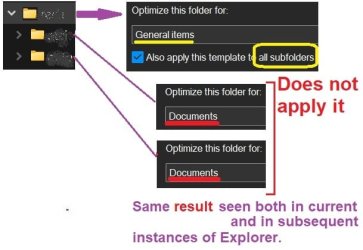
Be aware however, if you made any non-standard folder appearances, like Music and Videos, these changes will not apply since a 'Special" appearance has been given them by Microsoft. However these can easily be turned back to a standard appearance through by clicking on
Properties > Customize and changing the "Optimize this folder" selector to General.
 

My Computer

System One

  • OS
    Linux Arch (Windows 11 in a VM)
The option Also apply this template to all subfolders does not work in the Windows 11 Explorer. It was broken way back in January 2022. If you want to use that feature, you have to switch the Explorer to the Windows 10 style Explorer. I know that's crazy, but this is Microsoft we're talking about.

What is the path of the folder where you're trying to force the folder type? What problem are you trying to solve? There are certain tools and options that may help, but I need more details.
 

My Computer

System One

  • OS
    Windows 10/11
    Computer type
    Laptop
    Manufacturer/Model
    Acer

Attachments

  • Screenshot 2024-11-06 135401.png
    Screenshot 2024-11-06 135401.png
    25.8 KB · Views: 1

My Computers

System One System Two

  • OS
    Windows11 Pro 26200.8524
    Computer type
    PC/Desktop
    Manufacturer/Model
    Dell Alienware Aurora R16
    CPU
    Intel Core i9 14900F (24 -Core, 68 MB Total Cache)
    Motherboard
    Dell Alienware
    Memory
    32GB DDR5
    Graphics Card(s)
    RTX 4080 Super w/581.95
    Sound Card
    Realtec
    Monitor(s) Displays
    Corsair XENEON 32QHD165
    Screen Resolution
    2560 X 1440
    Hard Drives
    1-2TB Samsung 990 Pro PCIe NVMe M2 SSD
    1-4TB Samsung 990 Pro PCIe NVMe M2 SSD
    PSU
    1000 Watt Platinum Dell
    Case
    Alienware
    Cooling
    Liquid Closed Loop
    Keyboard
    Logitech MK270 Wireless Keyboard
    Mouse
    Logitech MK270 Wireless
    Internet Speed
    100Gb's Down-20 Up
    Browser
    Firefox 151.0.2
    Antivirus
    Defender
    Other Info
    Very Quiet And Fast
    CyberPower UPS CP1500PFCLCD
  • Operating System
    PClinuxOS Mate (2025.7)
    Computer type
    PC/Desktop
    Manufacturer/Model
    Intel
    CPU
    13th Gen Inter(R) Core(TM) i3-1315U
    Motherboard
    Intel
    Memory
    64 GB DDR4 @3200 MHz.
    Graphics card(s)
    Internal
    Sound Card
    None
    Monitor(s) Displays
    Dell 2419HGCF
    Screen Resolution
    1920 X 1080
    Hard Drives
    SAMSUNG 980 PRO SSD 2TB, PCIe 4.0 M.2 2280
    PSU
    Chicony 30 Watt
    Case
    Small
    Keyboard
    Dell
    Mouse
    Razor
    Internet Speed
    1GB
    Browser
    Slimjet
Back
Top Bottom




