How fast is Microsoft Defender real-time protection at stopping a threat?


If a malicious file download itself onto my laptop:

Will the real-time scanner then scan it immediately?
And the file will be unavavilable / inaccessible, until is has been scanned and declared clean by the scanning software?

Or will the scanner scan the malicious file for the first time, when the malicious file is ran / activated?

Thank you
 

My Computer My Computer

At a glance

Windows 11
OS
Windows 11
Computer type
Laptop
If you have a decent anti-malware program it won't allow you to download hostile pacakages.
 

My Computers My Computers

  • At a glance

    Windows 11 Pro 25H2 26200.8655AMD Ryzen 7 5825U with Radeon Graphics16GB
    OS
    Windows 11 Pro 25H2 26200.8655
    Computer type
    Laptop
    Manufacturer/Model
    Acemagic LX15PRO
    CPU
    AMD Ryzen 7 5825U with Radeon Graphics
    Memory
    16GB
    Screen Resolution
    1920 x 1080
    Hard Drives
    SSD 2TB
    Internet Speed
    30 Mbps
    Browser
    Brave
    Antivirus
    Webroot Secure Anywhere
    Other Info
    System 3

    Acer Swift SF114-34 laptop
    OS Windows 11 Pro 26200.8524
    CPU Pentium Silver N6000
    RAM 4GB
    SSD Samsung 970 EVO Plus SSD 2TB (an upgrade)
  • At a glance

    Windows 11 Pro 23H2 22631.2506Atom N450 1.66GHz2GB
    Operating System
    Windows 11 Pro 23H2 22631.2506
    Computer type
    Laptop
    Manufacturer/Model
    HP Mini 210-1090NR PC (bought in late 2009!)
    CPU
    Atom N450 1.66GHz
    Memory
    2GB
    Browser
    Brave
    Antivirus
    Webroot
If you want to see how windows defender handles 200new malware samples from 4days ago:

Register to the channel to get updated by new video's.
 

My Computer My Computer

At a glance

Windows 11
OS
Windows 11
Computer type
PC/Desktop
If you have a decent anti-malware program it won't allow you to download hostile pacakages.
Because the scanner handles the file (quarantine or delete), before it being accessible?
 

My Computer My Computer

At a glance

Windows 11
OS
Windows 11
Computer type
Laptop
It detects the payload or knows the website is dodgy.
 

My Computers My Computers

  • At a glance

    Windows 11 Pro 25H2 26200.8655AMD Ryzen 7 5825U with Radeon Graphics16GB
    OS
    Windows 11 Pro 25H2 26200.8655
    Computer type
    Laptop
    Manufacturer/Model
    Acemagic LX15PRO
    CPU
    AMD Ryzen 7 5825U with Radeon Graphics
    Memory
    16GB
    Screen Resolution
    1920 x 1080
    Hard Drives
    SSD 2TB
    Internet Speed
    30 Mbps
    Browser
    Brave
    Antivirus
    Webroot Secure Anywhere
    Other Info
    System 3

    Acer Swift SF114-34 laptop
    OS Windows 11 Pro 26200.8524
    CPU Pentium Silver N6000
    RAM 4GB
    SSD Samsung 970 EVO Plus SSD 2TB (an upgrade)
  • At a glance

    Windows 11 Pro 23H2 22631.2506Atom N450 1.66GHz2GB
    Operating System
    Windows 11 Pro 23H2 22631.2506
    Computer type
    Laptop
    Manufacturer/Model
    HP Mini 210-1090NR PC (bought in late 2009!)
    CPU
    Atom N450 1.66GHz
    Memory
    2GB
    Browser
    Brave
    Antivirus
    Webroot
If you want to see how windows defender handles 200new malware samples from 4days ago:
Very interesting!

I had another question, if there is a pop-up message, if Defender stops a threat - and your linked video clearly shows, that a pop-up message appears. There even comes warning messages, if you want to install the malicious software.

Why did Defender not block the download of the malware files?

When he executed / activated the malware files, they almost instantly was blocked by Defender, impressive.
 

My Computer My Computer

At a glance

Windows 11
OS
Windows 11
Computer type
Laptop
It detects the payload or knows the website is dodgy.
Can you try to describe the proces more detailed?

Thank you
 

My Computer My Computer

At a glance

Windows 11
OS
Windows 11
Computer type
Laptop
I think you need to do your own research! My knowledge of how Defender works is very limited.
 

My Computers My Computers

  • At a glance

    Windows 11 Pro 25H2 26200.8655AMD Ryzen 7 5825U with Radeon Graphics16GB
    OS
    Windows 11 Pro 25H2 26200.8655
    Computer type
    Laptop
    Manufacturer/Model
    Acemagic LX15PRO
    CPU
    AMD Ryzen 7 5825U with Radeon Graphics
    Memory
    16GB
    Screen Resolution
    1920 x 1080
    Hard Drives
    SSD 2TB
    Internet Speed
    30 Mbps
    Browser
    Brave
    Antivirus
    Webroot Secure Anywhere
    Other Info
    System 3

    Acer Swift SF114-34 laptop
    OS Windows 11 Pro 26200.8524
    CPU Pentium Silver N6000
    RAM 4GB
    SSD Samsung 970 EVO Plus SSD 2TB (an upgrade)
  • At a glance

    Windows 11 Pro 23H2 22631.2506Atom N450 1.66GHz2GB
    Operating System
    Windows 11 Pro 23H2 22631.2506
    Computer type
    Laptop
    Manufacturer/Model
    HP Mini 210-1090NR PC (bought in late 2009!)
    CPU
    Atom N450 1.66GHz
    Memory
    2GB
    Browser
    Brave
    Antivirus
    Webroot
I had another question, if there is a pop-up message, if Defender stops a threat - and your linked video clearly shows, that a pop-up message appears. There even comes warning messages, if you want to install the malicious software.
The popups are from the Blocked malware samples.
When you see the Missed item in the console, that sample continues to run, and that can generate the popup, warning messages, to install, or already is installed.
Why did Defender not block the download of the malware files?
Download links are based on reputation of the url, if it's a new malware on a new url, the url still has a good reputation, the more it get investigated/ clouds sample upload scans automated to learn about the file. If the file does bad/hostile things, the url will getting a bad reputation. So then with definition updates, the urls will have bad reputation and will be blocked. Only takes some time... thats why some new malware sample still get trough. Defender definitions updates every 4hours.
When he executed / activated the malware files, they almost instantly was blocked by Defender, impressive.
The script only downloads the file, and when script tries to execute the file, Blocked is shown, if the file is already move to quarentine. If script can run the file, it outputs Missed. So before the code can execute the exe it downloaded, it is already gone.
How this works.
You might have noticed on machines, when you have folder, with big .exe files, it might take a while for all exe's to load there Icons. Just before accessing the file/showing the icon, microsoft defender scans the file. And so can catch/stop before the user or any application that accesses the file to to execute something bad. In this case explorer.exe accesses the .exe file, to retrieve the icon. And so the defender kicks in.
Example what i talk about, with icons still not loaded.
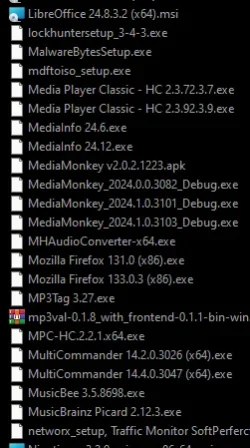
1739802102432.webp

Then Windows Defenders, has functions like EventWatcher, for example for the filesystem.

The FileSystem EventWachters is lisening on all the non-exluded files on the drive.
So when a file is downloaded some where on C: Windows will generate an Event. The programs that listen to those events, will get a notification directly when this happens. So when the file is created at the same moment defenders knows that is happend, and so will scan the file. Even before other application or the user will access the file! Thats why it's catching it so fast!

In the older days, when i made a program, that would check if a file was created in a folder, i would write a loop, and check the folder every second to see if a new file is in there. Now using those EventWatchers to monitor a file location. It does not have to loop, cost less cpu, and the moment the file is created(within a micro/nanosecond), the applications get a notification, and you can execute your code based on that.

This data comes from the kernel it self.

Read more about the filesystemwatcher: FileSystemWatcher Class (System.IO)

Perhaps Microsoft defender, even gets it faster then this filesystemwatcher as, it is a microsoft product, and so maybe can even get faster access directly from the kernal, then the api i write about.

 

My Computer My Computer

At a glance

Windows 11
OS
Windows 11
Computer type
PC/Desktop
If you want to see how windows defender handles 200new malware samples from 4days ago:

Register to the channel to get updated by new video's.
So how many ransomware devices out of 200 did Defender catch? The video does not make clear.
 

My Computers My Computers

  • At a glance

    Windows 11 Pro 25H2 26200.8655AMD Ryzen 7 5825U with Radeon Graphics16GB
    OS
    Windows 11 Pro 25H2 26200.8655
    Computer type
    Laptop
    Manufacturer/Model
    Acemagic LX15PRO
    CPU
    AMD Ryzen 7 5825U with Radeon Graphics
    Memory
    16GB
    Screen Resolution
    1920 x 1080
    Hard Drives
    SSD 2TB
    Internet Speed
    30 Mbps
    Browser
    Brave
    Antivirus
    Webroot Secure Anywhere
    Other Info
    System 3

    Acer Swift SF114-34 laptop
    OS Windows 11 Pro 26200.8524
    CPU Pentium Silver N6000
    RAM 4GB
    SSD Samsung 970 EVO Plus SSD 2TB (an upgrade)
  • At a glance

    Windows 11 Pro 23H2 22631.2506Atom N450 1.66GHz2GB
    Operating System
    Windows 11 Pro 23H2 22631.2506
    Computer type
    Laptop
    Manufacturer/Model
    HP Mini 210-1090NR PC (bought in late 2009!)
    CPU
    Atom N450 1.66GHz
    Memory
    2GB
    Browser
    Brave
    Antivirus
    Webroot
To many... at least 15 to 20 of them.
 

My Computer My Computer

At a glance

Windows 11
OS
Windows 11
Computer type
PC/Desktop
The script only downloads the file, and when script tries to execute the file
I thought the files were already downloaded, and the script was only to execute the file.

So the scripts downloads the file and also executes the file?

Blocked is shown, if the file is already move to quarentine.
Quarantine OR deleted?
 

My Computer My Computer

At a glance

Windows 11
OS
Windows 11
Computer type
Laptop
Ah i think your right they where already downloaded, he might have shutdown defender when he copyed them on the machines, then reactivated it, run the script.

Quarantined, only after setting the action in defender it cleans it up. Almost all files are first quarantined, however i have some seen some items in the past that where deleted, and you could not restore those items.
 

My Computer My Computer

At a glance

Windows 11
OS
Windows 11
Computer type
PC/Desktop
Dear all

If a malicious file / threat gets inside my system.

1.
How fast will Microsoft Defender real-time protection detect it?
Instantly?
After a couple of seconds?

2.
Will Microsoft Defender real-time protection scan it immediately?
Or first when the malicious file is ran / activated?

3.
Does Microsoft Defender real-time protection use the online / cloud scanner or offline scanner first?

Thank you

From Microsoft Copilot:

Great questions! Here are the answers:

  1. Detection Speed: Microsoft Defender's real-time protection detects threats instantly as soon as a file is accessed, downloaded, or executed.
  2. Scanning Process: Microsoft Defender real-time protection scans files immediately upon detection, without waiting for the file to be run or activated.
  3. Scanner Used: Microsoft Defender real-time protection primarily uses the online/cloud scanner first. The cloud scanner quickly checks for known threats using up-to-date signatures and behavior-based detection methods.
 

My Computers My Computers

  • At a glance

    Windows 11 ProIntel Series 3 Core Ultra X9 388H64GB LPDDR5x 9600 MT/sIntel Arc graphics B390 Panther Lake
    OS
    Windows 11 Pro
    Computer type
    Laptop
    Manufacturer/Model
    Dell XPS 16 DA16260
    CPU
    Intel Series 3 Core Ultra X9 388H
    Memory
    64GB LPDDR5x 9600 MT/s
    Graphics Card(s)
    Intel Arc graphics B390 Panther Lake
    Monitor(s) Displays
    16" 3.2K Tandem OLED Infinity Edge
    Screen Resolution
    3200 x 2000 16:10 236 PPI
    Hard Drives
    1 Terabyte M.2 PCIe NVMe SSD
    Case
    Black Anodized Aluminum
    Cooling
    Vapor Chamber Cooling
    Mouse
    None
    Internet Speed
    942 Mbps Netgear Mesh + 2 Satellites
    Browser
    Microsoft Edge (Chromium)
    Antivirus
    Windows Security (Defender)
    Other Info
    NPU delivering 67 TOPS
    Microsoft 365 subscription
    Microsoft Office 365
    Microsoft OneDrive 1TB Cloud
    Microsoft Visual Studio
    Microsoft Visual Studio Code
    Microsoft Sysinternals Suite
    Microsoft BitLocker
    Microsoft Copilot
    Dell Support Assist
    Dell Command | Update
    Macrium Reflect X subscription
    1Password Password Manager
    Amazon Kindle for PC
    Lightroom/Photoshop subscription
    Interactive Brokers Trader Workstation
  • At a glance

    Windows 11 ProSnapdragon® X Elite (12 Core) with Hexagon NP...32GB LPDDR5x 8448 MT/sIntegrated Adreno GPU
    Operating System
    Windows 11 Pro
    Computer type
    Laptop
    Manufacturer/Model
    Microsoft Surface Laptop 7
    CPU
    Snapdragon® X Elite (12 Core) with Hexagon NPU delivering 45 TOPS
    Memory
    32GB LPDDR5x 8448 MT/s
    Graphics card(s)
    Integrated Adreno GPU
    Sound Card
    Omnisonic speakers with Dolby Atmos spatial sound
    Monitor(s) Displays
    13.8″ PixelSense Flow touchscreen 120 Hz 600 NIT
    Screen Resolution
    2304 × 1536 (201 PPI), 3:2 aspect ratio
    Hard Drives
    1 TB PCIe NVMe Gen 4 SSD
    Case
    Black Anodized Aluminum
    Cooling
    Vapor Chamber Cooling
    Mouse
    None
    Internet Speed
    942 Mbps Netgear Mesh + 2 Satellites
    Browser
    Microsoft Edge (Chromium)
    Antivirus
    Windows Security (Defender)
    Other Info
    Microsoft 365 subscription (Office)
    Microsoft Office 365
    Microsoft OneDrive 1TB Cloud
    Microsoft Visual Studio 2026
    Microsoft Visual Studio Code
    Interactive Brokers Trader Workstation
    Lightroom/Photoshop subscription
    1Password Password Manager
    Microsoft Sysinternals
    Amazon Kindle for PC
    Microsoft BitLocker
    Microsoft Copilot

My Computer My Computer

At a glance

Windows 11
OS
Windows 11
Computer type
Laptop
  1. Detection Speed: Microsoft Defender's real-time protection detects threats instantly as soon as a file is accessed, downloaded, or executed.
  2. Scanning Process: Microsoft Defender real-time protection scans files immediately upon detection, without waiting for the file to be run or activated.
  3. Scanner Used: Microsoft Defender real-time protection primarily uses the online/cloud scanner first. The cloud scanner quickly checks for known threats using up-to-date signatures and behavior-based detection methods.
And the file will be unavavilable / inaccessible, until is has been scanned and declared clean by the scanning software?

And if there is no internet connection and it can't use the online scanner.
It will then instantly use the offline scanner?
 

My Computer My Computer

At a glance

Windows 11
OS
Windows 11
Computer type
Laptop
  1. Obviously, Defender would use local before online, can you really believe Windows is expected to wait to find out if you have a workable network connection before it attempts to protect you? This is why definitions and security updates are downloaded to your PC
And if there is no internet connection and it can't use the online scanner.
It will then instantly use the offline scanner?
 

My Computer My Computer

At a glance

Windows 11
OS
Windows 11
Computer type
Laptop
From Microsoft Copilot:
  1. Detection Speed: Microsoft Defender's real-time protection detects threats instantly as soon as a file is accessed, downloaded, or executed.
  2. Scanning Process: Microsoft Defender real-time protection scans files immediately upon detection, without waiting for the file to be run or activated.
  3. Scanner Used: Microsoft Defender real-time protection primarily uses the online/cloud scanner first. The cloud scanner quickly checks for known threats using up-to-date signatures and behavior-based detection methods.
And the file will be unavavilable / inaccessible, until is has been scanned and declared clean by the scanning software?

And if there is no internet connection and it can't use the online scanner.
It will then instantly use the offline scanner?

Thank you
 

My Computer My Computer

At a glance

Windows 11
OS
Windows 11
Computer type
Laptop
Could anyone please help me with my remaining questions:

From Microsoft Copilot:
  1. Detection Speed: Microsoft Defender's real-time protection detects threats instantly as soon as a file is accessed, downloaded, or executed.
  2. Scanning Process: Microsoft Defender real-time protection scans files immediately upon detection, without waiting for the file to be run or activated.
  3. Scanner Used: Microsoft Defender real-time protection primarily uses the online/cloud scanner first. The cloud scanner quickly checks for known threats using up-to-date signatures and behavior-based detection methods.
And the file will be unavavilable / inaccessible, until is has been scanned and declared clean by the scanning software?

And if there is no internet connection and it can't use the online scanner.
It will then instantly use the offline scanner?

Thank you
 

My Computer My Computer

At a glance

Windows 11
OS
Windows 11
Computer type
Laptop
And if there is no internet connection and it can't use the online scanner.
It will then instantly use the offline scanner?

The instant only applies to the trigger that a new file has appeared. So in that time the file is is still in blocking mode until the scanner gives the heads up all is clean, and then it is released to os/software or the user. That said, also virus free files are blocked until there good.
The scanning of the file is ofcouse not instant (ofcouse the trigger to scan a new file might appear instant, however ony after the trigger has run that a new file has appeard), as it takes some time to check the file, depending on size and internal complexity. The offline scanner is then ofcouse faster in detection, as it does not the send info out to the internet and recieve data back that the file is ok or not. However the dataset used in offline scanner is smaller, so it does not detect as much as online scanners. Or has the most recent info on new virus cases.

Example. If you look up to the sky and if there is a plane, you see that instantly. However it might take some time for you to determine what kind of plane it is.
 

My Computer My Computer

At a glance

Windows 11
OS
Windows 11
Computer type
PC/Desktop

Latest Support Threads

Back
Top Bottom