I Disabled Real Time Protection but Windows Defender Is still Running


edoWin11Forums

Well-known member
Local time
9:44 PM
Posts
23
OS
Windows 11
Hi, I disabled Real Time protection to install a "broken" Software. However even though Defender's Real Time Protection is off, I still get items being quarantined during installation. How can I actually disable Defender temporarily?
 

My Computers My Computers

  • At a glance

    Windows 11AMD Ryzen 9 9950X3DCrucial Pro Overclocking 32GB CL36 6000MHzAsus TUF RTX 4090
    OS
    Windows 11
    Computer type
    PC/Desktop
    Manufacturer/Model
    Gigabyte x870e Aorus Elite Wifi 7 Ice
    CPU
    AMD Ryzen 9 9950X3D
    Motherboard
    Gigabyte x870e Aorus Elite Wifi 7 Ice
    Memory
    Crucial Pro Overclocking 32GB CL36 6000MHz
    Graphics Card(s)
    Asus TUF RTX 4090
    Screen Resolution
    3840x2160
    Hard Drives
    Samsung 990 Pro 4 TB, SK Hynix Gold P31 1TB, Samsung 870 QVO 2TB, ADATA SU800 1TB, 2 x Seagate Exos X24 24GB, 2x Ultrastar DC HC530 14TB
  • At a glance

    Windows 11Ryzen 7 6800H16 GB LPDDR5-5200MHzRadeon 680M
    Operating System
    Windows 11
    Computer type
    Laptop
    Manufacturer/Model
    Asus Zenbook 14 Flip OLED UN5401RA-DB74T
    CPU
    Ryzen 7 6800H
    Memory
    16 GB LPDDR5-5200MHz
    Graphics card(s)
    Radeon 680M
    Screen Resolution
    2880x1800
    Hard Drives
    1 TB SSD M.2 2280 PCIe Gen4 TLC

Hi there. Open powershell. Enter the following: Set-MpPreference -DisableRealtimeMonitoring $true. When finished, simply enter: Set-MpPreference -DisableRealtimeMonitoring $false
 

My Computers My Computers

  • At a glance

    Windows 11 21H2AMD Ryzen 3 3100Corsair 8GB x 2 (16GB)Asus Nvidia Geforce GTX 1650 Super
    OS
    Windows 11 21H2
    Computer type
    PC/Desktop
    Manufacturer/Model
    Chillblast
    CPU
    AMD Ryzen 3 3100
    Motherboard
    Asus ROG Strix b450-f
    Memory
    Corsair 8GB x 2 (16GB)
    Graphics Card(s)
    Asus Nvidia Geforce GTX 1650 Super
    Monitor(s) Displays
    Dell 27" 1440p
    Screen Resolution
    1440p
    Hard Drives
    Seagate Barracuda 1TB
    256GB NVME Seagate Barracuda
    Browser
    Firefox / Edge
    Antivirus
    Windows Defender
  • At a glance

    Windows 8.1Amd E24GB
    Operating System
    Windows 8.1
    Computer type
    Laptop
    Manufacturer/Model
    HP
    CPU
    Amd E2
    Memory
    4GB
    Hard Drives
    128GB SSD
Hi, I disabled Real Time protection to install a "broken" Software. However even though Defender's Real Time Protection is off, I still get items being quarantined during installation. How can I actually disable Defender temporarily?
I haven't tried James's method, but my guess is that it won't work unless you turn off Tamper Protection first.

I'd suggest that you first try going into your Defender screen (Virus and threat protection) and disabling Tamper Protection, and then turning off real-time protection. If you don't turn off TP first, turning off real-time protection will be ineffective.

But if you go this route, be SURE to go back and change those settings when you're finished.

@James : Does the Power Shell method work with Tamper Protection ON?
 

My Computers My Computers

  • At a glance

    11 Pro 24H2 26100.2454i7-9700 @ 3.00GHz32GBDDR4 @ 2666MHzIntel HD 630 Graphics onboard
    OS
    11 Pro 24H2 26100.2454
    Computer type
    PC/Desktop
    Manufacturer/Model
    Lenovo ThinkCentre M920S SFF
    CPU
    i7-9700 @ 3.00GHz
    Motherboard
    Lenovo 3132
    Memory
    32GBDDR4 @ 2666MHz
    Graphics Card(s)
    Intel HD 630 Graphics onboard
    Sound Card
    Realtek HD Audio
    Monitor(s) Displays
    LG E2442
    Screen Resolution
    1920x1080
    Hard Drives
    1 x Samsung 970 EVO PLUS 500GB NVMe SSD, 1 x WD_BLACK SN770
    250GB NVMe SSD (OS and programs), 1 x WD_BLACK SN770
    500GB NVMe SSD (Data)
    Case
    Lenovo SFF
    Keyboard
    Cherry Stream TKL JK-8600US-2 Wired
    Mouse
    LogiTech M510 wireless
    Internet Speed
    Fast (for fixed wireless!)
    Browser
    Chrome, sometimes Firefox
    Antivirus
    Malwarebytes Premium & Defender (working together beautifully!)
  • At a glance

    11 Pro 24H2 26100.2454i5-8400 @ 2.80GHz32GB DDR4 @ 2600MHzIntel HD 630 Graphics onboard
    Operating System
    11 Pro 24H2 26100.2454
    Computer type
    PC/Desktop
    Manufacturer/Model
    Lenovo ThinkCentre M920S SFF
    CPU
    i5-8400 @ 2.80GHz
    Motherboard
    Lenovo 3132
    Memory
    32GB DDR4 @ 2600MHz
    Graphics card(s)
    Intel HD 630 Graphics onboard
    Sound Card
    Realtek High Definition Audio onboard
    Monitor(s) Displays
    LG FULL HD (1920x1080@59Hz)
    Screen Resolution
    1920 x 1080
    Hard Drives
    1 x Samsung 970 EVO PLUS NVMe; 1 x Samsung 980 NVMe SSD
    Case
    Lenovo Think Centre SFF
    Keyboard
    Cherry Stream TKL JK-8600US-2 Wired
    Mouse
    LogiTech M510 wireless
    Internet Speed
    Fast (for fixed wireless!)
    Browser
    Chrome
    Antivirus
    Malwarebytes Premium and MS Defender, beautiful together
You can also turn off internet if the program doesn’t rely on such. I haven’t tried the power shell method with fiddling with settings to turn off anything, so I’m assuming it works without Tamper Protection
 

My Computers My Computers

  • At a glance

    Windows 11 21H2AMD Ryzen 3 3100Corsair 8GB x 2 (16GB)Asus Nvidia Geforce GTX 1650 Super
    OS
    Windows 11 21H2
    Computer type
    PC/Desktop
    Manufacturer/Model
    Chillblast
    CPU
    AMD Ryzen 3 3100
    Motherboard
    Asus ROG Strix b450-f
    Memory
    Corsair 8GB x 2 (16GB)
    Graphics Card(s)
    Asus Nvidia Geforce GTX 1650 Super
    Monitor(s) Displays
    Dell 27" 1440p
    Screen Resolution
    1440p
    Hard Drives
    Seagate Barracuda 1TB
    256GB NVME Seagate Barracuda
    Browser
    Firefox / Edge
    Antivirus
    Windows Defender
  • At a glance

    Windows 8.1Amd E24GB
    Operating System
    Windows 8.1
    Computer type
    Laptop
    Manufacturer/Model
    HP
    CPU
    Amd E2
    Memory
    4GB
    Hard Drives
    128GB SSD
Hi, I disabled Real Time protection to install a "broken" Software. However even though Defender's Real Time Protection is off, I still get items being quarantined during installation. How can I actually disable Defender temporarily?
If you mean Modded Software, hey its a free world. I get the same issue. I have every setting and registry tweak done to rid defenders powerful grip. I use Avast Premiere Pro and it takes over defender for sure BUT, I say but because and I have had legit Owned software/files quarantined by some very deeply embedded part of Defender. Nothing shuts this off for me. I may try James tweak here and see what happens.
 

My Computer My Computer

At a glance

Windows 11 Pro Version 23H2(OS Build 22631.4890)12-Core AMD Ryzen 9 5900X, 4950 MHz (49.5 x 100)4 - G Skill Trident Z Neo F4-3600C16-16GTZNCPCI Express 4.0 x16: PowerColor RX 6800
OS
Windows 11 Pro Version 23H2(OS Build 22631.4890)
Computer type
PC/Desktop
Manufacturer/Model
AMD
CPU
12-Core AMD Ryzen 9 5900X, 4950 MHz (49.5 x 100)
Motherboard
Gigabyte X570 Aorus Master
Memory
4 - G Skill Trident Z Neo F4-3600C16-16GTZNC
Graphics Card(s)
PCI Express 4.0 x16: PowerColor RX 6800
Sound Card
Realtek ALC1220 @ AMD K19.2 - High Definition Audio Controller
Monitor(s) Displays
2 - 27 inch Westinghouse
Screen Resolution
1920 x 1080
Hard Drives
2 SSD - 2 TB each
1 SSD - 4TB
1 HDD - 2TB
Keyboard
logitech
Mouse
logitech
Internet Speed
1 GB
Browser
Firefox
Antivirus
Eset Endpoint Security
Not working for me...

PS C:\WINDOWS\system32> Set-MpPreference -DisableRealtimeMonitoring $true
Set-MpPreference : Operation failed with the following error: 0x800106ba. Operation: Set-MpPreference. Target:
DisableRealtimeMonitoring.
At line:1 char:1
+ Set-MpPreference -DisableRealtimeMonitoring $true
+ ~~~~~~~~~~~~~~~~~~~~~~~~~~~~~~~~~~~~~~~~~~~~~~~~~
+ CategoryInfo : NotSpecified: (MSFT_MpPreference:root\Microsoft\...FT_MpPreference) [Set-MpPreference],
CimException
+ FullyQualifiedErrorId : HRESULT 0x800106ba,Set-MpPreference
 

My Computers My Computers

  • At a glance

    Windows 11 Pro 25H2 26200.9550AMD Ryzen 7 5825U with Radeon Graphics16GB
    OS
    Windows 11 Pro 25H2 26200.9550
    Computer type
    Laptop
    Manufacturer/Model
    Acemagic LX15PRO
    CPU
    AMD Ryzen 7 5825U with Radeon Graphics
    Motherboard
    BIOS CT_BI_AMI_LX15PRO_AB8139_A-004
    Memory
    16GB
    Screen Resolution
    1920 x 1080
    Hard Drives
    SSD 2TB
    Internet Speed
    30 Mbps
    Browser
    Brave
    Antivirus
    Webroot SecureAnywhere Complete beta
  • At a glance

    Windows 11 Pro 23H2 22631.2506Atom N450 1.66GHz2GB
    Operating System
    Windows 11 Pro 23H2 22631.2506
    Computer type
    Laptop
    Manufacturer/Model
    HP Mini 210-1090NR PC (bought in late 2009!)
    CPU
    Atom N450 1.66GHz
    Memory
    2GB
    Browser
    Brave
    Antivirus
    Webroot
  • Acer Swift SF114-34 laptop
    OS Windows 11 Pro 26200.8894
    CPU Pentium Silver N6000
    RAM 4GB
    BIOS v1.17
    SSD Samsung 970 EVO Plus SSD 2TB (an upgrade)
Not working for me...

PS C:\WINDOWS\system32> Set-MpPreference -DisableRealtimeMonitoring $true
Set-MpPreference : Operation failed with the following error: 0x800106ba. Operation: Set-MpPreference. Target:
DisableRealtimeMonitoring.
At line:1 char:1
+ Set-MpPreference -DisableRealtimeMonitoring $true
+ ~~~~~~~~~~~~~~~~~~~~~~~~~~~~~~~~~~~~~~~~~~~~~~~~~
+ CategoryInfo : NotSpecified: (MSFT_MpPreference:root\Microsoft\...FT_MpPreference) [Set-MpPreference],
CimException
+ FullyQualifiedErrorId : HRESULT 0x800106ba,Set-MpPreference
Must need to turn of Tamperprotectoon
 

My Computers My Computers

  • At a glance

    Windows 11 21H2AMD Ryzen 3 3100Corsair 8GB x 2 (16GB)Asus Nvidia Geforce GTX 1650 Super
    OS
    Windows 11 21H2
    Computer type
    PC/Desktop
    Manufacturer/Model
    Chillblast
    CPU
    AMD Ryzen 3 3100
    Motherboard
    Asus ROG Strix b450-f
    Memory
    Corsair 8GB x 2 (16GB)
    Graphics Card(s)
    Asus Nvidia Geforce GTX 1650 Super
    Monitor(s) Displays
    Dell 27" 1440p
    Screen Resolution
    1440p
    Hard Drives
    Seagate Barracuda 1TB
    256GB NVME Seagate Barracuda
    Browser
    Firefox / Edge
    Antivirus
    Windows Defender
  • At a glance

    Windows 8.1Amd E24GB
    Operating System
    Windows 8.1
    Computer type
    Laptop
    Manufacturer/Model
    HP
    CPU
    Amd E2
    Memory
    4GB
    Hard Drives
    128GB SSD
Even as admin, I can't turn off Tamper Protection on Win 11 Pro. Need an IT Admin!

And I'm not allowed to edit the DWord here for TP

HKEY_LOCAL_MACHINE\SOFTWARE\Microsoft\Windows Defender\Features
 
Last edited:

My Computers My Computers

  • At a glance

    Windows 11 Pro 25H2 26200.9550AMD Ryzen 7 5825U with Radeon Graphics16GB
    OS
    Windows 11 Pro 25H2 26200.9550
    Computer type
    Laptop
    Manufacturer/Model
    Acemagic LX15PRO
    CPU
    AMD Ryzen 7 5825U with Radeon Graphics
    Motherboard
    BIOS CT_BI_AMI_LX15PRO_AB8139_A-004
    Memory
    16GB
    Screen Resolution
    1920 x 1080
    Hard Drives
    SSD 2TB
    Internet Speed
    30 Mbps
    Browser
    Brave
    Antivirus
    Webroot SecureAnywhere Complete beta
  • At a glance

    Windows 11 Pro 23H2 22631.2506Atom N450 1.66GHz2GB
    Operating System
    Windows 11 Pro 23H2 22631.2506
    Computer type
    Laptop
    Manufacturer/Model
    HP Mini 210-1090NR PC (bought in late 2009!)
    CPU
    Atom N450 1.66GHz
    Memory
    2GB
    Browser
    Brave
    Antivirus
    Webroot
  • Acer Swift SF114-34 laptop
    OS Windows 11 Pro 26200.8894
    CPU Pentium Silver N6000
    RAM 4GB
    BIOS v1.17
    SSD Samsung 970 EVO Plus SSD 2TB (an upgrade)

My Computer My Computer

At a glance

Home2FH2CanAMD Ryzen 5 8600G (07/24)2x32GB Kingston FURY DDR5 5600 MHz CL36 @5200...ASROCK Radeon RX 6600 Challenger D 8G @48FPS ...
OS
Home2FH2Can
Computer type
PC/Desktop
CPU
AMD Ryzen 5 8600G (07/24)
Motherboard
ASROCK B650M-HDV/M.2 (07/24) BIOS 4.43 AGESA ComboAM5 1.3.0.1b Patch A (07/26)
Memory
2x32GB Kingston FURY DDR5 5600 MHz CL36 @5200 CL40 (07/24)
Graphics Card(s)
ASROCK Radeon RX 6600 Challenger D 8G @48FPS (08/24)
Sound Card
Creative Sound BlasterX AE-5 Plus (05/24)
Monitor(s) Displays
24" Philips 24M1N3200ZS/00 (05/24)
Screen Resolution
1920×1080@165Hz via DP1.4
Hard Drives
Kingston KC3000 NVMe 2TB (05/24)
ADATA XPG GAMMIX S11 Pro 512GB (07/19)
PSU
Seasonic Core GM 550 Gold (04/24)
Case
Fractal Design Define 7 Mini with 3x Noctua NF-P14s/12@555rpm (04/24)
Cooling
Noctua NH-U12S with Noctua NF-P12 (04/24)
Keyboard
HP Pavilion Wired Keyboard 300 (07/24) + Rabalux 76017 Parker (01/24)
Mouse
Logitech M330 Silent Plus (07/26)
Internet Speed
500/100 Mbps via RouterOS (05/21) & TCP Optimizer
Browser
Edge, Brave for YouTube, LibreWolf for FB
Antivirus
NextDNS blocking 1/3 Traffic
Other Info
Phone: Motorola Moto G86 (02/26)
Backup: Hasleo Backup Suite (PreOS)
Headphones: Sennheiser RS170 (09/10)
Chair: Huzaro Force 4.4 Grey Mesh (05/24)
Notifier: Xiaomi Mi Band 9 Milanese (10/24)
FlexCore USB-C 3.2 Gen 1 (M) to LAN (F) (08/25)
Even as admin, I can't turn off Tamper Protection on Win 11 Pro. Need an IT Admin!
Strange. Do you have another Anti-V program running alongside Defender?
I only ask that because I use both Malwarebytes and Defender, and although I can't recall ever trying to turn off TP before I installed MWB, it's certainly the case that currently I can turn off TP at will, with just my normal Administrator login.
And I'm not allowed to edit the DWord here for TP
You'll have to edit your permissions for that key. I'm sure @Brink has help for that here, if you need it.
 

My Computers My Computers

  • At a glance

    11 Pro 24H2 26100.2454i7-9700 @ 3.00GHz32GBDDR4 @ 2666MHzIntel HD 630 Graphics onboard
    OS
    11 Pro 24H2 26100.2454
    Computer type
    PC/Desktop
    Manufacturer/Model
    Lenovo ThinkCentre M920S SFF
    CPU
    i7-9700 @ 3.00GHz
    Motherboard
    Lenovo 3132
    Memory
    32GBDDR4 @ 2666MHz
    Graphics Card(s)
    Intel HD 630 Graphics onboard
    Sound Card
    Realtek HD Audio
    Monitor(s) Displays
    LG E2442
    Screen Resolution
    1920x1080
    Hard Drives
    1 x Samsung 970 EVO PLUS 500GB NVMe SSD, 1 x WD_BLACK SN770
    250GB NVMe SSD (OS and programs), 1 x WD_BLACK SN770
    500GB NVMe SSD (Data)
    Case
    Lenovo SFF
    Keyboard
    Cherry Stream TKL JK-8600US-2 Wired
    Mouse
    LogiTech M510 wireless
    Internet Speed
    Fast (for fixed wireless!)
    Browser
    Chrome, sometimes Firefox
    Antivirus
    Malwarebytes Premium & Defender (working together beautifully!)
  • At a glance

    11 Pro 24H2 26100.2454i5-8400 @ 2.80GHz32GB DDR4 @ 2600MHzIntel HD 630 Graphics onboard
    Operating System
    11 Pro 24H2 26100.2454
    Computer type
    PC/Desktop
    Manufacturer/Model
    Lenovo ThinkCentre M920S SFF
    CPU
    i5-8400 @ 2.80GHz
    Motherboard
    Lenovo 3132
    Memory
    32GB DDR4 @ 2600MHz
    Graphics card(s)
    Intel HD 630 Graphics onboard
    Sound Card
    Realtek High Definition Audio onboard
    Monitor(s) Displays
    LG FULL HD (1920x1080@59Hz)
    Screen Resolution
    1920 x 1080
    Hard Drives
    1 x Samsung 970 EVO PLUS NVMe; 1 x Samsung 980 NVMe SSD
    Case
    Lenovo Think Centre SFF
    Keyboard
    Cherry Stream TKL JK-8600US-2 Wired
    Mouse
    LogiTech M510 wireless
    Internet Speed
    Fast (for fixed wireless!)
    Browser
    Chrome
    Antivirus
    Malwarebytes Premium and MS Defender, beautiful together
Hello, :alien:

I'm afraid Tamper Protection can only be turned off via Windows Security below for security reasons. It will not allow any other method.


My Computers My Computers

  • At a glance

    Windows 11 Pro for WorkstationsIntel i7-8700K 5 GHz64 GB (4x16GB) G.SKILL TridentZ RGB DDR4 3600...ASUS ROG-STRIX-GTX1080TI-O11G-GAMING (11GB GD...
    OS
    Windows 11 Pro for Workstations
    Computer type
    PC/Desktop
    Manufacturer/Model
    Custom self build
    CPU
    Intel i7-8700K 5 GHz
    Motherboard
    ASUS ROG Maximus XI Formula Z390
    Memory
    64 GB (4x16GB) G.SKILL TridentZ RGB DDR4 3600 MHz (F4-3600C18D-32GTZR)
    Graphics Card(s)
    ASUS ROG-STRIX-GTX1080TI-O11G-GAMING (11GB GDDR5X)
    Sound Card
    Integrated Digital Audio (S/PDIF)
    Monitor(s) Displays
    2 x Samsung Odyssey G75 27"
    Screen Resolution
    2560x1440
    Hard Drives
    1TB Samsung 990 PRO M.2,
    4TB Samsung 990 PRO M.2,
    TerraMaster F8 SSD Plus NAS
    PSU
    Seasonic Prime Titanium 850W
    Case
    Thermaltake Core P3 wall mounted
    Cooling
    Corsair Hydro H115i
    Keyboard
    Amazon Basics Wired Full Keyboard MD005
    Mouse
    Logitech MX Master 4
    Internet Speed
    2 Gbps Download and 100 Mbps Upload
    Browser
    Chrome and Edge
    Antivirus
    Microsoft Defender
    Other Info
    Logitech Z625 speaker system,
    Logitech BRIO 4K Pro webcam,
    HP Color LaserJet Pro MFP M477fdn,
    CyberPower CP1500PFCLCD
    Galaxy S23 Plus phone
  • At a glance

    Windows 11 ProSnapdragon X Elite (12 core) 3.42 GHz16 GB LPDDR5x-7467 MHz
    Operating System
    Windows 11 Pro
    Computer type
    Laptop
    Manufacturer/Model
    Surface Laptop 7 Copilot+ PC
    CPU
    Snapdragon X Elite (12 core) 3.42 GHz
    Memory
    16 GB LPDDR5x-7467 MHz
    Monitor(s) Displays
    15" HDR
    Screen Resolution
    2496 x 1664
    Hard Drives
    1 TB SSD
    Internet Speed
    Wi-Fi 7 and Bluetooth 5.4
    Browser
    Chrome and Edge
    Antivirus
    Microsoft Defender
Strange. Do you have another Anti-V program running alongside Defender?
I only ask that because I use both Malwarebytes and Defender, and although I can't recall ever trying to turn off TP before I installed MWB, it's certainly the case that currently I can turn off TP at will, with just my normal Administrator login.
Thanks. I use Webroot and Defender occasional scanning was off. When I turned it on, I was able to turn off Tamper Protection. But I did turn it back on. Anyway, it's all good to know.
 

My Computers My Computers

  • At a glance

    Windows 11 Pro 25H2 26200.9550AMD Ryzen 7 5825U with Radeon Graphics16GB
    OS
    Windows 11 Pro 25H2 26200.9550
    Computer type
    Laptop
    Manufacturer/Model
    Acemagic LX15PRO
    CPU
    AMD Ryzen 7 5825U with Radeon Graphics
    Motherboard
    BIOS CT_BI_AMI_LX15PRO_AB8139_A-004
    Memory
    16GB
    Screen Resolution
    1920 x 1080
    Hard Drives
    SSD 2TB
    Internet Speed
    30 Mbps
    Browser
    Brave
    Antivirus
    Webroot SecureAnywhere Complete beta
  • At a glance

    Windows 11 Pro 23H2 22631.2506Atom N450 1.66GHz2GB
    Operating System
    Windows 11 Pro 23H2 22631.2506
    Computer type
    Laptop
    Manufacturer/Model
    HP Mini 210-1090NR PC (bought in late 2009!)
    CPU
    Atom N450 1.66GHz
    Memory
    2GB
    Browser
    Brave
    Antivirus
    Webroot
  • Acer Swift SF114-34 laptop
    OS Windows 11 Pro 26200.8894
    CPU Pentium Silver N6000
    RAM 4GB
    BIOS v1.17
    SSD Samsung 970 EVO Plus SSD 2TB (an upgrade)
Great news! (y)
 

My Computers My Computers

  • At a glance

    11 Pro 24H2 26100.2454i7-9700 @ 3.00GHz32GBDDR4 @ 2666MHzIntel HD 630 Graphics onboard
    OS
    11 Pro 24H2 26100.2454
    Computer type
    PC/Desktop
    Manufacturer/Model
    Lenovo ThinkCentre M920S SFF
    CPU
    i7-9700 @ 3.00GHz
    Motherboard
    Lenovo 3132
    Memory
    32GBDDR4 @ 2666MHz
    Graphics Card(s)
    Intel HD 630 Graphics onboard
    Sound Card
    Realtek HD Audio
    Monitor(s) Displays
    LG E2442
    Screen Resolution
    1920x1080
    Hard Drives
    1 x Samsung 970 EVO PLUS 500GB NVMe SSD, 1 x WD_BLACK SN770
    250GB NVMe SSD (OS and programs), 1 x WD_BLACK SN770
    500GB NVMe SSD (Data)
    Case
    Lenovo SFF
    Keyboard
    Cherry Stream TKL JK-8600US-2 Wired
    Mouse
    LogiTech M510 wireless
    Internet Speed
    Fast (for fixed wireless!)
    Browser
    Chrome, sometimes Firefox
    Antivirus
    Malwarebytes Premium & Defender (working together beautifully!)
  • At a glance

    11 Pro 24H2 26100.2454i5-8400 @ 2.80GHz32GB DDR4 @ 2600MHzIntel HD 630 Graphics onboard
    Operating System
    11 Pro 24H2 26100.2454
    Computer type
    PC/Desktop
    Manufacturer/Model
    Lenovo ThinkCentre M920S SFF
    CPU
    i5-8400 @ 2.80GHz
    Motherboard
    Lenovo 3132
    Memory
    32GB DDR4 @ 2600MHz
    Graphics card(s)
    Intel HD 630 Graphics onboard
    Sound Card
    Realtek High Definition Audio onboard
    Monitor(s) Displays
    LG FULL HD (1920x1080@59Hz)
    Screen Resolution
    1920 x 1080
    Hard Drives
    1 x Samsung 970 EVO PLUS NVMe; 1 x Samsung 980 NVMe SSD
    Case
    Lenovo Think Centre SFF
    Keyboard
    Cherry Stream TKL JK-8600US-2 Wired
    Mouse
    LogiTech M510 wireless
    Internet Speed
    Fast (for fixed wireless!)
    Browser
    Chrome
    Antivirus
    Malwarebytes Premium and MS Defender, beautiful together
Even as admin, I can't turn off Tamper Protection on Win 11 Pro. Need an IT Admin!

And I'm not allowed to edit the DWord here for TP

HKEY_LOCAL_MACHINE\SOFTWARE\Microsoft\Windows Defender\Features
 

My Computer My Computer

At a glance

Windows 11 x64AMD Ryzen 7 5700U with Radeon Graphics64 GB
OS
Windows 11 x64
Computer type
PC/Desktop
Manufacturer/Model
BOSGAME
CPU
AMD Ryzen 7 5700U with Radeon Graphics
Memory
64 GB
Monitor(s) Displays
Hisence 100"
Screen Resolution
3840x2160
Internet Speed
Bell Fiber 8GB DL 8 GB UP Wifi-7
Browser
Google Chrome
Antivirus
AVG
Other Info
SODOLA 8-Port 2.5Gb Switch,8 x 2.5GBASE-T Ports,1X10G SFP+,100Gbps Switching Capacity, Fanless, Metal Plug & Play 2.5G Unmanaged Network Switch S24 Ultra Smartphone Android Tp-link Tri-band Be19000 Wi-fi 7 Gaming Router Archer Ge800 |
bitEngine 10G Media Converter, 10 Gigabit Copper to 10G Fiber Ethernet, Unmanaged 1x 1G/2.5G/5G/10GBase-T RJ45 to 1x 10GBase-X SFP+ Slot, Support 10G SR/LR SFP+ Module, Single
SODOLA 10GBase-SR SFP+ Transceiver, 850nm MMF, up to 300 Meters, Compatible with Cisco SFP-10G-SR, Meraki MA-SFP-10GB-SR, Ubiquiti UniFi UF-MM-10G, Fortinet, Mikrotik, Netgear, TP-Link and More

Don't use the Goggle defualts these servers are FASTER :)
MANUAL
DNS SERVER ASSIGNMENT 4.2.2.6 (Unencrypted)
IPv4 DNS Servers : 9.9.9.9 (Unencrypted)
NO you Don't lol
I fixed it with OPPut system refresh Now Put it in the currant Help lol


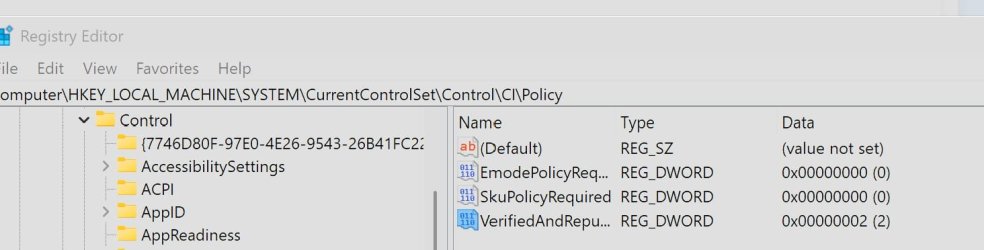
Computer\HKEY_LOCAL_MACHINE\SYSTEM\CurrentControlSet\Control\CI\Policy


I really Hate when Microosft tells people Like this Like the CODE Expert that Now Blocked Explorer 10 patch So Reported Him and what he Put In the File to ask people for Money hel write a code and Unblock it .

In the New Defender he wrote In you Have to RESECT you're with a fresh Install If Windows this would meen you LOOSE everthing if you don't have a Back Up .. I Said to My BOSSS Can I SMACK HIM NOW it let his supervisor Just let him go from MS.
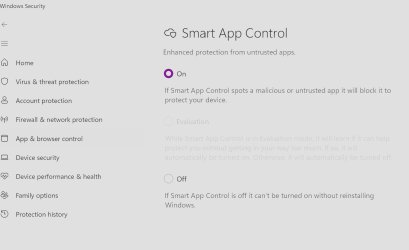
Screenshot 2024-11-03 021819.jpgScreenshot 2024-11-03 022322.jpg
 

My Computer My Computer

At a glance

Windows 11 x64AMD Ryzen 7 5700U with Radeon Graphics64 GB
OS
Windows 11 x64
Computer type
PC/Desktop
Manufacturer/Model
BOSGAME
CPU
AMD Ryzen 7 5700U with Radeon Graphics
Memory
64 GB
Monitor(s) Displays
Hisence 100"
Screen Resolution
3840x2160
Internet Speed
Bell Fiber 8GB DL 8 GB UP Wifi-7
Browser
Google Chrome
Antivirus
AVG
Other Info
SODOLA 8-Port 2.5Gb Switch,8 x 2.5GBASE-T Ports,1X10G SFP+,100Gbps Switching Capacity, Fanless, Metal Plug & Play 2.5G Unmanaged Network Switch S24 Ultra Smartphone Android Tp-link Tri-band Be19000 Wi-fi 7 Gaming Router Archer Ge800 |
bitEngine 10G Media Converter, 10 Gigabit Copper to 10G Fiber Ethernet, Unmanaged 1x 1G/2.5G/5G/10GBase-T RJ45 to 1x 10GBase-X SFP+ Slot, Support 10G SR/LR SFP+ Module, Single
SODOLA 10GBase-SR SFP+ Transceiver, 850nm MMF, up to 300 Meters, Compatible with Cisco SFP-10G-SR, Meraki MA-SFP-10GB-SR, Ubiquiti UniFi UF-MM-10G, Fortinet, Mikrotik, Netgear, TP-Link and More

Don't use the Goggle defualts these servers are FASTER :)
MANUAL
DNS SERVER ASSIGNMENT 4.2.2.6 (Unencrypted)
IPv4 DNS Servers : 9.9.9.9 (Unencrypted)
NO you Don't lol
I fixed it with OPPut system refresh Now Put it in the currant Help lol


Computer\HKEY_LOCAL_MACHINE\SYSTEM\CurrentControlSet\Control\CI\Policy


I really Hate when Microosft tells people Like this Like the CODE Expert that Now Blocked Explorer 10 patch So Reported Him and what he Put In the File to ask people for Money hel write a code and Unblock it .

In the New Defender he wrote In you Have to RESECT you're with a fresh Install If Windows this would meen you LOOSE everthing if you don't have a Back Up .. I Said to My BOSSS Can I SMACK HIM NOW it let his supervisor Just let him go from MS.
View attachment 115044View attachment 115047

What? I quite honestly didn’t understand a word you said.
 

My Computers My Computers

  • At a glance

    Windows 11 Pro 25H2 Build 26200.9168Intel(R) Core(TM) i7-4770K CPU @ 3.50GHz32.0 GB of I forget and the box is in storage.Gigabyte nVidia GeForce GTX 1660 Super OC 6GB
    OS
    Windows 11 Pro 25H2 Build 26200.9168
    Computer type
    PC/Desktop
    Manufacturer/Model
    Sin-built 2013
    CPU
    Intel(R) Core(TM) i7-4770K CPU @ 3.50GHz
    Motherboard
    ASUS ROG Maximus VI Formula
    Memory
    32.0 GB of I forget and the box is in storage.
    Graphics Card(s)
    Gigabyte nVidia GeForce GTX 1660 Super OC 6GB
    Sound Card
    ROG SupremeFX Formula 8-Channel High Definition Audio
    Monitor(s) Displays
    5 x LG 25MS500-B - 1 x 24MK430H-B - 1 x Wacom Pro 22" Touch Screen Tablet
    Screen Resolution
    All over the place
    Hard Drives
    Too many to list. OS on Samsung 1TB 870 QVO SATA
    PSU
    Silverstone 1500
    Case
    NZXT Phantom 820 Full-Tower Case
    Cooling
    Noctua NH-D15 Elite Class Dual Tower CPU Cooler / 6 x EziDIY 120mm / 2 x Corsair 140mm somethings / 1 x 140mm Thermaltake something / 2 x 200mm Corsair.
    Keyboard
    Corsair K95 / Logitech diNovo Edge Wireless
    Mouse
    Logitech: G402 / G502 / Mx Masters / Mx Air Cordless
    Internet Speed
    2000/500Mbps
    Browser
    All sorts
    Antivirus
    Kaspersky Premium
    Other Info
    ㅤㅤㅤㅤㅤㅤㅤㅤㅤㅤㅤㅤㅤㅤㅤㅤㅤㅤㅤㅤㅤㅤㅤㅤㅤㅤㅤㅤㅤㅤㅤㅤㅤㅤㅤㅤㅤㅤㅤㅤ⠀⠀⠀⠀⠀⠀⠀⠀⠀⠀
    TP-Link BE9300 WiFi 7 Bluetooth 5.4 (Archer TBE550E)
    TP-Link TX201 V1 2.5GB Lan

    Grandstream HT812 - VoIP
    ASUS DSL-AX82U - Mesh
    ASUS RT-AC68U - Mesh
    ASUS RT-BE88U Router

    Brother MFC-L2880DW Printer

    I’m on a horse.
  • At a glance

    Windows 11 Pro 25H2 Build 26200.9168 (Wifes)13th Generation Intel® Core™ i5-1340P Process...16GB LPDDR5-52001x Intel® Iris® Xe Graphics
    Operating System
    Windows 11 Pro 25H2 Build 26200.9168 (Wifes)
    Computer type
    Laptop
    Manufacturer/Model
    LENOVO Yoga 7 14IRL8 - Type 82YL
    CPU
    13th Generation Intel® Core™ i5-1340P Processor(Core™ i5-1340P)
    Memory
    16GB LPDDR5-5200
    Graphics card(s)
    1x Intel® Iris® Xe Graphics
    Sound Card
    Optimized with Dolby Atmos®
    Screen Resolution
    QHD 2880 x 1800 OLED
    Hard Drives
    M.2 512 GB SSD PCIe
    Mouse
    Logiteck MX Master 3S
    Internet Speed
    2000/500
    Antivirus
    Defender / Malwarebytes
    Other Info
    …still on a horse.


    Wireless Network: Wi-Fi 6E 2x2 AX; Bluetooth® 5.1 or above
    Ports: 1x 1 Novo button; 2 in 1 Audio Combo jack; Micro SD Card Reader; HDMI 1.4b; 2 x USB Type-C (TBT4)
    USB 3.2 Gen 2 DP 1.4a
    PD 3.0); 1 x USB 3.2 Gen1 Type A
    Camera
    1x 1080P FHD IR/RGB Hybrid with Privacy Shutter and Dual Array Microphone
    Graphics
    1x Intel® Iris® Xe Graphics
    Monitor
    14" WUXGA
    Form Factor
    Convertible Notebook
  • Windows 11 Pro 25H2 Build 26200.9168 (Wifes)

    Yoga 7 2-in-1 14IML9 - Type 83DJ

    Processor: Intel® Core™ Ultra 7 155H Processor(Core™ Ultra 7 155H)

    Memory: 32GB LPD5X-7467

    Hard Drive: 1 TB SSD PCIe

    Wireless Network: 1x Wi-Fi 6E 2x2 AX; Bluetooth® 5.1 or above

    Ports: 1 x HDMI 2.1 TMDS; 1 x Novo Button; 1 x Combo Audio Jack
    2 x USB-C (USB 4.0)
    1 x USB-A 3.2 Gen 1

    Camera: 1080P FHD IR Hybrid with Dual Microphone

    Graphics: Intel® Arc™ Graphics

    Monitor: 14" 2.8K

    ...Where's my horse?
I haven't tried James's method, but my guess is that it won't work unless you turn off Tamper Protection first.

I'd suggest that you first try going into your Defender screen (Virus and threat protection) and disabling Tamper Protection, and then turning off real-time protection. If you don't turn off TP first, turning off real-time protection will be ineffective.

But if you go this route, be SURE to go back and change those settings when you're finished.
You are a life saver. I was struggling with this issue. Right order is very important.
 

My Computer My Computer

At a glance

windows 11
OS
windows 11
Back
Top Bottom