
How to access NAS which is outside the subnet pool


johnpd

Well-known member
Member
VIP
Local time
11:22 AM
Posts
117
Location
Green Valley, AZ
OS
Windows 10
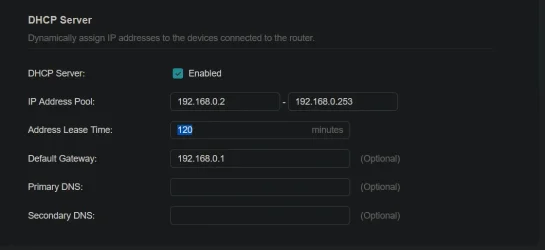
I bought a new router and it has a different DHCP pool range from my old router. Old = 192.168.1.2 - 192.168.1.128; New = 192.168.0.2 - 192.168.0.253. I had two NAS devices set at 192.168.1.81 and 192.168.1.82. I can actually access these through Windows, but they do not appear on the router's device list. I have a third NAS which does show on the device list which also had a fixed IP assigned to it, but I might have used a different method to do the assignment. These are all Synology NAS devices. If I try to change the range on the new router to include the two missing NAS devices, it does not like it. Is there some way I can change the assignment of the NAS devices outside the normal range? Here is the current setup.
1778253624934.webp

JohnD
 

My Computer My Computer

At a glance

Windows 10
OS
Windows 10
Well, you're going to have the NAT layer to contend with. Why not turn the secondary router into an AP? What's the purpose of the two routers?
 

My Computers My Computers

  • At a glance

    Win 11 Pro 25H2, Build 26200.8894Intel Core i5 1450064GB DDR4GeForce RTX 4060
    OS
    Win 11 Pro 25H2, Build 26200.8894
    Computer type
    PC/Desktop
    Manufacturer/Model
    Home Brew
    CPU
    Intel Core i5 14500
    Motherboard
    Gigabyte B760M G P WIFI
    Memory
    64GB DDR4
    Graphics Card(s)
    GeForce RTX 4060
    Sound Card
    Chipset Realtek
    Monitor(s) Displays
    LG 45" Ultragear, Acer 24" 1080p
    Screen Resolution
    5120x1440, 1920x1080
    Hard Drives
    Crucial P310 2TB 2280 PCIe Gen4 3D NAND NVMe M.2 SSD (O/S)
    Silicon Power 2TB US75 NVMe PCIe Gen4 M.2 2280 SSD (backup)
    Crucial BX500 2TB 3D NAND (2nd backup)
    Seagate 4TB Ironwolf, rotating HDD archive files
    External off-line backup Drives: 2 NVMe 4TB drives in external enclosures
    PSU
    Thermaltake Toughpower GF3 750W
    Case
    LIAN LI LANCOOL 216 E-ATX PC Case
    Cooling
    Lots of fans!
    Keyboard
    Microsoft Comfort Curve 2000
    Mouse
    Logitech G305
    Internet Speed
    Verizon FiOS 1GB
    Browser
    Firefox
    Antivirus
    Malware Bytes & Windows Defender Security
  • At a glance

    Win 11 Pro 25H2, Build 26200.8894Intel Core i5 1440032GB DDR5Intel 700 Embedded GPU
    Operating System
    Win 11 Pro 25H2, Build 26200.8894
    Computer type
    PC/Desktop
    Manufacturer/Model
    Home Brew
    CPU
    Intel Core i5 14400
    Motherboard
    Gigabyte B760M DS3H AX
    Memory
    32GB DDR5
    Graphics card(s)
    Intel 700 Embedded GPU
    Sound Card
    Realtek Embedded
    Monitor(s) Displays
    27" HP 1080p
    Screen Resolution
    1920x1080
    Hard Drives
    Crucial P310 2TB 2280 PCIe Gen4 eD NAND PCIe SSD
    Samsung EVO 990 2TB NVMe Gen4 SSD
    Samsung 2TB SATA SSD
    PSU
    Thermaltake Smart BM3 650W
    Case
    Okinos Micro ATX Case
    Cooling
    Fans
    Keyboard
    Microsoft Comfort Curve 2000
    Mouse
    Logitech G305
    Internet Speed
    Verizon FiOS 1GB
    Browser
    Firefox
    Antivirus
    Malware Bytes & Windows Defender Security
  • Nimo N171 17" Laptop, (Intel i3-1215U, 16GB RAM, 2TB NVMe, Win11 Pro)
    Acemagic Vista Mini PC V1 (Intel N150, 16GB RAM, 1TB NVMe, Win11 Pro)
    HP ENVY h8-1540t, (24GB RAM, 2TB SSD, 2TB HDD, Win11 Pro)
John, Forgive me if I'm not understanding the scenario entirely correctly here O let me summarize my understanding: You have a router that you're replacing with a new router but that new router uses a different address pool. The question is how do you adapt your network to handle this range of addresses that your router is programmed to hand out. Is that about right?

If I got that right let me ask this question: why don't you simply change the range of addresses that your new router is handing out to be the same range of addresses that the old router handed out? I know that you said that you already tried to change the range of addresses so that it would cover the range of addresses that the NAS devices have but are you actually doing this properly? In other words are you supplying a valid subnet range You can't just stop At any random address you need to make sure you're covering the entire subnet for example the entire 192.168.X.X address range Or subdividing that further but with valid binary increments.

I'm not going into more detail yet because I'm not sure if I'm even properly addressing your question so for now I'm just waiting to hear feedback from you as to whether I'm properly understanding your situation or not.
 

My Computers My Computers

  • At a glance

    Win11 Pro 25H2 (RTM+)Intel i7-14650HX32 GBNo GPU - Built-in Intel Graphics
    OS
    Win11 Pro 25H2 (RTM+)
    Computer type
    PC/Desktop
    Manufacturer/Model
    Acemagic
    CPU
    Intel i7-14650HX
    Memory
    32 GB
    Graphics Card(s)
    No GPU - Built-in Intel Graphics
    Sound Card
    Integrated
    Monitor(s) Displays
    Varies as machine will often be moved to locations with different monitors
    Screen Resolution
    Varies
    Hard Drives
    1 x 1TB Gen 4 NVMe SSD
    PSU
    120W Power Brick
    Keyboard
    Corsair K70 Max RGB Magnetic Keyboard
    Mouse
    Logitech MX Master 3
    Internet Speed
    1Gb Up / 1 Gb Down
    Browser
    Edge
    Antivirus
    Windows Defender
  • At a glance

    Win11 Pro 25H2 (RTM+)Intel i7-1255U16 GBIntel Iris Xe Graphics
    Operating System
    Win11 Pro 25H2 (RTM+)
    Computer type
    Laptop
    Manufacturer/Model
    Lenovo ThinkBook 13x Gen 2
    CPU
    Intel i7-1255U
    Memory
    16 GB
    Graphics card(s)
    Intel Iris Xe Graphics
    Sound Card
    Realtek® ALC3306-CG codec
    Monitor(s) Displays
    13.3-inch IPS Display
    Screen Resolution
    WQXGA (2560 x 1600)
    Hard Drives
    2 TB 4 x 4 NVMe SSD
    PSU
    USB-C / Thunderbolt 4 Power / Charging
    Keyboard
    Backlit, spill resistant keyboard
    Mouse
    Buttonless Glass Precision Touchpad
    Internet Speed
    1Gb Up / 1Gb Down
    Browser
    Edge
    Antivirus
    Windows Defender
    Other Info
    WiFi 6e / Bluetooth 5.1 / Facial Recognition / Fingerprint Sensor / ToF (Time of Flight) Human Presence Sensor
I read that wrong, if there's only one router involved, I like the suggestion by @hsehestedt as that should solve the whole problem!
 

My Computers My Computers

  • At a glance

    Win 11 Pro 25H2, Build 26200.8894Intel Core i5 1450064GB DDR4GeForce RTX 4060
    OS
    Win 11 Pro 25H2, Build 26200.8894
    Computer type
    PC/Desktop
    Manufacturer/Model
    Home Brew
    CPU
    Intel Core i5 14500
    Motherboard
    Gigabyte B760M G P WIFI
    Memory
    64GB DDR4
    Graphics Card(s)
    GeForce RTX 4060
    Sound Card
    Chipset Realtek
    Monitor(s) Displays
    LG 45" Ultragear, Acer 24" 1080p
    Screen Resolution
    5120x1440, 1920x1080
    Hard Drives
    Crucial P310 2TB 2280 PCIe Gen4 3D NAND NVMe M.2 SSD (O/S)
    Silicon Power 2TB US75 NVMe PCIe Gen4 M.2 2280 SSD (backup)
    Crucial BX500 2TB 3D NAND (2nd backup)
    Seagate 4TB Ironwolf, rotating HDD archive files
    External off-line backup Drives: 2 NVMe 4TB drives in external enclosures
    PSU
    Thermaltake Toughpower GF3 750W
    Case
    LIAN LI LANCOOL 216 E-ATX PC Case
    Cooling
    Lots of fans!
    Keyboard
    Microsoft Comfort Curve 2000
    Mouse
    Logitech G305
    Internet Speed
    Verizon FiOS 1GB
    Browser
    Firefox
    Antivirus
    Malware Bytes & Windows Defender Security
  • At a glance

    Win 11 Pro 25H2, Build 26200.8894Intel Core i5 1440032GB DDR5Intel 700 Embedded GPU
    Operating System
    Win 11 Pro 25H2, Build 26200.8894
    Computer type
    PC/Desktop
    Manufacturer/Model
    Home Brew
    CPU
    Intel Core i5 14400
    Motherboard
    Gigabyte B760M DS3H AX
    Memory
    32GB DDR5
    Graphics card(s)
    Intel 700 Embedded GPU
    Sound Card
    Realtek Embedded
    Monitor(s) Displays
    27" HP 1080p
    Screen Resolution
    1920x1080
    Hard Drives
    Crucial P310 2TB 2280 PCIe Gen4 eD NAND PCIe SSD
    Samsung EVO 990 2TB NVMe Gen4 SSD
    Samsung 2TB SATA SSD
    PSU
    Thermaltake Smart BM3 650W
    Case
    Okinos Micro ATX Case
    Cooling
    Fans
    Keyboard
    Microsoft Comfort Curve 2000
    Mouse
    Logitech G305
    Internet Speed
    Verizon FiOS 1GB
    Browser
    Firefox
    Antivirus
    Malware Bytes & Windows Defender Security
  • Nimo N171 17" Laptop, (Intel i3-1215U, 16GB RAM, 2TB NVMe, Win11 Pro)
    Acemagic Vista Mini PC V1 (Intel N150, 16GB RAM, 1TB NVMe, Win11 Pro)
    HP ENVY h8-1540t, (24GB RAM, 2TB SSD, 2TB HDD, Win11 Pro)
John, Forgive me if I'm not understanding the scenario entirely correctly here O let me summarize my understanding: You have a router that you're replacing with a new router but that new router uses a different address pool. The question is how do you adapt your network to handle this range of addresses that your router is programmed to hand out. Is that about right?

If I got that right let me ask this question: why don't you simply change the range of addresses that your new router is handing out to be the same range of addresses that the old router handed out? I know that you said that you already tried to change the range of addresses so that it would cover the range of addresses that the NAS devices have but are you actually doing this properly? In other words are you supplying a valid subnet range You can't just stop At any random address you need to make sure you're covering the entire subnet for example the entire 192.168.X.X address range Or subdividing that further but with valid binary increments.

I'm not going into more detail yet because I'm not sure if I'm even properly addressing your question so for now I'm just waiting to hear feedback from you as to whether I'm properly understanding your situation or not.
That was my first thought too..
Change the DHCP address range back to that used by the original router (not sure why it stopped at 128 tho'?) and.. bingo! Problem solved!
 

My Computer My Computer

At a glance

Win11 Pro 25H2 Latest GA buildIntel(R) Core(TM) i9-14900KF 3.20 GHzG.Skill DDR5-5600 / PC5-44800 DDR5 SDRAM UDIMMGIGABYTE GeForce RTX 4070 Ti WINDFORCE OC 12G...
OS
Win11 Pro 25H2 Latest GA build
Computer type
PC/Desktop
Manufacturer/Model
Powerspec
CPU
Intel(R) Core(TM) i9-14900KF 3.20 GHz
Motherboard
MSI PRO Z690-A WIFI (latest BIOS)
Memory
G.Skill DDR5-5600 / PC5-44800 DDR5 SDRAM UDIMM
Graphics Card(s)
GIGABYTE GeForce RTX 4070 Ti WINDFORCE OC 12G (GV-N407TWF3OC-12GD)
Sound Card
OnBoard
Monitor(s) Displays
Dell - various (3)
Screen Resolution
1920x1080
Hard Drives
SSD/HDD/NVME
PSU
850 Watt 80+ Gold Modular
Case
PowerSpec/Lian Li ATX 205 Mesh
Cooling
Coolermaster MASTERLIQUID ML240L V2 RGB
Keyboard
Logi MX Keys S
Mouse
MX Master 3S
Internet Speed
600 mbps
Browser
various (Opera, Vivaldi, Edge, Brave, Chrome)
Antivirus
anitmalwarebytes; superantispyware; defender
Other Info
Windows Feature Experience Pack 1000.26100.36.0
It won't let me do that. I am wondering if I have to change the default gateway first, then change the pool range to correspond to the gateway?

JohnD
 

My Computer My Computer

At a glance

Windows 10
OS
Windows 10
It won't let me do that. I am wondering if I have to change the default gateway first, then change the pool range to correspond to the gateway?

JohnD
Yes. You'll first need to change the routers BASE IP - they usually arrive as 192.168.1.1
idk why your 3rd node = 0.
Default DHCP settings are based off that base IP and are (unless user modified) in the range of 192.168.1.2 - 192.168.1.255

Gateway would be: 192.168.1.1
subnet mask: 255.255.255.0
 

My Computer My Computer

At a glance

Win11 Pro 25H2 Latest GA buildIntel(R) Core(TM) i9-14900KF 3.20 GHzG.Skill DDR5-5600 / PC5-44800 DDR5 SDRAM UDIMMGIGABYTE GeForce RTX 4070 Ti WINDFORCE OC 12G...
OS
Win11 Pro 25H2 Latest GA build
Computer type
PC/Desktop
Manufacturer/Model
Powerspec
CPU
Intel(R) Core(TM) i9-14900KF 3.20 GHz
Motherboard
MSI PRO Z690-A WIFI (latest BIOS)
Memory
G.Skill DDR5-5600 / PC5-44800 DDR5 SDRAM UDIMM
Graphics Card(s)
GIGABYTE GeForce RTX 4070 Ti WINDFORCE OC 12G (GV-N407TWF3OC-12GD)
Sound Card
OnBoard
Monitor(s) Displays
Dell - various (3)
Screen Resolution
1920x1080
Hard Drives
SSD/HDD/NVME
PSU
850 Watt 80+ Gold Modular
Case
PowerSpec/Lian Li ATX 205 Mesh
Cooling
Coolermaster MASTERLIQUID ML240L V2 RGB
Keyboard
Logi MX Keys S
Mouse
MX Master 3S
Internet Speed
600 mbps
Browser
various (Opera, Vivaldi, Edge, Brave, Chrome)
Antivirus
anitmalwarebytes; superantispyware; defender
Other Info
Windows Feature Experience Pack 1000.26100.36.0
@hsehestedt is the man when dealing with networking.
I'm a safety gal and here's the way I would accomplish doing what he said.

1.Turn off all devices in the network including printers.
2. On router disconnect cable from INTERNET (poe) port.
3. Connect only one device to the router using an ethernet cable to one of its ETHERNET ports, access router configuration and change its ip and address range. ( SSID. too, if you want to keep what was being broadcast from the old router.) Save configuration. Restart the router.
4. Reconnect POE cable back to Internet port on router.
4. Reconnect each device one at a time. I would also probably go so far as to reset networking in each device.
Overkill? Maybe. But I'm a better safe than sorry gal.
 

My Computers My Computers

  • At a glance

    Windows 11 Pro 25H2 26200.8875i9-10900 10 core 20 threads32 gbnone-Intel UHD Graphics 630
    OS
    Windows 11 Pro 25H2 26200.8875
    Computer type
    PC/Desktop
    Manufacturer/Model
    Dell Optiplex 7080
    CPU
    i9-10900 10 core 20 threads
    Motherboard
    DELL 0J37VM
    Memory
    32 gb
    Graphics Card(s)
    none-Intel UHD Graphics 630
    Sound Card
    Integrated Realtek
    Monitor(s) Displays
    Benq 27
    Screen Resolution
    2560x1440
    Hard Drives
    2x1tb Solidigm m.2 nvme /External drives 512gb Samsung m.2 sata+2tb Kingston m2.nvme
    PSU
    500w
    Case
    MT
    Cooling
    Dell Premium
    Keyboard
    Logitech wired
    Mouse
    Logitech wireless
    Internet Speed
    so slow I'm too embarrassed to tell
    Browser
    #1 Edge #2 Firefox
    Antivirus
    Defender+MWB Premium
  • At a glance

    Windows 11 Pro 24H2 26200.8875AMD Ryzen 7 6800U32 gbintegrated
    Operating System
    Windows 11 Pro 24H2 26200.8875
    Computer type
    PC/Desktop
    Manufacturer/Model
    Beelink Mini PC SER5
    CPU
    AMD Ryzen 7 6800U
    Memory
    32 gb
    Graphics card(s)
    integrated
    Sound Card
    integrated
    Monitor(s) Displays
    Benq 27
    Screen Resolution
    2560x1440
    Hard Drives
    1TB Crucial nvme
    Keyboard
    Logitech wired
    Mouse
    Logitech wireless
    Internet Speed
    still too embarrassed to tell
    Browser
    Firefox
    Antivirus
    Defender
    Other Info
    System 3 is non compliant Dell 9020 i7-4770/24gb ram Win11 PRO 26200.8875
1. That would be difficult. I have too many to shut off including a number of IoT devices. I can disconnect all devices from the router fairly easily as I have two cables going to wired computers and two cables going to switches which handle everything else.
2. You are saying disconnect the router from the modem?
3. I can easily connect one of the wired computers. I assume I need to change the default gateway and the IP address pool as shown on the screen print above? I don't want to change the SSIDs as then I would have to change all the devices that are connecting to the network. I am just using the original 2.4 and 5Ghz SSIDs.
4a. Reconnect back to the modem.
4b. It would be easier to reconnect one switch at a time to see if that works. It looks like I have about eight devices spread among the two switches.

JohnD
 

My Computer My Computer

At a glance

Windows 10
OS
Windows 10
@johnpd - I don't believe you need to shut them off, but a simple disconnect of the switches from the main router would suffice - since they aren't working with static IP's anyway.
Once you've change the primary router's IP, (probably requires a power cycle/restart) then DHCP should start assigning addresses and your NAS devices w/ static IP's should start showing again on the network.
Devices previously assigned IP's on the old 0.1 network should automatically refresh on the 1.1 network.
 

My Computer My Computer

At a glance

Win11 Pro 25H2 Latest GA buildIntel(R) Core(TM) i9-14900KF 3.20 GHzG.Skill DDR5-5600 / PC5-44800 DDR5 SDRAM UDIMMGIGABYTE GeForce RTX 4070 Ti WINDFORCE OC 12G...
OS
Win11 Pro 25H2 Latest GA build
Computer type
PC/Desktop
Manufacturer/Model
Powerspec
CPU
Intel(R) Core(TM) i9-14900KF 3.20 GHz
Motherboard
MSI PRO Z690-A WIFI (latest BIOS)
Memory
G.Skill DDR5-5600 / PC5-44800 DDR5 SDRAM UDIMM
Graphics Card(s)
GIGABYTE GeForce RTX 4070 Ti WINDFORCE OC 12G (GV-N407TWF3OC-12GD)
Sound Card
OnBoard
Monitor(s) Displays
Dell - various (3)
Screen Resolution
1920x1080
Hard Drives
SSD/HDD/NVME
PSU
850 Watt 80+ Gold Modular
Case
PowerSpec/Lian Li ATX 205 Mesh
Cooling
Coolermaster MASTERLIQUID ML240L V2 RGB
Keyboard
Logi MX Keys S
Mouse
MX Master 3S
Internet Speed
600 mbps
Browser
various (Opera, Vivaldi, Edge, Brave, Chrome)
Antivirus
anitmalwarebytes; superantispyware; defender
Other Info
Windows Feature Experience Pack 1000.26100.36.0
OK, it looks like I got everything back. I was able to get a hold of TP-Link support and the support person said all I had to do was change the default gateway IP address and the router would resolve everything else. So that is what I did and now it looks good.

Thanks all for your help,
JohnD
 

My Computer My Computer

At a glance

Windows 10
OS
Windows 10
Yes. You'll first need to change the routers BASE IP - they usually arrive as 192.168.1.1
idk why your 3rd node = 0.
The entire network address space of 192.168.0.0 thru 192.168.255.255 is considered "private" network space.

Whether your router's IP defaults to 192.168.0.1, 192.168.1.1, 192.168.2.1 or whatever is simply a convention.

The last two octets can be whatever you want, and different manufacturers can use different default IP addresses. If you have an older router that you're replacing, many times it's easier to go with what network IP's you had before, so you don't have to make too many changes on the network clients.
 

My Computer My Computer

At a glance

Windows 7
OS
Windows 7
The entire network address space of 192.168.0.0 thru 192.168.255.255 is considered "private" network space.

Whether your router's IP defaults to 192.168.0.1, 192.168.1.1, 192.168.2.1 or whatever is simply a convention.

The last two octets can be whatever you want, and different manufacturers can use different default IP addresses. If you have an older router that you're replacing, many times it's easier to go with what network IP's you had before, so you don't have to make too many changes on the network clients.
Thanks, but I’m well aware of the 3 privates network classes and network structures. I did NOT know how much network knowledge the OP had (based on his post) so I kept it simple.
I could have said 192.168.1.0/24 but wanted to avoid going down the CIDR rabbit hole. 😁
 

My Computer My Computer

At a glance

Win11 Pro 25H2 Latest GA buildIntel(R) Core(TM) i9-14900KF 3.20 GHzG.Skill DDR5-5600 / PC5-44800 DDR5 SDRAM UDIMMGIGABYTE GeForce RTX 4070 Ti WINDFORCE OC 12G...
OS
Win11 Pro 25H2 Latest GA build
Computer type
PC/Desktop
Manufacturer/Model
Powerspec
CPU
Intel(R) Core(TM) i9-14900KF 3.20 GHz
Motherboard
MSI PRO Z690-A WIFI (latest BIOS)
Memory
G.Skill DDR5-5600 / PC5-44800 DDR5 SDRAM UDIMM
Graphics Card(s)
GIGABYTE GeForce RTX 4070 Ti WINDFORCE OC 12G (GV-N407TWF3OC-12GD)
Sound Card
OnBoard
Monitor(s) Displays
Dell - various (3)
Screen Resolution
1920x1080
Hard Drives
SSD/HDD/NVME
PSU
850 Watt 80+ Gold Modular
Case
PowerSpec/Lian Li ATX 205 Mesh
Cooling
Coolermaster MASTERLIQUID ML240L V2 RGB
Keyboard
Logi MX Keys S
Mouse
MX Master 3S
Internet Speed
600 mbps
Browser
various (Opera, Vivaldi, Edge, Brave, Chrome)
Antivirus
anitmalwarebytes; superantispyware; defender
Other Info
Windows Feature Experience Pack 1000.26100.36.0
Back
Top Bottom




