
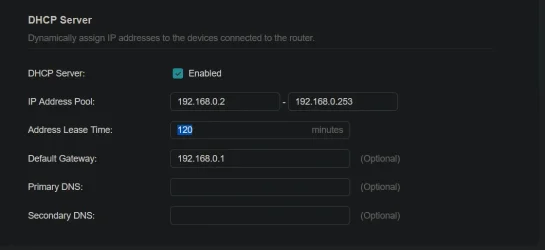
I bought a new router and it has a different DHCP pool range from my old router. Old = 192.168.1.2 - 192.168.1.128; New = 192.168.0.2 - 192.168.0.253. I had two NAS devices set at 192.168.1.81 and 192.168.1.82. I can actually access these through Windows, but they do not appear on the router's device list. I have a third NAS which does show on the device list which also had a fixed IP assigned to it, but I might have used a different method to do the assignment. These are all Synology NAS devices. If I try to change the range on the new router to include the two missing NAS devices, it does not like it. Is there some way I can change the assignment of the NAS devices outside the normal range? Here is the current setup.
JohnD
JohnD
My Computer
At a glance
Windows 10
- OS
- Windows 10






