Solved How to achieve *complete" shutdown of Windows 11 Pro x64?


rsbrux

Well-known member
Local time
6:44 PM
Posts
40
OS
Windows 11 Pro 25H2 Build 26200.7623
I usually use my Lenovo X1 2-in-1 on AC power and shut it down via the shutdown option in the Alt-F4 menu. After I did so recently I disconnected the laptop from AC power and left it in storage for a few days. When I retrieved it, the battery was almost fully discharged, so it evidently had *not* been fully shut down. I have already disabled "fast boot". What else can I do to ensure that shut down really does what it says?
 
Windows Build/Version
25H2

My Computers My Computers

  • At a glance

    Windows 11 Pro 25H2 Build 26200.7623Intel i5-1240016GBnone (INTEL UHD graphics 730 onboard)
    OS
    Windows 11 Pro 25H2 Build 26200.7623
    Computer type
    PC/Desktop
    Manufacturer/Model
    Gigabyte mainboard in FSC case
    CPU
    Intel i5-12400
    Motherboard
    Gigabyte H610 S2H V2 DDR4
    Memory
    16GB
    Graphics Card(s)
    none (INTEL UHD graphics 730 onboard)
    Sound Card
    none (7.1 channel Realtek HDA onboard)
    Monitor(s) Displays
    Panasonic TV
    Screen Resolution
    3840x2160
    Hard Drives
    KIOXIA-EXCERIA SSD 512GB
    TOSHIBA MQ01ABB200 2TB
    Case
    FSC SCALEO E
    Cooling
    ARCTIC CPU fan, 2 powersupply fans
    Keyboard
    various
    Mouse
    various
  • At a glance

    Windows 11 Pro 25H2 Build 26200.7623Intel(R) Core(TM) Ultra 7 165U (1.70 GHz)64.0 GB (63.5 GB usable)128 MB Intel Graphics
    Operating System
    Windows 11 Pro 25H2 Build 26200.7623
    Computer type
    Laptop
    Manufacturer/Model
    Lenovo X1 2-in-1
    CPU
    Intel(R) Core(TM) Ultra 7 165U (1.70 GHz)
    Motherboard
    Lenovo
    Memory
    64.0 GB (63.5 GB usable)
    Graphics card(s)
    128 MB Intel Graphics
    Sound Card
    none
    Monitor(s) Displays
    Philips 27B2U6903
    Screen Resolution
    3840x2160
    Hard Drives
    1 GB built-in SSD
    Mouse
    Kensington Expert Mouse (trackball)
    Browser
    Firefox
Shift/Shutdown
 

My Computers My Computers

  • At a glance

    Windows 11 Pro
    OS
    Windows 11 Pro
    Computer type
    PC/Desktop
    Manufacturer/Model
    ASUS ROG Strix
  • At a glance

    Windows 11 Pro
    Operating System
    Windows 11 Pro
    Computer type
    Laptop
    Manufacturer/Model
    ASUS VivoBook
  • ASUS VivoBook 'Lite' ~ Windows 11 Home
Thanks for the quick response. I assume that you mean I should hold down the shift key while I pick shutdown from the Alt-F4 menu.
Is there a way to tell if the PC is *really* shutdown? The red LED on the cover turns off, even if I don't use the shift key.
I am also missing the earlier option "Install updates and shut down". Now I don't get any shutdown option at all if updates are pending.
 

My Computers My Computers

  • At a glance

    Windows 11 Pro 25H2 Build 26200.7623Intel i5-1240016GBnone (INTEL UHD graphics 730 onboard)
    OS
    Windows 11 Pro 25H2 Build 26200.7623
    Computer type
    PC/Desktop
    Manufacturer/Model
    Gigabyte mainboard in FSC case
    CPU
    Intel i5-12400
    Motherboard
    Gigabyte H610 S2H V2 DDR4
    Memory
    16GB
    Graphics Card(s)
    none (INTEL UHD graphics 730 onboard)
    Sound Card
    none (7.1 channel Realtek HDA onboard)
    Monitor(s) Displays
    Panasonic TV
    Screen Resolution
    3840x2160
    Hard Drives
    KIOXIA-EXCERIA SSD 512GB
    TOSHIBA MQ01ABB200 2TB
    Case
    FSC SCALEO E
    Cooling
    ARCTIC CPU fan, 2 powersupply fans
    Keyboard
    various
    Mouse
    various
  • At a glance

    Windows 11 Pro 25H2 Build 26200.7623Intel(R) Core(TM) Ultra 7 165U (1.70 GHz)64.0 GB (63.5 GB usable)128 MB Intel Graphics
    Operating System
    Windows 11 Pro 25H2 Build 26200.7623
    Computer type
    Laptop
    Manufacturer/Model
    Lenovo X1 2-in-1
    CPU
    Intel(R) Core(TM) Ultra 7 165U (1.70 GHz)
    Motherboard
    Lenovo
    Memory
    64.0 GB (63.5 GB usable)
    Graphics card(s)
    128 MB Intel Graphics
    Sound Card
    none
    Monitor(s) Displays
    Philips 27B2U6903
    Screen Resolution
    3840x2160
    Hard Drives
    1 GB built-in SSD
    Mouse
    Kensington Expert Mouse (trackball)
    Browser
    Firefox
... you mean I should hold down the shift key while I pick shutdown from the Alt-F4 menu.
Or, hold Shift will pressing the normal Shut down button. (Hold Shift until the screen turns off)

12885.webp
Is there a way to tell if the PC is *really* shutdown?
On next boot, look in Event Viewer, if it shows the last session boot type as 0x0, it booted from a Cold Shutdown.

You can check it through PowerShell as well, I just can't recall the command. You could probably Google it.
 

My Computers My Computers

  • At a glance

    Windows 11 Pro
    OS
    Windows 11 Pro
    Computer type
    PC/Desktop
    Manufacturer/Model
    ASUS ROG Strix
  • At a glance

    Windows 11 Pro
    Operating System
    Windows 11 Pro
    Computer type
    Laptop
    Manufacturer/Model
    ASUS VivoBook
  • ASUS VivoBook 'Lite' ~ Windows 11 Home
Last edited:

My Computer My Computer

At a glance

Windows 11 Home x64 Version 25H2 Build 26200....
OS
Windows 11 Home x64 Version 25H2 Build 26200.8037
Is it necessary to use the shift key? I didn't have a clue of this. How many classes of "shut down" are there? I used to think that there's only two options: computer still plugged to the mains (this caused noticeable consumption with very old hw, from 17 years ago or more, but afaik this was a desktops issue, the EU and other countries produced norms against this and the PSU makers adapted to it fast) or totally unplugged (you can achieve this comfortably with a power strip at your feet or near anyway). Can you really "shut down" and leave the rig still working???
 

My Computer My Computer

At a glance

Windows 11Celeron J4125 (10th gen)8GB DDR4
OS
Windows 11
Manufacturer/Model
MeLE Quieter 2Q (fanless miniPC)
CPU
Celeron J4125 (10th gen)
Memory
8GB DDR4
Monitor(s) Displays
Samsung SyncMaster T260
Screen Resolution
1920x1200
Hard Drives
256GB eMMC (Windows)
2TB USB3 HDD Toshiba (Data)
I shut down by Typing Alt-F4 and then holding shift down while clicking the OK button in the resulting dialog:
ShutDownDialog.webp
After starting the PC again, this PowerShell command confirmed that I had indeed started from a complete shutdown (type 0x0):
Powershell:
Get-WinEvent -ProviderName Microsoft-Windows-Kernel-boot -MaxEvents 10 | Where-Object {$_.message -like "The boot type*"}
So as not to have to remember to use shift, I am going to create a shortcut on my desktop to run:
shutdown /s
in the hope that this will accomplish the same thing.
Many thanks for all of your help!
 

My Computers My Computers

  • At a glance

    Windows 11 Pro 25H2 Build 26200.7623Intel i5-1240016GBnone (INTEL UHD graphics 730 onboard)
    OS
    Windows 11 Pro 25H2 Build 26200.7623
    Computer type
    PC/Desktop
    Manufacturer/Model
    Gigabyte mainboard in FSC case
    CPU
    Intel i5-12400
    Motherboard
    Gigabyte H610 S2H V2 DDR4
    Memory
    16GB
    Graphics Card(s)
    none (INTEL UHD graphics 730 onboard)
    Sound Card
    none (7.1 channel Realtek HDA onboard)
    Monitor(s) Displays
    Panasonic TV
    Screen Resolution
    3840x2160
    Hard Drives
    KIOXIA-EXCERIA SSD 512GB
    TOSHIBA MQ01ABB200 2TB
    Case
    FSC SCALEO E
    Cooling
    ARCTIC CPU fan, 2 powersupply fans
    Keyboard
    various
    Mouse
    various
  • At a glance

    Windows 11 Pro 25H2 Build 26200.7623Intel(R) Core(TM) Ultra 7 165U (1.70 GHz)64.0 GB (63.5 GB usable)128 MB Intel Graphics
    Operating System
    Windows 11 Pro 25H2 Build 26200.7623
    Computer type
    Laptop
    Manufacturer/Model
    Lenovo X1 2-in-1
    CPU
    Intel(R) Core(TM) Ultra 7 165U (1.70 GHz)
    Motherboard
    Lenovo
    Memory
    64.0 GB (63.5 GB usable)
    Graphics card(s)
    128 MB Intel Graphics
    Sound Card
    none
    Monitor(s) Displays
    Philips 27B2U6903
    Screen Resolution
    3840x2160
    Hard Drives
    1 GB built-in SSD
    Mouse
    Kensington Expert Mouse (trackball)
    Browser
    Firefox
I am going to create a shortcut on my desktop to run:
shutdown /s

I use
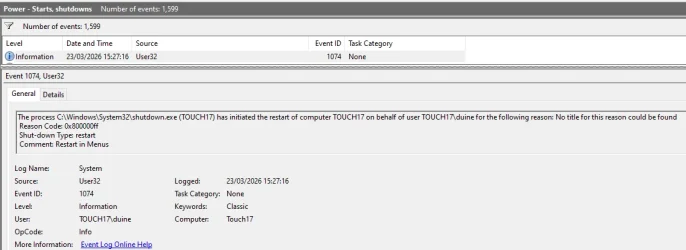
shutdown.exe /s /t 0 /f /c "Shutdown in Menus"
Shutdown - SS64
Shutdown - MSLearn
The only point of the /c "Shutdown in Menus" is that it leaves that text in the Event viewer records so I can spot deliberate shutdowns more easily when troubleshooting.

My Restart shortcut is
shutdown.exe /r /t 0 /f /c "Restart in Menus"

shutdown /s
in the hope that this will accomplish the same thing
Yes, it does.


Denis
 

My Computer My Computer

At a glance

Windows 11 Home x64 Version 25H2 Build 26200....
OS
Windows 11 Home x64 Version 25H2 Build 26200.8037
Thanks for the tips!
I purposely left out /f & /t 0 because I want to give any open applications a chance to exit gracefully (although I always close everything visible before shutdown anyway).
What I have read about the shutdown command says that /c only works from an admin account; I am almost always logged into an unprivileged account.
 

My Computers My Computers

  • At a glance

    Windows 11 Pro 25H2 Build 26200.7623Intel i5-1240016GBnone (INTEL UHD graphics 730 onboard)
    OS
    Windows 11 Pro 25H2 Build 26200.7623
    Computer type
    PC/Desktop
    Manufacturer/Model
    Gigabyte mainboard in FSC case
    CPU
    Intel i5-12400
    Motherboard
    Gigabyte H610 S2H V2 DDR4
    Memory
    16GB
    Graphics Card(s)
    none (INTEL UHD graphics 730 onboard)
    Sound Card
    none (7.1 channel Realtek HDA onboard)
    Monitor(s) Displays
    Panasonic TV
    Screen Resolution
    3840x2160
    Hard Drives
    KIOXIA-EXCERIA SSD 512GB
    TOSHIBA MQ01ABB200 2TB
    Case
    FSC SCALEO E
    Cooling
    ARCTIC CPU fan, 2 powersupply fans
    Keyboard
    various
    Mouse
    various
  • At a glance

    Windows 11 Pro 25H2 Build 26200.7623Intel(R) Core(TM) Ultra 7 165U (1.70 GHz)64.0 GB (63.5 GB usable)128 MB Intel Graphics
    Operating System
    Windows 11 Pro 25H2 Build 26200.7623
    Computer type
    Laptop
    Manufacturer/Model
    Lenovo X1 2-in-1
    CPU
    Intel(R) Core(TM) Ultra 7 165U (1.70 GHz)
    Motherboard
    Lenovo
    Memory
    64.0 GB (63.5 GB usable)
    Graphics card(s)
    128 MB Intel Graphics
    Sound Card
    none
    Monitor(s) Displays
    Philips 27B2U6903
    Screen Resolution
    3840x2160
    Hard Drives
    1 GB built-in SSD
    Mouse
    Kensington Expert Mouse (trackball)
    Browser
    Firefox
What I have read about the shutdown command says that /c only works from an admin account
No, /c does not need any Admin privileges to work.
Shutdown reason in Event viewer.webp

Perhaps, but I can only speculate, somebody was trying to explain that running Event viewer needs Admin privileges.


Denis
 

Attachments

  • Shutdown reason in Event viewer.webp
    Shutdown reason in Event viewer.webp
    34 KB · Views: 1

My Computer My Computer

At a glance

Windows 11 Home x64 Version 25H2 Build 26200....
OS
Windows 11 Home x64 Version 25H2 Build 26200.8037
I want to give any open applications a chance to exit gracefully (although I always close everything visible before shutdown anyway).
That's actually good practice, for background apps too, especially if you have WaitToKillAppTimeout set to an extremely low value.
 

My Computers My Computers

  • At a glance

    Windows 11 Pro
    OS
    Windows 11 Pro
    Computer type
    PC/Desktop
    Manufacturer/Model
    ASUS ROG Strix
  • At a glance

    Windows 11 Pro
    Operating System
    Windows 11 Pro
    Computer type
    Laptop
    Manufacturer/Model
    ASUS VivoBook
  • ASUS VivoBook 'Lite' ~ Windows 11 Home
Fortunately I haven't had any problems with applications not exiting gracefully in a short time since I got rid of MS365 Outlook.
The problems may have been due to GWSMO rather than Outlook itself.
 

My Computers My Computers

  • At a glance

    Windows 11 Pro 25H2 Build 26200.7623Intel i5-1240016GBnone (INTEL UHD graphics 730 onboard)
    OS
    Windows 11 Pro 25H2 Build 26200.7623
    Computer type
    PC/Desktop
    Manufacturer/Model
    Gigabyte mainboard in FSC case
    CPU
    Intel i5-12400
    Motherboard
    Gigabyte H610 S2H V2 DDR4
    Memory
    16GB
    Graphics Card(s)
    none (INTEL UHD graphics 730 onboard)
    Sound Card
    none (7.1 channel Realtek HDA onboard)
    Monitor(s) Displays
    Panasonic TV
    Screen Resolution
    3840x2160
    Hard Drives
    KIOXIA-EXCERIA SSD 512GB
    TOSHIBA MQ01ABB200 2TB
    Case
    FSC SCALEO E
    Cooling
    ARCTIC CPU fan, 2 powersupply fans
    Keyboard
    various
    Mouse
    various
  • At a glance

    Windows 11 Pro 25H2 Build 26200.7623Intel(R) Core(TM) Ultra 7 165U (1.70 GHz)64.0 GB (63.5 GB usable)128 MB Intel Graphics
    Operating System
    Windows 11 Pro 25H2 Build 26200.7623
    Computer type
    Laptop
    Manufacturer/Model
    Lenovo X1 2-in-1
    CPU
    Intel(R) Core(TM) Ultra 7 165U (1.70 GHz)
    Motherboard
    Lenovo
    Memory
    64.0 GB (63.5 GB usable)
    Graphics card(s)
    128 MB Intel Graphics
    Sound Card
    none
    Monitor(s) Displays
    Philips 27B2U6903
    Screen Resolution
    3840x2160
    Hard Drives
    1 GB built-in SSD
    Mouse
    Kensington Expert Mouse (trackball)
    Browser
    Firefox
No, /c does not need any Admin privileges to work.
Perhaps, but I can only speculate, somebody was trying to explain that running Event viewer needs Admin privilege
Absolutely correct, thanks!
I can't find where I saw that, but Event viewer can also be run for viewing without admin privileges, if you know where you need to look.
 

My Computers My Computers

  • At a glance

    Windows 11 Pro 25H2 Build 26200.7623Intel i5-1240016GBnone (INTEL UHD graphics 730 onboard)
    OS
    Windows 11 Pro 25H2 Build 26200.7623
    Computer type
    PC/Desktop
    Manufacturer/Model
    Gigabyte mainboard in FSC case
    CPU
    Intel i5-12400
    Motherboard
    Gigabyte H610 S2H V2 DDR4
    Memory
    16GB
    Graphics Card(s)
    none (INTEL UHD graphics 730 onboard)
    Sound Card
    none (7.1 channel Realtek HDA onboard)
    Monitor(s) Displays
    Panasonic TV
    Screen Resolution
    3840x2160
    Hard Drives
    KIOXIA-EXCERIA SSD 512GB
    TOSHIBA MQ01ABB200 2TB
    Case
    FSC SCALEO E
    Cooling
    ARCTIC CPU fan, 2 powersupply fans
    Keyboard
    various
    Mouse
    various
  • At a glance

    Windows 11 Pro 25H2 Build 26200.7623Intel(R) Core(TM) Ultra 7 165U (1.70 GHz)64.0 GB (63.5 GB usable)128 MB Intel Graphics
    Operating System
    Windows 11 Pro 25H2 Build 26200.7623
    Computer type
    Laptop
    Manufacturer/Model
    Lenovo X1 2-in-1
    CPU
    Intel(R) Core(TM) Ultra 7 165U (1.70 GHz)
    Motherboard
    Lenovo
    Memory
    64.0 GB (63.5 GB usable)
    Graphics card(s)
    128 MB Intel Graphics
    Sound Card
    none
    Monitor(s) Displays
    Philips 27B2U6903
    Screen Resolution
    3840x2160
    Hard Drives
    1 GB built-in SSD
    Mouse
    Kensington Expert Mouse (trackball)
    Browser
    Firefox
Perhaps that tip was correct after all. Using the following command:
Batch:
C:\Windows\System32\shutdown.exe /s /c "manual shutdown"
I don't see the /c text anywhere. Neither in the Event Viewer (screenshot attached), nor with either of the following commands:
Powershell:
Get-WinEvent -ProviderName Microsoft-Windows-Kernel-boot -MaxEvents 10 | Where-Object {$_.id -like "27"}
or
Powershell:
Get-WinEvent -ProviderName Microsoft-Windows-Kernel-boot -MaxEvents 10 | Where-Object {$_.message -like "The boot type*"}
BootEvent.webp
 

My Computers My Computers

  • At a glance

    Windows 11 Pro 25H2 Build 26200.7623Intel i5-1240016GBnone (INTEL UHD graphics 730 onboard)
    OS
    Windows 11 Pro 25H2 Build 26200.7623
    Computer type
    PC/Desktop
    Manufacturer/Model
    Gigabyte mainboard in FSC case
    CPU
    Intel i5-12400
    Motherboard
    Gigabyte H610 S2H V2 DDR4
    Memory
    16GB
    Graphics Card(s)
    none (INTEL UHD graphics 730 onboard)
    Sound Card
    none (7.1 channel Realtek HDA onboard)
    Monitor(s) Displays
    Panasonic TV
    Screen Resolution
    3840x2160
    Hard Drives
    KIOXIA-EXCERIA SSD 512GB
    TOSHIBA MQ01ABB200 2TB
    Case
    FSC SCALEO E
    Cooling
    ARCTIC CPU fan, 2 powersupply fans
    Keyboard
    various
    Mouse
    various
  • At a glance

    Windows 11 Pro 25H2 Build 26200.7623Intel(R) Core(TM) Ultra 7 165U (1.70 GHz)64.0 GB (63.5 GB usable)128 MB Intel Graphics
    Operating System
    Windows 11 Pro 25H2 Build 26200.7623
    Computer type
    Laptop
    Manufacturer/Model
    Lenovo X1 2-in-1
    CPU
    Intel(R) Core(TM) Ultra 7 165U (1.70 GHz)
    Motherboard
    Lenovo
    Memory
    64.0 GB (63.5 GB usable)
    Graphics card(s)
    128 MB Intel Graphics
    Sound Card
    none
    Monitor(s) Displays
    Philips 27B2U6903
    Screen Resolution
    3840x2160
    Hard Drives
    1 GB built-in SSD
    Mouse
    Kensington Expert Mouse (trackball)
    Browser
    Firefox
The /c comment is in the Event 1074 General tab - see the example in my post #10 picture.
I do not use Admin permissions when running my shutdown command.

The /c comment is not related to Event 27.
garlin posted an improved version of the first of those PS commands which I incorporated within a ps1 script rather than an Event viewer, Custom view because I find it more convenient to run a script than to open up Event viewer - adapting garlin's original code - my post #9 - ElevenForum

I've attached a Custom view definition that shows Starts & Shutdown events. It includes EventID 1074.
In case you do not already know how to import an Event viewer, Custom view definition there's an explanation in my post
Importing Event Viewer, Custom View - my post #23 - ElevenForum
Read from the line "To import it:" - you use the same procedure as in that post.
[You can also import the Custom view definition used in that example if you are interested in the transition between power-sleep states but you'll also need to read the explanatory notes from the line beginning 'You can see records of transitions' in that post because interpreting power-sleep state transition records is not straightforward.]


All the best,
Denis


Welcome to ElevenForum.

It's really worth making time to browse through the ElevenForum Tutorial index - there's a shortcut to it at the top of every ElevenForum page [within the Tutorials dropdown list].
- At the foot of the ElevenForum Tutorial index is a shortcut to download it as a spreadsheet.
- I download a new copy each month.
- By downloading it as a spreadsheet I can benefit from Excel's excellent filtering capabilities when I search for topics of interest.
- ElevenForum tutorials are also listed at Tutorials and there's a shortcut to that at the top of every page.

You can search ElevenForum using the search box in the top-right corner of all ElevenForum webpages or using Advanced Search - ElevenForum
- You can also search ElevenForum threads in many general search engines, such as Google, by adding site:elevenforum.com after your search term. For example,
Taskbar setup site:elevenforum.com
- [This is what the search box in the top-right corner of ElevenForum webpages does automatically]
 

Attachments

Last edited:

My Computer My Computer

At a glance

Windows 11 Home x64 Version 25H2 Build 26200....
OS
Windows 11 Home x64 Version 25H2 Build 26200.8037
The /c comment is in the Event 1074 General tab - see the example in my post #10 picture.
I do not use Admin permissions when running my shutdown command.
Thanks for your patience and detailed explanation! Sorry I didn't examine your screenshot more carefully. ;-}
Many thanks also for your comprehensive PowerShell script!
Welcome to ElevenForum.

It's really worth making time to browse through the ElevenForum Tutorial index - there's a shortcut to it at the top of every ElevenForum page [within the Tutorials dropdown list].
I did in fact search the tutorials but got no hits, but I wasn't aware of the Tutorial Index. Thanks for the tip!
 

My Computers My Computers

  • At a glance

    Windows 11 Pro 25H2 Build 26200.7623Intel i5-1240016GBnone (INTEL UHD graphics 730 onboard)
    OS
    Windows 11 Pro 25H2 Build 26200.7623
    Computer type
    PC/Desktop
    Manufacturer/Model
    Gigabyte mainboard in FSC case
    CPU
    Intel i5-12400
    Motherboard
    Gigabyte H610 S2H V2 DDR4
    Memory
    16GB
    Graphics Card(s)
    none (INTEL UHD graphics 730 onboard)
    Sound Card
    none (7.1 channel Realtek HDA onboard)
    Monitor(s) Displays
    Panasonic TV
    Screen Resolution
    3840x2160
    Hard Drives
    KIOXIA-EXCERIA SSD 512GB
    TOSHIBA MQ01ABB200 2TB
    Case
    FSC SCALEO E
    Cooling
    ARCTIC CPU fan, 2 powersupply fans
    Keyboard
    various
    Mouse
    various
  • At a glance

    Windows 11 Pro 25H2 Build 26200.7623Intel(R) Core(TM) Ultra 7 165U (1.70 GHz)64.0 GB (63.5 GB usable)128 MB Intel Graphics
    Operating System
    Windows 11 Pro 25H2 Build 26200.7623
    Computer type
    Laptop
    Manufacturer/Model
    Lenovo X1 2-in-1
    CPU
    Intel(R) Core(TM) Ultra 7 165U (1.70 GHz)
    Motherboard
    Lenovo
    Memory
    64.0 GB (63.5 GB usable)
    Graphics card(s)
    128 MB Intel Graphics
    Sound Card
    none
    Monitor(s) Displays
    Philips 27B2U6903
    Screen Resolution
    3840x2160
    Hard Drives
    1 GB built-in SSD
    Mouse
    Kensington Expert Mouse (trackball)
    Browser
    Firefox
Try another battery.
 

My Computer My Computer

At a glance

win 10amd ryzen 5-2600ng skill sniper x 16gbnvidea gtx 1050
OS
win 10
Computer type
PC/Desktop
Manufacturer/Model
home built
CPU
amd ryzen 5-2600
Motherboard
gigabyte b450m-ds3h
Memory
ng skill sniper x 16gb
Graphics Card(s)
nvidea gtx 1050
Monitor(s) Displays
benq fp 92
Hard Drives
samsung 860 evo 500gb m2 ssd
PSU
antec ea550g
Case
nzxt noctis 450
Browser
edge
Back
Top Bottom