Achille
Member
- Local time
- 3:23 PM
- Posts
- 3
- OS
- Windows 11
Hello! (following text from translator)
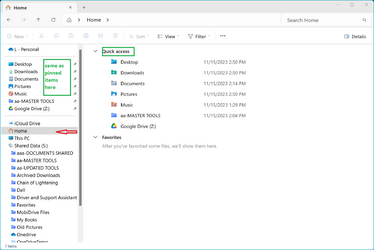
I wanted to ask you about a small change I’ve been trying to make (see photo).
I have kept this appearance since the time of the windows 7 until today in windows 11 22H2 22000.
In the newest version of win 11 23H2 22631 unfortunately I encounter an obstacle.
I have managed to achieve the set-up, I know how to rename the “Home” folder and delete the “Gallery”, but I have no idea how to add the Recycle Bin and the Downloads folder under the "Home" folder.
Do you know if this can be done? Do yoy have a solution with registry keys for this? Or do you know someone who could?
Thank you very much!!!
I wanted to ask you about a small change I’ve been trying to make (see photo).
I have kept this appearance since the time of the windows 7 until today in windows 11 22H2 22000.
In the newest version of win 11 23H2 22631 unfortunately I encounter an obstacle.
I have managed to achieve the set-up, I know how to rename the “Home” folder and delete the “Gallery”, but I have no idea how to add the Recycle Bin and the Downloads folder under the "Home" folder.
Do you know if this can be done? Do yoy have a solution with registry keys for this? Or do you know someone who could?
Thank you very much!!!
Attachments

My Computer
At a glance
Windows 11Intel(R) Core(TM) i9-12900K 3.20 GHz"32GBGeForce RTX 3080
- OS
- Windows 11
- Computer type
- PC/Desktop
- Manufacturer/Model
- ASUS
- CPU
- Intel(R) Core(TM) i9-12900K 3.20 GHz"
- Motherboard
- ASUS TUF Z690
- Memory
- 32GB
- Graphics Card(s)
- GeForce RTX 3080
- Monitor(s) Displays
- LG 4K 32"
- Screen Resolution
- 3840 x 2160
- Hard Drives
- (five) SSD m2-1TB PCIe 5 / 1TB m2 / 1TB m2 / 1TB m2 /2TB m2
- Case
- Corsair
- Cooling
- Corsair
- Internet Speed
- 500Mbps
- Browser
- Firefox
- Antivirus
- Avast